

title: [Google Colab][Python] How to Upgrade Google Colab's Python3 Version from 3.9 to 3.11
published: false
date: 2024-02-15 00:00:00 UTC
tags:
canonical_url: https://www.evanlin.com/til-gogle-colab-python3-upgrade-ver/
---
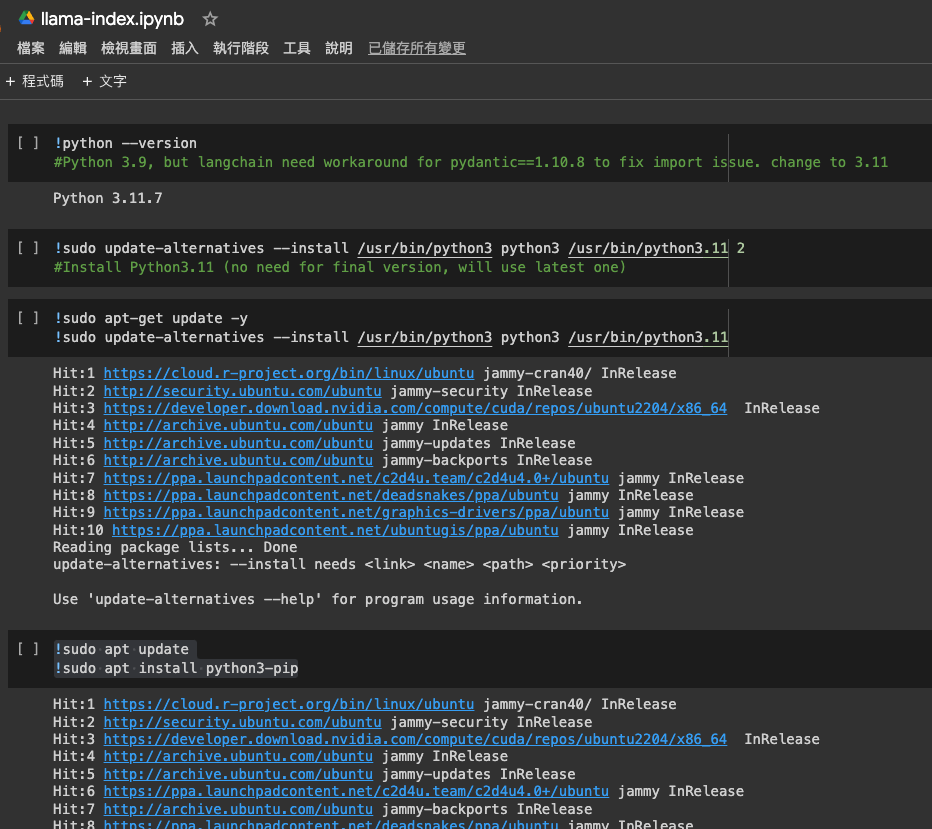
Google Colab is a free cloud-based Jupyter notebook environment that can be used to write and execute Python code. Colab's default Python version is 3.7, but in some cases, you may need to use other versions of Python.
**How to check the Python version of Google Colab**
To check the Python version of Google Colab, enter the following command in the code editing area:
!python --version
**How to change the Python version of Google Colab**

There are two ways to change the Python version of Google Colab:

- **Using the** `%env` **magic command**
%env PYTHONPATH=/usr/lib/python3.11
!python --version
- **Using the** `update-alternatives` **command**
sudo update-alternatives --install /usr/bin/python3 python3 /usr/bin/python3.11
!python --version
**Notes**

- Changing the Python version of Google Colab may affect installed packages.
- After changing the Python version, please restart the Colab runtime.

**Here are some common Google Colab Python version problems and their solutions:**

- **Problem:** I need to use Python 3.9, but Colab's default Python version is 3.7.
  - **Solution:** Use one of the above methods to change the Python version to 3.9.
- **Problem:** I changed the Python version, but Colab is still using the old version of Python.
  - **Solution:** Restart the Colab runtime.
- **Problem:** I changed the Python version, but some packages are not working properly.
  - **Solution:** Reinstall these packages.

**I hope this tutorial article can help you solve the Google Colab Python version number problem.**

The following is a code snippet from the screenshot, placed here for backup.
!python --version
Python 3.9, but langchain need workaround for pydantic==1.10.8 to fix import issue. change to 3.11
!sudo update-alternatives --install /usr/bin/python3 python3 /usr/bin/python3.11
Install Python3.11 (no need for final version, will use latest one)
!sudo apt update
!sudo apt install python3-pip


Top comments (0)