

title: [Learning Notes][Golang] Briefly Introducing Some New Features of Golang 1.16
published: false
date: 2021-03-06 00:00:00 UTC
tags:
canonical_url: http://www.evanlin.com/go1.16/
---
## Preface:
## TL;DR
This article will introduce:
- [How to install the Golang 1.16 preview version](#try-go)
- [Main list of new features in 1.16](#116)
- [Apple Silicon (i.e., the current Apple M1 Chip) support](#m1)
- [Go Module Retract (retracting problematic packages)](#retract)
- [Embedding Files (including static files in the project)](#embed)
## How to install the Golang 1.16 preview version
If you want to try it out, and there is no Golang version supported on Homebrew yet, currently (2021/02/19), due to many related packages not being updated yet, it results in [HomeBrew being unable to Merge for a long time, everyone can refer to this PR](https://github.com/Homebrew/homebrew-core/pull/71289).
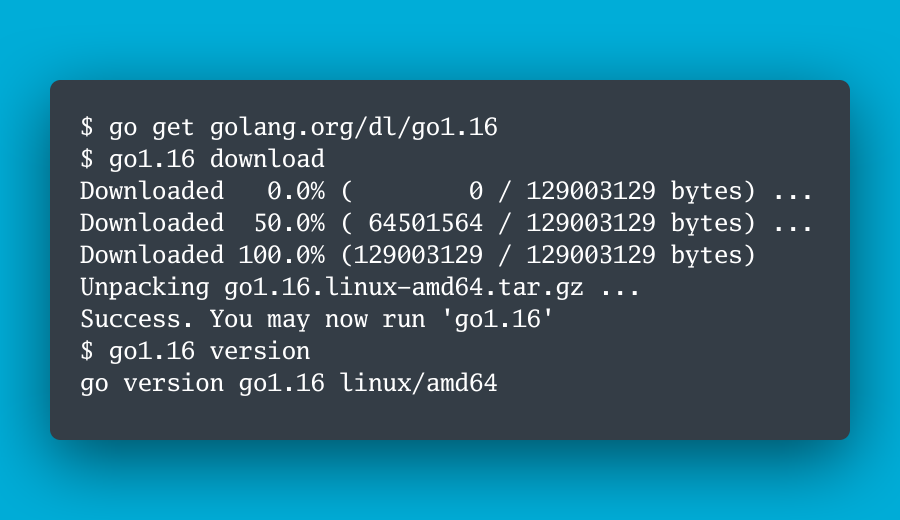
So, how to install a test version of Go1.16 locally? Just like the description in the opening image of this article:
go get golang.org/dl/go1.16
go1.16 download
In this way, a compiled file will be installed locally. `go1.16` If you need related tests, you can directly run `go1.16 build` or `go1.16 test` to run.

## Main list of new features in 1.16

### Apple Silicon (i.e., the current Apple M1 Chip) support

This version officially supports apple Silicon, which is the 64-bit ARM architecture. (a.k.a. Apple M1 chip). You can use the compiler parameters:

- `GOOS=darwin`,
- `GOARCH=arm64`

to set it, and the original iPhone binary settings are changed to:

- `GOOS=darwin`,
- `GOARCH=ios/arm64`

You can compile a binary for Apple M1 by using the command `env GOOS=darwin GOARCH=arm64 go build`.

### Go Module Retract

You can refer to my other detailed article on this. [[Learning Notes][Golang] Go 1.16 New Feature "Version Retraction (Removal)" (Go Modules retraction)](https://dev.to/evanlin/golang-go-1-16-go-modules-retraction-32dd-temp-slug-6560960)

### Embedding Files (including static files in the project)

Previously, it was not possible to include static files in a Golang project. The only ways were:

- If the file to be loaded is json, make it a variable.
- If it is an html template file, it needs to be placed together with the binary.
- Or you can take a look at the [go-bindata](https://github.com/go-bindata/go-bindata) project (similar ones include [packr](https://github.com/gobuffalo/packr) and [pkger](https://github.com/markbates/pkger)), through this method, static files are placed in the project and become resources.

But after 1.16, it is officially supported.

Assuming the file structure is:
.
├── go.mod
├── main.go
├── static
│ └── css
│ └── main.css
├── templates
│ └── index.html.tmpl
└── title.txt
By the following method, you can package the files into the project:

<script src="https://gist.github.com/kkdai/111803ace159cdaf87e7d855d701689b.js"></script>

In the future, when packaging the entire website, you don't have to worry about forgetting to package the template and image resource files when docker packaging.

#### Related information

-

[Go Doc: Embed Files](https://golang.org/doc/go1.16#embed)

-

[Embedding static files in a go binary using go embed](https://harsimranmaan.medium.com/embedding-static-files-in-a-go-binary-using-go-embed-bac505f3cb9a)

-

[How to embed files into Go binaries](https://stackoverflow.com/questions/17796043/how-to-embed-files-into-go-binaries)

## Related articles:

-

[Go 1.16 is released](https://blog.golang.org/go1.16)

-

[Retract Go Module Versions in Go 1.16](https://golangtutorial.dev/tips/retract-go-module-versions/)

-

[The feature of merging struct field tags, which was originally intended to be supported in Go 1.16, has been cancelled](https://mp.weixin.qq.com/s/7eLLhHt8hsTd6hmzj1AWTw)


Top comments (0)