
title: [n8n] Setting up your own n8n service for better information flow (IFTTT replacement)
published: false
date: 2025-05-30 00:00:00 UTC
tags:
canonical_url: https://www.evanlin.com/til-n8n-ifttt/
---
# Preface:
I've been wanting to learn [n8n](https://n8n.io/workflows/) for a while, but I hadn't figured out what to use it for. Recently, after attending the [gai conference](https://blindegg.kktix.cc/events/2025gaiconf), I saw a lot of interesting applications. I decided to come back and set it up to try it out first. This article quickly summarizes and shares some very useful information I've seen recently.
Also, what I used it for myself, hoping it will be helpful to everyone.
# Why do I need to set up n8n?
Let me share why I need to set up my own n8n and what it can help me with.
Frankly, when it comes to setting up an "automation service," the most important thing is "your own needs." I originally spent money to buy some automation services (IFTTT) and built my own knowledge flow structure through my LINE Bot.
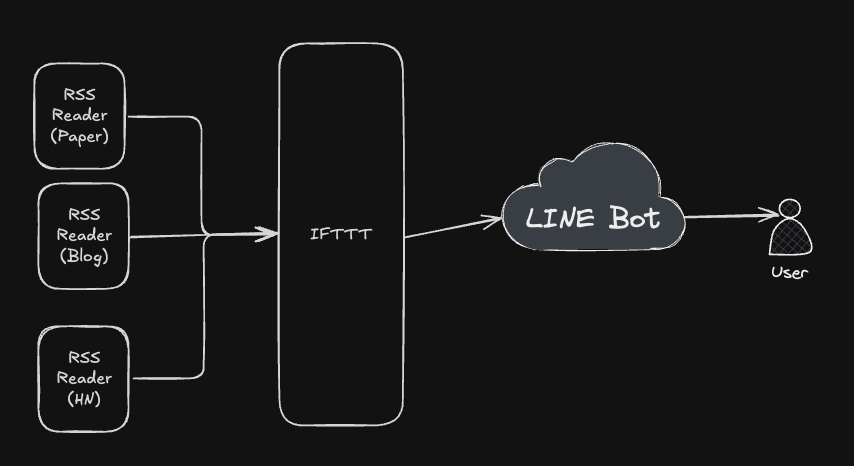
It's roughly this kind of structure. The LINE Bot work is quite heavy, requiring crawling the entire webpage content and also doing AI summarization.
So, IFTTT would often automatically stop. I had planned to move to GCP, but writing them one by one as CloudRun was too troublesome, so I kept it on hold, waiting for a better solution to appear. Recently, I saw n8n and decided to give it a try. Below, I'll record how I set up the server (free), and some things to pay attention to during setup.
# Setting up a free n8n server (HuggingFace + Supabase + Upstash)
You can take a look at this article, it helped me a lot. In short, see if the usage is enough, and then decide whether to put it on Google Cloud.
<iframe width="560" height="315" src="https://www.youtube.com/embed/ucCamELP8UY?si=Ar-kUIAoQYO9cxvO" title="YouTube video player" frameborder="0" allow="accelerometer; autoplay; clipboard-write; encrypted-media; gyroscope; picture-in-picture; web-share" referrerpolicy="strict-origin-when-cross-origin" allowfullscreen=""></iframe>
Things to pay more attention to:
- It's basically that the Supabase URL has an extra space, which is really annoying. Although the video author mentioned it, I still got caught by it. XD
## Integration parts that need more attention:
Here are a few things I think you need to pay attention to when connecting n8n Nodes:
### Google Sheet/Doc/Drive Integration
- You can refer to [this video](https://www.youtube.com/watch?v=vvqhzbp4J5A&t=8250s) shared by the same author. The original video is three hours long, but you can jump to this part to watch.
- Things to note:
- OAuth2 needs to be connected, because it's a test account, it might fail.
- Before connecting, be sure to enable "Google Drive API", "Google Sheet API", "Gmail API", these are the ones that GCP users usually don't open.
### JSON file processing
This part is a very important part of n8n. Many times you will need to use the `Edit Field(Set) Node` to process it. If you don't have a concept, you can watch [this part of the video](https://youtu.be/vvqhzbp4J5A?t=1998).
# Replacing some services on the original IFTTT
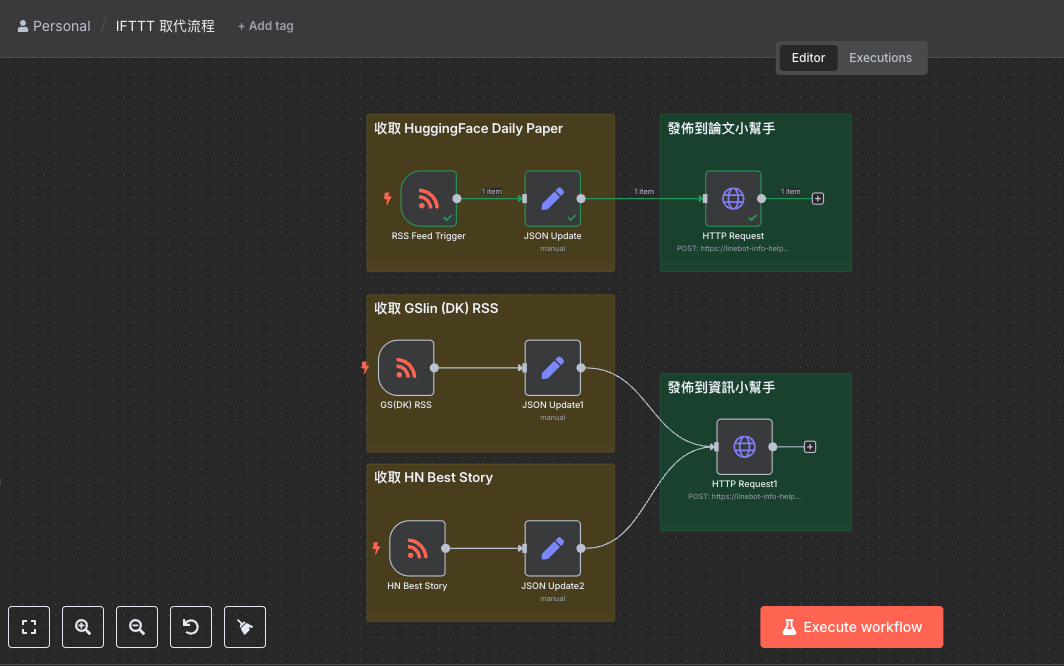
After setting up and configuring the relevant services, you can start replacing the services on IFTTT. Since IFTTT is originally a relatively simple SaaS service, it was very quick to transfer the relevant processes to the n8n service.
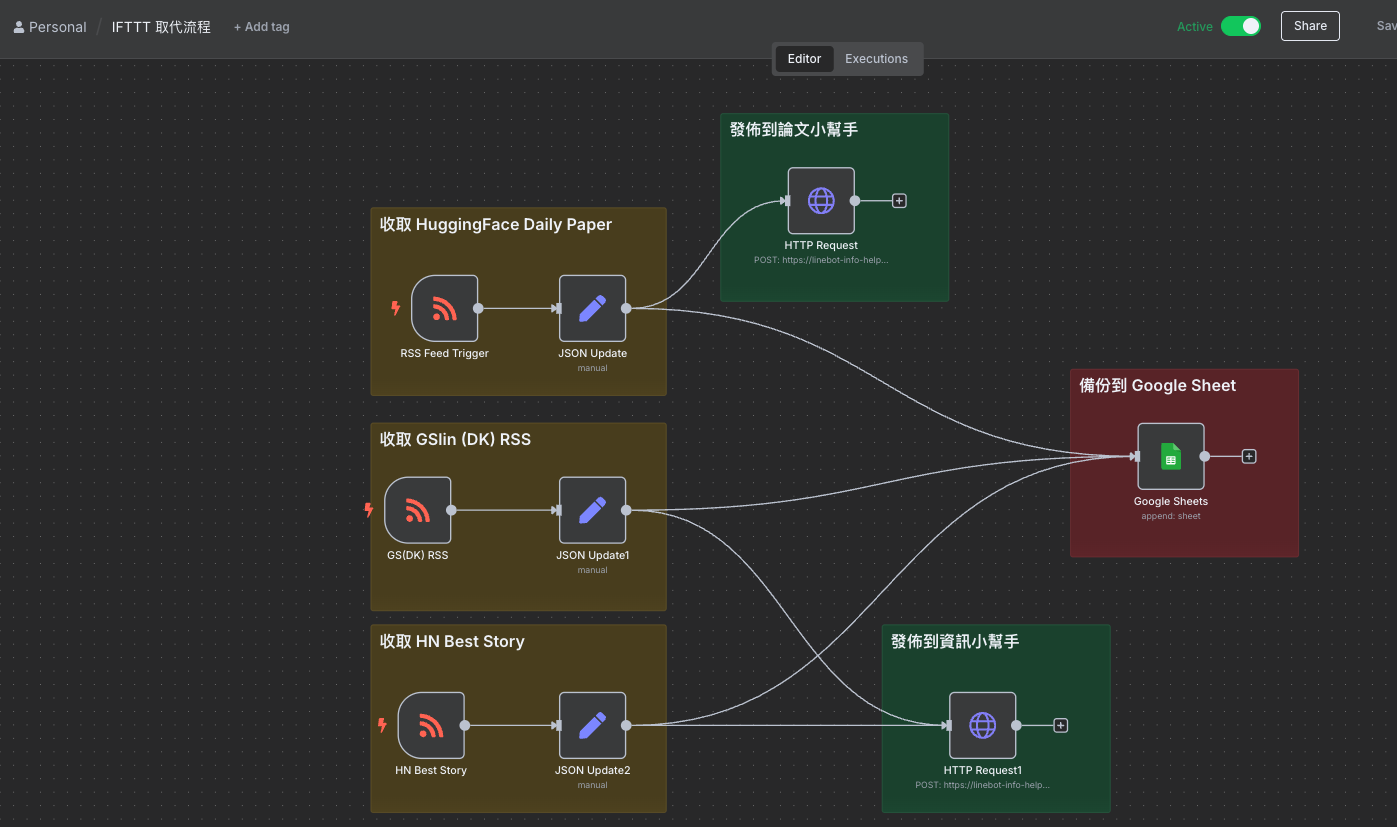
After switching over, there are more benefits you can get:
- You can test step by step, avoiding the entire information flow failing because of problems with some RSS data. (IFTTT can't test)
- You can add more information flow connections. Here, I connect to write each new piece of data in Google Sheet, so you can do some related processing later.
# Conclusion
Automation can help solve a lot of repetitive work in life, which is a service that every information worker needs. And I think n8n can solve many of the small and large difficulties in people's lives. This article provides a relatively simple setup method, as well as my own problem-solving ideas. I hope it can help everyone, and I hope that every reader can solve the places where their information flow needs help as soon as possible.

Evan Lin
Posted on Originally published at evanlin.com on
Setting up your own n8n service for better information flow (IFTTT alternative)
For further actions, you may consider blocking this person and/or reporting abuse


Top comments (0)