

When you start working with EKS, it's easy to get overwhelmed by the number of things you can configure. IAM, RBAC, Security Groups, Pod Identity, Network Policies, Secrets, logging, encryption, admission controllers... the list gets long very quickly.
When I look at a new EKS environment from a security perspective, I don't start with those controls. I start with a simpler question: what can each identity and each workload actually do?
The interesting problems usually show up where two controls meet. A developer who can create Pods may be able to use a ServiceAccount meant for an application. A workload with its own IAM role may still reach the node role through IMDS. A namespace-scoped permission can still expose every Secret in that namespace.
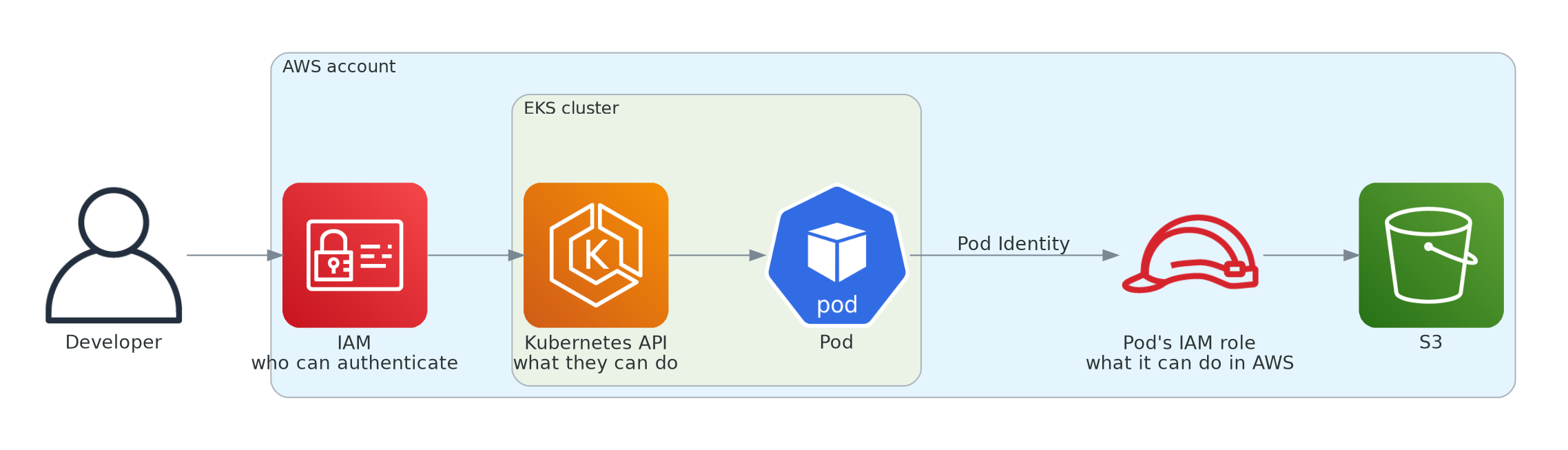
This article goes through the basic checks I'd run on an EKS cluster, each one with a short test on a lab cluster. It assumes you've already deployed something to EKS and know Pods, namespaces and ServiceAccounts.
I wrote it to explore how EKS security is set up and to validate the theory in practice, to see what is actually possible and what isn't.
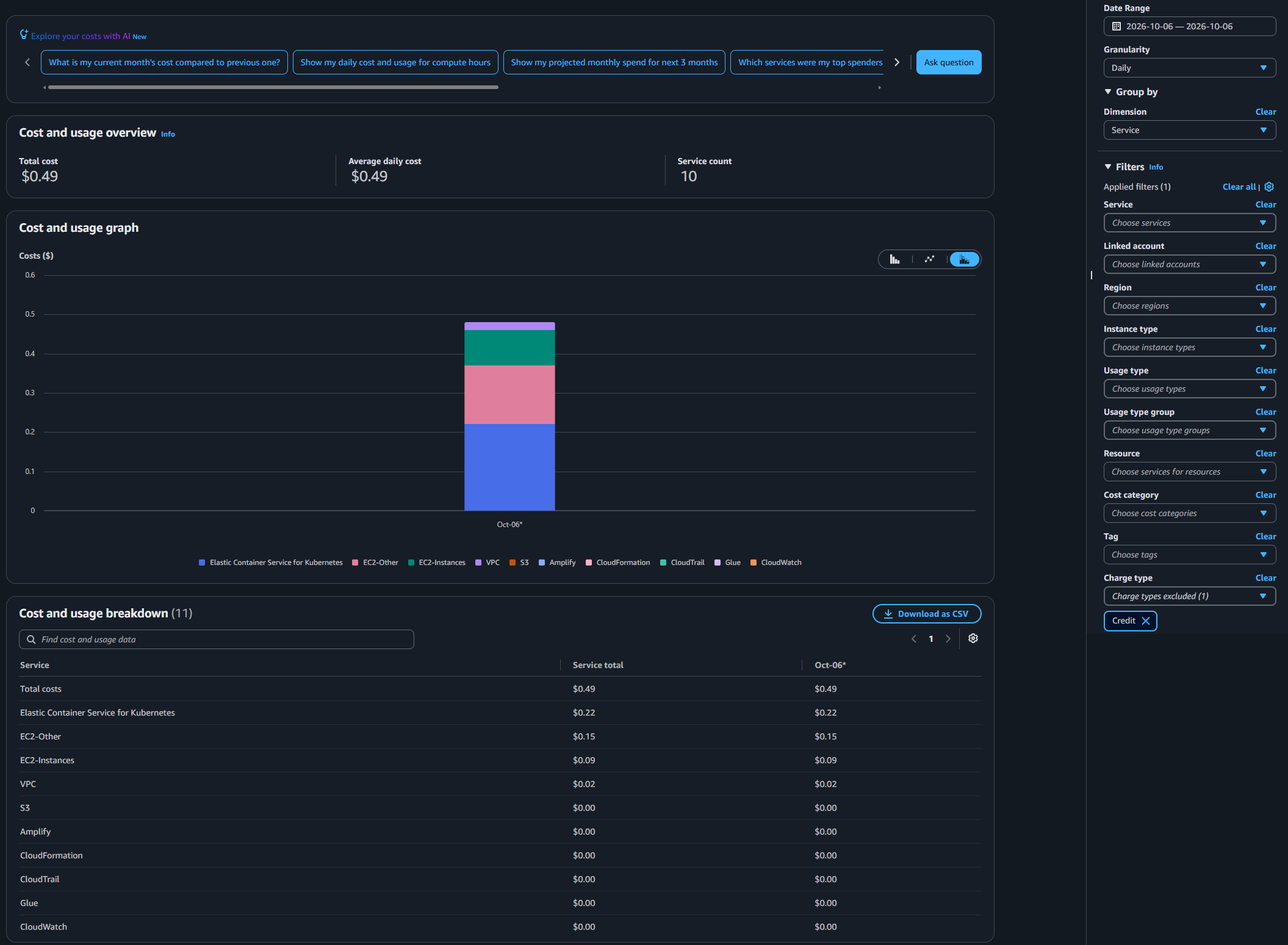
A note on cost: the EKS control plane costs $0.10 per hour on standard support, and the worker node and CloudWatch Logs are billed too while the environment exists. In my run, the cluster existed for about two and a half hours, from creation to cleanup, and the whole lab cost about $0.49: $0.22 for the EKS control plane, $0.15 under EC2-Other (where the NAT Gateway and the node's disk are billed), $0.09 for the node itself and $0.02 for public IPv4 addresses. Tear everything down when you're done.
The lab
The lab is small: one EKS cluster in us-east-1, a managed node group, two namespaces (team-a and app), an S3 bucket with one test object, and three IAM roles I manage directly:
- eks-lab-admin, used to create and administer the cluster
- dev-team-a, representing a developer limited to one namespace
- app-s3-read, used by the application through EKS Pod Identity
The managed node group has its own IAM role as well. That one comes back when we test IMDS.
Everything here is built for testing. A few insecure choices stay in place on purpose, like the API endpoint open to 0.0.0.0/0 and the broad Edit policy for the developer, so the tests can show what they allow. Don't take this setup to production as it is.
The setup lives in the github repository, so the article can focus on the security decisions and the tests. You need the AWS CLI, kubectl and eksctl, authenticated with an IAM role (env.sh stops if it detects an IAM user):
git clone https://github.com/Geovane-Oliveira/eks-security-basics-lab.git
cd eks-security-basics-lab
source env.sh
eksctl create cluster -f cluster.yaml
./00-setup.sh
eksctl creates the cluster with control plane logging off, and its own log says so. 00-setup.sh creates the namespaces, the bucket and the dev-team-a role, and turns on the audit and authenticator control plane logs so the denied requests are captured. audit records requests made to the Kubernetes API, and authenticator shows how IAM identities were authenticated into the cluster. None of these logs exist until you turn them on, and CloudWatch charges for what they ingest and store. The commands below use the variables from env.sh.
cluster.yaml doesn't pin a Kubernetes version, so eksctl used its default: 1.34, with Amazon Linux 2023 nodes. Creating everything took about 15 minutes. The version also matters for kubectl: Kubernetes only supports a kubectl within one minor version of the cluster, and the latest kubectl I had installed (1.37) was too new, so I switched to 1.34. The file also turns EKS Auto Mode off explicitly, because eksctl warns that a future release will enable it by default and this lab depends on a managed node group.
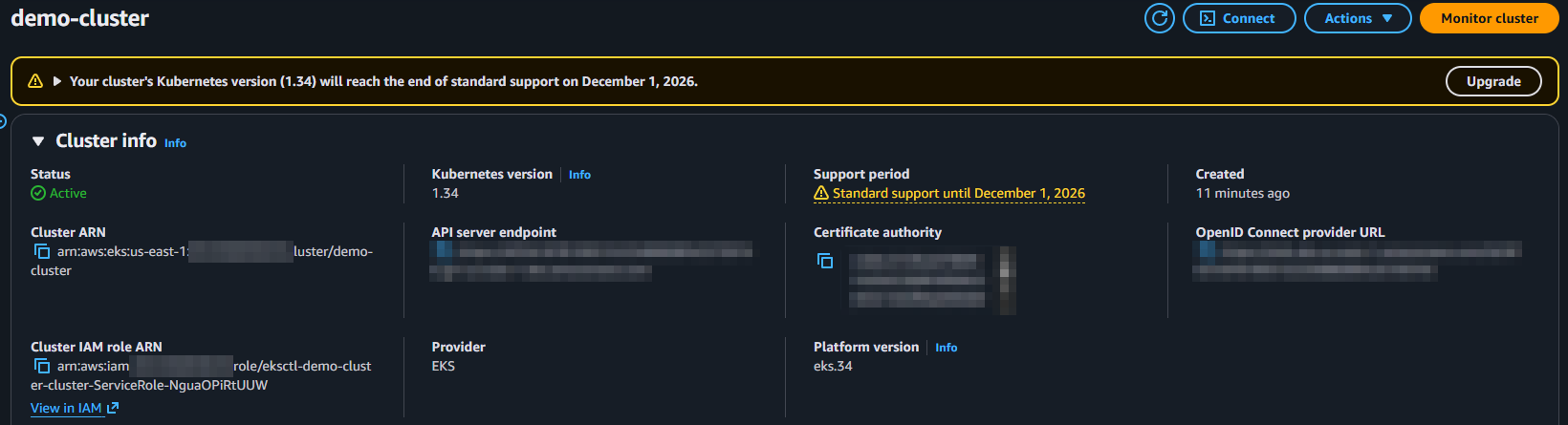
The console warned right away that 1.34 leaves standard support on December 1, 2026. That matters beyond a lab. EKS keeps each version in standard support for 14 months and then, by default, moves the cluster into extended support for another 12, where the control plane costs $0.60 per hour instead of $0.10. A cluster nobody upgrades eventually runs out of support entirely and gets upgraded automatically, on AWS's schedule instead of yours. The version and the upgrade policy are part of the first look at any cluster:
aws eks describe-cluster --name ${CLUSTER} \
  --query 'cluster.{version:version,upgradePolicy:upgradePolicy}'
{
    "version": "1.34",
    "upgradePolicy": {
        "supportType": "EXTENDED"
    }
}
Who can access the cluster?
There are two different questions here: who is allowed to authenticate, and what that identity can do after authentication.
In the lab I use EKS access entries. An access entry maps an IAM principal into the cluster, and an access policy or Kubernetes RBAC controls what that identity can do. Older clusters may still use the aws-auth ConfigMap, so start by checking the authentication mode:
aws eks describe-cluster --name ${CLUSTER} --query cluster.accessConfig
{
    "authenticationMode": "API"
}
For this lab I prefer the API authentication mode because access management stays in EKS instead of a hand-edited ConfigMap.
The creator is already an admin
The first thing I check is who already has access. When bootstrapClusterCreatorAdminPermissions is left at its default, the principal that creates the cluster gets cluster administrator access.
That is convenient during setup, but it is easy to forget. If a pipeline role or a personal role created the cluster, that identity remains a high-privilege path until someone removes the access.
aws eks list-access-entries --cluster-name ${CLUSTER}

aws eks list-associated-access-policies --cluster-name ${CLUSTER} \
  --principal-arn <creator-role-arn-from-the-list>
{
    "accessEntries": [
        "arn:aws:iam::123456789012:role/aws-service-role/eks.amazonaws.com/AWSServiceRoleForAmazonEKS",
        "arn:aws:iam::123456789012:role/eks-lab-admin",
        "arn:aws:iam::123456789012:role/eksctl-demo-cluster-nodegroup-ng-l-NodeInstanceRole-4wTJC0Ufaf7W"
    ]
}
{
    "associatedAccessPolicies": [
        {
            "policyArn": "arn:aws:eks::aws:cluster-access-policy/AmazonEKSClusterAdminPolicy",
            "accessScope": {
                "type": "cluster",
                "namespaces": []
            },
            "associatedAt": "2026-10-05T23:15:59.162000-03:00",
            "modifiedAt": "2026-10-05T23:15:59.162000-03:00"
        }
    ],
    "clusterName": "demo-cluster",
    "principalArn": "arn:aws:iam::123456789012:role/eks-lab-admin"
}
eks-lab-admin is the role I used to create the cluster, and it got AmazonEKSClusterAdminPolicy with cluster scope without anyone asking for it. Besides the creator and the node role, the list also includes an entry for EKS's own service-linked role, with access policies for EKS features like cluster insights and Pod Identity. The node role maps to the system:nodes group, which is how the nodes join the cluster.
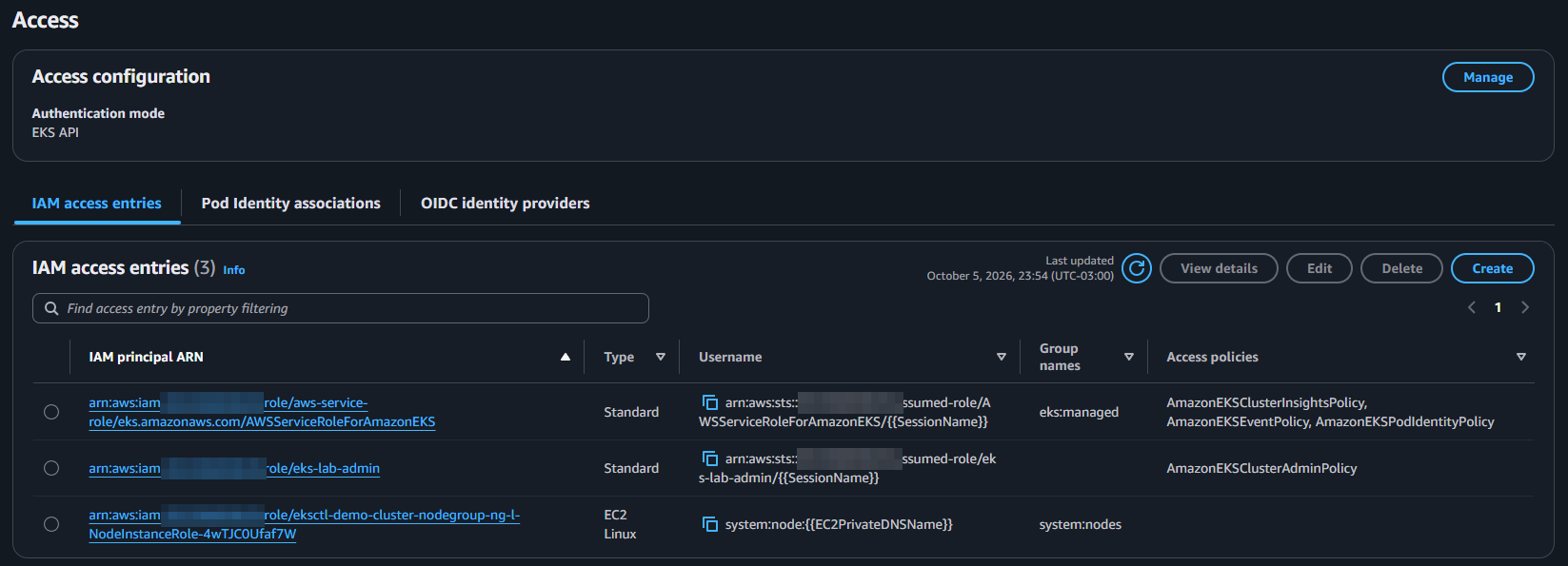
I wouldn't use that creator role for normal daily operations in production. A dedicated provisioning role and narrower operator roles are easier to reason about.
A developer limited to one namespace
01-dev-access.sh creates the access entry for dev-team-a and adds a dev-team-a context to your kubeconfig. The line that defines the boundary is the association, scoped to a single namespace:
aws eks associate-access-policy --cluster-name ${CLUSTER} \
  --principal-arn arn:aws:iam::${ACCOUNT_ID}:role/dev-team-a \
  --policy-arn arn:aws:eks::aws:cluster-access-policy/AmazonEKSEditPolicy \
  --access-scope type=namespace,namespaces=team-a
Run the script and test as the developer:
./01-dev-access.sh

kubectl --context dev-team-a get pods -n team-a
kubectl --context dev-team-a get pods -n kube-system
No resources found in team-a namespace.
Error from server (Forbidden): pods is forbidden: User "arn:aws:sts::123456789012:assumed-role/dev-team-a/EKSGetTokenAuth" cannot list resource "pods" in API group "" in the namespace "kube-system"
The first command works. The second fails because the developer access is scoped to team-a. The error names the identity EKS built from the IAM role, the verb, the resource and the namespace, which is exactly what we'll look for in the audit log later.
The interesting part is what happens inside that namespace. AmazonEKSEditPolicy sounds reasonable for a developer, but it is broader than the name suggests. It includes access to Secrets, pods/exec and ServiceAccount impersonation.
kubectl auth can-i asks the API server whether an identity is allowed to do something, without doing it. I asked two questions as the developer, and the answer to each one is in the comment below it:
kubectl --context dev-team-a auth can-i get secrets -n team-a
# yes
kubectl --context dev-team-a auth can-i create pods --subresource=exec -n team-a
# yes
So the developer can read any Secret in team-a and open a shell inside any Pod running there.
If that is more access than the developer actually needs, use a Kubernetes group with a custom Role and RoleBinding instead of relying on the managed Edit policy.
Where can the Kubernetes API be reached from?
This is a simpler check. I want to know whether the API is exposed publicly and whether that was intentional.
aws eks describe-cluster --name ${CLUSTER} \
  --query 'cluster.resourcesVpcConfig.{public:endpointPublicAccess,private:endpointPrivateAccess,cidrs:publicAccessCidrs}'
{
    "public": true,
    "private": false,
    "cidrs": [
        "0.0.0.0/0"
    ]
}
That's the default, and eksctl's log says it when it creates the cluster: publicAccess=true, privateAccess=false. A public endpoint still requires authentication, but with 0.0.0.0/0 anyone on the internet can reach it and try a credential, and a leaked one works from anywhere.
I kept this default only because the lab is short-lived and it keeps the setup simple. Don't use an endpoint open to 0.0.0.0/0 in production. There, the endpoint should be private, or public only for the CIDRs that really need it, like a VPN or the CI runners. One catch if you restrict the CIDRs and leave private access off: the nodes also call the public endpoint, so the addresses they use to reach the internet (a NAT Gateway's IP, for example) have to be on the list, or the nodes can't reach the API server. Turning on private access avoids that. The EKS documentation on endpoint access covers both options.
What can a Pod reach through the node?
Every EC2-backed worker node has an IAM role. That role is meant for the node, not for the applications running on it.
In this lab it carries more than you might expect. When eksctl installed the VPC CNI add-on, it warned that it couldn't set up the add-on's recommended IAM permissions without OIDC, and suggested Pod Identity instead. So the CNI's network permissions stay on the node role, and any Pod that reaches IMDS can use them too.
What I want to know is whether a Pod can still reach that role through the EC2 Instance Metadata Service.
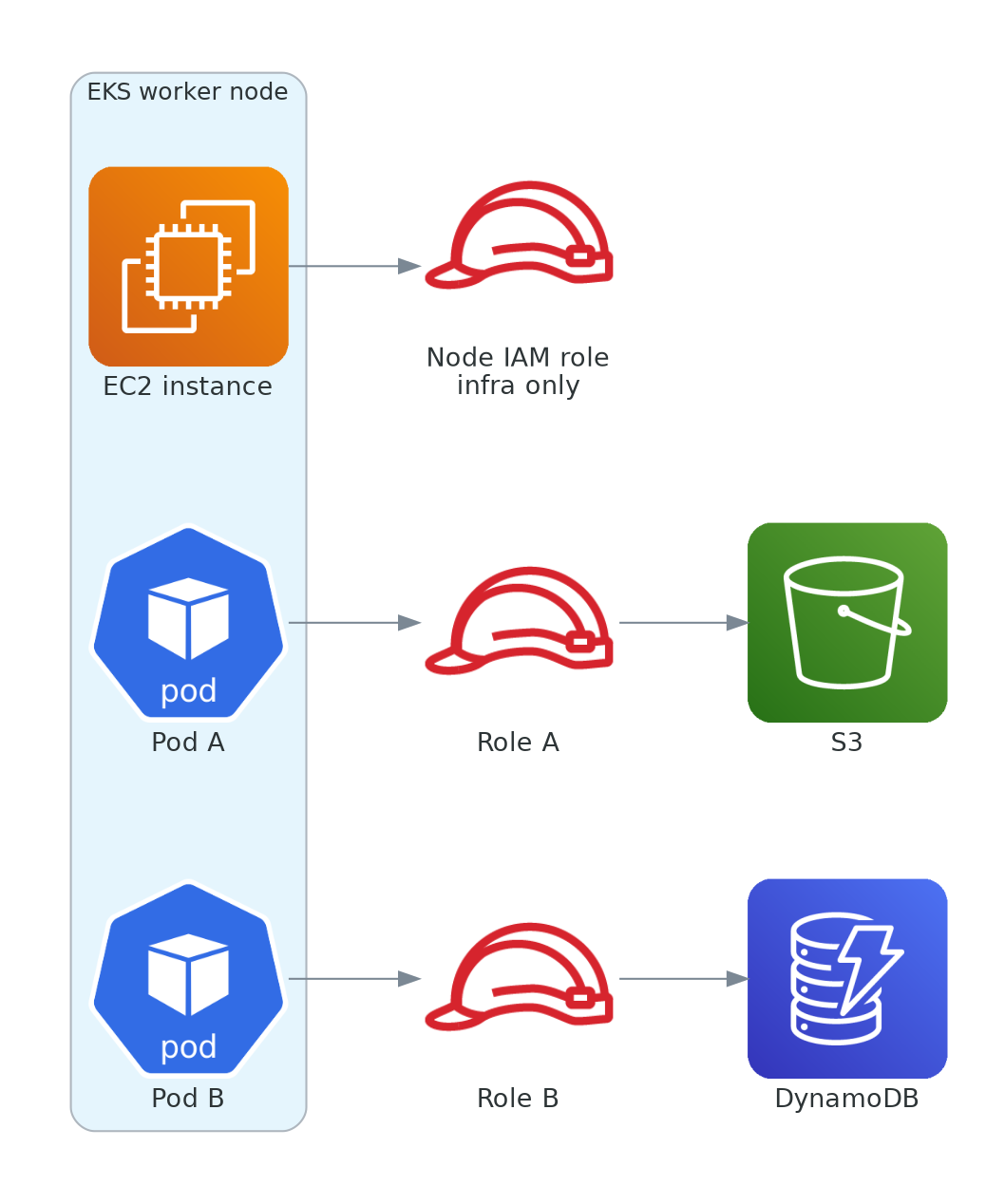
Run a Pod with no workload identity and ask IMDS for the node role name:
kubectl run imds-test -n app --rm -i --restart=Never --image=curlimages/curl -- sh -c '
TOKEN=$(curl -s -m 3 -X PUT "http://169.254.169.254/latest/api/token" -H "X-aws-ec2-metadata-token-ttl-seconds: 60")
echo "token length: ${#TOKEN}"
curl -s -m 3 -H "X-aws-ec2-metadata-token: $TOKEN" http://169.254.169.254/latest/meta-data/iam/security-credentials/'
token length: 56
eksctl-demo-cluster-nodegroup-ng-l-NodeInstanceRole-4wTJC0Ufaf7W
The role name is enough to prove that the path exists. We don't need to retrieve the credentials themselves. With that name, it's easy to see what the path leads to:
aws iam list-attached-role-policies --role-name <node-role-name-from-the-test>
{
    "AttachedPolicies": [
        {
            "PolicyName": "AmazonSSMManagedInstanceCore",
            "PolicyArn": "arn:aws:iam::aws:policy/AmazonSSMManagedInstanceCore"
        },
        {
            "PolicyName": "AmazonEKS_CNI_Policy",
            "PolicyArn": "arn:aws:iam::aws:policy/AmazonEKS_CNI_Policy"
        },
        {
            "PolicyName": "AmazonEKSWorkerNodePolicy",
            "PolicyArn": "arn:aws:iam::aws:policy/AmazonEKSWorkerNodePolicy"
        },
        {
            "PolicyName": "AmazonEC2ContainerRegistryPullOnly",
            "PolicyArn": "arn:aws:iam::aws:policy/AmazonEC2ContainerRegistryPullOnly"
        }
    ]
}
Besides what the node needs to join the cluster and pull images, there's AmazonEKS_CNI_Policy, which allows creating and changing network interfaces in the VPC, and AmazonSSMManagedInstanceCore, the permissions Systems Manager uses to manage the node. Any Pod that reaches IMDS gets all of that.
Requiring IMDSv2 with a hop limit of 1 keeps the token response from reaching Pods, which sit one network hop away from the node. In the lab I apply that to the running nodes:
for id in $(aws ec2 describe-instances --query 'Reservations[].Instances[].InstanceId' --output text \
    --filters "Name=tag:eks:cluster-name,Values=${CLUSTER}" "Name=instance-state-name,Values=running"); do
  aws ec2 modify-instance-metadata-options --instance-id "$id" --http-tokens required --http-put-response-hop-limit 1
done
Then I run the same IMDS test again.
token length: 0
The token request times out, and without a token there's no role name.
In production, this belongs in the node group's launch template so the setting survives node replacement. Pods using hostNetwork: true are a separate case because they share the node's network namespace. That's also why the VPC CNI itself isn't affected by the change: its Pods run on the host network.
The test talks to IMDS over plain http://, and there's nothing to fix there. IMDS only answers over HTTP, on a link-local address reached from inside the instance, and it has no HTTPS endpoint. What protects it is what we just set: the IMDSv2 session token requirement and the hop limit.
Give the workload its own role
Now we can move the AWS permissions from the infrastructure layer to the workload.
EKS has two approaches for this: EKS Pod Identity and IAM Roles for Service Accounts (IRSA). Both associate an IAM role with a Kubernetes ServiceAccount. I use Pod Identity here because it is the current AWS recommendation for new EKS workloads.
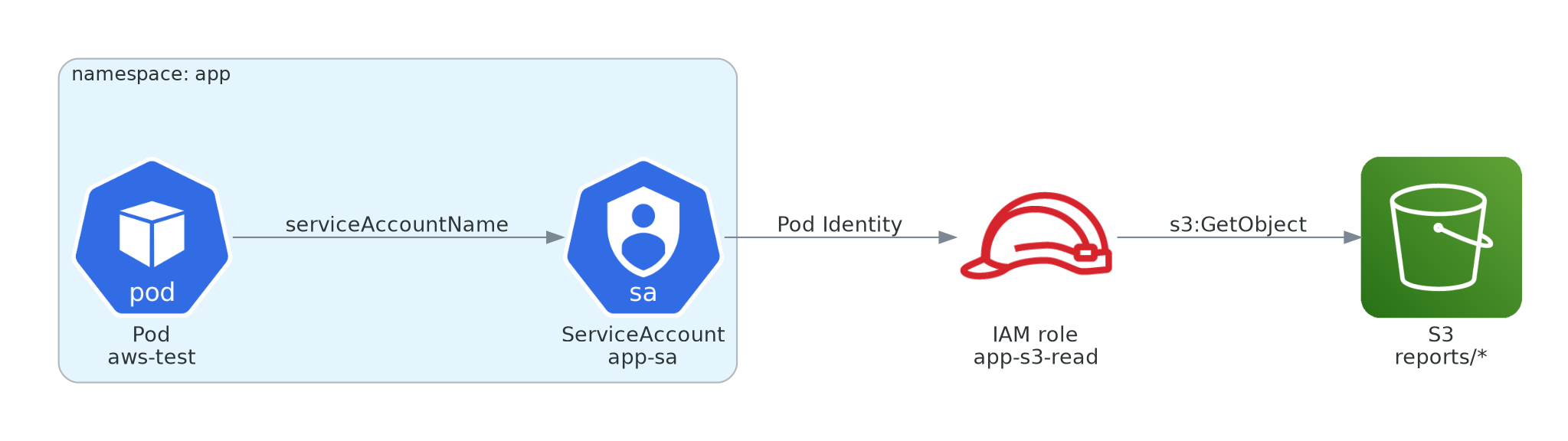
The application role only gets s3:GetObject on reports/* (iam/app-s3-read.json). The part that deserves more attention is the trust policy (iam/app-trust.json), which pins the role to one cluster, namespace and ServiceAccount using the session tags EKS sends:
"Condition": {
  "StringEquals": {
    "aws:RequestTag/eks-cluster-arn": "arn:aws:eks:${AWS_REGION}:${ACCOUNT_ID}:cluster/${CLUSTER}",
    "aws:RequestTag/kubernetes-namespace": "app",
    "aws:RequestTag/kubernetes-service-account": "app-sa"
  }
}
02-pod-identity.sh installs the Pod Identity agent, creates the role, the app-sa ServiceAccount and the association, and only then starts the aws-test Pod, because EKS injects the credentials when the Pod is created. The association is what ties it all together:
aws eks create-pod-identity-association --cluster-name ${CLUSTER} \
  --namespace app --service-account app-sa \
  --role-arn arn:aws:iam::${ACCOUNT_ID}:role/app-s3-read
Run the script, then test one operation that should work and two that should not:
./02-pod-identity.sh

kubectl exec -n app aws-test -- aws sts get-caller-identity
kubectl exec -n app aws-test -- aws s3 cp s3://${BUCKET}/reports/test.txt -
kubectl exec -n app aws-test -- aws s3 ls s3://${BUCKET}/
kubectl exec -n app aws-test -- aws ec2 describe-instances --max-items 1
$ aws sts get-caller-identity
{
    "UserId": "AROAQYJ6FKJC5MI6CF5WY:eks-demo-clust-aws-test-0c27b6ee-254d-4d86-998c-3b6bea19e7b0",
    "Account": "123456789012",
    "Arn": "arn:aws:sts::123456789012:assumed-role/app-s3-read/eks-demo-clust-aws-test-0c27b6ee-254d-4d86-998c-3b6bea19e7b0"
}

$ aws s3 cp s3://${BUCKET}/reports/test.txt -
hello from the lab

$ aws s3 ls s3://${BUCKET}/
aws: [ERROR]: An error occurred (AccessDenied) when calling the ListObjectsV2 operation: User: arn:aws:sts::123456789012:assumed-role/app-s3-read/eks-demo-clust-aws-test-0c27b6ee-254d-4d86-998c-3b6bea19e7b0 is not authorized to perform: s3:ListBucket on resource: "arn:aws:s3:::demo-bucket-123456789012" because no identity-based policy allows the s3:ListBucket action
command terminated with exit code 254

$ aws ec2 describe-instances --max-items 1
aws: [ERROR]: An error occurred (UnauthorizedOperation) when calling the DescribeInstances operation: You are not authorized to perform this operation. User: arn:aws:sts::123456789012:assumed-role/app-s3-read/eks-demo-clust-aws-test-0c27b6ee-254d-4d86-998c-3b6bea19e7b0 is not authorized to perform: ec2:DescribeInstances because no identity-based policy allows the ec2:DescribeInstances action
command terminated with exit code 254
The EC2 failure is the one that matters most. The node role has EC2 permissions, but the Pod is calling AWS as app-s3-read, and with IMDS blocked there is no fallback to the node role.
The session name EKS uses for the role carries the cluster and the Pod name, so each call in CloudTrail can be traced back to the Pod that made it.
Turn off the Kubernetes token when the app does not need it
A Pod also gets a Kubernetes ServiceAccount token by default. If the application never calls the Kubernetes API, there is no reason to mount that token.
kubectl patch serviceaccount app-sa -n app \
  -p '{"automountServiceAccountToken": false}'
Pod Identity uses its own projected token for the AWS credential flow, so disabling the default token does not remove the workload's AWS identity. The next test shows both sides.
Who else can get this role?
This is where Kubernetes and AWS permissions meet again.
Anyone who can create a Pod with app-sa in the app namespace can use the IAM role attached to that ServiceAccount. To test it, I extended the developer's Edit policy to the app namespace as well:
aws eks disassociate-access-policy --cluster-name ${CLUSTER} \
  --principal-arn arn:aws:iam::${ACCOUNT_ID}:role/dev-team-a \
  --policy-arn arn:aws:eks::aws:cluster-access-policy/AmazonEKSEditPolicy

aws eks associate-access-policy --cluster-name ${CLUSTER} \
  --principal-arn arn:aws:iam::${ACCOUNT_ID}:role/dev-team-a \
  --policy-arn arn:aws:eks::aws:cluster-access-policy/AmazonEKSEditPolicy \
  --access-scope type=namespace,namespaces=team-a,app
Then, as the developer, I created a Pod that uses the application's ServiceAccount (k8s/dev-pod.yaml). The line that matters is serviceAccountName: app-sa. The manifest also follows the restricted Pod Security Standard that we'll enforce on this namespace further down, so admission control won't block it.
kubectl --context dev-team-a apply -f k8s/dev-pod.yaml
kubectl --context dev-team-a wait --for=condition=Ready pod/dev-pod -n app --timeout=180s

kubectl --context dev-team-a exec -n app dev-pod -- aws sts get-caller-identity
kubectl --context dev-team-a exec -n app dev-pod -- aws s3 cp s3://${BUCKET}/reports/test.txt -
kubectl --context dev-team-a exec -n app dev-pod -- ls /var/run/secrets/kubernetes.io/serviceaccount/
{
    "UserId": "AROAQYJ6FKJC5MI6CF5WY:eks-demo-clust-dev-pod-abf9d238-7197-4529-854e-7b73aefa9f22",
    "Account": "123456789012",
    "Arn": "arn:aws:sts::123456789012:assumed-role/app-s3-read/eks-demo-clust-dev-pod-abf9d238-7197-4529-854e-7b73aefa9f22"
}
hello from the lab
ls: cannot access '/var/run/secrets/kubernetes.io/serviceaccount/': No such file or directory
command terminated with exit code 2
The developer's IAM role has no permissions at all, and now it's reading the application's data in S3 as app-s3-read. Enforcing the restricted profile doesn't change that, because the Pod follows every rule of it. In my run, the namespace was already enforcing it when I created the Pod. The missing token directory confirms the previous section: the Kubernetes token is gone, and the AWS role still works. The session name gives the path away in CloudTrail (dev-pod instead of aws-test), but only if someone is looking.
On the AWS side, eks:CreatePodIdentityAssociation plus iam:PassRole also deserves a careful review.
If you use IRSA
IRSA solves the same problem through the cluster's OIDC provider. What decides who can use the role is the trust policy, which has to name the exact ServiceAccount in the sub claim, next to the aud one:
"oidc.eks.us-east-1.amazonaws.com/id/EXAMPLE:aud": "sts.amazonaws.com",
"oidc.eks.us-east-1.amazonaws.com/id/EXAMPLE:sub": "system:serviceaccount:app:app-sa"
Leave sub out and any other ServiceAccount in the same cluster satisfies the trust policy just as well.
What can the container itself do?
AWS permissions are only one layer. The container can also run with more privileges than it needs.
I like starting with a configuration that is deliberately too strict, because the failure tells us something about the application. The container in k8s/web.yaml uses this securityContext, plus a RuntimeDefault seccomp profile at the Pod level and an emptyDir on /tmp:
securityContext:
  runAsNonRoot: true
  allowPrivilegeEscalation: false
  readOnlyRootFilesystem: true
  capabilities:
    drop: ["ALL"]
The manifest starts with the standard nginx image:
kubectl apply -f k8s/web.yaml
sleep 20
kubectl describe pod web -n app | tail -n 15
Events:
  Type     Reason     Age               From               Message
  ----     ------     ----              ----               -------
  Warning  Failed     6s (x3 over 20s)  kubelet            Error: container has runAsNonRoot and image will run as root (pod: "web_app(46c9a6d5-b618-4a89-bdb2-04a52e6bf84b)", container: web)
It fails because the image starts as root. That is useful information. The security control is not necessarily wrong. The workload and the security requirement simply do not match yet.
So I keep every setting and change only the image. The unprivileged nginx image runs as a regular user, and /tmp is the only place it needs to write:
kubectl set image pod/web -n app web=nginxinc/nginx-unprivileged:1.27
kubectl wait --for=condition=Ready pod/web -n app --timeout=120s

kubectl get pod web -n app
kubectl exec -n app web -- id
kubectl exec -n app web -- touch /etc/test
$ kubectl get pod web -n app
NAME   READY   STATUS    RESTARTS   AGE
web    1/1     Running   0          40s

$ id
uid=101(nginx) gid=101(nginx) groups=101(nginx)

$ touch /etc/test
touch: cannot touch '/etc/test': Read-only file system
command terminated with exit code 1
Because it doesn't run as root, the unprivileged image listens on 8080 instead of 80, and that's the port web.yaml declares. Nothing in this lab sends traffic to it: there's no Service, Ingress or load balancer in front of the Pod, and none of the tests connects to nginx. A web workload in production also needs TLS, at least up to the load balancer and, depending on your requirements, all the way to the Pod. That's a different layer from the one tested here.
After that, enforce the Kubernetes restricted baseline at the namespace level and try a Pod with no security settings at all:
kubectl label namespace app pod-security.kubernetes.io/enforce=restricted
kubectl run psa-test -n app --image=nginx
Warning: existing pods in namespace "app" violate the new PodSecurity enforce level "restricted:latest"
Warning: aws-test: allowPrivilegeEscalation != false, unrestricted capabilities, runAsNonRoot != true, seccompProfile
namespace/app labeled

Error from server (Forbidden): pods "psa-test" is forbidden: violates PodSecurity "restricted:latest": allowPrivilegeEscalation != false (container "psa-test" must set securityContext.allowPrivilegeEscalation=false), unrestricted capabilities (container "psa-test" must set securityContext.capabilities.drop=["ALL"]), runAsNonRoot != true (pod or container "psa-test" must set securityContext.runAsNonRoot=true), seccompProfile (pod or container "psa-test" must set securityContext.seccompProfile.type to "RuntimeDefault" or "Localhost")
The existing aws-test Pod only gets a warning, and web isn't listed because it already complies. The rejection of psa-test lists the same four settings the hardened manifest already had.
The restricted profile does not enforce a read-only root filesystem, so that part still belongs in the workload manifest or in a stronger policy layer.
Who can read Secrets?
Keep secrets out of code, images and Git. Inside Kubernetes, the question that matters most is who can reach a Secret.
A developer with permission to create Pods in a namespace can mount Secrets from that namespace, and Edit also lets them read Secrets directly. That means namespace scope by itself does not guarantee that sensitive data is isolated. The developer from earlier shows it:
kubectl create secret generic db-password -n team-a --from-literal=password=not-a-real-password
kubectl --context dev-team-a get secret db-password -n team-a -o jsonpath='{.data.password}' | base64 -d
not-a-real-password
The developer never had a permission called "read Secrets". It came with Edit, inside the namespace it was scoped to.
What gets logged?
The tests above also give us something to investigate later. Because audit and authenticator were enabled from the start, denied Kubernetes requests should be in CloudWatch.
A simple Logs Insights query on the /aws/eks/demo-cluster/cluster log group is enough for this lab:
fields @timestamp, user.username, verb, objectRef.resource, objectRef.namespace, responseStatus.code
| filter @logStream like /kube-apiserver-audit/
| filter responseStatus.code = 403
| filter user.username like /dev-team-a/
| sort @timestamp desc
| limit 20
The filter on user.username isn't optional. Without it, the results are dominated by eks:az-poller, an internal EKS component that gets a 403 on leases every couple of minutes, even on an idle cluster. On this cluster, the query matched 269 denied requests in a little over an hour of logs, almost all of them from that component, and the developer's request didn't make the top 20.
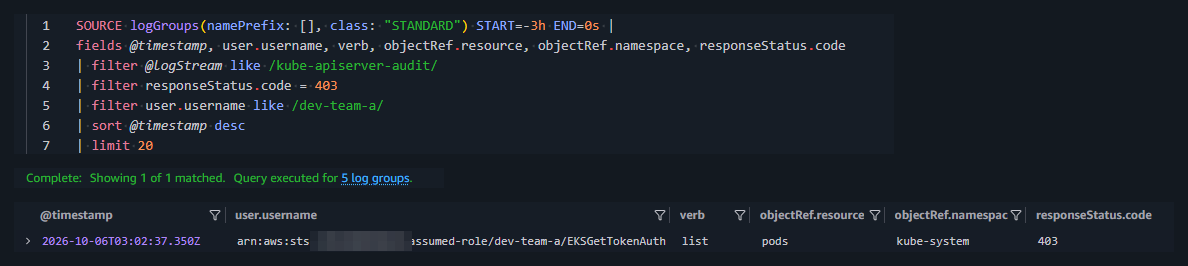
CloudTrail covers the AWS side. Access entry changes and Pod Identity associations are management events, so they can be traced there as well.
I wouldn't enable every control plane log type just because it exists. Logs have both cost and operational weight. For this lab, audit and authenticator are enough. The log group EKS creates has no retention at all (the console shows "Never expire"), so in a real cluster set one with aws logs put-retention-policy instead of storing and paying for these logs indefinitely.
My checklist for a first look at an EKS cluster
When I do a first pass on an EKS cluster, these are the questions I'd ask:
- Who has access to the cluster, especially the principal that created it?
- What can each identity actually do? Check effective permissions instead of trusting policy names.
- Where can the Kubernetes API be reached from, and was that a deliberate decision?
- Can application Pods reach the node's role through IMDS?
- Does each workload have its own IAM role through Pod Identity or IRSA, scoped to the intended ServiceAccount?
- Can someone who creates Pods in a namespace use a more privileged ServiceAccount or access its Secrets?
- Are unnecessary container privileges removed and enforced where possible?
- Do the logs contain enough information to reconstruct what happened?
- Is the cluster on a Kubernetes version still in standard support, and what happens when it leaves it?
What I left out
This is not a complete EKS security guide.
There is already a gap visible in this lab: without Network Policies, Pods can still talk to each other across namespaces. That's one of the next boundaries I'd look at.
Cleanup
99-cleanup.sh deletes the cluster first, so the node group, add-ons, access entries and Pod Identity associations go with it. Then it removes everything that can outlive the cluster: the IAM roles, the bucket and the log group.
./99-cleanup.sh
To see what the run cost, I opened Cost Explorer for the day of the lab, grouped by service. Two details changed the number I saw. Cost Explorer dates are in UTC, and my lab started around 11 PM in Brazil, so it shows up under the next day. And if the account has credits, the total shows $0.00 until you exclude the Credit charge type in the filters. Cost Explorer also refreshes its data at least once a day, so wait a day after cleanup before trusting the total.


Top comments (0)