

TouchGrass AI: Building a Local AI Companion That Gets You Outside 🌿
An AI companion designed to help you spend less time on screens and more time in the real world.
1. The Problem: We're Spending Too Much Time on Screens
As developers, we spend hours staring at terminals, code editors, documentation, and pull requests. Even when our eyes feel tired and our minds need a break, stepping away from the computer isn't always easy.
And when we finally go outside, we often take our screens with us. We check notifications, scroll through social media, or open another app.
We're physically outdoors, but mentally, we're still online.
For Hacktoberfest 2026 Week 1, themed “Touch Grass,” I wanted to build something different: an AI application that doesn't encourage people to stay on the screen longer.
Instead, I built TouchGrass AI — a local AI companion that helps you put your device away and explore the world around you.
2. What Is TouchGrass AI?
TouchGrass AI turns your available free time, mood, surroundings, and preferred activities into a personalized outdoor micro-adventure.
Instead of generating another long conversation, it gives you a practical mission you can remember and complete away from your screen.
Users can choose:
- Available time: 10, 20, 30, 60, or 120 minutes.
- Mood: Stressed, Bored, Energetic, Curious, or Peaceful.
- Activity: Walking, Gardening, Observation, Birdwatching, or Surprise.
- Environment: Neighborhood, Park, Garden, Campus, or Balcony.
- Accessibility preferences: Adapt the mission to the user's mobility and comfort needs.
Each generated adventure contains:
- A creative title and a short narrative hook.
- Three to five clear, sequential steps.
- A sensory observation challenge, such as noticing different leaf shapes or listening for bird calls.
- A screen-free instruction encouraging users to silence and pocket their phones.
- A reflection question to consider after returning.
- A distraction-free active mode that displays only the information needed before heading outside.
The goal is simple: use AI to make the screen the shortest part of the experience.
3. Why Local AI Instead of a Cloud API?
I chose Google Gemma through Ollama because the project's purpose is to encourage people to disconnect, and its personal inputs should remain private.
Privacy by design
A user's mood, preferences, and reflections can be personal. By running inference locally through Ollama, TouchGrass AI can generate missions without sending those inputs to a cloud AI provider, provided the application uses only local endpoints and does not transmit the data elsewhere.
Offline capability
Once the application dependencies and model weights have been downloaded, the core mission-generation workflow can operate without an internet connection while the local Ollama service is available.
This is useful when someone wants to prepare an activity before leaving home or visiting a location with poor connectivity.
Freedom to experiment
Using an open-weight model makes it possible to experiment with different models, adjust prompts, inspect the application logic, and build without requiring a paid cloud AI API key.
Gemma is an open-weight model distributed under Google's Gemma Terms of Use. Its terms still apply, so open-weight should not be confused with unrestricted licensing.
For this project, local inference is not just a technical choice. It supports the central idea: technology should help people reconnect with the world around them.
4. How I Built It
TouchGrass AI uses a modular Python architecture with a Streamlit interface, Ollama for local inference, Pydantic for data validation, and SQLite for progress tracking.
Tech stack
- Python: Core application logic.
- Streamlit: User interface.
- Ollama: Local model serving.
- Google Gemma: Open-weight language model.
- Pydantic: Input and output validation.
- SQLite: Adventure history and observation progress.
- Pytest: Automated testing.
Architecture
The application follows this flow:
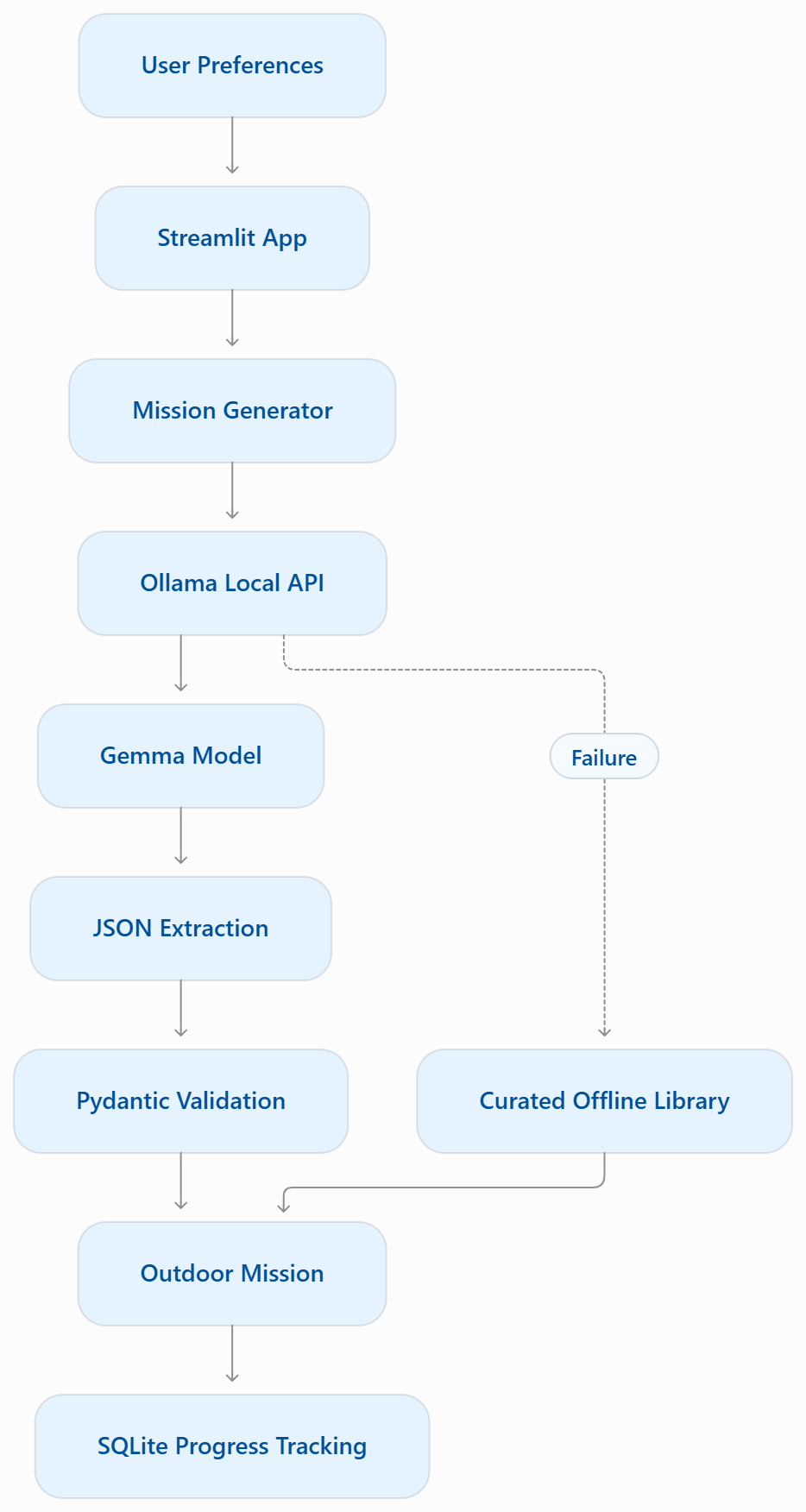Key modules
app.py
Provides the Streamlit interface, collects user preferences, and displays generated missions in a nature-inspired visual design.
services/ollama_service.py
Communicates with Ollama's local HTTP API, including model discovery and generation. It handles connection failures, missing models, and timeouts.
services/mission_generator.py
Builds prompts, requests structured JSON output, extracts the JSON payload, and validates the result against a Pydantic model called OutdoorMission.
services/progress_service.py
Stores adventure history and observation completions in SQLite. It calculates consecutive-day streaks from recorded dates rather than inventing progress.
5. The Hardest Challenge: Getting Reliable JSON from a Small Local Model
One of the most interesting challenges was making small local models return structured, usable mission data.
A model may produce conversational text before its answer, wrap JSON in Markdown code fences, omit required fields, or return malformed output.
That becomes a problem when the application expects a specific structure.
I addressed this with three layers of protection.
1. Ollama JSON mode
The generation request uses "format": "json" to encourage valid JSON output.
2. JSON extraction
An extract_json helper isolates the JSON object from surrounding text or Markdown formatting.
This makes the parser more tolerant of unexpected presentation, although malformed or incomplete JSON can still fail.
3. Pydantic validation and offline fallback
The extracted object is validated against the OutdoorMission schema. If generation fails or the output cannot be validated, the application can use its curated offline mission library.
The fallback is explicitly labeled “🍂 Curated Offline Library”, so users can distinguish a locally generated AI mission from a predefined mission.
This approach matters because a local model should not be allowed to break the entire user experience just because one response is malformed.
6. Testing and Verification
I treated reliability as an important part of the project rather than relying only on a successful demonstration.
The automated test suite uses Pytest and mocked Ollama endpoints to test behavior without requiring live inference for every test.
The test cases cover:
- User preference validation.
- Outdoor mission schema validation.
- JSON extraction from plain text and Markdown.
- Fallback behavior when Ollama cannot connect.
- Fallback behavior after a timeout.
- Consecutive-day streak calculation.
- Historical streak retention and multiple sessions on the same day.
Reported test results
The test run recorded for this project was:
- 14 out of 14 tests passed
- Execution time: 0.18 seconds
These results should correspond to the actual test run in the published repository.
Local inference example
A recorded inference run with gemma:2b generated the following mission:
Title: Floral Fable Hunt
Duration: 10 minutes
Steps: 4
Observation challenge: Identify at least five different types of plant leaves and notice their textures.
Screen-free rule: Keep your phone in silent mode and focus on the natural world around you.
Generation source: Local Gemma model
The recorded run completed without using the curated fallback library.
7. How to Run TouchGrass AI
You can run the project on your own computer with Python and Ollama.
Step 1: Install Ollama
Download and install Ollama from https://ollama.com.
Pull the model used by the project:
ollama pull gemma:2b
Ollama normally runs in the background after installation. If its server is already running, you do not need to start another instance with ollama serve.
Step 2: Clone the repository
Replace the URL below with the actual public repository URL.
git clone YOUR_GITHUB_REPOSITORY_URL
cd touchgrass-ai
Step 3: Create a virtual environment
On Windows:
python -m venv venv
.\venv\Scripts\Activate.ps1
pip install -r requirements.txt
On macOS or Linux:
python -m venv venv
source venv/bin/activate
pip install -r requirements.txt
Step 4: Run the tests
pytest tests -v
Step 5: Launch the application
streamlit run app.py
Open http://localhost:8501 in your browser.
Choose your preferences, generate an adventure, memorize the steps, and head outside.
For offline use, make sure the required dependencies and model weights have already been installed and downloaded.
8. What's Next?
There are several directions in which TouchGrass AI could grow:
- Offline nature soundscapes: Optional ambient audio for rain, wind, and flowing water.
- Printable field notes: Exportable PDF or Markdown checklists for screen-free nature journaling.
- Season-aware missions: Adapt activities to seasonal changes and locally relevant environmental conditions.
- More model choices: Allow users to configure different compatible local models.
- Accessibility improvements: Offer more ways to adapt activities to individual needs and surroundings.
These improvements would expand the experience without losing its main purpose.
9. Final Thoughts
Building TouchGrass AI reinforced an idea I find important: AI does not always have to maximize engagement with technology.
Sometimes, the most useful application is the one that helps us close the laptop, leave the notifications behind, and pay attention to what's around us.
Open-weight models and local inference make this experience more private, customizable, and accessible to people who want to experiment without depending on a paid cloud AI service.
The best AI interaction might be the one that inspires you to stop interacting and start exploring. 🌱
Project Links
GitHub repository: [https://github.com/Renuka-Kamani/touchgrass_ai]
Application screenshots: [
]

Built for the Hacktoberfest 2026 Open-Source AI Challenge — Week 1: Touch Grass.


Top comments (0)