


What if your SaaS store had a full-time operations worker that never sleeps, catches every failed payment within minutes, and answers "how many customers paid today?" in Telegram — at nearly zero cost per question?
That's what I built. Four modular Laravel packages, a deterministic API simulator, a two-tier AI intent classifier, a heartbeat monitoring engine with proactive workflows, and integrations with Telegram, OpenClaw, Slack, and plain HTTP.
This article walks through the architecture, the reasoning behind every layer, and the real problems I solved building it.
The Architecture at a Glance
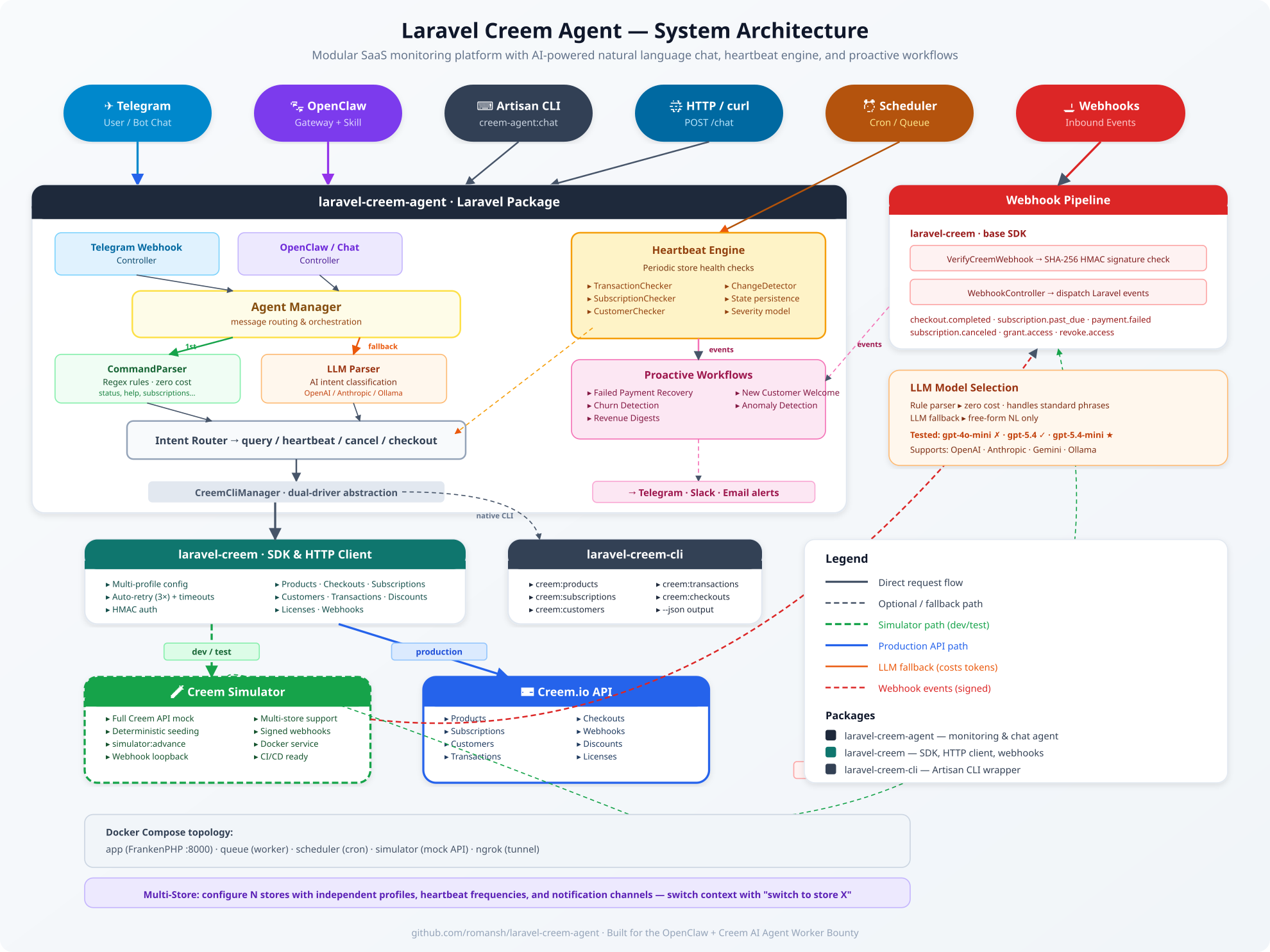
The system is composed of four independent Composer packages that snap together:
| Package | Role |
|---|---|
| laravel-creem | SDK — HTTP client, webhook verification, event-driven architecture |
| laravel-creem-cli | Artisan CLI — mirrors the native creem CLI, works standalone |
| laravel-creem-agent | The agent — chat, heartbeat engine, proactive workflows, notifications |
| creem-simulator | Full Creem API mock — deterministic seeding, webhook loopback |
Every package is a standalone Composer library. You can use laravel-creem without the agent and the CLI without OpenClaw. But when they're combined, you get something powerful.
Why Four Packages Instead of One?
Because real SaaS systems are composed of layers, not monoliths.
A developer who only needs the Creem SDK shouldn't install a Telegram bot. A DevOps engineer who wants CLI access for scripts shouldn't need an AI classifier. And someone building a custom dashboard can use the SDK + CLI without ever touching the agent.
The packages declare soft dependencies:
laravel-creem-agent
  ├── requires: laravel-creem (SDK)
  └── suggests: laravel-creem-cli (for native CLI acceleration)
The agent auto-detects whether the native creem CLI binary is installed. If yes, it uses shell exec for speed. If not, it falls back to in-process SDK calls — same result, zero manual configuration.
The Two-Tier Intent Classifier
Every user message goes through a two-stage parsing pipeline:
User message
    ↓
CommandParser (regex rules — zero cost)
    ↓ if intent == unknown
LlmCommandParser (AI call — low cost)
    ↓ if still unknown
"I didn't understand that. Type 'help' for options."
Stage 1: Rule-Based Parser — Free
The CommandParser matches common phrases with regex:
"how many active subscriptions?" → {intent: query_subscriptions, status: active}
"any payment issues?"           → {intent: query_subscriptions, status: past_due}
"run heartbeat"                 → {intent: run_heartbeat}
"cancel sub_abc123"             → {intent: cancel_subscription, id: sub_abc123}
Standard phrases like status, help, recent transactions, products, how many customers — all handled here. No API call, no tokens, no cost.
Stage 2: LLM Fallback — Only When Needed
Free-form questions like "how's the store doing?" or "what's going on with payments?" don't match any regex. The agent sends a prompt to an LLM and gets back structured JSON:
{"intent": "status", "store": "default", "status": null, "id": null}
Model Selection Matters — A Lot
This was one of the biggest lessons from the project.
I started with gpt-4o-mini as the OpenClaw skill model. It was fast and... completely ignored the skill instructions. When the SKILL.md file explicitly said "call the Laravel endpoint via curl", gpt-4o-mini would instead answer from its own knowledge: "I don't have transaction data loaded in this workspace yet. Where are your transactions stored?"
It literally refused to use the tool it was given.
Switching to gpt-5.4 fixed everything instantly. The model read the skill instructions, called curl, forwarded the exact user question, and relayed the response. Night and day difference.
Then I tested the middle ground:
| Model | Accuracy | Verdict |
|---|---|---|
| gpt-4o-mini | Poor — ignores skill instructions | ✗ Not viable |
| gpt-5.4-nano | Mediocre — sometimes simplifies questions | Acceptable for simple queries |
| gpt-5.4-mini | Good — follows instructions reliably | ★ Best balance |
| gpt-5.4 | Excellent — perfect routing | Overkill for intent classification |
The sweet spot is gpt-5.4-mini: it follows routing instructions and preserves user intent qualifiers (how many, today, successful).
Key takeaway: if your AI agent seems broken, check the model first. The difference between a smaller and a larger model can be the difference between "works" and "completely useless."
The Heartbeat Engine
The heartbeat is the core monitoring loop. It runs on a schedule (configurable per store) and detects what changed since the last check:
1. Load previous state from disk
2. Query current metrics:
   ├─ TransactionChecker  → new sales, revenue
   ├─ SubscriptionChecker → status transitions
   └─ CustomerChecker     → growth
3. ChangeDetector → compute deltas
4. Classify severity: good_news | warning | alert
5. Persist new state
6. Fire events → trigger workflows
State Persistence
Each store gets a JSON state file:
{
  "lastCheckAt": "2026-03-30T14:22:00Z",
  "lastTransactionId": "txn_abc123",
  "transactionCount": 487,
  "customerCount": 52,
  "subscriptions": {
    "active": 28, "trialing": 5,
    "past_due": 2, "canceled": 12
  }
}
The agent compares current API data against this snapshot and surfaces only the differences.
Proactive Workflows
Workflows listen to heartbeat events and take autonomous action:
| Workflow | Trigger | Action |
|---|---|---|
| Failed Payment Recovery | subscription → past_due
|
Alert via Telegram/Slack |
| Churn Detection | ≥2 cancellations in one cycle | Immediate alert with details |
| Revenue Digest | Scheduled (daily) | Summary of sales and growth |
| Anomaly Detection | Unusual metric drops | Flag for investigation |
Each workflow dispatches Laravel notifications through configurable channels — Telegram, Slack, email, or database.
Multi-Store Support
Real businesses run multiple stores or product lines. The agent handles this natively:
// config/creem-agent.php
'stores' => [
    'default' => [
        'profile' => 'default',
        'heartbeat_frequency' => 4, // hours
        'notifications' => ['database', 'telegram'],
    ],
    'enterprise' => [
        'profile' => 'enterprise',
        'heartbeat_frequency' => 1,
        'notifications' => ['slack'],
    ],
]
In chat: "switch to store enterprise" → all subsequent queries use the enterprise profile.
In heartbeat: php artisan creem-agent:heartbeat --all-stores → each store checked independently with its own state file and notification channels.
The Creem Simulator
This is the part I'm most proud of.

The simulator is a full standalone Laravel app that implements the entire Creem API surface. It runs as a Docker service alongside the main app and lets you test everything without a real payment processor.
Deterministic Seeding
php artisan simulator:seed-demo \
  --products=6 --customers=40 \
  --subscriptions=24 --transactions=120 \
  --days=45 --reset
This creates a realistic baseline dataset. Same seed, same data — every time. Perfect for CI/CD pipelines and reproducible demos.
Scenario Advancement
php artisan simulator:advance \
  --sales=3 --new-customers=2 \
  --past-due=2 --cancellations=1 \
  --send-webhooks
This command generates exactly the changes you specify. Three new sales, two new customers, two subscriptions going past-due, one cancellation. The --send-webhooks flag immediately fires signed webhook events back to the agent app — triggering the full notification pipeline.


When the scenario gets more complex — multiple sales, cancellations, and past-due transitions — the agent handles each event independently:


Webhook Loopback
The simulator signs webhooks with the same HMAC-SHA256 algorithm as the real Creem API:
simulator:advance --send-webhooks
  → generates checkout.completed event
  → POST http://app/creem/webhook
    Headers: {creem-signature: hmac-sha256(payload, secret)}
  → App receives → VerifyCreemWebhook middleware validates
  → WebhookController dispatches CheckoutCompleted event
  → TelegramNotifier sends "✅ New sale: Product ($10.00)"
The agent doesn't know (or care) whether the webhook came from the simulator or from Creem production. The signature is valid, the payload is structured correctly, and the workflows fire.
Why This Matters
Without a simulator, testing a payment monitoring agent means:
- Creating real test transactions on a payment platform
- Waiting for webhook delivery
- Hoping the timing works for your demo
With the simulator:
- Seed data in 2 seconds
- Advance the scenario with exact parameters
- Get immediate, deterministic results
This is the difference between a demo that might work and a demo that works every single time.
Talking to the Agent: curl Examples
The agent exposes a simple HTTP endpoint. No SDK required — just curl:
Store Status
curl -s -X POST http://localhost:8000/creem-agent/chat \
  -H 'Content-Type: application/json' \
  -d '{"message":"status","source":"api"}'
Response:
{
  "response": "Store 'default' — 28 active subscriptions, 52 customers, 487 transactions. Last heartbeat: 14 minutes ago. No alerts.",
  "store": "default"
}
Subscription Query
curl -s -X POST http://localhost:8000/creem-agent/chat \
  -H 'Content-Type: application/json' \
  -d '{"message":"any payment issues?","source":"api"}'
Response:
{
  "response": "⚠️ 2 subscription(s) are past due in store 'default':\n• sub_abc123 — $29.99/mo (past due since Mar 28)\n• sub_def456 — $9.99/mo (past due since Mar 30)",
  "store": "default"
}
Running Heartbeat via Chat
curl -s -X POST http://localhost:8000/creem-agent/chat \
  -H 'Content-Type: application/json' \
  -d '{"message":"run heartbeat","source":"api"}'
Response:
{
  "response": "Heartbeat complete — 5 change(s) detected:\n✅ 3 new transaction(s) — $89.97 revenue\n⚠️ sub_ghi789 transitioned to past_due\n🔴 sub_jkl012 was canceled",
  "store": "default"
}

Telegram Integration
The agent supports two Telegram paths. In both cases, you talk to the bot using natural language — ask about store status, payment issues, or trigger a heartbeat check:

Path 1: Direct Laravel Webhook
The agent runs its own webhook endpoint. Telegram messages come directly to the Laravel app:
User → Telegram Bot API → ngrok → POST /creem-agent/telegram/webhook
  → AgentManager → parse → route → respond
  → POST https://api.telegram.org/sendMessage
This is the simplest setup. No external tools. Just a bot token, an ngrok tunnel, and the agent.
Path 2: OpenClaw-Powered Telegram
For teams already using OpenClaw, the agent publishes as an OpenClaw skill. OpenClaw handles Telegram natively, and the skill bridges messages to the Laravel endpoint:
User → Telegram → OpenClaw Gateway → Skill (SKILL.md)
  → curl POST http://localhost:8000/creem-agent/chat
  → Response relayed back through OpenClaw → Telegram
The skill is a single SKILL.md file — no shell scripts, no binaries. Install it from ClawHub:
openclaw skills install openclaw-laravel-creem-agent-skill
Why Support Both?
Because OpenClaw adds value beyond basic messaging:
- Multi-skill orchestration — the agent becomes one skill among many
- Session management — OpenClaw handles conversation state
- Gateway security — shared secrets, pairing approval
- Channel flexibility — same skill works on Telegram, WebChat, Discord
But if you don't use OpenClaw, the agent works perfectly fine on its own. No vendor lock-in.
The CLI Package
laravel-creem-cli wraps the Creem API into Artisan commands:
php artisan creem:subscriptions list --profile=default --json
php artisan creem:transactions list --json
php artisan creem:customers list --json
php artisan creem:products list --json
php artisan creem:whoami
It's designed as a standalone package. If the native creem CLI binary is installed, the agent uses it for speed. If not, laravel-creem-cli handles everything through the SDK.
This dual-driver architecture means zero configuration:
Agent needs subscription data
  ↓
CreemCliManager:
  1. Check: is native `creem` binary available? (cached 24h)
  2. If yes → NativeCliDriver: shell exec `creem subscriptions list --json`
  3. If no  → ArtisanCliDriver: Creem::profile()->subscriptions()->list()
  ↓
Same JSON result either way
Docker Topology
The demo stack runs five services:
services:
  app:        # Laravel Octane + FrankenPHP (port 8000)
  queue:      # Queue worker for async jobs
  scheduler:  # Cron runner for heartbeat schedule
  simulator:  # Mock Creem API (internal only)
  ngrok:      # Public tunnel for webhooks

The simulator is only accessible inside the Docker network — it's not exposed to the host. The app talks to it via the Docker service name (http://simulator/api/v1), and the same app config seamlessly switches to https://api.creem.io/v1 in production by changing one environment variable.
What Makes This Different
This isn't a script that calls an API and prints results. It's a platform:
- Modular by design — use any package independently or compose them together
- Two-tier AI — rule parser handles 80% of queries at zero cost; LLM catches everything else
- Proactive, not reactive — heartbeat detects problems before users report them
- Simulator-first development — deterministic testing without real payment infrastructure
- Multi-store native — manage multiple stores with independent configs and notification channels
- Channel-agnostic — Telegram, OpenClaw, Slack, HTTP, CLI — same agent, same logic
- Production-grade webhooks — HMAC signature verification, retry handling, event-driven architecture
Screenshot Reference

Figure 1: Full system architecture — all packages, data flows, and integration points.

Figure 2: Creem Simulator deterministic seeding. Parameters control exact data volumes.

Figure 3: Scenario advancement with --send-webhooks. Signed webhook delivered and processed.

Figure 4: Real-time Telegram alert triggered by the simulator webhook.

Figure 5: Multiple advance commands generating sales, cancellations, and past-due transitions.

Figure 6: Telegram receiving 3 new sale alerts and 2 subscription cancellation alerts in real time.

Figure 7: Querying the agent via curl — status overview and payment issue check.

Figure 8: Natural-language conversation in Telegram. The agent understands "how's the store doing?" and "are there any issues?" — same flow for direct webhook or OpenClaw path.

Figure 9: Docker Compose topology — five services running: app, queue, scheduler, simulator, ngrok.

Figure 10: Heartbeat triggered via natural language in Telegram — "run it again" produces a full change report with new sales and customer counts.
Try It
The full source is on GitHub:
- laravel-creem — SDK
- laravel-creem-agent — Agent
- laravel-creem-agent-demo — Demo + Simulator
- laravel-creem-cli — CLI
- OpenClaw Skill on ClawHub
The simulator means you can test the entire system locally without any Creem API keys. Seed data, advance the scenario, watch the agent react.


Top comments (0)