

Note: This article is only intended to explain how I am loading my site. These steps may change as per your use case (Building an E-Commerce websit...
For further actions, you may consider blocking this person and/or reporting abuse


Glad to see other people worrying about performance! My portfolio site gets around 800ms, I'm pretty proud of that.
My one concern about your method is loading mobile css once it's determined it's needed. If you're gonna split the css, I think it makes more sense to just load mobile at first, since a pc is more likely to be able to take the extra processing/network loads.
That's just my opinion on the matter.
Hi, yes that's a good point, I think it is totally a right approach when you have a mobile first css. In my case, I wrote it for desktop first since a lot of recruiters and even developers use desktop for surfing but I will totally go for your approach when I make a mobile first site.
Thank you for sharing and reading this article🌻 and loading site in 800ms is so coool you should totally be proud of yourself🦄
800ms? Are you willing to share your techniques?
Yes, I do mobile first which loads everywhere, and responsive.css for desktops and tablets
And it's the opinion of most others!
What happens if a potential employer receives your application on their mobile device, opens your site and has a really bad experience?
I do get the point but I think it depends on one's use-case. In my case my mobile.css is 100 lines long and plus I'm minifying it so the final production size of my mobile.css is 2kb.
Also, I cared about my comfort and I am personally more creative when I think about desktop first and then turning it into mobile view is just a few adjustments (and especially since it is a portfolio I just wanted to be as creative as I can 🦄)
I have made websites where I had to write mobile-first CSS and I totally get the point of having that extra CSS file for PCs rather than mobile but yes the topic is too broad to talk about since other parameters like the size of your files, the eventual aim of the website, Your comfort, your team's comfort matter as well.
Oh, and do let me know if you have different views on this, Thank you🌻
What about 300ms for a WordPress + Vue.js site? ;)
wue-theme.app
(Server in Frankfurt without CDN, so in USA it could take around 2 seconds to load).
Your time to interactive is 3.3s on slow speed network. Test your site on web.dev
ehm, I don't know what web.dev does and how. But Google pagespeed insights says my site is quite ok ;)
thepracticaldev.s3.amazonaws.com/i...
Just checked web.dev as well. All Measures are between 85 and 97 points. So what's the point?
thepracticaldev.s3.amazonaws.com/i...
Do you know what each of the scores (in seconds) actually mean?
Fair enough if you're happy with 3.4s on TTI :)
This is good stuff.. although, the stylesheets still load, even with a media attribute. Combining css into fewer sheets/links, and keeping the media queries in the stylesheet, is proving to be the fastest way to load.
Hi Mark, I just checked my network tab and
mobile.cssis not really getting any request when I turn to desktop view.Mobile view

Desktop View
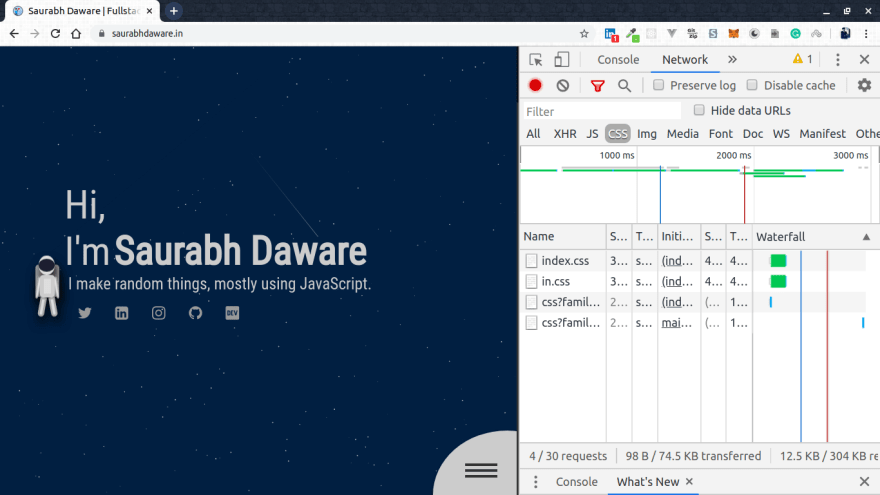
I'm not really sure about the browser support or for any gotchas in this but apparently this is how it works in new browsers.
Thank you for reading the article 🌻
I have a question on that matter.
If a user loads the website on phone in landscape that has more that 768px,
then rotates the screen into portrait, will the mobile.css file be loaded and applied?
That could make a big difference in my work. I could try that on my next project.
No, it won't be loaded by default since the media is checked on the loading time. However, you can actually call a javascript function which will add that link to head dynamically when a user rotates the screen but it depends if it fits your project needs
Thanks for sharing! You can also use f_auto and q_auto for automatic format and quality selection.
Oh, thank you so much! I will try out f_auto and q_auto🦄
Also, you guys are doing great job🌻
1.6s is still pretty poor for a static site.
Yeah I'm still working on improving it :D
I'm just very proud about it since it has canvas animations a lot of colors, images etc. 🦄
I personally use Javascript to load all JS/CSS files asynchronously. With the Joomla CMS powering my site and on SiteGround hosting (pretty bad TTFB times), I can manage 0.8s for first interactive
I am loading them asynchronously too. In fact I'm preloading them and applying them when they are loaded that should be faster than straight up loading them. Is there anything extra you're doing? Would you like to share your website?
This is what I wrote to properly asynchronously load JS gist.github.com/C-Lodder/a00cf9894...
You can use it for CSS too. My main template CSS I'm loading inline as I wrote my own mini framework and it's only 22kb
that looks interesting I have async attribute true in my script link, I'll do some research. Thanks for sharing! the performance insights are pretty crazy :D
Refreshing to hear about someone only using vanilla JS for a site. Nice!
Thank you! and yes I am actually super impressed with where the vanilla is heading. In the website the astronaut is a web component and the blue tshirt guy is just the same component with different styles. also, I love how much control you get when you work in vanilla of any language🦄 Thank you for reading the article🌻
Thanks so much for this write up. When I am optimizing websites I always feel overwhelmed with the amount of code there is to modify. Having a step by step guides like this really help to break up those problems into smaller bite-size packets.
You can preload image and javascript assets as well. Another suggestion for optimizing is to create image sprites for small images like icon sets or logos or other images that are small and similar or limited in color palette. Lots of npm packages that can help you with that, but easiest for people just starting to make them is one of the online generators like toptal.com/developers/css/sprite-g...
or spritegen.website-performance.org/
Another good optimization regarding images is to make sure the images are not only sized correctly, lazy loaded and/or spritified, but also that the individual images have been fully optimized. Again, lots of npm packages for that, but easiest for beginners is to use a GUI application like FileOptimizer, which I think is very good. Can download that here: sourceforge.net/projects/nikkhokkh...
Oh, these are some really helpful tips! Thank you so much I will check them out :D
Nice work!!.
What tool did/do you use to track your lighthouse score?
You can check your score on web.dev or chrome developer tools have the option of "audit" where you can check the score directly.
Lighthouse also has a CLI so you can run the performance insights from your command line
I know this tools. Thanks.
But I didn't know about web.dev possibility to login and save audits over time.
Nice feature to see improvements :)
The lack of spaces before the opening bracket of a code-block makes me want to throw up.
Hi, can you tell me which code-block are you talking about? I will fix it.
I'm just giving you a hard time - I liked the article.
This is what I'm talking about though, no spaces before the opening bracket:
function loadProjectImage(e){
You do it in pretty much every code block in the JS and CSS:
html,body{
.lazyload, .main-container{
Like I said though, just giving you a hard time. It is a style thing and I'm pretty anal about style. it was a good article. Thanks.
Oh I see. I think it totally depends on how you (and your team) prefer it.
I've seen a lot of w3 articles not putting any space there. Even a lot of code snippets in this article about JavaScript best practices - w3.org/wiki/JavaScript_best_practices do not add any space in the code.
So yeah it depends on how you are linting that particular project :)
Just checked google.github.io/styleguide/jsguid... and yes they mentioned about the space before brackets :D
Too funny! I was just about to link the Google style guide for you. Ya, Douglas Crockford recommends it as well: crockford.com/code.html
As well as every other style guide I've seen. Interesting that the w3 best practices doc writes them that way, I hadn't seen that.
On another note, I've also seen it said that it is against best practices to pass the event object around. Here is a link to the page of the book I saw it in, Maintainable JavaScript, thought you may be interested (it is a very good book too, I always recommend it, as well as JavaScript Patterns by Stoyan and JavaScript The Good Parts by Crockford:
books.google.com/books?id=bHhlCrvb...
Ever since I have seen this post, I have been working on improving my website and I am 100 all the way now. Thanks for the inspiration man!
unsungnovelty.org.
PS: Yes, I like my website plain and minimal. :)
That is so Nice! Im a new dev and making things work and not so slowly are ok by now for me, but Im always looking for the best :)
Hi, That is totally a right approach 🌻 Good luck with your journey 🕺
Those are some pretty awesome optimisations! well done!
Love the animations 😊 If you would like to restart your austronaut animations check out my article 😉
link.medium.com/1CKzyKfNU1
Thank you for your kind words🦄 reached the end of my medium limit :) I will read it later thank you for sharing :D
I dunno if i would bother splitting css even if it was 50kb
I agree, For my current use-case it would've worked to have a single file. Initially I just had no idea how big it would get. I'm not sure if having this extra file will cause any issues though since it is anyway loaded dynamically and does not block render.
My site renders in 200ms, if it's throttled to 4g it'll render in 1.6s. That's the power of statically generated sites :)
omg haha, 200ms is soo cool! that's literally less than my server's response time.
Really cool portfolio site
Thank you :D
Well done! Its always nice to squeeze some extra load time out of a website 👍🏼
Cool great job! That's why I love using Gatsby. Code in React but get static assets && optimized images 🤩😎
Cool looking website doe
Thank you so much :D
Nice!
If you want fast static site, Gatsbyjs FTW ❤️
Isn't that kind of slow though? : )
It is! I am still trying to improve it, its just that I'm proud of whatever I did till now.
Also, I don't think so there will be any major changes in the load time now. The thing is, After this point if I want to improve the performance I would have to compromise on the content (by deleting elements) or compromise on accessibility or seo (by rendering in javascript).
Eventually its not about providing the fastest website rather providing them with a good overall website which is comfortable to maintain, doest not take tooo long to load, and has good accessibility and seo. :)
You should try to put your css inline in your html. May not be the best practice, but your css it's really small, maybe, killing one (or two) requests worth it :)
That will surely help me in 'getting the content along with the styles and overall colors' as soon as possible but my index.css is still large and making it inline will just block the first load for some time.
Since they are preloaded they don't really make any change in the first load right now so I can afford having that extra request :D
Saurabh, your rocket game is unbeatable.
Thank you so muchh! It's a old project though so there are some mistakes. for the next few months I'll be working on games only so probably will end up building better games :D Thank you 🌻
If you make changes to your css, since everything is cached in browser, it wont fetch latest css, unless a hard reload is done manually. am i right?
I'm not really caching it but yes that is how it works when you use service worker and cache css. However there are some tricks to handle it like you can manually show in Ui when new css is ready and ask user to update and onclick of the update the new css can be loaded dynamically. Also, even without a hard reload they eventually get cached replacing the old ones.
Edit: If you're talking about the browser's cache without service worker, I am not very sure about this but I've seen sites eventually adapt to new css without hard reloads. I looked around and apprenntly it also depends on your server configurations.
Hi write blog on razorpay interview ...
Great article buddy!!
And...
That discussion between @technomad and @clodder is worth a read!!!