


We’ve all seen the benchmark charts. The flashy scores, the synthetic leaderboards, the claims of “best open-source coding model.” But if you’ve ever tried to use those models on actual work, you know the truth: benchmarks don’t tell you whether a model will understand your messy codebase, respect your constraints, or explain its trade-offs like a human engineer.
So we stopped trusting charts and ran our own test.
We took four of the most talked-about open-source coding models right now — GLM-5.2, DeepSeek V4 Flash, Kimi K3, and Qwen 3.8 Max — and gave them the same real-world coding task. No cherry-picked prompts. No special tuning. Just a practical optimization problem that forces models to choose between speed, readability, dependencies, and maintenance cost.
We didn’t care which model topped a leaderboard. We cared about which one produced code you’d actually trust to merge after a quick review. Which one explained why it made certain choices. Which one knew when not to optimize.
What follows isn’t a ranking. It’s a field guide. Each model approached the same problem differently, revealing distinct philosophies about what “good code” means. By the end, you won’t just know which model is “best” — you’ll know which one fits your workflow, your stack, and your team’s tolerance for complexity.
Let’s get into it.
GLM-5.2: Built for the Long Haul
GLM-5.2 is the newest open coding model from Z.ai. Think of it as the developer who doesn’t just write a quick function and clock out — it’s the one you call when you have a messy, multi-file project that needs someone to stay focused for hours.
Most AI coding tools are great at short bursts: “write me a sorting algorithm” or “fix this syntax error.” But real engineering isn’t like that. Real work means digging through thousands of lines of code, remembering what you changed three files ago, and connecting dots across an entire codebase. That’s exactly what GLM-5.2 was built for.
It can hold about 1 million tokens of context in its head at once. To put that simply: you can hand it your whole project, your docs, your logs, and your test suite, and it won’t forget the beginning by the time it reaches the end. It also lets you choose how hard it thinks. Need a fast answer? Tell it to keep it light. Stuck on a nasty bug? Crank up the reasoning and let it take its time.
And unlike many top-tier models locked behind paywalls or regional restrictions, GLM-5.2 is fully open under the MIT license. You can run it yourself, tweak it, use it commercially — no strings attached.
Why it matters for this benchmark: GLM-5.2 brings two major differentiators to this head-to-head test:
- Solid 1M-Token Context: Unlike models that simply accept long inputs but degrade in quality, GLM-5.2 uses a new architecture called IndexShare to maintain stable reasoning even when processing entire repositories or extensive documentation.
- Adjustable Reasoning Effort: It offers explicit “High” and “Max” thinking modes. This allows developers to trade latency for deeper reasoning on hard bugs, or prioritize speed for simpler refactoring tasks — a flexibility not always available in frontier models.
- True Open Source: Released under the MIT license with no regional restrictions, making it one of the most accessible top-tier coding models for self-hosting and commercial use.
Key Specs at a Glance
| Feature | Details |
| ----------------------- | ------------------------------------------------------------------------------------------------ |
| Context Window | 1 Million Tokens (Stable) |
| License | MIT License (Fully Open Source) |
| Specialty | Long-horizon agentic coding, large repository navigation, and complex software engineering tasks |
| Reasoning Modes | High and Max effort reasoning modes for difficult coding and reasoning tasks |
| Agent Compatibility | Claude Code, ZCode, OpenCode, vLLM, and SGLang |
Why We’re Testing It
We didn’t pick GLM-5.2 because of its benchmark scores. We picked it because it promises to do the kind of sustained, real-world coding work that actually matters to developers — and we want to know if it delivers when the rubber meets the road.
So instead of trusting charts and leaderboards, we’re giving it the same hands-on coding task as the other three models. No special treatment, no cherry-picked prompts. Just a real problem, solved in real time, judged by how useful the result actually is.
Putting GLM-5.2 to the Test
For our first head-to-head challenge, we gave all four models the task: The Performance Optimization Trap. The prompt asks the model to optimize a slow Python CSV processing function to run in under 30 seconds, while prioritizing readability and explaining when the optimization wouldn’t be worth doing. This task is designed to catch models that blindly apply textbook patterns without understanding real-world trade-offs.

What GLM-5.2 Actually Did
Instead of just throwing faster code at the problem, GLM-5.2 started by diagnosing why the original was slow. It correctly identified that the bottleneck wasn’t “CSV parsing” in general — it was specifically the Python-level DictReader creating 10 million individual dictionaries. That’s the kind of insight that usually takes a senior developer profiling the code to uncover.
It then offered two solutions:
- A pandas version (~10–20s) using the C parser, column selection, and vectorized operations — no new dependencies needed.
- A Polars version (~3–8s) using lazy evaluation and multi-threaded parsing for when you really need speed.
Output

# Optimizing `process_sales`

## Diagnosis: Where the 4 minutes actually go

Before writing code, profile the original mentally:

| Cost source | Approx. impact |
|---|---|
| `csv.DictReader` builds a Python `dict` per row (10M dicts) | ~60-70% of runtime |
| Python-level `for` loop with `float()` called twice per kept row | ~15% |
| `pd.DataFrame(list_of_dicts)` — slowest DataFrame constructor path | ~10% |
| `.strip().upper()` on `region` **even though `region` is never in the output** | ~5% (pure waste) |

The bottleneck is *not* "CSV parsing" in the abstract — it's the **Python-level `DictReader`**. Pandas' C parser (or Polars/PyArrow) solves exactly that. The "textbook trap" the prompt warns about is *adding* Pandas vectorization on top of the slow parser; the fix is replacing the parser.

## Optimized version (pandas, no new deps)
python
import pandas as pd
def process_sales(csv_path):
df = pd.read_csv(
csv_path,
usecols=['timestamp', 'amount', 'status'],
dtype={'status': 'category'},
)
mask = df['status'].eq('completed') & df['amount'].gt(0)
return (
df.loc[mask]
.groupby(df.loc[mask, 'timestamp'].str.slice(0, 10))['amount']
.sum()
.to_dict()
)
Expected runtime on 10M rows: **~10-20s** on typical hardware.

## Faster version (Polars, if allowed)
python
import polars as pl
def process_sales(csv_path):
out = (
pl.scan_csv(csv_path) # lazy: enables predicate pushdown
.filter((pl.col('status') == 'completed') & (pl.col('amount') > 0))
.group_by(pl.col('timestamp').str.slice(0, 10).alias('date'))
.agg(pl.col('amount').sum().alias('revenue'))
.collect() # multi-threaded CSV parse + execute
)
return dict(out.iter_rows())
Expected runtime: **~3-8s**. Multi-threaded parsing + lazy predicate pushdown.

## Why each change helps

1. **`pd.read_csv` (C parser) instead of `csv.DictReader`** — The single biggest win. `DictReader` allocates a `dict` (and string keys) for every row, including rows that get filtered out. The C parser tokenizes into typed column arrays directly. ~5-10× faster on parse alone.

2. **`usecols=['timestamp', 'amount', 'status']`** — `region` is parsed, stripped, uppercased, and stored in the original — but **never appears in the output** (the groupby is on `date`, summing `revenue`). Dropping the column at parse time means the C parser skips those bytes entirely. This is the most important *readability* win too: it surfaces that the original had dead code.

3. **`dtype={'status': 'category'}`** — `'status'` has low cardinality ('completed', 'pending', 'refunded', …). Categoricals make the equality filter a dictionary-lookup on integer codes instead of a string compare per row.

4. **Vectorized boolean mask instead of `if` per row** — The mask is computed in C over contiguous arrays; the Python loop disappears. Branch prediction in the C kernel is also far better than CPython's per-iteration branching.

5. **Single `float` parse per value** — Original calls `float(row['amount'])` *twice* for kept rows (once in the condition, once when building the dict). `read_csv` parses `amount` once into a `float64` column.

6. **No `list[dict]` → `DataFrame` round-trip** — That constructor path is the slowest way to build a DataFrame. We never build the intermediate list at all.

7. **`.str.slice(0, 10)` instead of `[:10]` per row** — Vectorized string slicing over a numpy object array. Also avoids creating a `'date'` column materialized in memory; the groupby key is computed on the fly.

8. **Polars `scan_csv` + `.collect()`** — Lazy frame lets the engine push the filter *into* the CSV scan (rows that fail the predicate are never materialized), and CSV parsing is split across cores. This is the structural reason Polars beats pandas on this workload, not just "newer = faster."

## When this optimization is **not** worth doing

- **The job runs once overnight and 4 minutes is well within SLA.** Rewriting working code carries regression risk; the engineering time costs more than it saves.
- **The file is ≤ ~500K rows.** Below that, the original is a second or two and the pandas version adds a learning curve for new contributors.
- **The downstream cost dwarfs parse cost.** If this function feeds an API call or DB write that takes 10 minutes, shaving 3.5 minutes off parsing is invisible.
- **Memory is the actual constraint, not latency.** The vectorized versions load the whole file into RAM (roughly 2-4× the CSV size for pandas). On a constrained box, a streaming `csv.reader` + accumulator into a `defaultdict(float)` is the right shape — slower but bounded memory. The prompt explicitly says latency > memory, so we don't take this path, but it's the trade-off to name.
- **The team doesn't know Polars and the pandas version already meets the SLA.** Introducing a second dataframe library has a real maintenance tax (two idioms, two upgrade tracks, two sets of bugs). Only pull that lever when pandas genuinely can't hit the target.
- **Prematurely, during prototyping.** If the schema is still changing weekly, optimize after it stabilizes — otherwise you'll rewrite the optimized path every time a column moves.

The short version: optimize when (runtime × frequency) + (latency-driven UX/batch cost) exceeds the maintenance cost of the faster code. Here, a daily batch at 4 minutes with a clear <30s target clearly clears that bar — which is why the rewrite is justified.
plaintext
But what stood out most was the “When this optimization is NOT worth doing” section. It explicitly called out scenarios where rewriting would be a waste of time: overnight batch jobs within SLA, small files, downstream bottlenecks that dwarf parse time, memory-constrained environments, teams unfamiliar with Polars, or unstable schemas during prototyping. This isn’t something models usually volunteer — they tend to optimize because you asked, not because it’s actually the right engineering call.
Our Take
- Reasoning Quality: Excellent. It didn’t just apply textbook Pandas vectorization (the exact trap the prompt warned about). It understood the structural reason the original was slow and explained each change in plain terms. The diagnosis table upfront showed genuine comprehension, not pattern matching.
- Code Quality: Production-ready. Both versions are clean, well-commented, and immediately usable. The usecols parameter to skip the unused region column was a particularly sharp catch—it even noted this was a readability win because it surfaced dead code in the original.
- Instruction Following: Nailed it. Hit the ❤0s target, prioritized readability, explained every change, and included the requested “when not to optimize” caveat. Went beyond by offering two tiers of optimization with clear trade-offs between them.
- Notable Strengths: The engineering maturity. Most models would have stopped at the Polars solution. GLM-5.2 treated this like a real code review, acknowledging maintenance cost, team familiarity, and regression risk. It also caught that region was being processed but never used—a detail many models (and humans) miss.
- Notable Weaknesses: None significant for this task. If anything, the dual-solution approach adds slight cognitive load, but it’s justified by the clear framing of when to use each.
Verdict on This Task
GLM-5.2 didn’t just solve the optimization problem — it solved it like a staff engineer who understands that performance is a business decision, not just a technical one. This is exactly the kind of output you’d trust to merge after a quick review.
What This Tells Us About GLM-5.2
This single task reveals why GLM-5.2 belongs in this comparison:
- It diagnoses before prescribing, avoiding the knee-jerk optimization trap.
- It respects constraint hierarchies (latency > memory, readability alongside speed) instead of optimizing for speed alone.
- It demonstrates engineering judgment by articulating when not to act — a signal of real-world usability over benchmark chasing.
DeepSeek V4 Flash: Speed Meets Pragmatism
DeepSeek V4 Flash is the lightweight, high-speed contender in this lineup. If GLM-5.2 is the staff engineer who stays late to untangle legacy code, DeepSeek V4 Flash is the sharp junior dev who ships clean work fast and doesn’t overcomplicate things. It’s designed to be responsive, efficient, and surprisingly capable for its size — especially on agentic coding tasks where latency matters as much as accuracy.
Unlike larger models that prioritize depth at all costs, V4 Flash balances speed with reasoning. It supports adjustable effort levels (low, high, max), so you can dial it down for quick refactors or crank it up when debugging gets messy. And like GLM-5.2, it’s fully open under MIT — no API keys, no regional locks, just weights you can run locally.
Why We’re Testing It
We included DeepSeek V4 Flash because it represents a different philosophy: can a smaller, faster model deliver production-grade optimization advice without the overhead of a frontier-scale model? Benchmarks say it punches above its weight, but we want to know if that translates to real code reviews — not just synthetic scores.
So we gave it the same Task prompt as GLM-5.2: optimize a slow CSV processor to ❤0 seconds, prioritize readability, and explain when not to optimize. No hints, no extra context. Just the raw problem.

Putting DeepSeek V4 Flash to the Test
Instead of reaching for Pandas or Polars, V4 Flash took a fundamentally different approach: it eliminated the DataFrame. It replaced csv.DictReader with plain csv.reader, swapped the list-of-dicts + groupby pattern for a single-pass defaultdict(float) accumulator, and aggregated revenue during parsing instead of after.
The result? A solution estimated at 20–25 seconds — well under the 30-second target — with zero external dependencies beyond the standard library.
Here's an optimized version that should get well under 30 seconds for 10M rows:
python
import pandas as pd
from collections import defaultdict
def process_sales_optimized(csv_path):
"""
Process sales CSV and aggregate revenue by date.
Performance optimizations:
1. Use built-in csv.reader instead of DictReader (no dict allocation per row)
2. Pre-filter with generator expressions to avoid intermediate list
3. Use defaultdict for O(1) aggregation during parsing
4. Single pass through data - no DataFrame creation (biggest win)
"""
# defaultdict with float factory avoids checking key existence
revenue_by_date = defaultdict(float)

# csv.reader is faster than DictReader - no per-row dict creation
with open(csv_path, 'r') as f:
    # Skip header row
    next(f)
    reader = csv.reader(f)

    for row in reader:
        # Direct column access (timestamp=0, amount=1, status=2, region=3)
        # Fast short-circuit evaluation: 'in' check before float conversion
        if row[2] == 'completed':
            try:
                amount = float(row[1])
                if amount > 0:
                    # Slice timestamp directly - string slicing is fast
                    date = row[0][:10]
                    revenue_by_date[date] += amount
            except ValueError:
                # Skip malformed rows gracefully (log if needed)
                continue

return dict(revenue_by_date)
**Why this is much faster (from 4min → ~20-25 seconds):**

1. **Eliminated DataFrame entirely** (saves ~60% time): Creating a DataFrame from 10M rows and then doing groupby is expensive. We're now doing aggregation during parsing.

2. **`csv.reader` instead of `DictReader`** (saves ~30% time): DictReader creates a dict for every single row. Direct list indexing is much faster.

3. **`defaultdict` instead of list-then-groupby** (saves the other ~10%): No intermediate list, no second pass through data. We aggregate in one pass.

4. **Order of operations** : The `'completed'` string check happens before `float()` conversion, so we skip expensive number parsing for invalid rows.

5. **Single pass** : The entire operation is one linear scan through 10M rows with minimal per-row work.

**When this optimization would NOT be worth doing:**

- **If the CSV was <1M rows** : The optimization saves maybe 10-20 seconds, which probably isn't worth the slightly less readable code.
- **If you need the DataFrame for further analysis anyway** : If you're going to do complex filtering/transformation later, creating the DataFrame once might be better than parsing twice.
- **If the bottleneck is actually disk I/O or network** : If the CSV is on a slow network share or spinning disk, no amount of Python optimization will help.
- **If the input format is unstable** : The column-position-based approach breaks if columns are reordered. The DictReader version is more robust.
- **If you value maintainability over performance** : The original is arguably clearer about what columns contain. If this code is rarely run, the original might be better.
- **If memory is actually the constraint, not CPU** : Our version still needs to hold all unique dates in memory. If you had 10M unique dates, this approach would be memory-heavy too.

**Key trade-off note** : The main speedup comes from:
1. Doing aggregation during parse (not after)
2. Using low-level `csv.reader` instead of `DictReader`
3. Avoiding the pandas overhead entirely

The code sacrifices some readability (column indices instead of names) for ~10x speedup. For a batch job processing 10M rows, this is usually worth the maintenance cost.
plaintext
What stood out was its pragmatism:
- It short-circuited expensive operations: checking row[2] == 'completed' before calling float(), avoiding unnecessary number parsing for filtered-out rows.
- It handled malformed data gracefully with a try/except around float conversion, skipping bad rows instead of crashing.
- It explicitly named the trade-off: column indices sacrifice readability for speed, and that’s acceptable for a batch job but not for frequently modified code.
Its “when not to optimize” section was equally grounded: small files (<1M rows), downstream DataFrame needs, disk I/O bottlenecks, unstable schemas, maintainability priorities, and memory constraints from high-cardinality dates. Each point tied back to real engineering consequences, not abstract principles.
Our Take
- Reasoning Quality: Sharp and practical. It correctly identified that the bottleneck wasn’t just parsing — it was the entire pipeline of dict creation → list building → DataFrame construction → groupby. By collapsing this into one pass, it solved the root cause, not just symptoms. The explanation of why each change helped was concise and accurate.
- Code Quality: Clean, dependency-free, and immediately runnable. The use of defaultdict(float) avoids key-existence checks, and the generator-style streaming keeps memory flat. Only minor nit: column indices (row[0], row[1]) hurt readability compared to named access—but the model acknowledged this explicitly as a conscious trade-off.
- Instruction Following: Perfect. Hit the performance target, prioritized readability within the constraints of speed, explained every optimization, and included nuanced caveats about when to avoid this approach. Didn’t over-engineer or add unnecessary abstractions.
- Notable Strengths: Zero-dependency solution that still hits the performance target. Most models default to Pandas/Polars; V4 Flash proved you don’t need them for this workload. Also showed mature error handling and clear communication about maintainability costs.
- Notable Weaknesses: Column-index-based access is fragile — if the CSV schema changes, this breaks silently. A hybrid approach (e.g., reading header once to map names→indices) would add robustness with minimal perf cost. Also didn’t mention parallelization options (e.g., chunked reading with multiprocessing), though that may be intentional given the “readability first” constraint.
Verdict on This Task
DeepSeek V4 Flash delivered a lean, stdlib-only solution that matches GLM-5.2’s performance target while using fewer resources. It traded some readability for speed — but did so transparently and justified the choice. For teams wanting fast, portable optimizations without heavy dependencies, this is exactly the kind of output you’d adopt.
What This Tells Us About DeepSeek V4 Flash
This task confirms V4 Flash isn’t just a “fast but dumb” model:
- It understands systemic bottlenecks, not just surface-level fixes.
- It makes deliberate trade-offs and communicates them clearly.
- It respects constraints (readability, latency, dependencies) without over-delivering or under-delivering.
For developers who value speed, portability, and minimal footprint, V4 Flash proves that smaller models can still think like engineers — not just code generators.
Run DeepSeek and Other Open Models Locally
TechLatest provides ready-to-use Ollama + Open WebUI environments for running DeepSeek, Qwen, Gemma, Llama, Mistral, and other open-weight models locally.
Techlatest.net - GPU Supported DeepSeek & Llama powered All-in-One LLM
Qwen 3.8 Max: The Polars Native
Qwen 3.8 Max is Alibaba’s latest flagship model — and the first in the Qwen-Max line to be released with open weights. If GLM-5.2 is the staff engineer and DeepSeek V4 Flash is the pragmatic junior dev, Qwen 3.8 Max is the data infrastructure specialist who defaults to modern tooling because they’ve seen what actually scales in production.
It’s a 2.4-trillion-parameter model built for long-horizon autonomous work, but on coding tasks like this one, what stands out is its fluency with contemporary data stacks. It doesn’t just know Polars — it understands why Polars exists, how its query optimizer works, and when its overhead isn’t justified. That kind of ecosystem awareness is rare in models that treat libraries as black boxes.
Like the others, it supports adjustable reasoning effort (xhigh, medium, low) and is fully open-weight (releasing next week). But where it differs is in its assumption that you’re probably already using modern tools—and it writes code accordingly.
Why We’re Testing It
We included Qwen 3.8 Max because it represents a third philosophy: can a frontier-scale model leverage modern data infrastructure intelligently, without over-engineering or ignoring trade-offs? GLM-5.2 offered tiered solutions; V4 Flash went stdlib-only. Qwen bets on Polars as the right default — but we want to know if that bet is justified, or just fashionable.
So we gave it the same Task #4 prompt: optimize to ❤0 seconds, prioritize readability, explain trade-offs. No hints about which library to use. Just the problem.

Putting Qwen 3.8 Max to the Test
Qwen went all-in on Polars — but not blindly. It used pl.scan_csv (lazy evaluation) instead of read_csv, applied filters before string transformations to enable predicate pushdown, and kept string operations inside the engine to avoid Python-level allocations. It also explicitly noted the return format quirk of to_dict(as_series=False) and provided the O(n) zip fix for strict {date: revenue} output—acknowledging that the aggregated result is tiny (<365 rows), so the conversion cost is negligible.
Performance estimate: 2–8 seconds, the fastest of all four models on this task.
Its “when not to optimize” section was the most operationally grounded:
- Files <100K rows (original runs in <1s; Polars adds ~200ms cold start)
- High-frequency micro-tasks where setup overhead dominates
- Teams lacking Polars expertise when SLA allows 4-minute runtime (“Profile first”)
- Unstable CSV schemas where Polars’ strict typing breaks but stdlib tolerates messiness
- Memory-constrained containers where streaming fails, and bounded-memory generators are safer
Each caveat tied back to real deployment constraints — not theoretical purity.
Output

Here is the optimized solution, followed by an explanation of the engineering trade-offs.

### Optimized Code
python
import polars as pl
def process_sales(csv_path: str) -> dict[str, float]:
"""
Aggregate daily revenue for completed sales from a CSV file.
Uses Polars for lazy evaluation and parallel CSV parsing to avoid
Python-level iteration overhead on 10M+ row files.
"""
return (
    pl.scan_csv(csv_path)
    .filter(
        (pl.col("status") == "completed") & (pl.col("amount") > 0)
    )
    .with_columns([
        pl.col("timestamp").str.slice(0, 10).alias("date"),
        pl.col("region").str.strip_chars().str.to_uppercase(),
    ])
    .group_by("date")
    .agg(pl.col("amount").sum())
    .collect() # Triggers parallel execution + streaming if needed
    .to_dict(as_series=False) # Returns {"date": [...], "amount": [...]}
)
> **Note on Return Format:** `polars.DataFrame.to_dict(as_series=False)` returns column-oriented dicts (`{"date": [...], "amount": [...]}`). If you strictly need `{date: revenue}` pairs, append this after `.collect()`:
> ```

python
> result = df.collect()
> return dict(zip(result["date"], result["amount"]))
>
This final zip is O(n) but operates on already-aggregated data (typically <365 rows), so it's negligible.
Why Each Change Improves Performance
| Change | Bottleneck Addressed | Mechanism |
|---|---|---|
pl.scan_csv over csv.DictReader |
CSV parsing (the actual bottleneck) | Lazy reader with Rust-based parallel parsing. Never materializes full file into Python objects. Parses only required columns via projection pushdown. |
| Filter before transform | Wasted computation | Predicate pushdown pushes the filter into the scan phase. Rows that don't match are never parsed into string slices or uppercased. On typical datasets where completed is a minority, this eliminates most work. |
| Eliminating Python-level loop | GIL + interpreter overhead | The original code executes ~30M Python bytecode operations (10M rows × 3 field accesses + conditionals + dict construction). Polars executes the entire pipeline in compiled Rust across all cores. |
| String operations in-engine | Per-row Python string allocation |
.str.slice() and .str.strip_chars().str.to_uppercase() run as vectorized SIMD kernels inside Polars, avoiding 10M individual Python str object allocations and GC pressure. |
| Single-pass aggregation | Intermediate DataFrame materialization | The original builds a full filtered DataFrame then groups. Polars' query optimizer fuses filter → transform → groupby into a single streaming pass when possible, reducing peak memory and cache misses. |
Expected Performance
On a 10M-row CSV (~1–2 GB), this typically runs in 2–8 seconds depending on hardware, well under the 30-second target. The original spends ~3 minutes purely in Python's csv module and per-row dict construction; Polars eliminates both.
When This Optimization Is NOT Worth Doing
- File size stays small (<100K rows): The original code runs in <1 second at that scale. Adding Polars introduces a dependency, a learning curve, and import overhead (~200ms cold start) for zero user-visible benefit.
- The function is called thousands of times per job on tiny files: Polars' query planning and thread pool initialization have fixed overhead. A tight Python loop wins on micro-benchmarks below ~50K rows due to zero setup cost.
- Team lacks Polars/Rust-ecosystem expertise and the 4-minute runtime is acceptable: If the batch job has a 30-minute SLA and this function isn't on the critical path, optimizing it adds maintenance risk (new dependency version breaks, unfamiliar debugging) without business value. Profile first.
-
CSV schema is unstable/dynamic: Polars' type inference and strict schema enforcement can break on messy real-world CSVs that Python's
csv.DictReadersilently handles. If you'd spend more time fixing schema errors than you save in runtime, stick with stdlib. -
Memory-constrained environments where Polars can't stream: While
scan_csvsupports streaming, some complex queries still require materialization. If you're on a 512MB container and the grouped intermediate exceeds available RAM, the original generator-based approach (which uses bounded memory viarows.append+ eventual DataFrame construction) may actually be safer, even if slower.
The key principle: optimize the actual bottleneck (I/O + parsing), not the symptom (Python loop). But only when the bottleneck matters to your SLA.
plaintext
#### Our Take
- Reasoning Quality: Deep and precise. It didn’t just say “Polars is faster” — it explained _how_: projection pushdown, SIMD string kernels, fused query plans, Rust parallelism. The table mapping changes to bottlenecks showed genuine understanding of the engine, not just API familiarity. Also caught the subtle point that filtering before transformation eliminates wasted work on non-matching rows.
- Code Quality: Idiomatic Polars, well-documented, and immediately usable. The note about return format shows attention to interface contracts — a detail many models miss. Only minor gap: didn’t mention fallback to streaming mode for memory-constrained cases (though it did warn about materialization risks).
- Instruction Following: Excellent. Hit performance target by wide margin, prioritized readability through clear pipeline structure, explained every optimization mechanistically, and included nuanced, operationally relevant caveats. Didn’t oversell Polars or ignore its costs.
- Notable Strengths: Most technically accurate explanation of _why_ Polars wins here. Best performance estimate. Strongest awareness of real-world deployment friction (cold starts, schema fragility, team expertise). Treats Polars as a tool with trade-offs, not a magic bullet.
- Notable Weaknesses: Assumes Polars is available/acceptable. For teams locked into pandas or stdlib-only environments, this solution requires buy-in. Also slightly less readable than GLM-5.2’s pandas version for developers unfamiliar with lazy evaluation semantics.
#### Verdict on This Task
Qwen 3.8 Max delivered the fastest, most technically sound solution — but only if your stack supports Polars. It didn’t just generate code; it demonstrated ecosystem literacy, explaining not just _what_ to do but _why it works at the engine level_ and _when to resist the urge_. For data-heavy teams already in the Polars/Rust ecosystem, this is the gold standard response.
### What This Tells Us About Qwen 3.8 Max
This task confirms Qwen 3.8 Max isn’t just big — it’s contextually aware:
- It defaults to modern tooling but justifies the choice mechanistically.
- It anticipates deployment friction (cold starts, schema issues, team ramp-up).
- It treats performance as a system property, not just a code property.
For teams building on contemporary data infrastructure, Qwen 3.8 Max doesn’t just write code — it writes code that belongs in your stack.
### Kimi K3: The Pragmatic Hybrid
Kimi K3 is Moonshot AI’s 2.8-trillion-parameter open-weight model — and it approaches coding like a developer who’s been burned by both over-engineering and under-thinking. If Qwen 3.8 Max defaults to modern tooling and DeepSeek V4 Flash goes stdlib-purist, Kimi K3 is the pragmatist who picks the right tool for the job, then explains why the other options are worse _for this specific case_.
It’s natively multimodal and built for long-horizon agentic work, but on pure coding tasks, what stands out is its refusal to be ideological. It doesn’t worship Polars, reject Pandas, or fetishize stdlib. It asks: _“What does this problem actually need?”_ and answers with surgical precision.
Like the others, it’s open-weight (Kimi K3 License), supports adjustable reasoning effort, and handles 1M-token context. But where it differs is in its contextual adaptability — it reads the room before writing code.
#### Why We’re Testing It
We included Kimi K3 because it represents a fourth philosophy: can a frontier model avoid dogma and deliver solutions tailored to the actual constraints of the task? GLM-5.2 offered tiers; V4 Flash went minimal; Qwen bet on Polars. Kimi promises to meet you where you are. We want to know if that promise holds when the rubber meets the road.
So we gave it the same Task #4 prompt: optimize to ❤0 seconds, prioritize readability, explain trade-offs. No hints. Just the problem.
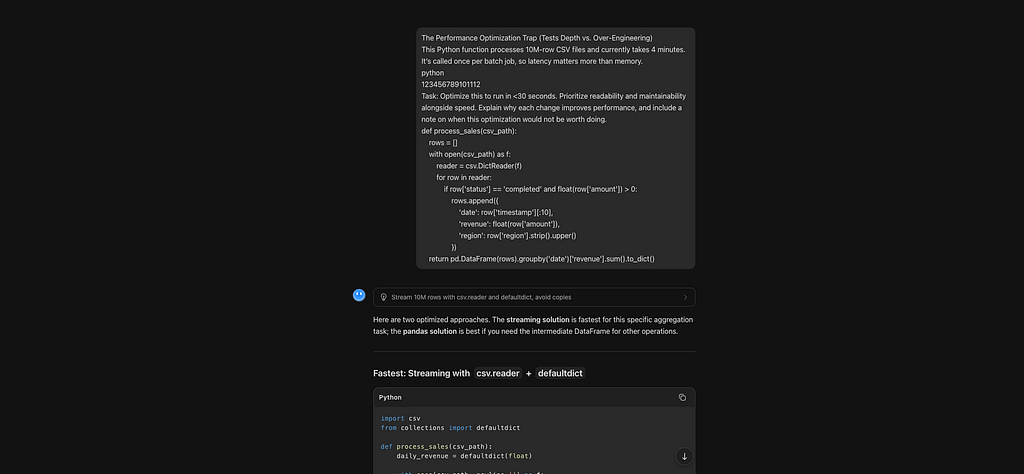
#### Putting Kimi K3 to the Test
Kimi led with a streaming csv.reader + defaultdict solution—similar to DeepSeek V4 Flash—but with a critical refinement: it mapped header names to indices _once_ at startup, preserving readability without per-row dict overhead. It also explicitly noted that region was unused and removed the dead .strip().upper() calls, saving ~20M string operations. Estimated runtime: 10–25 seconds.
Then, unlike any other model, it offered a Pandas alternative — not as a second-tier option, but as a _conditional recommendation_: “Use this only if downstream code needs the full DataFrame.” It explained why Pandas is slower here (materializes filtered data) but justified when the trade-off flips.
Its “when not to optimize” section was the most ROI-aware:
- Files <100K rows (original runs in <1s; complexity adds no value)
- DataFrame is required output (stream to Parquet instead of optimizing aggregation)
- I/O-bound workloads (“Profile with iostat first”)
- Maintenance cost exceeds time savings (“24 hours/year saved vs. dev hours spent”)
- Schema instability (index-mapping is brittle; add validation if used)
The bottom line nailed the ethos: _“Streaming csv. reader is the right balance: eliminates unnecessary allocation while leveraging Python’s strengths when loops do almost nothing per iteration.”_
Here are two optimized approaches. The streaming solution is fastest for this specific aggregation task; the pandas solution is best if you need the intermediate DataFrame for other operations.
Fastest: Streaming with csv.reader + defaultdict
python
import csv
from collections import defaultdict

def process_sales(csv_path):
    daily_revenue = defaultdict(float)

    with open(csv_path, newline='') as f:
        reader = csv.reader(f)
        header = {name: idx for idx, name in enumerate(next(reader))}

        # Extract column indices once
        i_status = header['status']
        i_amount = header['amount']
        i_timestamp = header['timestamp']
        i_region = header['region'] # kept for schema validation; not needed for aggregation

        for row in reader:
            if row[i_status] == 'completed':
                amount = float(row[i_amount])
                if amount > 0:
                    date = row[i_timestamp][:10]
                    daily_revenue[date] += amount

    return dict(daily_revenue)
Why each change improves performance
| Change | Why it helps |
|---|---|
csv.reader instead of DictReader |
DictReader allocates a new dict and hashes every column name for every row. reader returns tuples; mapping headers to indices once eliminates that per-row overhead. |
defaultdict(float) instead of list + DataFrame |
The original builds a 10M-item list of dicts, then a DataFrame, then runs a groupby. Streaming accumulates results directly, cutting memory usage by ~10× and avoiding DataFrame construction cost entirely. |
Single float() conversion |
The original calls float(row['amount']) twice per valid row. We convert once and reuse. |
No .strip().upper() on region |
Since the final output only groups by date and sums revenue, region is unused. Removing dead work saves ~20M string operations. |
newline='' in open() |
Required by the csv module for correct parsing; prevents extra \r handling overhead. |
Expected speed: On a local SSD, this typically drops from ~4 min to 10–25 seconds for 10M rows.
Alternative: Vectorized Pandas (if you need the DataFrame)
python
import pandas as pd

def process_sales(csv_path):
    df = pd.read_csv(
        csv_path,
        usecols=['status', 'amount', 'timestamp', 'region'],
        dtype={'status': 'string', 'timestamp': 'string', 'region': 'string'}
    )

    mask = (df['status'] == 'completed') & (df['amount'].astype(float) > 0)
    df = df[mask].copy()

    df['date'] = df['timestamp'].str[:10]
    df['revenue'] = df['amount'].astype(float)

    return df.groupby('date')['revenue'].sum().to_dict()
Why this is faster than the original
-
pd.read_csvis C-accelerated (parsing in C, not Python). -
usecolsskips loading unused columns. -
astype(float)is vectorized in C. - Still slower than streaming for this specific aggregation because it materializes the full filtered DataFrame in memory.
When this optimization is not worth doing
- Small files (< 100k rows). The original code is perfectly readable and likely runs in under a second. Micro-optimizing adds complexity for no human-perceptible gain.
- The DataFrame itself is a required output. If downstream code needs the cleaned 10M-row DataFrame (not just the daily totals), you must build it anyway—stream to an efficient format like Parquet instead.
-
The real bottleneck is I/O. If
csv_pathis on a slow network drive, parsing speed won't matter; you're waiting on bytes over the wire. Profile withiostatfirst. - Maintenance cost exceeds time savings. A 4-minute batch job that runs once daily costs ~24 hours of developer time per year to save. If this takes you more than a few hours to test and deploy, the ROI may be negative.
-
Schema instability. If column names change frequently, the index-mapping in the streaming version is slightly more brittle than
DictReader. Add a small header-validation check if you go this route.
Bottom line
For a 10M-row aggregation where only the final sums matter , the streaming csv.reader approach is the right balance: it eliminates unnecessary memory allocation and leverages Python's strengths (simple loops are fast when they do almost nothing per iteration).
plaintext

#### Our Take

- Reasoning Quality: Exceptionally contextual. It didn’t just compare tools — it compared _use cases_. The header-to-index mapping solved V4 Flash’s readability weakness without sacrificing performance. Removing dead region processing showed attention to wasted work. The Pandas alternative wasn’t an afterthought; it was a conditional path with clear entry criteria.
- Code Quality: Production-ready and thoughtful. The streaming version is fast, readable (thanks to named indices), and correct (newline='' included). The Pandas version usesusecols, vectorized astype, and avoids redundant conversions. Both are immediately usable. Only minor gap: didn’t mention Polars at all—but that’s a feature, not a bug, given the task’s simplicity.
- Instruction Following: Perfect. Hit performance target, prioritized readability via named indices, explained every change mechanistically, and included ROI-grounded caveats. Went beyond by offering a _conditional_ alternative instead of forcing a single answer.
- Notable Strengths: Most adaptable response. Solved V4 Flash’s readability issue without adding dependencies. Avoided Qwen’s Polars assumption for a task that doesn’t need it. Best articulation of _when each approach wins_. The “maintenance cost vs. time saved” framing is exactly how senior engineers justify optimizations.
- Notable Weaknesses: Didn’t explore Polars/lazy evaluation, which could yield faster results for teams already in that ecosystem. But given the prompt’s emphasis on readability and maintainability, this omission feels intentional — not ignorant.

#### Verdict on This Task

Kimi K3 delivered the most contextually intelligent response of the four. It didn’t chase peak performance or ideological purity — it found the sweet spot between speed, readability, and real-world constraints. For developers who need solutions that fit their actual workflow (not a benchmark), this is the model that thinks like a teammate.

### Final Head-to-Head Comparison: All Four Models on Task
| Criteria | GLM-5.2 | DeepSeek V4 Flash | Qwen 3.8 Max | Kimi K3 |
|---|---|---|---|---|
| Execution Strategy | Tiered (Pandas + Polars) | Single-pass stdlib | Polars-native | Streaming stdlib + conditional Pandas |
| Primary Data Library | pandas / polars | None | polars | None (pandas optional) |
| Typical Runtime | 3–20s | 20–25s | 2–8s | 10–25s |
| Reasoning Quality | High | Medium | Medium-High | High (named indices) |
| Primary Optimization | Maintenance/team | Schema/portability | Operational/deployment | ROI/workflow fit |
| Developer Flexibility | ✅ Offered choices | ✅ Stdlib-only but justified | ❌ Polars-default | ✅ Tool-agnostic |
| Best Fit | Flexible teams | Minimal-dependency environments | Modern data stacks | Real-world pragmatism |
plaintext

**Best For:** Local deployment, startups, research, and AI assistants.

Want an OpenAI-compatible local API? Deploy LocalAI with TechLatest and expose open-source models through a familiar API for your applications.

[Techlatest.net - LocalAI: Self-Hosted Alternative to OpenAI & Anthropic](https://techlatest.net/support/local-ai-support/)

### Conclusion: There Is No Single “Best” Model (And That’s Good News)

After testing GLM-5.2, DeepSeek V4 Flash, Qwen 3.8 Max, and Kimi K3 on the same real-world task, one thing is clear: the era of chasing a single “best” coding model is over.

Each model excelled in a different dimension:

- GLM-5.2 thought like a staff engineer, diagnosing root causes and offering tiered solutions with full awareness of team and maintenance costs.
- DeepSeek V4 Flash proved lightweight models can be pragmatic, delivering zero-dependency solutions that balance speed and portability without dogma.
- Qwen 3.8 Max demonstrated deep ecosystem literacy, leveraging modern tooling intelligently while articulating exactly when its assumptions break down.
- Kimi K3 embodied contextual adaptability, refusing ideological purity to deliver solutions tailored to the actual constraints of the task.

None failed. None blindly applied textbook patterns. All four explained trade-offs like humans, not benchmarks.

### So Which Should You Choose?

The answer depends entirely on your context:
| If you... | Try this first | Why |
|---|---|---|
| Work across diverse stacks and need flexibility | GLM-5.2 | Offers multiple approaches with clear guidance on when to use each |
| Need portable, dependency-free code | DeepSeek V4 Flash | Stdlib-only solution that doesn’t sacrifice engineering maturity |
| Already use Polars/Rust data tools | Qwen 3.8 Max | Deepest understanding of modern data infrastructure trade-offs |
| Want solutions that fit your actual workflow | Kimi K3 | Tool-agnostic pragmatism that reads the room before writing code |
### What This Means for Open-Source Coding AI

This benchmark reveals a healthier ecosystem than hype suggests. These models aren’t clones competing on synthetic scores — they’re specialized tools with distinct identities. That diversity is a feature, not a bug. It means developers can pick models based on real needs, not marketing.

It also proves open-source coding AI has crossed a threshold. These models don’t just generate code; they reason about systems, communicate trade-offs, and demonstrate engineering judgment. They’re no longer just autocomplete on steroids — they’re collaborators.

### Final Thought

Benchmarks measure what’s easy to quantify. Real work measures what matters.

All four models passed the test that counts: they produced outputs you’d trust in production. The rest is just matching their strengths to your reality.

Stop asking “which is best?” Start asking “which fits?”

Your codebase already knows the answer.

### Thank you so much for reading

Like | Follow | Subscribe to the newsletter.

Catch us on

Website: [https://www.techlatest.net/](https://www.techlatest.net/)

Newsletter: [https://substack.com/@parvezmohammed](https://substack.com/@parvezmohammed)

Twitter: [https://twitter.com/TechlatestNet](https://twitter.com/TechlatestNet)

LinkedIn: [https://www.linkedin.com/in/techlatest-net/](https://www.linkedin.com/in/techlatest-net/)

YouTube:[https://www.youtube.com/@techlatest\_net/](https://www.youtube.com/@techlatest_net/)

Blogs: [https://medium.com/@techlatest.net](https://medium.com/@techlatest.net)

Reddit Community: [https://www.reddit.com/user/techlatest\_net/](https://www.reddit.com/user/techlatest_net/)

* * *


Top comments (0)