


If you've opened Google Antigravity recently and looked at the model selection menu, you've probably noticed there are quite a few choices.
Gemini 4 Hydrogen, Neon, Argon, Carbon, Claude Sonnet, Claude Opus, and something called Orchestrator.
That's a lot of AI models just to build a website or fix a few lines of code.
And if you're new to AI-assisted development, it's not immediately obvious why you'd choose one over another. Even experienced developers can spend more time than they'd like deciding which model to use.
The good news is that you don't need to understand how every model works to get good results.
The trick is knowing which model is right for the job you're trying to accomplish.
In this guide, I'll explain what each model is good at, when to use it, and when you're probably better off choosing something else.
I'll also cover Orchestrator, which is one of the more interesting additions to Antigravity because it lets two AI models work together on the same task.
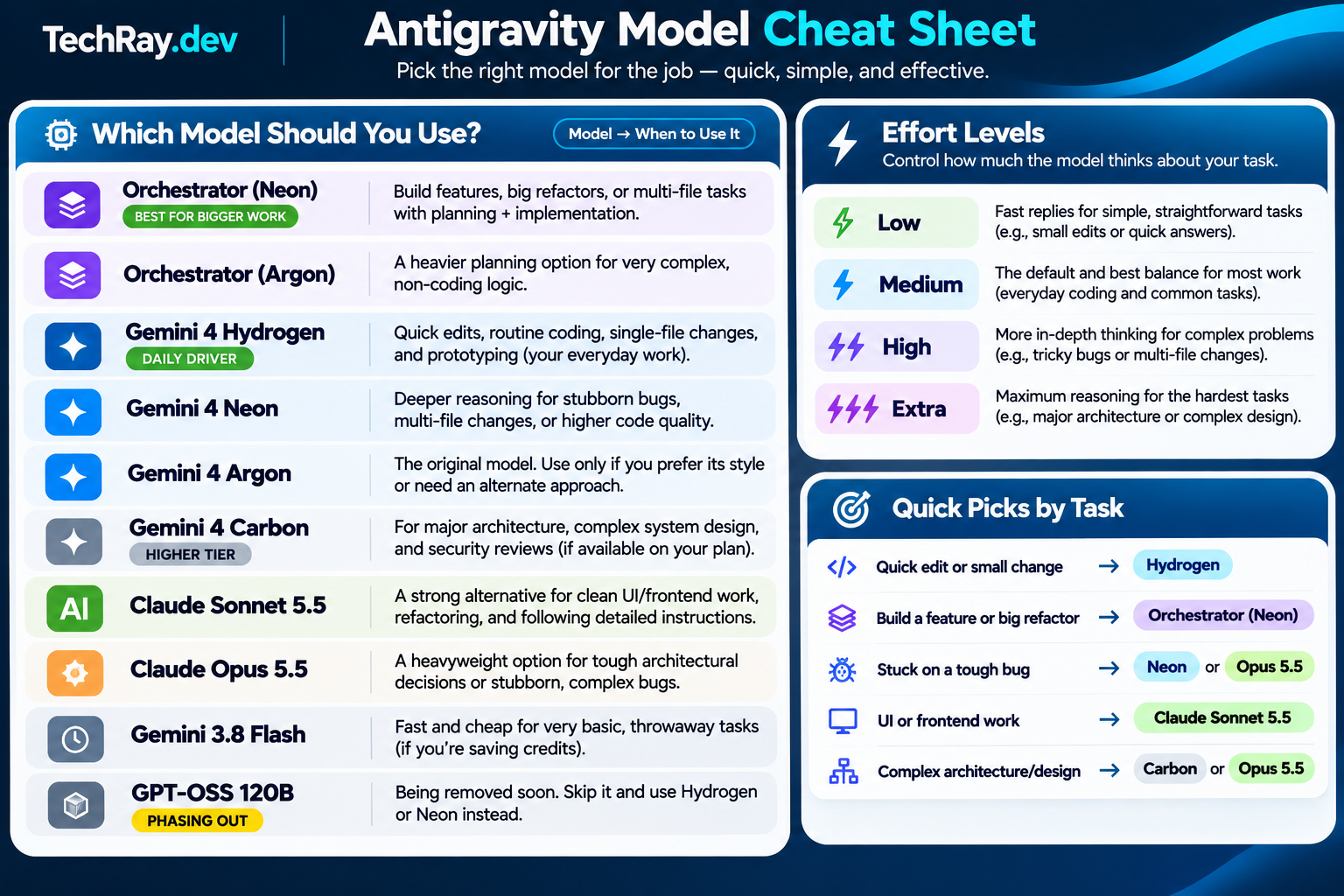
Click image to view full resolution.
First, You Don't Need the Most Powerful Model for Everything
One of the biggest mistakes people make with AI coding tools is assuming the most powerful model will always produce the best results.
Sometimes it will. But plenty of development tasks don't require an AI to spend extra time reasoning through every possible solution.
Imagine you're working on a website and you want to:
- Change the color of a navigation bar.
- Add a contact form.
- Fix a button that isn't working.
- Build an entire user authentication system.
- Restructure a large application without breaking anything.
These tasks have very different levels of complexity.
Changing a button color is straightforward. Building an authentication system involves multiple components, security considerations, and testing.
Using the same heavyweight model for both is often unnecessary.
A simpler approach is to start with a fast model for ordinary work and move to a more capable one when the task demands it.
Understanding the Three Types of Models in Antigravity
I find it helpful to think of Antigravity's model selection as three categories.
1. The Everyday Workers
These are individual AI models that handle your requests directly.
You ask them to write code, make changes, fix bugs, or explain something, and they work through the task.
Examples include Gemini 4 Hydrogen, Neon, Argon, and Carbon.
Some prioritize speed, while others are better suited to deeper reasoning.
2. The Orchestrators
Orchestrator works a little differently.
Instead of relying on one model to handle everything, it pairs two models with different responsibilities.
One model plans the work and reviews progress. Another handles the actual implementation.
Think of it like having an architect and a builder working together.
3. The Alternative Models
Antigravity also includes models from Anthropic, the company behind Claude.
These are useful when you want a different approach to solving a problem, particularly when your current model isn't producing the results you're looking for.
Sometimes asking a different AI model to examine a problem is more useful than repeatedly asking the same one.
The Gemini 4 Models: Which One Should You Use?
Let's start with Google's Gemini models, since these will probably handle most of your day-to-day development work.
Gemini 4 Hydrogen — Your Everyday Coding Assistant
Best for: Quick changes, routine coding, simple debugging, and everyday development.
If you're unsure which model to use, Hydrogen is an excellent place to start for smaller, well-defined tasks.
It's designed to execute coding tasks quickly without requiring the heavier reasoning process of models like Carbon.
I would use Hydrogen for things like:
- Updating HTML and CSS.
- Creating simple website components.
- Fixing straightforward JavaScript errors.
- Adding fields to existing forms.
- Writing small scripts.
- Updating documentation.
- Creating basic unit tests.
- Making small changes to an existing project.
A real-world example
Let's say you're building a website for a local business.
The customer wants the phone number displayed prominently at the top of every page, with a button that opens the phone's dialer on mobile devices.
That's a perfect Hydrogen task.
You could give it this prompt:
Add a clickable phone number to the website header. Make sure it looks good on desktop and mobile, and use a tel: link so mobile users can tap it to call. Keep the existing design consistent.
There's no complicated architecture to figure out. Hydrogen can inspect the relevant files, make the changes, and verify the result.
When I wouldn't use Hydrogen
If I'm dealing with a bug that involves several interconnected systems, or I'm planning a significant change to an application, I'd consider moving to Neon or Orchestrator.
Hydrogen can still handle more difficult tasks, especially with higher thinking settings. But sometimes it's worth bringing in a model with stronger planning abilities.
My recommendation: Start with Hydrogen for quick, clearly defined coding work. You don't need to use a heavyweight model every time you change something.
Gemini 4 Neon — When You Need More Brainpower
Best for: Difficult debugging, complex coding, multi-file reasoning, and problems that require more careful thought.
Neon sits between Hydrogen and Carbon in Google's Gemini 4 lineup.
It's a strong choice when you need more reasoning than Hydrogen typically provides but don't necessarily need the deepest-thinking model available.
Neon is particularly useful when a task requires understanding how different pieces of a project fit together.
A real-world example
Imagine you've built an application with user accounts.
Everything appears to work, but occasionally a user gets logged out after refreshing the page.
You ask Hydrogen to investigate, but the problem keeps coming back.
This is where I'd try Neon.
The bug might involve authentication tokens, session handling, browser storage, or the way your frontend communicates with your backend.
Instead of simply changing the code where the error appears, Neon can investigate the relationships between different parts of the application.
A good prompt might be:
Users are occasionally being logged out when refreshing the page. Investigate the authentication flow, session handling, and relevant frontend and backend code. Identify the likely root cause before changing anything. Then implement a fix and run the relevant tests.
Notice that I'm asking it to investigate before making changes.
That small detail matters, regardless of which model you're using.
When to use Neon instead of Hydrogen
I'd reach for Neon when:
- A bug keeps returning after multiple attempts to fix it.
- Several files are involved in the same problem.
- I need help understanding an unfamiliar codebase.
- I want a careful code review.
- The task involves complicated logic.
- I need to evaluate different implementation approaches.
Neon can also be a great choice for working through architecture decisions before writing code.
One important detail: Neon is now the default for new Antigravity conversations on plans that include it. That doesn't mean you have to use it for everything. You can switch to Hydrogen when a task doesn't need deeper reasoning.
My recommendation: Use Neon when a problem requires investigation and careful reasoning, not just a quick code change.
Gemini 4 Argon — The Older Heavyweight
Best for: Deep analysis, complex reasoning, and comparing approaches when other models aren't giving satisfactory results.
Argon was the original major Gemini 4 reasoning model.
Since its release, Google has introduced newer options, including Carbon, Hydrogen, and Neon.
That doesn't make Argon useless. It simply means there are now other models that may be more efficient for many coding tasks.
Personally, I wouldn't automatically choose Argon over Neon for everyday development.
But I would still consider it when dealing with complicated problems that benefit from exploring alternative reasoning approaches.
A real-world example
Suppose you're building an application that needs to synchronize information across several external services.
You need to decide how often data should update, what happens when a service becomes unavailable, and how to prevent duplicate records.
Argon could help examine these decisions before you begin implementing the system.
You might ask:
Review this application's data synchronization requirements. Compare possible architectures, identify potential failure points, and recommend an approach that prioritizes reliability and maintainability. Don't modify any code yet.
You could then compare its recommendation with Neon's.
Should you choose Argon over Neon?
For most coding work, I'd try Neon first.
If Neon is struggling with a difficult reasoning problem, testing Argon as an alternative may be worthwhile.
I wouldn't assume Argon is automatically better just because it's a heavier model.
My recommendation: Keep Argon as an alternative for difficult reasoning tasks, rather than making it your everyday default.
Gemini 4 Carbon — For the Really Difficult Problems
Best for: Complex software architecture, difficult system-level reasoning, major migrations, and demanding technical investigations.
Carbon is Google's heavyweight reasoning option in the Gemini 4 family.
It's the sort of model I'd consider when the task involves significant complexity and mistakes could become expensive to fix.
We're talking about work such as:
- Designing a large application from scratch.
- Planning major architectural changes.
- Investigating difficult concurrency problems.
- Migrating complicated systems.
- Reviewing security-sensitive designs.
- Reasoning through large, interconnected codebases.
A real-world example
Let's say you have a successful application that started as a simple project.
Over time, you've added user accounts, payments, background jobs, notifications, and integrations with several external services.
Now the application is becoming difficult to maintain, and you need to restructure it without losing data or breaking existing functionality.
That's a much bigger job than changing a few files.
Carbon could help examine the current architecture, identify dependencies, and develop a safer migration strategy.
For example:
Analyze the architecture of this application and propose a staged migration plan that improves maintainability without disrupting existing users. Identify dependencies, security concerns, database migration risks, rollback procedures, and testing requirements. Do not modify the project until the plan has been reviewed.
Even with a powerful model, I wouldn't blindly accept an architectural recommendation.
I'd review the plan, ask questions, and make sure the changes can be tested and reversed if necessary.
What if Carbon is unavailable?
Carbon is available on Google AI Ultra and certain Enterprise configurations, so you may find it unavailable on other plans.
If you don't have access, Neon and Orchestrator (Neon) are still capable options for complicated work.
You don't need Carbon just to build good software.
My recommendation: Save Carbon for particularly demanding tasks where deeper reasoning is worth the additional resources and time.
Orchestrator: Two AI Models Working Together
This is probably the feature I find most interesting in Antigravity.
Until recently, the usual approach with AI coding tools was to choose one model and let it handle the entire task.
If the model was especially powerful, it might spend unnecessary time and resources on simple implementation work.
If you used a faster model, it might struggle when it encountered complicated planning decisions.
Orchestrator attempts to solve that problem by combining the strengths of two models.
How Orchestrator Actually Works
Think about building a house.
You wouldn't necessarily want your architect spending the entire day installing drywall, and you wouldn't want the construction crew making major structural decisions without a plan.
Both have different responsibilities.
Orchestrator works on a similar principle.
The planner examines your project, understands the request, decides how to approach it, and reviews progress.
The executor follows the plan, writes code, modifies files, runs commands, and performs tests.
By default, Antigravity uses Gemini 4 Neon for planning and Gemini 4 Hydrogen for execution, although supported configurations allow other models.
Here's a simplified example:
Step 1: You describe the feature.
You ask Antigravity to add a customer dashboard to an existing application.
Step 2: The planner examines the project.
Neon reviews the application structure, identifies the relevant files, and determines what needs to change.
Step 3: Hydrogen implements the plan.
Hydrogen creates components, updates routes, connects existing functionality, and runs appropriate checks.
Step 4: Something unexpected happens.
A test fails repeatedly, or the existing application behaves differently than the planner expected.
Step 5: The planner steps back in.
Neon investigates the unexpected behavior and adjusts the plan before Hydrogen continues.
This happens within the same conversation. You don't have to manually switch between the two models.
And importantly, Orchestrator is not necessarily two independent agents working in parallel. It's a coordinated process where control passes between planning and execution.
Orchestrator (Neon) — My Pick for Most Serious Development Work
Best for: Building features, larger refactors, multi-file changes, and tasks requiring planning plus implementation.
If Hydrogen is my choice for quick work, Orchestrator (Neon) would be one of my first choices for building more substantial features.
It offers a useful balance between planning and execution without requiring me to manage model switches myself.
A real-world example
Suppose you want to add a booking system to a small-business website.
That might involve:
- Creating a booking form.
- Validating customer information.
- Storing appointments.
- Preventing double bookings.
- Sending confirmation emails.
- Adding an administrative interface.
- Testing the complete booking process.
This isn't a single-file change.
Several parts of the application need to work together correctly.
Orchestrator (Neon) is well suited to this type of task because the planner can consider the complete feature while Hydrogen handles implementation.
A prompt I'd use:
Add a basic appointment booking system to this website. Start by examining the existing project and planning the required changes. Reuse existing components and services where possible. Prevent double bookings, validate user inputs, and include appropriate error handling. Implement the feature in manageable steps and test the critical functionality before finishing.
Why not just use Neon by itself?
You absolutely can.
But Orchestrator lets Neon focus on planning and review while Hydrogen handles much of the routine implementation.
That can be a more efficient way to approach longer tasks.
Google has reported efficiency improvements for Orchestrator in its own benchmarks, although actual results will vary depending on the project.
My recommendation: Try Orchestrator (Neon) for significant feature development, especially when several files or components need to change together.
Orchestrator (Argon) — An Alternative Planning Approach
Best for: Complex projects where you specifically want Argon handling the planning process.
Orchestrator (Argon) uses the same general arrangement, but Argon takes the planner role.
Hydrogen remains the default executor.
This gives you another option when you want to compare planning approaches on a challenging problem.
When would I use it?
Imagine you've asked Orchestrator (Neon) to design a complex data-processing workflow, but you're not happy with how it handles certain edge cases.
You might switch to Orchestrator (Argon) and see whether its planning approach produces a better result.
I wouldn't automatically assume Argon will outperform Neon, though.
For routine feature work, I'd still start with Orchestrator (Neon).
My recommendation: Treat Orchestrator (Argon) as an alternative for demanding planning tasks rather than something you need to use regularly.
What About Orchestrator (Carbon)?
If you're on a plan that supports Carbon, you can also use it as the planner in Orchestrator.
This is particularly interesting for larger projects that need very deep reasoning at the planning stage but don't necessarily need Carbon performing every individual code edit.
Antigravity also supports certain custom planner and executor combinations, including Claude models, in the desktop app on eligible plans.
That means Orchestrator is more flexible than simply choosing between Neon and Argon.
For most people, though, I would start with the default Neon and Hydrogen pairing before experimenting with more expensive configurations.
Claude Sonnet and Opus: When a Second Opinion Helps
Google's models aren't the only options in Antigravity.
You can also use Anthropic's Claude models, including Sonnet 5.5 and Opus 5.5 on supported plans.
I think having access to models from different companies is genuinely useful.
Not because one company always makes better models, but because different models can approach the same problem differently.
A solution that one model struggles to produce might come more naturally to another.
Claude Sonnet 5.5 — A Strong Alternative for Everyday Development
Best for: Frontend work, UI refinement, refactoring, detailed instructions, and general coding.
Sonnet is a model I'd consider when I want an alternative to Google's Gemini models without automatically moving to a heavyweight reasoning model.
It can be particularly useful for tasks where the details of your instructions matter.
For example, imagine you've built a dashboard that technically works but doesn't look very professional.
The spacing is inconsistent, some components feel oversized, and the mobile layout isn't quite right.
You don't want to rebuild the application. You just want the interface improved without changing its functionality.
That's a good task to try with Sonnet.
Example prompt:
Improve the visual consistency of this dashboard while preserving its existing layout structure and functionality. Focus on spacing, typography, alignment, accessibility, and responsive behavior. Reuse the current design system and avoid introducing unnecessary dependencies.
This sort of request benefits from clear constraints.
You want the model to understand not only what to change, but what to leave alone.
When would I choose Sonnet over Hydrogen?
I'd consider Sonnet when:
- I want to compare frontend implementations.
- A model keeps ignoring specific design instructions.
- I'm refactoring code for readability.
- I want an alternative approach to a bug.
- I need careful changes to an established interface.
That doesn't mean Sonnet will always produce better UI than Gemini. It's simply another capable option worth trying.
My recommendation: Keep Sonnet available as an alternative daily driver, particularly for frontend refinement and instruction-heavy development.
Claude Opus 5.5 — For Complex Problems That Need Another Perspective
Best for: Difficult architecture decisions, complicated debugging, in-depth code analysis, and challenging reasoning tasks.
Opus is Anthropic's heavyweight option.
I wouldn't use it for changing a button label or updating a CSS property.
I'd reach for it when I genuinely need more reasoning or want an independent perspective on a difficult problem.
A real-world example
Let's say you've been working on a difficult bug involving asynchronous operations.
Sometimes two processes update the same record at almost the same time, causing inconsistent data.
You've tried several solutions, but the problem still appears occasionally.
At this point, I would consider asking Opus to analyze the problem independently.
For example:
Investigate this intermittent data consistency bug. Focus on potential race conditions, transaction handling, shared state, and asynchronous operations. Explain the possible root causes and propose a fix that can be verified with tests. Avoid making speculative changes without evidence.
The important part is getting a fresh analysis rather than just asking another model to keep patching the same code.
When would I choose Opus?
I'd consider it when Neon, Carbon, or Sonnet hasn't resolved a difficult problem, or when I want a second perspective on an important design decision.
For complicated tasks, comparing two independent analyses can reveal assumptions you might otherwise miss.
My recommendation: Use Opus selectively for difficult problems where the additional reasoning effort is justified.
What About the Older Models?
Depending on your Antigravity plan and version, you may see older models listed alongside the newer options.
You generally don't need to spend much time choosing between them unless you have a specific reason.
Gemini 3.8 Flash
Gemini 3.8 Flash is a previous-generation fast model.
It's still useful for basic tasks, particularly on plans where newer models aren't available.
If you just need to generate a simple script, explain a short piece of code, or handle a disposable experiment, it may be sufficient.
But if Hydrogen is available, I'd generally try Hydrogen first for coding work.
GPT-OSS 120B
GPT-OSS 120B is an open-weight model that has been available in Antigravity.
Google's current documentation lists it for removal on November 30, 2026.
With that date approaching, I wouldn't build a new development workflow around it.
If you already use it, this would be a good time to experiment with alternatives.
The same scheduled removal applies to the older Claude Sonnet 4.6 and Claude Opus 4.6 options.
Quick Reference: Which Antigravity Model Should You Choose?
Here's the cheat sheet I'd keep handy.
| What you're doing | Model I'd try first |
|---|---|
| Making quick website edits | Gemini 4 Hydrogen |
| Writing simple scripts or components | Gemini 4 Hydrogen |
| Prototyping a small idea | Gemini 4 Hydrogen |
| Fixing a stubborn bug | Gemini 4 Neon |
| Building a feature across multiple files | Orchestrator (Neon) |
| Refactoring a large section of an app | Orchestrator (Neon) |
| Improving UI and frontend code | Claude Sonnet 5.5 or Hydrogen |
| Investigating complex application logic | Gemini 4 Neon |
| Planning a difficult system architecture | Gemini 4 Carbon or Claude Opus 5.5 |
| Getting a second opinion on a difficult bug | Claude Opus 5.5 |
| Trying a different complex planning approach | Orchestrator (Argon) |
| Handling very basic tasks on a free plan | Gemini 3.8 Flash |
These aren't hard rules. They're starting points.
A well-written prompt with a smaller model can produce a better result than a vague prompt with a heavyweight one.
And that brings me to something worth understanding before you start switching models every time an AI gives you a disappointing answer.
Don't Forget About Thinking Levels
Antigravity doesn't just let you choose a model.
Many models also let you adjust how much reasoning effort they use.
You'll generally see options such as:
- Low: For simple tasks where speed matters.
- Medium: A good balance for ordinary development work.
- High: For problems that require more careful reasoning.
- Extra: Available on supported models, including Hydrogen and Neon, for particularly demanding tasks.
The exact options depend on the model and how you're using Antigravity.
Here's why this matters
Suppose you're using Hydrogen to fix a bug.
You ask it to investigate the problem, but its first solution doesn't work.
Your immediate reaction might be to switch to Neon.
Sometimes that's the right move.
But first, consider increasing Hydrogen's thinking level from Medium to High.
That gives the same model more opportunity to work through the problem before responding.
For some tasks, that's all you need.
Of course, deeper thinking doesn't guarantee a correct answer, and it can increase the time or resources required.
My general approach
For small, straightforward changes, I stick with Medium or Low.
For difficult debugging or complicated logic, I'll consider High.
For especially demanding reasoning tasks, I'll consider Extra on models that support it.
One thing worth knowing: in the Antigravity desktop app, supported Orchestrator configurations let you set thinking levels for the planner and executor. The CLI's Orchestrator uses a fixed reasoning budget, so its effort setting isn't adjustable in the same way.
A Simple Workflow That Works for Most Projects
You don't need to develop an elaborate system for choosing models.
Here's how I'd approach a typical AI-assisted development project.
Start with Hydrogen for small, obvious tasks
If I know exactly what needs to change, I'll use Hydrogen.
There's little reason to involve a complex planning process just to update a page or create a simple component.
Move to Neon when the problem gets complicated
If Hydrogen keeps struggling, or I realize the problem involves multiple systems, I'll switch to Neon.
I'll also explain what I've already tried so the new model doesn't repeat the same unsuccessful approach.
Use Orchestrator for substantial feature work
If I'm adding a new feature that involves several connected components, I'll start with Orchestrator (Neon).
That gives me the benefit of a planning model without requiring me to manually coordinate every implementation step.
Bring in Claude when I want another perspective
If the results aren't what I'm looking for, I'll consider Sonnet or Opus.
I particularly like the idea of having one model review a solution proposed by another.
It doesn't guarantee that either model is right, but it can expose issues that a single model overlooked.
Always verify the results
Regardless of which AI model I'm using, I still want to see the application running.
I'll check that the requested behavior works, review the changes, and make sure existing functionality hasn't been broken.
For important features, I also want automated tests.
AI-generated code should be treated like any other code: it needs to be reviewed and tested.
Five Tips for Getting Better Results From Any Model
Choosing the right model helps, but the way you communicate with it matters just as much.
1. Be specific about what you want
Instead of:
Make my website better.
Try:
Improve the mobile navigation, fix inconsistent spacing between sections, and make the contact form easier to use. Preserve the current colors and overall design.
The second request gives the model a much clearer objective.
2. Explain what shouldn't change
This is especially important when working on an existing project.
If you're happy with the current design, tell the AI.
If a feature is working correctly, explain that it needs to remain untouched.
You can save yourself a lot of frustration by making those boundaries clear.
3. Ask for investigation before implementation
When dealing with bugs, I often prefer asking the model to identify the cause before editing anything.
Otherwise, it may jump straight into changing code based on an incorrect assumption.
4. Work in manageable steps
Even with Orchestrator, I wouldn't ask an AI to rebuild a complex application without reviewing the plan.
Break major projects into features or milestones.
That makes problems easier to identify and gives you opportunities to review the work before moving forward.
5. Don't keep repeating a failed prompt
If a model has tried to fix the same issue several times and isn't making progress, change your approach.
Provide additional error information, ask it to reconsider its assumptions, increase the thinking level, or try a different model.
Sometimes the problem isn't that the model needs to try harder. It's that it needs better information or a completely different approach.
A Few Things Worth Knowing About Model Availability
Not everyone sees the same models in Antigravity.
Which models you can select depends on your subscription, whether you're using a trial, and which version of Antigravity you're running.
As of November 2026, Hydrogen, Neon, Argon, and Orchestrator are available through eligible Google AI Pro and Ultra plans, although some Pro features require a paid subscription rather than a trial.
Carbon is available through Google AI Ultra and supported Enterprise configurations.
Claude Sonnet 5.5 and Opus 5.5 are also available on eligible plans, but access may differ between paid subscriptions and promotional trials.
If a model mentioned in this article is grayed out or missing, that doesn't necessarily mean something is wrong.
It may simply not be included in your current plan.
Google is also updating Antigravity quickly, so model availability, limits, and capabilities may change.
For the latest details, check the official Antigravity model documentation.
Final Thoughts: Use the Model That Fits the Job
With all these models available, it's tempting to spend a lot of time trying to figure out which one is the absolute best.
I don't think there's a single answer.
The best model for fixing a small CSS problem isn't necessarily the best model for planning a complicated application.
And the model that writes your favorite frontend code might not be the one you want investigating a difficult backend bug.
If you're just getting started with Antigravity, I'd keep things simple.
Use Hydrogen for quick coding tasks, Neon for deeper problem-solving, and Orchestrator (Neon) when you're building something that needs careful planning and implementation.
Keep Claude Sonnet and Opus in mind when you want another approach, and consider Carbon for particularly demanding work if your plan includes it.
Most importantly, don't get so caught up in choosing AI models that you forget what you're actually trying to accomplish.
The goal isn't to use the biggest or newest model.
It's to build something that works.
And if a faster, simpler model can get you there, that's probably the one you should be using.
For more guides on AI-assisted development, building websites, and making technology easier to understand, visit TechRay.dev.


Top comments (0)