


Storm damage leads come from three things: a Google Business Profile that ranks in the map pack when the storm passes, service pages built for emergency and insurance queries, and a phone that gets answered. Tree services that prepare in the calm months collect those calls; the ones that start the morning after landfall get the leftovers. That gap is why the winners run the same playbook every season, and why ad spend cannot make up for a profile that reads "closed" when the phone rings. What follows is the plan I hand clients before storm season.
A tree service owner in Tulsa told me last spring that a single derecho paid for his new chipper. He did not run a single ad. His phone rang because his Google Business Profile ranked for "emergency tree removal near me" at 6:40 AM while three competitors showed "closed" and one showed a phone number that rang to voicemail.
Storm response is the single highest-ROI moment in local search for tree services. A fallen oak on a roof is a $1,500 to $15,000 job, the customer decides in under an hour, and almost nobody searches past the map pack. After watching dozens of tree companies handle (and fumble) storm events over five years of local SEO work, I can tell you the winners all run the same playbook. This is that playbook.
The fundamentals of Google Business Profile management still matter, but storms compress everything. Normal local SEO is a marathon. Storm SEO is a 72-hour sprint that starts before the wind does.
Why Storm Damage Leads Are Different
Normal tree service leads are planned. Trimming, removals, stump grinding. Homeowners collect two or three quotes over days. Storm leads are the opposite. A 100-year-old pecan just crushed someone's garage. Their deductible is $1,000. They will hire whoever answers the phone and sounds competent.
Three numbers frame the opportunity:
- Emergency tree jobs in storm-affected metro areas routinely run 5x to 15x daily normal call volume.
- Roughly 78% of local mobile searches for emergency services result in a call or visit within 24 hours, per Google's own local search data.
- The first three businesses in the map pack capture the large majority of clicks, so ranking fourth during a storm is nearly the same as ranking nowhere.
Storm searches also spike in patterns you can predict. "Tree removal" trends flat. "Emergency tree removal," "tree on house," "fallen tree removal cost," and "insurance tree removal" explode together, usually within 90 minutes of a storm cell hitting. If your site and profile only speak "scheduled service" language, you miss the surge entirely.

The Emergency Keyword Map for Storm Damage Leads
You need a dedicated keyword cluster, not a single page crammed with every phrase. I group storm keywords into four buckets:
| Bucket | Example queries | Intent |
|---|---|---|
| Emergency removal | "emergency tree removal near me," "24 hour tree service [city]" | Hire now |
| Insurance | "tree removal insurance claim," "does homeowners insurance cover tree removal" | Validating coverage |
| Damage scenarios | "tree fell on house," "tree on roof removal," "fallen tree on fence" | Specific problem |
| Storm timing | "tree service after storm [city]," "hurricane cleanup [city]" | Event-driven |
Build one service page per bucket, not one page for all four. The insurance bucket deserves the most content investment because those searchers become customers even when insurance denies the claim. A homeowner who learns their $4,000 removal is not covered still needs the tree gone. Your page that answers the coverage question honestly earns that job. Getting cited by AI search engines applies here too, because AI assistants increasingly answer "does insurance cover this" questions directly and cite whoever answered first.
Pricing content wins these searches. "Fallen tree removal cost" and variants carry real volume after storms, and almost no competitor publishes real numbers. Put ranges on the page: $500 to $1,500 for a simple ground pickup, $1,500 to $4,000 for a tree on a structure, $4,000+ when a crane is involved. Real ranges filter out tire-kickers and pre-qualify callers.
The GBP Storm Cadence
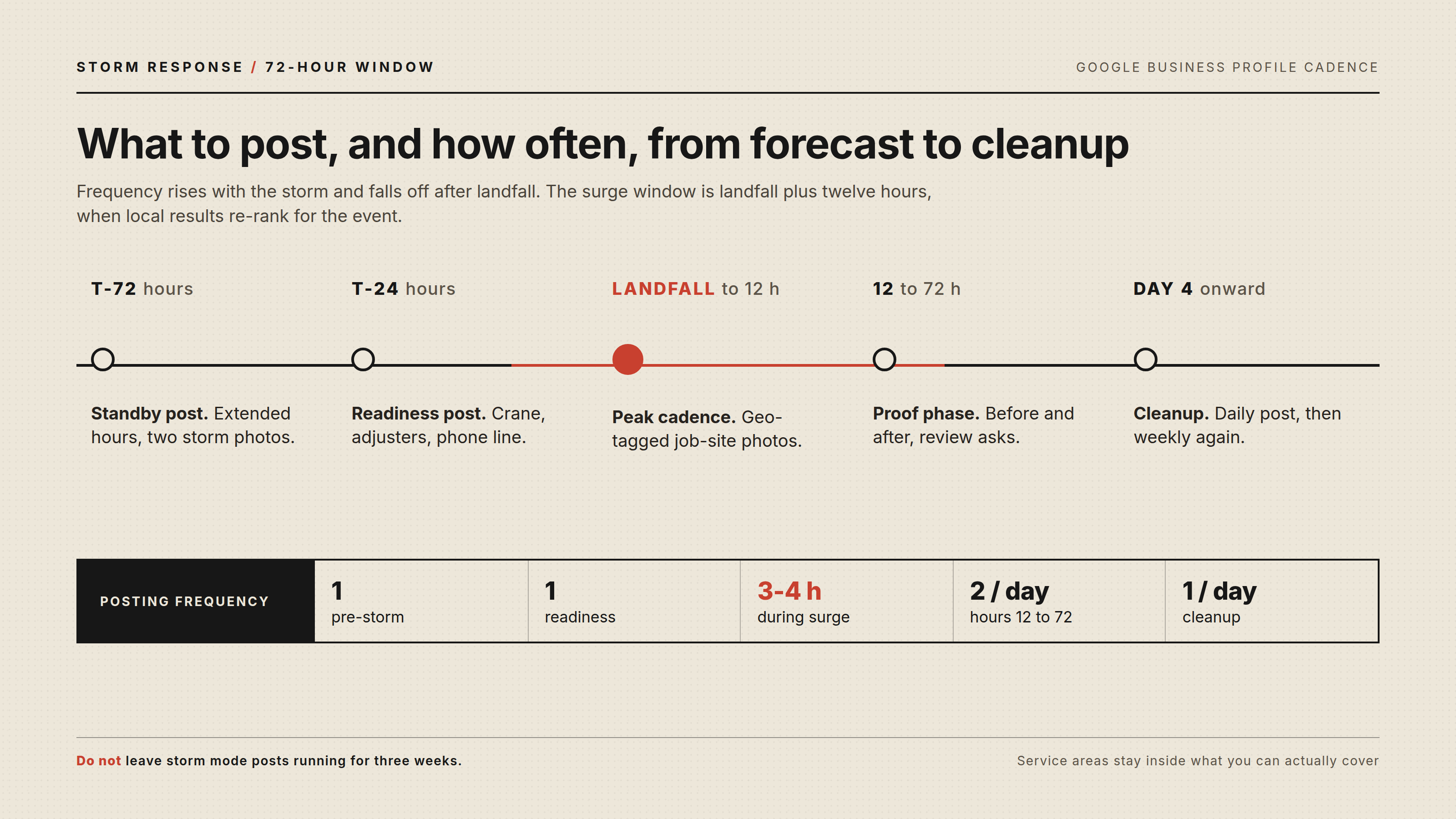
Your Google Business Profile is where storm jobs are won or lost. Standard advice of "post weekly" collapses during weather events. Here is the cadence I run with clients, starting the moment a named storm enters the forecast:
- T-minus 72 hours: Post that you are monitoring the storm and crews are on standby. Update business hours to reflect extended availability. Add a storm response photo or two to your GBP photos section.
- T-minus 24 hours: Post again with specific readiness details: crane availability, insurance claims experience, 24/7 line. Enable messaging if you can staff it, or disable it if you cannot, because a message left unanswered for six hours is worse than no message option.
- Landfall to hour 12: Post every 3 to 4 hours. Real job-site photos with location tags. "Crew removing a split red oak off a roof in Broken Arrow, insurance photos documented before we cut." These posts outperform stock graphics by miles and feed your profile fresh geo-tagged media exactly when Google is re-ranking local results for the event.
- Hours 12 to 72: Slow to two posts per day. Shift toward proof and reassurance: before-and-after shots, a review request to every completed storm job, and a post answering the insurance question.
- Day 4 onward: One post per day for the cleanup window. Then return to normal cadence. Do not leave "storm mode" posts up for three weeks.
Two operational details kill more storm campaigns than anything else. First, Google's business profile guidelines prohibit listing service areas you cannot actually serve during an event, so do not expand your service area temporarily hoping to catch overflow searches. Google detects it and suppresses profiles. If you operate from a home address rather than a storefront, the service area business setup rules decide how that footprint gets represented in the first place. Second, answer the phone. GBP rankings factor engagement, and a profile that gets calls answered keeps climbing during the surge. RingCentral and similar VoIP setups let you forward the main line to the on-call crew lead, which is a $30 per month fix that pays for itself with one job.
Insurance Claim Content: The Quiet Goldmine
Insurance content is where tree services separate themselves from the $99-guy-with-a-chainsaw crowd. Homeowners in storm situations are terrified of a denied claim and a $6,000 out-of-pocket bill. Content that walks them through the process builds trust before you ever meet them.
The highest-converting insurance content I have published covers these exact questions:
- Does homeowners insurance cover tree removal? (Answer: usually, when a tree hits a covered structure, less a deductible. Removal of a tree that fell in the yard with no structural damage is often excluded or capped around $500 to $1,000, depending on the policy.)
- Should I document before removal? (Yes, always. Photos of the tree, the damage, and the position before any cutting.)
- Do you work with adjusters directly? (State plainly whether you provide itemized estimates, photos, and arborist letters.)
- What if the tree is threatening but has not fallen yet? (Some policies cover "removal of a tree that threatens a structure." This is a real coverage many homeowners do not know they have.)
For accuracy, anchor your content to Insurance Information Institute guidance on standard homeowner policy coverage. Citing the III and major carrier claim pages keeps your content defensible and quotable.
One caution: never promise a claim outcome. "Document first, then remove" is safe advice. "Your insurance will pay for this" is not. The FTC treats misleading representations in service marketing seriously, and a tree company that overpromises coverage invites complaints.

Site Speed and Structure Under Surge Load
Storm surges bring traffic spikes, and a slow site bleeds emergency leads. Emergency searchers on mobile data with power flickering will not wait eight seconds for your hero video. Keep your storm pages lean: server-rendered HTML, compressed images, no heavy sliders. Google's Core Web Vitals thresholds set the bar, with Largest Contentful Paint under 2.5 seconds, and the ranking impact of those thresholds is concentrated on exactly the mobile emergency queries you are chasing, and your storm pages should beat that on a throttled 4G connection because that is exactly the connection your customer has.
A simple URL structure keeps things crawlable and memorable:
/storm-damage-tree-removal/
/tree-removal-insurance-claims/
/24-hour-emergency-tree-service/
Each page needs its own storm-focused title tag, a local phone number above the fold, and a click-to-call button that actually works on mobile. Test it. You would be surprised how many tree sites bury the phone number behind a hamburger menu.
Reviews as Storm Fuel
Reviews collected within 48 hours of a storm completion carry outsized ranking weight, in my experience with client accounts. Google watches review velocity and recency, and a profile that gains 15 reviews mentioning "storm" and "emergency" during a weather event gets pushed hard in local results for the weeks that follow.
The workflow is simple: text the customer a direct review link when the crew lead wraps up, while the relief is highest. Pre-write the ask so your office manager sends it in 30 seconds: "Glad we got that oak off your roof safely. A quick Google review helps neighbors find us in the next storm." Never offer anything of value in exchange. Google's review policies prohibit incentivized reviews, and profile suspensions during storm season are a self-inflicted disaster.
Also seed the keyword naturally in your responses. "Thanks for trusting us with your emergency tree removal in Owasso" reads as a normal thank-you and reinforces the association.
The 72-Hour Playbook, Condensed
Here is the operational checklist I hand to tree service clients, taped inside the office door before hurricane and derecho season:
- Forecast watch active: GBP post up, hours confirmed, storm pages checked for accuracy and phone links.
- T-minus 24 hours: second GBP post, messaging staffed or off, on-call phone forwarding tested with a real call.
- Landfall: posts every 3 to 4 hours with geo-tagged photos, every call answered, job photos archived for later GBP posts.
- Hours 12 to 72: two posts daily, review requests to every completed job, insurance FAQ shared as a post.
- Day 4+: daily cleanup posts, review responses with location keywords, log search-term data from GBP insights for next season.
- Week 2: publish a storm recap post ("What the June 12 derecho did to Tulsa's trees, and what removal cost") with real anonymized numbers. These recap posts earn links from local news and rank for months.

What Most Guides Get Wrong
Most local SEO advice for tree services treats storms as a content topic. It is not. It is an operations event with an SEO layer on top. The guides tell you to "target emergency keywords" but never mention that your GBP posts will flop if your crew lead cannot send photos from the job site because you never set up a shared photo workflow. They tell you to "collect reviews" but skip the part where review velocity during an event is what actually moves rankings. They recommend insurance content without the warning that promising coverage outcomes can get you in front of the FTC and your state insurance commissioner.
The other failure is timing. Companies that first think about storm SEO the morning after landfall are building the plane in the storm. Ranking for "emergency tree removal" in your metro takes pre-existing authority, accumulated reviews, and pages that Google has already crawled and indexed. That takes weeks to months. The derecho does not wait for your content calendar.
If you want the technical foundation sorted before storm season, a proper technical SEO audit in the off-season is money better spent than any ad budget you will burn reacting late.
What Storm Damage Leads Are Worth
Let me make the ROI concrete with a real composite from client work. A mid-size tree service in a storm-prone Oklahoma metro invested roughly $3,500 in storm-specific pages, GBP process setup, and training before the season. One derecho in May produced 38 emergency calls in five days, 21 of which converted at an average ticket of $2,900. That is roughly $61,000 in revenue against $3,500 in preparation, with the GBP review gains and page rankings continuing to pay out through the rest of the year.
Compare that to storm-chasing ad spend. Google Ads CPCs for "emergency tree removal" in affected metros regularly clear $25 to $45 during events, and click fraud from competitors spikes with them. Owned rankings cost you nothing per lead at the exact moment demand explodes.
Conclusion
Storm damage leads are the best customers a tree service will ever get: urgent, high-ticket, and decided in minutes. Winning them takes an emergency keyword cluster built before the season, a GBP posting cadence that compresses from weekly to every few hours during an event, insurance-claim content that earns trust with honest answers, and a review engine that runs while the debris is still on the curb. Start the work in the calm months. When the storm hits, the businesses that prepared answer the phone, and everyone else watches from page two.


Top comments (0)