

Preface
I'm continuing the Deep Dive into WPF series. Over the years I've built many projects with WPF and written quite a bit of miscellaneous material; here is a rough summary, and I hope it can help friends out there as well.
This article mainly implements a custom BindingEngine that can be used in WPF, WinForms, the Web, and other scenarios.
Introduction
As usual, let's find an entry point and start from there.
Since this is about enterprise applications, let's first talk about why a BindingEngine was needed.
The project background is a configuration-file editor for industrial machinery. There are roughly 200+ machines, each with 200+ parameters, and the app must support add/delete/modify, version control, Undo/Redo, and a series of other operations. The UI was built with WPF using the MVVM pattern, and the DataGrid control was chosen. To improve performance, Virtualizing and a series of other optimizations were used. After the prototype was built, DataGrid's performance with such a large number of cells was deeply disappointing — both performance and memory usage still had a long way to go.
Sticking stubbornly to one path is not an option. Replacing DataGrid with SourceGrid, an open-source C# grid implementation on CodePlex that measures and draws its own internal cells, was a great choice — both the idea and the implementation are excellent. After the switch everything went smoothly, but SourceGrid's binding support is thin. In the MVVM pattern, the VM (ViewModel) is an evolution of the PM (Presentation Model). Thanks to data binding and behaviors, View and PM can be more fully decoupled; the "Presentation" in Presentation Model means it holds all View state that the user might modify. After modifying View state in the PM, the View should refresh automatically through data binding. But SourceGrid is not WPF-based, so to implement features like Visible, Filter, and skinning the PM would need to hold a reference to the View, or abstract a View interface via the MVP pattern. Either approach requires changing the original design — and so the idea of implementing a BindingEngine from scratch was born.
What Is Binding?
Before implementing a BindingEngine, let's look at what Binding actually is.
Binding was introduced after .NET 2.0. Broadly speaking, it falls into two categories: one is binding a list control to a list, so the control's items grow and shrink as the list changes; the other is binding a single View to a Model, so the View's state updates when Model properties change.
The concept of Binding is simple, easy to understand, and convenient to use. It was warmly received as soon as it appeared, and it thrives especially in WPF/Silverlight — almost every WPF tutorial shows off Binding. This article is not about how to use Binding in WPF/Silverlight; rather, what is the principle behind Binding?
The Principle of Binding
A simplest Binding binds a property of A to a property of B, so that when B's property changes, A's property can be updated automatically. This Binding has two layers of meaning:
- A needs to watch for changes to B's property, and get notified when B's property changes.
- When the change notification arrives, A must set its own property value from B's new property value.
Watching for changes to B's property is a classic Observer pattern; in .NET it is expressed with events, for example:
b.PropertyChanged += a.HandlePropertyChanged;

void HandlePropertyChanged()
{
    a.Prop = b.Prop;
}
For the PropertyChanged event, .NET provides the INotifyPropertyChanged interface in System.ComponentModel, which defines the event PropertyChangedEventHandler PropertyChanged. Model classes that are typically used for data binding usually implement INotifyPropertyChanged and raise the PropertyChanged event when a property changes.
Highlights of Binding
In WPF, Binding is everywhere, and there are many elegant uses of Binding. Its two main design highlights are:
- Weak Event pattern
- Converter
To watch B's property changes, A must register for B's PropertyChanged event. In .NET, events hold strong references: once A registers for B's event, B holds a reference to A. That is, if A does not unregister from B's event, even if A is no longer used, as long as B is alive the garbage collector will not reclaim A's memory — a memory leak for A. During use of Binding, multi-level bindings may appear (A→B→C), and one object may also bind to many objects. Unregistering event handlers when an object is no longer used is impractical and too cumbersome to implement. What is needed is a weak event (Weak Event) pattern: after A listens to B's event, B does not prevent A from being garbage-collected.
Binding A's property directly to B's property is sometimes awkward too — for example, if B's property is a string and A's property is a DateTime, some conversion (Convert) is needed in the binding process. Converter in WPF/Silverlight is a very good idea: you can customize conversions and do conversion work between properties.
Design
Starting to design and implement the BindingEngine, first solve the weak event problem.
In .NET, WeakReference can be used to monitor an object; a WeakReference does not prevent garbage collection of the object. In practice, after A registers for B's event, B holds a reference to A, and the B object prevents A from being garbage-collected. Making the B object itself a weak reference is not practical, but an intermediate weak reference object C can be introduced so that B holds a reference to C and C holds a reference to A. Thus, even without unregistering the event handler, C still holds a reference to A, but because C is a weak reference it will not prevent A from being garbage-collected.
This is illustrated in a diagram:
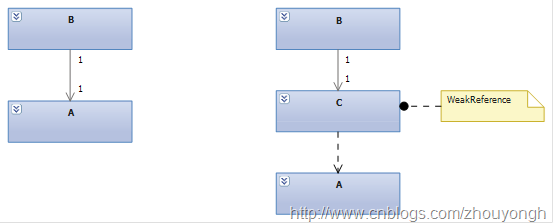
The intermediate class C is named WeakSource. Its design is as follows:

WeakSource isolates the A object; for memory reasons it has a one-to-one relationship with A. Thus, when listening to B's PropertyChanged event, the original b.PropertyChanged += a.HandlePropertyChanged becomes b.PropertyChanged += weakSource.HandlePropertyChanged. WeakSource provides two static methods, Register and UnRegister, to create and destroy WeakSource; the first parameter object source is the A object that WeakSource wraps.
The second parameter of Register, INotifyPropertyChanged target, is the B object to watch; the last parameter targetProp is the name of the property on B to watch. When B's property value changes, WeakSource is notified. To complete the binding, WeakSource then sets the corresponding property on the wrapped A object to B's new value.
Binding Values
When B's bound property value changes, completing the binding takes two steps: first, get B's new property value; second, set that new value onto A's property.
The simplest approach is reflection. For ease of writing, an Expression Tree is used to build the get/set operation:
// Set property
var prop = entry.SourceType.GetProperty(entry.SourceProp);
var paraSource = Expression.Parameter(entry.SourceType, "source");

// Get property
var targetProperty = entry.TargetType.GetProperty(entry.TargetProp);
var paraTarget = Expression.Parameter(entry.TargetType, "target");
var getter = Expression.Property(paraTarget, targetProperty);

// Combine
var body = Expression.Call(paraSource, prop.GetSetMethod(), getter);
Delegate action = Expression.Lambda(body, paraSource, paraTarget).Compile();
The third parameter passed into WeakSource's Register method is this Delegate. When the bound B property value changes, calling the Delegate's DynamicInvoke method completes the value update:
action.DynamicInvoke(source, target)
Converter
Building on this, add Converter support by defining the IDataConverter interface as follows:
public interface IDataConverter
{
    object Convert(object value, object parameter);
}
Updated Register signature:
public static WeakSource Register(Object source, INotifyPropertyChanged target, Delegate action, string targetProp,
                                IDataConverter converter = null, object parameter = null)
To reuse the built Expression Tree, the compiled Delegate is cached. The WeakEntry struct is created as the index key:
private struct WeakEntry
{
    public Type SourceType;
    public Type TargetType;
    public string SourceProp;
    public string TargetProp;
}
The updated Expression Tree:
// Set property
var prop = entry.SourceType.GetProperty(entry.SourceProp);
var paraObj = Expression.Parameter(entry.SourceType);

// Get property
var targetProperty = entry.TargetType.GetProperty(entry.TargetProp);
var paraTarget = Expression.Parameter(entry.TargetType);
var getter = Expression.Property(paraTarget, targetProperty);

// Combine
var paraConvert = Expression.Variable(typeof(IDataConverter));
var paraParameter = Expression.Variable(typeof(object));

var body = Expression.IfThenElse(
        Expression.NotEqual(paraConvert, Expression.Constant(null)),
        Expression.Call(paraObj, prop.GetSetMethod(), Expression.Convert(Expression.Call(paraConvert, typeof(IDataConverter).GetMethod("Convert"),
                            Expression.Convert(getter, typeof(object)), Expression.Convert(paraParameter, typeof(object))), prop.PropertyType)),
        Expression.IfThenElse(
            Expression.Equal(Expression.Constant(prop.PropertyType, typeof(Type)), Expression.Constant(getter.Type, typeof(Type))),
            Expression.Call(paraObj, prop.GetSetMethod(), Expression.Convert(Expression.Convert(getter, typeof(object)), prop.PropertyType)),
            Expression.Throw(Expression.Constant(new InvalidOperationException(
                "The property type between binding source and target does not match, please use IDataConverter to do custom convert.")))));

Delegate action = Expression.Lambda(body, paraObj, paraTarget, paraConvert, paraParameter).Compile();
Using Binding
Create the BindingEngine class to encapsulate Binding operations:
public class BindingEngine
{
    public static void SetPropertyBinding(Object source, INotifyPropertyChanged target, string sourceProp, string targetProp,
                                            IDataConverter converter = null, object parameter = null)
    {}

    public static void ClearPropertyBinding(Object source, INotifyPropertyChanged target, string sourceProp, string targetProp)
    {}
}
Create the test classes View and ViewModel, and TextConverter:
public class View
{
    public string Text { get; set; }
    public int Value { get; set; }
}

public class ViewModel : INotifyPropertyChanged
{
    private int _Value = 0;
    public int Value
    {
        get
        {
            return _Value;
        }
        set
        {
            _Value = value;
            NotifyPropertyChanged("Value");
        }
    }

    public event PropertyChangedEventHandler PropertyChanged;

    public void NotifyPropertyChanged(string prop)
    {
        if (PropertyChanged != null)
        {
            PropertyChanged(this, new PropertyChangedEventArgs(prop));
        }
    }
}

public class TextConverter : IDataConverter
{
    public object Convert(object value, object parameter)
    {
        int v = System.Convert.ToInt32(value);
        if (parameter != null)
        {
            v = System.Convert.ToInt32(parameter) + v;
        }
        return string.Format("\"{0}\"", v);
    }
}
Usage of BindingEngine:
View view1 = new View();
View view2 = new View();
ViewModel model = new ViewModel();

TextConverter converter = new TextConverter();
BindingEngine.SetPropertyBinding(view1, model, "Text", "Value", converter, null);
BindingEngine.SetPropertyBinding(view1, model, "Value", "Value");
BindingEngine.SetPropertyBinding(view2, model, "Text", "Value", converter, 2);
BindingEngine.SetPropertyBinding(view2, model, "Value", "Value");

BindingEngine.ClearPropertyBinding(view1, model, "Text", "Value");
Next Steps
This article only briefly introduced the implementation of BindingEngine; binding a list control to a list is not supported. Also, because Delegate.DynamicInvoke is used, there is still room for performance improvement — Emit and DynamicMethod can be used for the get/set operations.
For the BindingEngine source code and test code, please download this BindingEngineSample. Questions and suggestions are welcome in the comments. Thanks.


Top comments (0)