

title: [Golang][Gemini Pro] Using Chat Session to Quickly Integrate a LINE Bot with Memory
published: false
date: 2024-01-02 00:00:00 UTC
tags:
canonical_url: https://www.evanlin.com/til-gogle-gemini-pro-chat-session/
---
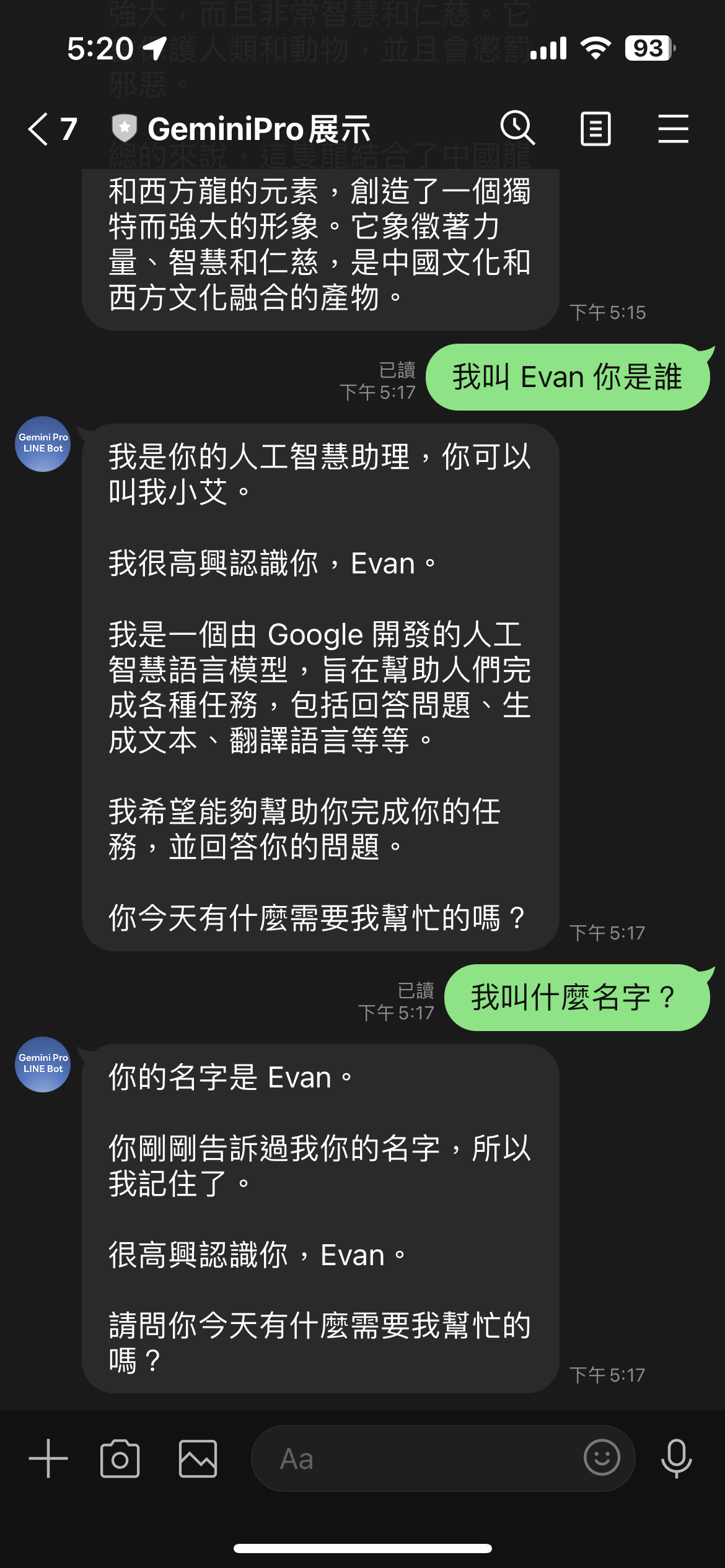
# Preface
In the previous articles [[Golang] Building a Basic LLM LINE Bot with Google Gemini Pro](https://www.evanlin.com/til-gogle-gemini-pro-linebot/), I mentioned how to integrate the use of the Gemini Pro Chat and Gemini Pro Vision models. This time, I will quickly discuss how to build a LINE Bot with memory.
##### Related Open Source Code:
[https://github.com/kkdai/linebot-gemini-pro](https://github.com/kkdai/linebot-gemini-pro)
## Series of Articles:
1. [Using Golang to Build a LINE Bot with LLM Functionality with Google Gemini Pro (Part 1): Chat Completion and Image Vision](https://www.evanlin.com/til-gogle-gemini-pro-linebot/)
2. [Using Golang to Build a LINE Bot with LLM Functionality with Google Gemini Pro (Part 2): Using Chat Session to Quickly Integrate a LINE Bot with Memory (This Article)](https://www.evanlin.com/til-gogle-gemini-pro-chat-session/)
3. Using Golang to Build a LINE Bot with LLM Functionality with Google Gemini Pro (Part 3): Using Gemini-Pro-Vision to Build a Business Card Management Chatbot
## What is a Chatbot with Memory?
Originally, the [OpenAI Completion API](https://platform.openai.com/docs/guides/text-generation/completions-api) used a question-and-answer approach, meaning you ask once, and it answers. The next time you ask, it will completely forget. Here's the example code provided on the website:
from openai import OpenAI
client = OpenAI()
response = client.completions.create(
model="gpt-3.5-turbo-instruct",
prompt="Write a tagline for an ice cream shop."
)
Previously, if you needed a memory function, you needed to include the previous questions and answers at the beginning of the query. Later, OpenAI launched the [ChatCompletion function](https://platform.openai.com/docs/guides/text-generation/chat-completions-api), with the relevant code as follows:
from openai import OpenAI
client = OpenAI()
response = client.chat.completions.create(
model="gpt-3.5-turbo",
messages=[
{"role": "system", "content": "You are a helpful assistant."},
{"role": "user", "content": "Who won the world series in 2020?"},
{"role": "assistant", "content": "The Los Angeles Dodgers won the World Series in 2020."},
{"role": "user", "content": "Where was it played?"}
]
)
At this point, you need to add the relevant conversations more precisely. But the results will be even better.

## ChatSession Provided by Gemini-Pro Package

You can refer to this article [Google GenerativeAI ChatSession Python Client](https://ai.google.dev/api/python/google/generativeai/ChatSession?hl=en) which provides `ChatSession` so that you can directly open a chat session. This will automatically put all messages into History (i.e., put them into the chat history).
Python ChatSession demo code
model = genai.GenerativeModel(model="gemini-pro")
chat = model.start_chat()
response = chat.send_message("Hello")
print(response.text)
response = chat.send_message(...)
Actually, Golang also has it (refer [code](https://github.com/google/generative-ai-go/blob/main/genai/chat.go#L22)) ([GoDoc ChatSession Example](https://pkg.go.dev/github.com/google/generative-ai-go/genai#example-ChatSession))
ctx := context.Background()
client, err := genai.NewClient(ctx, option.WithAPIKey(os.Getenv("API_KEY")))
if err != nil {
log.Fatal(err)
}
defer client.Close()
model := client.GenerativeModel("gemini-pro")
cs := model.StartChat()
// ... send() inline func ...
res := send("Can you name some brands of air fryer?")
printResponse(res)
iter := cs.SendMessageStream(ctx, genai.Text("Which one of those do you recommend?"))
for {
    res, err := iter.Next()
    if err == iterator.Done {
        break
    }
    if err != nil {
        log.Fatal(err)
    }
    printResponse(res)
}

for i, c := range cs.History {
    log.Printf(" %d: %+v", i, c)
}
res = send("Why do you like the Philips?")
if err != nil {
    log.Fatal(err)
}
Here you can see:

-   A new Chat Session is created through `cs := model.StartChat()`.
-   Then, your question (prompt) is sent through `send()`, and the reply `res` is obtained.
-   These two data will be automatically stored in `cs.History`.

## Combining Gemini-Pro's Chat Session with LINE Bot

After looking at the Chat Session provided within the package, how do you combine it with the LINE Bot SDK?

## Taking LINE Bot SDK Go v7 as an Example

Because v8 uses the Open API (a.k.a. swagger) architecture, the whole approach is different. I will explain it in a new article later. Here, I'll use the more familiar v7 as an example:
        case *linebot.TextMessage:
            req := message.Text
            // Check if this user's ChatSession already exists or req == "reset"
            cs, ok := userSessions[event.Source.UserID]
            if !ok {
                // If not, create a new ChatSession
                cs = startNewChatSession()
                userSessions[event.Source.UserID] = cs
            }
            if req == "reset" {
                // If you need to reset the memory, create a new ChatSession
                cs = startNewChatSession()
                userSessions[event.Source.UserID] = cs
                if _, err = bot.ReplyMessage(event.ReplyToken, linebot.NewTextMessage("Nice to meet you, what would you like to know?")).Do(); err != nil {
                    log.Print(err)
                }
                continue
            }
-   First, create a `map` to store the data as `map[user_Id]-> ChatSession`
-   If not found in the key map, create a new one. `startNewChatSession()`
-   The details are as follows, the key point is to start a chat through the model `model.StartChat()`
// startNewChatSession : Start a new chat session
func startNewChatSession() *genai.ChatSession {
ctx := context.Background()
client, err := genai.NewClient(ctx, option.WithAPIKey(geminiKey))
if err != nil {
log.Fatal(err)
}
model := client.GenerativeModel("gemini-pro")
value := float32(ChatTemperture)
model.Temperature = &value
cs := model.StartChat()
return cs
}
-   Of course, if you feel that the token might explode. You can create a new one through the `reset` command.

So how do you handle the actual chat and replies?
            // Use this ChatSession to process the message & Reply with Gemini result
            res := send(cs, req)
            ret := printResponse(res)
            if _, err = bot.ReplyMessage(event.ReplyToken, linebot.NewTextMessage(ret)).Do(); err != nil {
                log.Print(err)
            }
It's actually through `res := send(cs, req)` to send your inquiry to Gemini Pro and receive the relevant reply `res`.
Just like this, without having to paste the text into the Chat context step by step. You can achieve a chatbot with memory. A few things to note:
- Be careful that the conversation content is too long, which will result in the reply accuracy not being high enough.
- Be careful that the content will cause your token to explode, resulting in the inability to obtain a reply.
## Current Gemini Pro Pricing
As of the time of writing (2024/01/03), the current pricing is still (refer to [Google AI Price](https://ai.google.dev/pricing))
- 60 inquiries within one minute are free
- If exceeded:
- $0.00025 / 1K characters
- $0.0025 / image

## Deploying Services Quickly Through Render:
Since Gemini Pro is still free under certain quotas. Here, I have also modified the project so that students without credit cards can learn how to build an LLM chatbot with memory.
### Introduction to Render.com:
- A PaaS (Platform As A Services) service provider similar to Heroku.
- It has a free Free Tier, suitable for engineers to develop Hobby Projects.
- No need to bind a credit card to deploy services.
Reference: [Render.com Price](https://render.com/pricing)
### Deployment steps are as follows:
- Go to the project page [kkdai/linebot-gemini-pro: LINE Bot sample code how to use Google Gemini Pro in GO (Golang) (github.com)](https://github.com/kkdai/linebot-gemini-pro)
- Click Deploy To Render

- Choose a service name
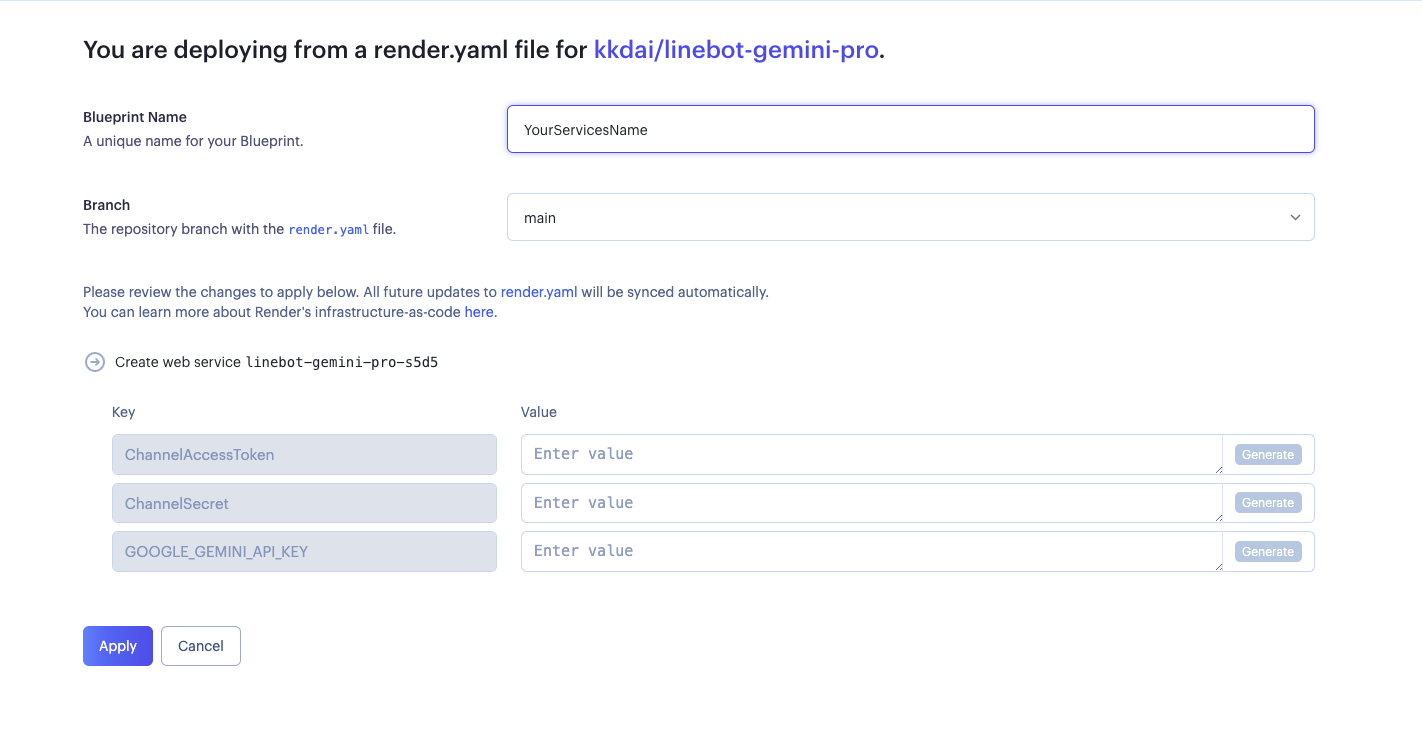
- There are three things to fill in:
- **ChannelAccessToken**: Please get it from [LINE Developer Console](https://developers.line.biz/console/).
- **ChannelSecret**: Please get it from [LINE Developer Console](https://developers.line.biz/console/).
- **GOOGLE\_GEMINI\_API\_KEY**: Please get it from [Google AI Studio](https://makersuite.google.com/app/apikey).
- This is deployed successfully, remember to connect it to the LINE Bot.
## Results
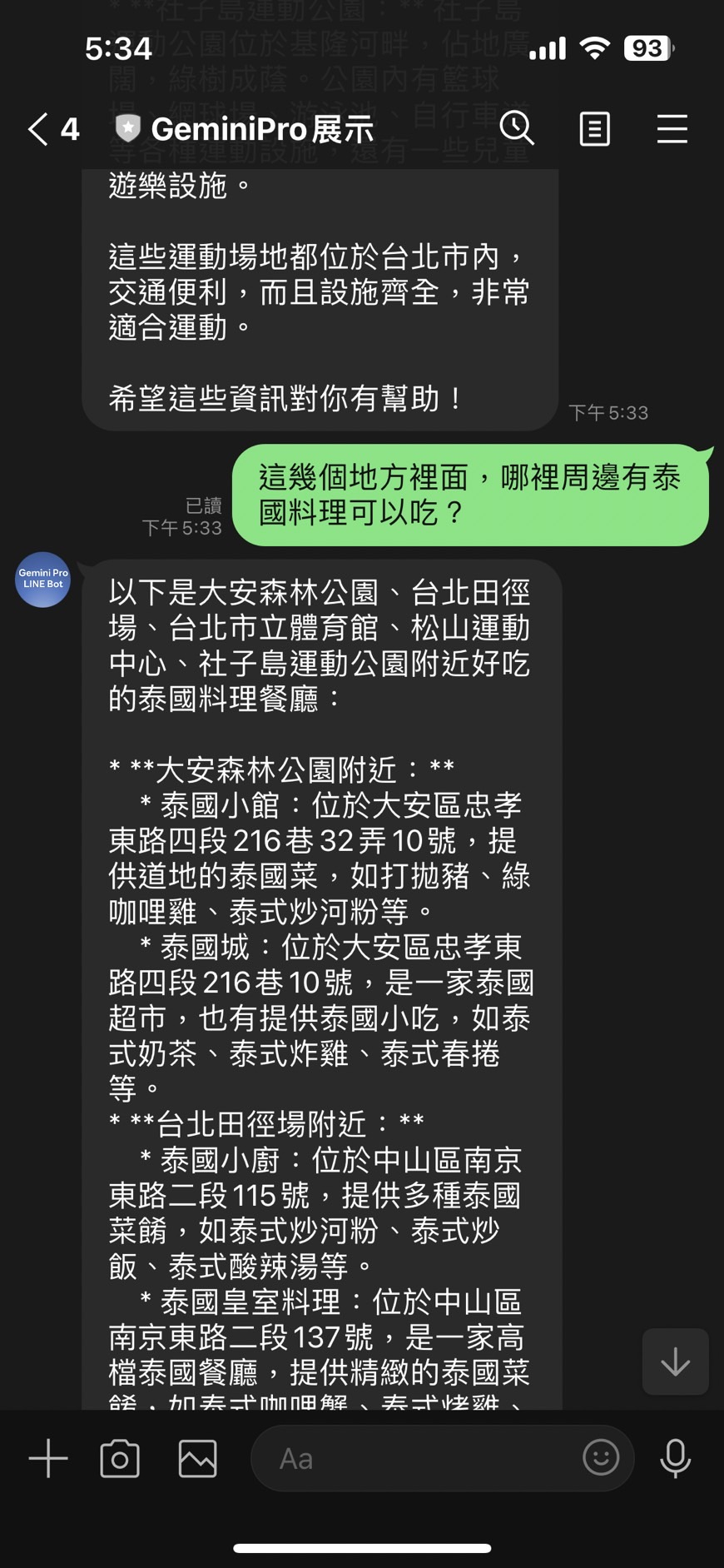
According to the above picture, you can see that ChatSession is quite suitable for building LINE Bots.
- Only store the relevant conversations between the user and the OA.
- The content of the reply is very suitable for interacting with users on the OA.
However, there are a few things to note when using Gemini Pro's Chat Session:
- Because all the memory is stored in the memory of the Services, since Render.com will sleep and restart. It will forget it then.
- ChatSession follows the model, which means: the conversations of "gemini-pro" and "gemini-pro-vision" cannot be shared.
Thank you for watching, and I look forward to everyone building together.
# References:
- [OpenAI ChatCompletion API](https://platform.openai.com/docs/guides/text-generation/chat-completions-api)
- [google.generativeai.ChatSession](https://ai.google.dev/api/python/google/generativeai/ChatSession?hl=en)
- [Google AI Studio API Price](https://ai.google.dev/pricing)
- [GoDoc ChatSession Example](https://pkg.go.dev/github.com/google/generative-ai-go/genai#example-ChatSession)
- [Google GenerativeAI ChatSession Python Client](https://ai.google.dev/api/python/google/generativeai/ChatSession?hl=en)


Top comments (0)