

title: [Learning Notes][OpenAI] About OpenAI's New Feature: Function Calling
published: false
date: 2023-06-14 00:00:00 UTC
tags:
canonical_url: http://www.evanlin.com/go-openai-func/
---

# Preface
OpenAI announced the new feature "[Function calling](https://openai.com/blog/function-calling-and-other-api-updates)" on **06/13**, which is actually a complete new development for LLM development. This article will quickly explain what changes this update will bring, and also use the integration of LINE official accounts as a case to help you build a travel assistant.
# Details about OpenAI's New Function Calling Feature
"[Function calling](https://openai.com/blog/function-calling-and-other-api-updates)" is mainly used to handle Intent recognition, and provide relevant JSON output to developers for processing based on the user's intent. In other words, if you want to create a "ChatGPT LINE Bot for weather services" today, how would you do it?
Relevant information:
- Blog "[Function calling](https://openai.com/blog/function-calling-and-other-api-updates)"
- API Documentation [ChatComplete](https://platform.openai.com/docs/api-reference/chat/create)
# What to do before OpenAI Functions Calling?
According to "[DeepLearning provides a good Prompt Engineering for Developers](https://learn.deeplearning.ai/chatgpt-prompt-eng/lesson/1/introduction)", you might need to do this:
You are now a helper to capture user information. If the user asks about the weather in a certain area, please help me extract the area and present it in the following format.
{
"location": "xxxx"
}
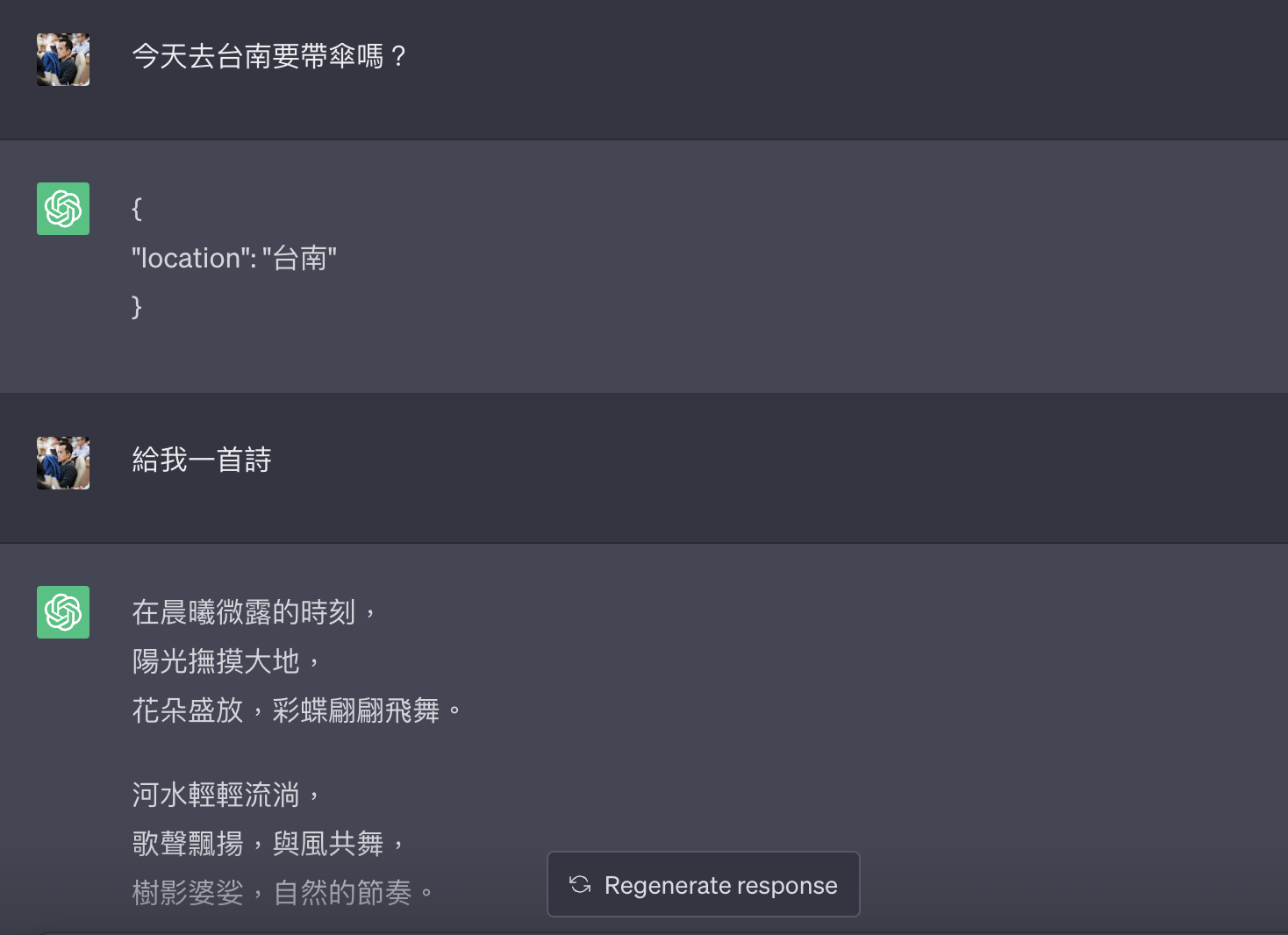
Many places are smart, but they still don't handle non-weather inquiries to be rejected. You can view the results through [ChatGPT Share](https://chat.openai.com/share/0dbd39c6-246a-4ca4-b941-2a103ec1daf0). If it's an NLU assistant, in this case, it might reply `{ "location" : ""}` or NULL, but this will make your Prompt very lengthy, and usually a long defensive Prompt (spell) can only defend one stage. So what to do?
# How does OpenAI Functions Calling help you?
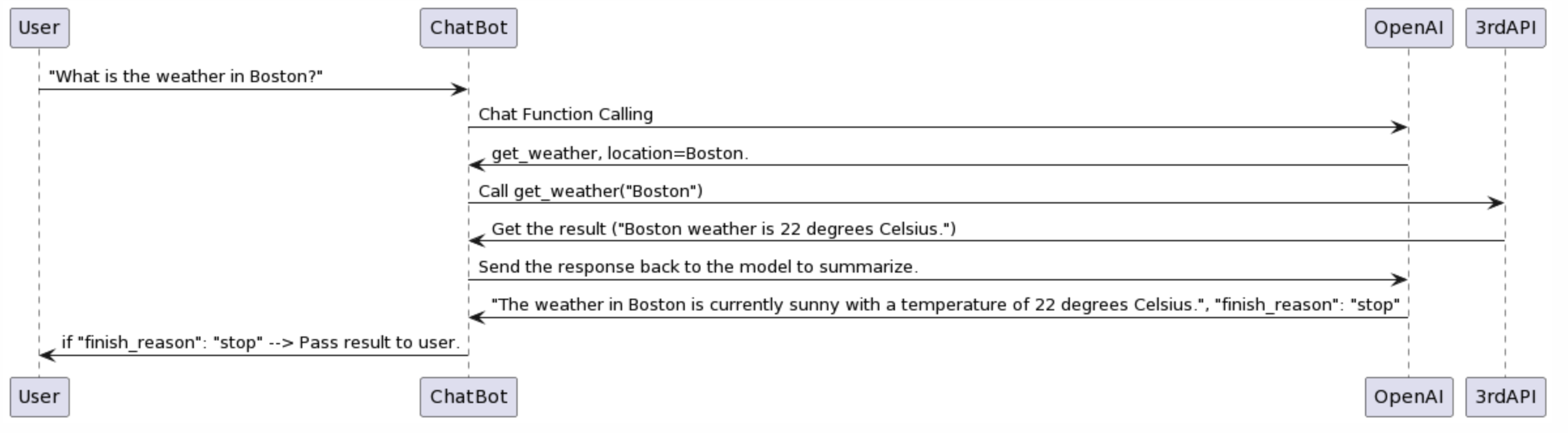
Here's a flowchart: [PlantUML](https://www.plantuml.com/plantuml/uml/TP5BIyD058Nt-HM7MIcqMTHTGEq355SML5oMCRbj1kSHvjwXr5_lf6cnXRZAOxxpCUVUEOkEafmjYW-cYEa3LgsMPP0AwZE_mJ2a9Un9vqU4yLW6bk0VLN4Y-z1hHtxnKXt3U4g-5XCyLjfQutSeXkCh-uvaSv9EO4Ej-yJzu2ulrNUnMQnxTPPTfcxK0AlROa2kzCyao1GYSRA2C_pNWp6ReQ5T96AioB99N6RNIAatyirPrWNFX2zTVqF2yQSB3Td-WvDpEfeVAiVwglUnAS8mwXGZUR67RF3-WBsH5Xf2hgEe9KL2s8xUTWArDTvmkucaENXLGMLhTxMQVgyLpFO_5jCChJNpULOIa7AcBEQvTtBs5m00)
## Step 1: Call Chat / Complete Function Calling
From the article "[Function calling](https://openai.com/blog/function-calling-and-other-api-updates)", you can provide a very simple example. You can find that the following calling method is no different from the original use of chat/completion, but the returned information is very different.
curl https://api.openai.com/v1/chat/completions -u :$OPENAI_API_KEY -H 'Content-Type: application/json' -d '{
"model": "gpt-3.5-turbo-0613",
"messages": [
{"role": "user", "content": "What is the weather like in Boston?"}
],
"functions": [
{
"name": "get_current_weather",
"description": "Get the current weather in a given location",
"parameters": {
"type": "object",
"properties": {
"location": {
"type": "string",
"description": "The city and state, e.g. San Francisco, CA"
},
"unit": {
"type": "string",
"enum": ["celsius", "fahrenheit"]
}
},
"required": ["location"]
}
}
]
}'
That is, you can ask `"What is the weather like in Boston?"` and let chatGPT analyze it through the `gpt-3.5-turbo-0613` (here we need to emphasize GPT3.5) model, and directly answer you with a JSON file.
{
"id": "chatcmpl-123",
...
"choices": [{
"index": 0,
"message": {
"role": "assistant",
"content": null,
"function_call": {
"name": "get_current_weather",
"arguments": "{ \"location\": \"Boston, MA\"}"
}
},
"finish_reason": "function_call"
}]
}
At this time, the OpenAI API `absolutely` will reply to you with JSON, without the need for various black magic defense techniques (special Prompt) to achieve it. If it can find relevant information, it will help you extract the information and put it in `arguments` to pass to you.

For more details, you can [refer to the API documentation](https://platform.openai.com/docs/api-reference/chat/create):
Function_call / string or object / Optional
Controls how the model responds to function calls. "none" means the model does not call a function, and responds to the end-user. "auto" means the model can pick between an end-user or calling a function. Specifying a particular function via {"name":\ "my_function"} forces the model to call that function. "none" is the default when no functions are present. "auto" is the default if functions are present.
## The difference from the original Prompt

Then you might think, what's the difference between this and the original through a special Prompt?

### **Returns other than JSON will not be returned:**

If at this time, you suddenly interject and say: "Give me a poem", it will still return you a JSON file. It may tell you that there are no related arguments available.

### **Handling multiple Functions:**

This is also the most powerful and best feature. Please check
curl https: //api.openai.com/v1/chat/completions -u :$OPENAI_API_KEY -H 'Content-Type: application/json' -d '{
"model": "gpt-3.5-turbo-0613",
"messages": [
{
"role": "user",
"content": "What is the weather like in Boston?"
}
],
"functions": [
{
"name": "get_current_weather",
"description": "Get the current weather in a given location",
"parameters": {
"type": "object",
"properties": {
"location": {
"type": "string",
"description": "The city and state, e.g. San Francisco, CA"
},
"unit": {
"type": "string",
"enum": [
"celsius",
"fahrenheit"
]
}
},
"required": [
"location"
]
}
},
{
"name": "get_current_date",
"description": "Get the current time in a given location",
"parameters": {
"type": "object",
"properties": {
"location": {
"type": "string",
"description": "The city and state, e.g. San Francisco, CA"
},
"unit": {
"type": "string",
"enum": [
"celsius",
"fahrenheit"
]
}
},
"required": [
"location"
]
}
}
]
}'
You will find that the above code has two functions waiting to be judged. `get_current_date` and `get_current_weather`.
- If your question is: `What is the weather like in Boston?`, then it will return you `get_current_weather`, and then give you `location = Boston`.
- Conversely, if your question is: `What time is it in Boston?`, then it will return you `get_current_date`, and then give you `location = Boston`.
## Step 2: Call 3rd Party API
- This is skipped here, it can be various Open APIs to find information.
- However, you can find information through the ChatGPT Plugin and simulate yourself as a ChatGPT Plugin.
## Step 3: Send the summary to OpenAI
The data at https://openai.com/blog/function-calling-and-other-api-updates was wrong
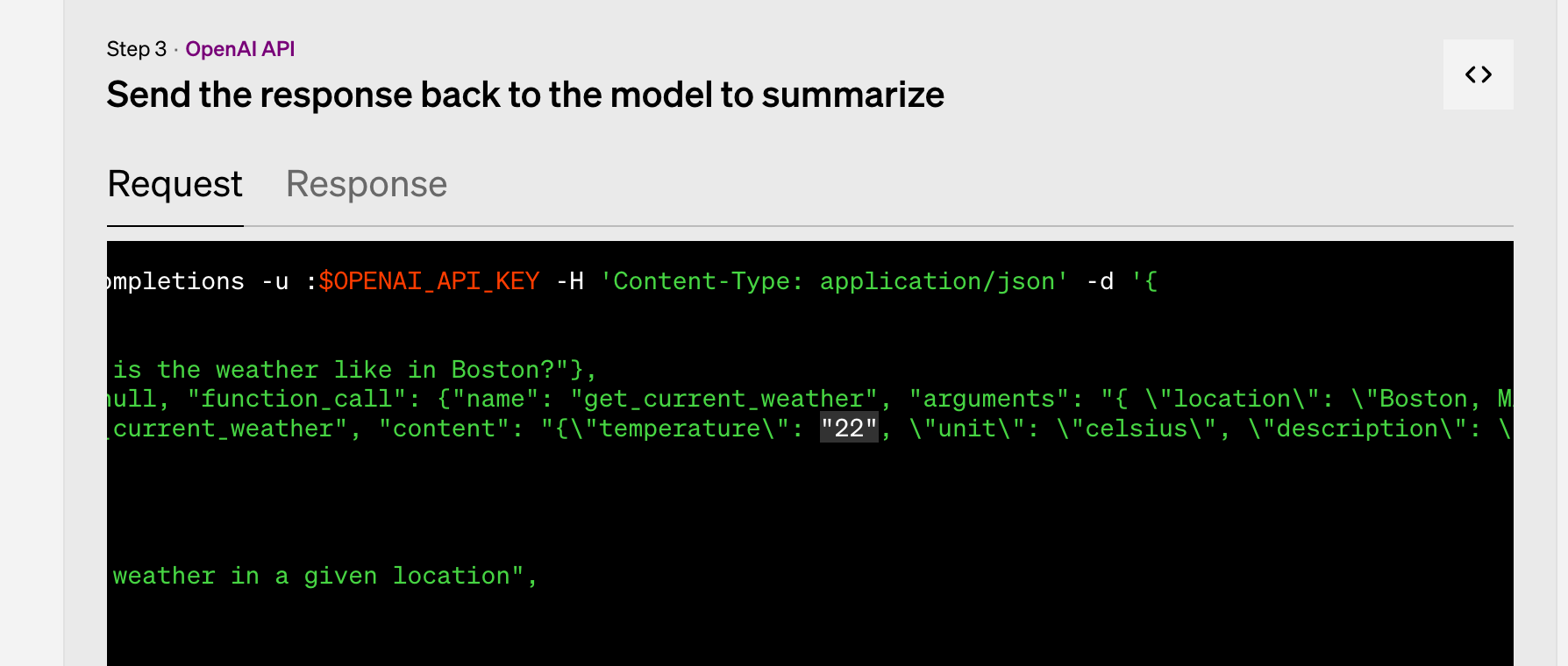
Here, you should note that if you intentionally return empty when calling the 3rd API, it means that OpenAI's Summary will not have "reference data". Refer to the following: ` {“role”: “function”, “name”: “get_poi”, “content”: “{}”}`.
That is to say, it will start using its own relevant information. (But it may not be what you expect).
curl https://api.openai.com/v1/chat/completions -u :$OPENAI_API_KEY -H 'Content-Type: application/json' -d '{
"model": "gpt-3.5-turbo-0613",
"messages": [
{"role": "user", "content": "台北好玩地方在哪裡?"},
{"role": "assistant", "content": null, "function_call": {"name": "get_current_poi", "arguments": "{ \"location\": \"台北\"}"}},
{"role": "function", "name": "get_poi", "content": "{}"}
],
"functions": [
{
"name": "get_current_poi",
"description": "Get the current point interesting in a given location",
"parameters": {
"type": "object",
"properties": {
"location": {
"type": "string",
"description": "The city and state, e.g. San Francisco, CA"
}
},
"required": ["location"]
}
}
]
}'
Here, you will receive a reply (Response):
{
"id": "xxx",
"object": "chat.completion",
"created": 1686816314,
"model": "gpt-3.5-turbo-0613",
"choices": [
{
"index": 0,
"message": {
"role": "assistant",
"content": "台北有很多好玩的地方,以下是一些推薦的地點:\n\n1. 101大樓:台北最著名的地標建築之一,是世界上最高的摩天大樓之一,可以在觀景台欣賞城市全景。\n\n2. 象山:台北的一座山峰,可以從山頂俯瞰整個城市,是非常適合登山和賞景的地方。\n\n3. 士林夜市:台北最著名的夜市之一,可以品嚐到各種美食和購物。\n\n4. 故宮博物院:收藏中國文化藝術品的博物館,展示了大量的歷史文物。\n\n5. 國立自然科學博物館:一個專門展示自然科學知識和展品的博物館,非常適合家庭和學生參觀。\n\n6. 北投溫泉:台北最著名的溫泉區之一,可以享受溫泉浸浴和放鬆身心。\n\n7. 龍山寺:台北最古老的寺廟之一,是信仰佛教的重要地方,也是一個參觀的旅遊景點。\n\n希望這些地方能讓您在台北有一個愉快的旅行!"
},
"finish_reason": "stop"
}
],
"usage": {
"prompt_tokens": 104,
"completion_tokens": 419,
"total_tokens": 523
}
}
I thought that `"finish_reason": "stop"` would be checked after the reply. And set it, for loop check, but found that even if you pass the data empty to OpenAI, it will also start to reply to you based on the information it has.

# Things to note when using Function Calling

## 1. Can Langchain be used too?

- [Actually, on the evening of 06/14 Taiwan time, LangChain also updated to 0.0.200 to support LangChain.](https://github.com/hwchase17/langchain/blob/master/docs/modules/agents/tools/tools_as_openai_functions.ipynb)

- [Flowise (visualized Langchain), which is used by many people, also supports it in 1.2.12.](https://github.com/FlowiseAI/Flowise/commits/main)

## 2. The semantic understanding ability of using Func Calling is not as smart as the original Chat

After my own observation, the relevant Arguments extracted through Func Calling are not as smart as testing directly in ChatGPT before. It may also be because the API GPT3.5 Turbo is actually not equal to ChatGPT. So in use, you will often need to ask more questions. To explain the relevant content, and then extract the relevant Arguments.

## 3. If Func Calling Summarized has no data, ChatGPT will reply with what it knows.

# Applications that Function Calling can bring

Here's a quick summary of a few new applications that can be brought:

- **Build your own ChatGPT Plugin:**
  - [ChatGPT App is launched in Taiwan! Plugins are open, understand how to use it at once](https://www.gvm.com.tw/article/102881) It has been welcomed by many people after its launch, but it is still relatively "few" because it requires an additional $20 fee. So the number of people using it is still relatively small.
  - You can build your own ChatGPT Plugin on your favorite platform (LINE official account, slack ...) through Function Calling
- **Smarter Intent recognition mechanism:**
  - Because the speed of this API is quite fast, and the tokens returned are not many.
  - It will be quite practical as an NLU recognition mechanism. And it can ensure that the JSON format of the reply is quite precise.


Top comments (0)