


I used to deploy my pet projects to Heroku using their free tier until it had a free tier. Let's all acknowledge that we have a fondness for free tiers, especially when we want to test our projects on a server.
I once built a text-to-ASCII art app using FastAPI. To demonstrate it, I initially utilized Heroku. However, due to the discontinuation of its free tier, I haven't been able to keep my project updated with live demos."
Now, let's talk about Vercel. I assume most of you are already familiar with it, so I won't delve into the specifics. Following some research and experimentation, I discovered that deploying a Python project on Vercel is a straightforward process. All you require is a 'vercel.json' file.
Here's what I did to deploy my FastAPI app to Vercel -
1) Add a vercel.json file in the project root
{
    "version": 2,
    "builds": [
        {
            "src": "main.py",
            "use": "@vercel/python"
        }
    ],
    "routes": [
        {
            "src": "/(.*)",
            "dest": "main.py"
        }
    ]
  }
In the builds.src use your app entrypoint, mine is app.py in the app root. Same goes for routes.src
Login to Vercel and add new project
Go to Continue with Github as shown below -
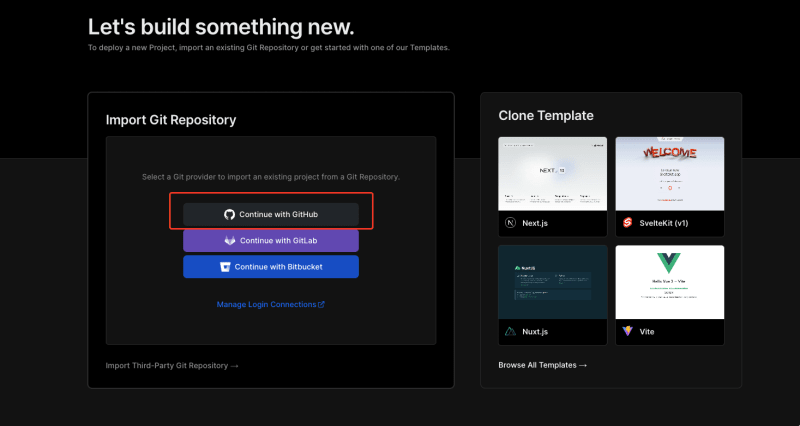
- Connect Your GitHub Account
- Authorize Vercel to access your GitHub repositories if prompted.
- Select the GitHub repository you want to import
That's it. The project will be deployed and it build and re-deploy each time you push a commit to your main branch.
GitHub: https://github.com/ganmahmud/fastapi-text-asciify
Live demo on Vercel: https://fastapi-text-asciify-npt1siwyq-ganmahmud.vercel.app


Top comments (0)