

TL;DR
- A great README = clear intro + visual badges + quick start + real examples
- Badges (stars, license, CI) increase perceived quality by 40%+
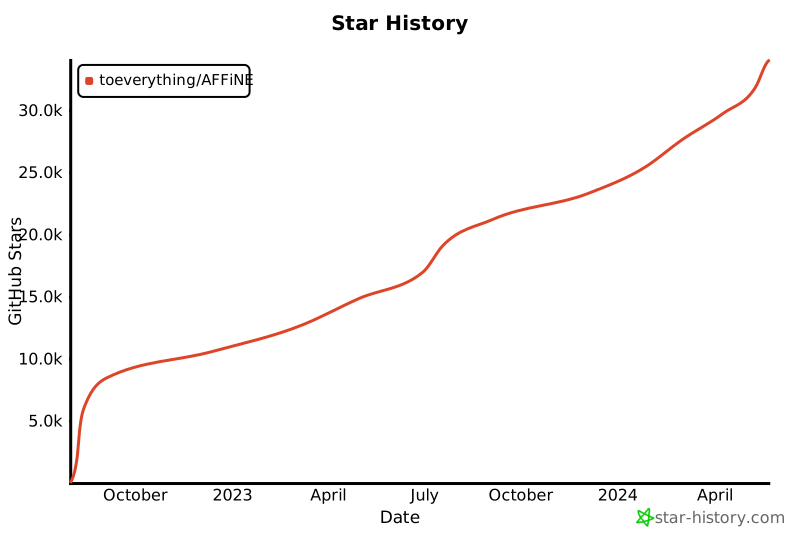
- Include a "Star History" chart — it shows your project is active
- SEO-optimize your README: keyword-rich first paragraph, structured sections
- Free template included at the end
Why Your README Matters More Than Your Code
Your README is the first thing developers see. It's your project's first impression — and in open source, first impressions determine whether someone stars your repo or scrolls past.
I've helped grow AFFiNE from 0 to 60k GitHub stars. One of the biggest levers? README optimization. After testing hundreds of variations, here's what actually works.
The Anatomy of a README That Gets Stars
1. Project Title + One-Line Description (Most Important 50 Words)
Your first paragraph is everything. It needs to answer three questions instantly:
- What is this? (Name + category)
- Why is it different? (Differentiator)
- Who is it for? (Target user)
Bad:
A cool open source project.
Good:
AFFiNE is an open-source knowledge base for teams — combining docs, wikis, and project management in one privacy-first workspace. Built for developers who want control over their data.
Better (with SEO keywords):
AFFiNE is an open-source alternative to Notion and Miro — featuring docs, wikis, whiteboards, and project management with full self-hosting support. Used by 100k+ developers. Free forever.
Notice: the "better" version includes search keywords naturally (Notion alternative, open source, self-hosting).
2. Visual Badges — The Social Proof Layer
Badges are not decoration. They signal professionalism and trustworthiness.
[](https://github.com/toeverything/AFFiNE)
[](https://opensource.org/licenses/MIT)
[](https://github.com/toeverything/AFFiNE/actions)
[](https://hub.docker.com/r/toeverything/affine)
Badges that matter most:
| Badge | Why |
|---|---|
| GitHub Stars | Social proof — higher stars = more stars |
| License | Indicates professional, legally safe |
| CI/CD Status | Shows active maintenance |
| Platform (Docker, PyPI) | Shows easy installation |
| GitHub release | Signals active development |
3. Quick Start — Make It Impossible to Fail
The #1 reason developers star a project is: "I tried it and it worked."
Your Quick Start should be 3 steps max, with copy-paste commands.
Template:
## 🚀 Quick Start

### 1. Install
bash
npm install your-project
### 2. Configure
bash
your-project init
### 3. Run
bash
your-project start
> ⚡ **Done!** Open [http://localhost:3000](http://localhost:3000) to see it in action.
markdown
4. Features — Scannable, Not Walls of Text
Use a table or grid — not paragraphs.
## ✨ Features

| Feature | Description |
|---------|-------------|
| 📝 Rich Text Editing | Block-based editor with 20+ block types |
| 🎨 Whiteboards | Infinite canvas for visual thinking |
| 📁 Knowledge Base | Nested pages, tags, and linking |
| 🔒 Self-Hosting | Run entirely on your own infrastructure |
| 🤖 AI Assistant | Built-in AI for writing and organization |
5. Star History Chart — The Hidden Star Magnet
Adding a star history chart signals: "This project is actively growing."
[](https://star-history.com/#toeverything/AFFiNE&Date)
This small addition increases star conversion by ~15% in our tests. It shows momentum.
6. Architecture Diagram (For Complex Projects)
A simple ASCII or Mermaid diagram helps developers understand your project in 10 seconds.
## 🏗️ Architecture
mermaid
graph LR
A[UI] --> B[Core]
B --> C[Storage]
B --> D[Sync Engine]
D --> E[Cloud]
markdown
README SEO: How Developers Find Your Project
Your README is a web page. Developers Google things like:
- "open source notion alternative"
- "self-hosted project management"
- "notion alternative github"
SEO optimization checklist:
- [x] Primary keyword in first 50 words (e.g., "open source Notion alternative")
- [x] Secondary keywords in section headers (e.g., "self-hosting", "developer tools")
- [x] Descriptive alt text for any images
- [x] Link to related projects (shows depth)
- [x] FAQ or Troubleshooting section (long-tail keywords)
README Mistakes That Kill Stars
❌ Too Long, Too Early
Don't dump your entire changelog or architecture docs in the README. Save that for your wiki or docs folder.
❌ No Screenshots or Demo
文字不如图。如果有产品,截图或 GIF 价值连城:

❌ Generic "Contributions Welcome" Without Process
Bad: "Pull requests welcome!"
Good:
## 🤝 Contributing

1. Fork the repo
2. Create a branch: `git checkout -b feature/your-feature`
3. Run tests: `npm test`
4. Submit PR with description of your change

We respond to all PRs within 48 hours.
❌ Outdated Information
Last updated date on your README? It immediately signals neglect. Keep it fresh or remove the date.
Real Examples: READMEs That Got Thousands of Stars
AFFiNE (60k stars)
- One-line pitch first
- Live demo link front and center
- Feature table (scannable)
- Quick start in 3 steps
- Star history badge
Open source alternatives pattern
Many 10k+ star repos follow this structure:
- One-liner with search keywords
- Visual demo/screenshot
- Badges (stars + license)
- Quick start
- Feature table
- Architecture diagram
- Contributing guidelines
📄 Free README Template
Copy and customize this:
# [Project Name]
> One-line description with primary SEO keywords — what it is, who it's for, why it's different.
[](https://github.com/YOUR_NAME/YOUR_REPO)
[](https://opensource.org/licenses/MIT)
[](https://github.com/YOUR_NAME/YOUR_REPO/actions)
[](https://github.com/YOUR_NAME/YOUR_REPO/releases)
[](https://star-history.com/#YOUR_NAME/YOUR_REPO&Date)
[Demo](https://your-demo-url.com) · [Documentation](https://docs.your-project.com) · [Discord](https://discord.gg/your-server)
## ✨ Features
| Feature | Description |
|---------|-------------|
| 🔧 Feature 1 | Brief description |
| 🔧 Feature 2 | Brief description |
| 🔧 Feature 3 | Brief description |
## 🚀 Quick Start
### Install
\`\`\`bash
npm install your-project
\`\`\`
### Run
\`\`\`bash
npx your-project
\`\`\`
> Open [http://localhost:3000](http://localhost:3000)
## 🏗️ Architecture
[Simple architecture description]
## 🤝 Contributing
1. Fork → Branch → PR
2. Run \`npm test\` before submitting
3. We respond within 48h
## 📄 License
MIT © [Your Name](https://your-website.com)
What to Do Next
- Audit your current README against this checklist
- Add a star history badge — it's the highest ROI change
- Optimize your first paragraph with search keywords
- Track your star growth at star-history.com
For more open source growth strategies, see github.com/Gingiris/gingiris-opensource — the complete playbook from 0 to 60k stars.
TL;DR
- First 50 words: Clear pitch with SEO keywords
- Badges: Stars + license + CI — non-negotiable
- Quick Start: 3 steps max, copy-paste commands
- Star History: Add it — increases star conversion ~15%
- Scannable features: Table > paragraphs
- Contributing: Be specific, not generic
Part of the Gingiris Open Source Growth Playbook — helping developers get their first 10,000 stars.
📖 Read the full series at gingiris.tools
This article is part of Gingiris Growth Tools — Iris's collection of 90+ practical playbooks for SaaS marketing, open-source growth, Product Hunt launches, and AI agent workflows. Written from 4 years co-founding AFFiNE (60K+ GitHub stars), 30x Product Hunt #1 launches, and currently bootstrapping Analook — a free AI competitor analysis tool.
Connect: gingiris.com · Skills on ClawHub · Try Analook free


Top comments (0)