

Part 2 of 4 — Part 1: Static Hosting with S3 and CloudFront | Part 2: Lambda + API Gateway (you are here) | Part 3: DynamoDB and IAM | Part 4: Full App Integration and CORS
The first time I hit a "Missing Authentication Token" error from API Gateway, I assumed the problem was with authentication. So I spent twenty minutes checking IAM permissions, looking for a missing auth header, and rereading the API Gateway docs.
The problem had nothing to do with authentication. I had simply called the wrong URL — the API root instead of the resource path. The error message is genuinely misleading.
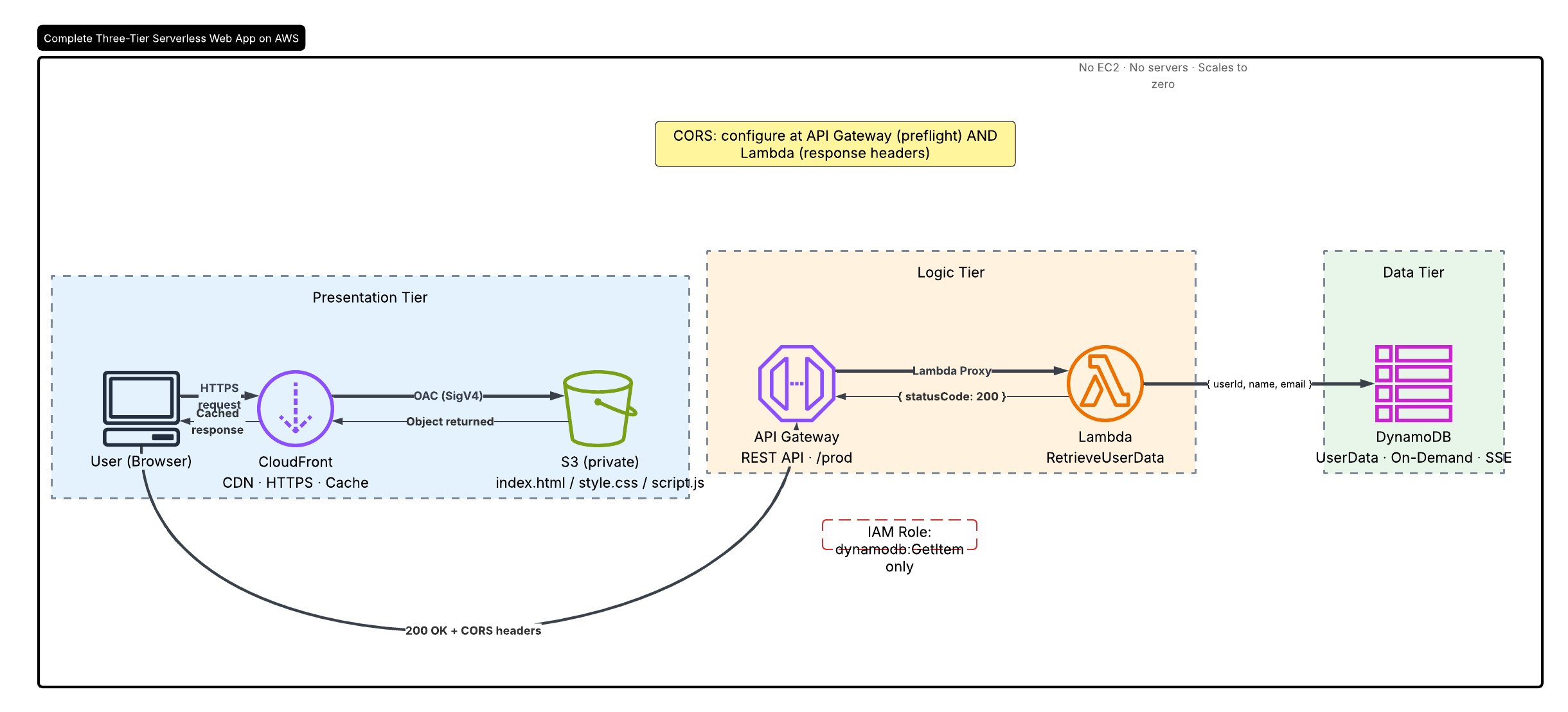
This is Part 2 of a four-part series where I build a serverless web app on AWS from scratch. In Part 1, I set up an S3 bucket and CloudFront distribution for the frontend. In this part, we are building the logic tier: a Lambda function wired to API Gateway that will form the backbone of the backend.
What We Are Building
A REST API with a single endpoint:
GET /users?userId={id}
→ Returns user data as JSON from DynamoDB (coming in Part 3)
The complete flow:
Browser / curl
    │
    ▼
API Gateway (REST API)
    │  Routes GET /users → Lambda proxy integration
    ▼
AWS Lambda (RetrieveUserData function)
    │  Queries DynamoDB for the requested userId
    ▼
Amazon DynamoDB
    │
    └── Returns JSON item → Lambda → API Gateway → Browser
Part 1: The Lambda Function
What Lambda Is — and Why It Makes Sense Here
Lambda is compute-on-demand. You give AWS your code, and AWS runs it only when something triggers it. You pay per 100ms of execution, not for idle time.
For a backend API serving variable load, this is compelling:
- No servers to patch or scale
- Cost is directly proportional to usage (free tier covers 1M requests/month)
- The execution role (IAM) controls exactly what the function can access — nothing more
The Code
// backend/lambda/index.mjs
import { DynamoDBClient } from "@aws-sdk/client-dynamodb";
import { DynamoDBDocumentClient, GetCommand } from "@aws-sdk/lib-dynamodb";

const client = new DynamoDBClient({ region: process.env.AWS_REGION });
const docClient = DynamoDBDocumentClient.from(client);

const CORS_HEADERS = {
  "Access-Control-Allow-Origin": process.env.ALLOWED_ORIGIN ?? "*",
  "Access-Control-Allow-Methods": "GET,OPTIONS",
  "Access-Control-Allow-Headers": "Content-Type,Authorization",
};

const response = (statusCode, body) => ({
  statusCode,
  headers: { "Content-Type": "application/json", ...CORS_HEADERS },
  body: JSON.stringify(body),
});

export const handler = async (event) => {
  if (event.httpMethod === "OPTIONS") {
    return { statusCode: 200, headers: CORS_HEADERS, body: "" };
  }

  const userId = event.queryStringParameters?.userId;

  if (!userId) {
    return response(400, { error: "Missing required query parameter: userId" });
  }

  try {
    const result = await docClient.send(
      new GetCommand({
        TableName: process.env.TABLE_NAME,
        Key: { userId },
      })
    );

    return result.Item
      ? response(200, result.Item)
      : response(404, { error: `No user found with userId: ${userId}` });
  } catch (err) {
    console.error("DynamoDB error:", err);
    return response(500, { error: "Internal server error" });
  }
};
Three things in this code that are worth understanding properly:
Why DynamoDBDocumentClient instead of DynamoDBClient directly?
The raw DynamoDBClient uses DynamoDB's type-annotated format: { userId: { S: "1" } }. The DynamoDBDocumentClient is a higher-level abstraction that marshals and unmarshals these types automatically, so you work with plain JavaScript objects. Always use DynamoDBDocumentClient unless you have a specific reason not to.
Why handle OPTIONS explicitly?
Modern browsers send a CORS preflight OPTIONS request before any cross-origin GET. If Lambda does not return a 200 with the correct headers on OPTIONS, the actual GET never fires. This is the CORS issue that bites nearly everyone building a serverless API for the first time — and we will cover it in depth in Part 4.
Why process.env.TABLE_NAME instead of a hardcoded table name?
Environment variables decouple your code from your infrastructure. When you deploy the same Lambda to a staging environment with a different table, you change the environment variable — not the code. This is a habit worth building from day one.

The RetrieveUserData Lambda function in the AWS console, showing runtime (Node.js 22), handler, and environment variables.
Part 2: API Gateway
REST API vs HTTP API
API Gateway offers two main flavours. HTTP API is newer, cheaper (~$1/million requests vs ~$3.50), and simpler to configure CORS on. REST API has more options: usage plans, request/response transformations, response caching, and WAF integration.
I am using a REST API here because it maps more directly to what most production APIs require, and the exam (Solutions Architect Professional) tests REST API configuration in detail. For a greenfield project today, I would lean towards HTTP API unless I specifically needed those REST API features.
Resources and Methods
An API is a tree of resources (URL paths) with HTTP methods attached:
/                 ← root resource
└── /users        ← our resource
    ├── GET       ← our method (→ Lambda)
    └── OPTIONS   ← CORS preflight (→ mock integration)

The UserRequestAPI REST API created in the API Gateway console.

The /users resource with its GET method wired to Lambda and OPTIONS configured for CORS preflight.
Lambda Proxy Integration
When you select Lambda Proxy Integration, API Gateway passes the entire HTTP request as a JSON event object to your Lambda and expects Lambda to return a properly shaped response (statusCode, headers, body). This is simpler and more flexible than mapping templates.
The event object Lambda receives looks like this:
{
  "httpMethod": "GET",
  "path": "/users",
  "queryStringParameters": {
    "userId": "1"
  },
  "headers": { "..." },
  "requestContext": { "..." }
}
Our handler reads event.httpMethod and event.queryStringParameters directly — that is the Lambda Proxy Integration contract in action.
Stages and Deployment
Every time you change your API configuration in API Gateway, those changes are not live until you deploy them to a stage. A stage is a named snapshot of your API with its own invoke URL:
https://abc123.execute-api.eu-north-1.amazonaws.com/prod
https://abc123.execute-api.eu-north-1.amazonaws.com/dev
Each stage can have different throttling limits, logging levels, and caching settings. I deployed to a stage named prod.

Deploying the API to the prod stage and the resulting invoke URL.
This is why "Missing Authentication Token" happens. If you call the root of the stage URL (
/prod) instead of the resource path (/prod/users), API Gateway does not recognise the route and returns that error. Always include the full resource path.
Part 3: Testing the API
Before connecting the API to the frontend, I tested it directly with curl:
curl "https://abc123.execute-api.eu-north-1.amazonaws.com/prod/users?userId=1"
At this stage, DynamoDB is not set up yet — that is Part 3. But if the API Gateway → Lambda wiring is correct, you will get a JSON error response, not a 403 or an AWS XML error. A JSON response tells you the plumbing is connected and Lambda is running.
I also tested the Lambda function in isolation using the console test editor. Create a test event:
{
  "httpMethod": "GET",
  "queryStringParameters": {
    "userId": "1"
  }
}
This lets you confirm the function logic is working before adding the API Gateway layer to the debugging surface. Test the layers separately first.
Part 4: API Documentation
Once the API is deployed, I exported an OpenAPI (Swagger) specification directly from API Gateway. This gives you a machine-readable description of your entire API:
{
  "swagger": "2.0",
  "info": {
    "title": "UserRequestAPI",
    "version": "2024-01-01T00:00:00Z"
  },
  "host": "abc123.execute-api.eu-north-1.amazonaws.com",
  "basePath": "/prod",
  "schemes": ["https"],
  "paths": {
    "/users": {
      "get": {
        "produces": ["application/json"],
        "parameters": [
          {
            "name": "userId",
            "in": "query",
            "required": true,
            "type": "string"
          }
        ],
        "responses": {
          "200": { "description": "User data returned successfully" },
          "404": { "description": "User not found" }
        }
      }
    }
  }
}
This matters for two reasons:
- Any developer consuming your API can understand the contract without asking you
- You can import the spec into Postman, Insomnia, or Swagger UI for interactive testing and sharing

The OpenAPI (Swagger) spec exported directly from the API Gateway console.
Architecture Decisions and Trade-offs
Why not use an HTTP API instead of a REST API?
HTTP API is cheaper and has built-in CORS configuration (no manual OPTIONS method needed). For a new project today, I would use HTTP API. The REST API here was chosen to cover the full API Gateway feature surface and because the Solutions Architect Professional exam tests REST API configuration specifically.
Why not deploy the Lambda inside a VPC?
DynamoDB has a public endpoint — Lambda running outside a VPC can reach it without a NAT Gateway. Putting Lambda inside a VPC adds NAT Gateway cost (~$0.045/hour always-on) and configuration complexity without meaningful security benefit for this architecture. If DynamoDB were replaced with an RDS instance in a private subnet, VPC deployment would be required.
Why a single Lambda function for the entire API?
This function does one thing: retrieve a user by ID. Single-responsibility functions are easier to test, deploy independently, and grant precise IAM permissions to. As the app grows, write operations would get separate functions rather than expanding this one. One function per operation is the pattern.
Architecture Diagram

Logic tier: API Gateway routes requests to Lambda via proxy integration. Lambda will query DynamoDB in Part 3.
What's Next
In Part 3, we wire up the data tier: creating a DynamoDB table, seeding it with test records, and tightening the IAM policy from a broad managed policy down to a precise inline policy scoped to a single table and a single action — dynamodb:GetItem on UserData only.
Part 3 → Fetch Data with AWS Lambda and DynamoDB →
 kehindeabiuwa-dotcom
/
aws-three-tier-serverless
kehindeabiuwa-dotcom
/
aws-three-tier-serverless
Production-grade three-tier serverless web app on AWS — private S3 + CloudFront (OAC), Lambda + API Gateway REST API, and DynamoDB with least-privilege IAM. Deploys in one CloudFormation command.
AWS Three-Tier Serverless Web App
A production-grade, serverless three-tier web application built entirely on AWS managed services — no EC2, no containers, no servers to manage.
Live Architecture: S3 + CloudFront → API Gateway → Lambda → DynamoDB


📖 Full walkthrough: 4-part serverless series on Dev.to
⭐ Found this useful? Star the repo — it helps others discover it and motivates the next part of the series.
Architecture
┌─────────────────────────────────────────────────────────────────┐
│                        PRESENTATION TIER                        │
│                                                                 │
│   Browser  ──►  CloudFront (CDN, HTTPS, edge caching)          │
│                      │  Origin Access Control (OAC / SigV4)    │
│                      ▼                                          │
│              S3 Bucket (private, Block All Public Access ON)    │
│              [index.html · style.css · script.js]               │
└─────────────────────────────────────────────────────────────────┘
                         │  GET /users?userId={id}
                         ▼
┌─────────────────────────────────────────────────────────────────┐
│                          LOGIC TIER                             │
│                                                                 │
│   API Gateway (REST API, /prod stage)                          │
│        │  Lambda Proxy Integration                              │
│        ▼                                                        │
│   Lambda: RetrieveUserData (Node.js 22, ESM)                   │
│Kehinde Abiuwa — AWS Certified Solutions Architect (Professional) | Microsoft AZ-305
linkedin.com/in/kehinde-abiuwa-b68087247


Top comments (0)