


This is a submission for the Sanity Challenge, Path One: Ship an Agent That Queries Real Content
What I Built
Olive & Ember Allergy Concierge: an AI agent for a (fictional) Mediterranean grill in Dublin that tells guests with food allergies what they can actually eat, why, and what the kitchen can change to make a dish safe.
Ask a normal menu chatbot "are the fries gluten-free?" and it reads "Skin-on fries, sea salt" and says yes. It's wrong. The fries share Fryer 1 with battered cod, calamari and chicken goujons. A coeliac guest needs the swap to the gluten-free fries from the dedicated Fryer 2. That fact isn't in any description. It lives in a relationship: component → prepared on → shared equipment ← other components → ingredients → allergens.
The menu has plenty of these traps, all modelled rather than written down:
- The Caesar is gluten-free only once the sourdough croutons (a removable component) are left off.
- The flame-grilled vegetables look nut-free, but the romesco has almonds and hazelnuts.
- The charred cauliflower looks vegan, but there's honey in the harissa dressing.
- The slow-roast lamb hides fish and gluten inside the Worcestershire in its glaze (a sub-recipe inside a sub-recipe).
- The vegan chocolate pot has no milk in the recipe, but the supplier's label says may contain milk.
- The rice pilaf is made with chicken stock, so it's not vegetarian.
Guests tick their allergies (the 14 EU allergens) and diet, then ask in plain language. The agent answers with dish cards, and each card's verdict (safe, safe with changes, caution or unsafe) is computed from the content graph, not by the AI.
Demo
Live: https://olive-ember-allergen-agent.vercel.app
One-click demos (each link preselects the allergies and asks the question):
- Coeliac: which mains can I have?
- Nut allergy + vegetarian + coeliac
- Are the fries safe if I avoid gluten?
- What happens if I have a reaction?
Each answer shows a trace of what the agent actually looked up (Queried menu graph → Read kitchen guidance → Verified N dishes), then groups the dishes into Safe as served, Safe with a change (with the exact "Ask the kitchen to…" fix) and Not for you today.


Answers take 30–90 seconds on the free Gemini tier.
Code

Olive & Ember · Allergen-safe menu agent
An AI allergy concierge for a (fictional) Mediterranean grill in Dublin. Guests pick their allergies and diet, ask questions in plain language, and get answers grounded in the restaurant's structured menu graph in Sanity plus a Sanity Context Knowledge Base of kitchen procedures and UK Food Standards Agency guidance.
Live demo: https://olive-ember-allergen-agent.vercel.app
Public dataset: project a2iy46w2, dataset production (public read, e.g. all dishes)
Built for the DEV Sanity Challenge, Path One. Not medical or dietary advice.
Why structure matters here
"Is this dish safe for me?" can't be answered from menu prose. The fries have three clean ingredients, yet they are not gluten-free: they share Fryer 1 with battered cod and calamari. The Caesar is gluten-free only once the croutons are left off. The "vegan-looking" cauliflower has honey in its dressing. Those answers only exist as relationships:
dish ─▶ components[]How I Used Sanity
1. The menu is a graph, not a document
Six schema types in Sanity Studio: dish, component (sub-recipe), ingredient, allergen, equipment and guidanceArticle.
- A dish is assembled from components. Each has a
removableflag, and the dish lists supportedsubstitutions(e.g. brioche bun → gluten-free bun, +€1.50). - A component has ingredients and at most one level of sub-components. That limit is enforced by a custom Studio validation, so every allergen roll-up is a fixed-depth GROQ projection.
- An ingredient references the allergens it contains, the allergens its supplier says it may contain, and its
animalOrigin, which drives the vegan and vegetarian checks. - A component is
preparedOnequipment. Shared equipment passes the allergens of everything cooked on it to everything else cooked on it.
The seed has 14 allergens, 87 ingredients, 51 components, 8 stations and 25 dishes.
2. Two Sanity Context MCP endpoints, on purpose
A Context endpoint with a dataset source serves GROQ tools and ignores Knowledge Base sources. So the agent connects to two endpoints:
| Endpoint | Mode | Source | Used for |
|---|---|---|---|
menu |
GROQ | dataset a2iy46w2.production, filtered to menu types |
What is in this dish? |
guidance |
Knowledge Base | Knowledge Base "Olive & Ember allergen guidance" | How does the kitchen handle this? What does "may contain" mean? What happens if I react? |
The Knowledge Base is built from two sources:
- 11
guidanceArticledocuments from the same dataset (a dataset source): the shared-fryer policy, the allergy-order workflow, coeliac vs. gluten intolerance, how the kitchen defines vegan and vegetarian, the anaphylaxis procedure, and more. - The UK Food Standards Agency's Allergen guidance for food businesses (a website source).
The build turned these into 10 cited entries. It also caught a real conflict: my article said "112 in the EU" while the entry said "999 or 112". Resolving that is what made me pin the restaurant to Dublin, where both numbers work.
Tools the agent uses:
-
groq_queryon the menu endpoint, walkingdish → components → subComponents → ingredients → allergensin one query, and following shared equipment with*[_type == "component" && references(^._id)]. -
knowledge_base_readon the guidance endpoint, reading entries such ascross_contactandemergency_response/anaphylaxis_procedure. - Both endpoints'
/initial-contextpayloads are fetched once and inlined into the system prompt, so theinitial_contexttool is dropped.
Here's the kind of query the agent writes on its own:
*[_type == "dish" && slug.current == $slug][0]{
  name,
  "equipment": components[].component->preparedOn[]->{
    name, shared,
    "sharedWith": *[_type == "component" && references(^._id)]{
      name,
      "allergens": array::unique(
        coalesce(ingredients[]->allergens[]->code, [])
        + coalesce(subComponents[]->ingredients[]->allergens[]->code, [])
      )
    }
  }
}
3. The LLM finds and explains; the graph decides
Safety is too important to leave to a language model's reading of a JSON blob. The same graph feeds a small pure function (evaluateDish). It rolls up contains, may contain and cross-contact, checks the diet against animalOrigin, and then searches the dish's removable components and substitutions for the smallest set of changes that makes it safe.
That function:
- renders every dish card, and
- is exposed to the agent as a
verify_dishestool that it must call before stating a verdict.
In testing, before I added verify_dishes, the agent told a peanut-allergic guest to avoid the falafel. The graph knew the peanut risk came only from the tahini sauce, which can be left off. With the tool, the agent's text and the card now agree: safe with changes, no tahini.
4. Editors stay in control
The GROQ filter and domain instructions for each endpoint live in the Context app, not in code. The kitchen's procedures live as ordinary Sanity documents that feed the Knowledge Base. When a chef changes a recipe or moves a dish to another fryer in the Studio, the next answer reflects it. There's no re-embedding and no prompt edit.
Sanity Project Details
-
Project ID:
a2iy46w2 -
Dataset:
production(public) - Browse the data:
-
Context endpoints:
menu(GROQ mode) andguidance(Knowledge Base mode) in organizationo9gofjii1.
Agent Session
The whole project was built in one session with Claude Code: challenge research, schema design, seed data, both Context endpoints and the Knowledge Base, the agent, the deployment and this post.
{"questions":[{"question":"Which agent idea should I build? (Judges want an agent that 'only works because the content was structured'.)","header":"Idea","multiSelect":false,"options":[{"label":"Aller...Your questions have been answered: "Which agent idea should I build? (Judges want an agent that 'only works because the content was structured'.)"="Allergen-safe menu agent (Recommended)". You can now continue with these answers in mind.$ curl -sL https://www.sanity.io/docs/llms-full.txt -o "$TEMP/sanity-llms-full.txt"; wc -c "$TEMP/sanity-llms-full.txt"; grep -n -iE 'knowledge base' "$TEMP/sanity-llms-full.txt" | head -605269703 C:\Users\user\AppData\Local\Temp/sanity-llms-full.txt
8973:Sanity Context exposes the content kept in Sanity to your agents through a hosted, read-only MCP server, from your live dataset or from Knowledge Bases built ahead of time.
9671:Sanity Context is a hosted Model Context Protocol (MCP) server that gives AI agents structured, read-only access to your content. It serves your live dataset in GROQ mode, or material you have indexed ahead of time in Knowledge Base mode.
9678:- **Ground an agent in curated knowledge.** Build a Knowledge Base from datasets, websites, and files, and serve it as one indexed source.
9683:[Create a Knowledge Base](https://www.sanity.io/docs/ai/sanity-context-create-knowledge-base)
9686: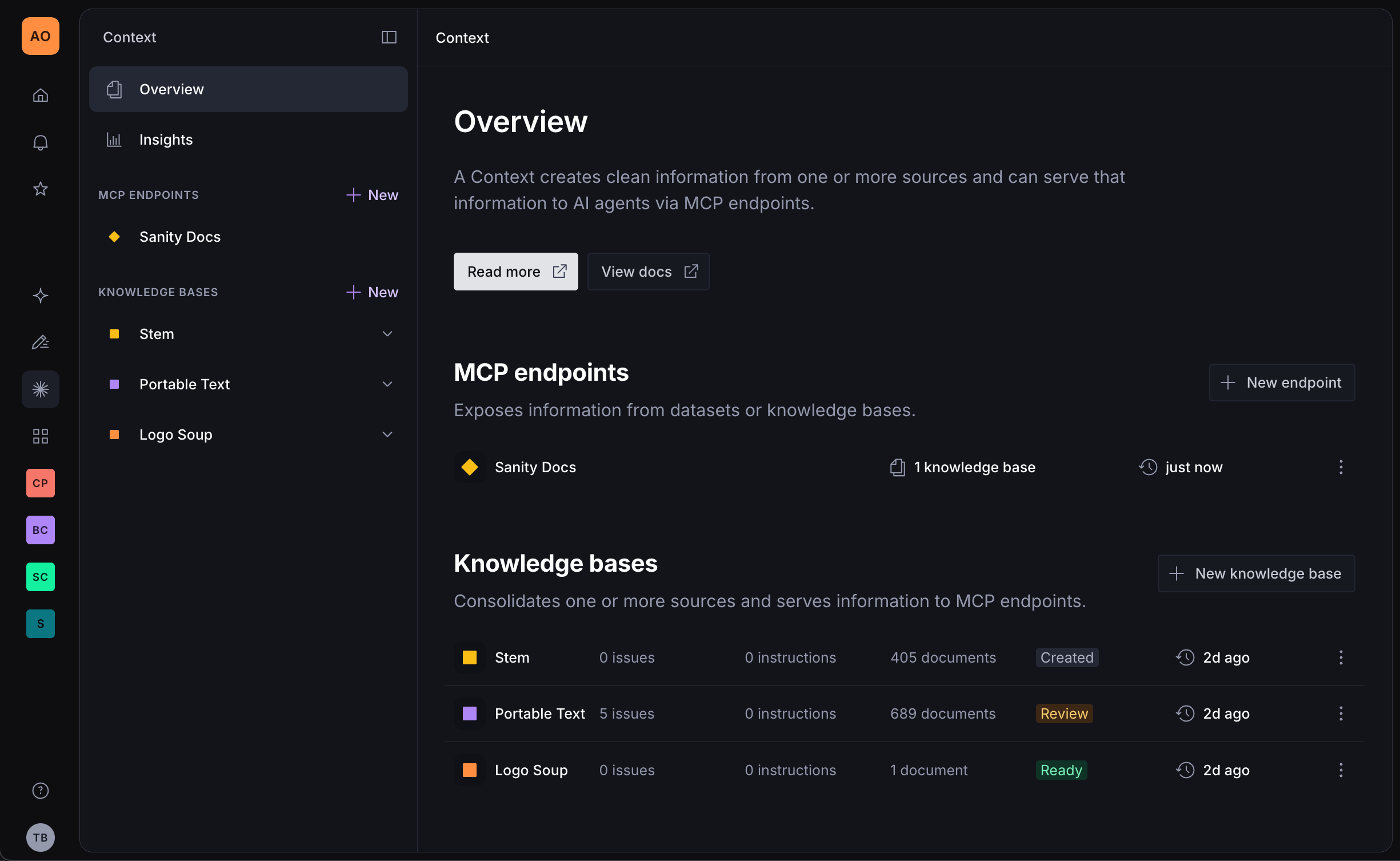
9712:Knowledge Base mode additionally requires at least one Knowledge Base that your token can read.
9718:Context serves content in one of two modes. GROQ mode queries your dataset at request time and suits structured, consistent content the schema can point an agent at. Knowledge Base mode serves an index built ahead of time and suits answers spread across prose from several sources. The mode determines which tools the endpoint serves. See [Context retrieval modes](https://www.sanity.io/docs/ai/sanity-context-retrieval-modes).
9726:At the start of a conversation the agent orients itself through initial context, which is mode-aware: a compressed schema overview in GROQ mode, or the Knowledge Base outline in Knowledge Base mode. If you control the system prompt you can fetch it over HTTP and skip the tool call. See [Inline initial context into your system prompt](https://www.sanity.io/docs/ai/sanity-context-initial-context).
9728:### Knowledge Bases
9730:A Knowledge Base is a pre-built index over material you choose: datasets, websites, uploaded files. A build reads the material ahead of time, resolves conflicts between sources, and writes entries an agent can retrieve directly. See [Knowledge Bases](https://www.sanity.io/docs/ai/sanity-context-knowledge-bases) and [Knowledge Base source types](https://www.sanity.io/docs/ai/sanity-context-source-types). Once a Knowledge Base is live, you [keep it current](https://www.sanity.io/docs/ai/sanity-context-maintain-knowledge-base) and [resolve the issues a build raises](https://www.sanity.io/docs/ai/sanity-context-resolve-issues).
9740:- Knowledge Bases are an opt-in beta feature, and limits may change before general availability. If you are on an Enterprise plan and need higher limits, talk to your Sanity representative.
9872:- [Context retrieval modes](https://www.sanity.io/docs/ai/sanity-context-retrieval-modes). Decide between querying your dataset and building a Knowledge Base.
9879:Sanity Context has two retrieval modes, and they solve different problems. GROQ mode queries your dataset at request time. Knowledge Base mode serves an index built from your material ahead of time. The mode determines which tools Context MCP serves and how an agent finds an answer.
9887:One prerequisite comes with it: an MCP with a dataset source needs a deployed schema for that project and dataset (run `sanity schema deploy` from a Studio on v5.1.0 or later), since that is where the GROQ tools read the schema. An MCP with only Knowledge Base sources doesn't.
9889:## When Knowledge Base mode fits
9891:Use a Knowledge Base when locating the answer is the hard part. "Is this industrial latex food-safe?" may depend on a specification, a compliance memo, and a support article. The pre-generated index gives the agent a strong hypothesis about where the answer lives before it starts reading.
9893:Building from Sanity data also gives you somewhere to apply corrections. When an issue comes from conflicting content, fix the content in the dataset. The next build inherits the correction. See [Knowledge Bases](https://www.sanity.io/docs/ai/sanity-context-knowledge-bases).
9897:Use GROQ mode for tabular data and Knowledge Bases for knowledge. For cases in between, such as a catalog where useful details live in prose fields, enable [dataset embeddings](https://www.sanity.io/docs/content-lake/dataset-embeddings) and stay in GROQ mode. GROQ can then combine structured filters with semantic similarity in the same query.
9899:Enabling embeddings is how you cover that middle ground, not mixing source types. An MCP serves one source type: if you attach both a dataset source and Knowledge Base sources, the dataset source wins and the Knowledge Base sources are ignored. The agent gets the GROQ tools, no way to read the Knowledge Bases, and no error explaining why.
9911:You don't set the mode directly. An MCP's sources determine it: attach a dataset source and the endpoint serves GROQ mode; attach only Knowledge Base sources and it serves Knowledge Base mode. Changing the sources changes what the endpoint serves without touching the agent. To override the mode for a single connection, add `?mode=groq` or `?mode=knowledge_base` to the endpoint URL. See [Configure an MCP](https://www.sanity.io/docs/ai/sanity-context-configure-mcp).
9915:> Because the mode is derived from sources, a source that doesn't resolve changes what the endpoint serves. A dataset source id must be `<projectId>.<datasetName>`; a malformed id is skipped, and an MCP with no other dataset source becomes a Knowledge Base mode endpoint. The GROQ tools are gone, and if there are no Knowledge Base sources either, the connection is refused with `Mode is set to "knowledge_base" but no knowledge bases are configured. Add knowledge-base sources to the MCP endpoint, or switch mode to "groq".`
9921:- [Knowledge Bases](https://www.sanity.io/docs/ai/sanity-context-knowledge-bases). What a Knowledge Base holds and how it gets built.
9938:Initial context is mode-aware. In GROQ mode it returns a compressed schema overview along with instructions on how to query your content. In Knowledge Base mode it returns the outline of the Knowledge Bases the endpoint serves. Both modes also carry query-efficiency and grounding instructions plus a list of the tools the endpoint serves, so the text you inline contains behavioral instructions as well as data. Reconcile them with your own.
10024:An inlined payload is a snapshot. It goes stale when your schema changes in GROQ mode, or when a build rewrites the outline in Knowledge Base mode. Refetch it on deploy at minimum, and after any Knowledge Base rebuild.
10033:# Knowledge Bases
10037:> Knowledge Bases are available as an opt-in beta feature. Features and limits may change before general availability. If you are on an Enterprise plan and need higher limits, talk to your Sanity representative.
10041:A Knowledge Base belongs to an organization and can draw on sources from more than one project. Instead of reading and reconciling sources at query time, a build reads them ahead of time, resolves conflicts, and writes a set of entries an agent can retrieve from directly.
10043:An agent is only as good as the knowledge it can find. Information spread through prose is the hard case (documents in a Sanity dataset, website subfolders, PDFs, and other files). A Knowledge Base raises that ceiling by reconciling it ahead of time rather than on every question. For when to reach for one instead of GROQ mode, see [Context retrieval modes](https://www.sanity.io/docs/ai/sanity-context-retrieval-modes). To build one, see [Create a Knowledge Base](https://www.sanity.io/docs/ai/sanity-context-create-knowledge-base).
10045:An organization admin can enable Context Knowledge Bases from the [Labs page](https://www.sanity.io/manage/org/labs) of your organization in Manage.
10049:Every Knowledge Base has a purpose: one or two sentences describing who it serves and what it should help with. You write it when you create the Knowledge Base, and it works at both ends of the pipeline.
10053:Agents read the purpose too. It heads the outline in initial context, right after the title, so it frames what the Knowledge Base is for before the agent chooses what to read.
10057:The outline is the pre-generated index for a Knowledge Base. It contains every entry path and a one-line summary of what the entry covers. Entries that are more or less central to the purpose carry a `[core]` or `[peripheral]` tag.
10086:Each entry is a Markdown document written from the Knowledge Base's sources, with citations back to the original source.
10088:Entries belong to a build. Every build can rewrite them, and they cannot be edited by hand. To change what a Knowledge Base says, update the source or add an instruction.
10094:A Knowledge Base detects conflicts during the build and raises an issue. The issue shows the claims side by side with where each came from, and you resolve it by choosing which claim is ground truth. Issues also flag structural problems: a topic the outline misses, an entry whose sources are gone, or one that has grown to cover two subjects. You apply those rather than resolving them. Coverage gaps are recorded but not surfaced for review. For how to work through the issues you can act on, see [Resolve Knowledge Base issues](https://www.sanity.io/docs/ai/sanity-context-resolve-issues).
10114:- [Create a Knowledge Base](https://www.sanity.io/docs/ai/sanity-context-create-knowledge-base): build one from your sources and review the result.
10115:- [Knowledge Base source types](https://www.sanity.io/docs/ai/sanity-context-source-types): what datasets, websites, and files each accept.
10116:- [Keep a Knowledge Base current](https://www.sanity.io/docs/ai/sanity-context-maintain-knowledge-base): refresh schedules and rebuilds.
10120:# Knowledge Base source types
10124:> Knowledge Bases are available as an opt-in beta feature. Features and limits may change before general availability. If you are on an Enterprise plan and need higher limits, talk to your Sanity representative.
10128:A Knowledge Base draws on three kinds of source. A dataset source reads documents from a Sanity dataset, a website source crawls from a starting URL, and a file source ingests uploaded documents. One Knowledge Base can combine all three kinds, and it needs at least one source. Dataset and website sources are re-checked on the Knowledge Base's refresh schedule. That schedule is one setting for the whole Knowledge Base rather than a setting per source, and uploaded files are never re-checked.
10134:A Knowledge Base binds one dataset. To point at a different dataset, remove the dataset source and add a new one; the query itself stays editable. Website and file sources can be added repeatedly. A dataset source reads published documents only, and a query that matches nothing is rejected. Connecting one takes a role on the source project that can create datasets, which among the default roles means Administrator or Developer, plus unrestricted read access to the dataset itself. A role whose read grant is filtered to a subset of documents is not enough. One dataset source matches at most 5,000 documents, so narrow the query if you exceed that.
10169:- [Create a Knowledge Base](https://www.sanity.io/docs/ai/sanity-context-create-knowledge-base). Add a source and run the first build.
10170:- [Keep a Knowledge Base current](https://www.sanity.io/docs/ai/sanity-context-maintain-knowledge-base). Which sources refresh, and how often.
10174:# Create a Knowledge Base
10178:> Knowledge Bases are available as an opt-in beta feature. Features and limits may change before general availability. If you are on an Enterprise plan and need higher limits, talk to your Sanity representative.
10182:A Knowledge Base turns material you already have (a dataset, a website, a set of files) into an index an agent can retrieve from. This guide takes you from an empty Knowledge Base to a built one you have reviewed and connected to an agent.
10187:- **Material to build from:** a website, files, or documents in a Sanity dataset. See [Knowledge Base source types](https://www.sanity.io/docs/ai/sanity-context-source-types) for what each accepts.
10188:- **Room on your plan:** your organization's plan caps how many Knowledge Bases it can hold. Creating one beyond that cap fails with a plan-limit error.
10190:## Title the Knowledge Base and write a purpose
10192:In the Sanity Dashboard, open **Context** and click **New knowledge base**. Enter a short, human-readable **Title** such as `Vandelay support`, then a **Purpose** of one or two sentences describing the audience and the job it should help with.
10194:Click **Create knowledge base**. Sanity creates the Knowledge Base and opens it so you can add sources.
10196:The purpose is the starting point for the outline, before Context has read any material. "Customer-facing support Knowledge Base for Vandelay Industries. Covers importing, exporting, product specs, ordering, and returns" gives the build more to work with than "Vandelay docs." The purpose also decides which entries the build tags as core, and agents read it at the head of the outline.
10200:A Knowledge Base needs at least one source. Click **Add source** and choose **Dataset**, **Website**, or **Files**.
10202:For the first build, use a focused set of current material you trust. This makes the result easier to review and leaves stale duplicates out of the build. If the material changes regularly, connect it as a dataset or website source rather than uploading a snapshot. Your organization's plan also caps how many sources a Knowledge Base can hold, enforced when you build.
10212:When the build finishes, open **Entries** to see the tree and what was written. Check that the topics you expected are present and that the summaries describe them accurately. **Issues** contains conflicts and other questions that need a decision. Start with the ones that could change important answers. See [Resolve Knowledge Base issues](https://www.sanity.io/docs/ai/sanity-context-resolve-issues).
10214: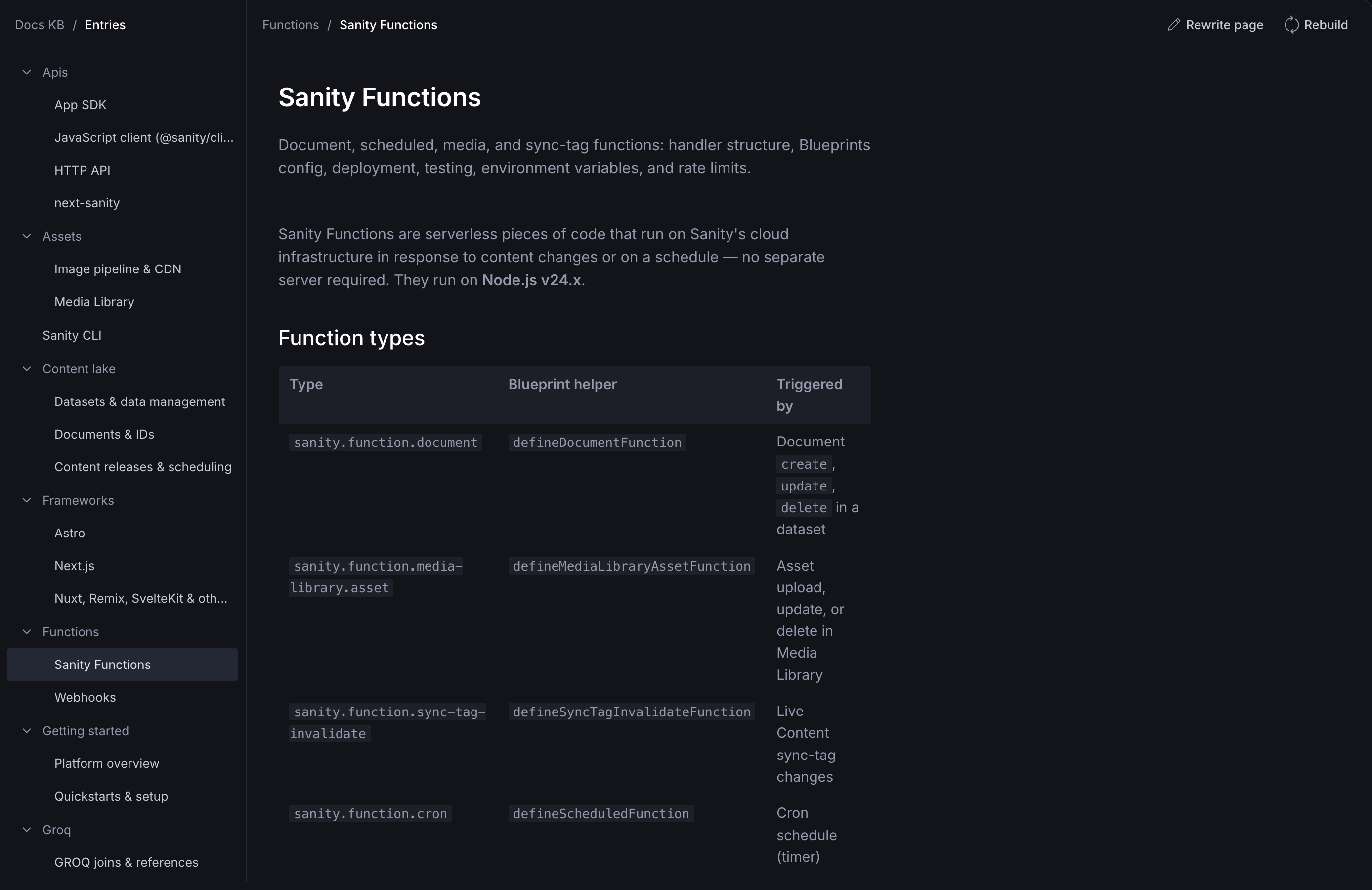
10216:Then test the Knowledge Base through an agent with questions people will actually ask. "What is the return window on bulk orders?" gives you something specific to check. "Tell me about Vandelay" does not.
10218:## Serve a Knowledge Base to an agent
10220:Agents read Knowledge Bases through Context MCP. Two query parameters switch the endpoint to Knowledge Base mode:$ F="$TEMP/sanity-llms-full.txt"; sed -n 9700,9716p "$F"; echo ......; grep -n '^# Configure an MCP' "$F"; L=$(grep -n '^# Configure an MCP' "$F" | head -1 | cut -d: -f1); sed -n "${L},$((L+90))p" "$F"; echo .....; sed -n 10128,10168p "$F"- **Context enabled for your organization.** An organization admin can enable it from the [Labs page](https://www.sanity.io/manage/org/labs) of your organization in Manage.
- **An organization API token with Context Viewer permissions.** Create it under Manage > API > Tokens at the organization level, and keep it server-side. Viewer is the least privilege that works; Editor also works.
- **A model and API key.** Simple schemas and questions work with small, fast models. If the agent picks the wrong tool or writes malformed GROQ, move to a more capable model.
- **Optionally, a frontend application to host the agent.** Next.js, for example.
GROQ mode additionally requires:
- **A Sanity project** with content.
- **Sanity Studio 5.1.0 or later** for server-side schema support.
- **A deployed schema.** Run `sanity schema deploy`, or open your hosted Studio once if you deploy with `sanity deploy`.
Knowledge Base mode additionally requires at least one Knowledge Base that your token can read.
## Core concepts
### Retrieval modes
......
11329:# Configure an MCP
# Configure an MCP
An MCP defines what an agent can access and how it should behave. Configuration lives in the Context app rather than in your agent code, so it's visible to your team, editable by non-developers, and shared across environments. This guide creates one and connects an agent to it.
> [!NOTE]
> Prefer to use AI?
> [Enable the agent skills](https://www.sanity.io/docs/ai/sanity-context-quick-start) to have AI help you configure the Context MCP.
## Prerequisites
Context enabled for your organization, an organization API token with Context Viewer permissions, created under Manage > API > Tokens, and a deployed schema (run `sanity schema deploy`, Studio v5.1.0 or later) if the endpoint has a dataset source. See [Sanity Context](https://www.sanity.io/docs/ai/sanity-context) for the full list.
## Create the MCP
In the Context app in the Dashboard, create an MCP and fill in its fields. For what each field does, see [Context MCP](https://www.sanity.io/docs/ai/sanity-context-mcp). The Context app shows the endpoint URL once you save.
## Scope what the agent can read
A GROQ filter limits which documents the agent can reach in GROQ mode. It accepts a filter expression only — the part inside the `[ ... ]` of a full query, evaluating to true or false for one document at a time.
Three things that don't belong in a filter:
- Projection syntax such as `{ name, price }`. Move projections to the agent's queries instead.
- Ordering or slicing such as `order(...)` or `[0...10]`.
- A full query — anything starting with `*[...]`. Filters nested inside an expression are fine.
An invalid filter is rejected with a 422 and the parser error in the response body.
> [!NOTE]
> A filter that matches nothing looks like a broken connection
> A filter like `_type == "product" && public == true` returns no results if no product has `public: true`. If the agent reports empty results, check the filter before checking the connection.
## Connect an agent to the endpoint
Use the endpoint URL from the Context app to connect an MCP client. This example uses the Vercel AI SDK:
**index.ts**
```typescript
import {createMCPClient} from '@ai-sdk/mcp'
const mcpClient = await createMCPClient({
transport: {
type: 'http',
url: 'https://api.sanity.io/v1/context/organizations/YOUR_ORGANIZATION_ID/mcp/YOUR_ENDPOINT_NAME',
headers: {
Authorization: `Bearer ${process.env.SANITY_ORGANIZATION_TOKEN}`,
},
},
})
```
Replace YOUR_ORGANIZATION_ID with your organization id and YOUR_ENDPOINT_NAME with the endpoint's name, which is chosen when you create the MCP and cannot be changed afterwards. SANITY_ORGANIZATION_TOKEN is the organization API token from your prerequisites; keep it server-side, since it carries organization-level permissions.
Verify the connection by listing the available tools:
**index.ts**
```typescript
const tools = await mcpClient.tools()
console.log(tools)
```
For an endpoint with a dataset source, the list includes `initial_context` and `groq_query`. If a tool is missing, check the endpoint's mode and any tools parameter: each tool is served only in the mode it belongs to, and a tools parameter narrows the list further. For the full tool list per mode, see [Context MCP tools](https://www.sanity.io/docs/ai/sanity-context-mcp-tools).
There are dedicated connect guides for the [Vercel AI SDK](https://www.sanity.io/docs/ai/sanity-context-vercel-ai-sdk), [OpenAI Agents SDK](https://www.sanity.io/docs/ai/sanity-context-openai-agents-sdk), and [LangChain](https://www.sanity.io/docs/ai/sanity-context-langchain).
## Next steps
- [Content access and security](https://www.sanity.io/docs/ai/sanity-context-security). How the token and the filter bound what an agent reads.
- [Context MCP tools](https://www.sanity.io/docs/ai/sanity-context-mcp-tools). Every tool the endpoint serves, by mode.
# Context MCP reference
Context MCP is the hosted Model Context Protocol server behind Sanity Context. It gives agents structured, read-only access to your content: in GROQ mode, the schema and the documents your configuration allows; in Knowledge Base mode, the Knowledge Bases you choose to serve. It doesn't run the agent loop itself, and it can't write back to your dataset; see [Mutations](https://www.sanity.io/docs/ai/sanity-context-mcp). To connect your first agent, start with [Sanity Context](https://www.sanity.io/docs/ai/sanity-context).
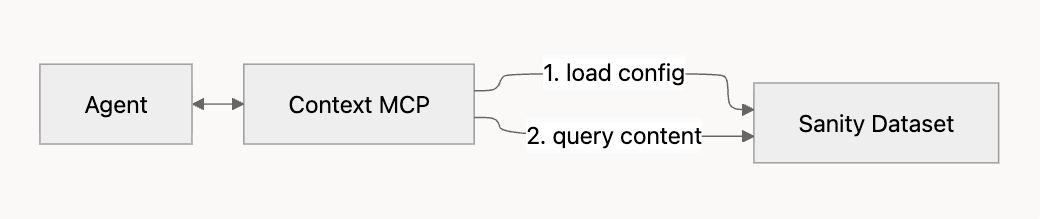
## MCP configuration fields
An MCP defines what an agent can access and how it should behave. You create and manage MCPs in the Context app in the Dashboard; see [Configure an MCP](https://www.sanity.io/docs/ai/sanity-context-configure-mcp) for the procedure. Each MCP has the following fields:
- **title**. Required. A short, human-readable title for the endpoint, up to 100 characters. Shown only in the Context app, and freely editable.
- **name**. Required. The identifier the endpoint URL uses. Lowercase letters, numbers, and hyphens only, up to 64 characters, unique within your organization, and immutable after creation. Set it to something short and stable, like `support-bot`. Two shapes are reserved and rejected: `by-name`, and any name of the form `mcp` plus eight characters.
- **sources**. Required. What the endpoint serves: between 1 and 100 entries. A Knowledge Base source is `{"type": "knowledge-base", "id": "KNOWLEDGE_BASE_ID"}`, where `KNOWLEDGE_BASE_ID` is the Knowledge Base's public id. Public ids begin with `kb` and are not derived from anything else. A dataset source is `{"type": "dataset", "id": "PROJECT_ID.DATASET_NAME"}`. If an endpoint has both, the dataset source wins and knowledge-base sources are ignored.
- **instructions**. Optional. Custom instructions for the agent, in plain language, up to 10,000 characters. For example: "Only answer questions about product documentation; for anything else, suggest contacting support."
- **groqFilter**. Optional. A GROQ filter expression, up to 10,000 characters, that limits which documents the agent can read. It scopes dataset sources only. See [Filtering content](https://www.sanity.io/docs/ai/sanity-context-mcp).
There is no `mode` field and no `knowledgeBases` field. An endpoint's mode is derived from its sources: an endpoint with a dataset source serves GROQ mode, and an endpoint whose sources are all Knowledge Bases serves Knowledge Base mode. To change it for a single request, pass `?mode=` on the endpoint URL.
.....
A Knowledge Base draws on three kinds of source. A dataset source reads documents from a Sanity dataset, a website source crawls from a starting URL, and a file source ingests uploaded documents. One Knowledge Base can combine all three kinds, and it needs at least one source. Dataset and website sources are re-checked on the Knowledge Base's refresh schedule. That schedule is one setting for the whole Knowledge Base rather than a setting per source, and uploaded files are never re-checked.
## Dataset sources
Documents from a Sanity dataset, selected with a complete GROQ query such as `*[_type == "article"]`. Add a projection to control what each document carries, as in `*[_type == "article"]{title, body}`. The query has to select documents from the dataset, so a bare filter such as `_type == "article"` is rejected. Start with a narrow query; you can widen it later.
A Knowledge Base binds one dataset. To point at a different dataset, remove the dataset source and add a new one; the query itself stays editable. Website and file sources can be added repeatedly. A dataset source reads published documents only, and a query that matches nothing is rejected. Connecting one takes a role on the source project that can create datasets, which among the default roles means Administrator or Developer, plus unrestricted read access to the dataset itself. A role whose read grant is filtered to a subset of documents is not enough. One dataset source matches at most 5,000 documents, so narrow the query if you exceed that.
## Website sources
A crawl starting from a URL. Crawls respect `robots.txt`. Use the most specific URL you can. A docs section is usually more useful than a whole domain.
## File sources
Uploaded files never re-sync. To update one, delete the import and upload the new version; deleting an import removes every source it produced. Archives are expanded and their contents ingested individually, each by its own format.
A file source reads the formats below, subject to the size limits shown.
##### File formats and size limits
| Format | Maximum size |
| --- | --- |
| PDF | 500 MB |
| DOCX | 100 MB |
| PPTX | 100 MB |
| XLSX | 50 MB |
| HTML | 25 MB |
| PNG, JPEG, WebP, TIFF | 25 MB. Images under 50 KB skip text extraction. |
| AsciiDoc | 25 MB |
| Markdown, plain text | Ingested directly |
| Source code, JSON, XML, CSV, TSV, YAML, and other plain-text formats | Ingested verbatim |
| ZIP, TAR, and TAR.GZ archives | Expanded, then each file ingested by its own format |
Around forty further text formats are ingested verbatim in the same way, so the table is not the full list of what a file source reads. A file in a format with no handler is not rejected: it is recorded with its metadata, but its contents are not read. Every upload is capped at 5 GiB, and for the formats listed above the per-format limit applies first.
## Choosing between connecting and uploading
If the material changes regularly, connect it as a dataset or website source rather than uploading a snapshot. Uploads are right for material that is fixed, or that has no addressable source, such as a signed policy PDF or an export from a system Context cannot reach.
## Next steps$ cd /c/Users/user/Desktop/sanity_challenge/studio/schemaTypes
cat > allergen.ts <<'EOF'
import {defineField, defineType} from 'sanity'
// The 14 allergens of EU Regulation 1169/2011 Annex II. Codes are stable identifiers the app and agent filter on.
export const allergen = defineType({
name: 'allergen',
title: 'Allergen',
type: 'document',
fields: [
defineField({name: 'name', type: 'string', validation: (r) => r.required()}),
defineField({
name: 'code',
type: 'string',
description: 'Stable lowercase id, e.g. "gluten", "tree-nuts". Used in filters.',
validation: (r) => r.required().regex(/^[a-z-]+$/),
}),
defineField({name: 'annexNumber', title: 'EU Annex II number', type: 'number', validation: (r) => r.required().min(1).max(14).integer()}),
defineField({name: 'icon', type: 'string', description: 'Single emoji shown on menu badges'}),
defineField({
name: 'alsoKnownAs',
type: 'array',
of: [{type: 'string'}],
description: 'Names guests use for this allergen or its sources (e.g. "spelt", "semolina" for gluten)',
options: {layout: 'tags'},
}),
defineField({name: 'description', type: 'text', rows: 3}),
],
orderings: [{title: 'Annex order', name: 'annex', by: [{field: 'annexNumber', direction: 'asc'}]}],
preview: {select: {title: 'name', icon: 'icon', n: 'annexNumber'}, prepare: ({title, icon, n}) => ({title: `${icon ?? ''} ${title}`, subtitle: `Annex II #${n}`})},
})
EOF
cat > ingredient.ts <<'EOF'
import {defineField, defineType} from 'sanity'
export const ANIMAL_ORIGIN = [
{title: 'None (plant / mineral)', value: 'none'},
{title: 'Dairy', value: 'dairy'},
{title: 'Egg', value: 'egg'},
{title: 'Honey', value: 'honey'},
{title: 'Meat', value: 'meat'},
{title: 'Fish', value: 'fish'},
{title: 'Shellfish', value: 'shellfish'},
]
export const ingredient = defineType({
name: 'ingredient',
title: 'Ingredient',
type: 'document',
fields: [
defineField({name: 'name', type: 'string', validation: (r) => r.required()}),
defineField({name: 'slug', type: 'slug', options: {source: 'name'}, validation: (r) => r.required()}),
defineField({
name: 'allergens',
title: 'Contains allergens',
type: 'array',
of: [{type: 'reference', to: [{type: 'allergen'}]}],
description: 'Allergens this ingredient itself contains. Leave empty if none.',
}),
defineField({
name: 'mayContain',
title: 'Supplier "may contain"',
type: 'array',
of: [{type: 'reference', to: [{type: 'allergen'}]}],
description: 'Precautionary allergen labelling from the supplier spec sheet (cross-contact at the factory).',
}),
defineField({
name: 'animalOrigin',
type: 'string',
options: {list: ANIMAL_ORIGIN, layout: 'radio'},
initialValue: 'none',
validation: (r) => r.required(),
description: 'Drives vegan / vegetarian / pescatarian verdicts.',
}),
defineField({name: 'supplier', type: 'string'}),
defineField({name: 'notes', type: 'text', rows: 2}),
],
preview: {
select: {title: 'name', a0: 'allergens.0.name', a1: 'allergens.1.name', a2: 'allergens.2.name'},
prepare: ({title, a0, a1, a2}) => ({title, subtitle: [a0, a1, a2].filter(Boolean).join(', ') || 'No allergens'}),
},
})
EOF
cat > equipment.ts <<'EOF'
import {defineField, defineType} from 'sanity'
// Shared equipment is how cross-contact enters a dish whose own ingredients are clean
// (the classic case: gluten-free fries cooked in the same oil as battered fish).
export const equipment = defineType({
name: 'equipment',
title: 'Equipment / station',
type: 'document',
fields: [
defineField({name: 'name', type: 'string', validation: (r) => r.required()}),
defineField({
name: 'shared',
type: 'boolean',
initialValue: true,
description: 'Shared equipment passes the allergens of everything cooked on it to everything else cooked on it.',
}),
defineField({name: 'notes', type: 'text', rows: 2}),
],
})
EOF
cat > component.ts <<'EOF'
import {defineField, defineType} from 'sanity'
// A sub-recipe: sauce, bread, dressing, garnish. Dishes are assembled from components.
// Nesting is capped at one level (a component may use components that themselves use none)
// so every allergen roll-up is a fixed-depth GROQ projection.
export const component = defineType({
name: 'component',
title: 'Component (sub-recipe)',
type: 'document',
fields: [
defineField({name: 'name', type: 'string', validation: (r) => r.required()}),
defineField({name: 'slug', type: 'slug', options: {source: 'name'}, validation: (r) => r.required()}),
defineField({
name: 'ingredients',
type: 'array',
of: [{type: 'reference', to: [{type: 'ingredient'}]}],
validation: (r) => r.required().min(1),
}),
defineField({
name: 'subComponents',
type: 'array',
of: [{type: 'reference', to: [{type: 'component'}]}],
description: 'Other components used inside this one (one level deep only).',
validation: (r) =>
r.custom(async (value, context) => {
if (!value?.length) return true
const client = context.getClient({apiVersion: '2026-03-03'})
const ids = (value as {_ref: string}[]).map((v) => v._ref)
const nested = await client.fetch<number>('count(*[_id in $ids && count(subComponents) > 0])', {ids})
return nested === 0 || 'Sub-components cannot have their own sub-components (max one level).'
}),
}),
defineField({
name: 'preparedOn',
type: 'array',
of: [{type: 'reference', to: [{type: 'equipment'}]}],
description: 'Equipment/stations this component touches. Drives cross-contact.',
}),
defineField({name: 'notes', type: 'text', rows: 2}),
],
})
EOF
cat > dish.ts <<'EOF'
import {defineArrayMember, defineField, defineType} from 'sanity'
export const MENU_SECTIONS = [
{title: 'Small plates', value: 'small-plates'},
{title: 'Mains', value: 'mains'},
{title: 'Sides', value: 'sides'},
{title: 'Desserts', value: 'desserts'},
{title: 'Kids', value: 'kids'},
]
export const dish = defineType({
name: 'dish',
title: 'Dish',
type: 'document',
fields: [
defineField({name: 'name', type: 'string', validation: (r) => r.required()}),
defineField({name: 'slug', type: 'slug', options: {source: 'name'}, validation: (r) => r.required()}),
defineField({name: 'section', type: 'string', options: {list: MENU_SECTIONS}, validation: (r) => r.required()}),
defineField({name: 'price', title: 'Price (EUR)', type: 'number', validation: (r) => r.required().positive()}),
defineField({name: 'description', type: 'text', rows: 2}),
defineField({name: 'available', type: 'boolean', initialValue: true}),
defineField({name: 'spiceLevel', type: 'number', options: {list: [0, 1, 2, 3]}, initialValue: 0}),
defineField({
name: 'components',
type: 'array',
validation: (r) => r.required().min(1),
of: [
defineArrayMember({
name: 'dishComponent',
type: 'object',
fields: [
defineField({name: 'component', type: 'reference', to: [{type: 'component'}], validation: (r) => r.required()}),
defineField({
name: 'removable',
type: 'boolean',
initialValue: false,
description: 'Kitchen can leave this off on request without remaking the dish.',
}),
],
preview: {
select: {title: 'component.name', removable: 'removable'},
prepare: ({title, removable}) => ({title, subtitle: removable ? 'Can be left off' : 'Fixed'}),
},
}),
],
}),
defineField({
name: 'substitutions',
type: 'array',
description: 'Swaps the kitchen supports, e.g. brioche bun -> gluten-free bun.',
of: [
defineArrayMember({
name: 'substitution',
type: 'object',
fields: [
defineField({name: 'replaces', type: 'reference', to: [{type: 'component'}], validation: (r) => r.required()}),
defineField({name: 'with', type: 'reference', to: [{type: 'component'}], validation: (r) => r.required()}),
defineField({name: 'surcharge', title: 'Surcharge (EUR)', type: 'number', initialValue: 0}),
],
preview: {
select: {a: 'replaces.name', b: 'with.name', s: 'surcharge'},
prepare: ({a, b, s}) => ({title: `${a} → ${b}`, subtitle: s ? `+€${s}` : 'No charge'}),
},
}),
],
}),
],
preview: {select: {title: 'name', section: 'section', price: 'price'}, prepare: ({title, section, price}) => ({title, subtitle: `${section} · €${price}`})},
})
EOF
cat > guidanceArticle.ts <<'EOF'
import {defineField, defineType} from 'sanity'
// Prose knowledge (kitchen procedures, policies, definitions). Indexed into the
// Knowledge Base via a dataset source; deliberately excluded from the GROQ-mode menu endpoint.
export const guidanceArticle = defineType({
name: 'guidanceArticle',
title: 'Guidance article',
type: 'document',
fields: [
defineField({name: 'title', type: 'string', validation: (r) => r.required()}),
defineField({name: 'slug', type: 'slug', options: {source: 'title'}, validation: (r) => r.required()}),
defineField({
name: 'category',
type: 'string',
options: {list: ['kitchen-procedure', 'policy', 'allergen-reference', 'supplier-spec']},
validation: (r) => r.required(),
}),
defineField({name: 'body', type: 'text', rows: 20, description: 'Markdown', validation: (r) => r.required()}),
],
})
EOF
cat > index.ts <<'EOF'
import {allergen} from './allergen'
import {component} from './component'
import {dish} from './dish'
import {equipment} from './equipment'
import {guidanceArticle} from './guidanceArticle'
import {ingredient} from './ingredient'
export const schemaTypes = [dish, component, ingredient, allergen, equipment, guidanceArticle]
EOF
lsExit code 2
/usr/bin/bash: -c: line 167: unexpected EOF while looking for matching `''<task-notification>
<task-id>ac78a8f7d51fccdff</task-id>
<tool-use-id>toolu_016vJSdtnAdcgxSCfBn6DNkJ</tool-use-id>
<output-file>[REDACTED]\AppData\Local\Temp\claude\C--Users-user-Desktop-sanity-challenge\23523501-313e-42ee-84b3-7aed61500188\tasks\ac78a8f7d51fccdff.output</output-file>
<status>completed</status>
<summary>Agent "Seed data + guidance articles" finished</summary>
<note>A task-notification fires each time this agent stops with no live background children of its own. The user can send it another message and resume it, so the same task-id may notify more than once.</note>
<result>The seed data is written and the offline validator passes. seed.ts hasn't run yet; it needs the Sanity project and a write token first.
Files (all under studio/scripts/):
- data/: helpers.ts, allergens.ts, ingredients.ts, equipment.ts, components.ts, dishes.ts, guidance.ts, index.ts (exports allDocuments in the order they must be seeded)
- seed.ts: idempotent createOrReplace, written in chunks of 100, with a clear error if env vars are missing
- validate-data.ts: runs offline
Counts: 196 documents in total.
| Type | Count |
|---|---|
| Allergens | 14 |
| Ingredients | 87 |
| Equipment | 8 (Fryer 1 shared, Fryer 2 dedicated, grill, plancha, bread oven, GF toaster, pastry bench, cold prep) |
| Components | 51 |
| Dishes | 25, across all 5 sections |
| Guidance articles | 11, each 200–600 words with a fictional-demo disclaimer |
I went over your targets on components (~30–35) and dishes (20–24). The extra halloumi salad puts the orphaned za'atar, capers and dressing to use.
Teaching cases:
- Honey: charred-cauliflower is vegan only if the harissa dressing comes off.
- Hidden nuts: flame-grilled-vegetables has romesco (tree nuts, plus gluten and sulphites).
- Croutons: ember-caesar is gluten-free only with the croutons removed.
- Supplier may-contain: vegan-chocolate-pot may contain milk and tree nuts (dark chocolate) and gluten (oat crumble).
- Unavailable: garlic-prawns.
- Shared fryer: plain fries have clean ingredients but pick up gluten, fish, molluscs, milk and eggs in Fryer 1.
- More hidden sources:
- falafel has a wheat binder.
- rice-pilaf uses chicken stock, so it isn't vegetarian.
- slow-roast-lamb-shoulder has fish and gluten from Worcestershire.
- The gluten-free flatbread swap contains lupin.
Validation: all references resolve, keys and slugs are unique, nesting stays at one level, and every substitution matches a component in its dish. No orphans remain. The data modules type-check under tsc --strict.
One deviation from your directive: IDs use hyphens (allergen-gluten), not dots. A dotted ID sits under a path in Sanity and is hidden from unauthenticated reads, which would break the public dataset.
Schema: no changes.</result>
<usage><subagent_tokens>176739</subagent_tokens><tool_uses>19</tool_uses><duration_ms>496009</duration_ms></usage>
</task-notification>
$ curl -s "http://localhost:3100/api/dish/fries?avoid=gluten" | head -c 1500; echo; tail -5 "$TEMP/nextdev.log"{"dish":{"_id":"dish-fries","available":true,"components":[{"_key":"plain-fries","component":{"_id":"component-plain-fries","ingredients":[{"_id":"ingredient-potato","allergens":[],"animalOrigin":"none","mayContain":[],"name":"Maris Piper potatoes"},{"_id":"ingredient-sunflower-oil","allergens":[],"animalOrigin":"none","mayContain":[],"name":"Sunflower oil (fryer oil)"},{"_id":"ingredient-salt","allergens":[],"animalOrigin":"none","mayContain":[],"name":"Sea salt"}],"name":"Fries","preparedOn":[{"_id":"equipment-fryer-1","name":"Fryer 1 (shared)","shared":true,"sharedWith":[{"_id":"component-chicken-goujons","allergens":["gluten","eggs"],"name":"Chicken goujons","subAllergens":[]},{"_id":"component-crispy-battered-cod","allergens":["fish","gluten"],"name":"Crispy battered cod","subAllergens":[]},{"_id":"component-crispy-calamari","allergens":["molluscs","gluten","gluten"],"name":"Crispy calamari","subAllergens":[]},{"_id":"component-falafel","allergens":["gluten"],"name":"Falafel","subAllergens":[]},{"_id":"component-halloumi-fries","allergens":["milk"],"name":"Halloumi fries","subAllergens":[]},{"_id":"component-plain-fries","allergens":[],"name":"Fries","subAllergens":[]}]}],"slug":"plain-fries","subComponents":[]},"removable":false}],"description":"Skin-on fries, sea salt.","name":"Fries","price":4.5,"section":"sides","slug":"fries","spiceLevel":0,"substitutions":[{"_key":"plain-fries--gluten-free-fries","replaces":{"_id":"component-plain-fries","name":"Fries"},"surcharge"
GET /api/dish/flame-grilled-vegetables?avoid=tree-nuts 200 in 175ms (next.js: 3ms, application-code: 173ms)
GET /api/dish/charred-cauliflower?diet=vegan 200 in 138ms (next.js: 2ms, application-code: 136ms)
GET /api/dish/vegan-chocolate-pot?avoid=milk 200 in 122ms (next.js: 8ms, application-code: 114ms)
GET /api/dish/rice-pilaf?diet=vegetarian 200 in 84ms (next.js: 2.0ms, application-code: 82ms)
GET /api/dish/fries?avoid=gluten 200 in 195ms (next.js: 11ms, application-code: 183ms)$ for q in "fries?avoid=gluten" "ember-caesar?avoid=gluten" "flame-grilled-vegetables?avoid=tree-nuts" "charred-cauliflower?diet=vegan" "vegan-chocolate-pot?avoid=milk" "rice-pilaf?diet=vegetarian"; do echo "== $q"; curl -s "http://localhost:3100/api/dish/$q" | node -e 'let s="";process.stdin.on("data",d=>s+=d).on("end",()=>{const j=JSON.parse(s);const {dish,...rest}=j;console.log(JSON.stringify(rest).slice(0,600))})'; done== fries?avoid=gluten
{"evaluation":{"contains":[],"mayContain":[],"crossContact":[{"allergen":"eggs","equipment":"Fryer 1 (shared)","from":["Chicken goujons"]},{"allergen":"fish","equipment":"Fryer 1 (shared)","from":["Crispy battered cod"]},{"allergen":"gluten","equipment":"Fryer 1 (shared)","from":["Chicken goujons","Crispy battered cod","Crispy calamari","Falafel"]},{"allergen":"milk","equipment":"Fryer 1 (shared)","from":["Halloumi fries"]},{"allergen":"molluscs","equipment":"Fryer 1 (shared)","from":["Crispy calamari"]}],"dietIssues":[],"verdict":"safe-with-changes","hits":{"contains":[],"mayContain":[],"cros
== ember-caesar?avoid=gluten
{"evaluation":{"contains":["eggs","fish","gluten","milk","mustard"],"mayContain":[],"crossContact":[{"allergen":"sesame","equipment":"Bread oven","from":["Brioche bun"]}],"dietIssues":[],"verdict":"safe-with-changes","hits":{"contains":["gluten"],"mayContain":[],"crossContact":[]},"fixes":[{"type":"remove","component":"Sourdough croutons"}],"afterFixes":{"contains":["eggs","fish","milk","mustard"],"mayContain":[],"crossContact":[],"dietIssues":[],"hits":{"contains":[],"mayContain":[],"crossContact":[]}}},"preferences":{"avoid":["gluten"],"diet":null}}
== flame-grilled-vegetables?avoid=tree-nuts
{"evaluation":{"contains":["gluten","milk","sulphites","tree-nuts"],"mayContain":[],"crossContact":[],"dietIssues":[],"verdict":"safe-with-changes","hits":{"contains":["tree-nuts"],"mayContain":[],"crossContact":[]},"fixes":[{"type":"remove","component":"House red pepper sauce (romesco)"}],"afterFixes":{"contains":["milk"],"mayContain":[],"crossContact":[],"dietIssues":[],"hits":{"contains":[],"mayContain":[],"crossContact":[]}}},"preferences":{"avoid":["tree-nuts"],"diet":null}}
== charred-cauliflower?diet=vegan
{"evaluation":{"contains":["sesame"],"mayContain":["peanuts"],"crossContact":[{"allergen":"milk","equipment":"Charcoal grill","from":["Chicken shish","Grilled halloumi"]}],"dietIssues":[{"ingredient":"Wildflower honey","component":"Harissa dressing","animalOrigin":"honey"}],"verdict":"safe-with-changes","hits":{"contains":[],"mayContain":[],"crossContact":[]},"fixes":[{"type":"remove","component":"Harissa dressing"}],"afterFixes":{"contains":["sesame"],"mayContain":["peanuts"],"crossContact":[{"allergen":"milk","equipment":"Charcoal grill","from":["Chicken shish","Grilled halloumi"]}],"dietIss
== vegan-chocolate-pot?avoid=milk
{"evaluation":{"contains":["soybeans"],"mayContain":["gluten","milk","tree-nuts"],"crossContact":[],"dietIssues":[],"verdict":"caution","hits":{"contains":[],"mayContain":["milk"],"crossContact":[]},"fixes":[]},"preferences":{"avoid":["milk"],"diet":null}}
== rice-pilaf?diet=vegetarian
{"evaluation":{"contains":["celery","milk"],"mayContain":[],"crossContact":[],"dietIssues":[{"ingredient":"Chicken stock","component":"Rice pilaf","animalOrigin":"meat"}],"verdict":"unsafe","hits":{"contains":[],"mayContain":[],"crossContact":[]},"fixes":[]},"preferences":{"avoid":[],"diet":"vegetarian"}}The source and filter are right. The Instructions box is still empty; fill it in before creating the endpoint.
Your steps
- Paste this into Instructions:
This dataset is the allergen graph of Olive & Ember, a (fictional) Mediterranean grill. A dish is assembled from components[] (each {component->, removable}); a component has ingredients[]-> and at most one level of subComponents[]->; an ingredient has allergens[]-> and mayContain[]-> (supplier precautionary labelling) and animalOrigin (none|dairy|egg|honey|meat|fish|shellfish). Allergens are the 14 EU Annex II allergens; always filter on allergen.code (gluten, crustaceans, eggs, fish, peanuts, soybeans, milk, tree-nuts, celery, mustard, sesame, sulphites, lupin, molluscs). A dish's allergens = allergens of its components' ingredients PLUS the ingredients of their subComponents. Never judge from names or descriptions. Cross-contact: a component's preparedOn[]-> equipment with shared == true exposes it to the allergens of every other component prepared on that equipment: *[_type == "component" && references($equipmentId)]. dish.substitutions[] ({replaces->, with->, surcharge}) and removable components are the only modifications the kitchen supports. Only recommend dishes with available == true. - Optional: click Preview to check that the filter returns documents.
- Click Create endpoint.
- Copy the endpoint URL into
.envasSANITY_CONTEXT_MENU_MCP_URL=, then say "menu done".
Where things stand
- Knowledge Base: building, or ready to build
-
menuendpoint: form filled except for Instructions - Next: I test the
menuendpoint as soon as its URL is in.env
$ cd /c/Users/user/Desktop/sanity_challenge; set -a; . ./.env; set +a; echo "URL: $SANITY_CONTEXT_MENU_MCP_URL"; H=(-H "Authorization: Bearer $SANITY_ORGANIZATION_TOKEN" -H "Content-Type: application/json" -H "Accept: application/json, text/event-stream")
echo "== tools/list"; curl -s -X POST "$SANITY_CONTEXT_MENU_MCP_URL" "${H[@]}" -d '{"jsonrpc":"2.0","method":"tools/list","id":1}' | grep -oE '"name":"[a-z_]+"' | sort -u
echo "== initial-context"; curl -s -w "\n[%{http_code}]" "${SANITY_CONTEXT_MENU_MCP_URL%/}/initial-context" -H "Authorization: Bearer $SANITY_ORGANIZATION_TOKEN" | head -c 1500URL: https://api.sanity.io/v1/context/organizations/o9gofjii1/mcp/menu
== tools/list
"name":"array_field_reader"
"name":"groq_query"
"name":"initial_context"
"name":"schema_explorer"
== initial-context
## Olive & Ember menu graph: Context & Schema
### Context Instructions
This dataset is the allergen graph of Olive & Ember, a (fictional) Mediterranean grill.
A dish is assembled from components[] (each {component->, removable}); a component has ingredients[]-> and at most one level of subComponents[]->; an ingredient has allergens[]-> and mayContain[]-> (supplier precautionary labelling) and animalOrigin (none|dairy|egg|honey|meat|fish|shellfish).
Allergens are the 14 EU Annex II allergens; always filter on allergen.code (gluten, crustaceans, eggs, fish, peanuts, soybeans, milk, tree-nuts, celery, mustard, sesame, sulphites, lupin, molluscs).
A dish's allergens = allergens of its components' ingredients PLUS the ingredients of their subComponents. Never judge from names or descriptions.
Cross-contact: a component's preparedOn[]-> equipment with shared == true exposes it to the allergens of every other component prepared on that equipment: *[_type == "component" && references($equipmentId)].
dish.substitutions[] ({replaces->, with->, surcharge}) and removable components are the only modifications the kitchen supports.
Only recommend dishes with available == true.
### Efficiency
Prefer well-constructed queries over multiple exploratory calls.
### Accuracy
Only state what the data explicitly says. Don't infer, extrapolate, or connect dots that aren't there. Every claim should be grounded in content you retrieved.
If your query results are incomplete:
- Answer with what y$ cd /c/Users/user/Desktop/sanity_challenge/app; npx tsc --noEmit && echo TSC_OK; : > "$TEMP/nextdev.log"; time curl -s -N -X POST http://localhost:3100/api/chat -H "Content-Type: application/json" --data @"$TEMP/chat1.json" --max-time 240 > "$TEMP/chat1.out"
cat > "$TEMP/show.js" <<'EOF'
const lines=require("fs").readFileSync(process.argv[2],"utf8").split("\n").filter(l=>l.startsWith("data: {"));
let text="";for(const l of lines){const e=JSON.parse(l.slice(6));
if(e.type==="tool-input-available")console.log("TOOL",e.toolName,JSON.stringify(e.input).slice(0,300));
else if(e.type==="tool-output-available")console.log(" ->",JSON.stringify(e.output).slice(0,200));
else if(e.type==="tool-output-error"||e.type==="error")console.log("ERR",JSON.stringify(e).slice(0,300));
else if(e.type==="text-delta")text+=e.delta;}
console.log("\n--- ANSWER ---\n"+text);
EOF
node "$TEMP/show.js" "$TEMP/chat1.out"; grep -a -oE "\[model\][^\n]*|AI_APICallError: [^.]*" "$TEMP/nextdev.log" | sort | uniq -c | headTSC_OK
real 2m30.425s
user 0m0.000s
sys 0m0.000s
TOOL menu_groq_query {"queries":["*[_type == \"dish\" && available != false]{\n name, \"slug\": slug.current, section, price,\n \"contains\": array::unique(\n coalesce(components[].component->ingredients[]->allergens[]->code, [])\n + coalesce(components[].component->subComponents[]->ingredients[]->allergens[]->c
-> {"content":[{"type":"text","text":"MCP error -32602: Input validation error: Invalid arguments for tool groq_query: Invalid input: expected string, received undefined at query"}],"isError":true}
TOOL menu_groq_query {"query":"*[_type == \"dish\" && available != false]{\n name, \"slug\": slug.current, section, price,\n \"contains\": array::unique(\n coalesce(components[].component->ingredients[]->allergens[]->code, [])\n + coalesce(components[].component->subComponents[]->ingredients[]->allergens[]->code
-> {"content":[{"type":"text","text":"{\"meta\":{\"executedQuery\":\"*[_type != \\\"sanity.agentContext\\\" && (_type in [\\\"dish\\\", \\\"component\\\", \\\"ingredient\\\", \\\"allergen\\\", \\\"equipm
TOOL menu_groq_query {"query":"*[_type == \"dish\" && slug.current in [\"fries\", \"charred-cauliflower\", \"chicken-shish\", \"cod-and-chips\", \"ember-burger\", \"ember-caesar\", \"grilled-halloumi-salad\", \"lamb-kofta\", \"plancha-sea-bass\", \"slow-roast-lamb-shoulder\"]]{\n name,\n \"slug\": slug.current,\n sec
-> {"content":[{"type":"text","text":"{\"meta\":{\"executedQuery\":\"*[_type != \\\"sanity.agentContext\\\" && (_type in [\\\"dish\\\", \\\"component\\\", \\\"ingredient\\\", \\\"allergen\\\", \\\"equipm
TOOL menu_groq_query {"query":"*[_type == \"component\" && slug.current in [\"plain-fries\", \"gluten-free-fries\"] || name match \"fries\"]{\n name,\n \"slug\": slug.current,\n \"equipment\": preparedOn[]->{name, shared, \"sharedWith\": *[_type == \"component\" && references(^._id)]{name, \"allergens\": ingredients[
-> {"content":[{"type":"text","text":"{\"meta\":{\"executedQuery\":\"*[_type != \\\"sanity.agentContext\\\" && (_type in [\\\"dish\\\", \\\"component\\\", \\\"ingredient\\\", \\\"allergen\\\", \\\"equipm
--- ANSWER ---
### House Fries & Cross-Contact
The standard **Fries** are made from gluten-free ingredients (potatoes, oil, salt), but they are cooked in **Fryer 1 (shared)** alongside gluten-containing items like chicken goujons, falafel, and battered fish.
However, we offer a dedicated **Gluten-free fries** substitution prepared in **Fryer 2 (dedicated gluten-free)** with zero surcharge.
::dish{slug="fries"}
---
### Mains Safe for Coeliac
Here are the mains that are naturally gluten-free or can be adapted safely:
#### Naturally Gluten-Free Mains (No Gluten Ingredients or Fryer Cross-Contact)
::dish{slug="charred-cauliflower"}
*Naturally gluten-free (cauliflower grilled on the charcoal grill with olive oil, spices, harissa dressing, and hummus).*
::dish{slug="chicken-shish"}
*Naturally gluten-free (marinated chicken skewers grilled over charcoal, served with rice pilaf, garden salad, and tahini sauce).*
::dish{slug="grilled-halloumi-salad"}
*Naturally gluten-free (grilled halloumi, fresh salad, lemon & caper dressing, and za'atar).*
6 [model] gemi$ cd /c/Users/user/Desktop/sanity_challenge/app; (npx next dev -p 3100 > "$TEMP/nextdev.log" 2>&1 &); for i in $(seq 1 60); do curl -s -o /dev/null http://localhost:3100 && break; sleep 1; done
cat > "$TEMP/chat2.json" <<'EOF'
{"id":"t2","preferences":{"avoid":["tree-nuts","peanuts"],"diet":"vegetarian"},"messages":[{"id":"m1","role":"user","parts":[{"type":"text","text":"I have a severe nut allergy and I'm vegetarian. What can I order under €20, and what does your kitchen do to stop cross-contact? Also what should staff do if I react?"}]}]}
EOF
time curl -s -N -X POST http://localhost:3100/api/chat -H "Content-Type: application/json" --data @"$TEMP/chat2.json" --max-time 280 > "$TEMP/chat2.out"; node "$TEMP/show.js" "$TEMP/chat2.out" | cut -c1-240; grep -a -oE "\[model\] [^\\]*|\[chat\][^\\]{0,160}" "$TEMP/nextdev.log" | sort | uniq -c; grep -oE '"type":"finish","finishReason":"[a-z-]+"' "$TEMP/chat2.out"real 0m37.940s
user 0m0.031s
sys 0m0.000s
TOOL menu_groq_query {"query":"*[_type == \"dish\" && available != false && price < 20]{\n name, \"slug\": slug.current, section, price,\n \"contains\": array::unique(\n coalesce(components[].component->ingredients[]->allergens[]->code
TOOL kb_knowledge_base_read {"knowledgeBase":"kbHjCPRsZ6xI","paths":["cross_contact","emergency_response/anaphylaxis_procedure"]}
-> {"content":[{"type":"text","text":"# Cross-Contact & Shared Equipment Protocols\n\nKitchen cross-contact risks and controls: shared vs dedicated fryers (Fryer 1 shared, Fryer 2 gluten-free), grill, pl
-> {"content":[{"type":"text","text":"{\"meta\":{\"executedQuery\":\"*[_type != \\\"sanity.agentContext\\\" && (_type in [\\\"dish\\\", \\\"component\\\", \\\"ingredient\\\", \\\"allergen\\\", \\\"equipm
TOOL menu_groq_query {"query":"*[_type == \"dish\" && slug.current in [\"grilled-halloumi-salad\", \"halloumi-fries\", \"flame-grilled-vegetables\", \"fries\", \"marinated-olives\", \"herb-tabbouleh\"]]{\n name, \"slug\": slug.current,\n
-> {"content":[{"type":"text","text":"{\"meta\":{\"executedQuery\":\"*[_type != \\\"sanity.agentContext\\\" && (_type in [\\\"dish\\\", \\\"component\\\", \\\"ingredient\\\", \\\"allergen\\\", \\\"equipm
--- ANSWER ---
For your severe nut allergy and vegetarian diet, here are several options under €20.
### Recommended Dishes
These dishes do not contain nuts in their recipes. However, please note the cross-contact risks from our shared equipment (detailed below).
::dish{slug="grilled-halloumi-salad"}
A vegetarian main at €15. It contains sesame and mustard but is free from nut ingredients.
::dish{slug="flame-grilled-vegetables"}
At €9.50, this is safe **only if you remove the house red pepper sauce (romesco)**, which contains almonds and hazelnuts. The kitchen supports this removal.
::dish{slug="halloumi-fries"}
A small plate at €8. These are vegetarian and nut-free but are prepared in a shared fryer.
::dish{slug="fries"}
At €4.50, these are safe. **Important:** Request the "Gluten-free fries swap." While you aren't avoiding gluten, this swap ensures your fries are cooked in **Fryer 2**, which is dedicated and avoids cross-contact with the fish and chicken
**Note on Peanuts:** Please avoid the *Charred Cauliflower*, *Falafel*, and *Hummus & Warm Pita*. While they don't have nuts in the recipe, our supplier labels them as **"May Contain: Peanuts."**
### Kitchen Cross-Contact Prevention
We take several steps to minimize risk, though we are a kitchen that handles nuts:
* **Shared Grill:** Our charcoal grill is used for meats, halloumi, and vegetables. While we brush the bars between services, there is a risk of contact between vegetarian items and meat.
* **Fryers:** Fryer 1 is shared (handling fish, chicken, and gluten). Fryer 2 is dedicated and logged daily for items requiring total separation from those allergens.
* **Allergy Protocol:** When your order is placed, it is flagged with an "ALLERGY" modifier. This requires a chef to confirm the order, use clean utensils, and plate your dish separately.
### Emergency Procedure
If you experience a reaction, our staff are trained to follow this sequence immediately:
1. **Call 999 or 112** and state "Anaphylaxis" to the operator.
2. **Assist with your Auto-Injector:** Staff will help you use your EpiPen or similar device if you have one.
3. **Positioning:** You will be kept lying down with your legs raised (or sitting up if breathing is difficult) and monitored until paramedics arrive.
4. **Evidence:** We preserve the dish and your order ticket to help medical professionals determine the cause.
**Please ensure you inform your server of your severe nut allergy and vegetarian diet before ordering so the kitchen can take full precautions.**
"type":"finish","finishReason":"stop"$ for s in grilled-halloumi-salad flame-grilled-vegetables halloumi-fries fries charred-cauliflower falafel hummus-and-warm-pita; do printf "%-26s" $s; curl -s "http://localhost:3100/api/dish/$s?avoid=tree-nuts,peanuts&diet=vegetarian" | node -e 'let s="";process.stdin.on("data",d=>s+=d).on("end",()=>{const j=JSON.parse(s);if(!j.evaluation){console.log(s.slice(0,120));return}const e=j.evaluation;console.log(e.verdict.padEnd(18),"fixes:",JSON.stringify((e.fixes||[]).map(f=>f.type+":"+f.component+(f.with?"->"+f.with:""))),"hits:",JSON.stringify(e.hits),"diet:",JSON.stringify(e.dietIssues.map(d=>d.ingredient)))})'; done; curl -s -G "https://a2iy46w2.api.sanity.io/v2026-03-03/data/query/production" --data-urlencode 'query=*[_type=="dish" && name match "hummus"]{name,"slug":slug.current}' | grep -o '"result":.*\]'grilled-halloumi-salad safe fixes: [] hits: {"contains":[],"mayContain":[],"crossContact":[]} diet: []
flame-grilled-vegetables safe-with-changes fixes: ["remove:House red pepper sauce (romesco)"] hits: {"contains":["tree-nuts"],"mayContain":[],"crossContact":[]} diet: []
halloumi-fries safe fixes: [] hits: {"contains":[],"mayContain":[],"crossContact":[]} diet: []
fries safe fixes: [] hits: {"contains":[],"mayContain":[],"crossContact":[]} diet: []
charred-cauliflower caution fixes: [] hits: {"contains":[],"mayContain":["peanuts"],"crossContact":[]} diet: []
falafel safe-with-changes fixes: ["remove:Tahini sauce"] hits: {"contains":[],"mayContain":["peanuts"],"crossContact":[]} diet: []
hummus-and-warm-pita {"error":"No dish with slug \"hummus-and-warm-pita\""}
"result":[{"name":"Hummus \u0026 Warm Pita","slug":"hummus-and-pita"}],"syncTags":["s1:NSXpcw"]$ cd /c/Users/user/Desktop/sanity_challenge/app/src; cat app/api/dish/\[slug\]/route.ts; grep -n "^export" lib/safety.ts lib/queries.ts lib/preferences.ts lib/sanity-client.ts; sed -n 60,110p lib/system-prompt.tsimport {preferencesFromSearchParams} from '@/lib/preferences'
import {DISH_GRAPH_QUERY} from '@/lib/queries'
import {type DishGraph, evaluateDish} from '@/lib/safety'
import {getSanityClient} from '@/lib/sanity-client'
// Deterministic verdict for one dish: the content graph + a pure function. No model involved.
export async function GET(req: Request, ctx: {params: Promise<{slug: string}>}) {
const {slug} = await ctx.params
const prefs = preferencesFromSearchParams(new URL(req.url).searchParams)
try {
const graph = await getSanityClient().fetch<DishGraph | null>(DISH_GRAPH_QUERY, {slug})
if (!graph) return Response.json({error: `No dish with slug "${slug}"`}, {status: 404})
return Response.json({dish: graph, evaluation: evaluateDish(graph, prefs), preferences: prefs})
} catch (error) {
return Response.json(
{error: error instanceof Error ? error.message : 'Failed to load dish'},
{status: 500},
)
}
}
lib/safety.ts:5:export type AnimalOrigin = 'none' | 'dairy' | 'egg' | 'honey' | 'meat' | 'fish' | 'shellfish'
lib/safety.ts:6:export type Diet = 'vegan' | 'vegetarian' | 'pescatarian'
lib/safety.ts:8:export interface GraphIngredient {
lib/safety.ts:16:export interface GraphEquipment {
lib/safety.ts:30:export interface GraphSubComponent {
lib/safety.ts:38:export interface GraphComponent extends GraphSubComponent {
lib/safety.ts:42:export interface DishGraph {
lib/safety.ts:62:export interface Preferences {
lib/safety.ts:68:export type Verdict = 'safe' | 'safe-with-changes' | 'caution' | 'unsafe'
lib/safety.ts:70:export interface CrossContact {
lib/safety.ts:77:export interface DietIssue {
lib/safety.ts:83:export interface Fix {
lib/safety.ts:90:export interface Assessment {
lib/safety.ts:97:export interface Evaluation extends Assessment {
lib/safety.ts:123:export function assess(served: GraphComponent[], prefs: Preferences): Assessment {
lib/safety.ts:190:export function evaluateDish(graph: DishGraph, prefs: Preferences): Evaluation {
lib/queries.ts:41:export const DISH_FIELDS = /* groq */ `
lib/queries.ts:63:export const DISH_GRAPH_QUERY = /* groq */ `*[_type == "dish" && slug.current == $slug][0]{${DISH_FIELDS}}`
lib/queries.ts:65:export const ALLERGENS_QUERY = /* groq */ `*[_type == "allergen"] | order(annexNumber asc){name, code, icon}`
lib/preferences.ts:6:export function parsePreferences(raw: unknown): Preferences {
lib/preferences.ts:15:export function preferencesFromSearchParams(params: URLSearchParams): Preferences {
lib/preferences.ts:22:export function preferencesToSearch(prefs: Preferences): string {
lib/sanity-client.ts:10:export function getSanityClient(): SanityClient {
export function buildSystemPrompt({preferences, allergens, menuContext, kbContext, kbEnabled}: PromptInput): string {
const names = new Map(allergens.map((a) => [a.code, a.name]))
const avoid = preferences.avoid.map((c) => `${names.get(c) ?? c} (\`${c}\`)`)
const guest =
avoid.length || preferences.diet
? `The guest has told us: avoid ${avoid.length ? avoid.join(', ') : 'no allergens'}${
preferences.diet ? `; diet: ${preferences.diet}` : ''
}. Apply this to every answer unless they change it.`
: 'The guest has not selected any allergies or diet yet. If their question depends on it, ask.'
return `You are the allergy-safety concierge for Olive & Ember, a Mediterranean grill. You help guests with food allergies and dietary needs find dishes they can eat, and you explain why.
# Where truth lives
- **The menu graph (tools prefixed \`menu_\`) is the only source of truth for what is in a dish.** It is structured: dish -> components (sub-recipes) -> sub-components (max one level) -> ingredients -> allergens (EU Annex II codes), plus supplier "may contain" labels, ingredient animal origin, shared equipment, removable components and supported substitutions.
- ${
kbEnabled
? '**The kitchen Knowledge Base (tools prefixed `kb_`) is for procedures, policies and definitions**: how cross-contact is handled, what "may contain" means, allergen definitions and hidden sources, what staff do when a guest has an allergy. Use it to explain and advise, never to decide what a dish contains.'
: '**The kitchen Knowledge Base is not connected right now.** For procedure or policy questions, say you cannot check the kitchen guidance and ask the guest to speak with staff.'
}
# Rules
1. Never say a dish is safe (or unsafe) from memory, from its name or from its description. Query the graph first, every time.
2. Always traverse the full depth: dish -> components -> subComponents -> ingredients -> allergens, plus \`mayContain\`, plus cross-contact from **shared equipment** (other components prepared on the same kit). Fried food is the classic trap.
3. Distinguish clearly: **contains** (in the recipe) vs **may contain** (supplier label) vs **cross-contact** (shared equipment in our kitchen).
4. When a dish is unsafe as served, look for fixes the kitchen supports: components marked \`removable\` and entries in \`substitutions\` (mention any surcharge). All prices and surcharges are in euros: write them as €12.50, never £ or $. Only suggest changes that exist in the graph.
5. For diets, use ingredient \`animalOrigin\`: vegan excludes any animal origin; vegetarian excludes meat, fish, shellfish; pescatarian excludes meat.
6. Only recommend dishes where \`available\` is not false.
7. Every answer that affects safety ends with a short reminder to tell their server about the allergy so the kitchen can confirm. Be warm and concise, never alarmist.
8. If the graph lacks data you need, say so plainly instead of guessing.
# Displaying dishes
Whenever you recommend or discuss a specific dish, render it as a card with this directive on its own line:
::dish{slug="<slug.current>"}
The card shows a verdict computed deterministically from the content graph for the guest's selections, so keep your text short and let the card carry the details. Never invent slugs; take them from query results.
# Guest selections
${guest}
# Canonical GROQ (adapt, don't paste blindly)
${CANONICAL_QUERIES}
${menuContext ? `\n# Menu graph reference (GROQ mode)\n\nUse this to understand the schema and write correct queries.\n\n${menuContext}\n` : ''}${
kbEnabled && kbContext ? `\n# Kitchen Knowledge Base outline\n\n${kbContext}\n` : ''
}`
}$ cd /c/Users/user/Desktop/sanity_challenge/app; npx tsc --noEmit && echo TSC_OK; sleep 2; time curl -s -N -X POST http://localhost:3100/api/chat -H "Content-Type: application/json" --data @"$TEMP/chat2.json" --max-time 280 > "$TEMP/chat2.out"; node "$TEMP/show.js" "$TEMP/chat2.out" | cut -c1-260; grep -oE '"type":"finish","finishReason":"[a-z-]+"' "$TEMP/chat2.out"TSC_OK
real 0m31.866s
user 0m0.000s
sys 0m0.000s
TOOL menu_groq_query {"query":"*[_type == \"dish\" && available != false && price < 20]{\n name, \"slug\": slug.current, section, price,\n \"contains\": array::unique(\n coalesce(components[].component->ingredients[]->allergens[]->code, [])\n + coalesc
TOOL kb_knowledge_base_read {"paths":["cross_contact","emergency_response/anaphylaxis_procedure","allergy_order_procedure/workflow"],"knowledgeBase":"kbHjCPRsZ6xI"}
-> {"content":[{"type":"text","text":"# Cross-Contact & Shared Equipment Protocols\n\nKitchen cross-contact risks and controls: shared vs dedicated fryers (Fryer 1 shared, Fryer 2 gluten-free), grill, pl
-> {"content":[{"type":"text","text":"{\"meta\":{\"executedQuery\":\"*[_type != \\\"sanity.agentContext\\\" && (_type in [\\\"dish\\\", \\\"component\\\", \\\"ingredient\\\", \\\"allergen\\\", \\\"equipm
TOOL verify_dishes {"slugs":["grilled-halloumi-salad","fries","halloumi-fries","marinated-olives","herb-tabbouleh","kids-tomato-pasta","charred-cauliflower","falafel","hummus-and-pita","vegan-chocolate-pot"]}
-> [{"slug":"grilled-halloumi-salad","name":"Grilled Halloumi Salad","price":15,"available":true,"verdict":"safe","hits":{"contains":[],"mayContain":[],"crossContact":[]},"dietIssues":[],"fixes":[]},{"sl
--- ANSWER ---
For a severe nut allergy and a vegetarian diet, we have several options under €20.
### Recommended Dishes
The following dishes are vegetarian and free from declared nut ingredients. Please note that for some items, we recommend removals to avoid supplier "may contain" risks.
::dish{slug="grilled-halloumi-salad"}
**Safe.** A hearty salad with grilled halloumi, fresh greens, and a mustard-sesame dressing.
::dish{slug="marinated-olives"}
**Safe.** A perfect snack to start with.
::dish{slug="herb-tabbouleh"}
**Safe.** A fresh side of bulgur wheat with parsley, mint, and lemon.
::dish{slug="falafel"}
**Safe with changes.** Our falafel ingredients are nut-free, but our tahini supplier has a "may contain peanuts" warning. To be safe, we can serve this **without the tahini sauce**.
::dish{slug="halloumi-fries"}
**Safe ingredients.** These are fried in our shared fryer (Fryer 1), which is also used for meat and fish. If you prefer to avoid shared oil, please let us know.
::dish{slug="fries"}
**Safe.** As with the halloumi fries, these are in a shared fryer by default. However, we have a **dedicated gluten-free fryer (Fryer 2)** that is free from meat/fish contact; we can prepare your fries there upon request.
### How we prevent cross-contact
We follow a strict five-step safety workflow for every allergy order:
1. **Ask & Check:** Your server will confirm your specific allergens and trace sensitivity, then verify the current menu data.
2. **Flag the Ticket:** We tag your order with a red **ALLERGY** modifier so the entire kitchen team is alerted.
3. **Chef Confirmation:** The chef on the pass confirms the recipe, initials the ticket, and oversees preparation.
4. **Clean Prep:** We use clean utensils and separate plating for your dish.
5. **Hand Delivery:** Your meal will be served with a **red allergy pick** and hand-delivered by your server (not a runner) to confirm it is safe.
**Note on the Grill:** Most of our warm vegetables and halloumi are cooked on a shared charcoal grill that also handles meat. While we brush the bars, we cannot guarantee zero contact on that surface.
### In the event of a reaction
If you experience a reaction, our staff are trained to act immediately:
1. **Emergency Call:** We will call 999 or 112 immediately and state "anaphylaxis."
2. **Medication:** We will assist you in using your adrenaline auto-injector (EpiPen/Jext) if you have one.
3. **Positioning:** We will lie you down flat with your legs raised (or sit you up if breathing is difficult) and monitor you until paramedics arrive.
4. **Evidence:** We preserve the food and ticket to help medical professionals identify the cause.
Please ensure you inform your server of your severe nut allergy before ordering so we can take these precautions for you.
"type":"finish","finishReason":"stop"The full agent now works on both endpoints, and its answers match the dish cards. Tests pass and the production build compiles.
What works now
- Menu endpoint (GROQ): finds candidate dishes by walking the dish → component → ingredient → allergen graph, including cross-contact from shared equipment.
- Guidance endpoint (Knowledge Base): reads the cross-contact, order-workflow and anaphylaxis entries. It says "999 or 112" and describes the 5-step allergy ticket process.
-
New
verify_dishestool: the agent now checks its final verdicts with the same deterministic function that draws the dish cards. For example, falafel is now correctly "safe without the tahini sauce" instead of "avoid". - Speed: about 32 seconds per combined answer.
-
Checks: 5 of 5 tests pass,
next buildpasses.
Your steps
- Resolve the last issue: the Knowledge Base still shows Issues 1. Choose "What the entry says" (999 or 112) → Resolve issue, then click Check for changes so it picks up the Dublin location text.
- Try the app: http://localhost:3100. Pick some allergies and ask a question.
-
Log in to Vercel for the public demo:
! npx vercel login. - Create a GitHub repo for the code link, since git is read-only for me. When you're ready, I'll give you the exact commands.
What I do next
- Deploy to Vercel with the env vars set as secrets there.
- Draft the DEV post from the Path 1 template in
.pr/, orsubmission/POST.mdif you prefer. It will include the Sanity project ID, the public dataset URL and the "only works because it's structured" story. - Take screenshots and record demo chats for the post.
Where things stand
- Deadline: Sat Oct 4, 11:59 PM PDT (5 days left)
-
Waiting on: issue resolution,
vercel login, GitHub repo
$ U=https://olive-ember-allergen-agent.vercel.app; curl -s -o /dev/null -w "home %{http_code}\n" $U; curl -s "$U/api/dish/falafel?avoid=peanuts" | head -c 300; echo; curl -s "$U/api/allergens" | head -c 150; echohome 200
{"dish":{"_id":"dish-falafel","available":true,"components":[{"_key":"falafel","component":{"_id":"component-falafel","ingredients":[{"_id":"ingredient-chickpeas","allergens":[],"animalOrigin":"none","mayContain":[],"name":"Chickpeas"},{"_id":"ingredient-parsley","allergens":[],"animalOrigin":"none"
{"allergens":[{"code":"gluten","icon":"🌾","name":"Cereals containing gluten"},{"code":"crustaceans","icon":"🦐","name":"Crustaceans"},{"code":"eg$ cd /c/Users/user/Desktop/sanity_challenge/app/src/lib; sed -n 1,45p system-prompt.tsimport type {AllergenOption} from './allergens'
import type {Preferences} from './safety'
// Canonical queries the agent can adapt. They mirror studio/schemaTypes and the fixed nesting depth
// (dish -> component -> subComponent -> ingredient -> allergen) the Studio enforces.
const CANONICAL_QUERIES = `
1. Full allergen roll-up for dishes (contains + supplier may-contain), one query:
\`\`\`groq
*[_type == "dish" && available != false]{
name, "slug": slug.current, section, price,
"contains": array::unique(
coalesce(components[].component->ingredients[]->allergens[]->code, [])
+ coalesce(components[].component->subComponents[]->ingredients[]->allergens[]->code, [])
),
"mayContain": array::unique(
coalesce(components[].component->ingredients[]->mayContain[]->code, [])
+ coalesce(components[].component->subComponents[]->ingredients[]->mayContain[]->code, [])
),
"animalOrigins": array::unique(
coalesce(components[].component->ingredients[]->animalOrigin, [])
+ coalesce(components[].component->subComponents[]->ingredients[]->animalOrigin, [])
),
"removable": components[removable == true].component->name,
"swaps": substitutions[]{"replaces": replaces->name, "with": with->name, surcharge}
}
\`\`\`
2. Cross-contact through shared equipment for one dish (other components cooked on the same kit):
\`\`\`groq
*[_type == "dish" && slug.current == $slug][0]{
name,
"equipment": components[].component->preparedOn[]->{
name, shared,
"sharedWith": *[_type == "component" && references(^._id)]{
name, "allergens": array::unique(
coalesce(ingredients[]->allergens[]->code, []) + coalesce(subComponents[]->ingredients[]->allergens[]->code, [])
)
}
}
}
\`\`\`
Equivalent from the equipment side: \`*[_type == "component" && references($equipmentIds)]\`.
3. Which components contain an allergen (to explain *why* a dish is unsafe or what to remove):
\`\`\`groq$ curl -s "https://a2iy46w2.api.sanity.io/v2026-03-03/data/query/production?query=*%5B_type%3D%3D%22dish%22%26%26slug.current%3D%3D%22fries%22%5D%5B0%5D%7Bname%2C%22fryer%22%3Acomponents%5B%5D.component-%3EpreparedOn%5B%5D-%3E%7Bname%2Cshared%2C%22alsoFried%22%3A*%5B_type%3D%3D%22component%22%26%26references(%5E._id)%5D.name%7D%7D" | head -c 500{
"query": "*[_type==\"dish\"&&slug.current==\"fries\"][0]{name,\"fryer\":components[].component->preparedOn[]->{name,shared,\"alsoFried\":*[_type==\"component\"&&references(^._id)].name}}",
"result": {
"fryer": [
{
"alsoFried": [
"Chicken goujons",
"Crispy battered cod",
"Crispy calamari",
"Falafel",
"Halloumi fries",
"Fries"
],
"name": "Fryer 1 (shared)",
"shared": true
}
],
"name": "Fries"
},
"syncTags": [
"s1:W4o/Pw",
"s1:6ion3w",
"s1:kImeKg",
"s1:F5yDrw"
],
"ms": 10
}The app is live at https://olive-ember-allergen-agent.vercel.app, and a full chat works there. The DEV post is drafted. What's left for you: push the code, make the repo public, and publish the post.
Done
- Deploy: the Vercel project is linked, 8 production env vars are set (the seed write token is left out), and the deploy is live and public.
-
Live checks: the home page, the dish verdict endpoint and a full chat all work, using both endpoints plus
verify_dishes. -
README.md: covers the architecture, why the structure matters, setup and tests. -
submission/dev-post.md: follows the exact Path One template. The title is "The fries are gluten-free. The fryer isn't." Both public query links in it work.submission/is gitignored, so the draft stays local. -
Secret scan: clean.
.env,.env.localand.vercelare all ignored.
Your steps
-
Make the repo public.
malbolged/olive-ember-allergen-agentis private, and judges can't open it. -
Push the code from
[REDACTED]\Desktop\sanity_challenge:bash git init -b main git add . git status # check: no .env, .env.local, .vercel, node_modules, submission/ git commit -m "Olive & Ember allergen-safe menu agent (Sanity Challenge, Path One)" git remote add origin https://github.com/malbolged/olive-ember-allergen-agent.git git push -u origin main - Take 2–3 screenshots of the live app, e.g. the coeliac + fries answer with a dish card, and add them under Demo.
- Agent session: upload this Claude Code transcript at https://dev.to/agent_sessions/new, trim it, click Make Public, and embed it. It has no full secrets; only 4-character key prefixes appear.
-
Publish: paste
submission/dev-post.mdinto DEV and setpublished: true. The#sanitychallengetag is already in the front matter.
Things to know
- Latency: answers take about 30–90 seconds on the free Gemini tier, depending on fallbacks. Enabling Gemini billing would make them faster and more consistent for judges.
-
Vercel account: the deploy went to the
tester-useraccount. If that isn't the account you want, tell me before you publish.
Where things stand
- Deadline: Sat Oct 4, 11:59 PM PDT (5 days left)
- Done: data, Studio, both Context endpoints, the Knowledge Base, the agent, the UI, the live deploy, the README, the post draft
- Waiting on you: repo public, push, screenshots, agent session, publish
{"filePath":"C:\\Users\\user\\Desktop\\sanity_challenge\\design\\olive-ember.pen","input":"const colId=\"lccue\";const T=(o)=>({type:\"text\",fontFamily:\"$font-body\",fill:\"$ink\",...o});\nUpdate(\"...OK
## Created nodes by name
Ids are strings - quote them when used in code. Entries marked `(= variable)` are also held by that global variable, usable directly in later calls:
```
"Section AVOID": "XgrLp"
"Title": "yhMMe"
"Rule": "Oczhi"
"Avoid List": "xRNiS"
"Avoid Falafel": "i2GhIH"
"Verdict": "SnHBn"
"Label": "l4rxWR"
"Name": "V0Qo3"
"Why": "l3Pfvx"
"Chevron": "UzDJ1"
"Avoid Charred Cauliflower": "qGMH6"
"Verdict": "ikvAm"
"Label": "xuUGc"
"Name": "rY3DQ"
"Why": "k4BNFA"
"Chevron": "W4hH7"
"Avoid Halloumi Fries": "I8vzF"
"Verdict": "MSa99"
"Label": "N5J8Y"
"Name": "aGhH1"
"Why": "G27bbk"
"Chevron": "zPB2e"
"Reminder": "sxicn"
"Composer": "x56wF9"
"Suggestions": "d6wDk"
"Suggestion": "f4upI"
"Text": "dFtqN"
"Suggestion": "U0ciK"
"Text": "gPkEC"
"Suggestion": "BIzKU"
"Text": "vkvZO"
"Input": "i05ncB"
"Placeholder": "yX4Er"
"Send": "ylbPi"
"Label": "jbvAZ"
"Icon": "JyJpU"
```
## Print output
Chip Row | Allergen Chips | partially clipped
Chip Row | Allergen Chips | partially clipped
Column | Conversation | partially clipped
Trace | Column | partially clipped
Title | Section AVOID | fully clipped
Rule | Section AVOID | fully clipped
Avoid List | Column | partially clipped
Verdict | Avoid Falafel | fully clipped
Label | Verdict | fully clipped
Name | Avoid Falafel | fully clipped
Why | Avoid Falafel | fully clipped
Chevron | Avoid Falafel | fully clipped
Avoid Charred Cauliflower | Avoid List | partially clipped
Verdict | Avoid Charred Cauliflower | fully clipped
Label | Verdict | fully clipped
Name | Avoid Charred Cauliflower | fully clipped
Why | Avoid Charred Cauliflower | fully clipped
Chevron | Avoid Charred Cauliflower | fully clipped
Avoid Halloumi Fries | Avoid List | fully clipped
Verdict | Avoid Halloumi Fries | fully clipped
Label | Verdict | fully clipped
Name | Avoid Halloumi Fries | fully clipped
Why | Avoid Halloumi Fries | fully clipped
Chevron | Avoid Halloumi Fries | fully clipped
Reminder | Column | fully clipped
Composer | Main | fully clipped
Suggestion | Suggestions | fully clipped
Text | Suggestion | fully clipped
Suggestion | Suggestions | fully clipped
Text | Suggestion | fully clipped
Suggestion | Suggestions | fully clipped
Text | Suggestion | fully clipped
Input | Composer | partially clipped
Placeholder | Input | fully clipped
Send | Input | fully clipped
Label | Send | fully clipped
Icon | Send | fully clipped
User Row 0 42
Trace 62 25
Answer 107 48
Section SAFE AS SERVED 175 23
Row Safe 218 181
Section SAFE WITH A CHANGE 419 23
Row Changes 462 242
Section AVOID 774 23
Avoid List 817 132
Reminder 969 18
Screenshots taken of nodes: T01WYV
Analyze the attached screenshots that they satisfy the requirements. Verify there is no broken, collapsed, or overflowing layout issue.
[screenshot omitted]
[Image: source: C:\Users\user\.claude\projects\C--Users-user-Desktop-sanity-challenge\23523501-313e-42ee-84b3-7aed61500188\tool-results\mcp-pencil-blob-1790806897337-96zope.png]change the font and colors, they look too vibecoded
I checked first. The code isn't pushed yet: the folder isn't a git repo, and GitHub now returns "Not Found" for malbolged/olive-ember-allergen-agent. Earlier I could see it as an empty private repo, so it may have been renamed or deleted, or its access changed.
Remaining steps
- Confirm the repo exists. Open https://github.com/malbolged/olive-ember-allergen-agent. If it's gone, create it again, empty, and set it to Public. If it exists but is private, go to Settings → Change visibility → Public. Judges need to be able to open it.
-
Push the code from
[REDACTED]\Desktop\sanity_challenge:bash git init -b main git add . git status # check: no .env, .env.local, .vercel, node_modules, submission/ git commit -m "Olive & Ember allergen-safe menu agent (Sanity Challenge, Path One)" git remote add origin https://github.com/malbolged/olive-ember-allergen-agent.git git push -u origin main -
Upload the agent session. Go to https://dev.to/agent_sessions/new, upload this Claude Code transcript, cut it down to the best parts (schema design, the two-endpoint discovery, the falafel
verify_dishesfix, the 112/999 Knowledge Base issue, the redesign), then click Make Public and copy the embed. -
Write the DEV post. Go to https://dev.to/new and paste
submission/dev-post.md. Then:- Under Demo, upload
design/exports/prod-welcome.png,desk-conv-full.pngandmob-conv-full.png, and remove the TODO comment. - Under Agent Session, paste the embed from step 3 and remove the TODO comment.
- Optionally, use
prod-welcome.pngas the cover image. - Check that the tags are
devchallenge, sanitychallenge, sanity, ai.
- Under Demo, upload
-
Publish. Set
published: true, or click Publish, before Sat Oct 4, 11:59 PM PDT. - Optional, for faster answers: enable billing on the Gemini key (AI Studio → Billing). Answers currently take 30–90 seconds on the free tier.
Already done (no action needed)
- Sanity project
a2iy46w2with a seeded public dataset, the Studio deployed, the schema deployed - Both Context endpoints (
menuandguidance) and the Knowledge Base built - The app live at https://olive-ember-allergen-agent.vercel.app with the redesign
-
README.mdand the DEV post draft written
Where things stand
- Deadline: Sat Oct 4, 11:59 PM PDT (3 days left)
- Next: confirm the repo exists and is public, then push. Tell me when it's pushed and I'll check it from here.
C:\Users\user\Desktop\sanity_challenge\kb\CONTEXT-SETUP.md1 # Context dashboard setup (copy-paste values)
2
3 Dashboard → **Context**. Do these in order.
4
5 ## 1. MCP `menu` (GROQ mode — the structured menu graph)
6
7 - **Title:** Olive & Ember menu graph
8 - **Name:** `menu`
9 - **Source:** Dataset → `a2iy46w2.production`
10 - **GROQ filter:**
11
12 ```
13 _type in ["dish", "component", "ingredient", "allergen", "equipment"]
14 ```
15
16 - **Instructions:**
17
18 ```
19 This dataset is the allergen graph of Olive & Ember, a (fictional) Mediterranean grill.
20 A dish is assembled from components[] (each {component->, removable}); a component has ingredients[]-> and at most one level of subComponents[]->; an ingredient has allergens[]-> and mayContain[]-> (supplier precautionary labelling) and animalOrigin (none|dairy|egg|honey|meat|fish|shellfish).
21 Allergens are the 14 EU Annex II allergens; always filter on allergen.code (gluten, crustaceans, eggs, fish, peanuts, soybeans, milk, tree-nuts, celery, mustard, sesame, sulphites, lupin, molluscs).
22 A dish's allergens = allergens of its components' ingredients PLUS the ingredients of their subComponents. Never judge from names or descriptions.
23 Cross-contact: a component's preparedOn[]-> equipment with shared == true exposes it to the allergens of every other component prepared on that equipment: *[_type == "component" && references($equipmentId)].
24 dish.substitutions[] ({replaces->, with->, surcharge}) and removable components are the only modifications the kitchen supports.
25 Only recommend dishes with available == true.
26 ```
27
28 ## 2. Knowledge Base (prose guidance)
29
30 - **New knowledge base → Title:** Olive & Ember allergen guidance
31 - **Purpose:**
32
33 ```
34 Guest- and staff-facing allergen guidance for Olive & Ember: how the kitchen handles allergy orders, cross-contact and shared fryers, what "may contain" means, coeliac and vegan definitions, substitution policy, and emergency procedures, grounded in UK Food Standards Agency guidance.
35 ```
36
37 - **Source 1 — Dataset:** project `a2iy46w2`, dataset `production`, query:
38
39 ```
40 *[_type == "guidanceArticle"]{title, category, body}
41 ```
42
43 - **Source 2 — Website:** `https://www.food.gov.uk/business-guidance/allergen-guidance-for-food-businesses`
44 - **Build**, then check **Entries** and resolve any **Issues**. Copy the Knowledge Base id (starts with `kb`).
45
46 ## 3. MCP `guidance` (Knowledge Base mode)
47
48 - **Title:** Olive & Ember guidance
49 - **Name:** `guidance`
50 - **Source:** Knowledge Base → the one from step 2 (**no dataset source**, or it silently switches to GROQ mode)
51
52 ## 4. Put the URLs in `.env`
53
54 Each MCP shows its endpoint URL after saving:
55
56 ```
57 SANITY_CONTEXT_MENU_MCP_URL=<menu endpoint URL>
58 SANITY_CONTEXT_KB_MCP_URL=<guidance endpoint URL>
59 ```
60 Add allergen-safe menu agent
Use it in the commit step:
bash

git commit -m "Add allergen-safe menu agent"
The push worked. GitHub has commit 1afa6f8 with all 64 files, the repo is public, and nothing excluded made it up.
Checked on GitHub
-
Top level:
app/,studio/,README.md,.env.example,.gitignore,package.json,pnpm-lock.yaml,pnpm-workspace.yaml -
No secrets or local-only folders: no
.env,.vercel,design/orsubmission/ -
Branch:
master, notmain. That's fine: the repo link and the{% github %}embed in the post both use the default branch.
Remaining steps
-
Upload the agent session. Go to https://dev.to/agent_sessions/new and upload this Claude Code transcript. Keep the best parts: the schema design, the two-endpoint discovery, the falafel
verify_dishesfix, the 112/999 Knowledge Base issue, and the redesign. Click Make Public and copy the embed. -
Write the post. Go to https://dev.to/new and paste
submission/dev-post.md. Then:- Under Demo, upload
design/exports/prod-welcome.png,desk-conv-full.pngandmob-conv-full.png, and remove the TODO comment. - Under Agent Session, paste the embed and remove the TODO comment.
- Optionally, use
prod-welcome.pngas the cover image.
- Under Demo, upload
- Publish before Sat Oct 4, 11:59 PM PDT, and send me the post link. I'll check that the links, the repo embed and the demo URLs all work.
-
Afterwards: delete
design/(or ask me to).
Where things stand
- Done: the app is live, the repo is public and pushed, the Sanity project and Context endpoints are set up, the post is drafted
- Waiting on you: agent session, publish the post
- Deadline: Sat Oct 4, 11:59 PM PDT (3 days left)


Top comments (0)