


Let me be honest - most AI voice generators suck.
Yes, most of them sound too robotic, lack emotion, and honestly feel like they forgot humans have emotions. But there are some best AI voice generators out there, and they are scary good.
Well, I've actually spent the last 3 weeks testing 25+ voice AI generators by using them in different real-world applications like:
- YouTube intros
- Sales videos
- Audiobook samples
And even cloned my own voice (which is weirdly accurate now), thanks to the development in AI.
And out of 25 tools? Only 7 were worth talking about.
And let me be honest once again, this post isn't a generic "Top 10 AI Voice Tools" article like you've seen a hundred times.
I want to list out the tested and proven AI voice tools that sound the most human - based on how real they sound, how easy they are to use, how fast they work, and if they're worth the price.
So if you're creating content, selling digital products, some faceless videos, or just want to clone your voice to build a personal brand - you can choose from one of these AI voice generators.
Note: This post contains a few affiliate links. If you choose to become a paid member through them, I may earn a small commission - at no extra cost to you.
More importantly, I only recommend products I've personally used and trust.
With that said, let's start.
- The problem with most "free AI voice generators"
- Fiverr AI Voiceover Service
- 1. ElevenLabs
- 2. Typecast AI
- 3. Fish Audio
- 4. WellSaid
- 5. Murf AI
- 6. Speechify
- 7. Listnr AI
- Bonus: Play.ht
The problem with most "free AI voice generators"
If you Google "free AI voice generator," you'll actually come across tons of options.
But here's the truth - most of them still sound robotic.
The voices lack emotion, the features are limited, and honestly, they're useless for most real-world use cases.
Many don't even bother with intonation. They don't pause naturally, emphasize certain words, or breathe while speaking like a real human would.
So, I went ahead and tested 25+ AI voice generators with a goal to find the one that sounds the most like a real human voice.
And here are the key parameters I looked for:
- The voice should sound realistic - like an actual person is speaking, not a bot.
- It should adjust pitch and tone to express emotions, ask questions, and highlight important words.
- It should be free to use (at least to some extent) so anyone can try it out.
- It should offer multiple voice options - male/female voices, different accents, multiple languages.
- Bonus points if it supports voice cloning and lets you fine-tune the output.
With these criteria in mind, let's dive into the recommendations.
Fiverr AI Voiceover Service
Since I am not sponsoring any AI voice generator, I need to be honest, if you are short on time, or just don't fully trust AI voice generators - you can simply hire a professional voice-over artist instead.
This will save your time, and get your work done without the need to try out multiple AI voice generators and find the one that suits your needs.
I have honestly tried a number of freelancing platforms for the last 3 years, and have hired more than 50+ experts for my work. And out of that, I liked Fiverr, so I'm suggesting that to you.
But how to get started?

Well, you just need to visit Fiverr, and then search for "ai voice over".

And then you will see a number of experts, from which you can apply some filters based on their reviews, your budget, delivery time, and more to get the best freelancer for your needs.
As you can see, you can hire an expert starting from just $5, and so on.
But why only Fiverr? Well, there are multiple reasons like:
- First of all, it is a trusted brand, and it provides a wide range of solutions related to AI voice over with more options, and it's even affordable.
- You can hire an expert from tons of options based on their ratings, reviews, and more. And even if you're not satisfied, you can ask for revisions.
- You interact with a real person throughout the whole order process, compared to an automated tool, so you can ask questions, explain your requirements, and get your preferred output.
- You don't need to try a number of AI voice generators and spend time learning to use them, and if you're unsatisfied with the output, you can get your money back.
Now let's talk about the best AI voice generators based on the different parameters that I focused on.
1. ElevenLabs
Let me be honest, everyone knows about this, and even today, no one can compete with ElevenLabs, and so, I need to position it in the #1 spot.
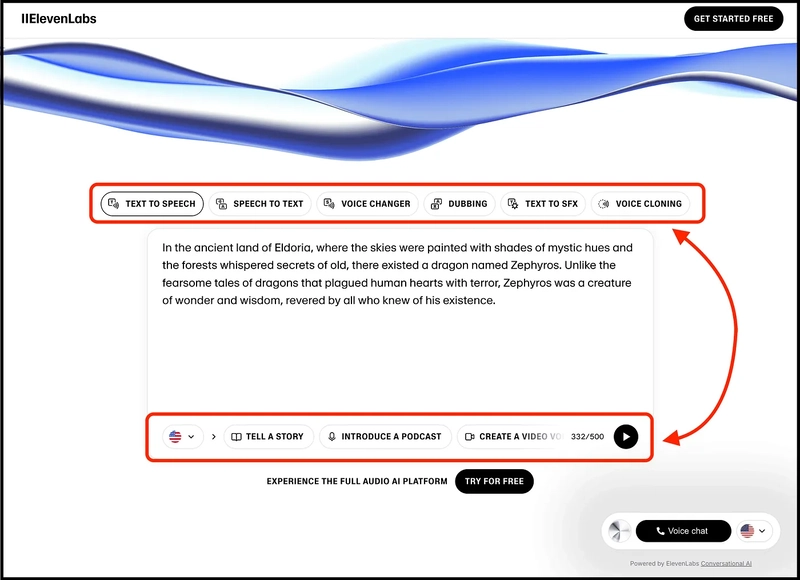
When you visit their website, you can try out their AI voice generator without even creating an account.
As you can see, you can try out text-to-speech, speech-to-text, voice changer, dubbing, and voice cloning in different real-world examples like storytelling, podcast introductions, or a video voiceover.
And it has 5,000+ voices shared by the ElevenLabs community and supports voice creation in 32 different languages.

To get started and use more features, you just need to create an account by clicking on the button, "GET STARTED FREE".
Talking about some more features, it provides easy-to-use APIs to integrate text-to-speech in your applications, build AI agents that can speak within minutes, clone your voice in any style and language, and more.

Thanks to all of these features, ElevenLabs is used by most companies and even by millions of creators worldwide.
Talking about the pricing, you can get started for free and create 10 minutes of high-quality text-to-speech.
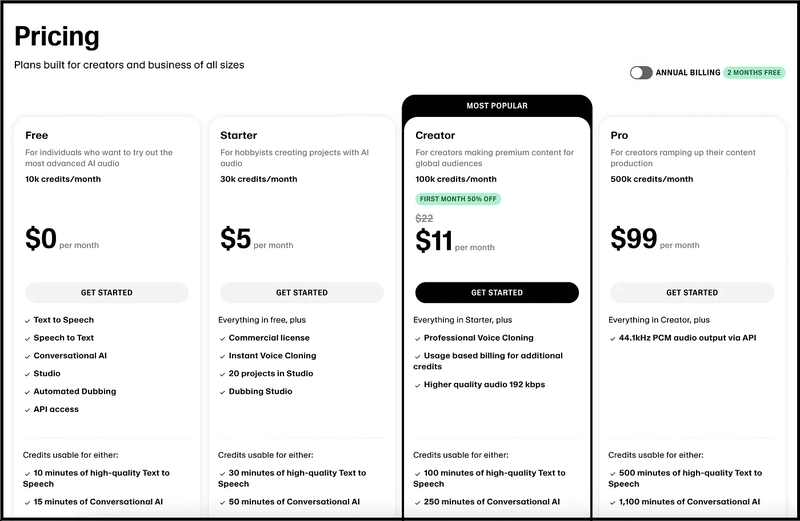
And if you want to upgrade, you have the options of $5 per month, $11 per month, and so on.
2. Typecast AI
This tool claims to be the world’s most expressive AI voice generator, and it comes with a feature called Smart Emotion, where the AI automatically understands your script and adjusts the emotion, tone, and speaking speed with just one click.
Further, they provide 700+ voices, along with the ability to create custom emotions to personalize your script exactly the way you want.
I’m talking about Typecast AI, where you can use tools like text-to-speech, a video editor, voice cloning, talking avatars, and even an AI voice API.

To try it out, simply visit their website and click on the “Try for Free” button to create your account.
Then, create a new project inside the text-to-speech tool and write the text you want to convert into speech.

Once you're inside, you can generate AI voiceovers by selecting different characters, adding multiple voices to different sentences, using features like Smart Emotion, Speed, and Dynamics, and then downloading the final speech.

When I tested it for YouTube storytelling videos, short-form motivational content, character-style narration, and emotional dialogue scenes, the voices sounded far more expressive and human-like compared to many other tools I tested.
That makes a huge difference when you're creating content where delivery matters more than just “reading text.”
Talking about pricing, Typecast AI offers a free unlimited voice generation plan where you can test different voices, emotions, and settings without using credits. Credits are only used when you download the final voice you want.

And if you want to download more voice generations, access 1080p video downloads, and unlock additional features, you can upgrade to one of their paid plans.
3. Fish Audio
This one claims to be “the most expressive, emotionally controllable real-time voice model”.
And I’ve tried it myself to see if it actually works.

You see, we can actually define emotions inside square brackets to let their open-weight S2 model know about the emotions we want to convey.
I’m talking about Fish Audio, and here you can convert text to speech, speech to text, perform voice cloning, apply sound effects, and perform audio separation.

To get started, simply visit their website and click on the “Sign Up Free” button to create your account.
And then you can use this AI voice generator for creating video voice overs, audiobook narration, character voices, conversational chatbots, and more.
The best part, especially if you’re building real-time AI agents, is that their API latency is insanely low. We’re talking about a Time-To-First-Audio of roughly 200ms, which basically removes that awkward, robotic pause you usually get in conversational AI.
On top of that, you get near-instant voice cloning with just 10–15 seconds of audio, plus access to a massive library of over 2 million community-generated voices, which makes the whole system feel far more flexible and production-ready.
Talking about the pricing, it has a free tier where you can generate 7 minutes of audio just to test things out.

And if you need more volume for your apps, their paid plans start at $11 a month for 200 minutes and scale up to a Pro tier at $75 a month for 27 hours of generation.
4. WellSaid
I know most of you may not have heard about this one.
But to be honest, I liked their voices a lot - they feel authentic and realistic. And that's the only reason I've placed it in the #4 position.
Well, getting started is easy.

You just need to visit their website, click on the button "Try for free," and then create your account.
Talking about the features, it has 120+ authentic voices in multiple languages.
You can even clone your voice, use their API, and integrate with your favourite tools like Adobe Premiere, Adobe Express, Canva, and more.
Here are some data points shared by the WellSaid team:

And lastly, about pricing - you can get started for free. It provides a free trial with 1 week of Studio access and an API trial with all features.

And if you want to try more features, you need to upgrade.
5. Murf AI
This is another popular AI voice generator and has been recommended by almost every post on the internet as an alternative to ElevenLabs.

To get started, you just need to visit their website and click on the button, "Sign Up".
Yes, you can get started for free, and it provides 200+ voices in 20+ languages with features such as text to speech, voice cloning, AI dubbing, and AI translation.
And you can integrate Murf AI voices easily into your favorite tools like Canva, PowerPoint, WordPress, Notion, Wix, and more, and even into your custom website.
The best part? 300+ Forbes companies are using Murf AI for their needs, and it even provides the functionality to integrate the AI voiceover feature with their API.
To keep it short, it has literally the same features as ElevenLabs, and that's the reason it is one of the best alternatives to ElevenLabs.
Talking about the pricing, you can get started for free and create up to 2 projects, and generate 10 minutes of voice generation, and then you need to pay.

6. Speechify
Now, let's talk about an AI voice generator that has cloned voices of some big names like Gwyneth Paltrow, MrBeast, Ali Abdaal, and more.

I'm talking about Speechify, which provides 200+ realistic voices across 60+ languages.

You can try out their AI voices by simply visiting their website, and then selecting the language along with the voice to see how realistic they are.
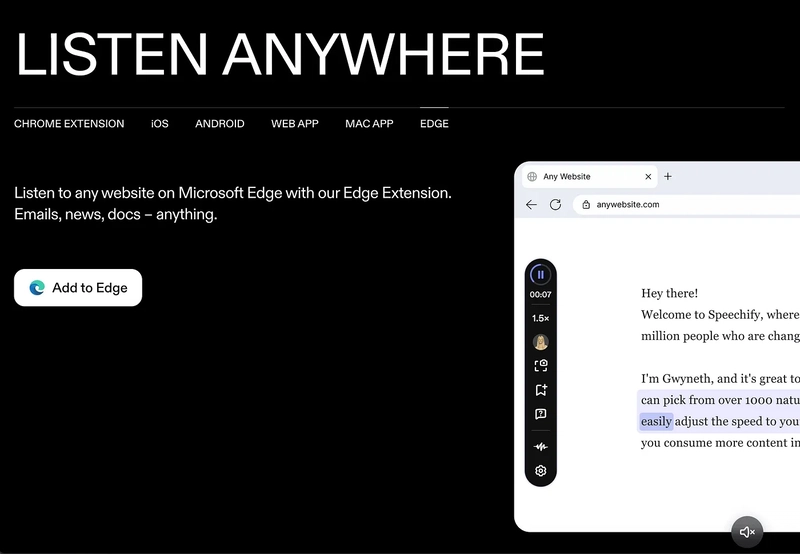
And the best part is that you can use it through a Chrome extension, web app, iOS or Android app, Mac app, and even with Microsoft Edge.
I've simply installed the Chrome extension for free and am using it to convert my Medium blogs into speech by selecting my preferred voice, and more.

Well, with Speechify, you can listen to anything - from content in PDFs, emails, documents, posts, and even use it with LinkedIn, Reddit, Gmail, Notion, Kindle, and more in your preferred voice.
Talking about the features, it provides literally everything from AI voice generation, AI voice dubbing, AI voice cloning, and it even provides an API to integrate.
Lastly, talking about the pricing, you can get started for free, and when I tried, it was giving me the Premium plan free for 7 days.

7. Listnr AI
The next AI voice generator I want to talk about was selected as the #1 product of the day and won the Golden Kitty Award on ProductHunt.
And it's been used by 2,500,000+ users with 1,000+ different voices in over 142 languages, and you can even clone your own voice.
I'm talking about Listnr AI.
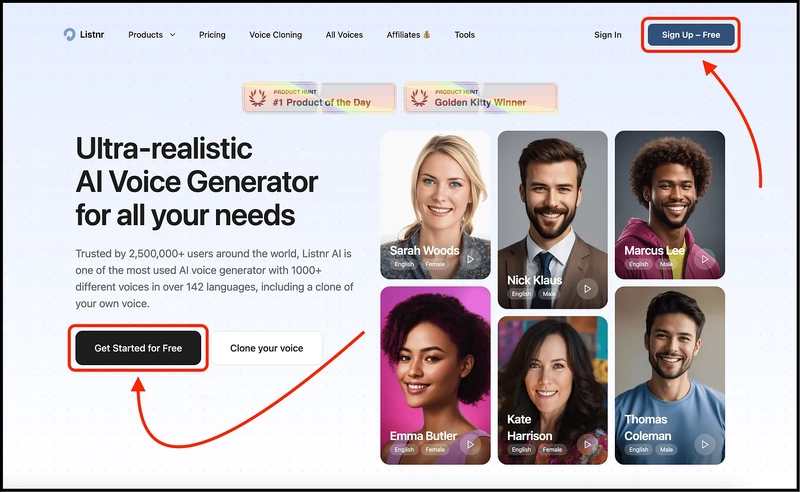
And getting started is easy - you just need to visit their website, and then click on the button "Get Started for Free".

And then you can generate AI voiceovers, create your podcast, convert text to video, clone your voice, and integrate text to speech into your apps with their APIs.

Talking specifically about the features of AI voiceovers, you can choose your style and speed (you need to be a paid subscriber), and even add custom configurations like pauses, pronunciation, and more.
And now, talking about the pricing, it gives you up to 1,000 words for free, and then you need to upgrade to any of these plans.

Bonus: Play.ht
Now, this is another free AI voice generator, and one of my favorites.
I'm talking about Play.ht, and you get the option to select from 206 natural-sounding voices across 142 languages and accents.
I've tried the Hindi option from the languages to see how realistically it generates the voice, and well, it was far better than I expected.

Getting started is easy - you just need to visit their website and click on the button, "Generate AI Voice for Free".
Just below that, you can even select the language along with the voice and hear examples of realistic voices provided by this AI tool.

And the best part?
It has all the needed features one would need - from creating AI podcasts, AI voice cloning, creating AI voice agents, and more.
Talking about the pricing, you can get started for free, but it will only help you generate just 1,000 characters for free.

Hope you like it.
That's it - thanks.
If you’ve found this post helpful, make sure to subscribe to my newsletter, AI Made Simple where I dive deeper into practical AI strategies for everyday people.


Top comments (0)