


You've done this. Don't lie. 😅
# "just for testing, I'll remove it later"
const API_KEY = "sk-prod-abc123supersecretdonotcommit"

git add .
git commit -m "fix stuff"
git push
3 minutes later:
GitHub Secret Scanning Alert: We found a secret in your repo...
Yeah. We've all been there.
Meet PasteShield
PasteShield is a VS Code extension that watches your clipboard like a hawk. Every time you hit Ctrl+V, it scans the content before it lands in your file.
Think of it as a bouncer at the door of your codebase.
No cloud. No subscription. No telemetry. 100% offline. Free forever.
See it in action
You paste an API key → PasteShield goes "hold on bestie" →

Three choices. Zero drama:
- Cancel — yeah don't do that
- Show Details — tell me more
- Paste Anyway — I know what I'm doing (do you though)

Also catches stuff already in your file
It doesn't just guard the door — it also checks if anything sketchy already got in, via CodeLens annotations right above the suspicious line:

No hunting through files. The warning is right there, above the guilty line.
What does it catch? Everything, basicall
~200 patterns. 25+ categories. Scanned in under 50ms.
| Vibe | Examples caught |
|---|---|
| AI keys | OpenAI, Anthropic, Gemini, Groq, DeepSeek, xAI... |
| Cloud creds | AWS, GCP, Azure — all the big ones |
| Payment secrets | Stripe, Razorpay, PayPal, Square |
| DB connections | MongoDB, Postgres, Supabase, Redis |
| Auth tokens | GitHub PAT, JWT, Slack, Discord |
| PII | SSNs, credit cards, Aadhaar, PAN, IBAN |
| Unsafe code |
eval(), innerHTML, SQL injection patterns |
| ...and 18 more | Mobile/IoT, Maps, CDN, Crypto, Web3 |
Too loud? Tune the noise level:
"pasteShield.minimumSeverity": "high"
// critical | high | medium (default) | low
Not ready to be blocked? Try silent mode 🤫
New in v1.7 — silent mode logs everything to the sidebar without interrupting your paste.
Perfect if you're the type who wants data before commitment (reasonable, honestly).
"pasteShield.silentMode": true
See the full history in the sidebar, export it as JSON, sleep better at night.
For teams
Drop a .pasteshield-policy.json in your repo (or host it at a URL) and your whole team gets the same rules automatically.
{
  "template": "strict",
  "rules": [
    { "type": "block_pattern", "pattern": "openai-api-key" },
    { "type": "audit_logging", "enabled": true }
  ]
}
One update → everyone's protected. No Slack message needed.
Where it stores your secrets
v1.7 upgraded this significantly. Credentials go into your OS keychain — Windows Credential Manager, macOS Keychain, Linux libsecret — via VS Code's native SecretStorage API.
Nothing in settings.json. Nothing in plaintext. Nothing in the cloud.
And if you actually want to store detected secrets properly, it integrates with:
HashiCorp Vault · AWS Secrets Manager · Azure Key Vault · Google Secret Manager
All from inside VS Code. No tab switching.
vs Gitleaks / git-secrets
Not a competition — they're complementary:
You type/paste  →  [PasteShield catches it here] ← THIS
      ↓
You commit      →  [Gitleaks / git-secrets catch it here]
      ↓
You push        →  [GitHub Secret Scanning catches it here]
      ↓
Production      →  [Too late]
PasteShield is your first line of defense. Use all of them.
Install in 10 seconds
Option 1: VS Code Marketplace → search PasteShield → Install
Option 2: Quick Open (Ctrl+P) and paste:
ext install NK2552003.pasteshield
That's it. It starts working immediately. No config needed.
What's coming
The roadmap is genuinely exciting:
- ML-based false-positive reduction — smarter, fewer annoying alerts
- CLI version — run it in CI/CD pipelines
- SARIF output — plug into GitHub Advanced Security
- Auto secret rotation via provider APIs
- Community pattern marketplace — share and import rulesets
TL;DR
You paste something sketchy → PasteShield yells at you → you don't get fired → 🎉
Free. Offline. 200+ patterns. Works in under 50ms.
 sidkr222003
/
PasteShield
sidkr222003
/
PasteShield
PasteShield intercepts every paste (`Ctrl+V` / `Cmd+V`) in the editor and scans the clipboard content for dangerous patterns — API keys, hardcoded passwords, unsafe JavaScript, prototype pollution, and more — before the text ever reaches your file.

PasteShield
Intercepts secrets before they land in your file — ~200 patterns, 100% offline.


Overview
PasteShield intercepts every paste (Ctrl+V / Cmd+V) in the editor and scans the clipboard content for dangerous patterns — API keys, hardcoded passwords, unsafe JavaScript, prototype pollution, and more — before the text ever reaches your file.
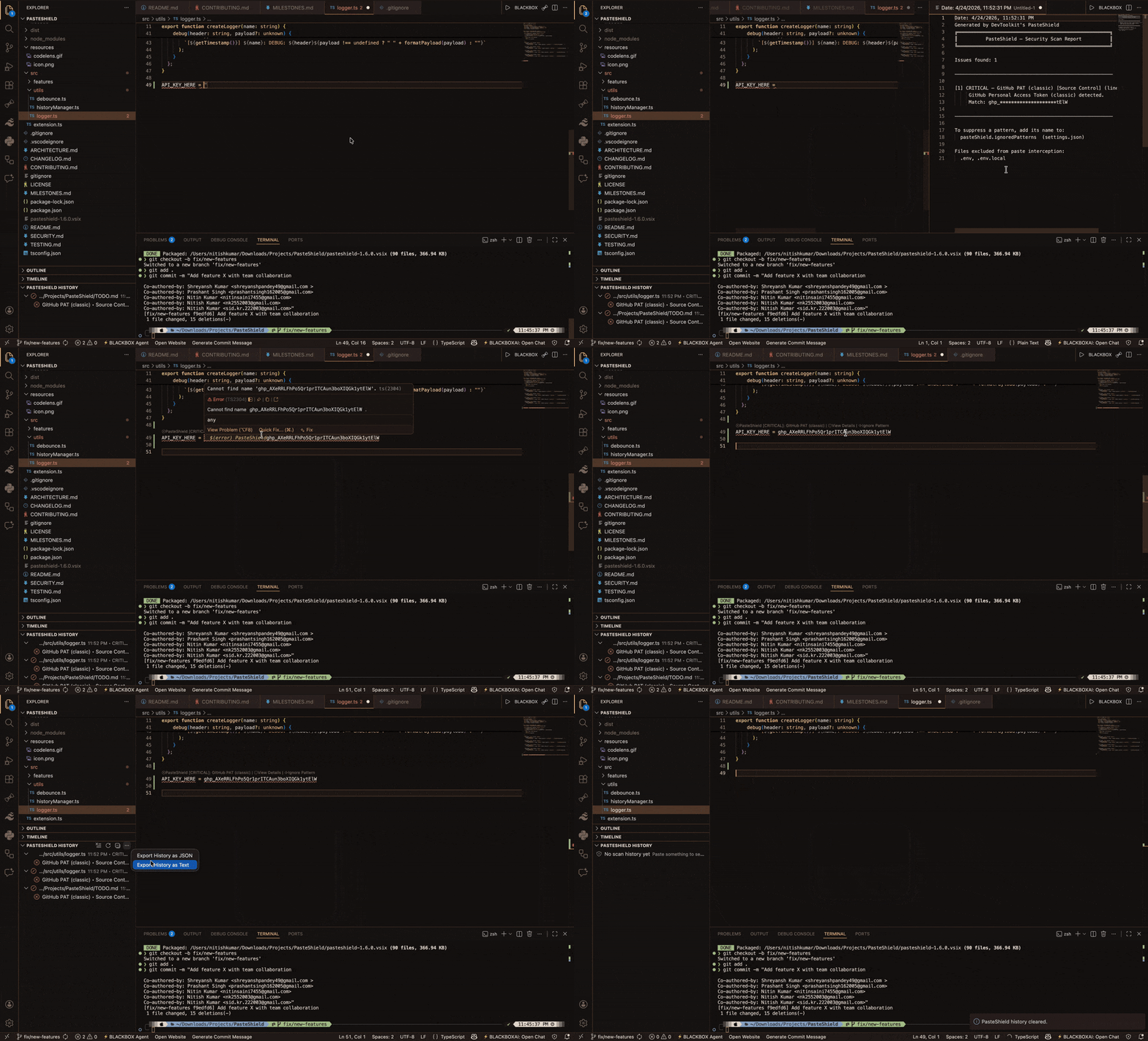
It works entirely offline, using a high-performance regex engine that evaluates ~200 pre-compiled patterns across 25+ categories in under 50 ms. Detected threats are surfaced through inline warnings, CodeLens annotations, a persistent history sidebar, and an ASCII statistics dashboard.
Why PasteShield vs Gitleaks?
Gitleaks catches what's in your repo. PasteShield catches what never should have been.
These tools are complementary, not competing:
- Gitleaks: Scans existing git repositories for leaked secrets (post-commit detection)
- PasteShield: Intercepts secrets at paste time, before they ever touch your filesystem (pre-commit prevention)
Use both for defense-in-depth: PasteShield as your first…
Built by Sid Kr. (NK2552003). MIT licensed. No VC funding, no upsell, no BS.
Drop a ⭐ on GitHub if this saved your job once. Or twice.


Top comments (0)