

🧠 Empowering Local AI with Tools: Ollama + MCP + Docker
Have you ever wanted to run a local AI agent that does more than just chat? What if it could list and summarize files on your machine — using just natural language?
In this post, you'll build a fully offline AI agent using:
-
Ollama to run local LLMs like
qwen2:7b - LangChain MCP for tool usage
- FastAPI to build a tool server
- Streamlit for an optional frontend
- Docker + Docker Compose to glue it all together
Why Use MCP (Model Context Protocol)?
MCP allows models (like those running in LangChain) to discover tools at runtime via a RESTful API dynamically.
Unlike traditional hardcoded tool integrations, MCP makes it declarative and modular.
You can plug and unplug tools without changing model logic.
“Think of MCP as a universal remote for your LLM tools.”
🧠 Why Ollama?
Ollama makes it dead-simple to run LLMs locally with one line:
ollama run qwen2:7b
You get full data privacy, no usage limits, and offline AI
🤖 Why qwen2:7b?
Qwen2 is a strong open-source model from Alibaba, excelling at reasoning and tool usage
Works well for agents, summaries, and structured thinking tasks
You could also swap in:
- mistral:7b (more lightweight)
- llama3:8b (strong general-purpose)
- phi3 (fast and smart in low RAM setups)
🚀 What You'll Build
A tool-using AI agent that:
✅ Lists text files in a local folder
✅ Summarizes any selected file
✅ Runs 100% locally — no API keys, no cloud
This is perfect for:
- Private AI assistants
- Offline development
- Custom workflows with local data
🧩 Architecture
[🧠 Ollama (LLM)]
↓
[🔗 LangChain Agent w/ MCP Tool Access]
↓
[🛠️ FastAPI MCP Server]
↓
[📁 Local Filesystem]
🛠️1) Prerequisites
Install Ollama and run a model like qwen2:7b:
ollama run qwen2:7b
📦2) Clone and Run
git clone https://github.com/rajeevchandra/mcp-ollama-file-agent
cd ollama-mcp-tool-agent

docker-compose up --build
✅ This starts:
- mcp-server: FastAPI tool server
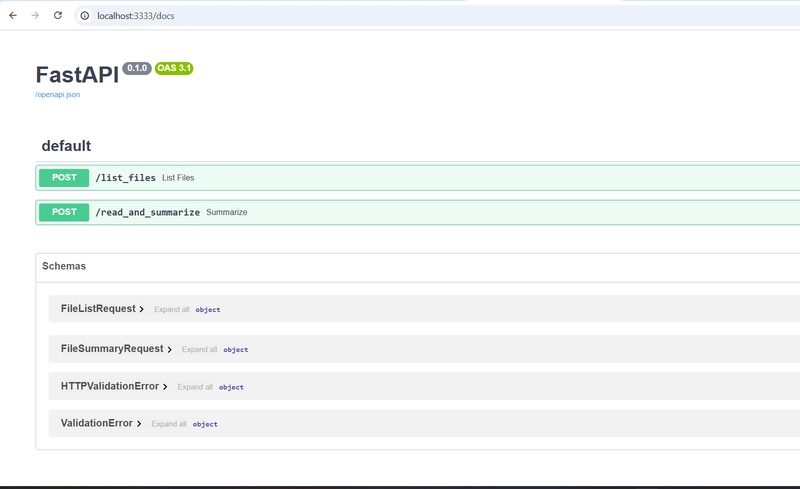
- streamlit: UI

- agent-runner: LangChain agent using Ollama + MCP tools
🔄 Example Interaction
Prompt:
“List files in ./docs and summarize the first one”
Flow:
- Agent selects the list_files tool
- Gets the list of files
- Picks the first file and calls read_and_summarize
- Uses the model to generate a summary
🧠 Conclusion
With just a few tools — Ollama, MCP, and LangChain — you’ve built a local AI agent that goes beyond chatting: it actually uses tools, interacts with your filesystem, and provides real utility — all offline.
This project demonstrates how easy it is to:
- Combine LLM reasoning with real-world actions
- Keep your data private and local
- Extend AI capabilities with modular tools via MCP
As the AI landscape shifts toward more customizable, self-hosted, and privacy-first solutions, this architecture offers a powerful and flexible blueprint for future agents — whether you're automating internal workflows, building developer assistants, or experimenting with multi-agent systems.
💬 If you found this useful or inspiring, ⭐️ star the repo, fork it with your own tools, or share what you build in the comments.


Top comments (0)