

Hello, I'm Shrijith. I'm building git-lrc, an AI code reviewer that runs on every commit. It is free, unlimited, and source-available on Github. Star Us to help devs discover the project. Do give it a try and share your feedback for improving the product.
As developers, we often dig through logs to find why something’s slow or broken. It’s tedious work. I built DuckTrace, a lightweight Go tool that automates this by analyzing log files, finding specific events, and calculating their durations. It’s open-source and outputs results in a colorful, scannable format.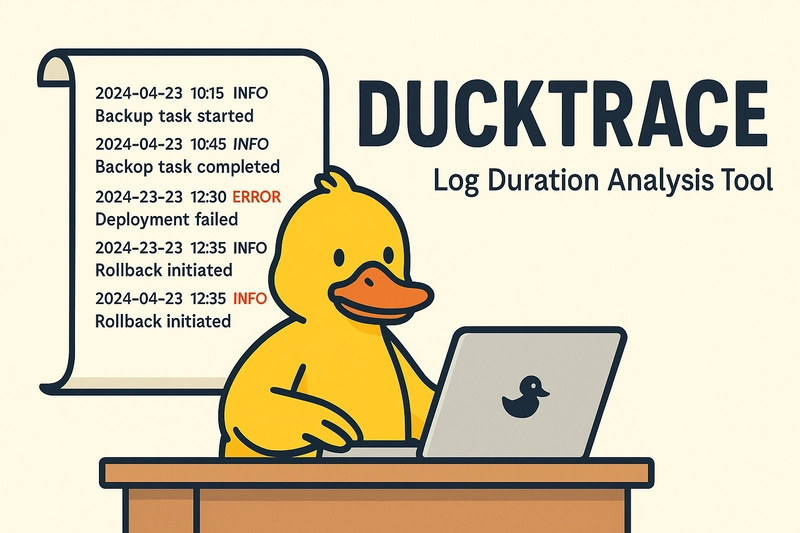
This article explains what DuckTrace does, how it works, and how to use it with detailed examples. If you’re debugging a slow backup or tracking deployment issues, DuckTrace can help.
Dax, the Detective Duck
Imagine your logs are a big pond, and important events are hiding in the reeds. Dax the Detective Duck (that’s DuckTrace!) paddles through, finding the start and end of each event, and tells you how long each took. No more guessing—Dax finds the answers and quacks them in color!
Why I Built DuckTrace
Logs are messy—timestamps, levels, and messages all jumbled up. Manually calculating event durations is a pain. I needed a tool to parse logs automatically, match start and end events, and show durations clearly. Existing tools were too complex or didn’t focus on timing. So, I created DuckTrace in Go for simplicity and portability.
Key goals:
- Support any log format via regex.
- Track user-defined events (e.g., backup start to end).
- Output durations and averages in a colorful format.
How DuckTrace Works
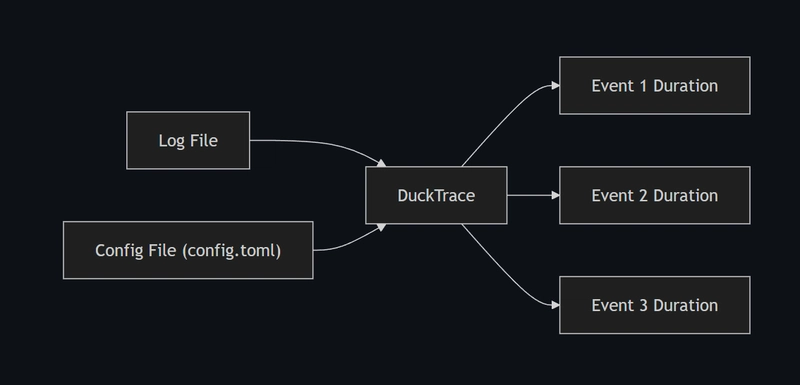
DuckTrace takes a log file and a TOML config as inputs. The config defines your log format and events to track. DuckTrace then:
- Parses the log file using a regex pattern.
- Matches start and end events based on your regexes.
- Calculates durations between start and end.
- Outputs a color-coded summary with per-event durations and averages.
Here’s a diagram of the process:
| Step | Description | Input/Output |
|---|---|---|
| Config | Define log format and events in TOML | config.toml |
| Parsing | Read logs, extract timestamps/messages | Log file → Structured data |
| Matching | Find start/end pairs for each event | Event regexes → Matched pairs |
| Timing | Calculate duration between start/end | Timestamps → Durations |
| Output | Print durations and averages in color | Terminal output |
Setting Up DuckTrace
You need Go 1.20 or newer. Here’s how to get started:
- Clone the repo:
   git clone https://github.com/shrsv/ducktrace.git
   cd ducktrace
- Install dependencies:
go mod tidy
- Build the tool:
go build -o ducktrace ducktrace.go
- Run it:
./ducktrace --config config.toml --log sample.log
CLI flags:
-
--config <file>: Path to TOML config (required). -
--log <file>: Path to log file (required). -
--help: Show usage info.
For issues, visit DuckTrace on GitHub.
Configuring DuckTrace with config.toml
The TOML config defines how DuckTrace reads logs and what events to track. It has two main sections: LogFormat and Events.
Example config.toml:
log_level = "debug"

[LogFormat]
pattern = '^(?P<date>\d{4}-\d{2}-\d{2}) (?P<time>\d{2}:\d{2}:\d{2}) \[(?P<level>\w+)\] (?P<message>.+)$'

[Events.backup]
start_regex = 'Backup job triggered'
end_regex = 'Backup job completed'

[Events.backup_nightly]
start_regex = 'Nightly .* started'
end_regex = 'Nightly .* completed'

[Events.error_rollback]
start_regex = 'Deployment failed'
end_regex = 'Rollback completed'
Breakdown:
-
log_level: Use"debug"for verbose output. -
[LogFormat].pattern: Regex with named groups (date,time,level,message). -
[Events.<name>]: Defines events withstart_regexandend_regex.
Tip: Test regexes on regex101.com.
Example: Analyzing a Backup Log
Consider a backup.log file:
2025-04-25 10:00:00 [INFO] Backup job triggered
2025-04-25 10:00:05 [INFO] Backup job completed
2025-04-25 22:00:00 [INFO] Nightly backup started
2025-04-25 22:00:10 [INFO] Nightly backup completed
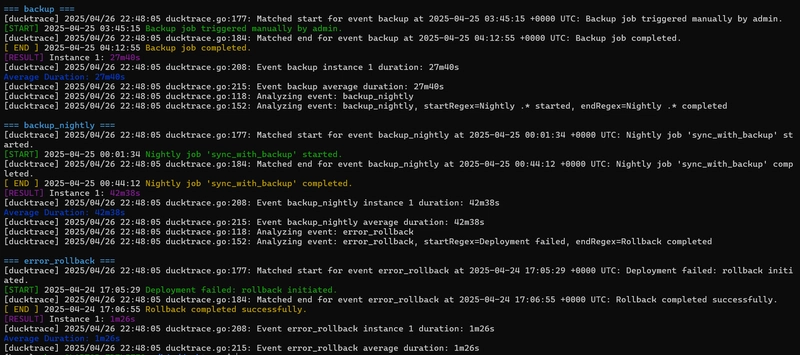
Using the config.toml above, run:
./ducktrace --config config.toml --log backup.log
Output :
Handling Complex Logs
For messier logs, like a deployment pipeline:
2025-04-25 09:00:00 [ERROR] Deployment failed for app v1.2.3
2025-04-25 09:00:10 [INFO] Rollback completed for app v1.2.3
2025-04-25 10:00:00 [ERROR] Deployment failed for app v1.2.4
2025-04-25 10:00:15 [INFO] Rollback completed for app v1.2.4
Update config.toml:
log_level = "debug"

[LogFormat]
pattern = '^(?P<date>\d{4}-\d{2}-\d{2}) (?P<time>\d{2}:\d{2}:\d{2}) \[(?P<level>\w+)\] (?P<message>.+)$'

[Events.rollback]
start_regex = 'Deployment failed for app'
end_regex = 'Rollback completed for app'
Run:
./ducktrace --config config.toml --log deploy.log
Output:
Event: rollback
- 2025-04-25 09:00:00: Deployment failed for app v1.2.3 -> 2025-04-25 09:00:10: Rollback completed for app v1.2.3 (Duration: 10s)
- 2025-04-25 10:00:00: Deployment failed for app v1.2.4 -> 2025-04-25 10:00:15: Rollback completed for app v1.2.4 (Duration: 15s)
Average duration: 12.5s
Why it works:
- Regexes match across app versions.
- DuckTrace pairs each start with the next end.
Extending DuckTrace
You can extend DuckTrace by:
-
Adding events: Include new
[Events.<name>]sections inconfig.toml. -
Tweaking regexes: Adjust
start_regexandend_regex. -
Changing log formats: Modify
[LogFormat].pattern.
For database migrations, add:
[Events.migration]
start_regex = 'Starting migration for table'
end_regex = 'Completed migration for table'
DuckTrace will track migrations alongside other events.
Limitations and Next Steps
DuckTrace is simple but has limits:
- No multi-line logs: Assumes one event per line.
- Basic pairing: Matches start to next end, not ideal for nested events.
- Static analysis: Processes log files, not live streams.
Future ideas:
- Multi-line log support.
- Advanced event pairing.
- Live log monitoring with a
--watchmode.
Contribute ideas on the GitHub issues page.
Get Started with DuckTrace
DuckTrace makes log analysis easier. It’s not perfect, but it’s saved me hours. Clone it, tweak the config, and try it on your logs. Share feedback or issues on GitHub.
Let me know how it works for you in the comments!

*AI agents write code fast. They also silently remove logic, change behavior, and introduce bugs -- without telling you. You often find out in production.
git-lrc fixes this. It hooks into git commit and reviews every diff before it lands. 60-second setup. Completely free.*
Any feedback or contributors are welcome! It's online, source-available, and ready for anyone to use.
⭐ Star it on GitHub:
 HexmosTech
/
git-lrc
HexmosTech
/
git-lrc
Free, Unlimited AI Code Reviews That Run on Commit
| 🇩🇰 Dansk | 🇪🇸 Español | 🇮🇷 Farsi | 🇫🇮 Suomi | 🇯🇵 日本語 | 🇳🇴 Norsk | 🇵🇹 Português | 🇷🇺 Русский | 🇦🇱 Shqip | 🇨🇳 中文 |

git-lrc
Free, Unlimited AI Code Reviews That Run on Commit


AI agents write code fast. They also silently remove logic, change behavior, and introduce bugs -- without telling you. You often find out in production.
git-lrc fixes this. It hooks into git commit and reviews every diff before it lands. 60-second setup. Completely free.
See It In Action
See git-lrc catch serious security issues such as leaked credentials, expensive cloud operations, and sensitive material in log statements
git-lrc-intro-60s.mp4
Why
- 🤖 AI agents silently break things. Code removed. Logic changed. Edge cases gone. You won't notice until production.
- 🔍 Catch it before it ships. AI-powered inline comments show you exactly what changed and what looks wrong.
- 🔁 Build a…


Top comments (0)