


How I went from noisy project scanning to shipping graphs, confidence-aware readiness, and legacy Unity support.
Building ShipCheck: a static preflight scanner for Unity projects
How I went from noisy project scanning to shipping graphs, confidence-aware readiness, and legacy Unity support.
Building ShipCheck: a static preflight scanner for Unity projects
I’ve been building ShipCheck, a local, read-only preflight scanner for Unity projects.
The original goal sounded simple:
Point the tool at a Unity project folder and tell me what could prevent this project from shipping.
The implementation turned out to be much more interesting.
A Unity project can look structurally healthy while still being incomplete.
A completed legacy project can look suspicious because modern static analysis cannot parse its scenes properly.
Third-party assets can generate hundreds of findings that have absolutely nothing to do with the final build.
That forced me to separate several concepts that initially looked like one problem.
Project Health is not Release Readiness
One of the first mistakes was treating all findings as part of a single score.
That doesn’t work.
A project may have:
- duplicate assets
- oversized textures
- stale metadata
- unresolved references
while still being perfectly shippable.
Conversely, a structurally clean project may only contain one unfinished gameplay scene.
So ShipCheck now separates:
Project Health
Observable technical defects and project hygiene.
Release Readiness
Evidence that the current project configuration represents something that could actually ship.
Confidence
How much reliable evidence ShipCheck was able to inspect.
This distinction became especially important with old Unity projects.
Sometimes the correct score is no score
Some older Unity projects use scene serialization that cannot be reliably inspected offline.
An early version of ShipCheck would still calculate something like:
Readiness: 94/100
That looked precise, but it wasn’t honest.
Now, if structural evidence is insufficient, ShipCheck reports:
LIMITED EVIDENCE
instead of inventing a readiness number.
The internal diagnostic score may still exist for debugging, but it is not presented as a reliable release score.
Building a Shipping Dependency Graph
Another major issue was third-party noise.
A Unity project may contain:
- asset store packages
- demo scenes
- sample prefabs
- TextMesh Pro examples
- plugin documentation
- unused assets
Scanning everything equally produced terrible results.
For example, a small WebGL trivia project looked badly broken because unresolved references inside TextMesh Pro example scenes were being treated as project release problems.
The fix was to build a shipping dependency graph.
ShipCheck starts from enabled build scenes and follows serialized GUID references through the project.
That lets it distinguish:
- shipping content
- project content
- non-shipping content
- third-party content
A broken GUID inside an unused demo scene can still be reported, but it should not reduce the release readiness of the actual game.
Static analysis also needs to understand Unity runtime loading
The dependency graph introduced another problem.
Not everything used at runtime has a direct serialized reference from a scene.
Unity projects often load content from:
Assets/Resources/
Assets/StreamingAssets/
So dimensional analysis and project intelligence also include these standard runtime-loading locations.
This mattered for an AR project that contained:
- 2D video/media
- sprite assets
- a 3D model
The scene graph alone initially classified it as UNKNOWN.
After including runtime resources, ShipCheck correctly classified it as:
MIXED 2D + 3D
2.5D vs mixed 2D + 3D
This was another surprisingly tricky distinction.
One completed memory game had:
- 2D UI
- sprites
- text
- 3D meshes
- rigidbodies
- cards implemented as physical 3D objects
A naive signal counter saw strong 2D and strong 3D evidence and called it:
MIXED 2D + 3D
But visually and structurally it was really a 2.5D game.
The difference I ended up using is roughly:
2.5D
A primarily flat or 2D presentation implemented partly with 3D mechanics.
Mixed 2D + 3D
Independent 2D and 3D content modalities coexist in the project.
For example:
- a real 2D video feed
- plus an independent 3D model
That distinction improved classification significantly.
Missing dependency detection is harder than matching names
At one point ShipCheck reported this as a blocker:
Code references namespace DG but no matching dependency was found.
The problem?
DOTween was actually installed under:
Assets/Plugins/Demigiant/
and correctly declared:
namespace DG.Tweening
The detector was matching names too literally.
Now ShipCheck also indexes namespaces declared by installed third-party source code, packages, assemblies and plugins before deciding that a dependency is missing.
That removed false blockers without weakening real missing-dependency detection.
Release states instead of only scores
ShipCheck now uses several explicit release states:
BLOCKED
NOT CONFIGURED
NOT READY
REVIEW BEFORE SHIP
LIMITED EVIDENCE
STRONG EVIDENCE
Examples:
BLOCKED
A deterministic missing dependency or similarly critical release problem exists.
NOT CONFIGURED
No effective enabled build-scene topology could be found.
LIMITED EVIDENCE
A build configuration exists, but static evidence is insufficient to assign a reliable numeric readiness score.
I found these states much more useful than trying to force every project into a 0–100 number.
The current tool
ShipCheck currently analyzes:
- Project Health
- Release Readiness
- Build configuration
- Enabled scenes
- Shipping dependency graph
- Missing dependencies
- Unresolved GUID references
- Near-empty scenes
- Incomplete-code markers
- Large and duplicate assets
- First-party vs third-party content
- 2D / 2.5D / 3D / mixed project structure
- Rendering and physics signals
- Content completeness signals
It also generates an AI Context Pack: a compact project brief designed to be pasted into tools such as ChatGPT, Claude or Codex without uploading the entire Unity project.
Everything runs locally.
No telemetry.
No cloud upload.
No API key.
Read-only analysis.
Testing it on real projects
I tested the current version against several real Unity projects:
- completed 2D games
- legacy Unity projects
- 2.5D games
- unfinished prototypes
- WebGL projects
- AR experiments
- mixed 2D + 3D content
- projects with large third-party asset packages
The interesting part was not getting every project to score highly.
The useful part was getting each project to fail differently for the correct reason.
That became the main design rule:
A scanner should explain what it knows, what it suspects, and what it cannot reliably prove.
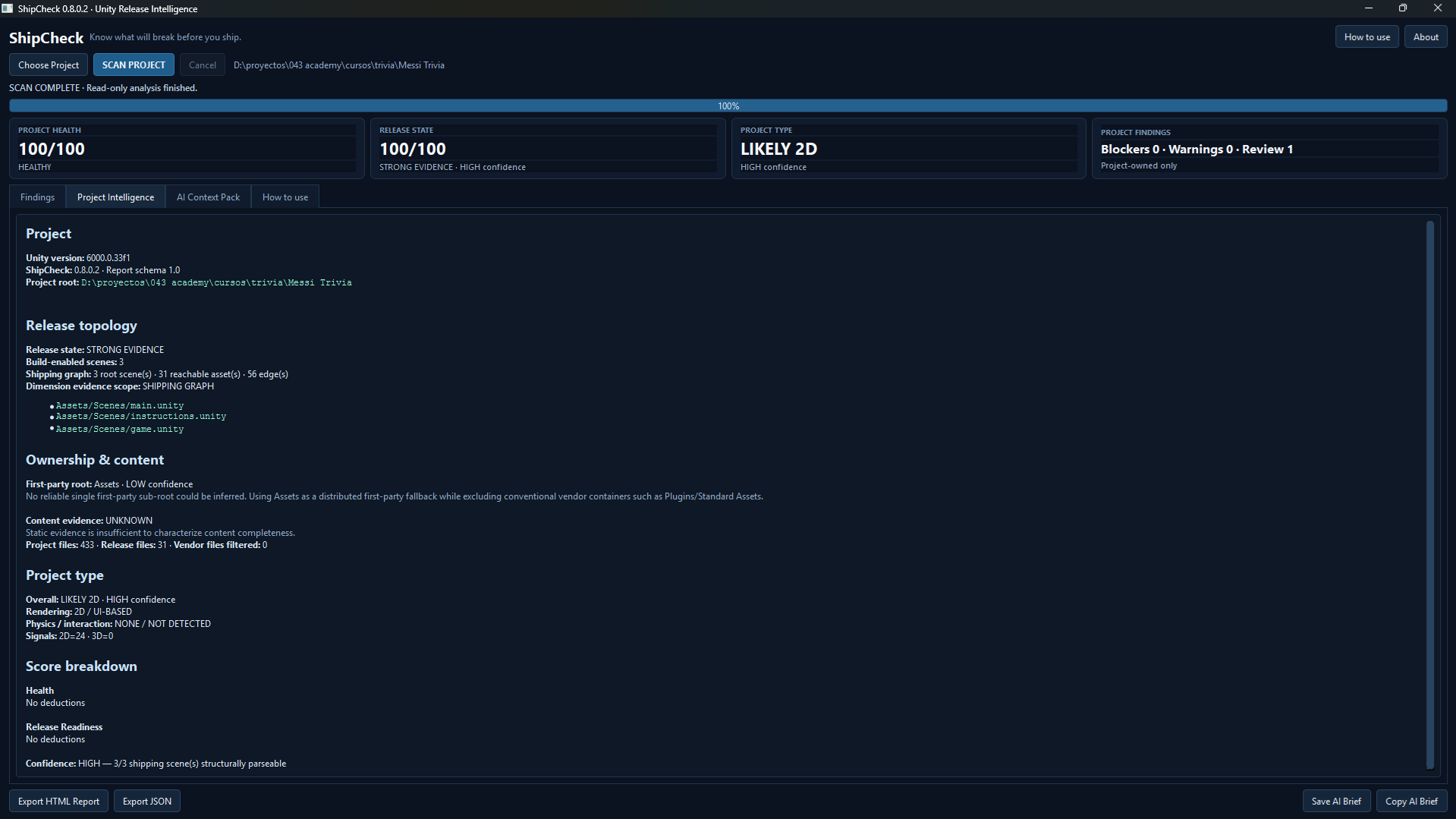
ShipCheck 0.8.0.2
I’ve just released the first public Windows build.
If you work with Unity projects — especially old, messy, inherited or partially finished ones — I’d be very interested in examples where the analysis gets something wrong.
False positives are particularly useful feedback right now.
Project page:
https://tools043.itch.io/shipcheck


Top comments (0)