


An infographic illustrating the key components and workflow of generative AI and language models.
Introduction
============
Artificial Intelligence (AI) is no longer a futuristic concept that belongs only in science fiction movies. It has quietly become a part of our daily lives.
When Netflix recommends a movie, when Google Maps suggests the fastest route, when your phone unlocks using face recognition, when ChatGPT helps you write code, or when a bank detects a suspicious transaction, AI is already working behind the scenes.
For software engineers, AI is becoming as important as the internet, cloud computing, and mobile applications once were.
The purpose of this article is simple: to help you understand the world of AI in plain English.
Whether you are a student, a software engineer, an architect, a manager, or simply curious about AI, this guide will help you understand the key concepts without requiring a PhD in mathematics.
By the end of this article, you will understand:
What AI really is
What Generative AI means
What Large Language Models (LLMs) are
How ChatGPT, Claude, Gemini, and other models work
What Tokens and Context Windows mean
What AI Agents are
Why APIs, JSON, GitHub, and Google Colab matter
How AI fits into modern software architecture
Why AI Matters More Than Ever
=============================

In just a few years, Artificial Intelligence has changed the way software is built, tested, documented, and maintained.
Consider a simple example.
In 2023, a junior developer might spend several hours building a basic CRUD REST API. They would write routes, validation logic, error handling, documentation, and tests manually.
Today, with AI-assisted development tools such as ChatGPT, Claude, GitHub Copilot, and Gemini, much of that boilerplate can be generated in minutes.
The developer still needs to understand architecture, security, scalability, and business requirements. However, AI significantly reduces the time spent on repetitive work.
Think of AI as a power tool.
A power drill does not replace a skilled carpenter. It simply allows the carpenter to work faster and focus on higher-value tasks.
Similarly, AI does not replace software engineers. It amplifies their productivity.In the past, software could only follow predefined rules.
For example:
IF amount > 10000THEN mark transaction as suspicious
Traditional software is excellent at following rules.
AI is different.
Instead of explicitly telling the computer every rule, we allow it to learn patterns from data.
This allows computers to:
Recognize images
Understand language
Detect fraud
Generate code
Create images
Summarize documents
Assist with decision-making
The impact of AI is similar to what happened when the internet became mainstream.
People who learned how to use the internet gained a tremendous advantage.
The same is now happening with AI.
How Software Development Has Changed
Activity
Before AI
With AI
Writing boilerplate code
Manual and repetitive
Generated in seconds
Debugging errors
Search engines, forums, trial and error
AI-assisted explanations and fixes
Writing unit tests
Often delayed or skipped
Generated alongside code
Understanding unfamiliar codebases
Days of reading documentation
AI-assisted code explanations
Creating documentation
Time-consuming manual effort
Drafted automatically
The biggest advantage is not that AI writes code. The biggest advantage is that AI helps developers spend more time solving problems and less time writing repetitive code.
Understanding AI: The Big Umbrella
==================================
The easiest way to understand AI is through a hierarchy.
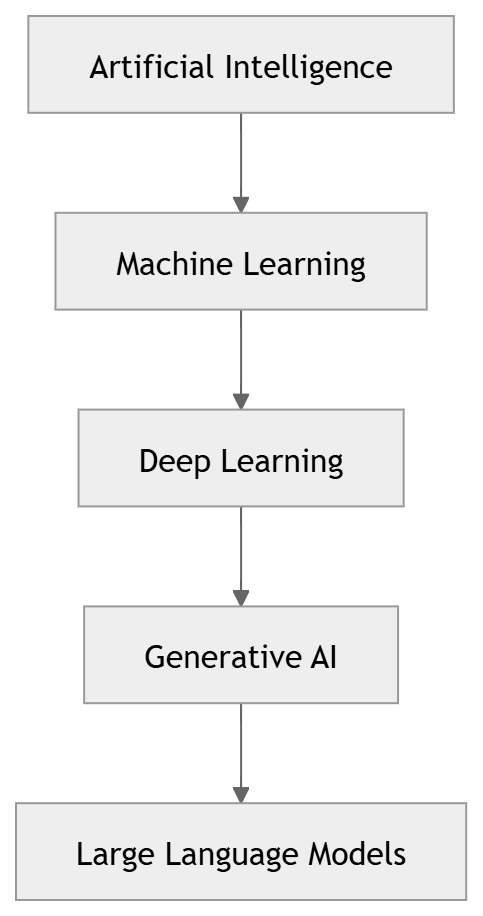
Think of it like transportation:
Transportation → AI
Motor Vehicles → Machine Learning
Electric Vehicles → Deep Learning
Tesla → LLMs
Every level becomes more specialized.
AI is the broad umbrella.
LLMs are just one specific category within AI.

What is Artificial Intelligence?
================================
Artificial Intelligence refers to software systems capable of performing tasks that would normally require human intelligence.
Examples include:
Recognizing faces
Understanding speech
Translating languages
Playing chess
Detecting fraud
Driving vehicles
Some common examples you already use:
Gmail
Automatically identifies spam emails.
Google Photos
Recognizes people, pets, and objects.
Netflix
Recommends movies based on your viewing history.
Amazon
Suggests products you might want to buy.
All of these are AI systems.
Narrow AI vs General AI
=======================
Narrow AI
Every AI system you use today is Narrow AI.
It is designed to perform one specific task extremely well.
Examples:
Face recognition
Recommendation systems
Chatbots
Fraud detection
A spam filter is great at detecting spam.
But it cannot drive a car.
General AI (AGI)
General AI is a hypothetical AI capable of performing any intellectual task a human can perform.
Imagine a system that can:
Write code
Diagnose diseases
Teach mathematics
Compose music
Run a company
All with human-level capability.
We have not achieved AGI yet.
What is Generative AI?
======================
Traditional AI predicts and classifies.
Generative AI creates.
This is the key difference.
Traditional AI:
Is this email spam?
Generative AI:
Write a professional email.
Traditional AI:
Is this a cat?
Generative AI:
Create an image of a cat wearing sunglasses.
Generative AI can create:
Text
Images
Videos
Music
Voice
Software Code
GenAI by modality (what it can create):
Modality simply means "the type of content." Text, image, audio, video — each is a different modality. Think of modalities as different languages that AI can speak.
Multimodal means the model can work with more than one type of input or output. Instead of just text-in, text-out, a multimodal model can look at an image and describe it, or listen to audio and transcribe it.
What is a Large Language Model (LLM)?
=====================================
LLM stands for Large Language Model.
Examples include:
ChatGPT
Claude
Gemini
Llama
Mistral
The easiest way to understand an LLM is this:
An LLM is the world's most well-read autocomplete.
Your smartphone predicts the next word while typing.
LLMs do the same thing.
The difference?
They have read billions of pages of text.
Books.
Websites.
Research papers.
Documentation.
Source code.
Stack Overflow discussions.
GitHub repositories.
Because they have learned patterns from enormous amounts of text, they become surprisingly good at generating useful responses.
How LLMs Actually Work
======================

One of the biggest misconceptions about AI is that it "thinks" like a human.
It does not.
The easiest way to understand a Large Language Model (LLM) is to imagine the world's most well-read autocomplete system.
When you type a message on your phone, the keyboard predicts the next word you are likely to type.
Now imagine that autocomplete system has read:
Millions of books
Billions of web pages
Programming documentation
Research papers
Source code repositories
Technical blogs
Online discussions
That is essentially what an LLM is.
Its primary job is surprisingly simple:
Predict the most likely next piece of text based on everything it has seen before.
For example:
Input:
"The capital of France is"
Prediction:
"Paris"
The model then predicts the next word, and the next, and the next, until a complete response is generated.
Although the underlying mathematics is incredibly sophisticated, the core idea remains simple:
An LLM is a next-token prediction engine trained on an enormous amount of data.
This is why prompt engineering matters so much.
The better the input, the better the model can predict what should come next.
Why "Large"?
Billions of internal parameters (think of them as adjustable dials)
Trained on internet-scale text (books, websites, code, articles)
"Large" is what makes them capable of handling such a wide range of tasks
Parameters are the internal numbers that the model adjusts during training to get better at predicting text. Think of them like the billions of tiny knobs on a mixing board — each one tuned just right to produce the best output.
Modern LLMs aren't text-only anymore. They can also process images, audio, and video (this is called "multimodal"). But the core mechanism — predict the next token — is still text prediction.
Meet the Major LLM Players
As a beginner, you will quickly encounter several AI models.
The good news is that you do not need to master all of them immediately.
The most important thing to understand is that there is no universally "best" model.
Each model has strengths, weaknesses, and ideal use cases.
ChatGPT (OpenAI)
ChatGPT is the model that introduced Generative AI to millions of people.
It is widely used for:
General-purpose assistance
Coding
Content creation
Research
Learning
Think of ChatGPT as a versatile all-rounder.
Claude (Anthropic)
Claude is known for:
Strong reasoning
Long document analysis
Technical writing
Code reviews
Many developers prefer Claude when working with large documents and architectural discussions.
Gemini (Google)
Gemini stands out because of its large context windows and strong multimodal capabilities.
It performs well with:
Large codebases
Long documents
Images
Video understanding
Llama (Meta)
Llama is one of the most popular open-source model families.
It allows organizations to run AI models on their own infrastructure and maintain greater control over data.
Mistral
Mistral is another popular open-source alternative that focuses on efficiency, speed, and enterprise-friendly deployment options.
Model
Company
Best For
ChatGPT
OpenAI
General-purpose AI
Claude
Anthropic
Long documents & reasoning
Gemini
Large context & multimodal
Llama
Meta
Open-source deployment
Mistral
Mistral AI
Efficient enterprise AI
Open-Source vs Closed Models
A useful way to think about this difference is:
Closed Models
ChatGPT
Claude
Gemini
You access them through a company's platform or API.
Open Models
Llama
Mistral
You can download and run them yourself.
Closed models are generally easier to use.
Open models provide more flexibility and control.
As you continue your AI journey, you will likely use a combination of both.
Choosing the Right AI Model for the Job
One of the most common questions beginners ask is:
"Which AI model is the best?"
The answer is surprisingly simple:
There is no universally best model.
Choosing an AI model is very similar to choosing a programming language, cloud platform, or database.
Each tool has strengths and trade-offs.
A good engineer chooses the right tool for the right problem.
The Vehicle Analogy
Imagine you need to transport something.
Would you use:
A bicycle to move a sofa?
A large truck to deliver a single envelope?
Probably not.
You choose the vehicle based on the job.
AI models work exactly the same way.
Some models are optimized for:
Fast responses
Everyday questions
Simple tasks
Others are designed for:
Deep reasoning
Large codebases
Research
Complex analysis
The goal is not to always use the most powerful model.
The goal is to use the most appropriate model.
Understanding Model Tiers
Most modern AI systems can be broadly grouped into three categories.
Tier
Purpose
Typical Use Cases
Frontier Models
Highest capability
Complex reasoning, architecture design, research
Mid-Range Models
Balanced capability and speed
Everyday development tasks, documentation, debugging
Lightweight Models
Fast and efficient
Simple lookups, formatting, summarization
Think of these tiers like cloud infrastructure.
Not every application requires the biggest server.
Similarly, not every AI task requires the most advanced model.
The 80/20 Rule of AI Usage
In most software engineering workflows:
80% of tasks are routine
20% require deep reasoning
Examples of routine tasks:
Explaining an error message
Writing a unit test
Summarizing documentation
Generating boilerplate code
Examples of advanced tasks:
Designing a microservices architecture
Reviewing an entire codebase
Analyzing trade-offs between multiple system designs
Research-heavy technical investigations
Most daily work falls into the first category.
This is why experienced developers often use different models for different types of work.
Think Like a Software Architect
When architects design systems, they don't select technologies based on popularity.
They evaluate:
Requirements
Scalability
Complexity
Performance
Cost
Maintainability
The same mindset applies when working with AI.
Before choosing a model, ask:
How difficult is the task?
How much context is required?
Do I need creativity or precision?
Is speed important?
Do I need multimodal capabilities such as images or audio?
These questions help determine the most suitable model.
The Developer's AI Decision Framework
One of the biggest mistakes beginners make is assuming that there is a single AI model that is best for every situation.
In reality, choosing an AI model is very similar to choosing a programming language, cloud service, database, or architecture pattern.
The best choice depends entirely on the problem you are trying to solve.
Rather than asking:
"Which AI model is the best?"
A better question is:
"Which AI model is the best for this specific task?"
The following framework provides a practical way to make that decision.
The 4-Step Decision Framework
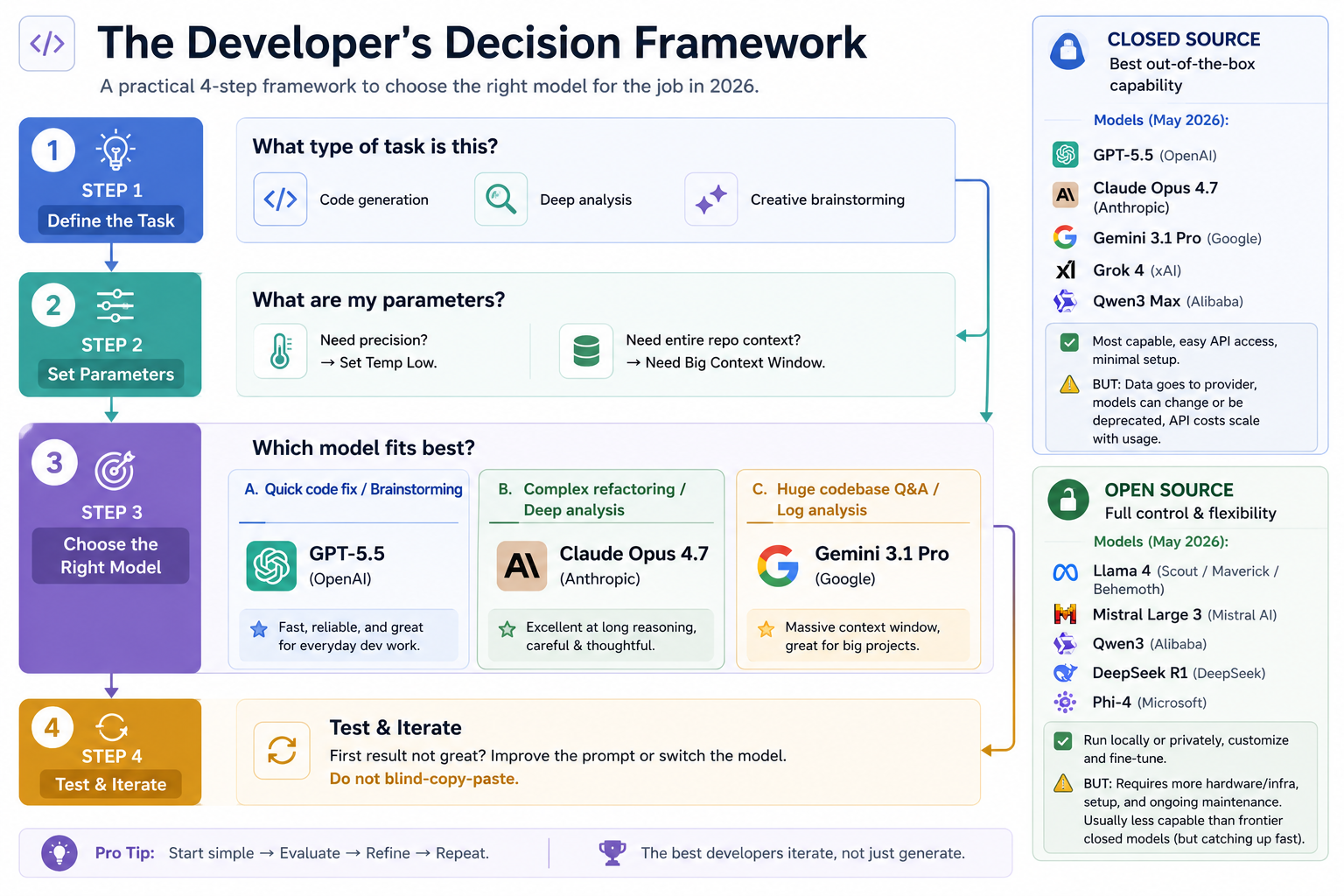
The Developer's Decision Framework for selecting the right AI model.
Step 1: Define the Task
Before choosing a model, clearly identify what you are trying to accomplish.
Different tasks require different strengths.
Examples:
Code Generation
Creating APIs
Writing unit tests
Generating boilerplate code
Deep Analysis
Architecture reviews
Root cause analysis
Security assessments
Creative Brainstorming
Product ideas
Blog topics
Marketing content
Naming suggestions
The clearer you define the task, the easier it becomes to select the appropriate model.
Step 2: Understand Your Requirements
Once the task is clear, identify the key requirements.
Ask yourself:
Do I Need Precision?
If accuracy and consistency are critical, use:
Lower temperature settings
Models known for reasoning and reliability
Examples:
Code generation
SQL queries
Technical documentation
Do I Need Large Context?
If you're working with:
Large codebases
Long documents
Research papers
Enterprise knowledge bases
Choose a model with a large context window.
A model cannot reason about information it cannot see.
Step 3: Select the Most Suitable Model
Different models excel in different situations.
For Everyday Development Tasks
Examples:
Debugging
Quick code fixes
API generation
Unit tests
A strong general-purpose model is usually sufficient.
For Deep Technical Analysis
Examples:
Architecture reviews
Refactoring recommendations
Design trade-offs
Reasoning-focused models often perform better.
For Massive Repositories and Long Documents
Examples:
Monorepos
Multi-service architectures
Enterprise documentation
Large-context models become extremely valuable.
Step 4: Test and Iterate
This may be the most important step.
Never assume the first response is the best response.
Professional AI users rarely accept the first answer blindly.
Instead they:
Refine the prompt
Compare multiple models
Add more context
Ask follow-up questions
Validate results
The best developers don't simply generate answers.
They iterate.
The Most Important Lesson
Think of AI as a team of specialists rather than a single expert.
Just as you would not ask:
A database administrator to design a UI
A frontend engineer to tune a distributed database
You should not expect every AI model to excel at every task.
The real skill is not memorizing model rankings.
The real skill is learning how to evaluate tasks, understand requirements, and select the most suitable tool for the job.
Pro Tip
A simple rule that works surprisingly well:
Start simple → Evaluate → Refine → Repeat.
That approach will often produce better results than endlessly searching for the "perfect" model
Different Models Have Different Personalities
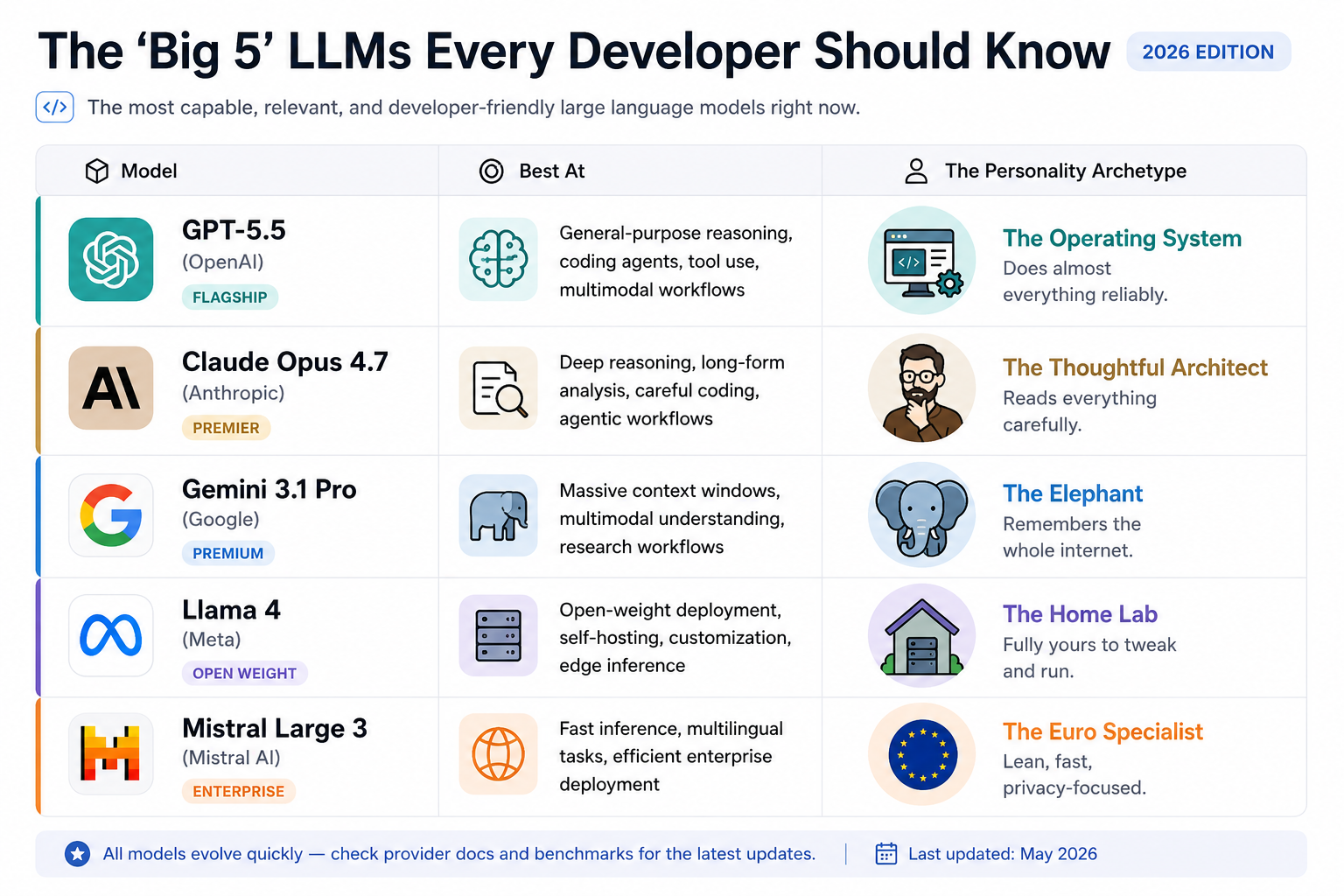
Although all major LLMs perform similar tasks, they often feel different in practice.
For example:
ChatGPT
Excellent all-rounder
Great for learning, coding, and general productivity
Claude
Strong at reasoning
Excellent for long documents and technical writing
Gemini
Excels at handling large amounts of information
Strong multimodal capabilities
Llama
Popular open-source option
Can run on private infrastructure
Mistral
Efficient and lightweight
Often preferred for enterprise deployments
Think of these differences like programming languages.
A developer may choose:
Python for rapid development
Go for concurrency
Java for enterprise systems
Similarly, different AI models may be better suited for different tasks.
The Most Important Lesson
Many beginners spend too much time trying to discover the "best" AI model.
Experienced AI users focus on something different:
Understanding the strengths and weaknesses of each model.
The model landscape changes constantly.
Today's top-performing model may be replaced by a better one next month.
The lasting skill is not memorizing model rankings.
The lasting skill is learning how to evaluate models and choose the right one for the task at hand.
Tokens, Context Windows, and Temperature: The Three Dials That Control Every LLM
================================================================================
Imagine buying a high-end DSLR camera.
Most people know how to press the shutter button.
Very few understand:
ISO
Aperture
Shutter Speed
Yet those three settings determine almost everything about the final photograph.
Large Language Models work in a very similar way.
Whether you use ChatGPT, Claude, Gemini, Llama, or any future AI model, there are three fundamental concepts that influence almost every interaction:
Tokens
Context Window
Temperature
Think of them as the three dials that control an AI system.
Once you understand these three concepts, you will immediately become better at:
Writing prompts
Optimizing costs
Improving response quality
Choosing the right model
Building AI applications
Tokens: The Building Blocks of AI Language
Before understanding tokens, let's first understand something important.
Humans read words.
LLMs do not.
Humans see:
I love programming.
An LLM may see something like:
[I][ love][ program][ming][.]
Notice something strange?
The model doesn't necessarily see complete words.
It sees chunks of text.
Those chunks are called tokens.
The LEGO Analogy

Tokens are like LEGO bricks. Humans see words; LLMs see tokens.
Imagine building a castle using LEGO blocks.
You don't build the castle in one piece.
You build it using thousands of smaller blocks.
Language works the same way for an LLM.
Words, spaces, punctuation marks, and even parts of words become small building blocks.
Those building blocks are tokens.
Example
The sentence:
Artificial Intelligence is amazing.
might be broken into:
Artificial Intelligence is amazing .
Each piece becomes a token.
The exact tokenization depends on the model.
Use https://platform.openai.com/tokenizer to understand more on this

Why Tokens Matter
Many beginners ignore tokens.
That is a mistake.
Tokens affect:
Cost
Most AI providers charge per token.
Every prompt consumes tokens.
Every response generates tokens.
More tokens = Higher cost.
Think of tokens as fuel.
The farther you drive, the more fuel you consume.
Speed
More tokens require more processing.
A 20-token prompt will usually respond faster than a 20,000-token prompt.
Memory Usage
Tokens consume space inside the model's context window.
We'll discuss context windows shortly.
Real-World Example
Suppose you ask:
Explain Java in detail.
The model may generate 1,500 tokens.
Now suppose you ask:
Explain Java in 5 bullet points.
The model may generate only 100 tokens.
Same topic.
Different token consumption.
Different cost.
Context Window: The Working Memory of an LLM
============================================

A context window is like a desk. The bigger the desk, the more information the model can work with.
Now that we understand tokens, let's ask another question.
How many tokens can an LLM remember at one time?
The answer is:
Context Window
Imagine a desk.
A small desk can hold a few documents.
A large conference table can hold entire books.
That desk is the Context Window.
The Context Window determines how much information the model can see at one time.
Examples:
Small context:
Short conversations
Simple questions
Large context:
Entire codebases
Long documents
Research papers
Books
A large context window allows models to reason across much larger amounts of information.
What Fits Inside the Context Window?
Everything.
Not just your prompt.
The context window contains:
Your current prompt
Previous messages
Uploaded documents
System instructions
The model's response
Everything must fit.
Think of it as a backpack.
Once the backpack becomes full, something must be removed.
What Happens When the Context Window Fills Up?
The earliest information begins to disappear.
This is why long conversations sometimes become strange.
You may have experienced this yourself.
After a long ChatGPT conversation:
It forgets earlier instructions
It contradicts previous answers
It loses context
Why?
Because the earliest tokens have fallen off the desk.
Software Engineering Example
Imagine uploading:
500 source files
Database schema
API documentation
Architecture diagrams
A small-context model may struggle.
A large-context model can analyze everything together.
This is one reason developers love large-context models.
Real-World Analogy
Imagine studying for an exam.
Student A can remember:
- One page
Student B can remember:
- An entire textbook
Who will perform better?
Usually Student B.
Larger context windows allow models to consider more information simultaneously.
Temperature: The Creativity Dial
================================

Temperature controls how creative or predictable an AI model becomes.
Temperature is probably the most misunderstood concept in AI.
Many people think:
Higher temperature means a smarter model.
It does not.
Temperature controls creativity and randomness.
The Chef Analogy
Imagine two chefs.
Chef 1
Follows the recipe exactly.
Every measurement is precise.
Every dish tastes identical.
Chef 2
Improvises constantly.
Adds new ingredients.
Experiments.
Sometimes creates magic.
Sometimes creates disaster.
Temperature controls which chef your model becomes.
Low Temperature
Temperature:
0.0 - 0.3
Behavior:
Predictable
Consistent
Deterministic
Best for:
Code generation
SQL queries
Debugging
Unit tests
Technical documentation
High Temperature
Temperature:
0.8 - 1.0
Behavior:
Creative
Diverse
Unpredictable
Best for:
Story writing
Brainstorming
Marketing
Naming ideas
Creative content
Example
Prompt:
Suggest a startup idea.
Temperature 0:
An AI-powered expense management platform.
Practical.
Safe.
Predictable.
Temperature 1:
A platform where AI negotiates freelance contracts while representing both parties through autonomous digital avatars.
Creative.
Unexpected.
Riskier.
See it in Action
Play with the Temperature & Top-K Visualizer (https://andreban.github.io/temperature-topk-visualizer/) to see how turning the dial changes the mathematical probabilities of the next word.
Top-K limits the model to choosing from only the K most likely next tokens instead of all possible tokens. For example, with Top-K = 5, the model can only pick from the 5 highest-probability next words.
Top-p (also called nucleus sampling) limits the model to choosing from the smallest set of tokens whose cumulative probability adds up to p.
Instead of fixing the number of candidate tokens (like Top-K), Top-p fixes the total probability mass.
For code, you want that consistency of temperature 0. For brainstorming, you want the variety of 0.7+. Knowing which dial to turn is a skill you need to develop.
Software Engineering Rule
When writing code:
Use low temperature.
When brainstorming:
Use higher temperature.
Most professional AI coding tools already use low temperatures by default because consistency matters more than creativity.
Bringing It All Together
========================
Whenever you interact with an LLM, remember:
Tokens
The fuel.
Context Window
The memory.
Temperature
The creativity.
A simple way to remember them is:
Concept
Think Of It As
Tokens
Fuel
Context Window
Memory
Temperature
Creativity Dial
Every modern AI application—from ChatGPT to enterprise AI agents—depends on these three concepts.
Master them once, and every future AI model will become easier to understand and use.
AI Agents: Beyond Chatbots
==========================
Many people confuse Chatbots and AI Agents.
They are not the same thing.
A chatbot answers questions.
An AI Agent completes tasks.
Example:
Chatbot
User:
Book me a flight to Delhi.
Response:
Here are some websites.
AI Agent
User:
Book me a flight to Delhi.
Agent:
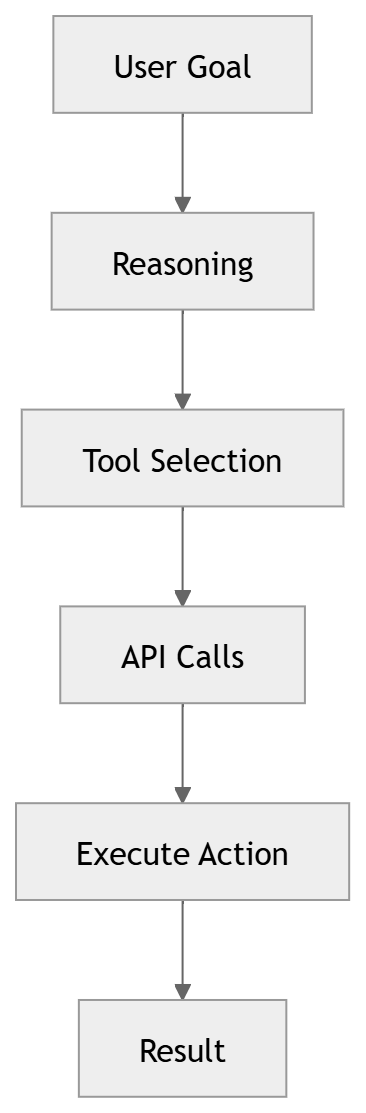
Searches flights
Compares prices
Selects best option
Books ticket
Sends confirmation
The chatbot answers.
The agent acts.
AI Agent Workflow
=================
APIs: How AI Talks to Software
==============================
An API is simply a way for software systems to communicate.
Think of a waiter in a restaurant.
You place an order.
The waiter carries it to the kitchen.
The kitchen prepares food.
The waiter returns with your meal.
An API works exactly the same way.
Application -> API Request -> AI Service -> Response
AI Agent vs Agentic AI
Aspect
AI Agent (The Noun / Instance)
Agentic AI (The Adjective / Paradigm)
Definition
A specific software system you build.
The broader category of AI systems that plan and act autonomously.
Usage
I built an AI agent that triages my inbox.
Agentic AI is the next wave after chatbots.
Analogy
I adopted a dog. (Specific instance)
Pets are great companions. (General category)
Agentic AI is the paradigm - the overall philosophy of building AI that plans, reasons, and acts autonomously.
AI Agent is the concrete thing you build following that philosophy.
Example: "Object-Oriented Programming" is a paradigm. A specific Java class you write is an instance of that paradigm. Same relationship here — Agentic AI is the idea, AI Agent is the implementation.
JSON: The Language of APIs
==========================
Most APIs communicate using JSON.
Example:
{ "model": "gpt-5", "prompt": "Explain AI"}
JSON is simply structured data using key-value pairs.
If you can read JSON, you can understand most API responses.
Google Colab
============
Google Colab (https://colab.research.google.com/) is one of the easiest ways to start learning AI.
Think of it as Google Docs for Python code.
Benefits:
Free
Browser-based
No installation required
Supports Python
Supports Machine Learning experiments
GitHub and Open Source AI
=========================
GitHub (https://github.com/) is where modern software lives.
Many of today's most popular AI projects are hosted there.
Examples:
LangChain
LlamaIndex
Transformers
Ollama
Open WebUI
Learning GitHub is almost mandatory for modern AI engineers.
How AI Fits Into Modern Software Architecture
=============================================
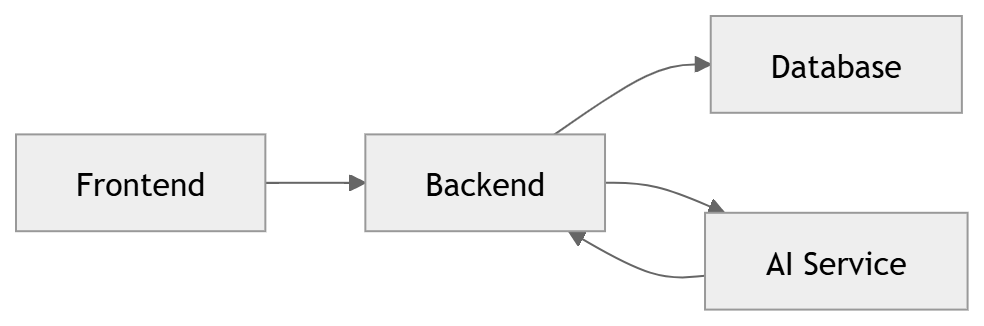
When a user asks a question:
Frontend sends request.
Backend processes it.
Backend calls AI service.
AI returns response.
Backend returns result to frontend.
Real-World Applications of Generative AI
========================================
Software Engineering
Code generation
Unit test creation
Documentation
Healthcare
Clinical summaries
Medical assistants
Research acceleration
Customer Support
AI chat assistants
Ticket summarization
Banking
Fraud analysis
Customer support automation
Education
Personalized tutors
Learning assistants
The Future of AI Careers
========================
The future belongs to people who can combine:
Domain knowledge
Critical thinking
AI tools
AI is unlikely to replace skilled professionals.
However, professionals using AI will almost certainly outperform professionals who refuse to use it.
The goal is not to compete with AI.
The goal is to learn how to work with AI effectively.
Key Takeaways
=============
AI is the umbrella term.
Machine Learning is a subset of AI.
Deep Learning is a subset of Machine Learning.
Generative AI creates content.
LLMs are the engines behind ChatGPT, Claude, and Gemini.
Tokens are the building blocks of AI language.
Context Windows determine memory.
Temperature controls creativity.
AI Agents perform actions, not just conversations.
APIs connect AI systems to applications.
Google Colab and GitHub are essential AI tools.
AI is already transforming every industry.
Final Thoughts
==============
When the internet became mainstream, learning how to use it became a career advantage.
Today, AI is creating a similar shift.
You do not need to become an AI researcher.
You do not need a PhD.
You simply need to understand the fundamentals, learn how these tools work, and start using t hem effectively.
The future belongs not to those who fear AI, but to those who learn how to collaborate with it.


Top comments (0)