

The cover image shows me using 1st monitor to watch youtube tutorial while coding on 2nd.
Since I bought an extra monitor to plug into my laptop 3...
For further actions, you may consider blocking this person and/or reporting abuse


Only 2? 😜
Welcome to the wonderful world of screen real-estate addiction!
p.s. couldn't agree more, 2 screens is a massive productivity boost, 99% of people don't need this setup I have and it is overkill!
But I would say save up and buy a 40+ inch 4k monitor as your main, being able to tile 4 1920x1080 windows on one screen is huge for time saving and that stops you having to look at more than one monitor, then keep the second monitor on your laptop for slack, emails or whatever you need open but not in direct line of sight!
People usually tell me that I'm using more monitors than they can handle and I'm using "only" 3:
when working in my desktop and 4 when using the laptop connected to the dock station so... well, I'm saving this post to make 'em think that twice 😆
If I don't forget about it I'll upload a pic later :)
Edit: didn't forget about it. There's a picture below in another comment plus you can see other pictures here.
Cheers! 😁
I would love to see the setup, especially if you put effort into aesthetics (as you can see mine is "all work no play" looking at the moment 🤣)!
I'm adding a reminder :D
@apayrus @inhuofficial
The top screen is at the left cuz I'm playing with a server but well, you can get an Idea.
More pics of the setup here
PD: I know I should tidy up my desk 😅
waw, cool setup. )) I have never met in real life monitor standing vertical, only on photos on the internet :D
I think this is a terrible idea to use vertical setup: the top of the screen should be levelled with your eyes in order to prevent neck ache.
Source: blitzresults.com/en/ergonomic/
Please, look at my setup from the side:

Viewing angle should be about 30°:
Source
With your setup, I'm pretty sure your viewing angle is greater than 30° which may lead to neck pain in long term.
Thank you for taking care of me ❤️
I use this setup for 3 years. And since then I spend much more time coding or writing -- because I don't get tired as soon as before. I don't look at both monitors at once. E.g: I code 5 minutes on a big monitor, then 10-20sec I look at results on a small monitor. Or I read doc 5 min, then 1 min I take notes on another monitor etc.
So, I suppose I don't look at once more than 30 degrees. And switches aren't too frequent.
Thanks for your feedback 👍
I will take time to try this setup
alt + tab will do the trick.
Yes in some cases :)
I like to see both windows opened.
Some people are used to more than one monitor without feeling overwhelmed. But for others, it is a source of distraction. I only see the need for a second monitor if you share your screen with others and don't want to show confidential information. Moreover, I don't think it is healthy to move your head all around frequently.
Did you try monitors one on top of another? I feel that healthy, my neck is ok :)
I use only 2 monitors:
1) read/watch
2) write/draw
One BIG FAT monitor for the win!
Yeah that's right. dell service center in Kolkata
I used to use multiple monitors, then went back to one for a while... preferred it, and never switched back. I find it much easier to focus.
Multi-monitor support on macos is kinda crappy, but swiping between workspaces works brilliantly
My monitor has only VGA port, and mac doesn't have it :)
So I am still with my Lenovo with Ubuntu
For me it is easier to focus when everything you need has already opened.
And it is not so much "multiple" (I imagine how difficult it can be), but it is just 2.
From 1st -- I read, in 2nd -- write.
I scaled down from two to one. Since I do TDD I hardly need to click test anything. Just in the end I do a test and then I focus fully on all the acceptance criteria.
Anything but my code starts to distract me.
I understand you. Unneeded things distract me too.
For other people mobility is a crucial factor, so they never think of extra monitor.
Also we paired 90%. Two screens 2 keyboards 2 mice one pc. A multi monitor setup is simply not supported (macos) if you mirror the screen.
If you put it vertical it would be enough to see spring boot stack traces
2 screen setup I use 😍
Having the big widescreen made everything 1000x better. So much more space, better overview, cleaner workspace on screen. Don't want anything else anymore!
To be honest... yeah I prefer working on 2 or 3 screens. But I have absolutely no problem unplugging and working on just my 15" laptop.
Its overrated. You can only focus one thing with your eyes anyways. You either look around or hit Alt+Tab, I dont even think about it anymore 🤷♂️
I definitely agree! It is so much easier to work for me with two monitors.
Thank you!
You are a first person who agree with me here without any caveats :D
And without showing your 10 monitors setup :D
lol
"you should choose a vertical setup – so you can switch your eyes from one monitor to another without straining your neck."
I thought so too, but after having massive neck problems and being treated by a chiropractor over months, I changed my set up to 1 major thing: movement.
There is nothing worse for your neck (even your body in general) than staying static. So I started using 3 monitors (horizontally) to have continuous neck movement as well as an electrical desk that is easily changeable in height. I switch between standing and sitting multiple times a day, turn my neck a lot, and my whole neck and back situation improved drastically.
Just my 2 cents
I also thought about electrical desk, but it is too expensive to me for now :-(
I'll try it later, thank you for reminding.
Honestly I don't spend much time in front of laptop, it is another sad story I hope I'll tell here later. So I cannot guarantee that my setup is good in any cases (depends on time you spend coding, body condition, age etc). Sorry that I didn't include all these caveats into the post, I was afraid it becomes too long and boring.
So, your 2 cents is very valuable. I hope many readers here will see it.
I have used only a laptop screen, then laptop plus side screen, then two screens with a pc. Fast forward to me being a full time developer now, I use only one 27" monitor. I found out that I don't like moving my head because it causes stress on my neck and I get headache. But I also like my workplace minimal and I always want to focus only on the task at hand so I fell in love with the "workspaces", that is multiple views that can be quickly switched. Now I usually have my IDE on one, then if I move to left (mac os, on ubuntu it's up and down) I have Slack there, to the right is the browser. I also keep an empty "screen" for music apps, Todoist etc. This setup means that I get to look at only one monitor and still get as many screens as I need. No need to spend cash on those extra monitors guys!
I avoided pain in the neck by setting monitors vertical -- one above another.
I also used working spaces like you and it was good expirience.
I need two monitors, because for me it is important to read-watch --> type/draw at the same time, so I need two full-screen opened apps at the same time. That's why I use them.
Alas, at over $2000, I found the 43" Philips 4K HDR display for $700 a more satisfactory investment.
I love these types of monitors. Is this the Samsung Odyssey?
Kinda looking great. Personally I use 2 monitors for work + tv for games and films. I am designer create.vista.com/create/podcast/, so monitors quality is necessary, tv not at all, but it cool for me
this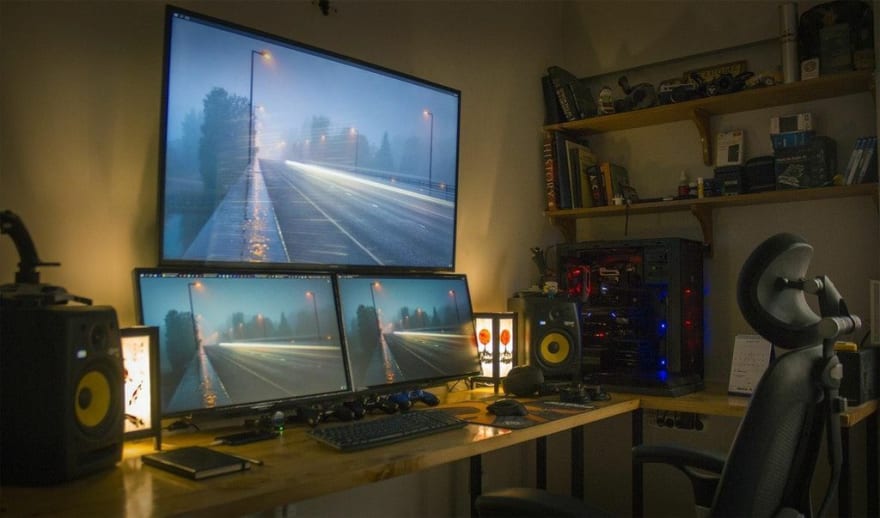
i think one is enough, two is distraction. I remember the days before browser tabs!
Yes. It is especially important for whom mobility is crucial. Because they cannot bring monitor everywhere they go :)
yes true
My second monitor is my cellphone, my desktop is the floor, my emulator is my second monitor, and I read docs/watch yt tuts on the monitor that serve it first
Great words. I wish you great success in everything!
Thank you
BIG isn't enough for this monster, GIGANTIC is much better.
Two screens. 27" as main monitor. And just the laptop as second. Been using two monitors since before 2000.
Woah! Gigantic, crazy monolith!
I thought to include that option into an article, but didn't, and was waiting it in comments :D
I have just dropped an article about this topic. I hope you will find it useful.
I much prefer using a single monitor for work… and here’s the post from someone else who agrees: hackernoon.com/why-i-stopped-using...
Only now I have seen the image :| waw.
I suppose its diagonal is measurable not in inches but in meters :D
Two monitors seems to be the sweet spot for most developers myself included.
Agree, I read an article before that two monitors can achieve the most efficient, more than two monitors, the efficiency will decline.
I used to use two monitors, but a friend convince me to go one 43" 4K monitor and I did and there's no looking back. Game changer, and much better. More real estate than the two monitors ...
How can you focus on your code/task while you're watching or reading another thing?
It is not another. They are related. I watch a video lesson, and follow steps from it. Or I read docs and implement functions from it.
I do have one question though, why do you have 2 keyboards😅
It's airfield 😄
I use three monitors. I love this setup.
I have two extra second-hand monitors!
Oh, I am also ok to use second hand things, if they work properly :)
This mindset is good when there is crisis in the world and I have 3 children ))
I am broke dev :) !
i do exactly this hahaa!! it's so convenient..!
I had 2 monitors. But then a friend with their enthusiasm suggest this:
philips.com.au/c-p/436M6VBRAB_75/m...
so I got one, and haven't looked back. One 43" 4K monitor works beautifully and way better than two smaller monitors IMHO.
Best option for monitor rising is old programming books :)
ahaa ok
Nice information.. Anyway if you need any help regarding any laptop issue better reach us at Dell service center Mumbai