


Turkish version: Medium
When GET gets cramped and POST feels too heavy, QUERY fills the gap.
What's in here:
- POST /search worked, but something felt off
- The old triangle: GET, GET with body, POST
- What QUERY says
- What a QUERY request looks like
- Using it with fetch
- Cache needs extra care
- The protocol is ready. Your stack might not be.
- When to use GET, QUERY, and POST
- POST /search was not a mistake
POST /search worked, but something felt off
A simple search usually starts like this:
GET /search?q=ada&limit=10
Then the filters pile up. Date ranges, status lists, sorting, nested conditions. The URL gets longer and harder to read.
After a while, the endpoint becomes this:
POST /search
Content-Type: application/json

{
  "filters": {
    "status": ["active", "trialing"],
    "createdAfter": "2026-01-01"
  },
  "sort": "-createdAt",
  "limit": 50
}
That works. In many cases, it is a reasonable choice.
A JSON body is a more natural shape for this input. Filters stay as separate fields. Tests and SDKs make it easier to see what was sent.
But the name POST /search leaves a small mismatch. The operation is not creating, updating, or deleting anything. It is only reading.
That was the part HTTP could not express cleanly. POST /search was not bad engineering. HTTP did not have a standard method for a request that carries a body but is still a safe read.
QUERY fills that gap: the query can live in the body, while the method still says the request is a read.
The old triangle: GET, GET with body, POST
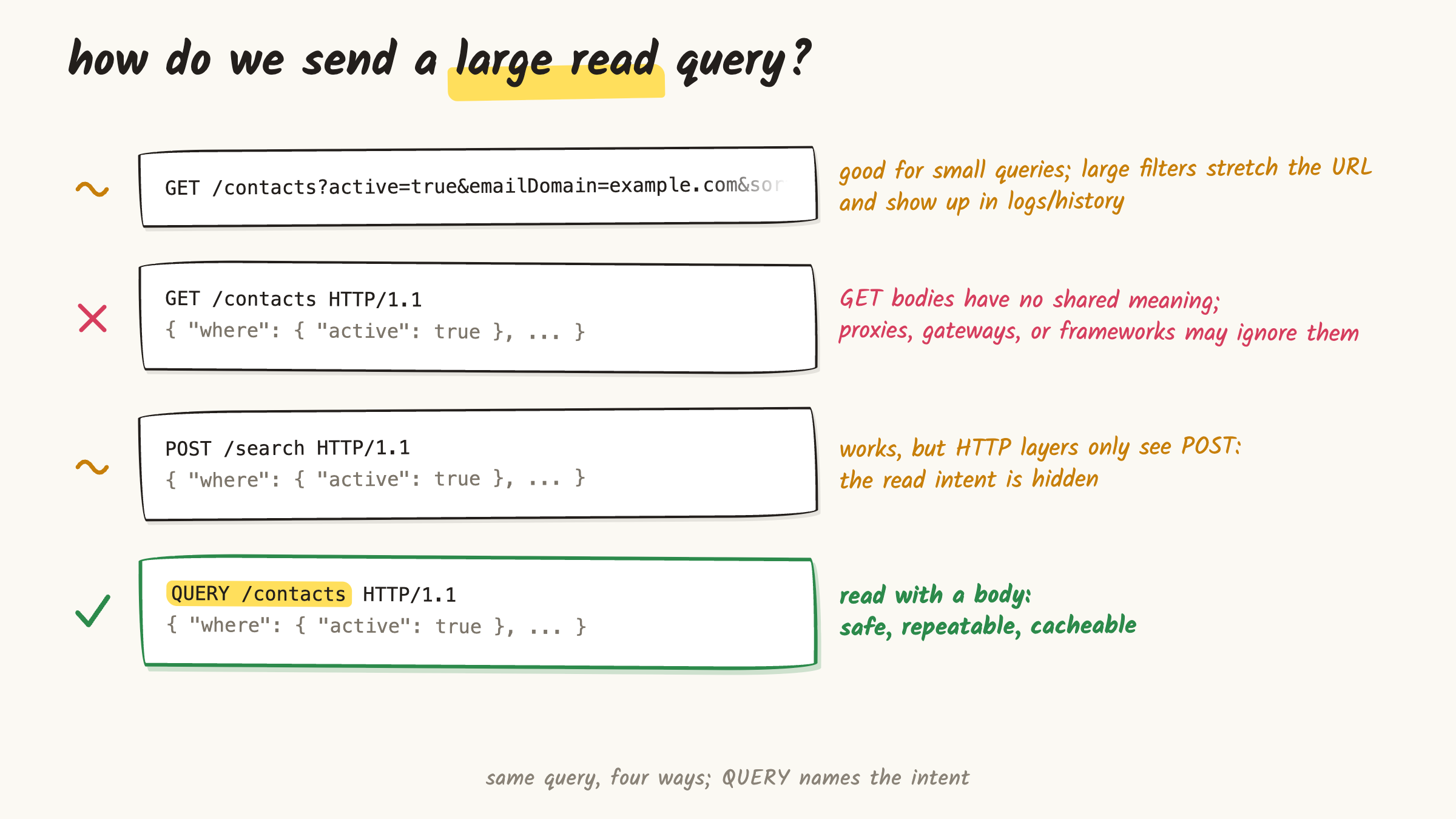
Before QUERY, complex read APIs usually had three choices.
The first choice was plain GET:
GET /contacts?emailDomain=example.com&active=true&limit=10
This is still the right tool for many jobs. It is linkable, easy to inspect, cache-friendly, and clear to people who know HTTP methods.
But as the query grows, the URL starts doing too much. Nested filters, long lists, report options, analytics dimensions, and search DSLs can turn it into a compressed body.
There is also the visibility question. URIs are more likely than bodies to show up in logs, browser history, bookmarks, and copied links.
That does not mean "the body is private." Bodies can be logged too. The data just tends to surface in different places.
Imagine a basic admin search: status, country, date range, a few flags, pagination, sort, maybe a filter like "one of these fields must be present."
You can put all of that in the URL. Past a point, though, the URL stops feeling like a clean address and starts feeling like an encoded query file.
The second choice was GET with a body.
At first, it looks neat. The intent is still read, and the input is in the body. The problem is on the HTTP side.
RFC 9110 does not define general semantics for content in a GET request. That content cannot change the meaning or target of the request. Some systems may reject it for security reasons.
So it is not simply "forbidden." But it is also not something you can send and expect every layer to understand.
The third choice was POST /search.
It carries the body cleanly. The server understands it. The client sends it. Plenty of production APIs have worked this way for years.
But a generic HTTP layer looking at the request does not see "safe read." It sees POST.
Is it safe to retry? Can it be cached? Is it only reading, or changing state? Without resource-specific knowledge, the layer cannot know.
That is exactly the gap QUERY fills.
What QUERY says
QUERY was defined by Standards Track RFC 10008, published in June 2026.
Short version:
QUERY tells the server: "Run the query in this body and return the result. Treat it as a safe read, not as a write."
In HTTP terms:
- The method is
QUERY. - The request is safe: the client is not trying to change the target resource.
- The request is idempotent: sending the same request again does not add another side effect.
- The query is carried in the body, not only in the URI.
-
Content-Typetells the server how to interpret that body.
The "safe read" part matters. QUERY is not a nicer spelling of POST.
If the client is asking to change state, do not use QUERY. Use POST, PUT, PATCH, DELETE, or whichever method actually fits.
The URI and the body have different jobs here. The URI answers "where are you asking?" The body carries "what exactly are you asking?"
QUERY /contacts asks the contacts resource. QUERY /orders asks the orders resource. Putting filters in the body does not make the URI irrelevant.
The value is simple: the method says read, and the body carries complex filters. You get both at the same time.
What a QUERY request looks like
A small curl example:
curl -X QUERY https://api.example.com/contacts \
  -H "Content-Type: application/json" \
  -H "Accept: application/json" \
  --data '{
    "where": {
      "emailDomain": "example.com",
      "active": true
    },
    "limit": 10
  }'
At the HTTP level, it is still a familiar request:
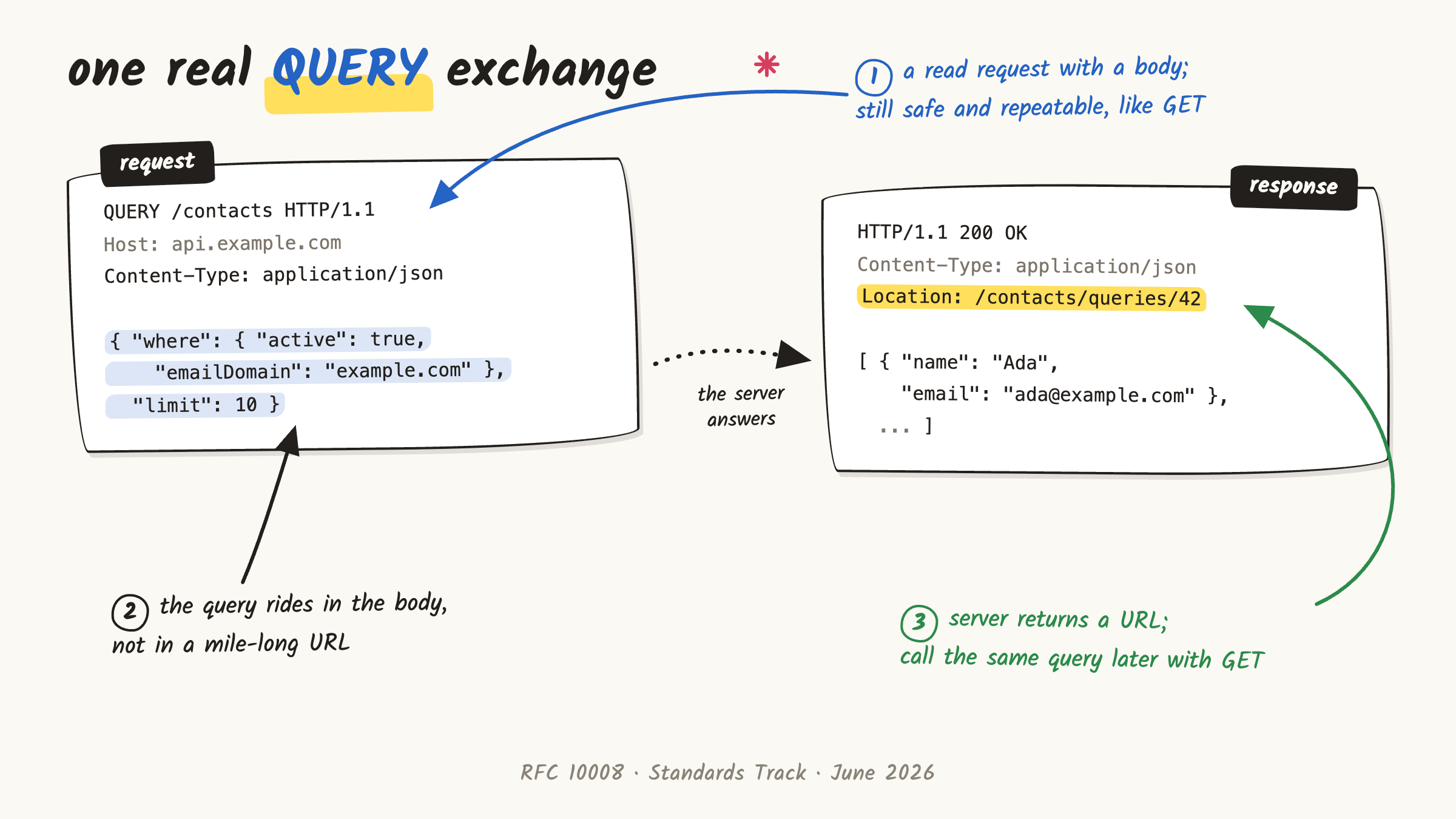
QUERY /contacts HTTP/1.1
Host: api.example.com
Content-Type: application/json
Accept: application/json

{
  "where": {
    "emailDomain": "example.com",
    "active": true
  },
  "limit": 10
}
The server can return the result directly:
HTTP/1.1 200 OK
Content-Type: application/json
Accept-Query: application/json
Content-Location: /contacts/results/17
Location: /contacts/queries/42

[
  {
    "name": "Ada",
    "email": "ada@example.com"
  }
]
Three fields are worth separating.
Content-Type is not decoration. RFC 10008 says a server must reject a QUERY request if Content-Type is missing or inconsistent with the body.
That is stricter than many casual JSON endpoints. But it makes sense: the body only means something when both sides know what it is.
Accept-Query tells clients which query formats this resource supports. If the endpoint accepts JSON query bodies, it can say so with Accept-Query: application/json.
Location and Content-Location are related, but not the same.
Location can point to an address where the same query can later be repeated with a normal GET. Content-Location can point to the result that was just returned.
Those addresses do not have to live forever. If a later GET fails, the client should still be able to fall back to the original QUERY.
You do not need all of this on the first endpoint. A minimal endpoint can accept a QUERY body and return a result.
The extra fields become useful for discovery, stored queries, or fetching an older result again.
Using it with fetch
The Fetch Standard does not limit method names to the classic list. It has a short forbidden list: CONNECT, TRACE, and TRACK.
So a same-origin request can be written like this:
const response = await fetch("/contacts", {
  method: "QUERY",
  headers: {
    "Content-Type": "application/json",
    "Accept": "application/json"
  },
  body: JSON.stringify({
    where: {
      emailDomain: "example.com",
      active: true
    },
    limit: 10
  })
});

const contacts = await response.json();
Same-origin is that simple. Cross-origin brings CORS into the picture.
QUERY is not one of the methods CORS lets through directly. So the browser sends a preflight first. The server must allow the QUERY method and, for JSON requests, the needed headers.
Native HTML forms are different. There is no <form method="query">. In the browser, the practical path is fetch plus the right CORS setup.
Cache needs extra care
One useful part of QUERY is this: when it is set up correctly, the response can be cached.
But the usual GET cache mental model is not enough.
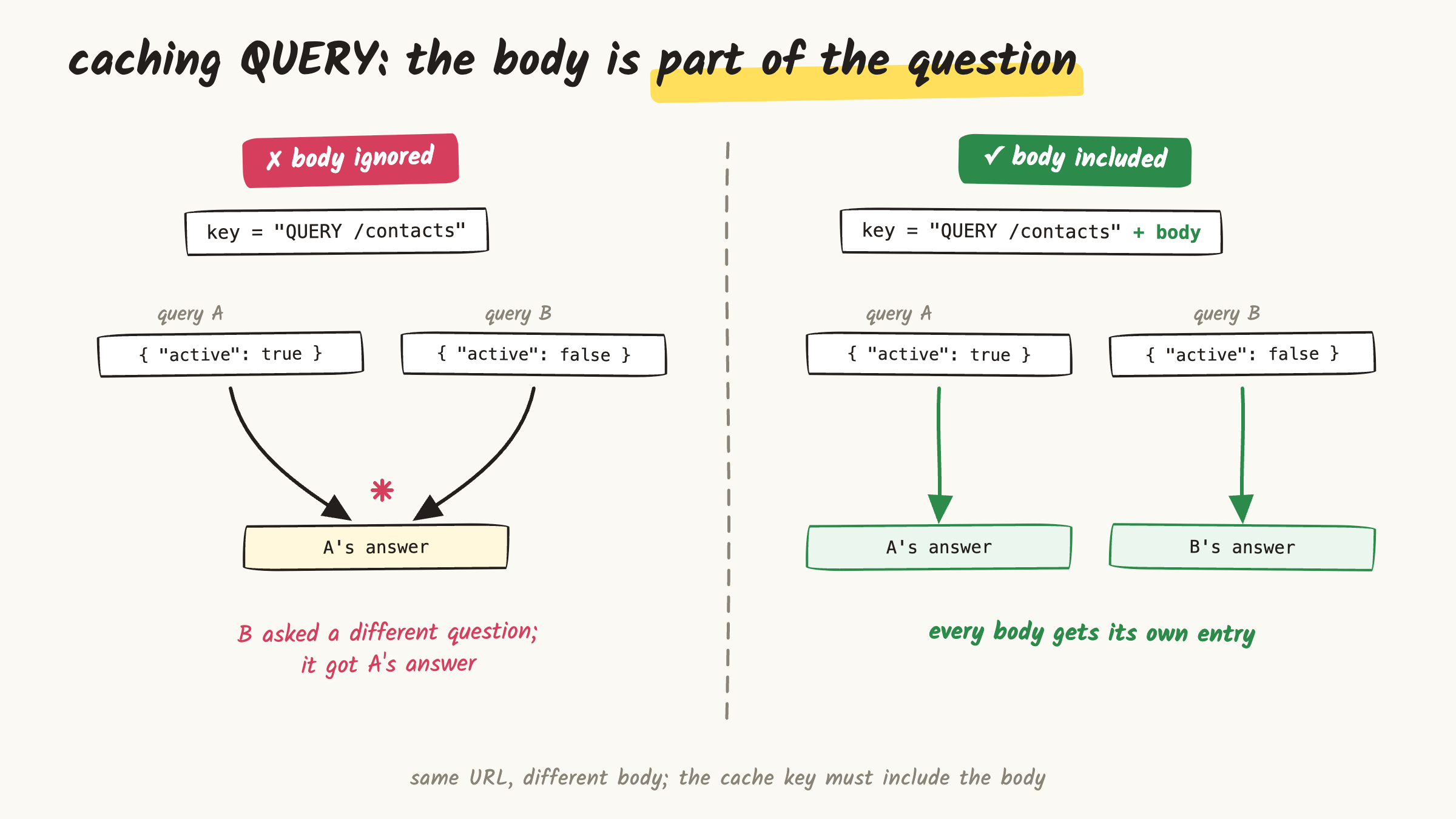
These two requests go to the same URL:
QUERY /contacts
Content-Type: application/json

{ "active": true }
QUERY /contacts
Content-Type: application/json

{ "active": false }
The first asks for active contacts. The second asks for inactive contacts.
The URL may be the same, but the question is not. The difference is in the body.
If a cache only looks at QUERY /contacts, it will treat both requests as the same thing. Then the second request may get the first response.
So when caching QUERY, the body must be part of the cache key. The body format and any other metadata that changes the meaning of the request matter too.
This is the part to test carefully. A cache can handle GET perfectly and still fail to separate a read request with a body.
"The spec says it is cacheable" does not prove your CDN, proxy, or framework is doing the right thing.
A simple test: send two different bodies to the same URL. Let the first response enter the cache. Then call again with the second body.
If the second request gets the first body's response, the bug is real. The request may route correctly and return 200. The cache behavior is still wrong.
That bug is quiet. The demo works. The request moves through the stack. But one user can get a result built from another user's filter.
The cache key is not just a performance detail here. It is correctness.
The protocol is ready. Your stack might not be.
QUERY is now a standard. That does not mean every system that handles your request already understands it.
A real request may pass through a browser, client library, corporate proxy, CDN, WAF, API gateway, load balancer, and framework router.
Then it may hit body parsing, logs, tracing, and cache. Any of those layers may still have an old method allowlist.
There may also be a quiet assumption like "we only parse bodies on POST."
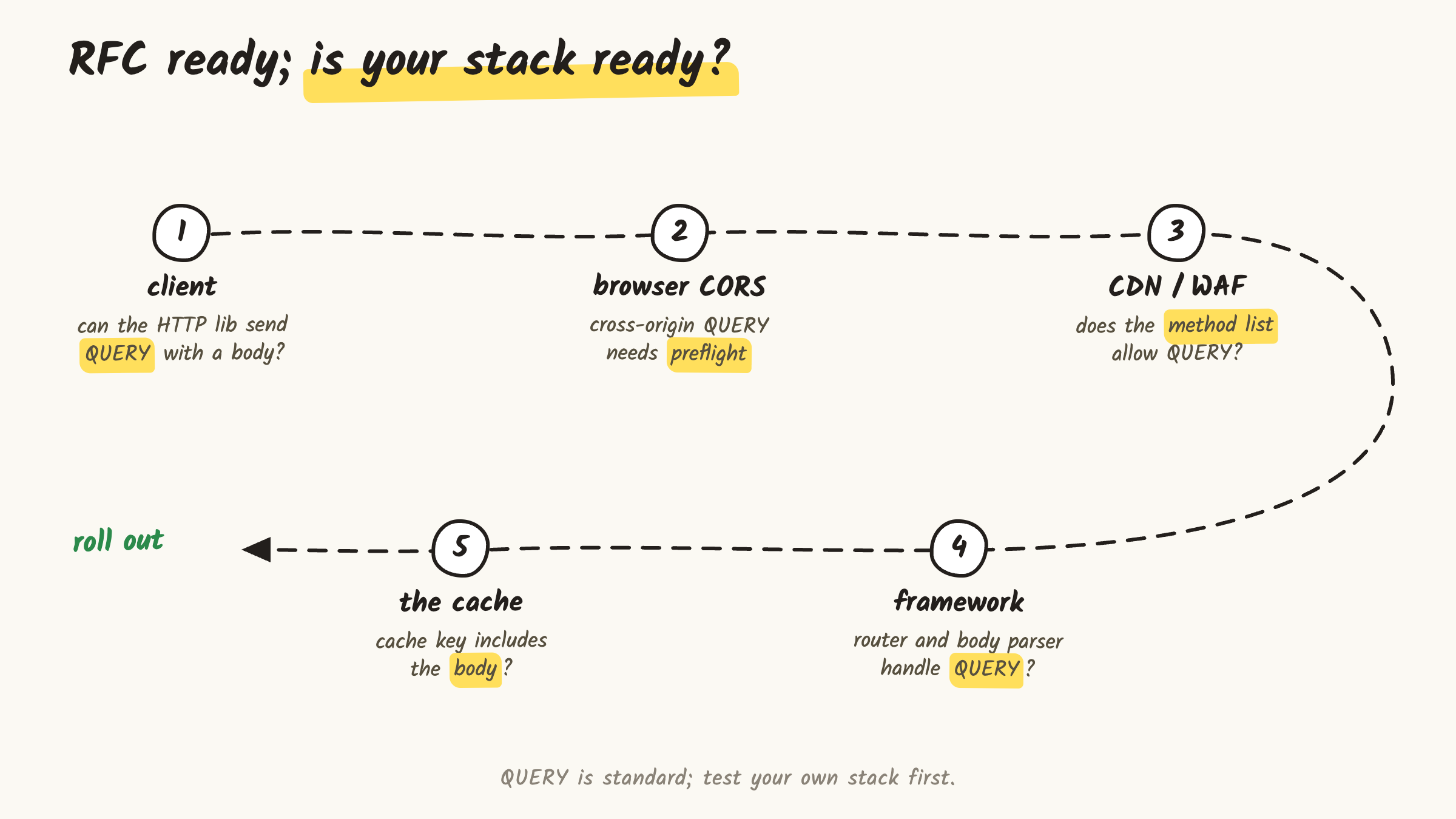
Before making QUERY the only public path, prove that your stack can carry it, route it, observe it, and cache it correctly.
Use your own checklist instead of a vendor matrix:
| Layer | Question to answer |
|---|---|
| Client | Can the HTTP library send QUERY with a body? |
| Browser | Does cross-origin preflight pass? |
| CDN / proxy / WAF | Is the method allowed instead of blocked? |
| Gateway | Do route rules include QUERY? |
| Framework | Does the router send it to the right handler? |
| Body parsing | Does parsing run for QUERY, not only POST? |
| Logs | Is there enough debug info without leaking query content? |
| Cache | Does the key include the body and related metadata? |
| Fallback | Can old clients keep using GET or POST /search where needed? |
That is why a static "which product supports it?" table is not very useful. Behavior can change by version, config, and the proxy sitting in front.
The better question is local: can your client send QUERY? Does your gateway pass it? Does your framework send it to the right handler? Does your cache include the body?
A safer rollout is one endpoint first. Once that works, open it to new clients and keep POST /search around for old clients.
That is not backing down. It is a rollout plan. Small queries can stay on GET; complex read requests can move to QUERY where the stack is ready.
When to use GET, QUERY, and POST
The simple rule:
Use GET when the query is small, clean in the URL, linkable, and safe to expose in normal URI surfaces.
Use QUERY when the operation only reads, the query naturally wants a body, and your stack can carry it end to end.
Keep POST /search as the fallback when the stack is not ready yet.
Use POST or another fitting method when the operation actually changes state.
Short version:
| Method | Good fit | Main problem |
|---|---|---|
GET |
Small, linkable reads | Structured or sensitive query input gets forced into the URI |
GET with body |
Looks like a read and carries a body | No generally defined HTTP semantics for the body |
POST /search |
Works today for complex search payloads | HTTP layers cannot see that it is a safe read |
QUERY |
Safe reads with a body | The production setup must be tested end to end |
POST /search was not a mistake
POST /search was not bad engineering. It was a reasonable answer to a missing method.
QUERY does not make POST /search disappear overnight. It just gives us a more precise option.
The body is still there. Complex filters can still stay in JSON. The difference is that the method can now say: this is a read request.
That is the real value of QUERY. It gives clearer HTTP meaning to a pattern many APIs have used for years.
The rest is practical: can the browser, proxy, gateway, framework, and cache actually carry it?
That answer will vary by project. But at least the problem is clearer now: we no longer have to make a complex read request look like a write.
Stay in touch: arasmehmet.com


Top comments (0)