

AWS Config: Automating Cloud Compliance and Security
Did you know cloud misconfigurations are responsible for a large percentage of modern data breaches? As cloud environments grow, maintaining visibility, compliance, and security across AWS resources becomes increasingly difficult.
This is where AWS Config becomes extremely valuable. AWS Config provides continuous monitoring and assessment of AWS resources, helping teams maintain compliance, improve governance, and quickly identify security misconfigurations before they become larger issues.
By automating configuration tracking and compliance evaluation, AWS Config gives organizations better visibility into their cloud infrastructure while reducing operational overhead.
Understanding AWS Config
Key takeaway: AWS Config helps teams catch configuration drift early instead of discovering issues during audits or incidents.
AWS Config gives you a detailed view of the configuration of AWS resources within your AWS account. It continuously records resource configurations and tracks configuration changes over time, making it easier to understand how resources are set up and how they evolve.
The service integrates with other AWS services such as CloudTrail, CloudWatch, and Security Hub to provide centralized visibility into your infrastructure and compliance posture.
One of the biggest advantages of AWS Config is that it helps teams move from reactive troubleshooting to proactive governance. Instead of discovering configuration problems during audits or incidents, teams can detect and remediate issues much earlier.
Benefits of Using AWS Config
Key takeaway: Continuous compliance visibility is one of the biggest operational gains, especially in regulated environments.
AWS Config provides several practical advantages for organizations operating in AWS environments. One of the most important is automated compliance monitoring. Teams can define rules that continuously evaluate resources against internal policies or industry standards such as PCI DSS and HIPAA. This makes compliance validation significantly easier and more consistent.
The service also improves security posture by providing near real-time visibility into configuration changes. For example, if a security group becomes overly permissive or an S3 bucket is configured incorrectly, AWS Config can quickly identify the issue and flag it for remediation.
Auditing also becomes much simpler because AWS Config maintains configuration history for supported resources. Teams can easily determine who changed a resource, what changed, and when the modification occurred. This historical visibility is especially useful during incident investigations and compliance reviews.
In addition to security and compliance benefits, AWS Config can also contribute to cost optimization by helping identify unused or over-provisioned resources. This allows organizations to better align infrastructure usage with actual workloads.
How AWS Config Works
Key takeaway: AWS Config creates a practical loop of detect, evaluate, and remediate across your cloud resources.
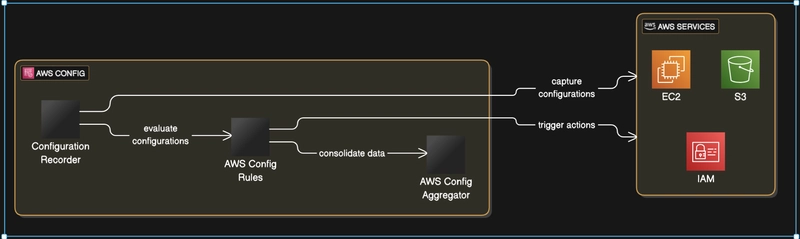
AWS Config relies on several core components that work together to monitor and evaluate AWS resources. These components include the configuration recorder, Config rules, and aggregators.
The configuration recorder continuously captures resource configuration details and tracks changes over time. Every recorded change generates a configuration item, which acts as a snapshot of the resource at a particular point in time. This provides both current-state visibility and historical tracking.
AWS Config Rules are responsible for evaluating whether resources comply with desired configurations. AWS provides managed rules for common compliance checks, while custom rules allow teams to define organization-specific requirements using AWS Lambda.
When a resource becomes non-compliant, AWS Config can trigger remediation workflows automatically. This helps reduce manual intervention and improves response time when configuration drift occurs.
For organizations operating across multiple AWS accounts or regions, AWS Config Aggregators provide a centralized view of compliance and configuration data. This makes it easier to monitor large-scale environments from a single location.
Implementing AWS Config
Key takeaway: A strong rollout starts with correct IAM permissions, then scales through targeted rules and automated remediation.
Setting up AWS Config requires a few foundational steps. Before enabling the service, it is important to ensure the correct IAM roles and permissions are configured, because AWS Config needs permission to access and record information about supported AWS resources.
Once permissions are in place, AWS Config can be enabled either through the AWS Management Console or the AWS CLI. During setup, you configure the configuration recorder and specify which resource types AWS Config should monitor.
After enabling the service, the next step is defining Config Rules. Organizations can start with AWS-managed rules for common security and compliance checks, then expand into custom rules where more specialized validation is required.
Monitoring compliance is handled through the AWS Config dashboard, which provides visibility into compliant and non-compliant resources across the environment. For automated remediation, AWS Config can integrate with AWS Systems Manager to apply corrective actions automatically whenever violations are detected.
Real-World Use Cases for AWS Config
Key takeaway: Most teams see immediate value by enforcing encryption and public-access guardrails first.
AWS Config is commonly used to support regulatory compliance, strengthen cloud security, and improve operational governance.
For compliance-focused environments, AWS Config can help validate configurations against standards such as PCI DSS or HIPAA. A common example is ensuring encryption is enabled for all S3 buckets storing sensitive data. AWS Config can continuously evaluate this requirement and alert teams whenever a bucket becomes non-compliant.
From a security perspective, AWS Config helps detect risky configurations such as publicly accessible EC2 instances or overly permissive security groups. This visibility allows teams to identify and remediate issues before they become security incidents.
AWS Config can also assist with infrastructure cost management. By identifying underutilized EC2 instances or over-provisioned resources, organizations can optimize infrastructure usage and reduce unnecessary spending.
Best Practices for AWS Config
Key takeaway: Keep rule design focused and actionable so compliance checks remain efficient at scale.
To get the most value from AWS Config, it is important to establish a consistent tagging strategy across resources. Proper tagging improves reporting, simplifies rule targeting, and helps organize infrastructure more effectively.
Teams should also carefully balance rule scope and complexity. While it may be tempting to create large numbers of Config Rules, excessive evaluations can introduce unnecessary overhead. Narrowing rule scope to relevant resources helps improve efficiency and maintainability.
Integrating AWS Config with CloudWatch is another recommended practice. CloudWatch alerts and notifications allow teams to respond quickly whenever non-compliant resources are detected. This improves visibility and accelerates remediation workflows.
Conclusion
Verdict: As cloud environments scale, AWS Config helps make governance repeatable, measurable, and faster to enforce.
AWS Config is a powerful service for automating cloud compliance, governance, and security monitoring across AWS environments. By continuously tracking resource configurations and evaluating compliance rules, organizations can reduce operational risk while improving visibility into their infrastructure.
As cloud environments continue to scale, maintaining consistent governance manually becomes increasingly difficult. AWS Config helps simplify that process through automation and continuous assessment.
In the next article, we will explore how to deploy a custom conformance pack using Terraform and automate the entire process. Stay tuned.


Top comments (0)