


Understanding the JavaScript Window Object: The Browser’s Global Powerhouse
When developers start learning browser-side JavaScript, they usually interact with elements using document.getElementById() or manipulate HTML through the DOM. However, behind the scenes, there is a larger object controlling the entire browser environment — the Window Object.
The Window object acts as the top-level container of everything running in a browser tab. Understanding this object helps developers clearly distinguish between Browser APIs (BOM) and Document APIs (DOM).
Let’s explore this powerful object step by step.
What is the Window Object?
The Window object represents the browser window or tab where your JavaScript is running. It is the global object in the browser environment, meaning that everything defined globally automatically becomes a property of the window.
console.log(window);

When executed in a browser console, this prints a large object containing browser APIs such as:
- document
- location
- history
- navigator
- localStorage
- timers
- dialog boxes
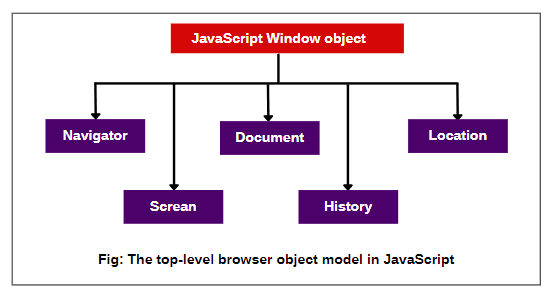
Think of the window object as the root controller of the browser environment.
Window
├── Document (DOM)
├── Location
├── History
├── Navigator
├── LocalStorage
└── Browser APIs
Global Scope and the this Keyword
In browser JavaScript, global variables and functions automatically become properties of the window object.
Example
var language = "JavaScript";

function sayHello() {
    console.log("Hello Developer");
}
Behind the scenes, the browser interprets this as:
window.language = "JavaScript";
window.sayHello = function() {
    console.log("Hello Developer");
};
So these are equivalent:
console.log(language);
console.log(window.language);
Both return:
JavaScript
this at Global Level
At the global scope in browsers:
console.log(this === window);
Output:
true
This means the global execution context refers to the window object.
Key Properties of the Window Object
The Window object contains several important properties that provide access to browser capabilities.
1. window.document — Accessing the DOM
The document property refers to the DOM (Document Object Model) representing the HTML page.
console.log(window.document);
Example usage:
document.getElementById("title");
Even though we write document, internally it is:
window.document
The document object allows JavaScript to:
- read HTML elements
- modify content
- attach event listeners
- manipulate styles
2. window.location — URL Manipulation
The location object provides information about the current page URL.
console.log(window.location.href);
Example:
window.location.href = "https://google.com";
This redirects the browser to a new page.
Useful properties:
| Property | Description |
|---|---|
href |
Full URL |
hostname |
Domain name |
pathname |
Page path |
protocol |
http / https |
Example:
console.log(location.hostname);
3. window.history — Browser Navigation
The history object allows navigation through the browser session history.
Example:
history.back();
Equivalent to clicking the back button.
Other methods:
history.forward();
history.go(-2);
Use cases include:
- single-page applications
- navigation control
- custom routing systems
4. window.navigator — Browser Information
The navigator object provides information about the user’s browser and device.
Example:
console.log(navigator.userAgent);
It can reveal:
- browser type
- operating system
- device type
- language settings
Example:
console.log(navigator.language);
5. window.localStorage and sessionStorage
These APIs allow storing data inside the browser.
Local Storage
Data persists even after the browser closes.
localStorage.setItem("theme", "dark");
Retrieve data:
localStorage.getItem("theme");
Remove data:
localStorage.removeItem("theme");
Session Storage
Data persists only during the browser session.
sessionStorage.setItem("user", "Bhupesh");
When the tab closes, the data disappears.
Important Methods of the Window Object
The Window object also provides several utility methods.
1. Dialog Boxes
Alert
alert("Welcome to JavaScript");
Displays a message box.
Prompt
let name = prompt("Enter your name");
Allows user input.
Confirm
confirm("Are you sure?");
Returns:
true or false
2. Timers
Timers allow delayed or repeated execution.
setTimeout
Runs code once after a delay.
setTimeout(function() {
   console.log("Hello after 3 seconds");
}, 3000);
setInterval
Runs code repeatedly.
setInterval(function() {
   console.log("Running every second");
}, 1000);
3. Window Manipulation Methods
window.open()
Opens a new browser window.
window.open("https://openai.com");
window.close()
Closes the current window (if opened via script).
window.close();
window.scrollTo()
Scrolls to a specific position.
window.scrollTo(0, 500);
This scrolls the page 500px down.
Difference Between window (BOM) and document (DOM)
Many beginners confuse BOM and DOM, but they serve different roles.
| Feature | Window (BOM) | Document (DOM) |
|---|---|---|
| Represents | Browser window | HTML document |
| Purpose | Browser control | Page content manipulation |
| Example | location, history | getElementById |
| Level | Top-level object | Child of window |
Structure:
Window (BOM)
   └── Document (DOM)
         └── HTML Elements
Example relationship:
window.document.body
Best Practices
1. You Usually Don’t Need to Write window
Because the window object is global, writing it explicitly is optional.
Example:
alert("Hello");
Internally the browser reads this as:
window.alert("Hello");
2. Avoid Global Variables
Since global variables attach to window, excessive globals can pollute the environment.
Bad practice:
var user = "Bhupesh";
Better practice:
const app = {
   user: "Bhupesh"
};
3. Use Storage Carefully
Avoid storing sensitive data like:
- passwords
- authentication tokens
inside localStorage.
Final Thoughts
The Window object is the backbone of browser-based JavaScript. It provides access to:
- the DOM (
document) - browser navigation (
history) - URL control (
location) - client storage (
localStorage) - timers and dialog boxes
By understanding the Window object, developers gain deeper insight into how JavaScript communicates with the browser environment.
In simple terms:
If JavaScript is the brain of a web page, the Window object is the entire operating system of the browser tab.
Mastering it will significantly improve your ability to build interactive, browser-aware applications.


Top comments (0)