


day 2 of my 20 days of django: exploring mongodb as the backend
some time back, i explored using mongodb with django:


so for day 2, i decided to revisit it—but this time, with a simple authentication flow. my goal was to test if the mongodb backend now plays nicely with third-party libraries like django-allauth.
setup & default user flow
mongodb has solid documentation, but i prefer following the official github readme:
 mongodb
/
django-mongodb-backend
mongodb
/
django-mongodb-backend
Django MongoDB Backend
Django MongoDB Backend
Django MongoDB Backend is a Django database backend that uses PyMongo to connect to MongoDB.
Documentation
Documentation written in the style of MongoDB's documentation is available at https://www.mongodb.com/docs/languages/python/django-mongodb/current/.
Documentation written in the style of Django's documentation is available at https://django-mongodb-backend.readthedocs.io/en/latest/.
Quick Start
Install
Use the version of django-mongodb-backend that corresponds to your version of
Django. For example, to get the latest compatible release for Django 6.0.x:
pip install django-mongodb-backend==6.0.*
Create a project
From your shell, run the following command to create a new Django project
called example using our project template. Make sure the end of the template
URL corresponds to your version of Django (e.g. 6.0.x.zip for any Django
6.0.x version).
django-admin startproject example --template https://github.com/mongodb-labs/django-mongodb-project/archive/refs/heads/6.0.x.zip
You can check what version of Django you're using with:
django-admin --version
Connect to the database
Navigate to your example/settings.py file and replace the DATABASES
setting using…
the setup process involves bootstrapping a project from their provided templates:
# install the backend
pip install --pre django-mongodb-backend==5.2.*

# start a new project from the mongodb template
django-admin startproject example --template https://github.com/mongodb-labs/django-mongodb-project/archive/refs/heads/5.2.x.zip

# start an app from their sample app template
python manage.py startapp sample_mflix --template https://github.com/mongodb-labs/django-mongodb-app/archive/refs/heads/5.1.x.zip
update your database settings like this:
databases = {
    "default": django_mongodb_backend.parse_uri(
        config("mongo_uri"), db_name="mongousers"
    ),
}
code is available here:
https://github.com/achingachris/mongo-users
thoughts on the setup
authentication works out of the box, even with custom user models.
the only issue i had was not running mongo locally—so performance took a hit. but honestly, seeing my django data as mongodb documents? that was deeply satisfying.
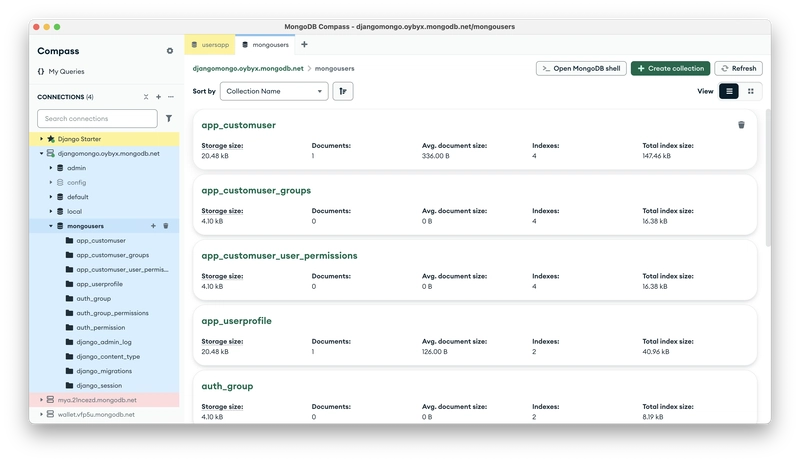
i'm using jazzmin for the admin interface. adds some nice polish.
trying django-allauth with mongodb
unfortunately, still no support.
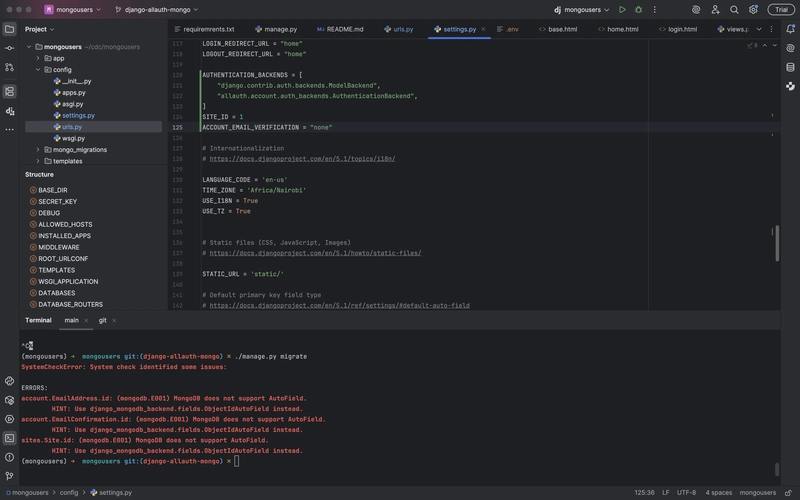
from the docs:
"we plan to test compatibility with the following third-party libraries by the ga release:
django-filter, django rest framework, django-allauth, wagtail, django debug toolbar."
source
code for the test branch:
https://github.com/achingachris/mongo-users/tree/django-allauth-mongo
final thoughts
i have high hopes for the mongodb django backend. once third-party libraries are supported, it’ll unlock serious potential for real-world projects.
until then, we wait.


Top comments (0)