

title: [Learning Document] How to Access Google Cloud Services on Heroku Using Golang
published: false
date: 2022-03-18 00:00:00 UTC
tags:
canonical_url: http://www.evanlin.com/til-heroku-gcp-key/
---
## Preface:
In the past, if you wanted to use Google Cloud related APIs (for example: Google Cloud Storage) to access APIs, you could only operate through JSON files. However, if you wanted to put it on Heroku, you had to put it on GitHub, and at this time, it was easy to accidentally put the JSON file and be scanned by robots and stolen.
This article will tell you that by using environment variables and Golang Buildpack, you can deploy Heroku projects in a safe and worry-free situation, and you can also open source them to Github.
## Process:
In fact, the content of this article [Adding Google Cloud Credentials to Heroku](https://devdojo.com/bryanborge/adding-google-cloud-credentials-to-heroku) is quite complete, but the buildpack inside seems a bit strange recently.
1. Open a dedicated services account
2. Set the required permissions: (The image shows the Cloud Storage creator)
3. Download your JSON Key (Please store the file properly)
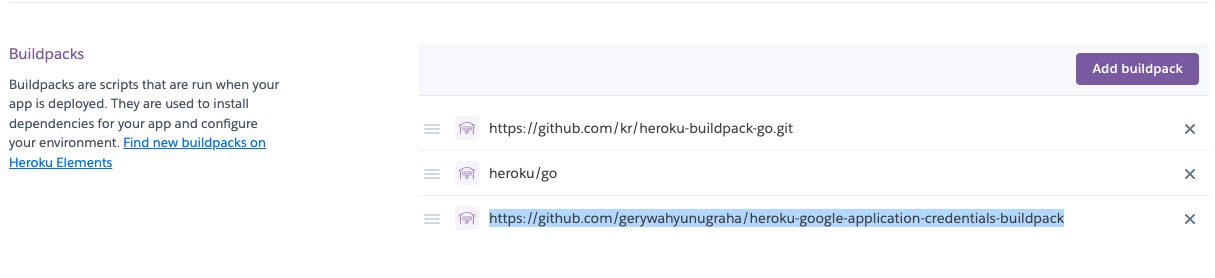
4. Add via golang build pack
5. Next, fill in the JSON file parameters in the Heroku settings
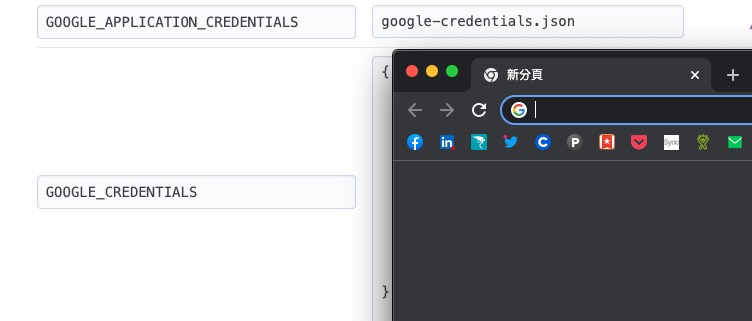
GOOGLE_APPLICATION_CREDENTIALS: google-credentials.json (fixed)
GOOGLE_CREDENTIALS: Put the complete JSON content inside.
1. Related program part:
<script src="https://gist.github.com/kkdai/96a7c3a9c1b74d40330c1b132b023726.js"></script>
## Related Articles:

- [Adding Google Cloud Credentials to Heroku](https://devdojo.com/bryanborge/adding-google-cloud-credentials-to-heroku)
- [Stackoverflow: How to use Google API credentials json on Heroku?](https://stackoverflow.com/questions/47446480/how-to-use-google-api-credentials-json-on-heroku)
- [Simple Golang API File Uploader Using Google Cloud Storage](https://adityarama1210.medium.com/simple-golang-api-uploader-using-google-cloud-storage-3d5e45df74a5)


Top comments (0)