


I've shipped projects through CI pipelines and deployed them on managed platforms before, so none of the individual pieces were new to me. What I realized was that platforms are very good at hiding the layer underneath. You push, things happen, and a URL shows up. That's the point of them, but it also meant I'd never really owned what sits between git push and someone opening the app in a browser.
So I picked one of my projects and took it the whole way myself: automated builds, containerized, running on a Linux server I set up and manage, with a push to the repo being the only thing needed to ship a change.
This isn't a how-to. It's a write-up of what I learned, including a few places where my assumptions turned out to be wrong.
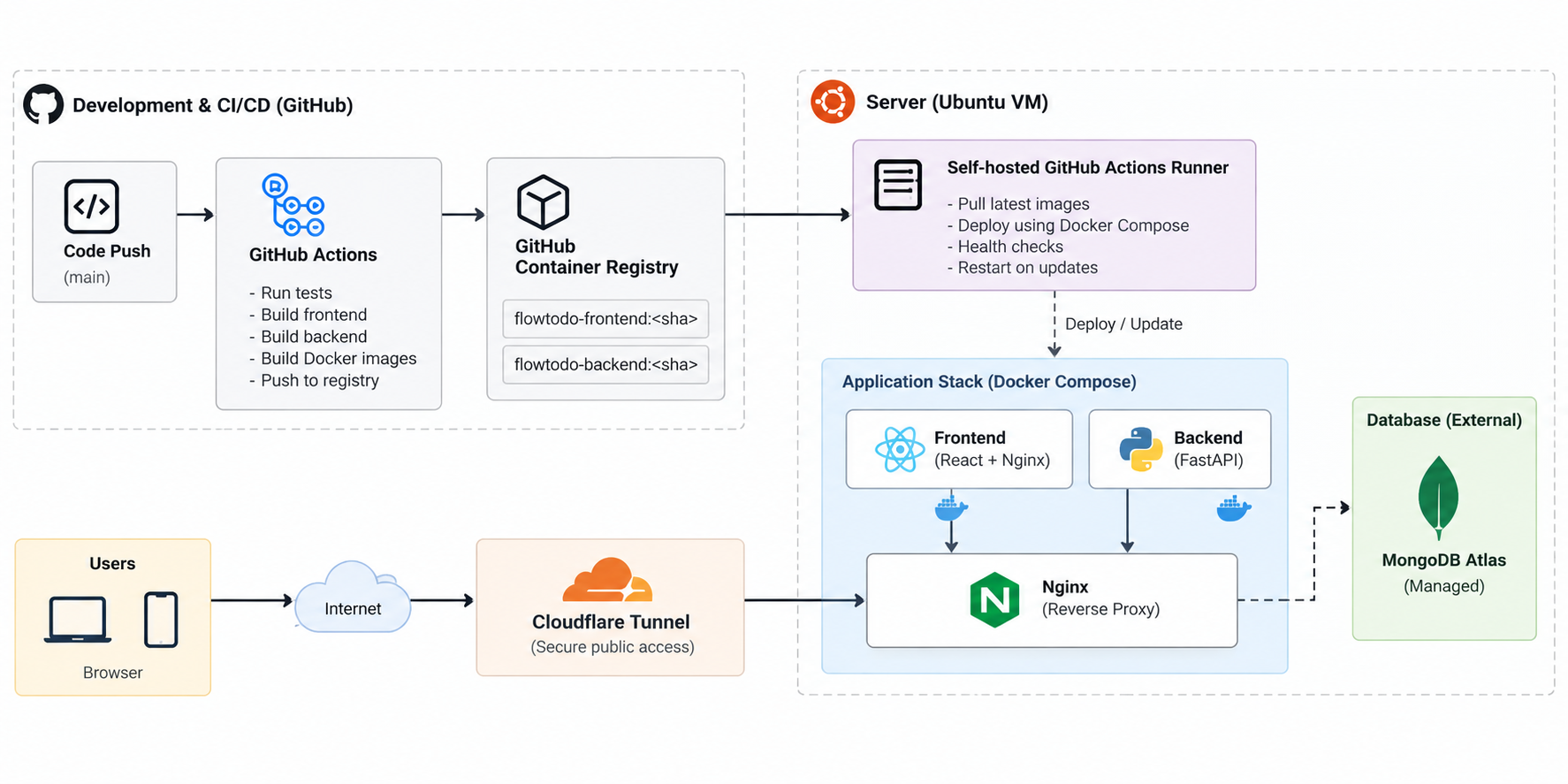](https://media2.dev.to/dynamic/image/width=800%2Cheight=%2Cfit=scale-down%2Cgravity=auto%2Cformat=auto/https%3A%2F%2Fdev-to-uploads.s3.us-east-2.amazonaws.com%2Fuploads%2Farticles%2Faexk2vg0l0gjaobga7ky.png)
The project
A fairly standard full-stack app: a web frontend, an API backend, and a managed database. I kept it boring on purpose. If the app is simple, any problem is far more likely to come from the setup than from my code, and the setup was what I wanted to learn from.
What platforms had been doing for me
On a platform, "the server" is an abstraction. You rarely think about what's installed on it, how it got that way, or what happens if it disappears.
Once I managed the server myself, that changed quickly. A server you configure by hand accumulates changes you don't remember making, and the only documentation of how it's set up is the server itself. If it died tomorrow, I wouldn't be able to rebuild it with confidence. That bothered me more than any single bug did, and it's a problem platforms quietly solve for you.
Think in builds, not machines
The question I'd been implicitly asking was "how do I set this server up to match my laptop?"
The better question is "which build should this server run?"
Treating the deployable thing as a finished, versioned package, rather than source code plus setup steps, simplified a lot. The server doesn't need to know how to build anything. It pulls a specific package and runs it. If it disappears, I point a fresh machine at the same package instead of reconstructing a snowflake.
It also separated building from running, and that separation turned out to be useful in almost every problem I hit afterwards.
The pipeline as a guarantee
I'd already used pipelines for tests and deploys, so this part wasn't new. What changed was how much of the path I owned.
The value isn't speed, it's consistency. Every change takes the same route: tests, build, package, deploy, verify. When I did parts of it by hand, I'd occasionally skip a step or reorder it, usually on a "small change." Small changes are exactly when tests get skipped, and a pipeline doesn't get hurried.
"Latest" tells you nothing
Early on I deployed using a generic moving label for the build. It's convenient: you always deploy the newest one. The first time something broke after a deploy, I tried to work out what was actually running and couldn't answer it directly. The label looked the same before and after.
I changed it so every deployed build is tied to the exact commit that produced it. Debugging now starts with one question, which commit is live, and I can answer it in seconds and compare it with what I expect.
It also changed how I think about rollback. Reverting in git and waiting for a rebuild is hopeful. Running the previous known-good build is a much stronger guarantee, and the difference is a small change in how things are labelled.
My network didn't care about my plan
This was the biggest lesson, and it had nothing to do with code.
My first design assumed the automation could reach into the server and run commands, which is how most guides describe it. But my server sat behind a network that doesn't allow inbound connections from outside, and I spent longer than I'd like trying to force it before accepting the constraint was real.
The fix was changing who starts the conversation. Instead of something outside pushing in, the server reaches out and picks up work when there's something to do. Same result, opposite direction.
It's arguably the better design too, since nothing on that machine has to be exposed to the public internet just so I can deploy. If my network had been friendlier, I'd probably have built the weaker version and never questioned it. The environment shapes the design more than I used to give it credit for.
One front door
The frontend and backend are separate services, but users shouldn't need to know that. A reverse proxy in front gives a single entry point and decides where each request goes.
Two things I liked about it:
- The backend is no longer reachable directly from outside, which is where I'd want it anyway.
- The browser talks to one origin, which removed a whole category of cross-origin issues.
It also pushed me to be explicit about what is public and what isn't, something a platform often decides for you by default.
Running is not the same as healthy
I had a deploy where everything was green. The pipeline passed, the container was up, and the app was dead.
The process had started, which is all "running" means. The app inside couldn't do anything useful, and nothing in my setup was checking. Now a deploy isn't finished until the app answers a real health check, and if the check fails, the deploy fails.
"It deployed" and "it works" are two different claims, and only something that actually verifies it should earn you the second one.
Most of my failures were boring
None of the problems that cost me time were clever. They looked like this:
- Leftovers from the previous deploy colliding with the new one
- Behavior that was fine in development and different in production
- A database reachable from my laptop but not in the same way from the server
- Configuration that was correct in one place and missing in another
- A frontend that behaved differently once built for production
What helped was less a specific fix than a change in approach. I started treating the system as layers and asking which one was failing: the app, the container, the network between containers, the proxy, the server, the network outside it, the database. Checking them roughly in order lets me rule out several layers in minutes, and the problem is usually in whichever one I wasn't looking at.
What I haven't solved
There's plenty I haven't done well yet.
- Monitoring is minimal. I mostly find out something is wrong when I happen to look.
- I haven't thought enough about growth. One server and light traffic hide a lot of problems.
These are next.
What I'm taking from this
Deployment is a chain, and when it breaks, it's almost always one specific link. Platforms taught me the shape of the path, and owning it end to end taught me where the links are and how each one fails.
If you've gone from managed platforms to running your own setup, I'd like to hear what broke for you, especially the boring stuff. That's where most of my learning came from.


Top comments (0)