


Hello Everyone!
In this post I am going to show you how I was able to generate a link to automatically import your current project to CodeSandbox.
📠 Import
According to its documentation, CodeSandbox has a way to automatically import a project (templates) from a GitHub repository to its online IDE by simply modifying the GitHub URL of the repository.
Using GitHubBox.com
An easy way to import a repo to CodeSandbox via URL is with GitHubBox.com. Append 'box' to your github.com URL in between 'hub' and '.com' and it will redirect to CodeSandbox.
Here's an example:
Change the GitHub URL: https://github.com/reduxjs/redux/tree/master/examples/todomvc.
To: https://githubbox.com/reduxjs/redux/tree/master/examples/todomvc.
The result is we take the last part of the url (everything after github.com) and use it in our importer at codesandbox.io/s/github/, adding the repo to CodeSandbox.
Github Action
Hence, I created a Github Action that will concatenate the GithubBox.com url to the path of the branch for each newly-created pull request.
📚 Reason
Generating a url to an online playground for each pull request created can enhance the review process by:
instantaneously generating a sandbox for each branch, therefore shortening the visual feedback loop
-
providing the ability to play around with the code and provide better code suggestions
Workflow
Here's the code of the workflow file you need to add to your project.
"on":
  - pull_request
jobs:
  annotate_pull_request:
    runs-on: ubuntu-latest
    name: perform annotation
    steps:
      - name: annotation action step
        id: annotation
        uses: kherin/pr-comment-action@v1.0.1
        with:
          annotation-url: "https://githubbox.com/"
          token: ${{ secrets.GITHUB_TOKEN }}
💼 Usage
PR Comment

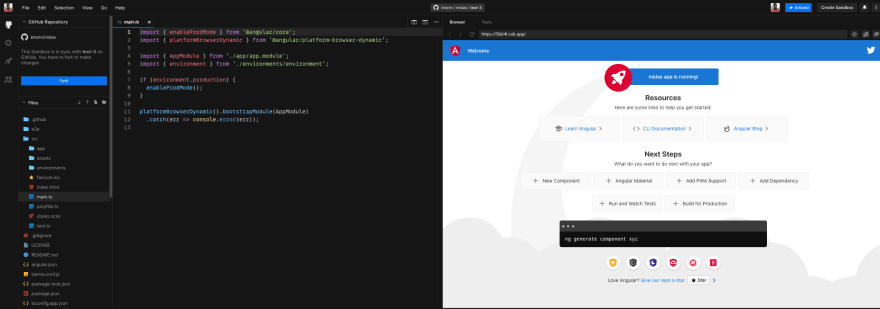
Online Playground
✨ GitHub Action
The source code can be found here:
 kherin
/
pr-comment-action
This action annotates the description section of a newly-created pull request with a comment
Review App Action
This action adds a new comment to a newly-created pull request when it is created for the firs time.
Type:
JavaScript Action
annotation-url
The URL of the review app which is linked to the code branch of the newly-created pull request
Purpose
Integration with CodeSanbox
You can easily import a new pull request for an Angular/React/Vue project to CodeSanbox
An easy way to import a repo to CodeSandbox via URL is with GitHubBox.com. Append 'box' to your github.com URL in between 'hub' and '.com' and it will redirect to CodeSandbox. CodeSanbox Documentation
Example usage
uses: actions/pr-comment-action@v1 with: annotation-url: 'https://location-of-demo-app.com'


Top comments (0)