


GitHub is where over 65 million developers shape the future of software, together. Contribute to the open source community, manage your Git repositories, review code like a pro, track bugs and features, power your CI/CD and DevOps workflows, and secure code before you commit it.
Here is the most popular repos published on this platform.
#1
 louislam
/
uptime-kuma
louislam
/
uptime-kuma
A fancy self-hosted monitoring tool

Uptime Kuma
Uptime Kuma is an easy-to-use self-hosted monitoring tool.







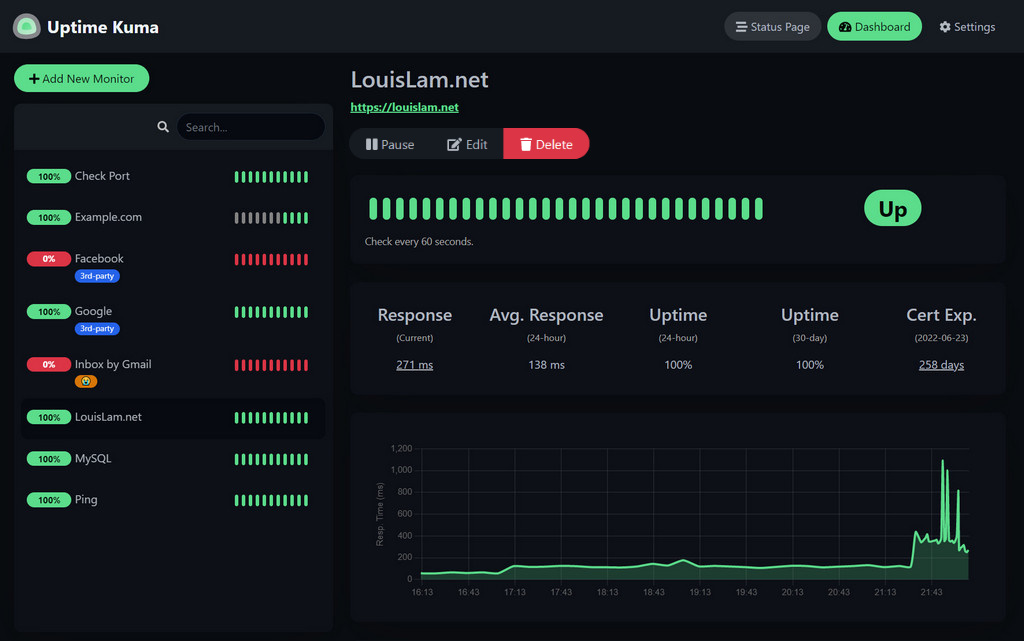
🥔 Live Demo
Try it!
Demo Server (Location: Frankfurt - Germany): https://demo.kuma.pet/start-demo
It is a temporary live demo, all data will be deleted after 10 minutes. Sponsored by Uptime Kuma Sponsors.
⭐ Features
- Monitoring uptime for HTTP(s) / TCP / HTTP(s) Keyword / HTTP(s) Json Query / Websocket / Ping / DNS Record / Push / Steam Game Server / Docker Containers
- Fancy, Reactive, Fast UI/UX
- Notifications via Telegram, Discord, Gotify, Slack, Pushover, Email (SMTP), and 90+ notification services, click here for the full list
- 20-second intervals
- Multi Languages
- Multiple status pages
- Map status pages to specific domains
- Ping chart
- Certificate info
- Proxy support
- 2FA support
🔧 How to Install
🐳 Docker Compose
mkdir uptime-kuma
cd uptime-kuma
curl -o compose.yaml https://raw.githubusercontent.com/louislam/uptime-kuma/master/compose.yaml
docker compose up -d
Uptime Kuma is now running on all network interfaces (e.g. http://localhost:3001 or http://your-ip:3001).
…
#2

Flipper


Important Announcement
Flipper is moving away from its Electron distribution to an in-Browser experience.
How does this affect me?
Functionality hasn't changed. The UI remains unchanged. Flipper will run in your default browser instead of a standalone application If you build from source, Flipper will open in the browser instead of a standalone app. We also provide a MacOS app for the Flipper runtime which can be run and will also open Flipper in the browser.
The last Electron release is v0.239.0. As such, future releases will not include Electron artifacts.
React Native support
If you are debugging React Native applications, v0.239.0 will be the last release with support for it due to technical limitations for React Dev Tools and Hermes Debugger plugins. As such, please refer to that release when debugging React Native applications.
New, dedicated debug tooling for React Native is currently being developed at Meta…
#3
goplus
/
xgo
XGo is a programming language that reads like plain English. But it's also incredibly powerful — it lets you leverage assets from C/C++, Go, Python, and JavaScript/TypeScript, creating a unified software engineering ecosystem. Our vision is to enable everyone to become a builder of the world.

The XGo Programming Language
xgo.dev | Docs | XGo vs. Go | Tutorials | Playground | XGo REPL (iXGo) | Contributing & compiler design



XGo is a programming language that reads like plain English. But it's also incredibly powerful — it lets you leverage assets from C/C++, Go, Python, and JavaScript/TypeScript, creating a unified software engineering ecosystem.
XGo := C * Go * Python * JavaScript + Scratch
Our vision is to enable everyone to become a builder of the world.
Easy to learn
- Simple and easy to understand
- Smaller syntax set than Go and Python in best practices
Ready for large projects
- Integrate C/C++, Go, Python, and JavaScript/TypeScript into a unified ecosystem
- Derived from Go and easy to build large projects from its good engineering foundation
The XGo programming language is designed for engineering, STEM education, and data science.
- For engineering: working in the simplest language that…
#4
school-dev-k8s
Все работы проводим на sbox.slurm.io: ssh sbox.slurm.io
Форк проекта
Открываем в браузере репозиторий xpaste. Он находится по адресу
https://gitlab.com/slurm-io/xpaste
Справа на одной линии с названием проекта видим кнопку fork. Нажимаем ее. Выбираем в качестве нэймспэйса в следующем окне свой логин. И дожидаемся окончания процесса форка. Последним шагом клонируем получившийся форк к себе на админбокс.
cd ~ git clone https://gitlab.com/<наименование своего нэймспэйса>/xpaste.git
#5
babysor
/
MockingBird
🚀Clone a voice in 5 seconds to generate arbitrary speech in real-time
🚧 While I no longer actively update this repo, you can find me continuously pushing this tech forward to good side and open-source. I'm also building an optimized and cloud hosted version: https://noiz.ai/ and we're hiring.

Features
🌍 Chinese supported mandarin and tested with multiple datasets: aidatatang_200zh, magicdata, aishell3, data_aishell, and etc.
🤩 PyTorch worked for pytorch, tested in version of 1.9.0(latest in August 2021), with GPU Tesla T4 and GTX 2060
🌍 Windows + Linux run in both Windows OS and linux OS (even in M1 MACOS)
🤩 Easy & Awesome effect with only newly-trained synthesizer, by reusing the pretrained encoder/vocoder
🌍 Webserver Ready to serve your result with remote calling
Quick Start
1. Install Requirements
1.1 General Setup
Follow the original repo to test if you got all environment ready **Python 3.7 or higher ** is needed to run the…
#6
English | 中文 | Português do Brasil | 日本語 | עברית

Light and Versatile Graphics Library
Website | LVGL Pro Editor | Docs | Forum | Demos | Services
Table of Contents
Overview
Features
Platform Support
LVGL Pro Editor
Commercial Services
Integrating LVGL
Examples
Contributing
📒 Overview
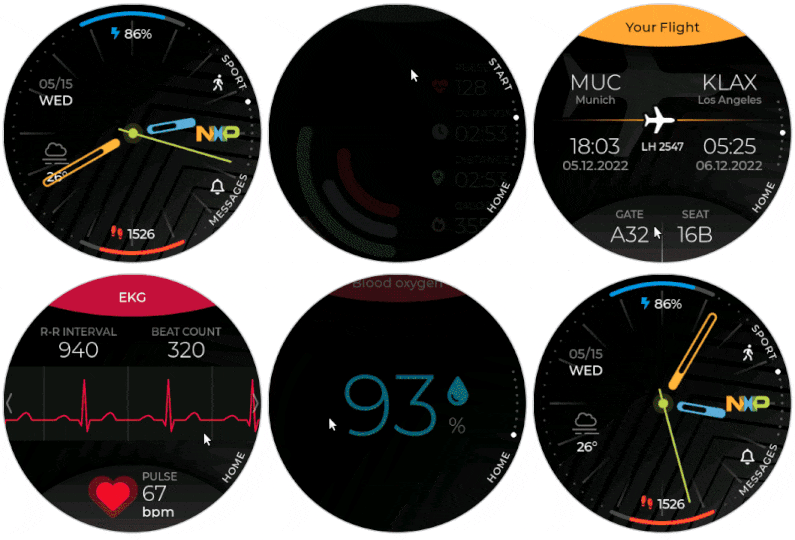
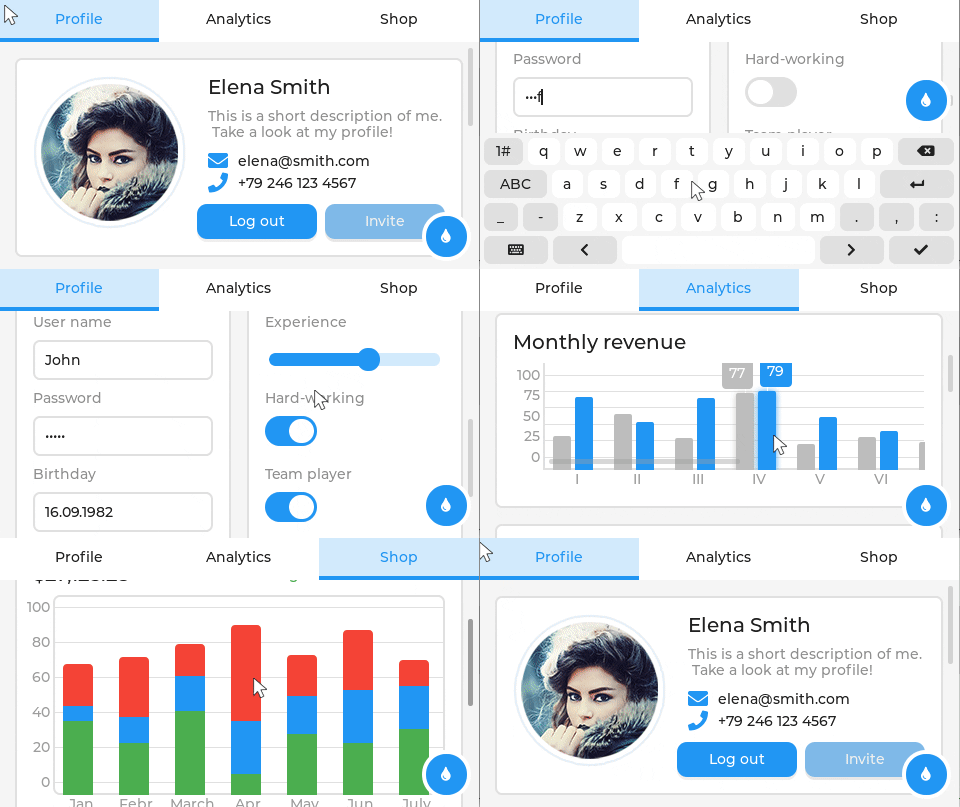
LVGL is a free and open-source UI library that enables you to create graphical user interfaces for any MCUs and MPUs from any vendor on any platform.
Requirements: LVGL has no external dependencies, which makes it easy to compile for any modern target, from small MCUs to multi-core Linux-based MPUs with 3D support. For a simple UI, you need only ~100kB RAM, ~200–300kB flash, and a buffer size of 1/10 of the screen for rendering.
To get started, pick a ready-to-use VSCode, Eclipse, or any other project and try out LVGL on your PC. The LVGL UI code is fully platform-independent…
#7
trailofbits
/
algo
Set up a personal VPN in the cloud
Algo VPN

Algo VPN is a set of Ansible scripts that simplify the setup of a personal WireGuard and IPsec VPN. It uses the most secure defaults available and works with common cloud providers.
See our release announcement for more information.
Features
- Supports only IKEv2 with strong crypto (AES-GCM, SHA2, and P-256) for iOS, MacOS, and Linux
- Supports WireGuard for all of the above, in addition to Android and Windows 11
- Generates .conf files and QR codes for iOS, macOS, Android, and Windows WireGuard clients
- Generates Apple profiles to auto-configure iOS and macOS devices for IPsec - no client software required
- Includes helper scripts to add, remove, and manage users
- Blocks ads with a local DNS resolver (optional)
- Sets up limited SSH users for tunneling traffic (optional)
- Privacy-focused with minimal logging, automatic log rotation, and configurable privacy enhancements
- Based on Ubuntu 22.04 LTS with automatic security updates
- Installs to DigitalOcean…
#8
nvim-cmp
A completion engine plugin for neovim written in Lua Completion sources are installed from external repositories and "sourced".
demo.mp4
Readme!
- There is a GitHub issue that documents breaking changes for nvim-cmp. Subscribe to the issue to be notified of upcoming breaking changes.
- This is my hobby project. You can support me via GitHub sponsors.
- Bug reports are welcome, but don't expect a fix unless you provide minimal configuration and steps to reproduce your issue.
- The
cmp.mapping.preset.*is pre-defined configuration that aims to mimic neovim's native like behavior. It can be changed without announcement. Please manage key-mapping by yourself.
Concept
- Full support for LSP completion related capabilities
- Powerful customizability via Lua functions
- Smart handling of key mappings
- No flicker
Setup
Recommended Configuration
This example configuration uses vim-plug as the plugin manager and vim-vsnip as a snippet plugin.
call plug#begin(s:plug_dir)
Plug 'neovim/nvim-lspconfig'
Plug 'hrsh7th/cmp-nvim-lsp…#9
Releases:



Code:


Social:




Argo CD - Declarative Continuous Delivery for Kubernetes
What is Argo CD?
Argo CD is a declarative GitOps continuous delivery tool for Kubernetes.

Why Argo CD?
- Application definitions, configurations, and environments should be declarative and version controlled.
- Application deployment and lifecycle management should be automated, auditable, and easy to understand.
Who uses Argo CD?
Documentation
To learn more about Argo CD go to the complete documentation. Check live demo at https://cd.apps.argoproj.io/.
Community
Contribution, Discussion and Support
You can reach the Argo CD community and developers via the following channels:
- Q & A : GitHub Discussions
- Chat : The #argo-cd Slack channel
- Contributors Office Hours: Every Thursday | Agenda
- User Community meeting: First Wednesday of the month | Agenda
Participation in the Argo CD project is governed by the CNCF Code of Conduct
Blogs and Presentations
#10
ossrs
/
srs
SRS is a simple, high-efficiency, real-time media server supporting RTMP, WebRTC, HLS, HTTP-FLV, HTTP-TS, SRT, MPEG-DASH, and GB28181, with codec support for H.264, H.265, AV1, VP9, AAC, Opus, and G.711.
SRS(Simple Realtime Server)








SRS/7.0 (Kai) is a simple, high-efficiency, and real-time video server supporting RTMP/WebRTC/HLS/HTTP-FLV/SRT/MPEG-DASH/GB28181, Linux/macOS, X86_64/ARMv7/AARCH64/M1/RISCV/LOONGARCH/MIPS with codec support for H.264, H.265, AV1, VP9, AAC, Opus, and G.711, and essential features.
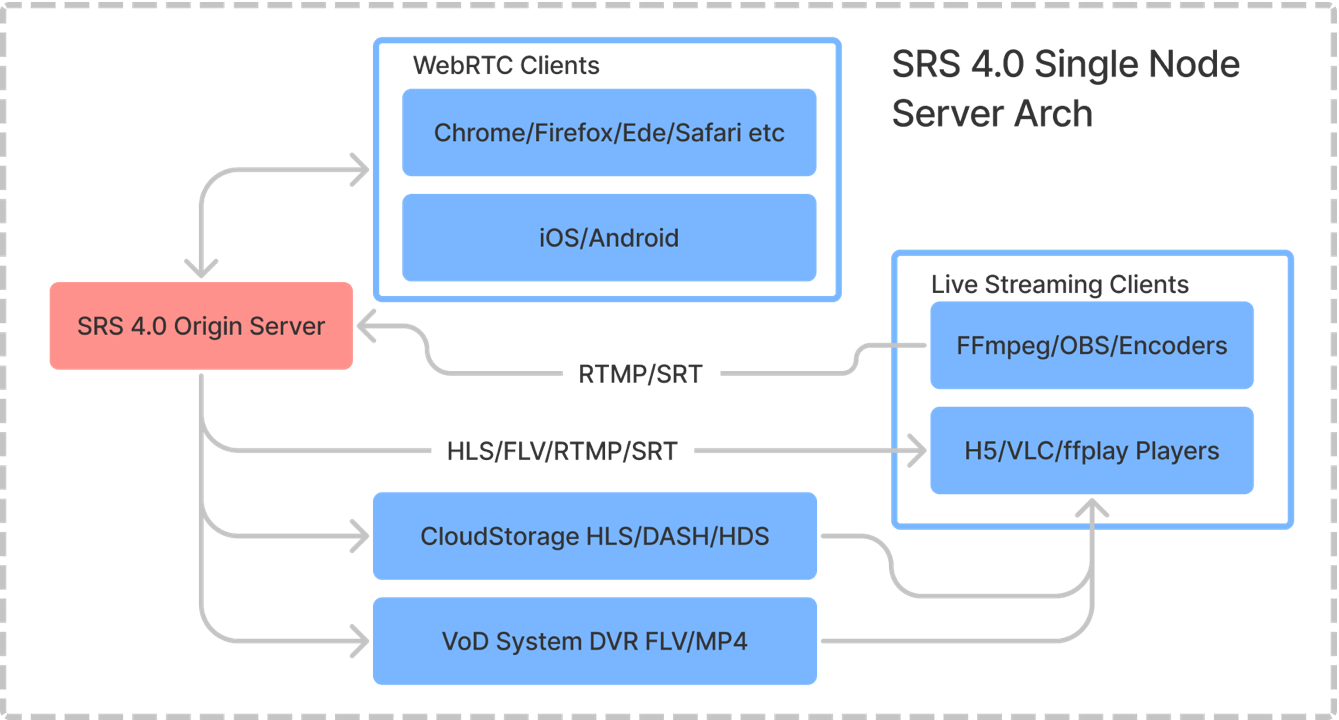
Note: For more details on the single-node architecture for SRS, please visit the following link.
SRS is licenced under MIT, and some third-party libraries are distributed under their licenses.
Usage
Please check the Getting Started guide in English or Chinese. We highly recommend using SRS with docker:
docker run --rm -it -p 1935:1935 -p 1985:1985 -p 8080:8080 \
    -p 8000:8000/udp -p 10080:10080/udp ossrs/srs:6
Tips: If you're in China, use this image
registry.cn-hangzhou.aliyuncs.com/ossrs/srs:6for faster speed.
Open http://localhost:8080/ to verify, and then stream using the following FFmpeg command:
ffmpeg -re -i ./doc/source.flv -c copy -f flv -y rtmp://localhost/live/livestream
Alternatively, stream by OBS using the following configuration:
- Service:
Custom - Server:
rtmp://localhost/live - Stream Key…
Enjoy these repos.
Follow me for more articles.
Thanks 💖💖💖


Top comments (0)