


==========================================================================
HSBC-gamma:Production-Grade 3-Tier Image Processing Platform
A secure, scalable, and highly available image processing platform built on AWS with Terraform
📋 Overview
This project implements a production-grade 3-tier image processing platform on AWS using Infrastructure as Code (IaC) with Terraform. Users can upload images through a web interface, which are then automatically processed (resized into multiple versions) and stored securely in encrypted S3 buckets.
Key Features
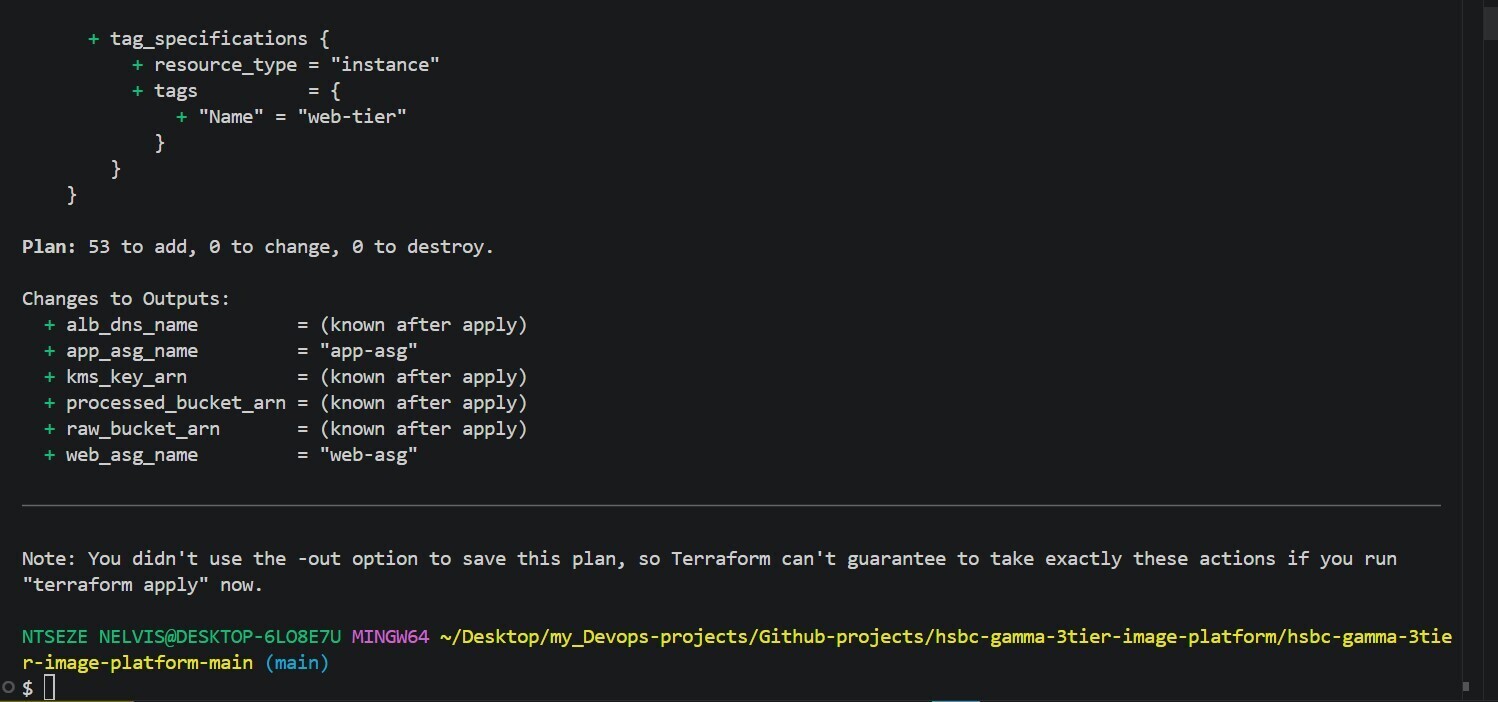
- 53 Terraform resources deployed in AWS
- Multi-AZ high availability across eu-north-1a and eu-north-1b
- Auto-scaling (1-3 instances per tier based on CPU utilization)
- KMS encryption for all S3 data at rest
- Least privilege IAM with instance profiles (no access keys on EC2)
- Path-based routing with Application Load Balancer
- Complete observability with CloudWatch logs and alarms
- Self-healing architecture with health checks
📂 Project Structure
C:.
│ .gitignore
│ .gitlab-ci.yml
│ .terraform.lock.hcl
│ complete-configuration.txt
│ elbv2 describe-target-groups _
│ elbv2 describe-target-groups
│ main.tf
│ outputs.tf
│ print_project.sh
│ project_tracker.sh
│ providers.tf
│ README.md
│ terraform.tfstate
│ terraform.tfstate.backup
│ terraform.tfvars
│ variables.tf
│
├───.terraform
│ ├───modules
│ │ modules.json
│ │
│ └───providers
│ └───registry.terraform.io
│ └───hashicorp
│ └───aws
│ └───6.31.0
│ └───windows_amd64
│ LICENSE.txt
│ terraform-provider-aws_v6.31.0_x5.exe
│
└───modules
├───alb
│ main.tf
│ outputs.tf
│ variables.tf
│
├───app
│ asg.tf
│ launch_template.tf
│ outputs.tf
│ user_data.sh
│ variables.tf
│
├───monitoring
│ alarms.tf
│ cloudwatch.tf
│ logs.tf
│ user_data.sh
│ variables.tf
│
├───s3
│ buckets.tf
│ kms.tf
│ lifecycle.tf
│ outputs.tf
│ test-upload.html
│ variables.tf
│
├───security
│ iam.tf
│ outputs.tf
│ sg.tf
│ variables.tf
│
├───vpc
│ main.tf
│ outputs.tf
│ variables.tf
│
└───web
asg.tf
launch_template.tf
output.tf
user_data.sh
variables.tf
Module Resource Count
| Module | Purpose | Resources |
|---|---|---|
| vpc | Network infrastructure | 11 |
| security | Security controls | 12 |
| s3 | Storage layer | 9 |
| alb | Load balancing | 4 |
| web | Frontend tier | 3 |
| app | Backend tier | 3 |
| monitoring | Observability | 7 |
| Total | 53 |
Architecture Diagram
HSBC-Gamma-Achitectural-Diagram

Quick Start
Prerequisites
# AWS CLI installed and configured
aws configure
# Enter your credentials and region: eu-north-1

# Terraform v1.0+ installed
terraform --version

# Clone the repository
git clone https://github.com/Ntseze-Nelvis/hsbc-gamma-3tier-image-platform.git
cd hsbc-gamma-3tier-image-platform-main
Deploy Infrastructure
# Initialize Terraform
terraform init
# Format and validate configuration
terraform fmt -recursive
terraform validate
# Review what will be created
terraform plan
**Terraform plan**
# Deploy infrastructure
terraform apply -auto-approve
## View outputs
terraform output
Expected Outputs
alb_dns_name = "hsbc-gamma-dev-alb-50807543.eu-north-1.elb.amazonaws.com"
app_asg_name = "app-asg"
kms_key_arn = "arn:aws:kms:eu-north-1:211125430491:key/bb2beb00-4920-44e4-8ea6-6fb2a554b0e8"
processed_bucket_arn = "arn:aws:s3:::hsbc-gamma-dev-processed-images"
raw_bucket_arn = "arn:aws:s3:::hsbc-gamma-dev-raw-images"
web_asg_name = "web-asg"
Terraform apply

Test Your Application
Open your browser and navigate to:
http://hsbc-gamma-dev-alb-50807543.eu-north-1.elb.amazonaws.com
Upload and Process an Image
Click "Choose Image" or drag & drop an image
Wait 5-10 seconds for processing
HSBC-Gamma-Web-App

Verify Processing
## Check raw bucket
aws s3 ls s3://hsbc-gamma-dev-raw-images/

## Check processed bucket
aws s3 ls s3://hsbc-gamma-dev-processed-images/
- Expected output shows:
- thumbnail-uuid.jpg
- small-uuid.jpg
- medium-uuid.jpg
- large-uuid.jpg
Monitoring & Observability
View CloudWatch Logs
# App tier logs (Flask API)
aws logs tail /hsbc-gamma/app --since 1h --follow

# Web tier logs (Apache)
aws logs tail /hsbc-gamma/web --since 1h --follow
Check Auto Scaling Status
# Web tier instances
aws autoscaling describe-auto-scaling-groups --auto-scaling-group-names web-asg

## App tier instances
aws autoscaling describe-auto-scaling-groups --auto-scaling-group-names app-asg
Monitor ALB Health
# Check target group health
aws elbv2 describe-target-health \
  --target-group-arn $(aws elbv2 describe-target-groups \
    --names hsbc-gamma-dev-alb-web-tg \
    --query 'TargetGroups[0].TargetGroupArn' \
    --output text)
    ```
{% endraw %}

## Security Validation
## Verify S3 Encryption
{% raw %}

```bash
aws s3api get-bucket-encryption --bucket hsbc-gamma-dev-raw-images
# Expected: KMS encryption enabled
Verify Public Access Block
aws s3api get-public-access-block --bucket hsbc-gamma-dev-raw-images
# Expected: All blocks enabled
Verify Security Groups
aws ec2 describe-security-groups --group-names hsbc-gamma-dev-web-sg \
  --query 'SecurityGroups[0].IpPermissions'
# Expected: Only port 80 from ALB security group
Sample Calculation (2 instances each tier)
EC2: 4 × $8.76 = $35.04
ALB: $0.0225/h × 730h = $16.43
NAT: $0.045/h × 730h = $32.85
S3: Estimated = $8.00
KMS: $1.00 + operations = $1.50
CW: Logs + metrics = $4.00
Data: Estimated = $15.00
─────────────────────────────────
Total: $112.82/month
Troubleshooting
Issue 1: Can't Access Web UI
# Check ALB DNS
terraform output alb_dns_name

## Verify ALB is active
aws elbv2 describe-load-balancers --names hsbc-gamma-dev-alb \
  --query 'LoadBalancers[0].State.Code'

## Test ALB endpoint
curl -I http://$(terraform output -raw alb_dns_name)
Verify ALB is in active state
Ensure security group allows port 80 from 0.0.0.0/0
Check that web tier instances are healthy
Issue 2: Image Upload Fails
Symptoms: Upload returns server error, image not processed
Diagnostic Commands:
# Check app tier logs for errors
aws logs tail /hsbc-gamma/app --since 30m --filter-pattern "ERROR"

# Verify target group health
aws elbv2 describe-target-health \
  --target-group-arn $(aws elbv2 describe-target-groups \
    --names hsbc-gamma-dev-alb-app-tg \
    --query 'TargetGroups[0].TargetGroupArn' \
    --output text)
    #Diagnostic Commands:
Common Solutions:
- Restart Flask app on app tier instances
- Verify IAM role has S3 permissions
- Check S3 bucket policies allow app role access
# Issue 3: Instances Not Launching
#Symptoms: Auto Scaling group shows 0 instances or desired capacity not met
#Diagnostic Commands:

## Check ASG status
aws autoscaling describe-auto-scaling-groups --auto-scaling-group-names web-asg

## View scaling activities
aws autoscaling describe-scaling-activities --auto-scaling-group-name web-asg
Clean UpClean Up
# Destroy all infrastructure
terraform destroy -auto-approve

# Verify resources are deleted
aws s3 ls | grep hsbc-gamma-dev
aws ec2 describe-instances --filters "Name=tag:Name,Values=*hsbc*"
aws elbv2 describe-load-balancers --names hsbc-gamma-dev-alb
aws autoscaling describe-auto-scaling-groups --auto-scaling-group-names web-asg app-asg
Resources & Documentation
| Resource | Link |
|---|---|
| Terraform AWS Provider | registry.terraform.io/providers/hashicorp/aws |
| AWS 3-Tier Architecture | aws.amazon.com/architecture/3-tier |
| IAM Instance Profiles | docs.aws.amazon.com/IAM/latest/UserGuide/id_roles_use_switch-role-ec2_instance-profiles.html |
| Flask Documentation | flask.palletsprojects.com |
| Pillow Documentation | pillow.readthedocs.io |
| Auto Scaling Groups | docs.aws.amazon.com/autoscaling/ec2/userguide/ |
| Application Load Balancer | docs.aws.amazon.com/elasticloadbalancing/latest/application/ |
Terraform Operations
terraform init                                      # Initialize
terraform validate                                  # Validate config
terraform plan                                      # Preview changes
terraform apply -auto-approve                       # Deploy
terraform destroy -auto-approve                     # Destroy all
terraform output                                    # View outputs
terraform output -raw alb_dns_name                  # Get specific output
terraform state list                                # List resources
terraform state show aws_instance.example          # Show resource details
terraform graph | dot -Tpng > graph.png            # Generate graph

# State Management
terraform state mv aws_instance.old aws_instance.new # Move resource
terraform state rm aws_instance.to_remove           # Remove from state
terraform import aws_instance.example i-12345678    # Import resource
AWS CLI Commands
# Account & Identity
aws sts get-caller-identity                        # Verify account

# EC2 & Compute
aws ec2 describe-instances --filters "Name=tag:Name,Values=*hsbc*"

# Auto Scaling
aws autoscaling describe-auto-scaling-groups --auto-scaling-group-names web-asg
aws autoscaling describe-scaling-activities --auto-scaling-group-name web-asg

# Load Balancer
aws elbv2 describe-load-balancers --names hsbc-gamma-dev-alb
aws elbv2 describe-target-groups --names hsbc-gamma-dev-alb-web-tg

# S3 Storage
aws s3 ls s3://hsbc-gamma-dev-raw-images/ --recursive --summarize
aws s3api get-bucket-encryption --bucket hsbc-gamma-dev-raw-images

# CloudWatch
aws logs tail /hsbc-gamma/app --since 1h --follow
aws logs filter-log-events --log-group-name /hsbc-gamma/app --filter-pattern "ERROR"
Monitoring & Debugging
# Real-time monitoring
watch -n 5 'aws autoscaling describe-auto-scaling-groups --auto-scaling-group-names web-asg --query "AutoScalingGroups[0].Instances[*].LifecycleState"'

# Check ASG instances health
watch -n 10 'aws elbv2 describe-target-health --target-group-arn $(aws elbv2 describe-target-groups --names hsbc-gamma-dev-alb-web-tg --query "TargetGroups[0].TargetGroupArn" --output text)'

# Network connectivity test
curl -w "Connect: %{time_connect}s TTFB: %{time_starttransfer}s Total: %{time_total}s\n" -o /dev/null -s http://$(terraform output -raw alb_dns_name)
License
This project is licensed under the MIT License - see the LICENSE file for details.
Author
Owner : NTSEZE VOUFFO NELVIS
Role Responsibilities
| Role | Responsibilities |
|---|---|
| Solutions Architect | Architecture design, security compliance, system diagrams, trade-off analysis |
| Cloud/DevOps Engineer | Infrastructure automation, CI/CD, deployment, monitoring setup |


Top comments (0)