


Most proxy providers publish numbers you cannot verify. This is a practical walkthrough for checking latency, anonymity level, geo accuracy and pool depth yourself — using public endpoints and a small Python script — so you evaluate a pool on evidence instead of a pricing page.
How to Verify Proxy Quality Before You Buy: Latency, Anonymity & Geo Accuracy
Every proxy provider publishes the same three claims: huge pool, high success rate, global coverage. None of them are verifiable from the outside, and all of them are true in the sense that a used car "runs."
The good news is that the things that actually matter are measurable in about fifteen minutes with a small script and a minimum top-up. This post walks through what to measure, why each metric matters, and how to read the output.
What actually matters

Four measurable properties tell you almost everything about a pool's usefulness:
![Four measurable proxy metrics: latency, anonymity level, geo accuracy, pool depth — and what each one tells you
Four metrics, four different failure modes. Measure all four — any one of them alone is misleading.
Latency — round-trip time through the proxy. Residential routing adds real overhead; anything under 1s to a nearby endpoint is healthy, 1–3s is workable for batch jobs, consistently above 3s will wreck any interactive workflow.
Anonymity level — whether the proxy forwards headers that reveal it's a proxy at all. X-Forwarded-For, Via, and friends. A proxy that announces itself defeats the purpose.
Geo accuracy — whether the IP is actually where the dashboard says it is. Registry data and physical routing disagree more often than you'd expect, and CDN-served content is regional, so a mismatch silently corrupts collected data.
Pool depth — how many distinct IPs you actually get for a given location. A provider can support a country with forty usable addresses in it. That's technically true and operationally useless.
The script
Nothing exotic — requests and the standard library. It pulls each proxy from a list, measures round-trip time, checks which headers arrive at the other end, and resolves geo from a public IP-intelligence endpoint.
import time
import requests
from collections import Counter
# Public endpoints that echo what the other side sees.
ECHO = "https://httpbin.org/get"
GEO = "https://ipinfo.io/json"
# Headers that reveal a proxy is in the path.
LEAK_HEADERS = {"X-Forwarded-For", "Via", "X-Real-Ip", "Forwarded", "X-Proxy-Id"}
def check(proxy_url, timeout=10):
"""Measure one proxy: latency, header leaks, exit IP and geo."""
proxies = {"http": proxy_url, "https": proxy_url}
result = {"proxy": proxy_url, "ok": False}
try:
start = time.perf_counter()
r = requests.get(ECHO, proxies=proxies, timeout=timeout)
result["latency_ms"] = round((time.perf_counter() - start) * 1000)
r.raise_for_status()
seen = set(r.json().get("headers", {}))
result["leaks"] = sorted(LEAK_HEADERS & seen)
g = requests.get(GEO, proxies=proxies, timeout=timeout).json()
result["ip"] = g.get("ip")
result["city"] = g.get("city")
result["country"] = g.get("country")
result["org"] = g.get("org", "")
result["ok"] = True
except Exception as exc:
result["error"] = f"{type(exc).__name__}: {exc}"
return result
def report(proxy_list, expect_country=None):
rows = [check(p) for p in proxy_list]
alive = [r for r in rows if r["ok"]]
print(f"alive: {len(alive)}/{len(rows)}")
if not alive:
return rows
lat = sorted(r["latency_ms"] for r in alive)
print(f"latency ms min={lat[0]} median={lat[len(lat)//2]} max={lat[-1]}")
unique_ips = len({r["ip"] for r in alive})
print(f"unique exit IPs: {unique_ips} (from {len(alive)} working proxies)")
leaking = [r for r in alive if r["leaks"]]
print(f"header leaks: {len(leaking)}")
for r in leaking:
print(f" {r['ip']} leaks {r['leaks']}")
if expect_country:
wrong = [r for r in alive if r["country"] != expect_country]
print(f"geo mismatch: {len(wrong)} expected {expect_country}")
for r in wrong:
print(f" {r['ip']} -> {r['country']} / {r['city']}")
print("top networks:", Counter(r["org"] for r in alive).most_common(3))
return rows
if __name__ == "__main__":
# user:pass@host:port — one entry per proxy you want to evaluate
pool = [
"http://user:pass@proxy.example.net:8000",
"http://user:pass@proxy.example.net:8001",
]
report(pool, expect_country="US")
Two notes on running it:
- Test sequentially first, not concurrently. Concurrency hides per-proxy latency in queue time and you'll misread the numbers.
- Run it twice, an hour apart. A pool that looks great once and degrades on the second pass is telling you something important about peer churn.
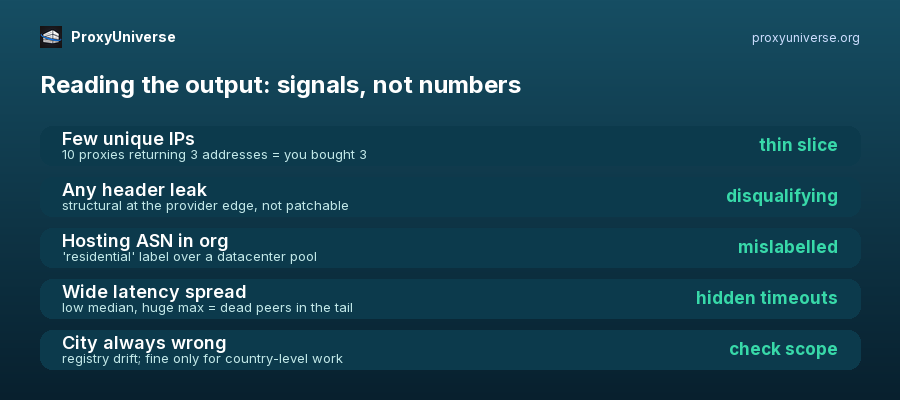
Reading the results
The raw numbers are less interesting than the patterns they form.


Top comments (0)