


Introduction
Getting an app deployed is only half the job. The other half is keeping it running, and noticing quickly when it isn't.
In my previous lab, ShipIt Weekend, I deployed my first app to Azure. This time I worked through the follow-up, RunIt Weekend: Ship, Break and Recover an App, a four-mission lab that covers what happens after deployment.
The scenario: you own a small production web app. A teammate ships a new "discount" feature. The pipeline goes green, the health check says everything is fine, and every single user gets an error page. Your job is to notice, find the cause, restore service fast, and write it up so it doesn't happen again.
Here's what I did:
- Build and measure a small app locally, with a health check and an SLO check.
- Go live on Azure Container Apps, with a GitHub Actions pipeline that deploys every push.
- Break it in production with a realistic bug.
-
Fix it: roll back with
git revert, measure time to restore, and write a blameless postmortem.
I'll also cover the errors I hit along the way, because that's where most of the learning happens.
Tools: Python (standard library only), Docker, GitHub, GitHub Container Registry (GHCR), GitHub Actions, Azure CLI and Azure Container Apps. Everything ran in WSL (Ubuntu) on Windows 11.
Before I started: cleaning up an old run
When I listed my project folder, I found files that shouldn't have been there yet: README.md and postmortem.md. A quick look at the Git history explained it:
git log --oneline
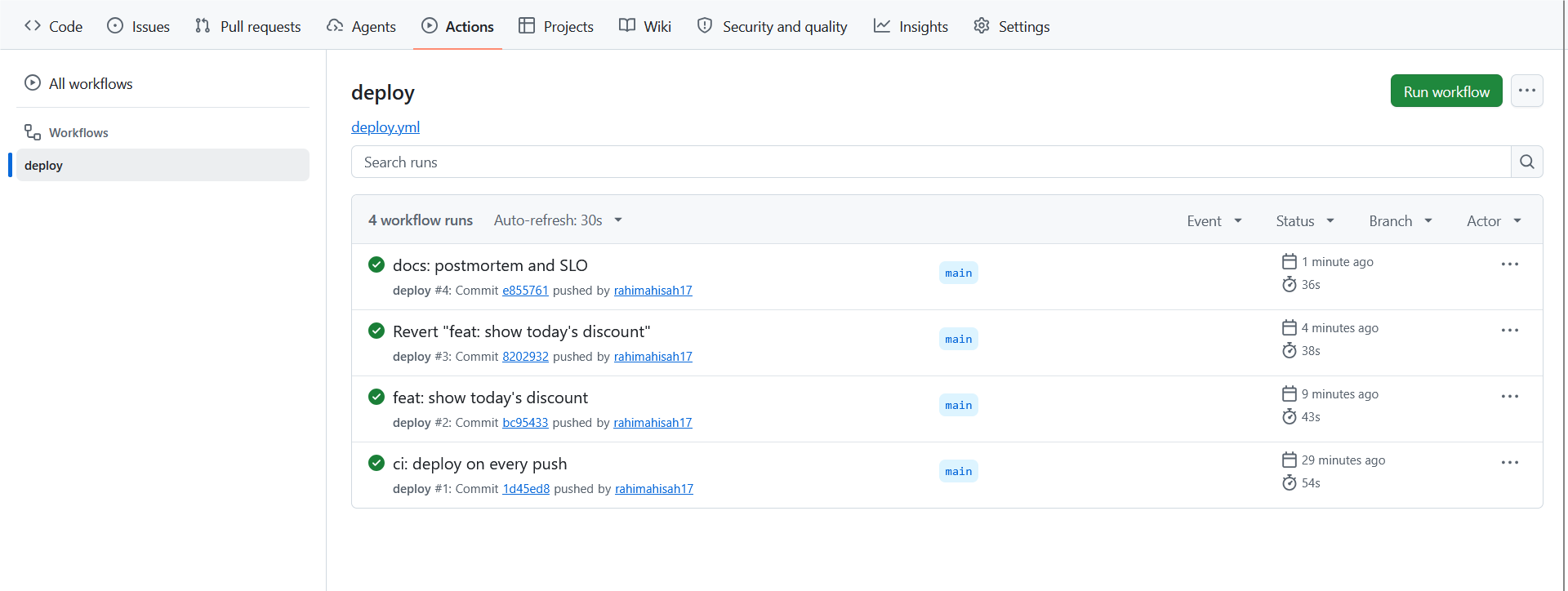
4590c2c (HEAD -> main) docs: postmortem and SLO
532b0a0 Revert "feat: show today's discount"
cc3fa10 feat: show today's discount
6472f4f ci: deploy on every push
6dc47b2 ci: deploy on every push
5216414 feat: app with health endpoint and SLO check
I had done this lab before and forgotten. Since I wanted fresh outputs for this article, I deleted the local folder and checked for leftovers in the cloud:
# Azure resource group
az group show --name runit-rg -o table          # ResourceGroupNotFound
# Service principals I own
az ad sp list --show-mine -o table              # nothing
# GitHub repos
gh repo list rahimahisah17 --limit 200 | grep -i runit   # nothing
Nothing was left in the cloud, so I started clean, this time in a folder on my Windows Desktop (/mnt/c/Users/Admin/Desktop/runit-app from WSL).
Lesson:
git logis a great first check when a folder isn't what you expect.
Mission 1: Build and measure it locally
The goal: a tiny app that can tell you whether it works.
Create the project
mkdir -p /mnt/c/Users/Admin/Desktop/runit-app && cd /mnt/c/Users/Admin/Desktop/runit-app
git init -q -b main && git branch --show-current

The app
The app uses only Python's standard library, so there's nothing to install. Two things matter here:
-
/healthalways returns{"status": "ok"}while the process is alive. -
/serves the home page. Any crash is caught, logged withprint()and turned into a clean 500 instead of killing the process.
import os
from http.server import BaseHTTPRequestHandler, HTTPServer

MESSAGE = "Hello from ShipIt Weekend!"


def home_page():
    return f"<h1>{MESSAGE}</h1><p>Now with a health check, an SLO and a rollback plan.</p>"


class Handler(BaseHTTPRequestHandler):
    def send(self, status, body, content_type="text/html; charset=utf-8"):
        data = body.encode()
        self.send_response(status)
        self.send_header("Content-Type", content_type)
        self.send_header("Content-Length", str(len(data)))
        self.end_headers()
        self.wfile.write(data)

    def do_GET(self):
        if self.path == "/health":
            return self.send(200, '{"status": "ok"}', "application/json")
        try:
            self.send(200, home_page())
        except Exception as error:
            print(f"ERROR serving {self.path}: {error!r}", flush=True)
            self.send(500, "<h1>Something went wrong</h1>")


HTTPServer(("0.0.0.0", int(os.environ.get("PORT", "8080"))), Handler).serve_forever()

Keep that try/except in mind. It becomes important in Mission 3.
The Dockerfile
FROM python:3.12-slim
WORKDIR /app
COPY app.py .
ENV PORT=8080
EXPOSE 8080
USER nobody
HEALTHCHECK --interval=10s --timeout=3s CMD python -c "import urllib.request; urllib.request.urlopen('http://localhost:8080/health')"
CMD ["python", "app.py"]
-
USER nobodyruns the app as a non-root user. -
HEALTHCHECKmakes Docker call/healthevery 10 seconds, so the platform can restart a dead container.
The SLO check
An SLO (Service Level Objective) is a reliability target. check.sh is a quick way to measure it. It sends 20 requests to the real home page (not /health) and counts how many return HTTP 200.
#!/usr/bin/env bash
# Sends 20 requests and reports how many succeeded, like an SLO check.
URL="${1:-http://localhost:8080}"
ok=0
for i in $(seq 1 20); do
  code=$(curl -s -o /dev/null -w "%{http_code}" "$URL/")
  [ "$code" = "200" ] && ok=$((ok + 1))
done
echo "$ok/20 requests succeeded ($((ok * 5))%) at $URL"
[ "$ok" -ge 19 ] && echo "SLO met (95% or more)" || echo "SLO BROKEN: page someone!"

Run it and measure the baseline
docker build -q -t runit-app:good . > /dev/null && echo "image built"
docker rm -f runit > /dev/null 2>&1; docker run -d -p 8080:8080 --name runit runit-app:good > /dev/null
for i in $(seq 1 15); do curl -s localhost:8080/health > /dev/null && break; sleep 1; done; curl -s localhost:8080/health; echo
bash check.sh

{"status": "ok"}
20/20 requests succeeded (100%) at http://localhost:8080
SLO met (95% or more)
That's my baseline, what healthy looks like. I stopped the container and committed. This commit becomes the "last good version":
docker rm -f runit > /dev/null && echo "stopped"
git add app.py Dockerfile check.sh
git commit -q -m "feat: app with health endpoint and SLO check"

Mission 2: Go live with a pipeline
The goal: put the app on the internet, and make every push to main deploy it automatically.
Push to GitHub
I created an empty public repo called runit-app on GitHub (no README, so the first push doesn't clash), then linked my future container image to it with an OCI label:
export GH_USER=rahimahisah17
echo "LABEL org.opencontainers.image.source=https://github.com/$GH_USER/runit-app" >> Dockerfile
git commit -qam "chore: link image to repository"
git remote add origin https://github.com/$GH_USER/runit-app.git
git push -u origin main

The LABEL tells GitHub Container Registry which repo the image belongs to.
Publish the first image to GHCR
I created a classic personal access token with the write:packages scope and pushed a v1 image:
echo YOUR_TOKEN | docker login ghcr.io -u $GH_USER --password-stdin
docker build -t ghcr.io/$GH_USER/runit-app:v1 .
docker push ghcr.io/$GH_USER/runit-app:v1

Then, in the package settings on GitHub, I made the package Public, so Azure can pull it without credentials.


Deploy to Azure Container Apps
az login --use-device-code
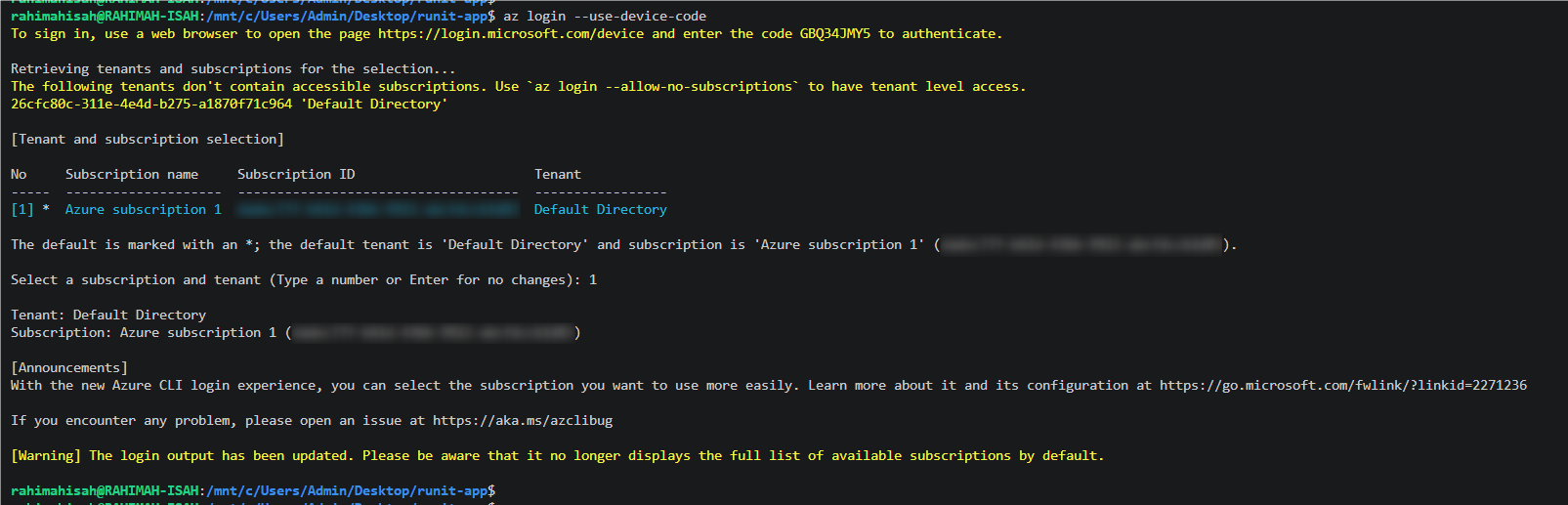
az extension add --name containerapp --upgrade
az provider register --namespace Microsoft.App --wait
az provider register --namespace Microsoft.OperationalInsights --wait

az group create --name runit-rg --location westeurope
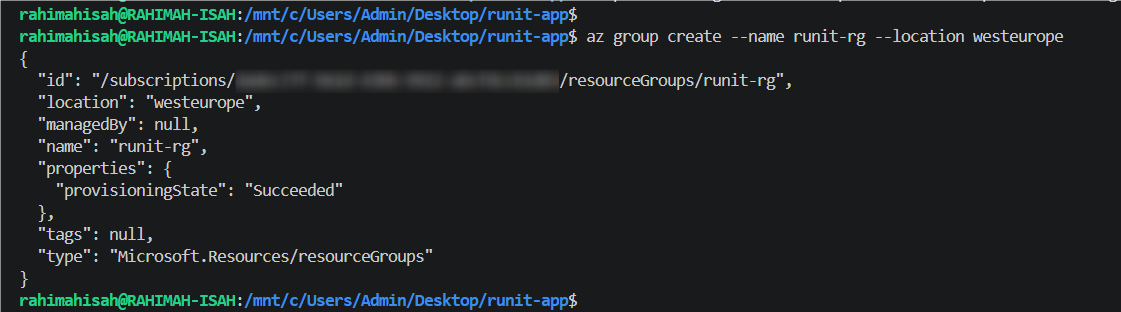
az containerapp up --name runit-app --resource-group runit-rg --location westeurope \
--image ghcr.io/$GH_USER/runit-app:v1 --ingress external --target-port 8080

az containerapp up is an all-in-one command. It created the Container Apps environment, a Log Analytics workspace for logs and the app itself.
Note: az extension add hung on "Searching"
The extension install sat on Searching .. with no progress. I cancelled it and checked whether I already had the extension:
az extension show --name containerapp --query "{name:name, version:version}" -o table
Name          Version
------------  ---------
containerapp  1.3.0b5
It was already installed from an earlier lab, so I skipped the upgrade.
Note: az containerapp up hung after creating the environment
The command sat on Running .. for a long time. In a second terminal, I checked the environment's state:
az containerapp env show --name runit-app-env --resource-group runit-rg \
  --query "properties.provisioningState" -o tsv
Succeeded
The environment was ready, but the app didn't exist yet (ResourceNotFound). The CLI had stopped polling. I pressed Ctrl + C and re-ran the same command. It reused the existing environment and created the app in seconds:
Using ContainerAppEnvironment 'runit-app-env' in resource group runit-rg
Creating Containerapp runit-app in resource group runit-rg

Container app created. Access your app at https://runit-app.<random>.westeurope.azurecontainerapps.io/
Lesson: when a long-running CLI command looks stuck, check the actual resource state before cancelling. If the slow part is done, re-running is often safe, because
az containerapp upreuses what already exists.
Production baseline
export APP_URL=https://$(az containerapp show --name runit-app --resource-group runit-rg \
  --query properties.configuration.ingress.fqdn -o tsv)
curl -s $APP_URL/health; echo
bash check.sh $APP_URL

{"status": "ok"}
20/20 requests succeeded (100%) at https://runit-app.<random>.westeurope.azurecontainerapps.io
SLO met (95% or more)
Give GitHub Actions access to Azure
I created a service principal (a robot identity for the pipeline), scoped to only the runit-rg resource group. That's the principle of least privilege:
export SUB_ID=$(az account show --query id -o tsv)
az ad sp create-for-rbac --name runit-github --role contributor \
  --scopes /subscriptions/$SUB_ID/resourceGroups/runit-rg --json-auth

I saved the JSON output as a GitHub Actions secret called AZURE_CREDENTIALS.

The pipeline
.github/workflows/deploy.yml:
name: deploy

on:
  push:
    branches: [main]
  workflow_dispatch:

permissions:
  contents: read
  packages: write

jobs:
  deploy:
    runs-on: ubuntu-latest
    steps:
      - uses: actions/checkout@v4

      - name: Log in to GitHub Container Registry
        uses: docker/login-action@v3
        with:
          registry: ghcr.io
          username: ${{ github.actor }}
          password: ${{ secrets.GITHUB_TOKEN }}

      - name: Build and push the image
        run: |
          IMAGE=ghcr.io/${GITHUB_REPOSITORY_OWNER,,}/runit-app:${GITHUB_SHA::7}
          docker build -t "$IMAGE" .
          docker push "$IMAGE"
          echo "IMAGE=$IMAGE" >> "$GITHUB_ENV"

      - name: Log in to Azure
        uses: azure/login@v2
        with:
          creds: ${{ secrets.AZURE_CREDENTIALS }}

      - name: Deploy to Azure Container Apps
        run: az containerapp update --name runit-app --resource-group runit-rg --image "$IMAGE"

Each image is tagged with the first 7 characters of the commit SHA, so every running version can be traced back to a commit.
Note: permission_denied: write_package
The first pipeline run failed. I pulled the failed step's log from the terminal:
gh run view $(gh run list --limit 1 --json databaseId -q '.[0].databaseId') --log-failed | tail -30
error from registry: permission_denied: write_package
##[error]Process completed with exit code 1.
The build worked, but the workflow's GITHUB_TOKEN wasn't allowed to push to the package. I had created the package by pushing v1 manually with my own token, so the repo's Actions token had no access to it.
Fix: in the package settings, go to Manage Actions access → Add Repository → runit-app and give it write access. Then re-run the failed job.


Lesson: a GHCR package you create manually isn't automatically writable by your repo's GitHub Actions. You have to grant the repo access explicitly.
Proof that the pipeline deployed
az containerapp show --name runit-app --resource-group runit-rg \
  --query "properties.template.containers[0].image" -o tsv

ghcr.io/rahimahisah17/runit-app:1d45ed8
The app was now running a commit-tagged image built by the pipeline, not my manual v1.
Mission 3: Break it in production
The goal: ship a realistic mistake and see how it shows up.
Ship a "discount" feature with a hidden bug
The only change was in home_page():
def home_page():
    discount = int(os.environ["DISCOUNT_PERCENT"])   # new feature: show a discount
    return f"<h1>{MESSAGE}</h1><p>Today only: {discount}% off all courses!</p>"
os.environ["DISCOUNT_PERCENT"] uses square brackets, which means the variable must exist. It was never set in production.

git commit -q -am "feat: show today's discount"
git push

The pipeline went green ✅. As the lab puts it: the pipeline is happy; your users will not be.
See the SLO break
curl -s $APP_URL/health; echo
{"status": "ok"}
bash check.sh $APP_URL

0/20 requests succeeded (0%) at https://runit-app.<random>.westeurope.azurecontainerapps.io
SLO BROKEN: page someone!
This is the trap. /health is green while every user gets an error. The health check only proves the process is alive. It never calls the home page. Because the app catches the exception and keeps running, the platform has no reason to restart it.
Find the cause in the logs
az containerapp logs show --name runit-app --resource-group runit-rg --tail 20 | grep ERROR

{"TimeStamp": "2026-11-16T21:39:27.1107135+00:00", "Log": "F ERROR serving /: KeyError('DISCOUNT_PERCENT')"}
{"TimeStamp": "2026-11-16T21:39:27.6567845+00:00", "Log": "F ERROR serving /: KeyError('DISCOUNT_PERCENT')"}
{"TimeStamp": "2026-11-16T21:39:28.1854115+00:00", "Log": "F ERROR serving /: KeyError('DISCOUNT_PERCENT')"}
...
Root cause: KeyError('DISCOUNT_PERCENT'). The metrics told me that something was wrong, and the logs told me why.
Mission 4: Fix it and learn
The goal: restore service fast, then write it up.
Roll back with git revert
I recorded the start time, because time to restore (one of the four DORA metrics) is measured from here:
date -u +"rollback started %H:%M:%S UTC"
rollback started 21:40:52 UTC
git revert --no-edit HEAD > /dev/null && git log --oneline -3 | cut -c9-
Revert "feat: show today's discount"
feat: show today's discount
ci: deploy on every push

git revert creates a new commit that undoes the bad one. Nothing is deleted from history, so the pipeline simply deploys the new commit like any other change. There's no special rollback procedure: the normal deploy path is the rollback path.
git push
Once the pipeline went green:
bash check.sh $APP_URL
date -u +"service restored %H:%M:%S UTC"
20/20 requests succeeded (100%) at https://runit-app.<random>.westeurope.azurecontainerapps.io
SLO met (95% or more)
service restored 21:44:14 UTC
Time to restore: 3 minutes 22 seconds.
To build an accurate timeline, I pulled the exact pipeline run times from GitHub instead of guessing:
gh run list --limit 3 --json displayTitle,createdAt,updatedAt,conclusion \
  -q '.[] | "\(.createdAt) -> \(.updatedAt)  \(.conclusion)  \(.displayTitle)"'

2026-11-16T21:42:22Z -> 2026-11-16T21:43:00Z  success  Revert "feat: show today's discount"
2026-11-16T21:38:16Z -> 2026-11-16T21:38:59Z  success  feat: show today's discount
2026-11-16T21:18:01Z -> 2026-11-16T21:29:57Z  success  ci: deploy on every push
The blameless postmortem
A blameless postmortem focuses on what failed and how to prevent it, not on who made the mistake. Here's mine:
# Postmortem: home page returned errors after the discount release
**Status:** resolved · **Severity:** high (home page down for all users) · **Blameless:** yes
## Summary
The "discount" release made the home page return HTTP 500 for every visitor.
The health check stayed green, so nothing restarted the app. We rolled back
with `git revert` and the pipeline redeployed the previous version.
## Timeline
| Time (UTC) | Event |
|------------|-------|
| 21:38 | Discount release pushed to main and deployed by the pipeline |
| 21:39 | check.sh / users report errors: 0/20 requests succeeded |
| 21:40 | Logs show `KeyError: 'DISCOUNT_PERCENT'` |
| 21:42 | `git revert` pushed; pipeline redeployed the previous version |
| 21:44 | check.sh: 20/20 requests succeeded. Incident resolved |
Time to restore: 3 minutes.
## Root cause
The new code read the `DISCOUNT_PERCENT` environment variable, which was never
set in production. The error was caught and turned into a 500 for every request
to the home page.
## Contributing factors
- No test exercised the home page with production-like settings.
- `/health` only checks that the process is running, not that the home page works.
## Action items
| Action | Owner | Due |
|--------|-------|-----|
| Read optional settings with a safe default (`os.environ.get`) | me | next release |
| Add a test that requests `/` before deploy, in the pipeline | me | this week |
| Alert when the success rate drops below the SLO | me | this week |
The README and the SLO
I also wrote a README documenting the architecture, how to deploy and roll back, and the SLO:

99.5% of requests to the home page succeed (HTTP 200), measured over 30 days.
That target gives an error budget: 0.5% of a 30-day month is about 3.6 hours of allowed failure. This incident caused about 5 minutes of errors (21:39 to 21:44), a small part of the budget, thanks to a fast rollback.
git add postmortem.md README.md && git commit -qm "docs: postmortem and SLO" && git push

Clean up
When I was finished, I deleted the resource group and everything in it (the Container App, its environment and the Log Analytics workspace):
az group delete --name runit-rg --yes --no-wait

The GitHub repo, the postmortem and the container image stay. Because the service principal was scoped to runit-rg, it lost all its permissions when the group was deleted. I'm still deleting it afterwards, along with the AZURE_CREDENTIALS secret, because unused identities with valid secrets are poor security hygiene.

Lessons to learn
-
Green doesn't mean working. The pipeline was green and
/healthwas green, while 0% of users could load the page. Measure the path users actually take. - Health checks and SLOs answer different questions. A health check asks "is the process alive?" An SLO asks "are users getting what they came for?" You need both.
-
Logs tell you why.
check.shtold me something was broken. The logs pinpointedKeyError('DISCOUNT_PERCENT')in seconds. -
Make rollback boring. With
git revert, the rollback goes through the same pipeline as every other change. The result was 3 minutes 22 seconds to restore. -
Write it down, without blame. The postmortem turns one bad release into three concrete improvements: safe defaults for config, a smoke test of
/in the pipeline, and alerting on the SLO. - Least privilege everywhere. The service principal was scoped to one resource group, and the pipeline only gets the package permissions it needs.
Summary
In this lab I took a containerised Python app from my laptop to production on Azure Container Apps, with a GitHub Actions CI/CD pipeline that builds, tags (by commit SHA), pushes to GitHub Container Registry and deploys on every push to main.
I then ran a realistic incident drill: I shipped a bad release, saw the health check stay green while the SLO dropped to 0%, found the root cause in the container logs, rolled back with git revert in 3 minutes 22 seconds, and wrote a blameless postmortem with a timeline, root cause, contributing factors and action items.
Along the way, I troubleshot a hanging Azure CLI deployment, a GHCR permission_denied: write_package error in the pipeline, and leftover state from an earlier run.
Skills demonstrated: Docker · GitHub Actions CI/CD · GitHub Container Registry · Azure Container Apps · Azure CLI · Service principals and least-privilege RBAC · SLOs and error budgets · Health checks · Log-based debugging · Incident response and rollback · DORA metrics (time to restore) · Blameless postmortems
Repo: github.com/rahimahisah17/runit-app
If you're learning DevOps or SRE, I really recommend breaking something on purpose. It's the safest way to practise for the day it happens for real. Thanks for reading!


Top comments (2)
Check the actual resource state before assuming a command failed. When az containerapp up looked stuck, az containerapp env show showed the environment was already Succeeded, and a quick re-run finished in seconds.
The other one is the GHCR permission_denied: write_package error. If you push a package manually first, your repo’s GitHub Actions token can’t write to it until you grant access under Manage Actions access. That one cost me a failed pipeline run, so hopefully this saves someone else the trouble.
For a setting the page needs, a default hides the mistake instead of fixing it. If DISCOUNT_PERCENT is required, I'd read it once at startup with os.environ["DISCOUNT_PERCENT"], outside any try/except, so the process exits before it serves a single request. That moves the failure from the home page to the deploy.
On Container Apps that's worth a lot. In single revision mode the old revision keeps 100% of the traffic until every replica of the new one passes its startup and readiness probes, and Microsoft's revisions page says that if an update fails, traffic stays on the old revision. A container that dies on boot never passes, so your users would have kept the working version with no revert at all, and you'd have found a failed revision instead of a 0/20 from check.sh. Keep os.environ.get with a default for the settings that really are optional.