

Hello, I'm Shrijith. I'm building git-lrc, an AI code reviewer that runs on every commit. It is free, unlimited, and source-available on Github. Star Us to help devs discover the project. Do give it a try and share your feedback for improving the product.
## Replicating The micrograd Program in PyTorchIn PyTorch we can replicate our micrograd expression using the following code. Here instead of the Value class we use the Tensor class.
import torch

class Model:
  def __init__(self):
    self.linear = torch.nn.Linear(10, 1)

  def forward(self, x):
    return self.linear(x)

model = Model()
input_tensor = torch.randn(10)
output_tensor = model(input_tensor)
orch
x1 = torch.Tensor([2.0]).double() ; x1.requires_grad = True
x2 = torch.Tensor([0.0]).double() ; x2.requires_grad = True
w1 = torch.Tensor([-3.0]).double() ; w1.requires_grad = True
w2 = torch.Tensor([1.0]).double() ; w2.requires_grad = True
b = torch.Tensor([6.8813735870195432]).double() ; b.requires_grad = True
n = x1*w1 + x2*w2 + b
o = torch.tanh(n)
print(o.data.item())
o.backward()
print('----')
print('x2', x2.grad.item())
print('w2', w2.grad.item())
print('x1', x1.grad.item())
print('w1', w1.grad.item())
The output is -- which agrees with the output from the previous post:
0.7071066904050358
x2 0.5000001283844369
w2 0.0
x1 -1.5000003851533106
w1 1.0000002567688737
In a typical real-world project, instead of scalars, we'd use larger tensors.

For instance, we can define a 2x3 tensor as follows:
python
torch.Tensor([[1,2,3],[4,5,6]])
Result:
tensor([[1., 2., 3.],
[4., 5., 6.]])
By default, PyTorch stores number as `float32`, so we convert them to `float64` as expected:
python
torch.Tensor([2.0])
Also, in PyTorch by default nodes are not expected to require gradients. This is for efficiency reasons - for example, we do not require gradients in leaf nodes.

For nodes that require gradients, we must explicitly enable it:
python
x1.requires_grad = True
## Start Building Neural Networks on the `Value` Class

The goal is to build a two layer MLP (Multi-Layer Perceptron).
python
class Neuron:
def __init__(self, nin):
    self.w = [Value(random.uniform(-1,1)) for _ in range(nin)]
    self.b = Value(random.uniform(-1,1))
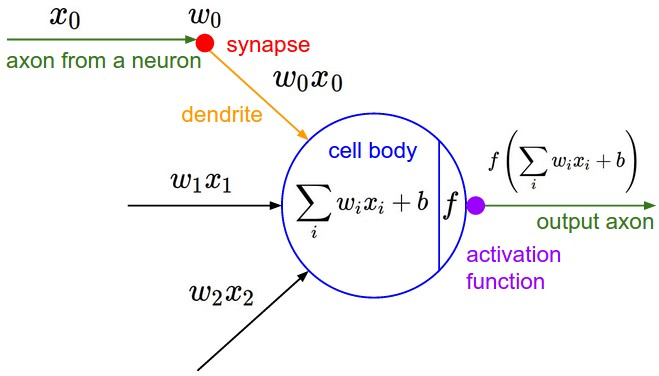
In the above code `random.uniform(-1, 1)` will generate a random number between -1 and 1. And `nin` is the number of inputs. So if we want say 10 inputs to our Neuron, then we will set `nin=10`.
For reference, this is the diagram for a neuron:
### The `__call__` Mechanism In Python Classes
Consider this code:
python
import random
random.uniform(-1, 1)
class Neuron:
def init(self, nin):
self.w = [Value(random.uniform(-1, 1)) for _ in range(nin)]
self.b = Value(random.uniform(-1, 1))
def call(self, x):
print(x)
return 0.0
We have a `__call__` mechanism, which can be used to use the objects of type Neuron *as* though they were functions.

So we can use like this:
python
x = [1.0, 2.0]
N = Neuron(2)
N(x)
Result:
[1.0, 2.0]
0.0
## Implementing `tanh(wx + b)` on a neuron
python
import random
class Neuron:
def __init__(self, nin):
    self.w = [Value(random.uniform(-1,1)) for _ in range(nin)]
    self.b = Value(random.uniform(-1,1))

def __call__(self, x):
    # w * x + b
    # sum is initiailized as the bias value (and then rest of the stuff is added to it)
    act = sum((wi * xi for wi, xi in zip(self.w, x)), self.b)
    out = act.tanh()
    return out
x = [2.0, 3.0]
n = Neuron(2)
n(x)
I get an output like this:
Value(data=-0.6963855451596829, grad=0, label='')
As of now, on every run the value received will be different - since we are initializing with random inputs during initialization.
## Defining a Layer of Neurons
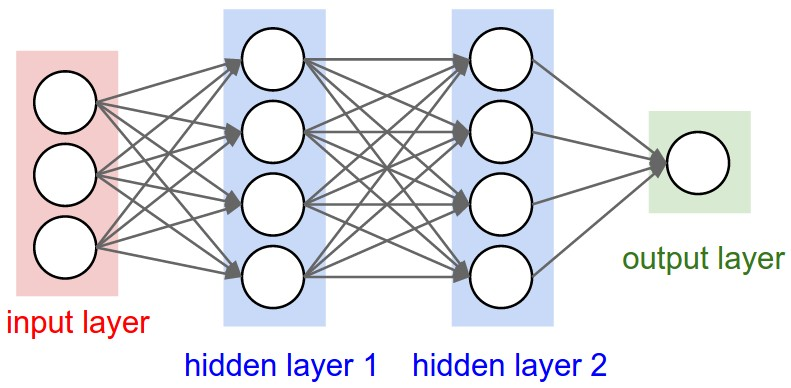
The code for defining a layer of neurons is as follows:
python
class Layer:
def __init__(self, nin, nout):
    self.neurons = [Neuron(nin) for _ in range(nout)]

def __call__(self, x):
    outs = [n(x) for n in self.neurons]
    return outs
x = [2.0, 3.0]
n = Layer(2, 3)
n(x)
For a layer - we need to take in the number of inputs and number of outputs, and we simply create a list of Neuron objects first.

When the Layer is called, we just call each neuron object with the given input values.

The above code gives a result like this:
[Value(data=0.8813774949215492, grad=0, label=''),
Value(data=0.9418974314812039, grad=0, label=''),
Value(data=0.3765244335798038, grad=0, label='')]
## Defining a full MLP

Code:
python
class MLP:
def __init__(self, nin, nouts):
    sz = [nin] + nouts
    self.layers = [Layer(sz[i], sz[i+1]) for i in range(len(nouts))]

def __call__(self, x):
    for layer in self.layers:
        x = layer(x)
    return x
You can see how the above will transform into a list of layers - with the right number of input and output neuron```

python
x = [2.0, 3.0, -1.0]
n = MLP(3, [4, 4, 1])
n(x)
Gives a Value object to the last output (after forward pass).
We can visualize the whole expression graph with following:
draw_dot(n(x))
The result is a huge expression graph - representing the whole expression with a single output node.
The spelled-out intro to neural networks and backpropagation: building micrograd - YouTube

*AI agents write code fast. They also silently remove logic, change behavior, and introduce bugs -- without telling you. You often find out in production.
git-lrc fixes this. It hooks into git commit and reviews every diff before it lands. 60-second setup. Completely free.*
Any feedback or contributors are welcome! It's online, source-available, and ready for anyone to use.
⭐ Star it on GitHub:
 HexmosTech
/
git-lrc
HexmosTech
/
git-lrc
Free, Unlimited AI Code Reviews That Run on Commit

git-lrc
Free, Unlimited AI Code Reviews That Run on Commit

AI agents write code fast. They also silently remove logic, change behavior, and introduce bugs -- without telling you. You often find out in production.
git-lrc fixes this. It hooks into git commit and reviews every diff before it lands. 60-second setup. Completely free.
See It In Action
See git-lrc catch serious security issues such as leaked credentials, expensive cloud operations, and sensitive material in log statements
git-lrc-intro-60s.mp4
Why
- 🤖 AI agents silently break things. Code removed. Logic changed. Edge cases gone. You won't notice until production.
- 🔍 Catch it before it ships. AI-powered inline comments show you exactly what changed and what looks wrong.
- 🔁 Build a habit, ship better code. Regular review → fewer bugs → more robust code → better results in your team.
- 🔗 Why git? Git is universal. Every editor, every IDE, every AI…


Top comments (0)