


Efficiently handling data from APIs is a critical factor in ensuring a smooth user experience. As datasets grow, seemingly simple operations, such as searching for a specific item in a list, can become performance enemies.
In this article, I’ll show some ways to handle API data that can turn slow searches into instant access. Grab a cup of coffee and let’s go!
Table of Contents
The problem with arrays
The Solution: API Data Indexing
Ninja indexing techniques
Performance in practice
An extra: Objects vs Maps
Conclusion

The problem with arrays
Usually, an API returns data like this:
const products = [
  { id: 1, name: "Ultra Mega Smartphone", category: "electronics", price: 1599.99 },
  { id: 2, name: "Comfortex Sofa", category: "furniture", price: 899.50 },
  { id: 3, name: "55-inch Smart TV", category: "electronics", price: 2499.99 },
  // ... and another 500 products your application needs to manage
];
When you need to access this data, you usually end up using methods like find() or filter():
// Everyone has written this at some point
function findProductById(id) {
  return products.find(product => product.id === id);
}

function filterByCategory(category) {
  return products.filter(product => product.category === category);
}
The problem is that these methods perform a linear search, which means that execution time increases linearly with the size of the array. In other words: the more products you have, the longer it takes. This happens because these methods go through each item in the list until they find what you want (a search with O(n) performance).
To get a general idea of an algorithm’s performance, we can just look at the chart below to see where each Big O notation sits. Here, we’ll focus on O(n) and O(1) performance.
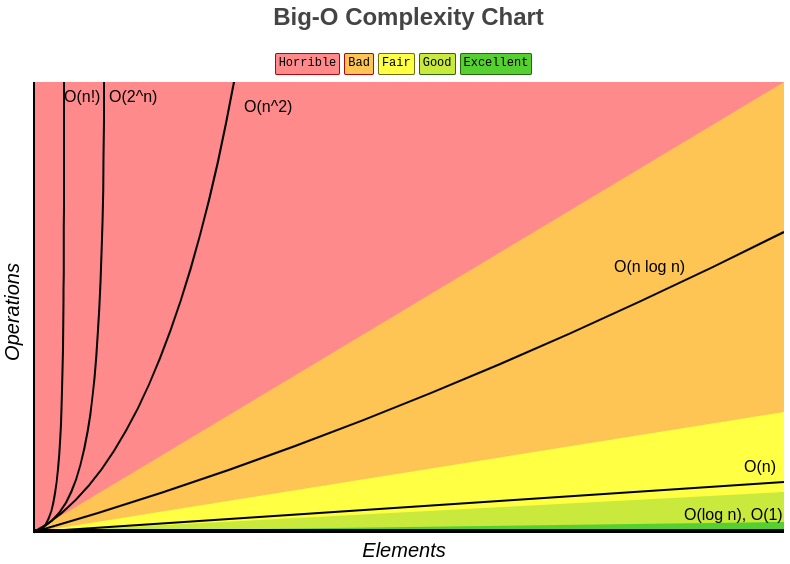
Note: The performance we’ll consider in this article is the performance of accessing indexed data, not the performance of creating the indexes, since, for the end user, data access is what makes the difference.
The Solution: API Data Indexing
Indexing means creating a data structure where access is instant, like a book index. In JavaScript, we can easily do this with objects or Maps.
// Transforming our array into an indexed object
// With reduce:
const productsById = products.reduce((acc, product) => {
  acc[product.id] = product;
  return acc;
}, {});

// OR with Object.fromEntries:
const productsById = Object.fromEntries(
  products.map(product => [product.id, product])
);

// Now access is instant: O(1) performance
function findProductById(id) {
  return productsById[id];
}

/* Example return value of productsById:
{
  1: { id: 1, name: "Ultra Mega Smartphone", category: "electronics", price: 1599.99 },
  etc...
}
*/
You can also use the Map class for more flexibility, since Map has several built-in methods to help you manipulate data:
const productMap = new Map(
  products.map(product => [product.id, product])
);

// Here we also have O(1) performance!
function findProduct(id) {
  return productMap.get(id);
}
All the approaches above have O(1) performance, meaning that regardless of how many items you have in the array, the access speed to the data is practically constant!
Ninja indexing techniques
Lookup by ID
The basic approach that works: indexing lists by item ID. It’s the same approach we used in the previous examples, but here’s a new example:
const usersById = users.reduce((acc, user) => {
  acc[user.id] = user;
  return acc;
}, {});

// O(1) performance, it’s like data teleportation!
const user = usersById[123]; // { id: 123, name: "John Doe", age: 25 }

/*
Example return value of usersById:
{
  123: { id: 123, name: "John Doe", age: 25 },
  234: { id: 234, name: "Jane Doe", age: 48 },
  ...
}
*/
We can also create a lookup by ID by indexing the items with Map and accessing them with .get(id):
// Like one-liners?
const usersById = new Map(users.map(user => [user.id, user]));

// O(1) access
const user = usersById.get(123); // { id: 123, name: "John Doe", age: 25 }
Multi-Value Indexing
When we need to group items by a property that can have repeated values, such as product category:
const productsByCategory = products.reduce((acc, product) => {
  // If the category doesn't exist yet, create an empty array
  if (!acc[product.category]) {
    acc[product.category] = [];
  }
  // Throw the product in there
  acc[product.category].push(product);
  return acc;
}, {});

// Instant search by category, O(1) performance
const electronics = productsByCategory["electronics"];

// Example return value of productsByCategory
// {
//   electronics: [ /* List of electronics */ ],
//   furniture: [ /* List of furniture */ ]
// }
Let’s see how to do this indexing by combining .reduce() and Map, then accessing it with Map.get(id):
const productsByCategory = products.reduce((acc, product) => {
  // .has() and .set() are native Map methods...
  if (!acc.has(product.category)) {
    acc.set(product.category, []);
  }

  // ...just like .get()
  acc.get(product.category).push(product);
  return acc;
}, new Map());

// O(1) access for the "furniture" category
productsByCategory.get("furniture"); // [{ id: 2, name: "Comfortex Sofa", category: "furniture", price: 899.50 }]
Composite indexes
When you need more complex searches, such as searching by field combinations, for example:
const productsByCategoryAndPrice = products.reduce((acc, product) => {
  // Creates a composite key, like "electronics_premium"
  const key = `${product.category}_${product.price >= 1000 ? "premium" : "basic"}`;

  if (!acc[key]) {
    acc[key] = [];
  }

  acc[key].push(product);
  return acc;
}, {});

// O(1) search: Want all expensive electronics? Here you go!
const expensiveElectronics = productsByCategoryAndPrice["electronics_premium"];

/* return
[
  { id: 1, name: "Ultra Mega Smartphone", category: "electronics", price: 1599.99 },
  { id: 3, name: "55-inch Smart TV", category: "electronics", price: 2499.99 }
]
*/
Using a Map for a composite index (such as category_price) works similarly, but takes advantage of Map benefits, such as better performance with large volumes of data and support for any key type:
const productsByCategoryAndPrice = products.reduce((acc, product) => {
  const key = `${product.category}_${product.price >= 1000 ? "premium" : "basic"}`;

// Here we use Map methods:
  if (!acc.has(key)) {
    acc.set(key, []);
  }

  acc.get(key).push(product);
  return acc;
}, new Map());

// Search premium electronics: O(1)
productsByCategoryAndPrice.get("furniture_basic"); // [{ id: 2, name: "Comfortex Sofa", category: "furniture", price: 899.50 }]
Performance in practice
Let’s see what happens when we have 10,000 products. To do this, we’ll create our test setup: our huge product list that would come from an API:
const hugeProductList = Array.from({ length: 10000 }, (_, i) => ({
  id: i + 1,
  name: `Product ${i + 1}`,
  category: i % 5 === 0 ? "electronics" : "others",
  price: Math.random() * 2000
}));
Now we’ll index the list above:
const indexedProducts = hugeProductList.reduce((acc, p) => {
  acc[p.id] = p;
  return acc;
}, {});
And now, the showdown: Non-Indexed Access VS Indexed Access! We’ll use console.time() and console.timeEnd() before and after our accesses to record the elapsed time for each one:
// Non-indexed access: O(n)
console.time("Without indexing (turtle mode 🐢)");
for (let i = 0; i < 1000; i++) {
  const id = Math.floor(Math.random() * 10000) + 1;
  hugeProductList.find(p => p.id === id);
}
console.timeEnd("Without indexing (turtle mode 🐢)");

// Indexed search: O(1)
console.time("With indexing (rocket mode 🚀)");
for (let i = 0; i < 1000; i++) {
  const id = Math.floor(Math.random() * 10000) + 1;
  indexedProducts[id];
}
console.timeEnd("With indexing (rocket mode 🚀)");
Spoiler: the indexed version is usually hundreds of times faster on large datasets, with differences becoming increasingly noticeable as the dataset size grows. Check it out:

The price of speed
Of course, nothing in life comes for free. Indexing has an additional memory cost, because you’re practically duplicating data references. In applications with severe memory constraints, this trade-off should be carefully considered:
- A simple indexed structure (by ID) approximately doubles memory usage;
- Multi-value indexes multiply this cost;
- Partial indexes (using only the necessary fields instead of the full object) can reduce this impact;
Indexing increases memory consumption, but the performance gain usually pays off, especially in web and mobile applications.
The key is finding the balance between performance, code readability, and memory usage. The most complex solution is not always the best one.
When not to index
Indexing is not always necessary:
- Very small datasets (<100 items): in small datasets, the difference between indexed search and standard search reflects little performance gain;
- Searches performed rarely: the memory cost is not worth it;
- Prototypes and early-stage projects: focus on the basics that work.
An extra: Objects vs Maps
If you’re dealing with a few hundred items: relax, either one will fly. But if you’re dealing with thousands or millions: that’s when it starts to make a difference. Maps generally have an advantage in frequent addition/removal operations and when you need to iterate over everything.
Object: The classic that never goes out of style
😁 Advantages:
- Everyone knows how to use it;
- It has native integration with
JSON(objects can be easily converted); - Easy access with
obj[key]; - Solid performance that won’t let you down.
😬 Disadvantages:
- It only accepts strings and Symbols as keys;
- It doesn’t have native manipulation methods, only helper functions;
- It can be complicated to get its size without using
Object.keys();
🤔 When to use it:
- When you need direct integration with
JSON; - For simpler data structures;
- If the keys are always strings;
- When read performance is the priority.
Map: The modern cousin
😁 Advantages:
- It accepts anything as a key, even objects, imagine that!
- It preserves insertion order. Got OCD? This one’s for you;
- It comes with useful built-in methods, such as
.set(),.get(),.has(), etc; - Better performance for frequent manipulation and iteration.
😬 Disadvantages:
- A lot of people still don’t know it very well;
- If you need to use
JSON, it requires manual conversion; - It has limited support in older browsers, but who still uses IE?
🤔 When to use it:
- For more complex data structures;
- When you need key types other than strings;
- When insertion order matters. My OCD is grateful;
- When manipulation and iteration performance is the priority.
Conclusion

Turning arrays into indexed structures may seem like extra work at first, but the performance gain is so huge that you’ll wonder how you lived so long without doing it.
The difference between an app that freezes and one that runs as smoothly as butter on warm bread often lies in how we organize data. With the techniques in this article, you can reduce search times from hundreds of milliseconds to just a few milliseconds, significantly improving the user experience.
Remember: in development, strategic laziness (doing the heavy work only once, during the initial indexing) almost always pays off. Your app becomes faster, your users become happier, and you get more time to drink that coffee while admiring your optimized code.
Final Tip: Always measure performance before and after optimizations. Browser profiling tools are your best friends on this journey. See ya!


Top comments (0)