


GitHub tells me how much I contributed. I wanted to know where.

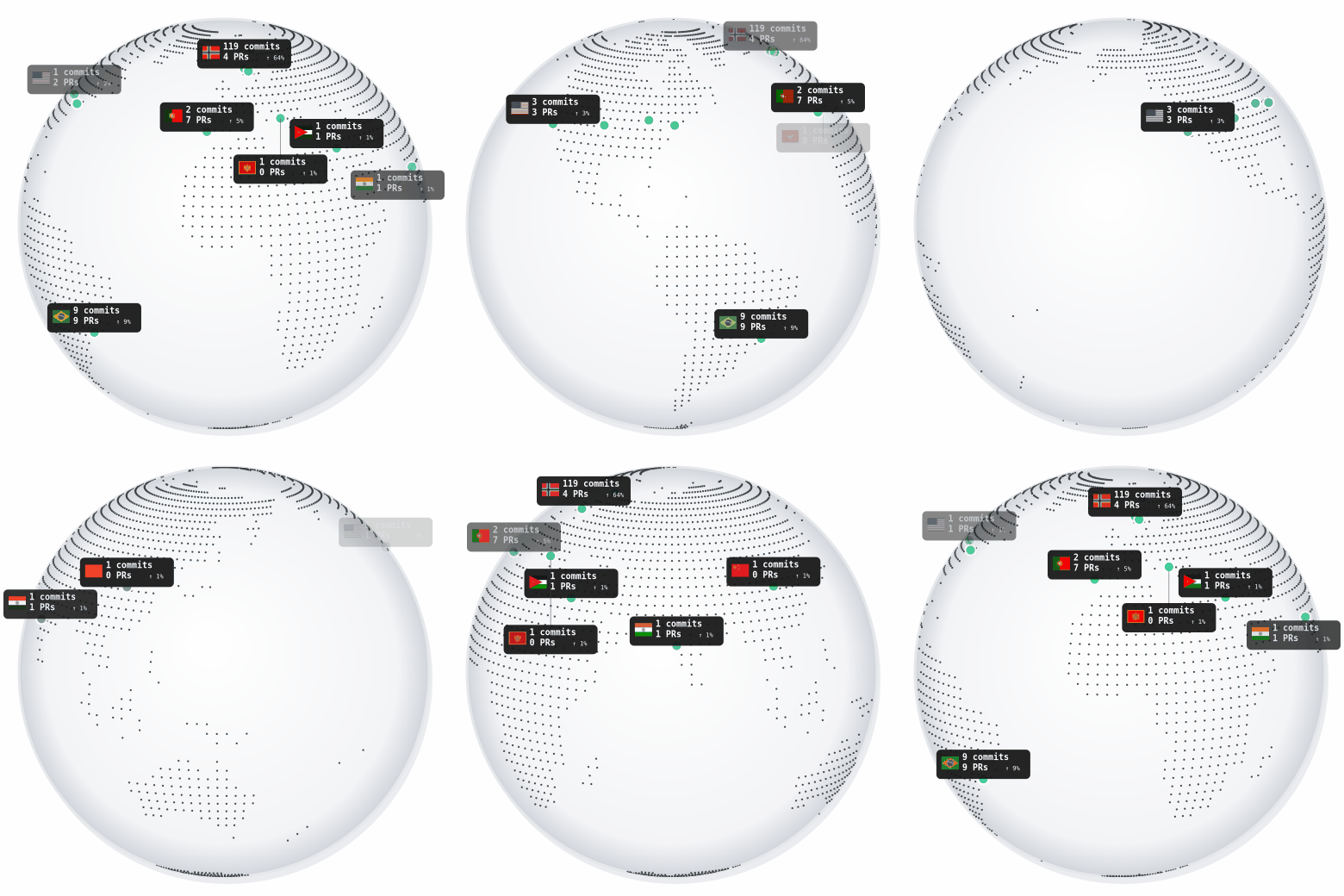
This is the badge. Click it to open the interactive 3D globe. The animated GIF rotates on its own so it works as a static profile badge too.
I built a GitHub profile badge that traces contributions to public repositories back to their owners and maps them onto an interactive globe.
Try it yourself
Want your own globe? It takes about two minutes.
- Fork the repository: https://github.com/turbolego/github-contrib-globe-badge
- Replace
turbolegowith your GitHub username in the workflow (or setGITHUB_ACTORin Actions secrets) - Enable GitHub Pages → Source: Deploy from branch →
main/(root) - Add this to your profile README:
[](https://turbolego.github.io/github-contrib-globe-badge/)
Replace turbolego with your username. GitHub Actions regenerates the badge daily.
Repo: https://github.com/turbolego/github-contrib-globe-badge
Interactive demo: https://turbolego.github.io/github-contrib-globe-badge/
How does it work?
GitHub commits authored by me
         │
         ├── Co-authored-by trailers
         │
         ▼
Resolve true repository origin
         │
         ├── GitHub fork source → follow to ultimate origin
         │
         └── Commits-search fallback → find oldest repo sharing the SHA
         │
         ▼
Repository owner (not the fork owner)
         │
         ▼
GitHub profile location (free-text string)
         │
         ▼
Nominatim geocoding
         │
         ├── Country polygon lookup (primary)
         │
         └── Reverse geocode fallback (coastal / edge cases)
         │
         ▼
Country code + flag
         │
         ▼
┌─────────────────────┬─────────────────────┐
│ badge.gif           │ data.json           │
│ (animated GIF)      │ (Cobe globe data)   │
└─────────┬───────────┴─────────┬───────────┘
          ▼                     ▼
    GitHub README          GitHub Pages
    (static badge)         (interactive Cobe globe)
The entire thing runs on GitHub. No server, no database, no backend API that has to stay running. A daily GitHub Action collects contributions, resolves repository origins, geocodes owners, generates the GIF and JSON, and GitHub Pages serves the interactive globe from the committed data.json.
The surprisingly hard part: where did the contribution actually happen?
The visual is fun, but the engineering is the interesting part.
A contribution might exist in a fork, but you don't necessarily want to attribute it to the person who owns the fork.
Your fork → someone else's repository → original repository → repository owner → owner's location → country on the globe
The project has to resolve the true origin repository for each commit:
Follow GitHub's fork
sourcefield — if the repo is a registered GitHub fork, walk the fork chain to the ultimate origin.Fall back to commits-search origin detection — when a repository duplicates commit history without being a registered GitHub fork (common when someone seeds a new repo from a full clone of another repo's history), search all public repositories that contain the commit SHA and pick the oldest by creation date.
Cache origins per repository — this runs at most once per distinct repository, not once per commit. The cache is persisted across Action runs with a 30-day TTL (a repo that was private can later become public and turn out to be the true older origin).
// Simplified: the core origin resolution logic
const candidates = new Set([fullName]);
// 1. Search all repos containing this commit SHA
const data = await searchCommits(`sha:${sha} is:public`);
for (const item of data.items) candidates.add(item.repository.full_name);
// 2. Expand fork networks
for (const name of candidates) {
  const info = await getRepositoryInfo(name);
  if (info?.fork && info.source?.full_name) candidates.add(info.source.full_name);
}
// 3. Pick oldest by creation date
let oldest = null;
for (const name of candidates) {
  const info = await getRepositoryInfo(name);
  if (info?.created_at && (!oldest || info.created_at < oldestDate)) {
    oldest = name;
  }
}
return oldest || fullName;
What counts as a contribution?
A simple GitHub commit search isn't quite enough. Collaborative commits can contain Co-authored-by: trailers, so I also look for those.
The generator searches:
-
Authored commits:
author:me is:public -user:me -
Co-authored commits: full-text search for
"Co-authored-by: me"then verifies each hit against the actual trailers in the commit message (matching by GitHub noreply address, public profile email, or login name)
This catches contributions to repositories where you weren't the primary author but were credited in the commit message.
Turning a GitHub profile location into a country
GitHub's profile location is free-form user-entered text. That's not a structured address.
Oslo, Norway
Berlin
California
Internet
Earth
Remote
The pipeline handles this:
- Nominatim forward geocode — convert the string to lat/lon
-
Country polygon lookup — test the point against Natural Earth country polygons (the
geo-countriesdataset) -
Reverse geocode fallback — if the point falls outside any polygon (coastal locations, small islands), call Nominatim reverse geocode with
zoom=3to get the country code from the address details -
Flags — from the MIT-licensed
flag-iconslibrary for the animated GIF
// Country lookup with fallback
marker.countryCode = countryCodeAt(marker.location, geojson);
if (!marker.countryCode) {
  // wait for Nominatim rate limit
  await sleep(1100);
  marker.countryCode = await reverseCountryCode(marker.location);
}
Why GitHub Actions?
| What you'd normally need | This project |
|---|---|
| Database for caching |
commit-cache.json committed to repo |
| Server for geocoding | Calls Nominatim directly from the Action |
| Backend API | GitHub Actions does all computation |
| Cron job | GitHub Actions scheduled workflow |
| Hosting for globe | GitHub Pages serves index.html + data.json
|
| SSL, domain, DNS | Free on username.github.io
|
The Action runs daily at midnight UTC, commits badge.gif + data.json + commit-cache.json back to main, and Pages picks up the new data automatically. Zero infrastructure to maintain.
What my globe looks like
| Country | Commits | PRs | Tracked % | Repositories |
|---|---|---|---|---|
| 🇳🇴 Norway | 119 | 4 | 63.7% | 7 |
| 🇧🇷 Brazil | 9 | 9 | 9.3% | 1 |
| 🇺🇸 USA | 3 | 3 | 3.1% | 4 |
| 🇵🇹 Portugal | 2 | 7 | 4.7% | 1 |
| 🇯🇴 Jordan | 1 | 1 | 1.0% | 1 |
| 🇲🇪 Montenegro | 1 | 0 | 0.5% | 1 |
| 🇮🇳 India | 1 | 1 | 1.0% | 1 |
| 🇨🇳 China | 1 | 0 | 0.5% | 1 |
Total tracked: 137 commits, 25 merged PRs across 8 countries.
The biggest surprise? Norway dominates because I've contributed heavily to local Norwegian organizations (Experis, TurboDevs, GULBILBOT). The globe revealed a geographic bias I couldn't see in the standard contribution graph.
Limitations
| Limitation | What it means |
|---|---|
| GitHub locations aren't authoritative | Self-entered free text. "Internet", "Earth", "Remote" don't geocode. |
| Not every owner has a location | Org accounts, bots, and users without a location set are invisible. |
| Repository owner ≠ all contributors | You're visualizing repository-owner geography, not the geography of every person who touched the code. |
| Country attribution is approximate | Especially when profile locations are vague ("California" → US, but which state?) |
| History is bounded | Currently queries from account creation date (fallback 2023-01-01). Very old contributions may be missed if the account is older than the search API can reliably return. |
| Percentages are "of tracked contributions" | If a country shows 42%, that's 42% of the resolvable contribution set — not 42% of all your GitHub activity. |
Why I built this
GitHub's contribution graph tells me how much I've contributed.
I started wondering about a different question:
Who are all these contributions actually reaching?
A contribution to an open-source project isn't just an entry on my GitHub graph. It's a connection to another developer, organization, or community somewhere else in the world.
I wanted to visualize that network — not as an abstract chart, but as a literal map. Where does my open-source work actually end up?
What's next?
Things I'd like to explore (no promises):
- Historical animation — scrub through time to watch the globe grow
- Repository-level markers — not just country aggregates
- Organization support — attribute contributions to orgs, not just owners
- Better ambiguous-location handling — disambiguate "Springfield" etc.
- City-level view — zoom in on dense regions
- Contribution types beyond commits/PRs — issues, reviews, discussions
- Interactive repository filtering — click a country, see its repos
- Time-range selection — "last year", "all time", custom range
- Caching/API optimization — smarter search query batching
What does your globe look like?
Fork the project, add the badge to your profile, and see what your globe looks like.
I'm especially curious to see whether anyone gets a more geographically distributed contribution map than mine.
If you find a weird location that the geocoder gets wrong, open an issue or let me know in the comments.
Where does your open-source work take you?
GitHub repository: https://github.com/turbolego/github-contrib-globe-badge
Interactive demo: https://turbolego.github.io/github-contrib-globe-badge/


Top comments (0)