

You've been there. You give an AI a meaty task — "analyze this codebase," "write a threat model," "design the API surface" — and you get back something useful. It works for the repo you're looking at. But try it on a different codebase and the quality is hit or miss. The output is sensitive to the structure of the project, the naming conventions, and whatever the model happens to latch onto that day.
The result isn't bad. It's just not reliable. And for anything you want to repeat across projects or hand to a team, reliability is what matters.
This article is about how to take AI output that works once and make it work consistently — structured, evidence-grounded, and reproducible regardless of the target repository.
We'll walk through ten prompting techniques, each one a standalone concept you can use tomorrow on whatever you're working on. To keep things concrete, we'll use a running example: we used AI to generate C4 architecture diagrams for OpenCode, an open-source AI coding assistant built with TypeScript, Bun, and the Model Context Protocol. Over five iterations we improved the prompts until the output was structured, evidence-backed, and reproducible. But the techniques themselves apply to any complex task — threat models, dependency audits, API docs, migration plans, you name it.
Let's start with where things started.
The "good enough" trap
Here's the prompt we started with, more or less:
Produce a C4 container diagram for this repository.
And here's what we got:
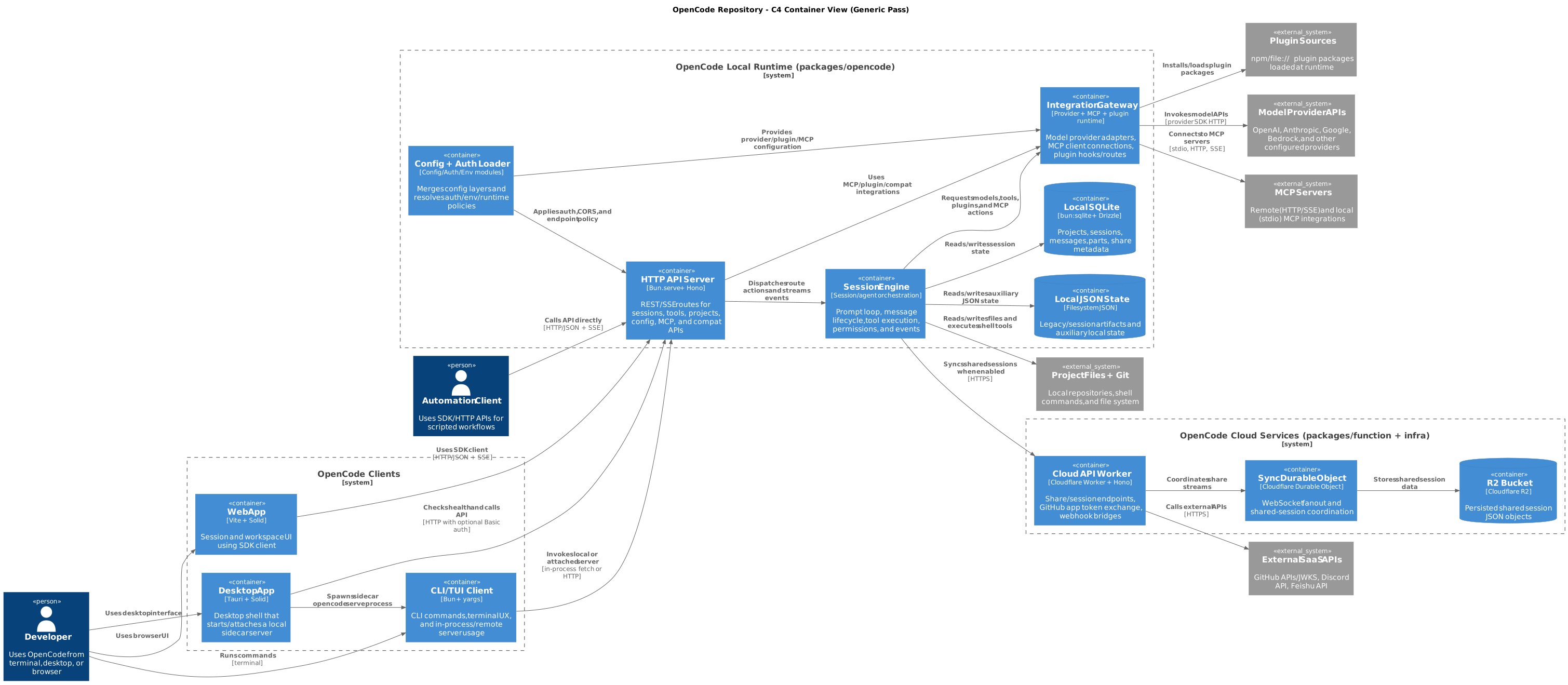
A valid diagram with reasonable container names, correct syntax, and... a giant box labeled "Integration Gateway" that smooshed together three completely different subsystems (an LLM provider adapter, an MCP transport layer, and a plugin system).
The analysis notes were 31 lines long. No scoring. No alternatives considered. No evidence trail. It was a useful starting point for this particular codebase, but there was nothing in the process that would make the result reliable if you pointed it at a different repo tomorrow.
The problem wasn't the AI. The problem was the prompt. We'd given it a vague task with no methodology, and gotten output that reflected exactly that.
The core insight we kept coming back to: For complex analytical tasks, the prompt isn't just an input. It's the methodology. If you give the AI a rigorous process to follow, it produces rigorous output. If you give it a one-liner, it wings it.
Over five iterations, we added techniques one at a time and watched the output improve measurably each round. Here's what we learned.
1. Put the instruction first
The concept
When you're explaining a task to a new team member, you don't spend ten minutes describing the codebase and then say "oh, by the way, I need you to write architecture docs." You lead with what you need, then fill in context.
AI works the same way. Language models process your prompt sequentially — they're building up attention and expectations as they read. If you put 500 words of context before the actual task, the model has already formed opinions about what matters before it even knows what you're asking for.
The fix is dead simple: put the task first.
How to do it
Task: [What you want — one sentence]
Constraints: [What NOT to do — hard limits]
Context: [Background, file paths, prior work]
Output: [Exact format expected]
The order matters. Task sets the frame. Constraints prevent common failure modes. Context fills in the details. Output format tells the model what "done" looks like.
What this looks like in practice
Here's what a context-first prompt sounds like:
Here is a TypeScript monorepo with packages for CLI, desktop, web, and
cloud functions. The CLI uses yargs, the server uses Hono on Bun,
sessions use a prompt loop with tool execution...
[500 more words]
...please produce a C4 diagram.
And here's instruction-first:
You are an architecture analysis agent.
Analyze a codebase and produce evidence-backed C4 outputs.
Keep container-level abstraction unless explicitly requested otherwise.
Three lines. The model immediately knows its role, what it's producing, and what abstraction level to stay at. Everything that follows is interpreted through that frame — when it later reads about provider adapters and MCP transports, it's thinking "how does this map to a container?" rather than "let me summarize this TypeScript project."
In our project: Switching to instruction-first was the first change we made (see the protocol prompt), and it immediately sharpened the output. The model stopped producing generic summaries and started producing architecture analysis. Small change, big difference.
2. Require a fixed output structure
The concept
Think about code reviews. What's easier to review: a PR with a clear description template (## What, ## Why, ## How, ## Testing), or a PR with a freeform paragraph that might or might not cover everything?
Same principle applies to AI output. When the model can choose its own structure, it gravitates toward prose that reads nicely but is hard to verify or compare. It'll write flowing paragraphs that sound thoughtful and skip the parts where it has low confidence — and you won't notice, because there's no checklist telling you what's missing.
How to do it
Define the exact sections you want, in order:
Return exactly these sections in this order:
1) Scope and non-goals
2) Key findings
3) Evidence table
4) Alternatives considered
5) Recommendation with rationale
6) Assumptions and caveats

Do not add extra sections. Do not omit sections.
Mark empty sections as "N/A — [reason]".
Two key constraints: "Do not add extra sections" stops the model from creating its own structure that might hide things. "Do not omit sections" stops it from quietly skipping areas where it's uncertain. The "N/A with reason" clause is especially useful — it forces the model to acknowledge what it didn't find rather than just... not mentioning it.
Why freeform fails
Freeform output has three failure modes:
You can't diff it. When two iterations don't share a structure, comparing them is like comparing two essays. With fixed sections, you can go section-by-section.
The model hides its gaps. Low confidence on a topic? Just don't write that section. A required structure with "mark empty as N/A" closes that escape hatch.
Reviewers get fatigued. Scanning prose for the one claim that matters is exhausting. Named sections let reviewers jump directly to what they care about.
In our project: Our first-pass analysis notes were 31 lines across 3 freeform sections. By the final pass, we had 145 lines across 17 structured sections — scope, execution boundaries, entry points, interfaces, flows, dual drafts, scoring table, evidence anchors, self-critique, and more. The final version is longer, but every line serves a purpose. A reviewer can jump straight to "Draft scoring table" to check whether the model actually evaluated alternatives, or to "Inferred claims register" to see what's uncertain.
3. Break the work into phases
The concept
You wouldn't ask a junior developer to "build the feature" as a single task. You'd break it down: first understand the existing code, then design the approach, then implement, then test. Each step produces something the next step builds on. If step one is wrong, you catch it before step three depends on it.
This is prompt chaining — decomposing a complex task into sequential phases, where each phase produces a concrete artifact that the next phase consumes.
How to do it
Execute these phases in order. Complete each phase fully before
moving to the next.

Phase 1: [Discovery] — produce [list of findings]
Phase 2: [Analysis] — consume Phase 1 findings, produce [evaluation]
Phase 3: [Synthesis] — consume Phase 2 evaluation, produce [final output]

Do not skip phases. Do not combine phases.
The key constraint is "complete each phase fully before moving to the next." Without it, models will start Phase 2 before finishing Phase 1, especially when they spot something in Phase 1 that's relevant to Phase 2. That interleaving leads to incomplete discovery and rushed analysis.
Why single-shot prompts fall short
When you ask a model to do everything at once, it holds the entire task in working memory and makes all decisions simultaneously. The result? It cuts corners — usually in the early phases where the foundation matters most. It might skip an execution boundary during discovery, and then the entire container model is built on an incomplete picture. You won't notice until a reviewer asks "where's the desktop app?"
With phases, that gap is visible immediately. If Phase 1 lists five execution boundaries and misses three, you can catch it before Phase 3 builds a diagram on a faulty foundation.
In our project: We used a five-phase workflow: discovery (find all execution boundaries, entry points, interfaces, dependencies), flow tracing (follow 2-4 end-to-end paths through the code), draft modeling (create two alternative container models), selection (score and pick one), and finalization (render, validate, self-check). You can see this phasing in the agentic prompt.
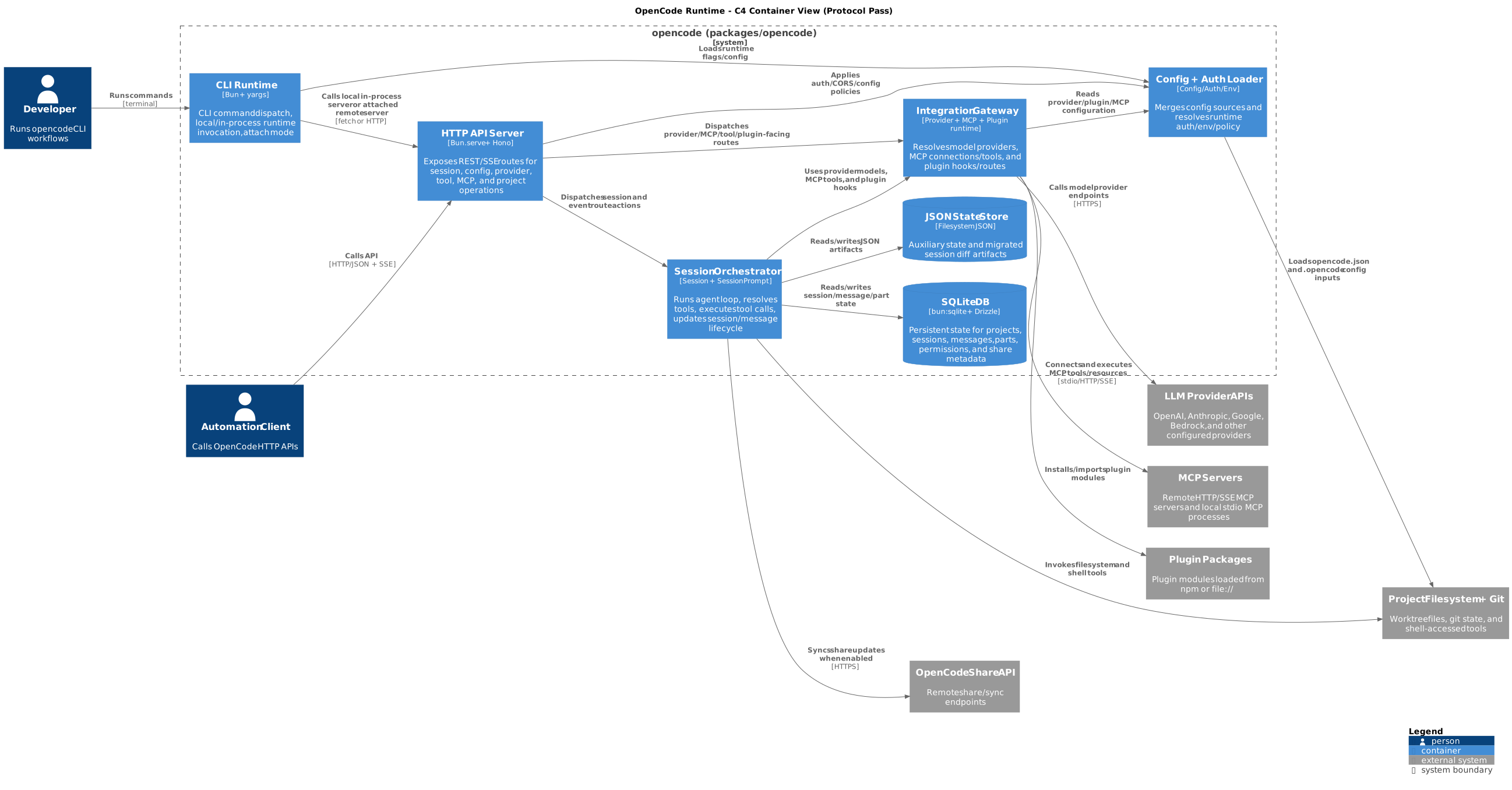
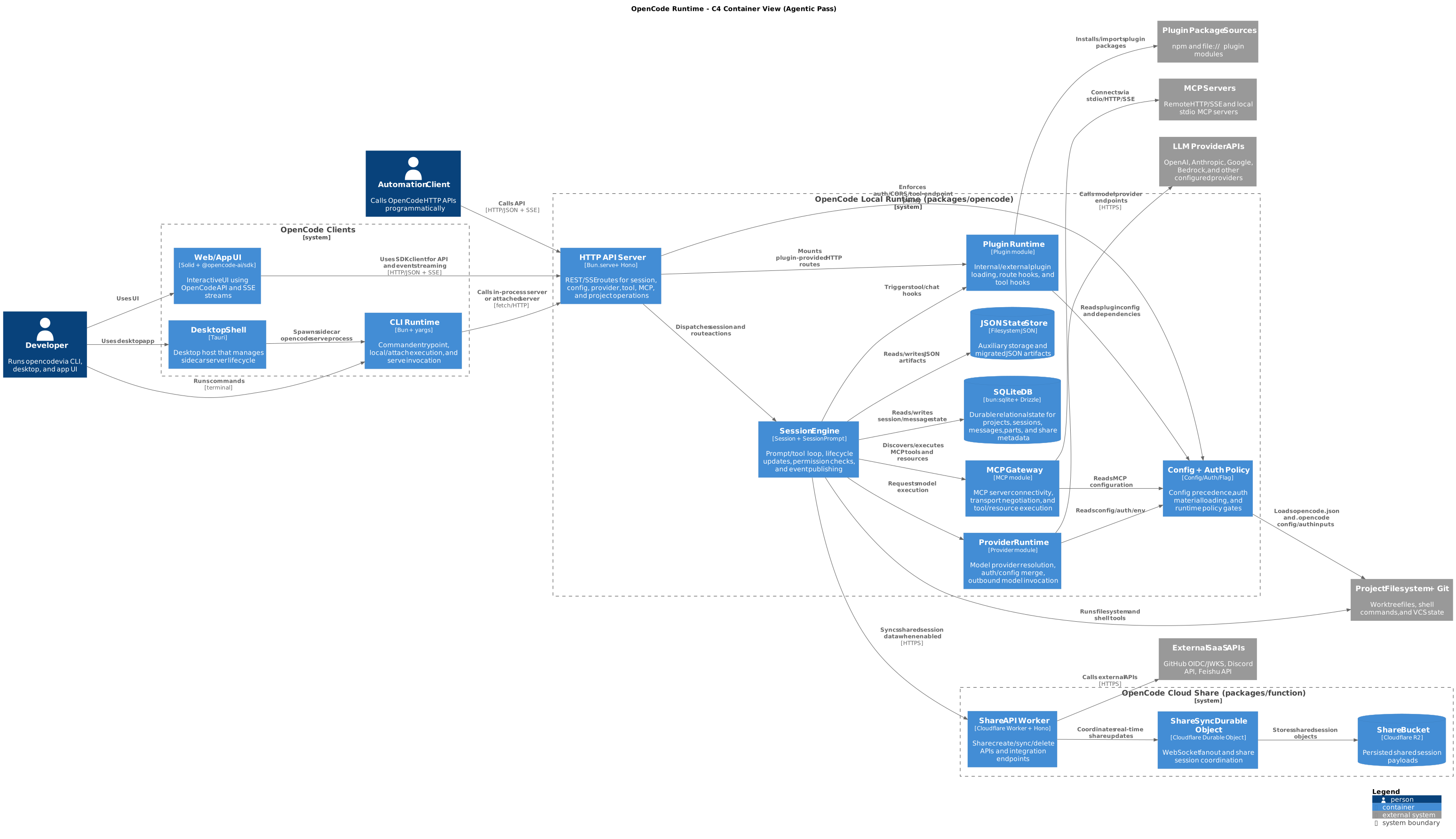
The difference was dramatic. Our protocol pass, which used phases, found five execution boundaries. Our agentic pass, with more explicit phasing, found eight — including the desktop sidecar lifecycle, the app UI runtime, and the cloud worker boundary that the earlier pass had missed entirely.
4. Generate two drafts, then score them
The concept
This is the single most impactful technique we found. It fights first-answer bias — the model's tendency to commit to the first plausible answer and then rationalize it.
Here's what happens without this technique: the model produces one answer, presents it as the answer, and moves on. If that answer happens to be conservative (which it usually is, because conservative is safe), you get output that merges things that should be separate, simplifies things that are genuinely complex, and plays it safe at every decision point.
The fix: require two drafts with explicitly different strategies, then score them against a fixed rubric with numeric scores. The rubric forces the model to evaluate tradeoffs along dimensions you care about, and the numeric scores prevent wishy-washy "both drafts have their merits" conclusions.
How to do it
Create Draft A and Draft B using different strategies.
Score each draft 1-5 on these criteria:
  1. [Criterion] — [what a score of 5 means]
  2. [Criterion] — [what a score of 5 means]
  3. [Criterion] — [what a score of 5 means]
  4. [Criterion] — [what a score of 5 means]
Select the winner. Justify each score in one sentence.
Do not default to the simpler option without scoring.
That last line is load-bearing. Without it, the model often picks the simpler draft in its rationale while admitting in the scores that the other draft is better.
Designing a good rubric
The rubric criteria should reflect what your audience actually cares about, not just what's easy to evaluate. For our architecture work, we used:
- Fidelity — Does this accurately reflect what the code actually does?
- Explanatory power — Would this help an engineer debug a problem or plan a change?
- Readability — Can someone understand this without a guided tour?
- Boundary quality — Are genuinely different responsibilities in separate boxes?
Notice that "simplicity" isn't a criterion. If it were, the model would always pick the simpler draft. Instead, we have "readability" (which rewards clarity) and "boundary quality" (which penalizes oversimplification). This is a deliberate design choice — the rubric encodes your values.
In our project: The scoring table told the whole story:
Draft Fidelity Explanatory power Readability Boundary quality Total A (merged) 4 3 4 2 13 B (split) 5 5 4 5 19 Draft A merged three subsystems (LLM providers, MCP transport, and plugins) into one box called "Integration Gateway." Draft B split them into three separate containers. Draft A won slightly on readability (fewer boxes, fewer edges), but Draft B dominated on everything that matters for real engineering work. The 13-vs-19 gap left no room for waffling.
Without the rubric, the model would almost certainly have picked Draft A. It's simpler, fewer edges, lower risk of error. The rubric forced it to confront the cost of that simplicity.
5. Anchor every claim in evidence
The concept
You know that feeling when someone in a meeting says "the system works like X" and you're 70% sure they're right but can't verify it without reading the code? That's what AI output feels like without evidence anchors.
Language models generate plausible text. That's literally what they do. Sometimes "plausible" and "true" are the same thing. Sometimes they're not. The only way to tell the difference is to require evidence — specific file paths, line numbers, config entries — for every major claim.
How to do it
For every major claim, attach at least one evidence anchor.
Format: <claim> — <file_path:line_number>
Claims with no anchor must be marked as "inferred" with rationale.
Do not assert implementation details without code evidence.
The "inferred" marker is important. Some claims are genuinely inferred — and that's fine! The problem isn't inference; it's invisible inference. When a claim is marked "inferred," a reviewer knows to treat it differently from a verified claim. When it's not marked, the reviewer has to guess.
Evidence constrains the model, not just the reviewer
Here's something we didn't expect: requiring evidence anchors doesn't just help reviewers verify claims. It changes how the model reasons. When the model knows it has to cite a file path for every claim, it actually goes and looks at the code instead of pattern-matching on names. The evidence requirement turns the model from a plausible-text generator into something closer to an analyst.
In our project: The difference between our generic pass and our final pass is stark.
Generic pass:
"Grouped provider, MCP, and plugin modules into a single Integration Gateway container."
No file paths. No line numbers. Trust me, bro.
Final pass:
- Session -> Provider:
packages/opencode/src/session/prompt.ts:732- Session -> MCP:
packages/opencode/src/session/prompt.ts:830- Session -> Plugin:
packages/opencode/src/session/prompt.ts:794- Provider -> LLM APIs:
packages/opencode/src/provider/provider.ts:84- MCP -> MCP Servers:
packages/opencode/src/mcp/index.ts:328Every claim verifiable in 30 seconds. That's the difference between "I think this diagram is right" and "here's the proof."
6. Make the model justify every merge
The concept
This technique was our biggest surprise. We call it a lossiness check, borrowing from audio/video compression: when you compress something, you lose information. The question is whether the lost information matters.
Models love to merge things. Merging is safe — fewer boxes, fewer edges, fewer chances to be wrong. But merging hides information. When you put three different subsystems in one box, you lose the ability to see their different failure modes, their different owners, their different rates of change.
The lossiness check makes this cost explicit. For every merge, the model must state what information is lost and grade the severity. If the loss is high, it must split.
How to do it
For each merged/grouped element, state:
  1. What information is lost by the merge
  2. Impact on: ownership clarity, failure isolation, debugging, change coupling
  3. Loss level: low / medium / high
If loss is high, split the element. Justify any high-loss merge you keep.
The four impact dimensions aren't arbitrary — they're the four most common reasons people look at architecture diagrams. If a merge degrades any of them significantly, the merge is hiding something important.
Why this flips the model's default
Without a lossiness check, the model's implicit rule is "merge unless there's a strong reason to split." With a lossiness check, the rule becomes "split unless the loss is genuinely low." That single flip is why our agentic pass produced eight containers where our generic pass produced six.
In our project: Here's the actual lossiness check the model produced (from the agentic analysis notes) for its "merge everything" draft:
Lossiness check on merged
Session + Integrations:
- Lost signal: provider vs MCP vs plugin failure domains are blurred
- Lost signal: ownership between model adapters and plugin route hooks is hidden
- Lost signal: debugging path for MCP transport failures vs provider auth failures is less explicit
- Loss level: high for debugging and impact analysis
Once the model wrote "loss level: high," there was no way to justify keeping the merge. It had to give that draft a 2 out of 5 on boundary quality. And once the numbers were on the table, the split draft won by 6 points.
The lossiness check didn't just help us pick a better draft — it made the model produce a better analysis. The act of thinking about what gets lost is itself a form of reasoning about architecture.
7. Verify with a separate checker
The concept
Every technique so far runs inside the generator — the same AI that produces the output. This creates a structural problem: the generator has confirmation bias toward its own work. When it self-critiques (which our prompt does require), it critiques within the frame of its own reasoning. It's unlikely to catch errors that stem from assumptions it made early on.
The fix is simple in principle: use a separate prompt (ideally a separate session, or even a separate model) whose only job is to audit the output. The checker doesn't generate anything new. It verifies claims against evidence, flags hallucinations, and reports gaps.
Think of it like code review. The author and the reviewer serve different roles. You wouldn't ask someone to review their own PR.
How to do it
Act as an independent verifier. Do not regenerate the artifact.
For each claim in [artifact], verify against [source of truth].
Classify each claim: VERIFIED / PARTIAL / UNVERIFIED / INCORRECT
Provide evidence for each classification.
Flag hallucinations (claims not supported by evidence).
Flag omissions (important things missing from the artifact).
Three things matter in this snippet:
"Do not regenerate" — Without this, the checker often starts from scratch, produces its own version, and then "verifies" by comparing. That's circular.
The four-level classification — VERIFIED/PARTIAL/UNVERIFIED/INCORRECT gives the checker a vocabulary for precision. "Partial" is especially useful — it means "there's some evidence but it's not conclusive," which is different from both "confirmed" and "unsupported."
Separate hallucinations from omissions — Something being wrong (hallucination) and something being missing (omission) require different fixes. Flagging them separately makes the correction step cleaner.
In our project: Our checker audited 18 claims and found 16 fully verified (full correctness report). The two that weren't? Both were real issues the generator had missed:
Claim Status What was wrong "Automation Client calls API" PARTIAL The HTTP API exists and supports programmatic callers, but no first-party automation client is actually implemented in the repo. The actor was inferred, not proven. "Session syncs directly to Share Worker" PARTIAL The local code calls /api/share/*endpoints, but the cloud worker exposes/share_*routes. The paths don't match — there must be an unmodeled gateway between them.That second finding — the endpoint contract mismatch — was a genuine architectural insight. It wasn't a prompt artifact or a technicality. An engineer debugging a share-sync failure would need to know that the local client and the cloud worker aren't directly contract-compatible. The checker found it because it went looking for proof of the claimed relationship and found a discrepancy instead.
8. Correct surgically, not wholesale
The concept
The checker found issues. Now what?
The tempting move is to auto-fix everything. But auto-fixing creates drift. A "small correction" to a diagram label might change the implied relationship. A "minor addition" of a gateway container changes the edge structure. What started as fixing two issues becomes a partial redesign that nobody explicitly approved.
The better pattern: offer before apply. Present the correction plan, get approval, then apply only what was approved. No scope expansion.
How to do it
If issues are found:
1. List exact edits needed (file, location, change)
2. Do NOT apply edits automatically
3. Present the correction plan and wait for confirmation
4. Apply only approved changes — do not expand scope
"Do not expand scope" is the critical constraint. Without it, correction loops snowball. The model sees an opportunity to improve something adjacent, makes the improvement, and suddenly the correction has become a rewrite.
In our project: The checker's correction plan had four items:
- Relabel the session-to-share edge to stop implying direct route parity
- Add a gateway external system to represent the unmodeled intermediary
- Mark "Automation Client" as "(inferred)" in the diagram
- (Optional) Add the fallback proxy edge for unmatched routes
We approved items 1-3 and the optional item 4. The actual changes: three lines modified in the diagram file, two lines added to the notes. Everything else — all 18 containers, all relationships, all evidence anchors — stayed untouched. That's surgical correction. The diagram got better without getting different.
9. Feed checker findings back into the generator
The concept
Here's where it gets meta. The checker found two issues. We fixed them in the current diagram. Great. But what about the next time we run this process?
If we don't change the generator prompt, the next run will make the same mistakes, and the checker will catch the same issues. That's wasteful. Instead, we take the checker's findings and add them as new requirements in the generator prompt, so future runs catch these issues before the checker even needs to look.
This creates a feedback loop: the checker teaches the generator, the generator gets better, and the checker finds subtler issues next time. The system improves monotonically.
How to do it
After each checker cycle:
- Look at what the checker flagged
- Ask: "What requirement in the generator prompt would have prevented this?"
- Add that requirement
- Next run, the generator handles it in its own preflight check
The virtuous cycle
Generator produces output
  -> Checker audits and finds issues
    -> Issues get fixed in current output
    -> Issues ALSO get folded into generator prompt as new requirements
      -> Next generator run catches them during its own preflight
        -> Checker finds fewer (or different, subtler) issues
          -> Those issues get folded in too
            -> Repeat
Each cycle makes the system more reliable. The prompt accumulates institutional knowledge — the same way a team's code review checklist grows over time as people catch new categories of bugs.
In our project: Two checker findings became two new generator requirements:
Finding: Cross-runtime endpoint contract mismatch between
/api/share/*and/share_*
Added to generator prompt:Cross-runtime contract check: - For cross-runtime/API edges, compare caller paths with callee route surface - If contracts don't match, model a gateway/adapter or mark the edge as inferredFinding: Automation Client had no first-party implementation anchor
Added to generator prompt:Mark inferred actors/edges explicitly as "inferred" when no first-party implementation anchor exists.After applying these changes and re-running the checker, confidence went from 84 to 90 (post-correction report). The remaining warning (share gateway translation being out-of-repo) is a genuine limitation, not a fixable gap. That's the right outcome — an accurate representation of what the code contains, with honest markers for what it doesn't.
10. Self-critique before finalizing
The concept
Before sending anything to the checker, have the generator review its own work. Yes, self-review has limits (confirmation bias), which is why we still need an independent checker. But a self-critique pass catches the obvious stuff — edge density problems, label clarity issues, cross-cutting concerns that are over- or under-represented — before the checker has to deal with them.
Think of it as running the linter before opening the PR. It doesn't replace code review, but it raises the quality floor.
How to do it
Before finalizing, run one self-critique pass:
- Is edge density manageable or is the diagram cluttered?
- Are labels concise and consistent?
- Are any cross-cutting concerns over-represented?
- Have I made claims I can't back up with evidence?
Apply one round of refinement based on the critique.
Limit it to one round. Multiple self-critique rounds lead to the model arguing with itself and making the output worse. One pass catches the obvious issues. After that, hand it to the independent checker.
In our project: The self-critique caught that the initial agentic draft had too many edges from the policy container — it was connected to almost everything. The refinement trimmed low-signal cross-links and simplified relationship labels. The final diagram kept the important policy edges (auth checks, config loading) and dropped the redundant ones. The checker later confirmed this was the right call.
Putting it all together: the progression
Let's zoom out and see how these techniques compound. Here's what happened across our five iterations:
Iteration 1: Generic prompt
Techniques: None, really. Just "make a diagram." (prompt | analysis notes | diagram source)
Result: 6 local containers, 31 lines of notes, no scoring, no alternatives, merged Integration Gateway.
Verdict: Useful as a starting point, but not structured or reproducible enough to trust across different codebases.
Iteration 2: Protocol prompt
Added: Instruction-first, structured output, evidence anchors, phased discovery. (prompt | reasoning protocol | analysis notes | diagram source)
Result: 7 local containers, 101 lines across 12 sections, evidence-anchored claims.
Verdict: Much better notes, but still merged the Integration Gateway. No mechanism to force evaluation of alternatives.
Iteration 3: Agentic prompt (the breakthrough)
Added: Dual drafts, scoring rubric, lossiness checks, prompt chaining. (prompt | analysis notes | diagram source)
Result: 8 local containers (Provider, MCP, Plugin all split out), 146 lines across 14 sections, Draft A vs B scoring table.
Verdict: First iteration that would survive a design review. The lossiness check killed the conservative merge.
Iteration 4: Final prompt + checker
Added: Independent checker, correction loops, feedback into generator. (generator prompt | checker prompt | correctness report | analysis notes)
Result: Same 8 containers, plus explicit share gateway, inferred markers, fallback proxy. Checker confidence: 84.
Verdict: Two real issues caught and corrected. Contract mismatch was a genuine architectural insight.
Iteration 5: Post-correction
Applied: Surgical corrections from checker findings. (post-correction report | final diagram source)
Result: Checker confidence: 90. One remaining PARTIAL that's a genuine out-of-repo limitation.
Verdict: Publishable.
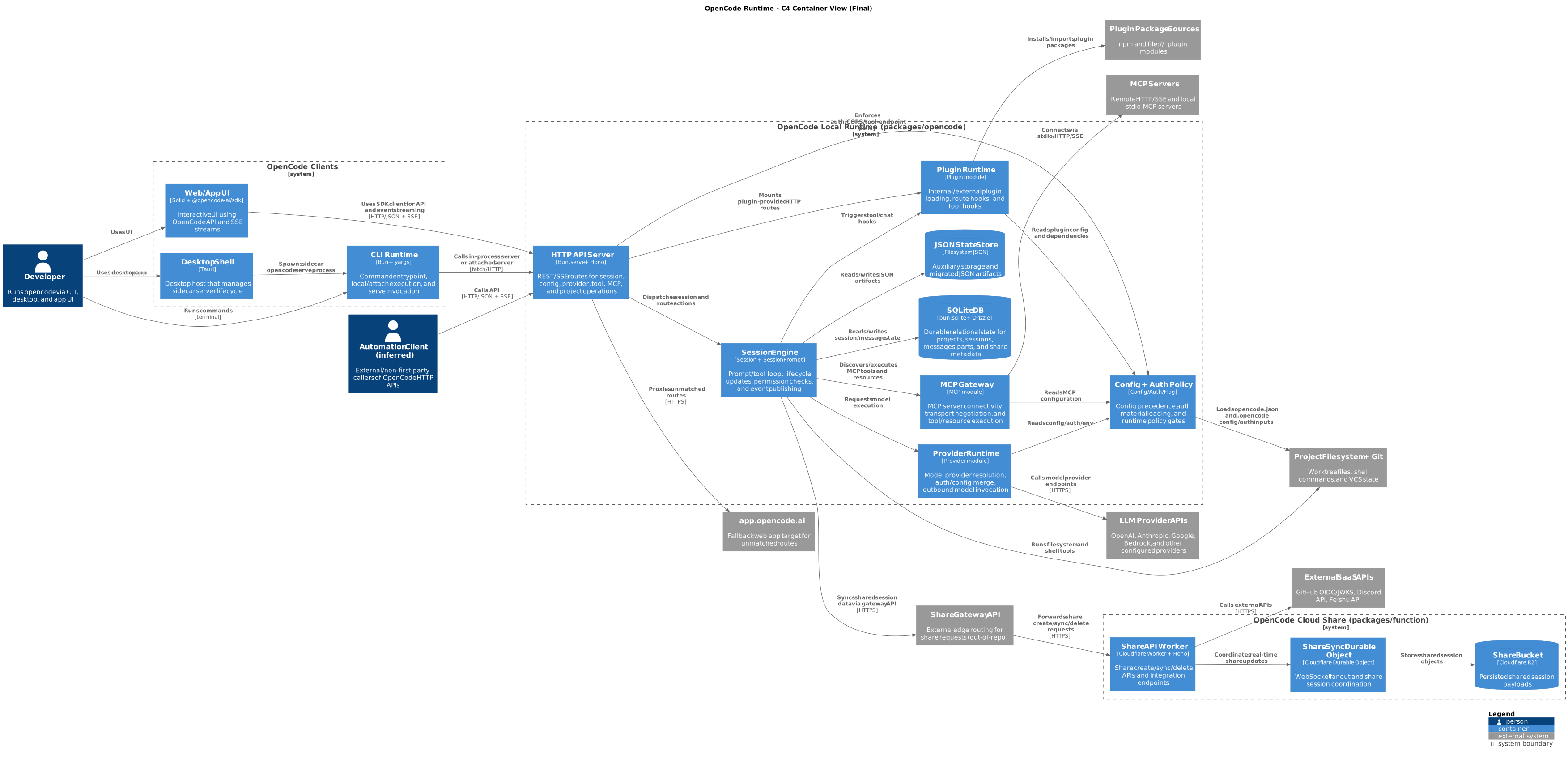
The progression from iteration 1 to 5 wasn't about the AI getting smarter. It was about the prompt getting more rigorous. Same model. Different methodology. Different results.
A workflow you can use tomorrow
Here's the step-by-step process, generalized beyond architecture diagrams:
Define scope. One sentence for what's in, one for what's out. Prevents the model from wandering.
Discover. Use instruction-first prompting to extract the raw material — boundaries, entry points, interfaces, dependencies, whatever's relevant to your task.
Trace. Pick 2-4 critical paths through the system and trace them end-to-end. These become your evidence backbone.
Draft twice. Require Draft A and Draft B with different strategies. Each draft includes a lossiness check for every merge/grouping decision.
Score. Apply a fixed rubric. Numeric scores, one-sentence justifications, explicit winner selection. No "both have their merits" waffling.
Self-critique. One pass. Fix obvious issues with density, clarity, and over-claiming.
Verify independently. Run a separate checker prompt. Classify claims as VERIFIED/PARTIAL/UNVERIFIED/INCORRECT.
Correct surgically. Present the correction plan. Get approval. Apply only approved changes. Don't expand scope.
Feed back. Turn checker findings into new generator requirements. The system gets better each cycle.
Ship. Run the checklist below. If everything passes, open the PR.
When things go wrong: a debugging guide
Most bad AI output fails in predictable ways. Here's how to diagnose and fix the common ones:
| What you're seeing | What's probably happening | What to change in your prompt |
|---|---|---|
| Output is valid but tells you nothing useful | Model optimized for safety over signal | Add rubric criteria for "explanatory power" and "boundary quality" |
| Everything got merged into 3-4 giant boxes | No cost accounting for merges | Add lossiness checks with explicit loss grading |
| Claims sound right but you can't verify them | No evidence requirement | Require file:line anchors for every major claim |
| Model always picks the simpler option | First-answer bias, no numeric scoring | Force Draft A/B with numeric rubric before selection |
| Your "checker" just agrees with the generator | Checker prompt isn't adversarial enough | Add "do not regenerate" + explicit classification levels |
| Small corrections turn into big rewrites | No scope guard on corrections | Add "offer before apply" + "do not expand scope" |
| Same mistakes show up every time you run it | No feedback loop | Fold checker findings into the generator prompt |
| Actors/entities appear from nowhere | No requirement to mark inferred claims | Require "inferred" labels when no evidence anchor exists |
| Cross-system edges assume things just work together | No contract verification | Add cross-runtime contract checks |
The most common failure — "valid but useless" — deserves extra attention. This happens when your prompt doesn't define what "useful" means. The model's default optimization is "correct and simple," which minimizes risk but also minimizes value. Your rubric defines "useful." If "useful" means "helps an engineer debug a 3am incident," put that in the rubric. The model will optimize for what you measure.
The checklist
Run through this before calling it done. If anything fails, go back and fix the prompt, not just the output.
- [ ] Scope and non-goals are stated explicitly
- [ ] Output follows the required structure (all sections present)
- [ ] Two drafts exist with different strategies
- [ ] Scoring rubric applied with numeric scores and justifications
- [ ] Lossiness check done for every merge/grouping
- [ ] Every major claim has at least one evidence anchor
- [ ] Inferred items are labeled as such, with rationale
- [ ] Independent checker report is attached
- [ ] Checker verdict is PASS or PASS_WITH_WARNINGS
- [ ] Corrections were proposed before being applied
- [ ] Only approved changes made it into the final version
- [ ] Cross-system contract checks are documented
- [ ] Remaining PARTIAL claims are acknowledged in caveats
This checklist isn't just for AI output, by the way. It's a reasonable standard for any analytical document, whether written by a human or a model. The difference is that a model can be prompted to hit every item, every time, without forgetting or rushing.
What surprised us
The lossiness check was the highest-leverage technique. We expected dual-draft scoring to be the star, and it's important — but the lossiness check is what makes the scoring work. Without it, the model might have scored the merged draft's boundary quality as 3 instead of 2. With it, the model had to confront the specific things the merge was hiding (failure domains, ownership, debugging paths) and couldn't look away. The 2 was inevitable, and the 13-vs-19 gap made the decision obvious.
The checker found real bugs, not just prompt artifacts. The endpoint contract mismatch between the local code's /api/share/* paths and the cloud worker's /share_* routes was a genuine architectural issue. An engineer debugging a failed share sync would need to know about the unmodeled gateway between them. We found this not by reading the code carefully — we found it because the checker went looking for proof and found a discrepancy.
Feeding findings back into the generator is the closest thing to compound interest in prompting. Each cycle makes the next cycle better. The cross-runtime contract check and the inferred-claim markers both started as checker findings and ended up as permanent generator requirements. The system learns.
What we'd do differently
Start with all the techniques from the beginning. We wasted two iterations learning what structured output and evidence anchors can't do alone. The protocol pass had great notes but still merged the Integration Gateway because there were no dual drafts or lossiness checks to challenge the merge. If we'd started with the full agentic prompt, we'd have reached the final result in two iterations instead of five.
Run the checker earlier. We only ran the checker after the final pass. Running it after the agentic pass would have caught the contract mismatch one iteration sooner.
Try a third draft strategy. Our two drafts used "conservative grouping" vs "explicit boundaries." A third — grouping by deployment unit (same process, separate process, different region) — might surface tradeoffs that neither draft captured.
Where to go next
These techniques aren't specific to architecture diagrams. They're general-purpose methods for getting rigorous, reviewable output from AI on any complex analytical task.
Threat models? Use dual drafts (one optimistic, one paranoid), lossiness checks on grouped threat categories, evidence anchors to actual code paths, and an independent checker that verifies each threat is real.
API surface documentation? Phase 1 discovers endpoints, Phase 2 traces request flows, Phase 3 drafts the docs, checker verifies claims against actual route registrations.
Migration plans? Draft A is incremental migration, Draft B is big-bang. Score them on risk, effort, and reversibility. Checker verifies that dependencies are correctly mapped.
The pattern is always the same: structure the task, require alternatives, score them, ground claims in evidence, verify independently, correct surgically, and feed back.
The meta-lesson
Every time you get disappointing output from AI, check your prompt first. Not the model. Not the temperature. Not the context window. The prompt.
Because for complex tasks, the prompt isn't just what you type into the box. It's the methodology you're giving the AI to follow. A rigorous methodology produces rigorous results. A one-liner produces a one-liner's worth of thinking.
Write your prompts like you'd write process documentation for a sharp but new team member: explicitly, completely, and with no assumptions about what they'll figure out on their own. That's the whole trick. There is no magic. There's just clarity.
This article is based on a real five-iteration architecture analysis of the OpenCode codebase. All prompt snippets, scoring tables, checker findings, and corrections are from actual analysis artifacts. The generator prompt, checker prompt, analysis notes, and correctness reports are all available in the companion repository.


Top comments (4)
The structured decomposition approach here matches what I've found works best too. Giving the model a specific analysis framework rather than a vague 'analyze this' is the difference between useful output and generic fluff.
One thing I'd add: for architecture analysis specifically, I've had good results giving the model a role with constraints — like 'you are a senior engineer who has to maintain this system for the next 5 years.' It shifts the output from theoretical to practical.
I couldn't read your post: the-agentic-sdlc-how-ai-teams-debate-code-and-secure-enterprise-infrastructure why you deleted?
It'll be back in a bit. Working on cleaning it up. ;)
good job i want for it