


TL;DR
ONTAP FPolicy pushes file operation notifications over a persistent TCP connection. We run a lightweight Python server on ECS Fargate that receives these events, normalizes them, and forwards them to SQS → Lambda → Datadog. In my validation environment, create events reached Datadog in about 6 seconds. Rename/delete behavior depends on FPolicy mode, protocol, and FSx for ONTAP behavior, so this post documents both the working path and the limitations observed.
Update — production hardening path
This article remains the Datadog-specific introduction to the FPolicy file activity pipeline. Since publishing it, the repository has been expanded with production-readiness guidance, governance and security review checklists, sample payloads, CI policy, cfn-guard rules, and shared Python helpers for observability and idempotent object processing.For production planning, start from the repository README:
- Choose Your Path
- Recommended first 30 minutes
- Production Readiness Levels
- PoC Success Criteria
- Security Review Checklist
- Governance and Compliance Guide
- CI Policy
The FPolicy pattern has also been expanded with Persistent Store guidance, idempotent object processing, EventBridge dispatch, and a hybrid polling/event-driven migration path. This Part 4 article focuses on the Datadog delivery path; the repository now documents the broader production baseline.
Why FPolicy Needs Fargate
In Part 3, we showed how EMS webhooks deliver ARP alerts via API Gateway → Lambda. That works because EMS uses standard HTTPS.
FPolicy is different. ONTAP's FPolicy subsystem uses a proprietary binary protocol over persistent TCP connections. ONTAP initiates the connection to the FPolicy server and maintains it with periodic KeepAlive messages. This means:
- ❌ Lambda — No persistent TCP connections, max 15-minute timeout
- ❌ API Gateway — HTTP/HTTPS only, no raw TCP
- ✅ ECS Fargate — Persistent TCP listener, private IP, auto-restart
Why I Did Not Use an NLB in This Validation
I tested an NLB-based approach, but it did not work reliably in my validation. The issue was not that NLB cannot forward binary TCP traffic; it can. The challenge was FPolicy's stateful session negotiation and ONTAP's expectation of configured FPolicy server IPs. Health checks and connection behavior introduced additional complexity. For this validation, the simplest reliable path was to let ONTAP connect directly to the Fargate task's private IP and automate external-engine IP updates on task restart.
The Fargate task runs a Python server that:
- Listens on TCP:9898
- Handles FPolicy protocol negotiation (version handshake)
- Receives KeepAlive messages (connection health)
- Parses file operation notifications
- Forwards structured events to SQS
Architecture
SMB/NFS Client
    │ file create/write/rename/delete
    ▼
FSx for ONTAP (FPolicy enabled)
    │ proprietary TCP protocol
    ▼
ECS Fargate (TCP:9898)
    │ parse → normalize → forward
    ▼
SQS Queue
    │ event source mapping
    ▼
Lambda (fpolicy_handler)
    │ format → ship
    ▼
Datadog Logs API v2 (source:fsxn-fpolicy)
Key design decisions:
- ONTAP connects TO Fargate — the Fargate task must be reachable on a private IP. Because that IP can change on task restart, the ONTAP external engine must be updated automatically or operationally.
- SQS decouples the TCP server from the shipping logic — if Datadog is slow, events buffer in SQS
- Lambda handles Datadog shipping — retry logic, batch formatting, API key management
- No NLB — ONTAP connects directly to the Fargate task's private IP
Production Boundary: Why FPolicy Needs More Than Lambda
The audit-log and EMS paths are natural fits for Lambda:
- Audit logs are file/object reads through the FSx for ONTAP S3 Access Point read path
- EMS events are HTTPS webhook payloads
FPolicy is different. ONTAP FPolicy uses a persistent TCP connection to an external FPolicy server. That makes it a poor fit for API Gateway + Lambda as the first receiver.
This is why the production-oriented path is:
ONTAP FPolicy
  → ECS Fargate TCP listener
  → SQS
  → Lambda shipper
  → Datadog

## Deployment

### Prerequisites

- FSx for ONTAP file system with a CIFS-enabled SVM
- VPC with private subnets (same as FSx for ONTAP)
- ECR repository with the FPolicy server image
- Private subnet egress for Fargate: either a NAT Gateway or VPC endpoints for ECR image pull, CloudWatch Logs, and SQS access

### Step 1: Deploy the Fargate Stack
bash
aws cloudformation deploy \
--template-file shared/templates/fpolicy-server-fargate.yaml \
--stack-name fsxn-fpolicy-server \
--parameter-overrides \
VpcId= \
SubnetIds= \
FsxnSvmSecurityGroupId= \
ContainerImage=.dkr.ecr..amazonaws.com/fsxn-fpolicy-server:latest \
--capabilities CAPABILITY_NAMED_IAM
This creates:
- ECS Cluster + Fargate Service (1 task)
- SQS Queue for FPolicy events
- Security Group (inbound TCP:9898 from FSx SG)
- CloudWatch Log Group

### Step 2: Deploy the Datadog Shipping Lambda

The template accepts the SQS queue ARN as a parameter and automatically creates the event source mapping:
bash
Get the SQS queue ARN from Step 1 outputs
SQS_ARN=$(aws cloudformation describe-stacks \
--stack-name fsxn-fpolicy-server \
--query "Stacks[0].Outputs[?OutputKey=='FPolicyQueueArn'].OutputValue" \
--output text)
aws cloudformation deploy \
--template-file integrations/datadog/template-ems-fpolicy.yaml \
--stack-name fsxn-datadog-ems-fpolicy \
--parameter-overrides \
DatadogApiKeySecretArn= \
DatadogSite=ap1.datadoghq.com \
FPolicySqsQueueArn=${SQS_ARN} \
--capabilities CAPABILITY_NAMED_IAM
This creates the Lambda function with an SQS event source mapping — no manual `create-event-source-mapping` needed.

### Step 3: Get the Fargate Task IP
bash
TASK_ARN=$(aws ecs list-tasks \
--cluster fsxn-fpolicy-server-cluster \
--service-name fsxn-fpolicy-server-service \
--query "taskArns[0]" --output text)
aws ecs describe-tasks \
--cluster fsxn-fpolicy-server-cluster \
--tasks $TASK_ARN \
--query "tasks[0].containers[0].networkInterfaces[0].privateIpv4Address" \
--output text
## ONTAP FPolicy Configuration

> **CLI note**: Some ONTAP versions show these commands under `vserver fpolicy ...`, while newer CLI contexts may allow shortened forms. Use the command form supported by your ONTAP version. The examples below use the form validated in my environment (FSx for ONTAP 9.17.1). See [NetApp CLI reference](https://docs.netapp.com/us-en/ontap-cli-9151/vserver-fpolicy-policy-external-engine-create.html) for the full command syntax.

FPolicy requires three components: an External Engine (where to send events), an Event (what to monitor), and a Policy (linking them together).

### Create the External Engine
shell
vserver fpolicy policy external-engine create -vserver \
-engine-name fpolicy_aws_engine \
-primary-servers \
-port 9898 \
-extern-engine-type asynchronous \
-ssl-option no-auth
> **Production note**: For production deployments, evaluate `server-auth` or `mutual-auth` instead of `no-auth`, and validate certificate handling between ONTAP and the FPolicy server. See [NetApp FPolicy external engine documentation](https://docs.netapp.com/us-en/ontap/nas-audit/create-fpolicy-external-engine-task.html).

### Create the FPolicy Event
shell
vserver fpolicy policy event create -vserver \
-event-name cifs_file_events \
-protocol cifs \
-file-operations create,write,rename,delete
> **Tip**: For write-heavy workloads, review the protocol-specific FPolicy filters supported by your ONTAP version and protocol. Where supported, use close/modify-oriented filters to reduce duplicate or noisy write events.

### Create and Enable the Policy
shell
vserver fpolicy policy create -vserver \
-policy-name fpolicy_aws \
-events cifs_file_events \
-engine fpolicy_aws_engine \
-is-mandatory false
vserver fpolicy enable -vserver \
-policy-name fpolicy_aws \
-sequence-number 1
This example uses an asynchronous, non-mandatory policy so client file operations are not blocked by FPolicy server processing or Datadog delivery. If the FPolicy server is unavailable, file operations continue unimpeded — but notifications may be buffered or lost depending on your ONTAP version and configuration.

### Verify Connection
shell
vserver fpolicy show-engine -vserver -engine-name fpolicy_aws_engine
You should see `connected` status. In the ECS logs, KeepAlive messages confirm the connection:
console
[INFO] fpolicy-server: [+] Connection from ('10.0.x.x', 44107)
[INFO] fpolicy-server: [Handshake] Policy=fpolicy_aws | Session=... | VsUUID=...
[INFO] fpolicy-server: [Send] NEGO_RESP | Version=1.2 | Policy=fpolicy_aws
[INFO] fpolicy-server: [KeepAlive] Received — connection healthy
## E2E Validation Results
File operations on the SMB share produce events that flow through the entire pipeline:
| Operation | ECS Log | SQS | Lambda | Datadog | Latency |
|-----------|---------|-----|--------|---------|---------|
| create `blog_demo_create.txt` | ✅ | ✅ | ✅ shipped:1 | ✅ | ~6 seconds |
| create `blog_demo_write.txt` | ✅ | ✅ | ✅ shipped:1 | ✅ | ~6 seconds |
| create `confidential_report_2026.xlsx` | ✅ | ✅ | ✅ shipped:1 | ✅ | ~6 seconds |
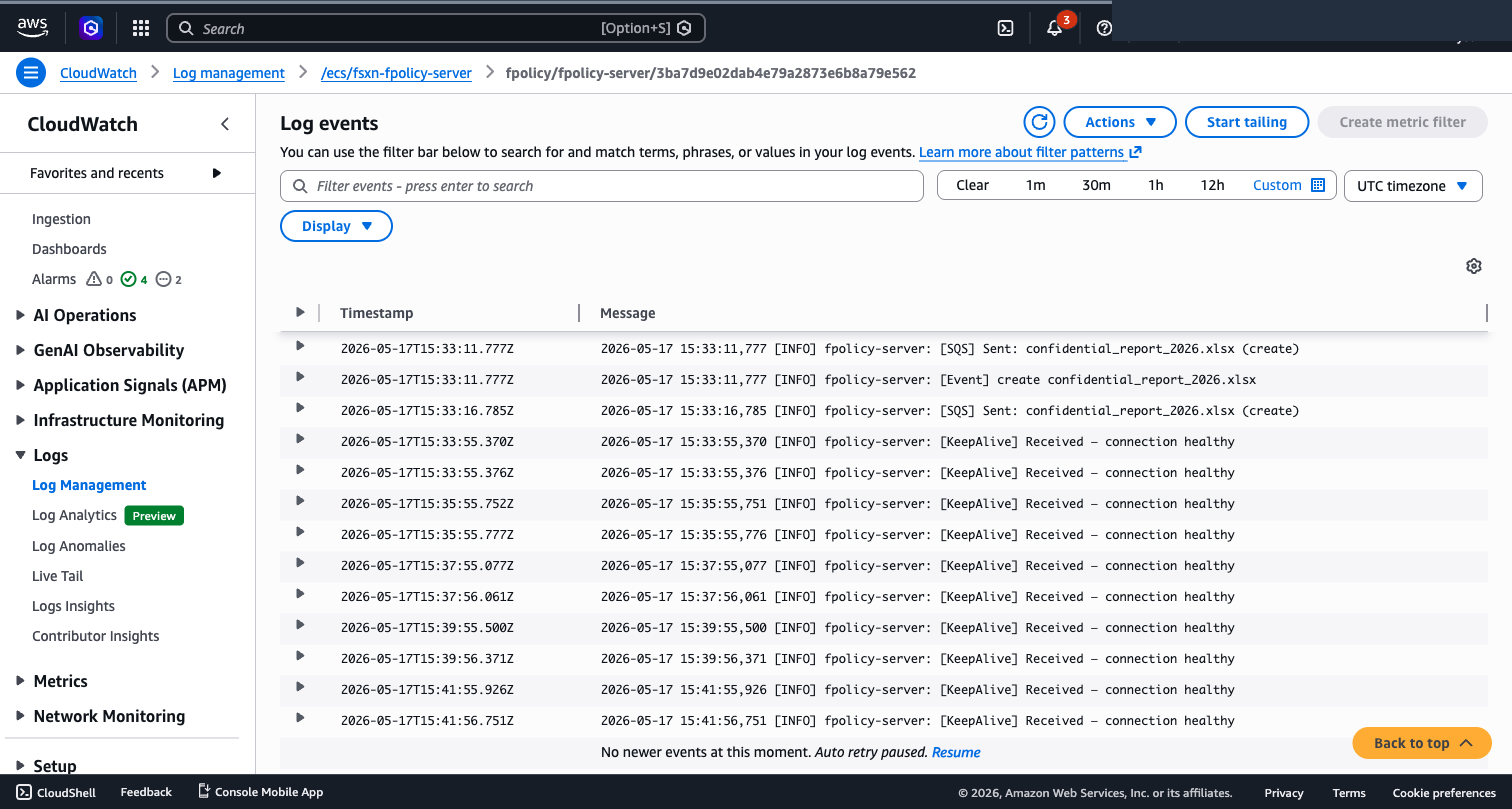
### ECS Fargate Logs — Connection Lifecycle
The FPolicy server logs show the complete lifecycle: server start → ONTAP connection → protocol handshake → KeepAlive → file events → SQS delivery.
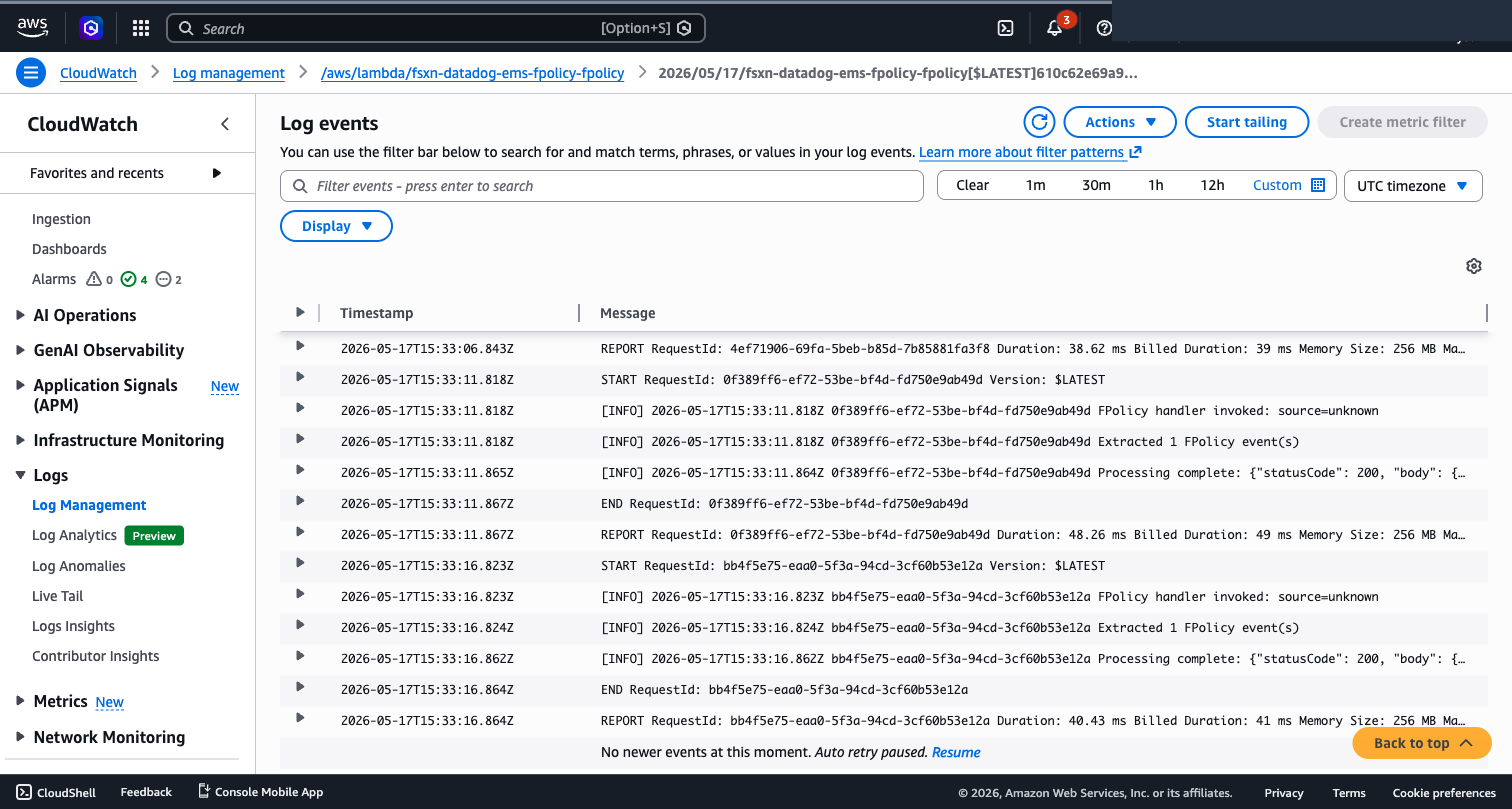
### Lambda CloudWatch Logs — Event Processing
Each SQS message triggers a Lambda invocation. Processing time is typically 30-50ms per event.
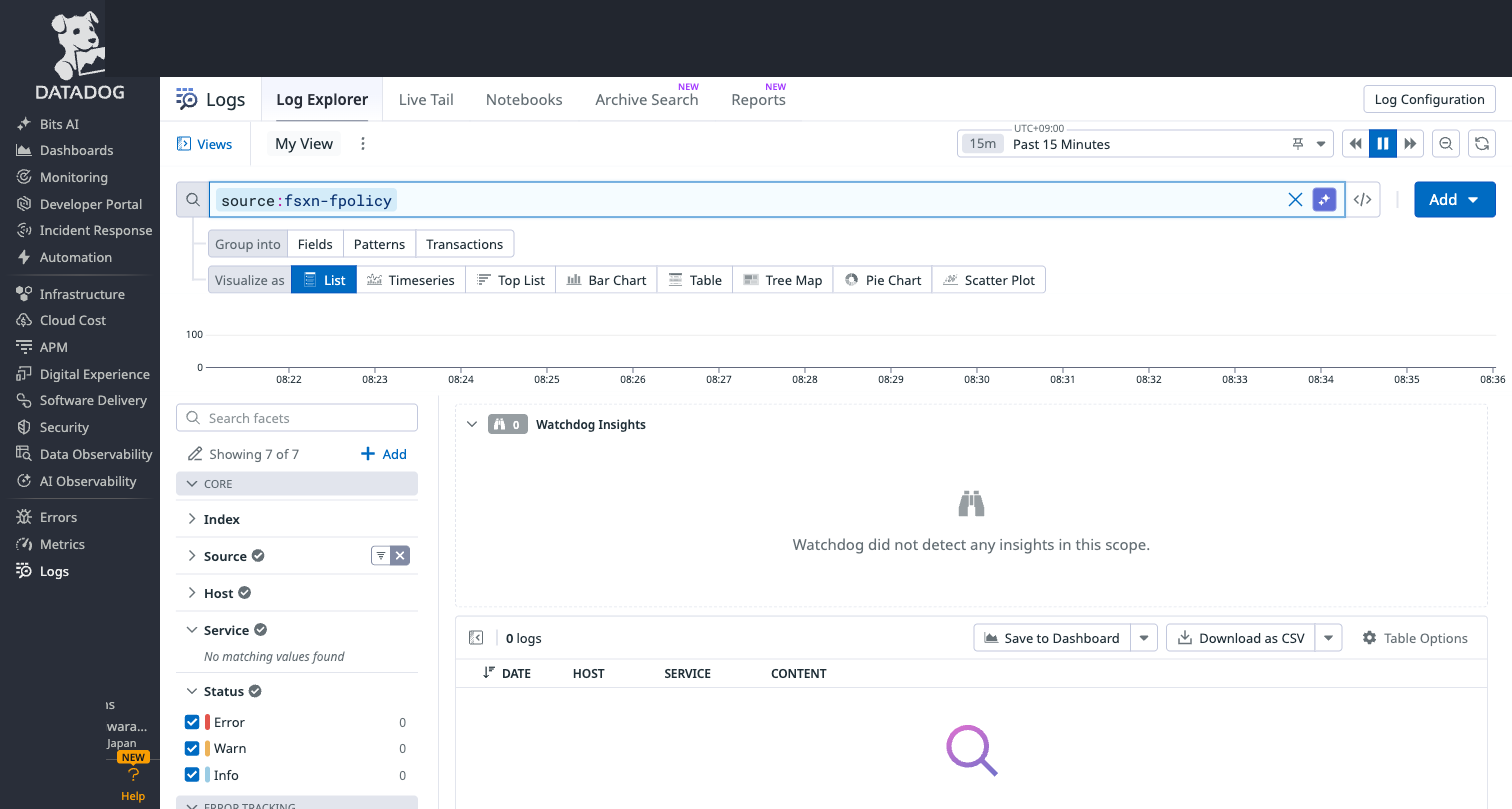
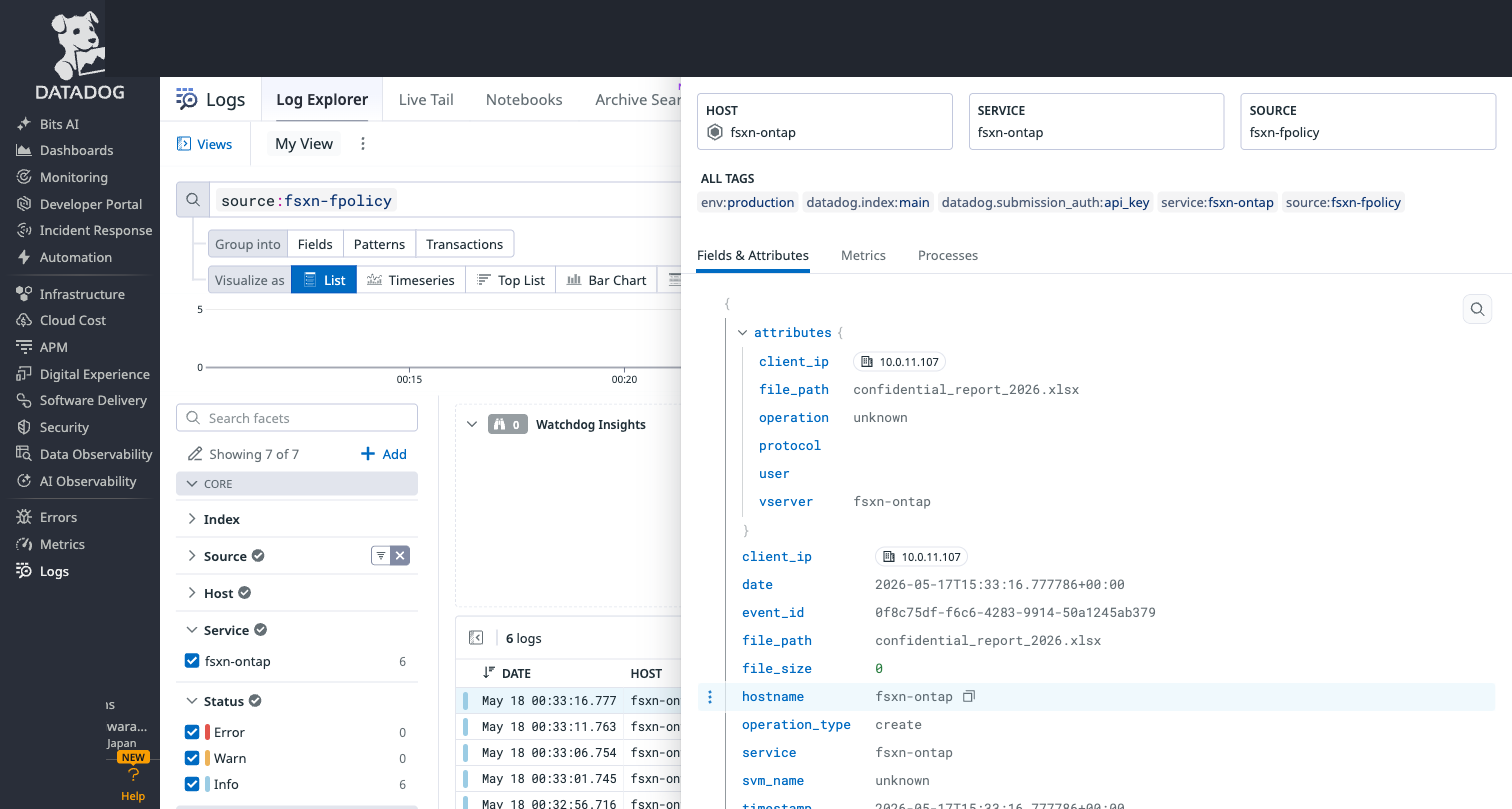
### Datadog Log Explorer
Query: `source:fsxn-fpolicy`
Each event contains structured attributes:
- `operation_type`: The file operation (create, write, rename, delete)
- `file_path`: The file that was operated on
- `client_ip`: The client that performed the operation
- `volume_name`: The ONTAP volume
- `svm`: The ONTAP SVM name (may show "unknown" if not resolved from handshake context)
- `timestamp`: When the operation occurred
## Correlating FPolicy with ARP
The real power emerges when you combine FPolicy file activity with ARP ransomware detection from Part 3:
plaintext
source:(fsxn-fpolicy OR fsxn-ems) @attributes.svm:svm-prod-01
This correlation query shows:
1. **ARP alert** (from EMS): "Ransomware detected on volume X"
2. **File operations** (from FPolicy): Which user, from which IP, created/renamed which files

Together they answer the critical incident response questions: *What happened, who did it, and from where?*

### Security Use Case: Detecting Suspicious File Creation Bursts

With FPolicy create events in Datadog, you can create a Monitor that fires when a single client creates more than 50 files in 5 minutes — a potential indicator of ransomware encryption or unauthorized bulk operations:

**Datadog Monitor query:**
plaintext
logs("source:fsxn-fpolicy @attributes.operation_type:create").rollup("count").by("@attributes.client_ip").last("5m") > 50
**Alert message:**
plaintext
🚨 Suspicious file creation burst detected on FSx for ONTAP
Client IP: {{@attributes.client_ip}}
Volume: {{@attributes.volume_name}}
Count: {{value}} file creations in 5 minutes
Investigate immediately — check if this is authorized batch processing or potential ransomware activity.
> **Note on delete monitoring**: If your FPolicy configuration and ONTAP version reliably deliver delete events (e.g., synchronous mode or a future ONTAP release), you can extend this pattern to bulk deletion detection. In my async-mode validation, delete notifications were not reliably delivered — I recommend using audit logs from [Part 2](https://dev.to/aws-builders/shipping-fsx-for-ontap-logs-to-datadog-the-serverless-way-n9c) for delete-event completeness.

This is difficult to achieve with traditional audit log polling, which depends on rotation and scheduler intervals. FPolicy's event-driven delivery makes sub-minute detection possible for the operations it reliably captures.

## Operational Considerations

### Fargate Task IP Changes

When a Fargate task restarts (deployment, crash, scaling), it gets a new private IP. ONTAP's External Engine must be updated with the new IP. Options:

1. **Manual update**: `vserver fpolicy policy external-engine modify -primary-servers <new-ip>`
2. **Automated**: Lambda triggered by ECS task state change → ONTAP REST API update

The repository includes a helper script (`shared/scripts/fpolicy-update-engine-ip.sh --auto`) that detects the current task IP and updates the ONTAP engine. For full automation, wire an EventBridge rule on ECS task state changes to an update Lambda — this is not included in the base stack but is straightforward to add. Automated updates require network reachability to the ONTAP management endpoint and credentials (stored in Secrets Manager) with permission to modify the FPolicy external engine.

### Restart Resilience — Validated

I tested the full restart cycle to confirm the pipeline recovers gracefully:

| Step | Result | Time |
|------|--------|------|
| Stop Fargate (scale to 0) | Task stopped | ~30s |
| Restart Fargate (scale to 1) | New task, new IP | ~45s |
| Update ONTAP Engine IP | Reconnection | ~20s |
| File operation after restart | Event delivered to Datadog | ~6s |
| **Total recovery time** | | **~2 minutes** |

The Lambda's retry logic also proved itself: on the first request after reconnection, a transient `RemoteDisconnected` error occurred. The exponential backoff retry succeeded on the second attempt — exactly the behavior we designed for.
console
[WARNING] HTTP error shipping to Datadog (attempt 1/3): RemoteDisconnected
[INFO] Processing complete: {"statusCode": 200, "body": {"shipped": 1}}
### Cost Profile

| Component | Monthly Cost (estimate) |
|-----------|------------------------|
| Fargate (0.25 vCPU, 0.5 GB) | ~$10 |
| SQS (low volume) | < $1 |
| Lambda (event-driven) | < $1 |
| CloudWatch Logs | ~$2 |
| **Total** | **~$14/month** |

Compare this to an always-on EC2-based collector, plus OS patching, agent management, and HA considerations. Exact EC2 costs vary by region and instance type.

> This is an AWS-side estimate and excludes Datadog ingest/retention costs, NAT Gateway or VPC endpoint charges, ECR storage, and high-volume CloudWatch Logs.

### Scaling

A single Fargate task is sufficient for the low-volume validation scenarios in this post. The architecture can scale by tuning Fargate CPU/memory, SQS buffering, and Lambda concurrency, but you should benchmark your own workload before assuming a specific events/sec capacity.

### Monitoring

Key CloudWatch metrics to watch:
- `ECS/CPUUtilization` — Fargate task health
- `SQS/ApproximateNumberOfMessagesVisible` — Queue depth (should stay near 0)
- `Lambda/Errors` — Shipping failures
- `Lambda/Duration` — Processing time per batch

## The FPolicy Server

The FPolicy server (`shared/fpolicy-server/fpolicy_server.py`) implements:

- **Protocol negotiation**: Responds to ONTAP's version handshake
- **KeepAlive handling**: Acknowledges connection health checks
- **Event parsing**: Extracts file path, operation, user, client IP from binary frames
- **SQS forwarding**: Sends normalized JSON events to the queue
- **Write coalescing**: Configurable delay to batch rapid write events (default: 5 seconds)

The server runs in `realtime` mode — events are forwarded as they arrive, with optional write-complete delay to avoid duplicate notifications for multi-write operations.

## Limitations and Future Work

### Rename/Delete Events Not Delivered in Async Mode

In my E2E testing, ONTAP did not deliver rename or delete notifications to the FPolicy server in asynchronous mode — even though these operations are configured in the FPolicy event definition. Only create events were reliably delivered. This appears to be a limitation of FSx for ONTAP's FPolicy implementation in async mode for certain operation types.

**Workaround options:**
- Use synchronous mode (adds latency to file operations — not recommended for production)
- Combine FPolicy (event-driven create) with audit log polling (catches rename/delete in EVTX)
- Accept create-only monitoring for event-driven alerting, use audit logs for forensic completeness

### NFS Protocol Support

| Protocol | FPolicy Support | Notes |
|----------|----------------|-------|
| SMB/CIFS | ✅ Verified | Primary validation protocol |
| NFSv3 | ✅ Supported | Requires explicit `vers=3` mount option |
| NFSv4.0 | ✅ Supported | Requires explicit `vers=4.0` |
| NFSv4.1 | ✅ Supported | Requires ONTAP 9.15.1+, explicit `vers=4.1` |
| NFSv4.2 | ❌ Not supported | ONTAP FPolicy does not monitor NFSv4.2 operations |

For protocol support details, verify your ONTAP version. NetApp [documents](https://kb.netapp.com/onprem/ontap/da/NAS/Does_ONTAP_support_FPolicy_for_NFS_4.2) that FPolicy does not currently support NFSv4.2; supported NFS protocols include NFSv3, NFSv4.0, and NFSv4.1 (ONTAP 9.15.1+).

**Critical gotcha:** `mount -o vers=4` on modern Linux negotiates to NFSv4.2, which ONTAP FPolicy does **not** support. Always use explicit version: `mount -o vers=4.1` or `vers=3`.

**NFS + FPolicy latency:** NFSv3 lacks close semantics, so the FPolicy server cannot know when a write is complete. The server uses a configurable `WRITE_COMPLETE_DELAY_SEC` (default: 5s) to wait before forwarding the event. This adds latency but prevents premature processing of incomplete files.

**NFS write hang (observed):** In some configurations, NFS write operations may hang when FPolicy is enabled — even with `is-mandatory=false`. This is a [known ONTAP behavior](https://kb.netapp.com/onprem/ontap/da/NAS/NFS_hung_slowness_issue_when_dealing_with_long_path_names_with_FPolicy_enabled) related to FPolicy notification processing. If you experience this, verify your ONTAP version and consider limiting FPolicy scope to specific volumes.

### User Identity

In the current implementation, the `user` field may be empty for some operations depending on ONTAP's FPolicy notification content. The FPolicy binary frame includes user identity in extended attributes that require additional parsing logic. Future versions will extract this from the NOTI_REQ body.

### Event Durability During Restarts

In my validation, events generated while the Fargate server was disconnected were not observed downstream in Datadog after reconnection. Treat FPolicy delivery during server outages as something you must validate in your own environment.

ONTAP [documentation](https://docs.netapp.com/us-en/ontap/nas-audit/synchronous-asynchronous-notifications-concept.html) describes buffering behavior for asynchronous notifications — notifications generated during a network outage are stored on the storage node and can be fetched when the server comes back online. Beginning with ONTAP 9.14.1, [FPolicy persistent store](https://docs.netapp.com/us-en/ontap/nas-audit/persistent-stores.html) support is available for asynchronous non-mandatory policies. If you cannot tolerate event loss during FPolicy server restarts, evaluate persistent store and validate the behavior on your FSx for ONTAP version.

## Try It Yourself
bash
Clone the repository
git clone https://github.com/Yoshiki0705/fsxn-observability-integrations.git
Deploy prerequisites (if not already done)
aws cloudformation deploy \
--template-file shared/templates/fpolicy-server-fargate.yaml \
--stack-name fsxn-fpolicy-server \
--parameter-overrides \
VpcId= \
SubnetIds= \
FsxnSvmSecurityGroupId= \
ContainerImage= \
--capabilities CAPABILITY_NAMED_IAM
Configure ONTAP FPolicy (see ONTAP section above)
Create a file on the SMB share
Check Datadog: source:fsxn-fpolicy
## Where FPolicy Fits in ONTAP Telemetry

This series covers three ONTAP telemetry sources. Each serves a different purpose:

| Use Case | Best Source | Latency | Coverage |
|----------|-------------|---------|----------|
| Compliance audit trail | Audit logs ([Part 2](https://dev.to/aws-builders/shipping-fsx-for-ontap-logs-to-datadog-the-serverless-way-n9c)) | Minutes (scheduler interval) | Complete historical record |
| Ransomware detection | ARP via EMS ([Part 3](https://dev.to/aws-builders/event-driven-ransomware-detection-with-ontap-arp-datadog-4cda)) | ~30 seconds (webhook) | ML-based pattern detection |
| Event-driven file activity signal | FPolicy (this post) | ~6 seconds (TCP) | Create events validated; other operations depend on mode/version |
| Forensic investigation | Audit logs + FPolicy correlation | Combined | Timeline reconstruction |

**FPolicy is not a replacement for audit logs.** It provides an event-driven signal for detection and alerting. Audit logs provide the authoritative, complete historical record for compliance and forensics. Use them together.

## Key Takeaways

1. **Use Fargate for FPolicy TCP listener** — Lambda cannot maintain persistent TCP connections. Fargate provides the long-running listener without OS management.
2. **Use SQS to decouple ingestion from shipping** — If Datadog is slow or Lambda is throttled, events buffer safely in SQS.
3. **Validate operation coverage in your environment** — Async mode reliably delivered create events in my testing. Rename/delete behavior varies by ONTAP version and mode.
4. **Use audit logs for forensic completeness** — FPolicy provides event-driven signal for detection; audit logs (Part 2) provide the complete historical record.
5. **Treat FPolicy as event-driven alerting, not full audit replacement** — The two are complementary, not interchangeable.

## Production Considerations Beyond This Validation

This post validates the end-to-end path. For production deployments, the following topics warrant additional design work:

| Topic | Key Questions |
|-------|--------------|
| **HA / Multi-AZ** | ONTAP external engine supports `primary-servers` and `secondary-servers`. How to run multiple Fargate tasks across AZs? |
| **Scope Design** | Which volumes, operations, and protocols to monitor? How to avoid noisy workloads? |
| **Security Hardening** | TLS/mTLS for FPolicy, ECR image scanning, VPC Flow Logs, task role least-privilege |
| **Cost Model** | FPolicy generates events per file operation — Datadog ingest can become the dominant cost at scale |
| **Operations Runbook** | Task restart, engine disconnected, SQS backlog, Datadog missing events, NFS hang |
| **Stable Endpoint** | Auto-update Lambda for engine IP, or primary/secondary server design for zero-downtime restarts |

These topics are documented in the repository:

- **[Production Architecture Patterns](https://github.com/Yoshiki0705/fsxn-observability-integrations/blob/main/docs/en/fpolicy-production-architecture-patterns.md)** — Single task, primary/secondary, auto-update, multi-AZ patterns with failure mode matrix
- **[Operational Guide](https://github.com/Yoshiki0705/fsxn-observability-integrations/blob/main/docs/en/fpolicy-operational-guide.md)** — 4-layer health model, runbooks, IP reconciliation, synthetic health check
- **[PoC Checklist](https://github.com/Yoshiki0705/fsxn-observability-integrations/blob/main/docs/en/fpolicy-poc-checklist.md)** — Preconditions, scope, validation steps, success criteria, go/no-go

Contributions and questions are welcome.

## Series Navigation

- **Part 1**: [Why Your FSx for ONTAP Audit Logs Deserve Better Than EC2](https://dev.to/aws-builders/why-your-fsx-for-ontap-audit-logs-deserve-better-than-ec2-kod)
- **Part 2**: [Shipping FSx for ONTAP Logs to Datadog — The Serverless Way](https://dev.to/aws-builders/shipping-fsx-for-ontap-logs-to-datadog-the-serverless-way-n9c)
- **Part 3**: [Event-Driven Ransomware Detection with ONTAP ARP + Datadog](https://dev.to/aws-builders/event-driven-ransomware-detection-with-ontap-arp-datadog-4cda)
- **Part 4**: FPolicy File Activity Pipeline — ONTAP to Datadog via ECS Fargate (this post)
- **Part 5**: [Escape Vendor Lock-in: Multi-Backend Log Delivery with OTel Collector for FSx for ONTAP.](https://dev.to/aws-builders/escape-vendor-lock-in-multi-backend-log-delivery-with-otel-collector-for-fsx-for-ontap-2inb)
- **Part 6**: [Direct-to-Grafana: Shipping FSx for ONTAP Logs to Grafana Cloud Loki via OTLP Gateway](https://dev.to/aws-builders/direct-to-grafana-shipping-fsx-for-ontap-logs-to-grafana-cloud-loki-via-otlp-gateway-33hk)
- **Part 7**: [Ship FSx for ONTAP Audit Logs to New Relic via Serverless Lambda Pipeline](https://dev.to/aws-builders/ship-fsx-for-ontap-audit-logs-to-new-relic-via-serverless-lambda-pipeline-3g87)
- **Part 8**: [EC2 to Serverless: Modernizing FSx for ONTAP Splunk Integration](https://dev.to/aws-builders/ec2-to-serverless-modernizing-fsx-for-ontap-splunk-integration-e8l)
- **Part 9**: [Data Sovereignty: FSx for ONTAP Logs in Your VPC with Elastic](https://dev.to/aws-builders/data-sovereignty-fsx-for-ontap-logs-in-your-vpc-with-elastic-1mog)
- **Part 10**: [High-Cardinality File Access Analysis with Honeycomb + OTel](https://dev.to/aws-builders/high-cardinality-file-access-analysis-with-honeycomb-otel-1962)
- **Part 11**: [AI-Powered Root Cause: Correlating File Access with APM via Dynatrace](https://dev.to/aws-builders/ai-powered-root-cause-correlating-file-access-with-apm-via-dynatrace-4ffl)
- **Part 12**: [FSx for ONTAP Audit Logs with Data Residency in your region with Sumo Logic](https://dev.to/aws-builders/fsx-for-ontap-audit-logs-with-data-residency-in-your-region-46e6)
- **Part 13**: [9 Vendors, One Architecture](https://dev.to/aws-builders/9-services-one-architecture-what-we-learned-shipping-fsx-for-ontap-logs-to-every-major-19ig)
---

*Questions about FPolicy or the Fargate architecture? Drop a comment below.*

- **Part 1**: [Why Your FSx for ONTAP Audit Logs Deserve Better Than EC2](https://dev.to/aws-builders/why-your-fsx-for-ontap-audit-logs-deserve-better-than-ec2-kod)
- **Part 2**: [Shipping FSx for ONTAP Logs to Datadog — The Serverless Way](https://dev.to/aws-builders/shipping-fsx-for-ontap-logs-to-datadog-the-serverless-way-n9c)
- **Part 3**: [Event-Driven Ransomware Detection with ONTAP ARP + Datadog](https://dev.to/aws-builders/event-driven-ransomware-detection-with-ontap-arp-datadog-4cda)
- **Part 4**: [FPolicy File Activity Pipeline — ONTAP to Datadog via ECS Fargate](https://dev.to/aws-builders/fpolicy-file-activity-pipeline-ontap-to-datadog-via-ecs-fargate-2ing)
- **Part 5**: Escape Vendor Lock-in: Multi-Backend Log Delivery with OTel Collector for FSx for ONTAP. (this post)
- **Part 6**: [Direct-to-Grafana: Shipping FSx for ONTAP Logs to Grafana Cloud Loki via OTLP Gateway](https://dev.to/aws-builders/direct-to-grafana-shipping-fsx-for-ontap-logs-to-grafana-cloud-loki-via-otlp-gateway-33hk)
- **Part 7**: [Ship FSx for ONTAP Audit Logs to New Relic via Serverless Lambda Pipeline](https://dev.to/aws-builders/ship-fsx-for-ontap-audit-logs-to-new-relic-via-serverless-lambda-pipeline-3g87)
- **Part 8**: [EC2 to Serverless: Modernizing FSx for ONTAP Splunk Integration](https://dev.to/aws-builders/ec2-to-serverless-modernizing-fsx-for-ontap-splunk-integration-e8l)
- **Part 9**: [Data Sovereignty: FSx for ONTAP Logs in Your VPC with Elastic](https://dev.to/aws-builders/data-sovereignty-fsx-for-ontap-logs-in-your-vpc-with-elastic-1mog)
- **Part 10**: [High-Cardinality File Access Analysis with Honeycomb + OTel](https://dev.to/aws-builders/high-cardinality-file-access-analysis-with-honeycomb-otel-1962)
- **Part 11**: [AI-Powered Root Cause: Correlating File Access with APM via Dynatrace](https://dev.to/aws-builders/ai-powered-root-cause-correlating-file-access-with-apm-via-dynatrace-4ffl)
- **Part 12**: [FSx for ONTAP Audit Logs with Data Residency in your region with Sumo Logic](https://dev.to/aws-builders/fsx-for-ontap-audit-logs-with-data-residency-in-your-region-46e6)
- **Part 13**: [9 Vendors, One Architecture](https://dev.to/aws-builders/9-services-one-architecture-what-we-learned-shipping-fsx-for-ontap-logs-to-every-major-19ig)

**GitHub**: [github.com/Yoshiki0705/fsxn-observability-integrations](https://github.com/Yoshiki0705/fsxn-observability-integrations)


Top comments (0)