


👋 Hey there, tech enthusiasts!
I'm Sarvar, a Cloud Architect with a passion for transforming complex technological challenges into elegant solutions. With extensive experience spanning Cloud Operations (AWS & Azure), Data Operations, Analytics, DevOps, and Generative AI, I've had the privilege of architecting solutions for global enterprises that drive real business impact. Through this article series, I'm excited to share practical insights, best practices, and hands-on experiences from my journey in the tech world. Whether you're a seasoned professional or just starting out, I aim to break down complex concepts into digestible pieces that you can apply in your projects.
"Servers are like pets you feed them, nurse them, and cry when they die. Lambda functions are like cattle spin them up, use them, forget them."
🎯 Welcome Back!
Remember in Article 7 when you deployed web servers with a load balancer? You built EC2 instances running 24/7 behind an ALB. That's great for high-traffic web apps. But what about workloads that only run occasionally?
Here's the reality: You've been paying for EC2 instances 24/7 even when nobody's using them. That internal tool that processes files once a day? Running on a t3.medium at $30/month for 5 minutes of actual work.
Lambda changes the equation:
- Pay only when code runs
- No servers to patch or maintain
- Scales from zero to thousands automatically
- IAM roles handle permissions (you know this now!)
By the end of this article, you'll:
- ✅ Deploy Lambda functions with Terraform
- ✅ Create API Gateway endpoints for HTTP access
- ✅ Trigger Lambda from S3 file uploads
- ✅ Configure IAM roles with least privilege
- ✅ Set up CloudWatch logging automatically
- ✅ Test everything with real invocations
Time Required: 45 minutes (20 min read + 25 min practice)
Cost: $0 (Lambda free tier)
Difficulty: Intermediate
Let's go serverless! 🚀
💔 The Problem: Paying for Idle Servers
The Wake-Up Call
Monthly AWS bill review. Something doesn't add up:
EC2 Instances:
- file-processor (t3.medium)  → $30.37/month
  Actual compute time: 12 minutes/day
  Utilization: 0.8%

- api-backend (t3.small)      → $15.18/month
  Actual requests: 200/day
  Utilization: 2.1%

- cron-worker (t2.micro)      → $8.47/month
  Runs one script at midnight
  Utilization: 0.03%
Total: $54/month for services used less than 1% of the time.
With Lambda, that same workload costs under $1/month. Not a typo. Under one dollar.
When EC2 Doesn't Make Sense:
❌ Event-driven processing: File uploaded → process it → done
❌ Low-traffic APIs: Dozen requests per hour
❌ Scheduled tasks: Run once a day or hour
❌ Webhook handlers: Wait for external events
❌ Data transformations: Input → transform → output
Sound familiar? Let's move these to Lambda.
🌟 What is AWS Lambda?
Simple Definition
Lambda = Your code runs only when triggered. No servers. No patching. No scaling configuration.
Think of it like this:
- EC2 is renting an apartment you pay monthly whether you're home or not
- Lambda is a hotel room you pay only for the nights you stay
How Lambda Works:
Trigger (API call, S3 upload, schedule)
    ↓
AWS spins up your function (milliseconds)
    ↓
Your code runs
    ↓
Result returned
    ↓
Function shuts down (you stop paying)
Lambda + Terraform = Perfect Match
Why Terraform for Lambda?
- Version control your function configuration
- Consistent deployments across environments
- IAM roles defined alongside functions (Article 9 skills!)
- Connected resources (API Gateway, S3, CloudWatch) in one config
📋 Prerequisites
Before starting:
- ✅ Terraform installed (Article 2)
- ✅ AWS credentials configured
- ✅ Understand VPCs and Security Groups (Article 6)
- ✅ Basic Python knowledge (for Lambda code)
🏗️ What We're Building
┌─────────────────────────────────────────────────────┐
│                    Our Architecture                 │
│                                                     │
│  ┌──────────┐       ┌──────────────┐                │
│  │   User   │──────▶│ API Gateway  │                │
│  └──────────┘       └──────┬───────┘                │
│                            │                        │
│                            ▼                        │
│                     ┌──────────────┐                │
│                     │ Hello Lambda │──▶ CloudWatch │
│                     └──────────────┘                │
│                                                     │
│  ┌──────────┐       ┌──────────────┐                │
│  │ S3 Upload│──────▶│S3 Processor  │──▶ CloudWatch │
│  │  (.txt)  │       │   Lambda     │                │
│  └──────────┘       └──────────────┘                │
└─────────────────────────────────────────────────────┘
Two Lambda functions:
- Hello API - HTTP endpoint via API Gateway, returns JSON
-
S3 Processor - Triggered when
.txtfiles are uploaded to S3
Source Code
The complete source code and Terraform configuration used in this article can be found on GitHub:
 simplynadaf
/
terraform-by-sarvar
simplynadaf
/
terraform-by-sarvar
Terraform Series
🚀 Terraform By Sarvar
Complete Terraform tutorial series from basics to advanced concepts




📚 Series Overview
This repository contains ONLY Terraform code examples for the Terraform By Sarvar tutorial series.
⚠️ IMPORTANT: This repo contains only.tffiles and infrastructure code. Articles are published on dev.to, not stored here.
📖 Read the series on dev.to: https://dev.to/sarvar_04/series/36963
🎯 What You'll Learn
- ✅ Infrastructure as Code (IaC) fundamentals
- ✅ Terraform basics to advanced concepts
- ✅ AWS resource provisioning
- ✅ Best practices and real-world patterns
- ✅ Production-ready configurations
📊 Series Progress


📖 Article Series
📘 Foundation (Articles 1-5) ✅ Complete
- Introduction to Terraform & IaC - ✅ Published
- Installation & Setup - ✅ Published
- Your First AWS Resource - ✅ Published
- Understanding Terraform State - ✅ Published
- Variables and Outputs - ✅ Published
📗 Real Infrastructure (Articles 6-10)
Getting Started
Follow these steps to run the project on your local machine:
- Clone the repository:
git clone https://github.com/simplynadaf/terraform-by-sarvar.git
- Navigate to the project directory:
cd terraform-by-sarvar/articles/08-lambda-serverless
🔧 Step 1: Write the Lambda Functions
Before Terraform, we need the actual code. Create a lambda/ directory:
mkdir -p lambda
lambda/hello.py - Simple API handler:
import json

def lambda_handler(event, context):
    """
    Simple Hello World Lambda function
    """
    print(f"Event received: {json.dumps(event)}")

    # Get name from query parameters or use default
    name = "World"
    if event.get('queryStringParameters'):
        name = event['queryStringParameters'].get('name', 'World')

    response_body = {
        'message': f'Hello, {name}!',
        'timestamp': context.aws_request_id,
        'function_name': context.function_name,
        'memory_limit': context.memory_limit_in_mb
    }

    return {
        'statusCode': 200,
        'headers': {
            'Content-Type': 'application/json',
            'Access-Control-Allow-Origin': '*'
        },
        'body': json.dumps(response_body)
    }
lambda/s3_processor.py - Processes uploaded files:
import json
import urllib.parse

def lambda_handler(event, context):
    """
    Process files uploaded to S3
    """
    print(f"Event received: {json.dumps(event)}")

    for record in event['Records']:
        bucket = record['s3']['bucket']['name']
        key = urllib.parse.unquote_plus(record['s3']['object']['key'])
        size = record['s3']['object']['size']
        event_name = record['eventName']

        print(f"Processing file: {key}")
        print(f"Bucket: {bucket}")
        print(f"Size: {size} bytes")
        print(f"Event: {event_name}")

        result = {
            'status': 'processed',
            'file': key,
            'bucket': bucket,
            'size': size
        }

        print(f"Result: {json.dumps(result)}")

    return {
        'statusCode': 200,
        'body': json.dumps('File processed successfully')
    }
Key points:
-
lambda_handleris the entry point AWS calls -
eventcontains trigger data (HTTP request, S3 event, etc.) -
contexthas runtime info (request ID, function name, memory) - Always return a proper response with statusCode
🔧 Step 2: Terraform Configuration
main.tf - Here's the complete infrastructure:
terraform {
  required_version = ">= 1.0"
  required_providers {
    aws = {
      source  = "hashicorp/aws"
      version = "~> 5.0"
    }
    archive = {
      source  = "hashicorp/archive"
      version = "~> 2.0"
    }
  }
}

provider "aws" {
  region = var.aws_region
}
Notice the archive provider Terraform uses this to zip your Python files into deployment packages. No manual zipping.
Package the Lambda code:
data "archive_file" "hello_lambda" {
  type        = "zip"
  source_file = "${path.module}/lambda/hello.py"
  output_path = "${path.module}/lambda/hello.zip"
}

data "archive_file" "s3_processor_lambda" {
  type        = "zip"
  source_file = "${path.module}/lambda/s3_processor.py"
  output_path = "${path.module}/lambda/s3_processor.zip"
}
The archive_file data source creates zip files at plan time. When you change the Python code, Terraform detects the hash change and redeploys automatically.
🔧 Step 3: IAM Role (Applying Article 9 Knowledge)
resource "aws_iam_role" "lambda_role" {
  name = "${var.project_name}-lambda-role"

  assume_role_policy = jsonencode({
    Version = "2012-10-17"
    Statement = [{
      Action = "sts:AssumeRole"
      Effect = "Allow"
      Principal = {
        Service = "lambda.amazonaws.com"
      }
    }]
  })
}

resource "aws_iam_role_policy_attachment" "lambda_basic" {
  role       = aws_iam_role.lambda_role.name
  policy_arn = "arn:aws:iam::aws:policy/service-role/AWSLambdaBasicExecutionRole"
}

resource "aws_iam_policy" "lambda_s3" {
  name = "${var.project_name}-lambda-s3-policy"

  policy = jsonencode({
    Version = "2012-10-17"
    Statement = [{
      Effect = "Allow"
      Action = [
        "s3:GetObject",
        "s3:PutObject"
      ]
      Resource = "${aws_s3_bucket.lambda_trigger.arn}/*"
    }]
  })
}

resource "aws_iam_role_policy_attachment" "lambda_s3" {
  role       = aws_iam_role.lambda_role.name
  policy_arn = aws_iam_policy.lambda_s3.arn
}
Key decisions:
-
AWSLambdaBasicExecutionRoleAWS managed policy for CloudWatch Logs access. Every Lambda needs this. - Custom S3 policy Only
GetObjectandPutObjecton our specific bucket. Least privilege from Article 9. - The assume role policy says "only Lambda service can use this role." No human, no other service.
🔧 Step 4: Lambda Functions
resource "aws_lambda_function" "hello" {
  filename         = data.archive_file.hello_lambda.output_path
  function_name    = "${var.project_name}-hello"
  role             = aws_iam_role.lambda_role.arn
  handler          = "hello.lambda_handler"
  source_code_hash = data.archive_file.hello_lambda.output_base64sha256
  runtime          = "python3.11"
  timeout          = 10
  memory_size      = 128

  environment {
    variables = {
      ENVIRONMENT = var.environment
      PROJECT     = var.project_name
    }
  }

  tags = {
    Name        = "${var.project_name}-hello"
    Environment = var.environment
  }
}

resource "aws_lambda_function" "s3_processor" {
  filename         = data.archive_file.s3_processor_lambda.output_path
  function_name    = "${var.project_name}-s3-processor"
  role             = aws_iam_role.lambda_role.arn
  handler          = "s3_processor.lambda_handler"
  source_code_hash = data.archive_file.s3_processor_lambda.output_base64sha256
  runtime          = "python3.11"
  timeout          = 30
  memory_size      = 256

  environment {
    variables = {
      ENVIRONMENT = var.environment
      PROJECT     = var.project_name
    }
  }

  tags = {
    Name        = "${var.project_name}-s3-processor"
    Environment = var.environment
  }
}
Why these settings:
-
source_code_hashTerraform redeploys when code changes. Without this, it won't detect updates. -
timeout = 10for Hello (API calls should be fast),timeout = 30for S3 processor (file processing needs more time) -
memory_size = 128for Hello (minimal),256for S3 processor (more processing power) -
handler = "hello.lambda_handler"format isfilename.function_name
🔧 Step 5: CloudWatch Log Groups
resource "aws_cloudwatch_log_group" "hello_lambda" {
  name              = "/aws/lambda/${aws_lambda_function.hello.function_name}"
  retention_in_days = 7
}

resource "aws_cloudwatch_log_group" "s3_processor_lambda" {
  name              = "/aws/lambda/${aws_lambda_function.s3_processor.function_name}"
  retention_in_days = 7
}
Lambda creates log groups automatically, but Terraform-managed groups give you:
- Controlled retention (7 days, not infinite)
- Proper cleanup on
terraform destroy - Cost control (old logs don't pile up)
🔧 Step 6: S3 Bucket with Lambda Trigger
resource "aws_s3_bucket" "lambda_trigger" {
  bucket = var.s3_bucket_name

  tags = {
    Name        = var.s3_bucket_name
    Environment = var.environment
  }
}

resource "aws_lambda_permission" "s3_invoke" {
  statement_id  = "AllowS3Invoke"
  action        = "lambda:InvokeFunction"
  function_name = aws_lambda_function.s3_processor.function_name
  principal     = "s3.amazonaws.com"
  source_arn    = aws_s3_bucket.lambda_trigger.arn
}

resource "aws_s3_bucket_notification" "lambda_trigger" {
  bucket = aws_s3_bucket.lambda_trigger.id

  lambda_function {
    lambda_function_arn = aws_lambda_function.s3_processor.arn
    events              = ["s3:ObjectCreated:*"]
    filter_suffix       = ".txt"
  }

  depends_on = [aws_lambda_permission.s3_invoke]
}
Critical detail: The aws_lambda_permission must come before the bucket notification. The depends_on ensures this. Without it, S3 can't invoke your Lambda because the permission doesn't exist yet.
The filter_suffix = ".txt" means only .txt file uploads trigger the function. Upload a .jpg? Nothing happens. This prevents accidental infinite loops if your Lambda writes back to the same bucket.
🔧 Step 7: API Gateway
resource "aws_api_gateway_rest_api" "main" {
  name        = "${var.project_name}-api"
  description = "API Gateway for Lambda functions"

  endpoint_configuration {
    types = ["REGIONAL"]
  }
}

resource "aws_api_gateway_resource" "hello" {
  rest_api_id = aws_api_gateway_rest_api.main.id
  parent_id   = aws_api_gateway_rest_api.main.root_resource_id
  path_part   = "hello"
}

resource "aws_api_gateway_method" "hello_get" {
  rest_api_id   = aws_api_gateway_rest_api.main.id
  resource_id   = aws_api_gateway_resource.hello.id
  http_method   = "GET"
  authorization = "NONE"
}

resource "aws_api_gateway_integration" "hello_lambda" {
  rest_api_id             = aws_api_gateway_rest_api.main.id
  resource_id             = aws_api_gateway_resource.hello.id
  http_method             = aws_api_gateway_method.hello_get.http_method
  integration_http_method = "POST"
  type                    = "AWS_PROXY"
  uri                     = aws_lambda_function.hello.invoke_arn
}

resource "aws_api_gateway_deployment" "main" {
  rest_api_id = aws_api_gateway_rest_api.main.id

  triggers = {
    redeployment = sha1(jsonencode([
      aws_api_gateway_resource.hello.id,
      aws_api_gateway_method.hello_get.id,
      aws_api_gateway_integration.hello_lambda.id,
    ]))
  }

  lifecycle {
    create_before_destroy = true
  }

  depends_on = [aws_api_gateway_integration.hello_lambda]
}

resource "aws_api_gateway_stage" "main" {
  deployment_id = aws_api_gateway_deployment.main.id
  rest_api_id   = aws_api_gateway_rest_api.main.id
  stage_name    = var.environment
}

resource "aws_lambda_permission" "api_gateway" {
  statement_id  = "AllowAPIGatewayInvoke"
  action        = "lambda:InvokeFunction"
  function_name = aws_lambda_function.hello.function_name
  principal     = "apigateway.amazonaws.com"
  source_arn    = "${aws_api_gateway_rest_api.main.execution_arn}/*/*"
}
API Gateway is verbose in Terraform. That's 7 resources for one endpoint. Here's what each does:
-
rest_api- The API itself -
resource- The/hellopath -
method- GET on/hello -
integration- Connect method to Lambda (always POST for Lambda proxy) -
deployment- Snapshot of the API config -
stage- Named deployment (dev,prod) -
lambda_permission- Allows API Gateway to invoke the function
The triggers block on deployment ensures redeployment when any resource changes. Without it, API Gateway serves stale configurations.
🔧 Step 8: Variables and Outputs
variables.tf:
variable "aws_region" {
  description = "AWS region"
  type        = string
  default     = "us-east-1"
}

variable "project_name" {
  description = "Project name"
  type        = string
  default     = "terraform-lambda"
}

variable "environment" {
  description = "Environment"
  type        = string
  default     = "dev"
}

variable "s3_bucket_name" {
  description = "S3 bucket name for Lambda triggers"
  type        = string
  default     = "terraform-lambda-demo-2026"
}
outputs.tf:
output "api_gateway_url" {
  description = "API Gateway URL"
  value       = "${aws_api_gateway_stage.main.invoke_url}/hello"
}

output "hello_lambda_name" {
  description = "Hello Lambda function name"
  value       = aws_lambda_function.hello.function_name
}

output "s3_bucket_name" {
  description = "S3 bucket name"
  value       = aws_s3_bucket.lambda_trigger.id
}
🚀 Deploy and Test
# Initialize (downloads aws + archive providers)
terraform init

# Preview
terraform plan

# Deploy (creates ~18 resources)
terraform apply


Deployment takes about 2 minutes. Most of that is API Gateway.
✅ Testing
Test 1: API Gateway → Hello Lambda
# Get the API URL
API_URL=$(terraform output -raw api_gateway_url)

# Basic call
curl $API_URL
Expected output:
{
  "message": "Hello, World!",
  "timestamp": "abc123-def456",
  "function_name": "terraform-lambda-hello",
  "memory_limit": 128
}

# With query parameter
curl "$API_URL?name=Terraform"
Expected output:
{
  "message": "Hello, Terraform!",
  "timestamp": "xyz789",
  "function_name": "terraform-lambda-hello",
  "memory_limit": 128
}

Test 2: S3 Upload → Processor Lambda
# Create a test file
echo "Hello from Terraform Lambda demo" > test.txt
# Upload to S3 (triggers Lambda)
aws s3 cp test.txt s3://$(terraform output -raw s3_bucket_name)/test.txt

# Check CloudWatch logs (wait 10 seconds)
sleep 10
aws logs tail /aws/lambda/terraform-lambda-s3-processor --since 2m
Expected log output:
Processing file: test.txt
Bucket: terraform-lambda-demo-2026
Size: 35 bytes
Event: ObjectCreated:Put
Result: {"status": "processed", "file": "test.txt", ...}

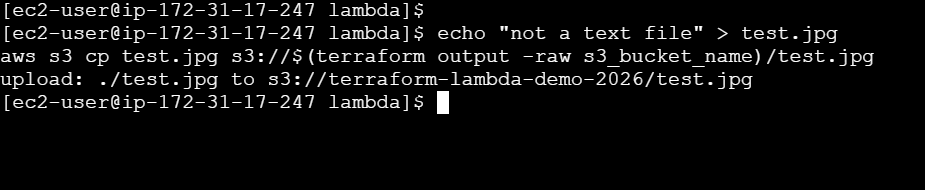
Test 3: Verify Non-.txt Files Don't Trigger
# Upload a .jpg - should NOT trigger Lambda
echo "not a text file" > test.jpg
aws s3 cp test.jpg s3://$(terraform output -raw s3_bucket_name)/test.jpg
# Check logs - no new entries
aws logs tail /aws/lambda/terraform-lambda-s3-processor --since 1m

Nothing. The .txt filter works.
🔍 Understanding the Cost
Lambda pricing:
- First 1 million requests/month: FREE
- After that: $0.20 per million requests
- Compute: $0.0000166667 per GB-second
Our usage estimate:
- API: 1,000 requests/day = 30,000/month → FREE
- S3 processor: 100 files/day = 3,000/month → FREE
Compare to EC2:
| Approach | Monthly Cost | Maintenance |
|---|---|---|
| EC2 t3.medium (24/7) | $30.37 | Patch, monitor, scale |
| Lambda (30K requests) | $0.00 | Zero maintenance |
That's not a typo. For low-traffic workloads, Lambda is effectively free.
🐛 Troubleshooting
Issue 1: "Unable to import module 'hello'"
Error:
Runtime.ImportModuleError: Unable to import module 'hello': No module named 'hello'
Cause: Handler doesn't match filename. If your file is hello.py, handler must be hello.lambda_handler.
Fix: Verify handler in Terraform matches filename.function_name.
Issue 2: S3 Trigger Not Firing
Symptoms: Upload file, nothing in logs.
Check:
- Is the file suffix
.txt? Other files are filtered out. - Did the permission deploy before the notification? Check
depends_on. - Check Lambda permission:
aws lambda get-policy --function-name terraform-lambda-s3-processor
Issue 3: API Gateway Returns 500
Cause: Usually a Lambda execution error.
Debug:
# Check Lambda logs directly
aws logs tail /aws/lambda/terraform-lambda-hello --since 5m

# Test Lambda directly (bypass API Gateway)
aws lambda invoke \
  --function-name terraform-lambda-hello \
  --payload '{"queryStringParameters":{"name":"Test"}}' \
  response.json

cat response.json
Issue 4: "AccessDeniedException" on S3
Cause: IAM policy doesn't include the bucket or action needed.
Fix: Verify the custom policy references the correct bucket ARN with /* suffix for object-level actions.
💡 Best Practices
Set
source_code_hash- Without it, Terraform won't redeploy when code changes.Use
archive_filedata source - Let Terraform handle zipping. Manual zip files drift.Set retention on log groups - Default is infinite. At $0.03/GB stored, this adds up.
Timeout appropriately - API handlers: 10-30s. Processing: 30-300s. Never use the 900s max unless you know why.
Memory = CPU - Lambda allocates CPU proportionally to memory. 128MB gets minimal CPU. 1024MB gets significantly more. If your function is slow, increase memory before optimizing code.
Environment variables for config - Never hardcode bucket names, table names, or URLs in your Lambda code. Pass them through environment variables in Terraform.
🧹 Cleanup
# Remove S3 objects first (bucket must be empty)
aws s3 rm s3://$(terraform output -raw s3_bucket_name) --recursive

# Destroy everything
terraform destroy
S3 buckets can't be deleted if they contain objects. Empty it first, then Terraform handles the rest.
✅ Summary
Today you learned:
- ✅ Deploy Lambda functions with Terraform
- ✅ Package Python code with
archive_file - ✅ Create API Gateway endpoints
- ✅ Trigger Lambda from S3 uploads
- ✅ Apply least-privilege IAM (Article 9 skills!)
- ✅ Manage CloudWatch logs with retention
- ✅ Test functions via API and S3
The serverless mindset: Stop paying for idle servers. Lambda runs your code only when needed, scales automatically, and costs nearly nothing for typical workloads.
🚀 What's Next?
In the next article, we'll add:
- Terraform modules for reusability
- Package your Lambda + API Gateway as a reusable module
- Share infrastructure patterns across projects
Coming Up: Article 9: Secure Database Deployment: RDS + Secrets Manager with Terraform
📌 Wrapping Up
Thank you for reading. I hope this article provided practical insights and a clearer understanding of the topic.
If you found this useful:
- ❤️ Like if it added value
- 🦄 Unicorn if you’re applying it today
- 💾 Save it for your next optimization session
- 🔄 Share it with your team
💡 What’s Next
More deep dives are coming soon on:
- Cloud Operations
- GenAI & Agentic AI
- DevOps Automation
- Data & Platform Engineering
Follow along for weekly insights and hands-on guides.
🌐 Portfolio & Work
You can explore my full body of work, certifications, architecture projects, and technical articles here:
🛠️ Services I Offer
If you're looking for hands-on guidance or collaboration, I provide:
- Cloud Architecture Consulting (AWS / Azure)
- DevSecOps & Automation Design
- FinOps Optimization Reviews
- Technical Writing (Cloud, DevOps, GenAI)
- Product & Architecture Reviews
- Mentorship & 1:1 Technical Guidance
🤝 Let’s Connect
I’d love to hear your thoughts. Feel free to drop a comment or connect with me on:
For collaborations, consulting, or technical discussions, reach out at:
Found this helpful? Share it with your team.
⭐ Star the repo • 📖 Follow the series • 💬 Ask questions
Made by Sarvar Nadaf
🌐 https://sarvarnadaf.com


Top comments (0)