


Next.js has quietly become one of the most type-safe full-stack frameworks out there — yet many teams still use only a fraction of what it offers.
In this post, I’ll walk through practical, production-ready type safety features in modern Next.js (App Router), including:
- Next.js TypeScript plugin
- Statically Typed Links
- Route-aware type helpers
- Auto complete environment variables
- Typed NextRequest and NextResponse
This is not a beginner guide — it focuses on features that actually prevent bugs in real-world applications.
Next.js TypeScript plugin
Next.js ships with a custom TypeScript plugin that enhances type-checking beyond what plain tsc can do.
It understands Next.js concepts such as:
- File-based routing
- Server vs Client Components
- Metadata APIs
- Layout and page conventions
To ensure VS Code uses this plugin:
- Open the Command Palette
(Ctrl / ⌘ + Shift + P) - Search for TypeScript: Select TypeScript Version
- Choose Use Workspace Version
This allows VS Code to pick up Next.js–specific type rules automatically via next-env.d.ts.


Once enabled, you’ll get IntelliSense and in-context documentation for Next.js-specific APIs such as metadata and caching options.
Showing available options and in-context documentation

Other useful checks provided by the plugin include:
- Ensuring the
"use client"directive is used correctly - Preventing client-only hooks (like useState) from being used in Server Components
- Catching invalid exports in
page.tsx,layout.tsx, androute.ts
Statically Typed Links
Next.js can generate statically typed routes to prevent typos and invalid navigation.
Enable typed routes in next.config.ts
import type { NextConfig } from 'next'

const nextConfig: NextConfig = {
  typedRoutes: true,
}

export default nextConfig
Next.js will generate route definitions inside .next/types, which TypeScript uses to validate links and navigation.

This ensures:
- Invalid routes are caught at compile time
- Route refactors are safer
- IntelliSense suggests only valid paths
Route-Aware Type Helpers
Next.js generates global route-aware helpers for App Router types. These are available without imports and are generated during next dev, next build, or via next typegen.
Available helpers include:
- PageProps
- LayoutProps
- RouteContext
Without PageProps
export default function Details({
  params,
  searchParams,
}: {
  params: { slotId: string };
  searchParams: { name?: string };
}) {
  const { slotId } = params;
  const { name } = searchParams;

  return (
    <div>
      Slot: {slotId} <br />
      Name: {name}
    </div>
  );
}
This approach is explicit and works well for smaller components.
With PageProps
export default async function Details(props: PageProps<"/details/[slotId]">) {
  const { slotId } = await props.params;
  const { name } = await props.searchParams;

  return (
    <div>
      Slot: {slotId} <br />
      Name: {name}
    </div>
  );
}
This version is more concise and automatically stays in sync with the route definition.
Without LayoutProps
import type { ReactNode } from "react";

export default function RootLayout({
  children,
}: {
  children: ReactNode;
}) {
  return (
    <html lang="en">
      <body>{children}</body>
    </html>
  );
}
With LayoutProps
export default function RootLayout(props: LayoutProps<"/">) {
  return (
    <html lang="en">
      <body>
        {props.children}
      </body>
    </html>
  );
}
Without RouteContext
export async function GET(
  _request: NextRequest,
  { params }: { params: Promise<{ id: string }> }
) {
  const { id } = await params;
With RouteContext
export async function GET(
  _request: NextRequest,
  ctx: RouteContext<"/api/[id]"> // you will get intellisense
) {
  const { id } = await ctx.params;
Using RouteContext gives you full IntelliSense for route params and avoids manual typing.
Auto complete environment variables
Enable it in next.config.ts
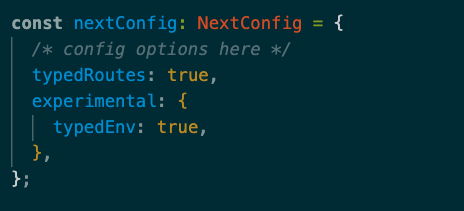
Now you will get intellisense support

Typed NextRequest and NextResponse
import { NextRequest, NextResponse } from "next/server";

export async function GET(
  _request: NextRequest
) {

  return NextResponse.json(
    { msg: 'Hello!!! })
}
NextRequest extends the Web Request API with:
- Typed cookies
- Parsed URLs via nextUrl
- Middleware-friendly helpers
NextResponse extends the Web Response API with:
- json()
- redirect()
- Cookie helpers
- Edge-friendly APIs
Final Thoughts
Next.js type safety isn’t about writing more types —
it’s about letting the framework encode architectural rules directly into your editor.
When used well, TypeScript becomes a guardrail, not a burden,
and IntelliSense becomes an extension of your system design.
Reference - Next.js - TypeScript
Connect with Me
If you enjoyed this post or want to follow my work:
- LinkedIn: Bharath Kumar S
- GitHub: Bharath Kumar
Feel free to connect, star my projects, or reach out — I love discussing Next.js, TypeScript, and modern frontend best practices!


Top comments (0)