


We spend a significant amount of time ensuring our Python code is clean, linted, and logically sound. We write unit tests to verify correctness and integration tests to ensure systems talk to each other. Yet, there is a massive blind spot in most modern CI/CD pipelines: performance regressions.
Most teams only realize a new feature has introduced a 30% latency spike after the code is deployed and the monitoring alerts start firing. By then, the damage is done. Recovering from a performance leak in production is significantly more expensive than catching it during the pull request stage.
Standard unit tests aren't designed to measure execution speed, and full-scale profilers are often too heavy to run as part of a rapid development loop. This is why we need to shift-left our performance testing.
Table Of Contents
- Introducing oracletrace
- Performance Tracing in 60 Seconds
- The Delta: Branch vs. Branch Comparison
- Automated Enforcement
- Visualizing Call Flows
Introducing oracletrace: The CI-First Profiler
oracletrace is a performance-focused tool designed specifically to prevent slow code from ever reaching your main branch. Unlike traditional profilers that output overwhelming amounts of data, oracletrace is built for comparison and enforcement.
Under the hood, it leverages Python’s sys.setprofile() mechanism. This allows it to be remarkably lightweight while maintaining the precision required to trace function calls across your entire application.
GitHub Repository:
 KaykCaputo
/
oracletrace
KaykCaputo
/
oracletrace
Lightweight Python tool to detect performance regressions and compare execution traces with call graph visualization.
OracleTrace — Detect Python Performance Regressions with Execution Diff
Detect performance regressions between runs of your Python script in seconds.
 |
Fail your CI when performance regresses. OracleTrace is a git diff for performance. Run your script twice and instantly see what got slower — with function-level precision. |


Documentation: https://kaykcaputo.github.io/oracletrace/
Featured in: PyCoder's Weekly #729 • awesome-debugger • awesome-profiling
Installation
pip install oracletrace
Quick Start
1. See where your program spends time instantly:
oracletrace app.py
2. Compare runs and detect regressions:
oracletrace app.py --json baseline.json
oracletrace app.py --json new.json --compare baseline.json
See it in action
See exactly which functions got slower between runs:
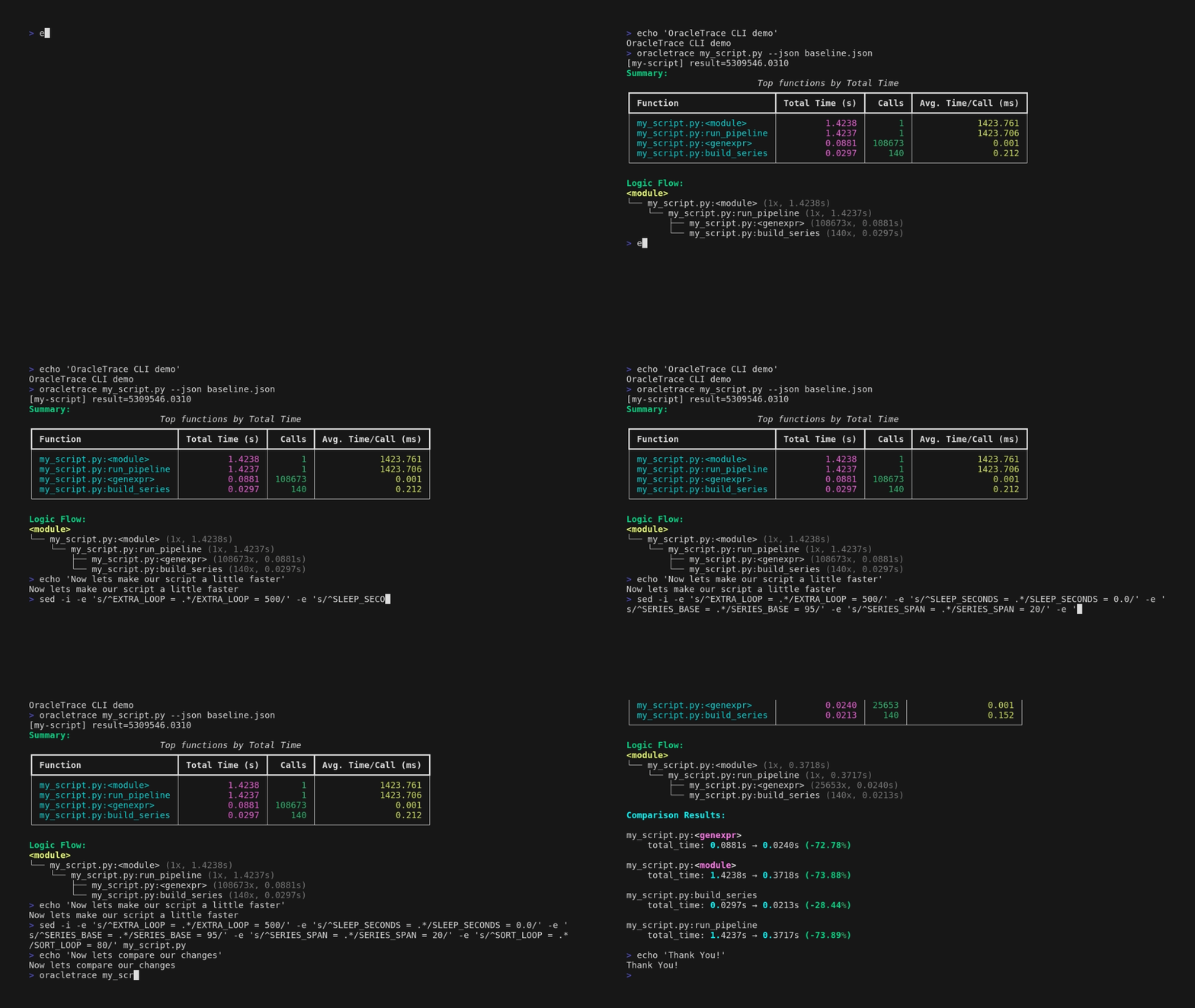
Example Output
Starting application
Iteration 1:
  > Processing data...
    > Calculating results...

Iteration 2:
  > Processing data...
    > Calculating results...

Application finished.

Summary:
                         Top functions by Total Time
┏━━━━━━━━━━━━━━━━━━━━━━━━━━━━━━┳━━━━━━━━━━━━━━━━┳━━━━━━━┳━━━━━━━━━━━━━━━━━━━━━┓
┃ Function                     ┃ Total Time (s) ┃ Calls ┃ Avg. Time/Call (ms) ┃
┡━━━━━━━━━━━━━━━━━━━━━━━━━━━━━━╇━━━━━━━━━━━━━━━━╇━━━━━━━╇━━━━━━━━━━━━━━━━━━━━━┩
│ my_app.py:main │ 0.6025 │Official Documentation: kaykcaputo.github.io/oracletrace/
Installation:
pip install oracletrace
Performance Tracing in 60 Seconds
The barrier to entry for profiling should be zero. Once installed, you can profile any Python script directly from your terminal:
oracletrace my_script.py
The output is a structured view of your function calls, showing execution time and call counts. This immediate visibility allows developers to see the performance impact of their changes locally before even pushing to a remote branch.
The Delta: Branch vs. Branch Comparison
The core value proposition of oracletrace is the ability to compare execution data between two different states of your codebase. This allows you to quantify exactly how much a refactor or a new feature has impacted your performance budget.
The workflow is straightforward:
-
Capture a Baseline: Run your script on your stable branch (e.g.,
main) and export the results to a JSON file.
oracletrace main_app.py --json baseline.json -
Compare the Feature Branch: Run the same command on your feature branch using the
--compareflag.
oracletrace main_app.py --compare baseline.json
The resulting report includes a Delta percentage column. If a core utility function has slowed down by 20%, oracletrace highlights it immediately. This transforms performance from a vague feeling into a concrete metric that can be debated and addressed during code reviews.
Automated Enforcement
For teams that prioritize system stability, oracletrace can act as a gatekeeper. By using the --fail-on-regression flag, the tool will return a non-zero exit code if any function exceeds a specified performance threshold.
oracletrace main_app.py --compare baseline.json --fail-on-regression --threshold 15
In this scenario, if your code is more than 15% slower than the baseline, the process fails. This ensures that performance standards are enforced automatically, rather than relying on manual oversight.
Visualizing Call Flows and Data Export
Beyond simple timing, oracletrace generates visual call graphs that represent the execution flow of your program. This is particularly useful for identifying "hot paths"—functions that are called thousands of times in a loop and represent the best opportunities for optimization.
Furthermore, because oracletrace supports JSON and CSV exports, the performance data can be ingested by external tools for long-term trend analysis or historical tracking.
Conclusion: Protect Your Main Branch
Performance is a feature, not an afterthought. Integrating a lightweight profiling step into your workflow ensures that your application remains fast as it grows in complexity.
It takes less than ten minutes to set up oracletrace, but it provides a safety net that protects your production environment from the silent creep of technical debt.
How are you currently catching performance drops before they hit production? Share your approach in the comments below!


Top comments (0)