


📘 Educational Documentation: Object-Oriented Programming (OOP) in Python
Development Environment:
Terminal: Warp
IDE: IntelliJ IDEA with Python Plugin
- What is Object-Oriented Programming (OOP)?
Object-Oriented Programming is a paradigm that organizes code around "objects" that represent real-world entities with properties (attributes) and behaviors (methods).
Key Concepts:
Class: Blueprint to create objects.
Object: Instance of a class.
Attribute: Characteristic of an object.
Method: Behavior or action of an object.
Encapsulation: Hiding internal details of an object.
Inheritance: Reusing code through class hierarchies.
Polymorphism: Ability of different classes to respond to the same method differently.
Abstraction: Modeling relevant objects while hiding unnecessary complexity.
Everyday Example:
A Person is a class. João and Maria are objects of this class. They have attributes like name and age, and methods like speak or walk.
- Setting Up the Environment
Warp Terminal
Download and install Warp (https://www.warp.dev/)
Use the terminal to navigate to your project directory.
IntelliJ IDEA with Python Plugin
Download IntelliJ IDEA (https://www.jetbrains.com/idea/)
Go to Preferences → Plugins → Marketplace and install the "Python" plugin.
Create a new Python project (File → New Project → Python).
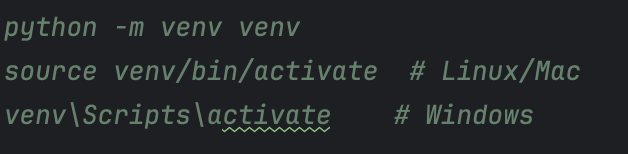
Set up the virtual environment:
- Creating Your First Class and Object
Class: Person


- Encapsulation
Hides internal data of the object, allowing controlled access.


- Inheritance
Allows a class to inherit attributes and methods from another class.


- Polymorphism
Allows methods with the same name to behave differently depending on the class.


- Abstraction with abc
Create abstract classes with mandatory methods.


- Practical Project: User Registration System
Structure:
Base class: User
Subclasses: Admin, Client
Methods: show_data(), validate_age()


- Tips with IntelliJ + Warp
Use shortcut Shift + Shift to search any file/command.
Use integrated terminal with Warp to run and test your scripts.
Enable debug mode: Run → Debug and set breakpoints beside the line numbers.
 10. Illustration: Class Structure
(Add diagram with labels: class, attributes, methods, inheritance)
I can generate an image representing this structure. Would you like it now?
✅ Conclusion
Object-Oriented Programming allows you to create more organized, reusable, and scalable applications. With Python, these concepts are applied in a simple and clear way. Practice by creating your own classes and relationships!
If you'd like, I can continue expanding this content with:
Practical exercises
Guided projects
Learning checklists
Visual explanations per concept
BONUS
Mini Game:


Story-Style Explanation
Imagine you are playing with building blocks. Each block is special:
A blue block is a Rabbit — it hops.
A green block is a Turtle — it walks slowly.
A brown block is a Horse — it runs fast.
You build your toy and say: "Block, run!" And each one runs in its own way!
This is what Object-Oriented Programming does: you tell the object what to do (like "run!"), and each object does it in its own unique way.


Top comments (1)
Great explanation! One thing I'd love to see in a future post is how these OOP concepts are applied in a real project (like a small inventory or library management system). I think that would help bridge the gap between theory and practice.