


For the last six months (at the time of this writing) I have been using Claude Code to create Stewie (stewie-js). Throughout this journey, I have learned a lot about building something real from scratch with AI and going beyond “vibe coding” or just adding features to an already mature codebase. I want to share some key things that I think will resonate with some people and hopefully be helpful to anyone embarking on a similar path.
Stewie is a small, coherent UI web framework written in TypeScript for modern runtimes. It covers reactivity, rendering (server-side and client-side), routing, optional compiler, testing utilities, devtools, and scaffolding – all designed together as a whole rather than assembled from third-party pieces. It’s intended as a friendly alternative to React and other UI frameworks, using JSX syntax, but there is no costly re-render cycle and no virtual DOM. Fine-grained reactivity is baked into the core, keeping DOM updates targeted and minimal with reactive bindings. And, just like Stewie Griffin, this framework is meant to be small, powerful, and awesome. 😁
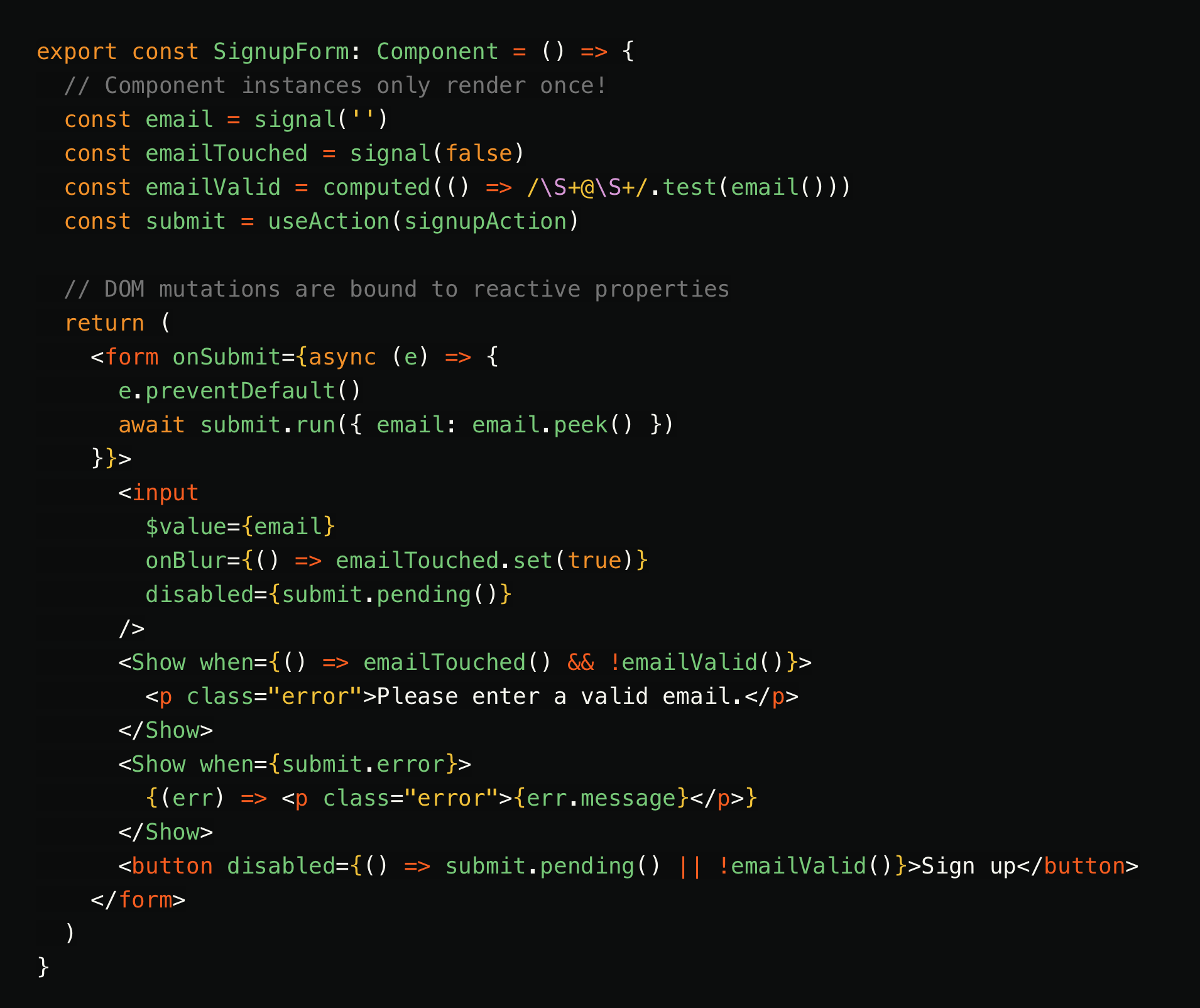
As a quick reference, here is what a Stewie component looks like. It's still TypeScript JSX, but uses Stewie APIs and also the jsxImportSource from Stewie.
Motivation
If you are going to invest time in something, you should probably have a reason. So, why did I create Stewie and why did I do it with Claude?
Wanting Something Better
I found myself one day thinking about how even though I love React, there are some things that I also dislike about it or that I genuinely wish it would do better. I’ve spent so many years with React, building entire platforms and libraries around it, watching it grow and evolve. I have used other UI frameworks as well, but not nearly to the extent that I have with React. For example, I have worked with Angular here and there, but mostly with exploratory side projects. While I’m not a huge fan of Angular, there are definitely aspects of the framework and ecosystem that I appreciate. Vue and Solid are also in this arena. I have a good surface understanding of each, but I have not had enough reason to invest much time into either of them.
With all of these options available I’m very grateful for all the contributors and maintainers of these frameworks because they have paved the way with great foundations and different approaches to similar problems. React, specifically, completely changed the game and created an entire job market that many of us engineers have benefited from.
Leveraging AI
So, sitting with my mental list of likes and dislikes (pros and cons) regarding these primary UI frameworks, I wondered if something existed that had everything I wanted. I thought, “If not… maybe I should build it!”. That was exciting for about 5 seconds… because my very next thought was “there is no way I will have the time to create a new framework and make significant progress any time soon”. I have worked on large internal frameworks and libraries in my career and I know these things take a lot of time and effort.
I had just recently signed up for a Claude Pro account because I wanted to start building stuff and keep up in the AI tooling rat race. The obvious lightbulb went on. 💡 “I will use Claude to build a new UI framework!!”. Taking on the creation of a large, long-life project would be a great way to thoroughly evaluate Claude as well as my ability to utilize it properly over time. Prior to this, I had mostly been using Cursor and VS-Code (with Copilot) for my day-to-day coding work. I also highly utilized ChatGPT and Gemini for technical deep-dives and system design conversations. It was Claude’s turn to get a bigger slice of my time!
Starting Point
I created a skeleton repository with a package.json and .gitignore and fired up Claude CLI. Before having the agent write any code, I knew I had to do the tedious and important work up-front. I began with a lengthy conversation between myself and the agent about what I wanted to build. I typed out my list of pros and cons for existing UI frameworks, gave detailed responses about the desired architecture and patterns, and established core pillars that the repo should always stay firm to.
Brain Dumping to the Agent
Thanks to existing UI frameworks, I was able to start my conversations with Claude from a solid position by clearly defining what I wanted to carry forward and what I wanted to avoid. I provided a detailed list of pros and cons based on my experience. For React, I value its intuitive JSX syntax, robust ecosystem, and patterns like hooks and context, but I want to avoid its performance pitfalls, specifically the overhead of the virtual DOM and the manual, painful process of optimizing re-renders. Regarding Angular, I appreciate built-in features like routing and dependency injection, but I prefer to avoid its template complexity, cryptic component scoping, and over-reliance on an IDE extension to catch issues. By synthesizing all of my perspectives, capturing both the goods and bads with each architecture, Claude was able to construct a clear vision for the ideal capabilities of this new framework. We reviewed the vision and gave each other a virtual high-five.
It’s critical to provide as much detail as possible to the agent. Otherwise, AI has a tendency to fill in gaps with assumptions.
For example, if I simply said "I like React hooks", but didn’t clarify with detail that I was just generally referring to the concept of hooks compared to higher order components, or if I didn’t call out real concerns with performance related to large re-renders of the virtual DOM – then it might infer that hooks and the rest of React’s rendering architecture, including [state, setState], are what I wanted to carry into Stewie. Such an assumption would have immediately taken Claude down a very different path than I wanted. I would have had to waste time talking it backwards on its assumptions. I was able to avoid that kind of friction, by being explicit and clear from the beginning.
If you love bananas, but hate grapefruit (gross), then don’t take a chance asking someone to just “pick up some fruit from the store”.
Establishing Core Pillars
I now had a good starting point for the project after working through my list of UI framework likes and dislikes with the agent. We had solidified enough to directionally navigate the areas we should avoid and the ones we could lean into more. It still wasn’t granular enough and it was important that I didn’t hand off important architecture decisions. Claude is going to do a lot of heavy lifting, but I need to stay in the driver’s seat.
I had the agent ask me any clarifying questions about the architecture, specifically with things I didn’t cover already or where it felt there was an equally strong alternative to at least consider. The agent came back with more than 10 really good questions, asking for more clarity on things like reactivity, hydration, virtual DOM, routing, etc. I spent the next hour typing out my detailed responses for these important decisions.
🧃 Learning Note
You should direct your agent to ask you questions that will help refine your requirements and see gaps that you may have missed. You can also install theinterview-meskill from addyosmani/agent-skills to make your process more robust.
Now that I had a useful amount of information and requirements for the project, I needed to define some pillars to be the foundational guide for all future decisions. These pillars are not just meant to be hopeful goals; they are core values and “lines in the sand” for the whole project. All decisions must align to these pillars. The solutions that don’t, will be rejected, and other solutions will need to be explored. With large projects I have worked on, the ones that were the most successful and had the highest engagement from the team, were the ones that had clear and meaningful pillars.
Key pillars that I established early:
-
No Virtual DOM: The renderer produces real DOM directly. There is no virtual DOM and no diffing step.
- Fine-grained signals eliminate the need. Each reactive expression subscribes directly to the signals it reads. When a signal changes, only that expression's DOM node updates. There is nothing to diff because updates are already precisely targeted.
-
Minimal API Surface: Every public export must earn its place. Before adding a new exported function, check whether an existing one can cover the use case. Prefer one powerful primitive over two slightly different ones.
- Users should be able to hold the entire API in their head. The gut check: if a new export does "almost the same thing" as an existing one, that's a signal to extend the existing one or find a different design.
- When considering a new export, ask: (1) Can an existing API handle this with a small composition? (2) Is this needed by most users or only edge cases? (3) Does adding it make the documentation more fuzzy or require a lengthy explanation in a way that would intimidate a new user?
-
Compiler Must Remain Optional: Any compiler (perhaps used with a Vite plugin) improves output but is not required. Plain JSX via
jsxImportSourceproduces a fully working app.- Not every project uses Vite. The runtime must work correctly without compiler transforms. Compiler improvements that only apply when the compiler is present are fine, but improvements that benefit both paths are always preferred.
- The developer writes simple, obvious code. The compiler is responsible for transforming it into the optimal fine-grained reactive output. If an optimization requires the developer to write their code differently, when it should be free, that's a design failure.
Early Progress
With a solid set of criteria, goals, and non-negotiable pillars in place, it was time for Claude to start building. In the early stages, progress felt lightning-fast, things were coming together quickly, and I was shipping real features with robust test coverage. I continued to have important back and forth discussions with Claude about architectural decisions and I was incredibly impressed by how human-like the agent felt in these conversations. It didn’t overly agree or disagree with me, which is something you commonly see when interacting with AI. Instead it was very pragmatic and flexible, but stood its ground in the right places. I don’t know if this type of persona has more to do with the model, Claude’s agent wrapper, or both; but it’s exactly what I want when working with a coding agent.
Everything felt awesome and I was riding the wave, glued to my terminal.

Then some real friction started to creep up. I realized that I hadn't done enough to keep Claude properly on track over time. Without a stronger foundation and additional harness, the reality of context decay was becoming more and more evident. There were times where the generated code drifted from my original vision or some of the agent’s suggestions were in conflict with previous decisions we made days or weeks ago. I’m embarrassed to admit that I didn’t even have a CLAUDE.md file in the repo for the first two weeks. 😳 I was merely benefitting from machine local memory files and a long-running session.
🧃 Learning Note
Always remember to create aCLAUDE.mdfile when starting Claude within your repo for the first time.
Token Usage
While working with Claude, I would hit points where I was burning through tokens faster than expected. Tracking down exactly what was driving that usage (tools, commands, parsed output) was difficult. The high-level usage summary in Claude CLI was sort of helpful, but just not granular enough. One suspicion I had was that perhaps all the files in the codebase were being entirely loaded into the context. Honestly though, this was only a guess. Regardless, I had to try and reduce token consumption or else hitting limits regularly would remain an impediment and cost me more money. So, a few things I did in my quest to optimize were: set up GitNexus in the repo, try different models, and stumble across an update to Vitest.
🧃 Learning Note
There are different types of tokens context tokens (the current notebook of information and chat history), reasoning tokens (transcription of the model’s internal thinking process), output tokens (the model’s final response to the prompt it received), and Chuck E. Cheese tokens (not even relevant). They all count towards usage in different ways.Frequently, but not always, using a high percentage of context tokens has a direct correlation to increased usage of reasoning tokens.
GitNexus
During my search for token optimizations, I discovered GitNexus, which is actually pretty awesome. It creates a queryable knowledge graph of your codebase, linking relationships and dependencies. It can even be configured to index multiple repos so the knowledge graph can map relationships that extend beyond your codebase. It comes with a local MCP server and installable agent skills.
I ran with GitNexus for a few months, but it was hard to definitively say whether or not things were better. Attempting to get some confirmation, I did a mini experiment comparing two different prompts. One prompt asked the agent to explain how reactivity works in Stewie and the other was a refactor that modified the public API surface of Stewie’s core package exports. I ran each prompt with and without GitNexus configured. The results showed negligible differences in token usage and output quality. Not quite what I was expecting.
Ultimately, I concluded that for my specific project, GitNexus added a layer of friction (keeping the index up to date, starting up the MCP server, a nested skills structure not compatible with other AI tools) without providing tangible value. So I removed it from the project. Since then, I have not seen any increase in my usage. I believe any reduction in token usage while GitNexus was active, was likely just coincidence. I may try GitNexus again in the future. I was using v1.6.2 and there have already been many improvements since then. I still think it’s awesome and genuinely believe it provides value, especially for large repositories and organizational setups where dependencies span across multiple repos.
Model Selection
During the first 4-5 weeks I almost exclusively used Sonnet 4.6 for Stewie. As the codebase grew, I started to see Claude trip over itself more frequently. Meaning, it would fix one thing that then broke something else, or wire up a new feature and then churn through the failing tests until it finally got everything fixed.
So, on one hand it was great that the agent could work through these issues on its own, but on the other hand it was wasting a lot of cycles and tokens to do it. Now that we were further into the weeds, I started using Opus 4.7, hoping it would more consistently understand the architecture and wiring between all the packages in this monorepo. I had planned to mostly use Opus for planning and talking through complex technical decisions, while still using Sonnet for the actual coding work. Instead, I chose to keep Opus for everything and monitor my usage.
To my surprise, I wasn’t really burning through my budget any faster. Opus seemed much better dealing with the size of the codebase and relationships between packages. It was making significantly fewer mistakes and not wasting many cycles on debugging and fixing such mistakes. I’ve continued with Opus (v4.7, v4.8, v5), typically with medium reasoning effort and have been very happy with the results.
🧃 Learning Note
In certain cases, a better and more expensive model can actually negate its higher cost or usage rate by getting more things “right” the first time.
Test Suite Logging
One of the things that can quickly bloat your context and token usage is the raw output from running tests. I was using Vitest and it was not immune to this problem. For a brief period of time I instructed Claude to use the --silent flag when running vitest. This brought down my token usage, but gave no output for Claude to inspect. 😖
I then pulled up the Vitest documentation, internally yelling ”There has to be a better option!” Turned out, there was, with version 4.1.0. In that release was the addition of an agent reporter, which would print minimal output, except for failing tests, with the direct goal of reducing AI token usage. 🥳 After updating to the latest version at that time (4.1.2), and instructing Claude to use the --reporter=agent flag, the reduction was noticeable.
🧃 Learning Note
The console output from build scripts, runtime logs, test runners, lint checks, etc. can all eat up a lot of tokens unnecessarily, especially when run repeatedly by an agent. Many maintainers have added logic within their libraries to reduce console output when running within an AI agent, so check your packages for updates.
Defining a Roadmap
I needed a way keep better track of what work was done, but also what things we needed to do. I was worried priorities would drift, even with CLAUDE.md in place. Having a dedicated file just for this purpose felt like it made sense. I created a blank ROADMAP.md and instructed the AI agent to track both current and future work slices within it to ensure no ideas or tasks were lost during the development process. I am not certain if a ROADMAP.md is a common practice that others use, but it has proven to be an incredibly effective and practical strategy for me. This dedicated file acts as a persistent memory for the project's trajectory, aligned with the long-term vision captured in CLAUDE.md, but with tangible deliverables. It allows me anytime to ask “ok, what’s next?” and Claude will give me a quality answer and group related work into sensible milestones.
Below is a screenshot of the ROADMAP.md from early in the project. There are different sections for what has already been completed, what's left to do, possible ideas to explore, and a list of ranked priorities.

I chose an earlier version of this file because it's smaller and easier to see the structure in a screenshot. You can view the latest ROADMAP.md in the repo and browse the file history to see how it has progressed.
Adding Skills and Checks
As the project scope expanded, there was an obvious need to think about this repo as if a whole team was working on it and not just the duo of myself and Claude. It helped me to consider different areas of the codebase and workflow that could be improved, regardless of the actual number of contributors. I started adding some of my own agent skills to improve architecture decisions and documentation; and also automated scripts to stay on top of code linting and formatting.
Rubber Wall Skill
One of the first skills I created was one that I called “rubber wall”. I use this when my gut tells me I need a second opinion on a significant decision, such as changes to the core APIs or framework architecture. This is not to be confused with the “rubber duck” technique as that’s actually quite different and doesn’t include feedback from someone else. There is probably a better name I could have used, perhaps “sounding board”, but I can live with my naming choice for now.
🧃 Learning Note
”rubber wall” is a dumb name.
My “rubber wall” skill spins up a clean subagent session, often initiated by the primary agent, to bounce ideas off of, mimicking the experience of grabbing a colleague in the office to explain my problem and proposed solution. This helps me uncover blind spots, receive probing questions, and refine my approach before committing to code.
In one scenario, a primary AI agent drafted a complex data deduplication plan and spawned a "rubber wall" subagent to independently pressure-test the proposed changes. Operating as an independent, read-only reviewer, the subagent quickly exposed real, code-grounded risks in the phases that appeared easy on the surface – such as cross-request state leaks and broken SSR streaming contracts. By rigorously validating the plan against the codebase rather than taking it on faith, the subagent forced myself and the primary agent to rethink some aspects of the plan.
Lightweight ADR Skill
To battle the inevitable problem of tribal knowledge and hidden historical context, I adopted the practice of creating lightweight ADRs (Architectural Decision Records). Unlike traditional (heavy) ADRs, these are more compact – essentially just structured notes that capture the what, why, when, status, and any additional context behind significant architectural choices. These files are essential partner documentation to go along with CLAUDE.md and ROADMAP.md. By anchoring these decisions in writing, I avoid the “re-litigation loop” where I might ask an agent to change a feature and its proposed change contradicts a key design decision we established months ago. It keeps the architectural integrity of the framework sound without adding unnecessary overhead to the development flow.
It’s important to keep in mind that ADRs are not just the things you decided to do, it’s also the things you have decided not to do, to deprecate, to replace, or are still proposing. Maintaining these records provides the information for humans and AI to understand the historical context of your codebase.
I have used lightweight ADRs on many projects and repos throughout the years. I find this practice brings a lot of benefits and doesn’t require a lot of developer time to create. They naturally fit with a human-only workflow, an AI-heavy workflow, or anything in between. Think about it this way, if you deleted .claude/ from your repository, where is your documentation of “how we got here”?
Pre-commit Hooks
While skills and rules are powerful, they aren't fool-proof. You often need to be extremely precise with your instructions to remove any ambiguity regarding when specific commands should run. I repeatedly encountered scenarios where the agent would apply changes and run tests, but neglect linting or formatting. This often led to subsequent tasks failing due to unrelated linting errors or a flurry of unexpected file changes.
To solve this, I installed husky with a pre-commit hook that automatically runs lint and format. This ensures these simple steps get executed every time git commit is run, preventing those issues from sneaking into the main branch. Reiterating a central theme of this post: prioritizing a human-friendly codebase, complete with solid documentation and automated scripts, creates a reliable foundation for AI agents. It’s fundamental hygiene that is easy to overlook, because AI doesn't complain as humans would when these things are lacking.
Model Validation
As Stewie matured, I realized relying on a single AI tool and model family for all coding and architectural decisions was a potential blind spot. It’s difficult for a model to be the objective critic of its own logic. To safeguard the framework’s architectural integrity, I introduced Codex as an independent auditor. This wasn't just about using another tool; it was a deliberate strategy to catch architectural drift and ensure the codebase didn't become optimized around a specific model's biases. I tasked Codex with two distinct objectives: validating the framework's API surface by building a functional sample application, and performing a deep, targeted technical audit of the entire codebase.
Building a Sample App
For the generated sample app, I searched for existing public APIs that would provide a good base for a Stewie app. I settled on the Rick and Morty API. I shared the endpoints with the Codex agent and asked it to create a multi-page webapp with stewie-js, following the framework’s patterns and exports. First it explored the API, then it created visual mocks and color palette, and finally it built out the app. Not gonna lie, it was pretty cool to watch it go through the process and in the end the app worked!

The whole process was relatively smooth, with only a few issues here and there, but nothing that I couldn't work through with the agent. Feel free to explore the Rick and Morty sample app code and also the published site.
Reviewing the Codebase and Architecture
While I was stoked to see that the demo app was easy to create and that it actually worked, I was even more interested in having Codex evaluate and review Stewie. I gave the agent specific instructions and not just “hey, what do you think of stewie-js?”.
This is the first part of my prompt to Codex:
Look through the codebase for this UI web framework. Understand what it is and how it works. Write up an audit document capturing the following things:
- Brief summary of the project's purpose and what it does.
- What's good about it. Consider architecture, code, testing, developer experience, runtime and performance, security, etc.
- Things that are bad about it. Consider architecture, code, testing, developer experience, runtime and performance, security, etc.
- Things you just have questions about that aren't clear. Consider architecture, code, testing, developer experience, runtime and performance, security, etc.
- Key similarities and differences to other popular UI frameworks (React, Vue, Angular, Solid, etc.).
- Is there any code that looks like a direct copy from other popular frameworks. Not just concepts or basic naming like "Signals", but actual code implementation.
- Should people use it and why.
- Do the next steps in
ROADMAP.mdmake sense and seem like the right things to focus on. Are there things you would suggest adding to the roadmap.
It’s natural for people to include statements and questions that lean towards their preferred outcome, but that’s not a helpful approach with AI or with people. I tried to avoid any bias in my prompt and ensure I covered the main points that a senior engineer would think about when evaluating a new UI framework.
The next section of my prompt was to control the token usage by providing rules for model selection and reasoning effort.
You are an orchestrator. If a task requires extensive file reading or parallel actions, then break it down and spawn subagents to be more efficient and effective. Try to avoid using flagship models for subagents, instead you will prefer gpt-5.4-mini and then only use gpt-5.3-codex when it feels necessary. Choose the right reasoning effort for subagents, based on task complexity, but go no higher than Medium. Subagents cannot create their own subagents, the subagent depth is limited to 1. Each subagent should only see its specific prompt and only receive information that's useful and relevant to its task. This is to avoid unnecessarily large contexts.
If a task is repeatable, you or a subagent should create it as a tool or skill instead of reasoning through it several times. Ensure tasks for subagents are specific and well-defined. If a subagent does not complete a task or fails, do not retry, note the failure and ask me what to do.
These rules worked out great and kept the token usage at a more reasonable level, even with the full evaluation going deep in several areas. Honestly, I would consider this an important and valuable step for any project that’s using AI. You can specify similar guidelines directly in the chat (like I did in this case), you could put them in your AGENTS.md, CLAUDE.md, or tool-specific rules file.
One last bit that I put into my prompt was to have the main orchestrator list out each subagent that was used and give them a grade for the specific task that was assigned.
As part of your final output you will also include a breakdown of the subagent tasks, including a short summary of their task, summary of the context, the reasoning effort they used, the time spent, your score of how well they completed the task (on a scale of 0-10, with 0 being a complete fail and 10 meaning they did great and exactly what you asked). You can provide this in its own markdown file.
This was a really easy way to see what work was delegated to individual subagents. By directing the main agent to grade how each subagent handled their task, it creates an opportunity for a feedback loop that both myself and the main agent could learn from.
For example, we could extend this prompt to also say:
“If you give any subagent a score that is less than 8 out of 10 for their initial attempt at a task, then retry exactly one time with more specific instructions and context. Capture both runs in the markdown file, noting the second one as a retry attempt. Move forward with the output and results of whichever run had the highest score. In the case of a tie, move forward with the output and results of the first run.”
Below is a sample of the markdown file created by the main orchestration agent.
### Task 1

- Task summary: derive a prioritized engineering fix list from the latest audit state
- Context provided: current audit conclusions, verification status, and known improvements/regressions
- Reasoning effort: `medium`
- Time spent: under 1 minute
- Completion score: 9/10

Notes:

- The output was concise, practical, and well ordered.
- I adjusted the final document slightly to better reflect source-level details, especially around hydration tests and roadmap cleanup.

### Task 2

- Task summary: produce a differentiation strategy for Stewie versus Solid and adjacent frameworks
- Context provided: latest audit conclusion that Stewie is Solid-adjacent but not copied, plus candidate differentiators already visible in the repo
- Reasoning effort: `medium`
- Time spent: under 1 minute
- Completion score: 9/10

Notes:

- The output was directionally strong and matched the repo well.
- I kept the core recommendations and tightened them into a product/positioning memo.
Using Codex for the review with the specified persona provided a different perspective from a different model, and different agent harness. I took the time to read through the full report documents and then passed them back into Claude saying ”An external review of Stewie was performed. Read through these files and let me know what you think”. The general consensus between myself and the agent was that Stewie is on the right track, but still had several things that needed to be solved.
If you take a similar approach, you do not have to use a completely separate AI tool from the one you’re using to write the code. While there is some truth that using different AI tools helps avoid the problem of “grading your own paper”, it’s not necessary. Using different models, personas, and goals is typically sufficient enough. It's common practice for individuals and companies to run separate dedicated agents to review code, check for security vulnerabilities, and uphold coding standards and best practices.
The Future of Stewie
If you’re wondering where Stewie goes from here, the honest answer is: I don’t know. I’m not positioning it to be the next industry standard or claiming it’s ready to replace React for enterprise-scale platforms tomorrow. But I do know that it’s a viable, performant UI framework that proves its own architectural concepts. It works, it’s fast, and it does exactly what I set out to build. I’m continuing to invest time into it, both because it’s a great sandbox and because it remains a compelling project to maintain.
Takeaways
There is so much content out there about working with AI as a software engineer and there are many different approaches that are all valid. Throughout this post I have tried to capture some of the specific things that worked for me, small mistakes I made, and the learnings that surfaced along the way.
Key Points
- Define Clear Architectural Pillars: Set non-negotiable rules early to provide the AI with firm constraints, preventing it from making assumptions that drift from your vision.
- Maintain Persistent Context: Use files like CLAUDE.md and ROADMAP.md to anchor the project's long-term trajectory, helping the AI agent remain consistent over long sessions.
- Adopt Lightweight ADRs: Capture the "what" and "why" of significant design decisions in simple, structured notes to avoid the "re-litigation loop" of changing features later.
- Use "Rubber Wall" Techniques: Spin up subagent sessions to bounce ideas off of, simulating peer reviews to uncover blind spots before committing to code.
- Implement Automated Hooks: Establish basic codebase hygiene, such as pre-commit hooks for linting and formatting, to prevent AI agents from skipping essential maintenance steps.
- Validate with Independent Reviews: Run audits using different models, personas, or agent harnesses to avoid the bias of "grading your own paper" and get objective feedback on your architecture.
Summary
Building a web framework like Stewie-js with AI requires shifting beyond simple "vibe coding" to a more structured, engineering-focused approach. By treating the AI as a technical partner that needs to be equipped for ongoing success, the development process becomes an exercise in clear communication and rigorous architectural intent. Maintaining firm architectural constraints, persistent documentation, and independent validation loops are critical aspects of any AI coding workflow. The strategies I’ve refined during this process – the foundational pillars, the lightweight ADRs, the agent-driven roadmap tracking, the rubber-wall technique – have already proven to be valuable for me. These aren’t specific to Stewie; they are durable engineering practices that I’ve carried into other projects.
This journey has definitely sharpened my ways of working with AI as a collaborative engineering partner and maintaining long-term project complexity. I hope my learnings are helpful to you too.
Helpful Links
Recommended:
Stewie Stuff:


Top comments (1)
wow its good to hear you build up understanding and skill with claude, but my opinion on claude, code was abstraction of abstraction, not imperatife step by step like human do, so I prefer chinese model, baddas, I also built engine 3.7kb gzip or 10kb minified coz using web api only and pure javascript, demo awesome. I tried buil engine with different Dev Experience, its always html with binding, then javascript still javascript minimum directive and state can call across module, :for loop are component so maybe when we write pokemon card just
just try my playground also, on veri low end android phone 100-150ms for 1000 row table build and update, 50ms laptop, coz android consume large memory and many app installed and running. just tellme how much ms with your device?