


In the previous article in this series, we covered the theory of sizing and using Bloom Filters; now let's actually implement them with full JavaScript code.
Creating a Bloom Filter
A BF will be implemented as an object with three properties: b and h as described above, and bits, an array with b bit flags, all initially set to 0. (It could be argued that a BF user need not know its internals; see question 11½‑1.) We could skip including b since it's just the length of the bits array, but let's not worry about that now.
const EPSILON = 0.01;
➊ const LN2 = Math.log(2);
➋ const LN2_SQ = LN2 * LN2;
const newStandardBloomFilter = (n, eps
= EPSILON) => {
➌ const b = Math.ceil(-(n * Math.log(eps)) / LN2_SQ);
➍ const h = Math.max(1, Math.round((b / n) * LN2));
return {
b,
h,
bits: new Array(b).fill(0)
};
};
Just as a minimal optimization, we define two constants ➊ ➋ to avoid redoing calculations if we create more than one filter. Then ➌ ➍ we use those values to directly implement the results we found. We can now create a BF; now let's see how to update it. (See question 11½‑2 for an optimization as to memory usage.)
Adding a value to a Bloom Filter
How do we add a value to a BF? We'll need a function to produce a hash value from a string. The result should be between 0 and b-1. Using that function, we will write a getIndices function that will return the h positions that correspond to the string.
const crypto = require("crypto");

const hashWithSeed = (value, seed, limit) =>
  crypto
➊  .https://dev.to/fkereki/part-4-double-hashing-bloom-filters-31l5createHash("sha256")
➋  .update(`${seed}:${value}`)
    .digest()
➌  .readUInt32BE(0) % limit;

const getIndices = (filter, value) =>
➍ Array.from({ length: filter.h }, (_, i) =>
     hashWithSeed(String(value), i, filter.size)
   );
The hash generation uses SHA-256 ➊ to produce a stable, cryptographic fingerprint for each value and seed pair. It combines the seed and the item ➋ as a string like "2:GROUCHO", hashes that, and then takes the first 32 bits of the digest and reduces it modulo the Bloom filter's bit-array size ➌. This gives a deterministic index to the bit array, which is exactly what we need. Finally ➍ getIndices generates an array of size h with all the calculated hashes; each hash is different because we combined the value with distinct seeds.
Given these functions, adding a value is quite short.
const add = (filter, value) => {
  for (const idx of getIndices(filter, value)) {
    filter.bits[idx] = 1;
  }
};
The getIndices function returns an array of the bit positions we need to set, and we do that one by one. We're done! Now, let's do searches.
Searching for a value in a Bloom Filter
With all the code we showed, search can be done in a very concise way, a "one liner" in fact.
const find = (filter, value) =>
  getIndices(filter, value).every((idx) => filter.bits[idx] === 1);
As when adding a value, the getIndices function returns an array with the positions of the bits we have to check, and we use .every to verify that all those bits are 1.
Deleting a value from a Bloom Filter
If adding a value to a BF just requires setting some bits to 1, you might think that removing a value would imply zeroing those same bits - but that won't work! In fact, you cannot remove a value from a BF without possibly making it produce wrong answers, as we'll see.
Let's go back to the example with the Marx brothers. Suppose you wanted to remove GROUCHO and then set bits 2, 7, and 4 to zero. Figure 11½–5 below shows the result.

Figure 11½–5: Removing a value may unset bits that were also set by other previous values
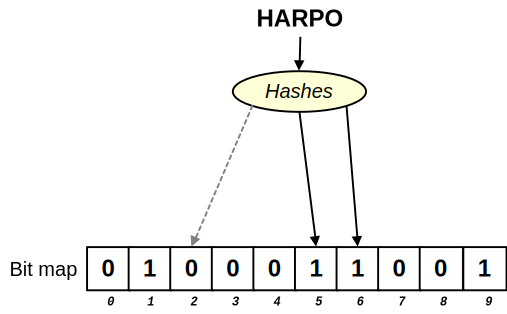
Now, there's a problem. What happens when you search for HARPO? You would check bits 6, 5, and 2 - and find that bit 2 is now 0! Since all the bits corresponding to an item must be set to 1 for it to be considered present, you'd conclude that HARPO was never added to the Bloom filter; see Figure 11½–6.

Figure 11½–6: After removing GROUCHO, a search for HARPO produces a false negative
We'll consider Bloom filters that allow deletions, but first we'll study a variant: a Double Hashing Bloom Filter, which uses a technique that provides better overall performance.
Bye for now! In the next article in the series, we'll look at the better-performing Double Hashing Bloom Filters.
Questions
11½‑1. Do it with class! In the book, we have always been working in a functional way and used few classes. Can you rewrite the Bloom Filter code to use a class instead? Alternatively, you may want to use closures. The goal here is to hide as many internal details as possible.
11½‑2. Getting down to bits. Using an array of numbers wastes a lot of memory, because you just need 1 bit at each position. Rewrite the code using the Unit8Array type and bitwise operators to minimize memory usage. Each byte in the array should provide 8 bits.
Want to get the book?
If you want the original, complete book, you can find it at the publisher, No Starch Press, or at Amazon, Barnes & Noble, Books-A-Million, Bookshop, Powell's Books, Target, or Walmart, in either paperback or e-book format.


Top comments (0)