

Let's face it, packaging your kivy application for android can be pretty rough. First you create the app, then you install buildozer only to realize that python-for-android doesn't even run on windows! Now you're looking into installing a virtual Linux distribution. If you already use Linux, well lucky you, but if not, you are probably pounding your keyboard in frustration.
Is there a better way to do it? The answer is yes. In this article I'm going to show you how to package an application for android using Google Colab.
First thing's first, let's code up our application. I assume you already have kivy and kivymd installed in a virtual environment.
Create two files:
- main.py
- main.kv
Inside main.py, add the following code:
from kivymd.app import MDApp
from kivymd.uix.list import OneLineIconListItem, IconLeftWidget

class MainApp(MDApp):
    def build(self):
        self.theme_cls.primary_palette = "Purple"

    def add_item(self, text):
        new_list_item = OneLineIconListItem(text=text)
        new_list_item.add_widget(
            IconLeftWidget(icon = "language-python")
            )
        self.root.ids.listcontainer.add_widget(new_list_item)
        self.root.ids.listinput.text = ''


if __name__ == "__main__":
    app = MainApp()
    app.run()
Inside main.kv add the following lines:
MDBoxLayout:
    orientation: 'vertical'
    id: box
    MDTopAppBar:
        title: 'SampleApp'
        pos_hint: {'top': 1}

    MDTextField:
        id: listinput
        hint_text: 'Add Item'
        mode: 'rectangle'
        size_hint_x: .9
        pos_hint: {'center_x': .5}
        text_validate_unfocus: False
        on_text_validate: app.add_item(listinput.text)

    ScrollView:
        MDList:
            id: listcontainer
This is a simple application that gets text from the user and creates a list item and adds it to the list.
When we run our application, it looks like this:

Now for packaging!📦
Open google colab on your web browser and create a new notebook or you can use my notebook.
Now create a cell and run the following lines:
!sudo apt update
!sudo apt install -y git zip unzip openjdk-17-jdk python3-pip autoconf libtool pkg-config zlib1g-dev libncurses5-dev libncursesw5-dev libtinfo5 cmake libffi-dev libssl-dev
!pip3 install --user --upgrade Cython==0.29.33 virtualenv
Luckily for you, the developers of kivymd decided to make the process easier so we can install buildozer dependencies in one fell swoop. Create a cell in your notebook and add the following lines and execute:
# git clone, for working on buildozer
!git clone https://github.com/kivy/buildozer
%cd buildozer
!python setup.py build
!pip install -e .
%cd ..
And now, everything is ready for the packaging process.
Upload your files to colab by clicking on the files icon and then right clicking and clicking upload.(Uuuh what?😫)
After the files have been uploaded, run the following command:
!buildozer init
This will create a file named buildozer.spec. Double click the file to edit it. You can change the application name and the package name. I changed mine as follows:

Next, scroll down to the requirements and change them as follows:
requirements = python3, kivy==2.1.0, kivymd==1.1.1, sdl2_ttf==2.0.15, pillow

Note: If your application requires special permissions such as internet or storage, scroll down to
android.permissions:
Uncomment the android.permissions line and add the permissions. For a full list of all the available permissions, check out this link.

Now to package our application. Run the following command:
!buildozer -v android debug
This process can take up to 20 minutes so you might need a little bit of patience. In the mean time you could skip to the bonus section below or watch an episode of my hero academia(I won't judge😉).
After successful execution, the apk file is saved in the bin folder:

Download the apk, transfer it over to your android device and install it!

The application works!👏
Full Code is available HERE.
Bonus section(Not really)
Debugging our application.
Packaging applications this way is faster than having to go through installing all the requirements on your PC but this does have a draw back. How do you debug the application? Imagine successfully installing the application and trying to run it only for it to crash. How do you know what the problem is? You can't run buildozer -v android deploy run logcat which displays the logs so that you can search through them to identify errors. You can't do that on colab but you can if you're on Linux(perhaps your should just switch to linux😁).
This is where adb comes in. Android Debug Bridge (adb) is a versatile command-line tool that lets you communicate with a device. You can get more information about it here but for now, we are going to be making use of adb platform tools. Download them here.

This will download a zipped file. Unzip it then copy the apk that we just made and paste it inside the unzipped folder. The selected item is the apk file in the image below:

Connect your device, make sure usb debugging is enabled. Now open a command prompt terminal and navigate to the folder containing the adb files we extracted:

Run adb install name-of-the-app.apk
This will install the application on your device! You can open the application and try it out. To view the application log, run the following command in the terminal:
adb logcat
Now you can see the application log. If any error occurs while running the application, you'll probably find the details in the log, but be warned, it can be like looking for a needle in a haystack!
If you want to learn more about adb and it's commands check out this link.
And that just about wraps it up. I hope you found this article helpful. If you're facing any challenges don't hesitate to reach out in the comments section.


Latest comments (46)
Hey bro.
I'm having a problem packaging my python program in Colab.
i got the apk but it crashes and even when i'm trying to build on wsl: ubuntu 22.04, it was unsuccessful. Can i get your whatsapp number ?
please its urgent
Hey. Have you tried debugging with adb logcat?
Can I submit the program here ?
share on link my email: ngonidzashedelight@gmail.com
Sent. Please help me
Bro. Please reply my mail 🙏
Yes. But I'm still a beginner I couldn't debug
Hi. I have an issue where after building app (kivy,kivymd), it didn't work. I looked up for the logcat and noticed that there is an issue with kivymd2.0.1.dev0
it doesnt recognize MDFAButton. This is declared requirements:
requirements = python3,pynmea2,kivy_garden==0.1.5,kivy==2.3.0,kivymd==2.0.1.dev0
And another question is how to make a permission for apk app, for socket comm, gps (location) ?
When i try with my own main.py and main.kv and while getting apk then your application is getting...??????
ModuleNotFoundError: No module named '_ctypes'
The above error keeps getting raised after following the steps you have outlined. Kindly assist
Hey
I've updated the article. I believe one of the required packages was missing. Try to run your program with the latest notebook.
Am also using pyrebase in my app. Is there a way to know all the dependencies required?
To use pyrebase in your application, you just need to add it to the requirements in the spec file. When you run buildozer, it will automatically download any dependencies that pyrebase needs.
However, if you encounter an error with pyrebase, it could be because it's a Python package that requires compilation, and there is no specific support for it in Python-for-android. In such cases, the package won't work as expected.
If you want to make pyrebase work with Python-for-android, you can contribute to the Python-for-android project by creating a recipe specifically for pyrebase. By creating a recipe, you provide the necessary instructions for Python-for-android to properly compile and include pyrebase in the final application package.
Okay
Thank you! This worked out for me.
Greetings, I am currently attempting to transform my python code into an APK, however, after converting it and installing the file, it unfortunately crashes right after the kivy logo appears. I am using google collab to convert my code into APK.
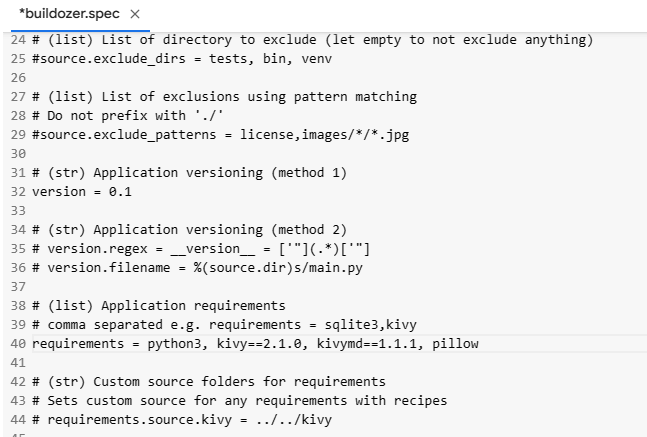
Spec file
main.py
please help me bro
NN,
Completed the build but had to change the version of Cython from 0.29.19 to 0.29.21 to complete compile.
ERROR: pip's dependency resolver does not currently take into account all the packages that are installed. This behaviour is the source of the following dependency conflicts.
tables 3.8.0 requires cython>=0.29.21, but you have cython 0.29.19 which is incompatible.
!pip install --upgrade Cython==0.29.21 virtualenv
I suspect that's why the resulting APK builds but bombs after the splash screen.
Do you have any suggestions?
RAHRAH
Hi,
So a few things have changed since I've written the article. I have updated it. You can fix the issues you are facing by changing the requirements to:
requirements = python3, kivy==2.1.0, kivymd==1.1.1, sdl2_ttf==2.0.15, pillowAnd for installing the initial build packages, instead of using the commands with Cython, use the following:
This should fix the errors your were encountering. Hope that helps!
i have been trying to follow your tutorial on the above project and there
I have tried to follow the required steps from the tutorial including this update but google colab is not creating the apk file as the bin folder is empty.
Please help
Hey. Are you getting any errors during execution?
No errors but it creates an empty bin folder
have you tried running the code from your end again?
I can't run it at the moment but could you try this notebook.
thank you very much the apk file was created but the application doesn't on my mobile after installation. i tries to open then shuts down
Could you try installing your app with
adb, then runningadb logcat, before opening it. The error should be printed within the console.Thank you very much
all working good now i think i missed something along the way
you're are the best keep doing the good job
My question is what did you change in the code to make it work this time
Hi, I get this error: No module named 'kivy.graphics.instructions' Thank you for any suggestions
did you manage to solve the problem
Hello,
You can try changing the version of kivy in the buildozer spec file from kivy==2.0.0 to kivy==2.1.0
app open and close direct
I/python (32368): [Clang 12.0.8 (android.googlesource.com/toolchain... c935d99d
I/python (32368): [INFO ] [Python ] Interpreter at ""
I/python (32368): [INFO ] [KivyMD ] 1.1.0.dev0, git-Unknown, 2022-09-24 (installed at "/data/data/org.test.eiranstudio/files/app/python_bundle/site-packages/kivymd/init.pyc")
I/python (32368): [INFO ] [Factory ] 186 symbols loaded
I/python (32368): Traceback (most recent call last):
I/python (32368): File "/content/.buildozer/android/app/main.py", line 1, in
I/python (32368): File "/content/.buildozer/android/platform/build-arm64-v8a_armeabi-v7a/build/python-installs/EiranStudio/armeabi-v7a/kivymd/init.py", line 66, in
I/python (32368): File "/content/.buildozer/android/platform/build-arm64-v8a_armeabi-v7a/build/python-installs/EiranStudio/armeabi-v7a/kivymd/font_definitions.py", line 10, in
I/python (32368): File "/content/.buildozer/android/platform/build-arm64-v8a_armeabi-v7a/build/python-installs/EiranStudio/armeabi-v7a/kivy/core/text/init.py", line 85, in
I/python (32368): File "/content/.buildozer/android/platform/build-arm64-v8a_armeabi-v7a/build/python-installs/EiranStudio/armeabi-v7a/kivy/graphics/init_.py", line 89, in
I/python (32368): ModuleNotFoundError: No module named 'kivy.graphics.instructions'
I managed to create an apk using Coollaboratory and it works, but the Android device cannot install subsequent versions to the previous one, even if nothing changes in the code. How can I organize the apk update on the device?
Pandas does not work
Some comments have been hidden by the post's author - find out more