

What this article covers: how to build a terminal environment where you can monitor multiple Claude Code sessions with live status, come back to the same sessions after stepping away or over SSH, and — the interesting part — let the agents reorganize their own screen layout. It's a field log from installation to the point where the editor's (Zed's) role shrank from "writing" to "sign-off" (reviewing and approving) to "gone."
Intro — the "where do I put them" problem of parallel agents
Once you start running multiple Claude Code or Codex sessions in parallel, you hit these walls:
- Terminal tabs pile up, and remembering "which tab was doing what" costs you time every single round
- Quitting your editor or terminal app kills the agent sessions running inside it
- You can't check on your running agents from your iPhone or another machine while away from your desk
- Agents can't touch their own execution environment (pane layout, workspaces) at all. Rearranging things is always manual human work
This article solves these with herdr (an agent multiplexer — a terminal multiplexer built for agents). I'm a Zed user, and right after installing it my verdict was "isn't this redundant with what Zed already does?" — until the moment I let an agent manipulate the layout itself, which flipped my evaluation.
And the flip didn't stop there. Once herdr became my main battleground, the editor's (Zed's) role shrank from "a tool for writing" to "a tool for signing off on agent output" — and eventually it lost even that role and I stopped opening it. This is the whole story, from installation to the editor becoming unnecessary, with the configs and commands that actually worked.
Prerequisites
- macOS + Homebrew (herdr also runs on Linux)
- You're already using CLI agents such as Claude Code
- This article is based on herdr v0.7.4 (verified 2026-07-18). The tool is only about three and a half months old, so the command surface may change
- The editor is Zed (a recent build with the
markdown_preview_*settings), and the terminal I end up choosing is Ghostty (the how and why comes later) - Pane IDs in this article (
w5:p8etc.) are real values from my environment. Yours will differ
What herdr is — only two real differences from tmux
herdr is an "agent multiplexer that lives in your terminal." It's a single Rust binary, and like tmux it persists sessions in a server process (the prefix key is even tmux-compatible: ctrl+b). GitHub is ogulcancelik/herdr, dual-licensed AGPL-3.0-or-later + commercial (stated in the LICENSE file).
The essential differences from tmux come down to two things:
-
Semantic agent state tracking — it auto-detects agents inside panes and lists their state —
working/blocked/done/idle/unknown— in a sidebar. You can see "which one is waiting on me" without visually patrolling every pane -
A socket API — pane splitting, command execution, output reading, and layout changes are all controllable from external processes (CLI commands like
herdr pane runare wrappers around a Unix-socket API). Which means an agent can operate its own execution environment
The screen has three levels: workspace → tab → pane. From the CLI you address them as w1 (workspace 1), w1:t1 (tab 1 inside it), and w1:p1 (pane 1). Read the command examples below with this notation in mind.
Installing — one brew command
It's bottled in homebrew-core, so brew it is. I skipped the official site's curl | sh because piped install scripts are hard to audit. Including config generation, it's four lines:
brew install herdr                                    # v0.7.4
mkdir -p ~/.config/herdr
herdr --default-config > ~/.config/herdr/config.toml  # 305-line baseline config
herdr config check                                    # → config: ok
Running herdr starts the TUI, and the server (herdr server) comes up automatically. No login-item daemon (brew services) was needed.
As a sanity check, run a smoke test of the socket API. This doubles as the minimal example of "letting an agent operate the environment" covered later:
# Create a workspace, run a command in a pane, wait for output, read it back
herdr workspace create --cwd ~ --label smoke-test --no-focus
# → Returns workspace_id and pane_id as JSON. The lines below assume it returned
#   "w1:p1" — substitute whatever IDs you actually got (if you already have
#   workspaces, you'll get w2 or later)
herdr pane run "w1:p1" "echo herdr-smoke-ok"
herdr wait output "w1:p1" --match "herdr-smoke-ok" --timeout 5000
herdr pane read "w1:p1" --lines 10
# → If the output contains herdr-smoke-ok, you're wired up
If all four pass, layout, execution, and reading are controllable from an external process.
Where Zed is enough, and where it isn't
Let me be honest here: right after installing, my evaluation was "this is barely different from Zed."
Zed announced Parallel Agents on 2026-04-22. The Threads sidebar runs multiple agents in parallel, with per-thread git worktree isolation. Its terminal already does tabs (cmd+N) and splits (cmd+D). If you're at your desk reviewing in a GUI while agents run, Zed's experience is better. herdr's workspace switching looked about the same as switching Zed windows.
In fact, I almost shelved it with a tidy division of "at the desk = Zed, away = herdr."
What changed my evaluation was using the layers that structurally don't exist in Zed:
| Layer | Zed | herdr |
|---|---|---|
| GUI review experience | ◎ Parallel Agents + editor integration | — (terminal only) |
| Execution persistence | Quitting the app stops execution (thread history survives) | Server-resident. Execution continues with every app closed |
| External reattach to a running session | Not possible (SSH remote dev exists, but it's a different thing) |
ssh → herdr from an iPhone etc. drops you back into the same screen |
| Agents operating their own environment | Not possible | Full control via the socket API |
The first row is Zed's win; the bottom three are territory only herdr has (and the first row's verdict changes later, once plugins enter the picture). So it's not competition — it's a complement: herdr fills the "managing many agents" layer where Zed is weak.
One more trap that matters in practice: sessions launched from Zed's agent panel can't be grabbed from outside — not by the official Claude Code app (Remote Control), not by Termius (verified myself). They're sealed inside the editor process. A Claude Code launched as a CLI from a terminal shows up in the official app's list and is reachable via SSH → herdr. If there's any chance you'll want to look at a session from outside, launch it as a CLI.
The next section is the clincher for the complement story.
Letting the agent operate the layout itself
After installing, I wanted my agents — scattered across tabs — on one screen, and on a whim asked Claude Code itself: "consolidate the tabs into one."
Claude Code executed these three commands:
# Move panes from other tabs into tab t2 as splits (executed by Claude Code itself)
herdr pane move w5:p5 --tab w5:t2 --split right --no-focus
herdr pane move w5:p7 --tab w5:t2 --split down --target-pane w5:p4 --no-focus
herdr pane move w5:p6 --tab w5:t2 --split down --target-pane w5:p5 --no-focus
# → Panes scattered across tabs become a 2×2 grid on one tab. Emptied tabs auto-close
Two agents were in working state at the time, and the layout changed without stopping a single one. All I did was say one sentence. No worrying about reopening panes and interrupting processes, no assembling the sequence of move commands by hand.
Here's what it looked like. Starting from one-tab-per-agent (Before):

Before: four tabs in the bar. Only one session visible at a time
I ask the Claude Code in another pane to "consolidate them":

The instruction is a single sentence. Claude Code surveys the current tab structure via the socket API, assembles the pane moves, and runs them
And everything lands in a 2×2 grid on one tab:

After: every agent on one screen. Running processes never stopped
Agents know where they are through environment variables:
$ env | grep -i herdr    # home directory in the output replaced with ~
HERDR_ENV=1
HERDR_PANE_ID=w5:p8
HERDR_SOCKET_PATH=~/.config/herdr/herdr.sock
HERDR_TAB_ID=w5:t2
HERDR_WORKSPACE_ID=w5
So an agent knows "which pane am I in," and from there it can split a pane next door, run a command, and read the result. The shape of the execution environment itself becomes one of the agent's tools. Incidentally, the session writing this very article is a Claude Code inside a herdr pane — herdr agent list shows it as working on this draft.
git worktree integration was also a one-liner (verified myself):
# Create a worktree + branch + new workspace in one shot
herdr worktree create --workspace w6 --branch feature-x
# → Creates a worktree at ~/.herdr/worktrees/<repo-name>/feature-x/ and
#    opens a workspace labeled "feature-x" with that as its cwd
The same "one room per branch, work in parallel" structure as Zed Parallel Agents — except an agent can assemble it from the CLI.
Gotcha: a zoomed tab refuses layout changes
pane move can return changed: false (reason: "zoomed_tab") and do nothing. If the target tab is in zoomed view, layout changes are rejected by design. Run herdr pane zoom --off to unzoom first.
Gotcha: an omitted target means the focused pane, not the caller
When I had Claude Code run herdr pane split, the pane split in a different workspace — the one I happened to be looking at — not the intended one. That's because when you omit the pane target, it resolves to "the pane focused in the TUI," not "the pane the command was invoked from" (stated in the official CLI reference; passing --current resolves to the calling pane).
When agents drive the CLI, don't let them omit the target; have them pass their own position explicitly via --current or HERDR_PANE_ID.
Gotcha: server lifetime and startup directory
-
The server belongs to the parent process that started it. If
herdr servergets started from Claude Code's shell, it can die with that session. After my experiments I stopped the server once and restartedherdrmyself so the server ownership sat with my own process -
The startup cwd only matters once, at first session creation.
cd-ing into a repo and runningherdrjust reattaches to the existing session from the second time on. Add repos from inside herdr withherdr workspace create --cwd --label. It took a mental-model move from "cd to navigate" to "switch workspaces to navigate"
Does the sidebar show state, or history?
Running herdr inside Zed's terminal gives you this nesting:

The spaces / agents sidebar on the left. Each agent gets one line with its state and remaining context
What I noticed in use: herdr's sidebar only shows rows that map 1:1 to living processes. When an agent finishes, its row disappears. It structurally cannot get cluttered.
Zed's Threads sidebar, by contrast, is a history list. Sessions that ended days or months ago sit alongside active ones, projects interleaved. Finished work keeps occupying your screen as "attention inventory."

Zed's Threads sidebar. Sessions from 4 days, 2 weeks, and 2 months ago mixed into the same list as active ones
Does a list show current state, or past history? That felt like a litmus test for UIs in the parallel-agent era.
This realization changed how I use the whole screen, too. I used to keep a permanent two-way split of editor and CLI — but I only actually looked at the editor "when reading code," and the rest of the time it was dead space.

Before: permanent two-way split. The editor side spends most of its time unwatched

After: herdr (the CLI side) is the main screen; when I read code I flip the editor to full screen with cmd+shift+backtick
In agent-driven development, the primary screen flips from the editor to the agent CLI, and the editor becomes the on-demand side. Same root idea as the sidebar: align "what's in view" with "what's in use right now," and you stop leaking attention.
For a while, the answer was "Zed at the desk, herdr everywhere else"
Even after the evaluation flipped, my placement answer briefly returned to that first instinct (the "shelve it" plan above). Only now it wasn't a passive shelving but an active division of labor: GUI review at the desk goes to Zed; being away, persistence, and delegation to agents go to herdr. Monitoring and reattaching from the iPhone is measured and working on the herdr side.
Field notes on away-from-desk operation (iPhone mirroring, sleep behavior) - The iPhone connection path (Tailscale + Termius) is identical to [the one I wrote up in the tmux days](https://dev.to/shimo4228/running-claude-code-from-iphone-via-ssh-tmux-4c10) — just swap tmux for herdr. If conversational UX is your main goal, [my write-up on the official Claude Code app](https://dev.to/shimo4228/claude-code-from-iphone-plugging-3-holes-in-remote-control-17cf) is a better fit. The split is: "conversation = official app / fleet monitoring = Termius + herdr" - Attach to the same session from the Mac's terminal and from Termius on the iPhone, and the two become **mirrors of the same screen**. Workspace switches and focus moves on one side show up on the other with barely any lag 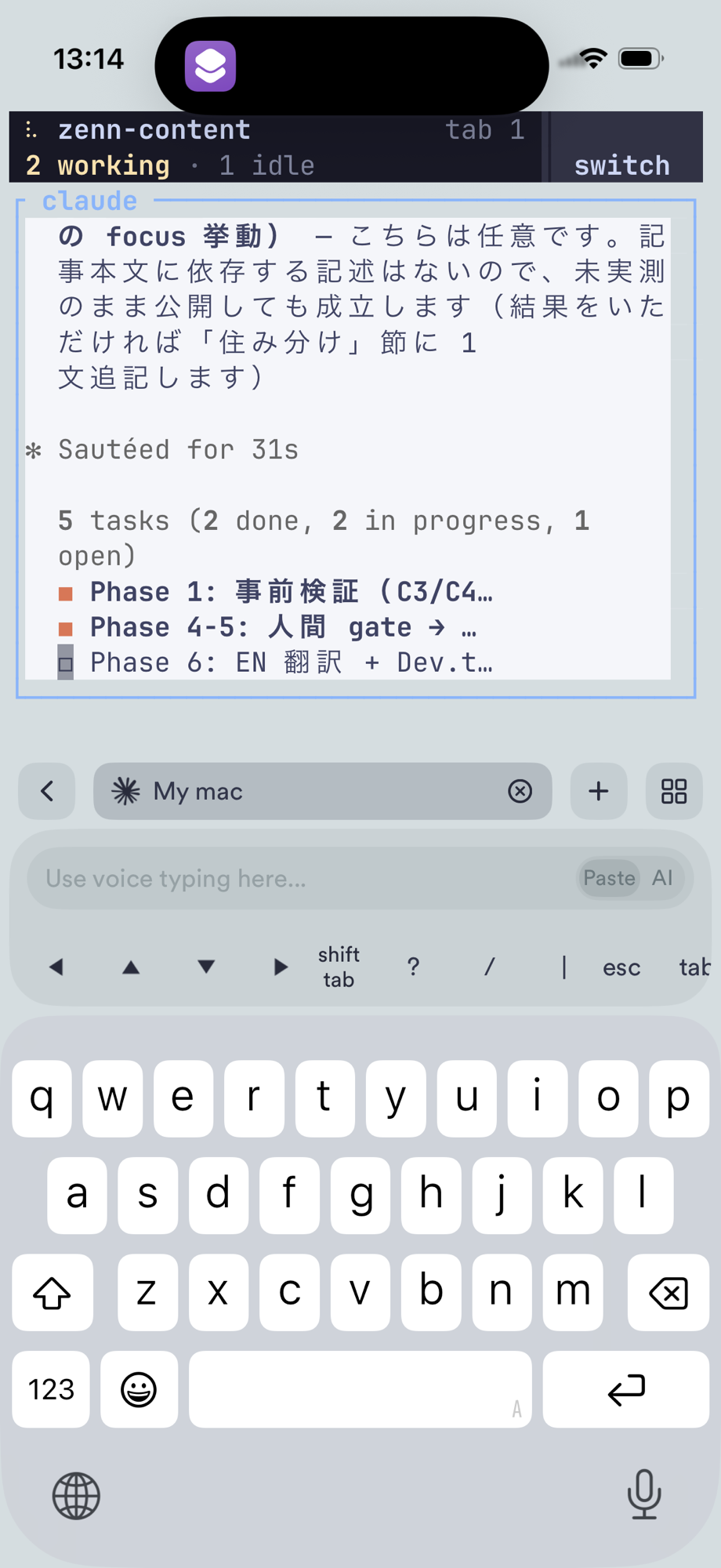 *The iPhone side. It syncs with the Mac's screen with barely any lag* - The display size **syncs to the smaller client**. While you're driving from the iPhone, the Mac's terminal also rewraps to the iPhone's screen width 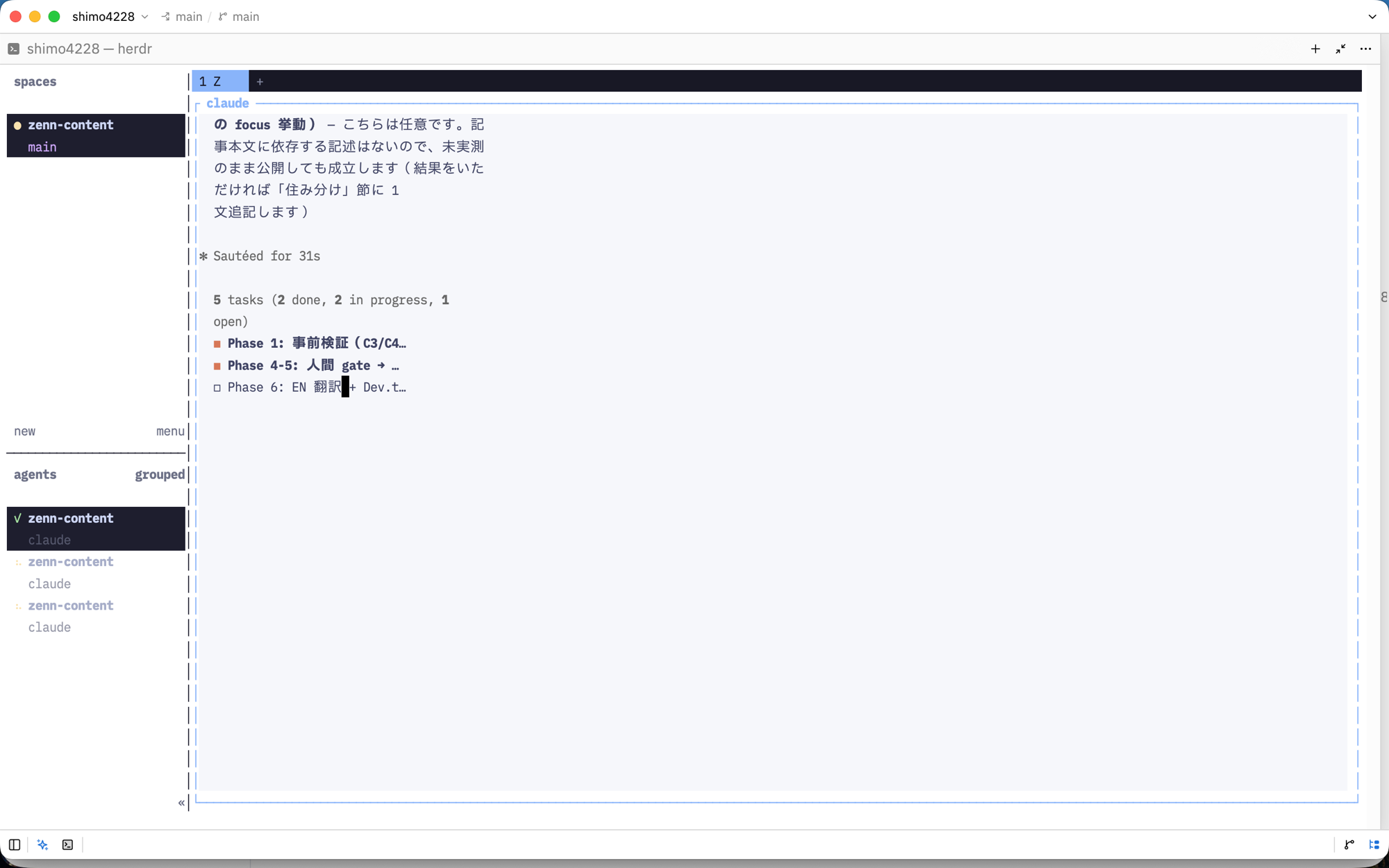 *The Mac at the same moment. While the iPhone is driving, the Mac's display syncs to iPhone size* - **Agents make no progress while the Mac sleeps** (sleep suspends process execution, launchd-managed or not). Sleep doesn't kill the server — sessions are intact on wake (measured myself: sleep → wake, session survived). If you want agents running while you're away, configure the Mac not to sleepBut this division of labor didn't last. A few days of using herdr as the main battleground ran me into the next question: Claude Code writes the code — so what am I actually doing in the editor? Here begins the second half.
The three jobs left in Zed — from "writing tool" to "sign-off tool"
Once you hand all code-writing to the CLI (Claude Code), the editor's "write" function has long since retired. I was still keeping Zed around for three things:
- Reading — following multiple files side by side on one screen (multibuffer)
- Diff review — eyeballing the changes
- Checking Markdown — polishing how articles and design notes look
In other words, everything left was on the "reading" side. So I flipped the framing: optimize Zed as a tool for reading and signing off.
The first thing that paid off was the zed CLI. Append :line to a file path and it opens with the cursor on that line:
# Open a specific line (line:column also works)
zed src/contemplative_agent/cli.py:715

# Open several sign-off points at once
zed src/core/metrics.py:88 src/cli.py:715 tests/test_cli.py:350

# --wait: don't proceed to the next command until the human closes the file
zed --wait changed_file.py
This reverses the direction of the sign-off flow:
-
Before: the agent tells you
path:lineas text → the human hunts for it in the editor -
Now: Claude Code pinpoints the line with
grep, runszed <file>:<line>→ and hands the human an editor already open at the spot
The human stops searching and just reads the line being pointed at. Add --wait and you get a structural pause — "don't proceed until the human has laid eyes on this file" — in a single command. One caveat: closing the file only means "seen." It can't distinguish approve from reject, so don't chain irreversible operations like commits onto --wait; run those explicitly, human-side, after confirming.
I didn't uninstall Zed at this point. Its resident cost while unused is zero, and the cost of rebuilding a "reading" replacement on the terminal side is real. Let actual usage make the call — that was the judgment.
The Japanese-text rendering wall, and a host swap — to Ghostty
Once I started optimizing for "reading and signing off," I hit a rendering-quality wall next. Two problems, both around Japanese text.
First: line spacing in Zed's Markdown preview. Preview a Japanese Markdown document and the lines are cramped and hard to read. Digging in, the preview's paragraph line height is hard-coded at 1.3 with no user setting (zed#56111 has a request for Japanese-friendly settings). The preview-only font settings (markdown_preview_font_family etc.) let you raise the size, but the 1.3 ratio itself can't be changed, so it's not a real fix. I moved final article checks to npx zenn preview (the same rendering as production) and demoted Zed's preview to "glances while writing." Zed can't finish the reading experience — the first crack.
Second, and nastier: Markdown tables emitted by Claude Code came out misaligned in the terminal, with broken rules.

My suspect was characters whose East Asian Width (Unicode's character-width classification) is "ambiguous" — box-drawing characters and the like. That width can be interpreted differently by each layer: Claude Code computing character widths, herdr laying out the grid, and the terminal actually drawing. When the layers disagree about width, tables break. (Other rendering factors, like font fallback, can produce similar symptoms — so this is a leading suspect, not a confirmed cause.)
I couldn't pin down the exact mechanism, but which layer was at fault could be isolated with a controlled swap: replace only the host (the terminal doing the rendering). Piping the same Claude Code + herdr output into Terminal.app, the tables lined up cleanly. The misbehaving layer was confirmed to be Zed's terminal rendering. For display bugs in a multi-layer stack, this "swap exactly one layer" move is the fastest isolation you can do.
| Host | Table correctness | Color (True Color) |
|---|---|---|
| Zed's terminal | Breaks | Accurate |
| Terminal.app | Accurate | Not supported |
| Ghostty | Accurate | Supported |
I ended up on Ghostty. It draws box-drawing and block characters itself instead of relying on the font, so tables don't break, and colors come out accurate.

"After the fix." Same Claude Code + herdr output — on Ghostty, tables with box-drawing rules line up.
With the host settled, unify the look across the nesting too. If the host (Ghostty) and the TUI (herdr) disagree on color scheme, every glance between them adds a small snag. herdr can auto-follow the host's light/dark appearance:
# ~/.config/herdr/config.toml
[theme]
name = "tokyo-night"
auto_switch = true          # follow the host's light/dark
dark_name = "tokyo-night"
light_name = "tokyo-night-day"
herdr server reload-config applies it without complaint, and the three tiers — macOS appearance → Ghostty → herdr — switch together.


The same two-pane screen in light and dark. It follows the host's (Ghostty's) appearance, TUI and all.
Why herdr gets details like Japanese input right — a solo dev and his bots
What surprised me in use: herdr has engineering effort in places as practical as Japanese input (IME) handling. The settings dialog has entries like these:

For example, with a Japanese IME active, pressing a key sequence like ctrl+b v can get the v swallowed by the IME. herdr's countermeasure: switch the input source to ASCII only while accepting a key sequence, then switch back. There's also a feature that persists pane scrollback across server restarts.
How does a tool get this level of polish? The repository's raw data hints at the reason:
gh api repos/ogulcancelik/herdr \
  --jq '{created: .created_at, stars: .stargazers_count, license: .license.spdx_id}'
# → {"created":"2026-03-27...","stars":17794,"license":"NOASSERTION"}
#   (license shows NOASSERTION because GitHub can't auto-detect
#    the AGPL + commercial dual license)

gh api "repos/ogulcancelik/herdr/contributors?per_page=6" \
  --jq '.[] | "\(.login): \(.contributions)"'
# → ogulcancelik: 979 / kangal-bot: 54 / github-actions[bot]: 43
#   akbash-bot: 16 / human contributors are at 4 commits or fewer each
At 113 days since creation (as of 2026-07-18) it's past 17k stars, and it hit Hacker News on 2026-06-29 (166 points, 110 comments; all figures as of writing). Meanwhile, roughly 979 of the commits are the author's own — it's effectively a solo project. The fun part: the #2 and #4 contributors are bots (kangal-bot and akbash-bot). Presumably these are agents the author operates, committing under their own accounts.
An aside: kangal and akbash are both real breeds of Turkish livestock guardian dogs. Perhaps a deliberate match with the name herdr (one who herds) — though that's speculation about naming intent. What the API establishes for certain is only that nearly all commits are attributed to the author himself and to bot-named accounts; that the author operates those bots as agents is itself an inference from circumstance.
The tool's defects bounce back into the developer's own velocity every day. So requirement discovery gets fast. Tools of the agent era fit the hand best when they're built together with agents — and that structure was right there in the contributor list.
The ending — Zed didn't even get to be the sign-off viewer
Everything so far was about "optimizing Zed as a sign-off viewer." Then even that role got taken by the herdr side.
The trigger was two herdr plugins:
- file-viewer — read-only, git-aware file browsing
- reviewr — shows diffs in a sidebar and sends line comments back to the agent
file-viewer covers "reading"; reviewr covers "review the diff and send feedback" — both now inside herdr.

The agent on the left and the file it opened on the right, on the same screen. "Reading" moved to the terminal side.

The reviewr screen. The right sidebar shows the uncommitted diff and the changed-file list. What's on screen is the diff of this very article's consolidation work.
Here the flow comes full circle. Against the "agent → human" bridge from the earlier section (zed file:line), reviewr builds the reverse "human → agent" bridge (comment send-back). The sign-off loop closed inside herdr.
This plugin marketplace just auto-indexes a GitHub topic — there's no review process. Installing a plugin is the same as granting code execution, so I read the manifest and install script before installing (for file-viewer: SHA-256 verification present, no automatic hooks — confirmed).
The result: thezed file:linebridge stopped needing to be crossed within hours of being built. The third job, checking Markdown, was covered too — glances-while-writing by file-viewer's rendered view (thevkey cycles diff ⇄ rendered ⇄ syntax), and final checks already consolidated ontonpx zenn preview— leaving no reason for Zed to stay. Zed lost even the sign-off viewer seat, and within a day I'd stopped opening it.
The final stack: Ghostty + herdr + plugins + Claude Code. There is no editor.
Closing — the shape of the execution environment becomes the agent's tool
Seen as "a tmux successor," herdr looks redundant next to Zed. My evaluation flipped when the socket API let an agent operate its own environment. Splitting panes, opening rooms, cutting worktrees — the "workspace housekeeping" humans used to do becomes delegable, wholesale.
And the flip kept going, all the way to a change of tools. From "isn't Zed enough?" to "sign-off only" to "gone." While every layer — editor, terminal, harness (Claude Code's own subagent machinery) — is absorbing "agent orchestration" features at the same time, herdr's distinctive answer is that it made the layout of the execution environment itself something agents can operate. Each layer slimming down to a single function feels less like regression than like attention design: the work of paring what's on screen down to a state with not one layer surplus to its current role.
That said, "best" here means best for the current role, not forever. The honest way to test the judgment is against actual usage, so in a few weeks I plan to look back at "how many times did I open Zed?"
It's one brew command to try. If you're running two or more Claude Code sessions in parallel, start by watching your own agents show up in herdr agent list.
Related links
- ogulcancelik/herdr — herdr itself (GitHub)
- herdr.dev — official site and docs
- Ghostty — the terminal I ended up choosing
- Zed: Parallel Agents — Zed's parallel agent feature
- zed#56111 — the Discussion on the hard-coded Markdown preview line height
- Running Claude Code from iPhone via SSH + tmux — building the mobile connection path (read tmux as herdr)
- Claude Code from iPhone: Plugging 3 Holes in Remote Control — the conversational-UX side
- Cursor to Zed: Disabling Built-in AI for a CLI-First Setup — the Zed environment this article started from
- github.com/shimo4228 — my GitHub (agent-related skills and tools)


Top comments (0)