


No training, no training data and no GPU. This classifier's whole brain is a list of English sentences I typed by hand - and I can teach it a new card type by writing one more.
Introduction
In Previous article, I walked through the whole pipeline that turns a crooked phone photo of a collectible AWS Builder Card into a published page. That pipeline goes like this:
- Pre-signed upload
- Cheap image classifier
- Expensive image processor
- Human approval
- Commit
- Publish
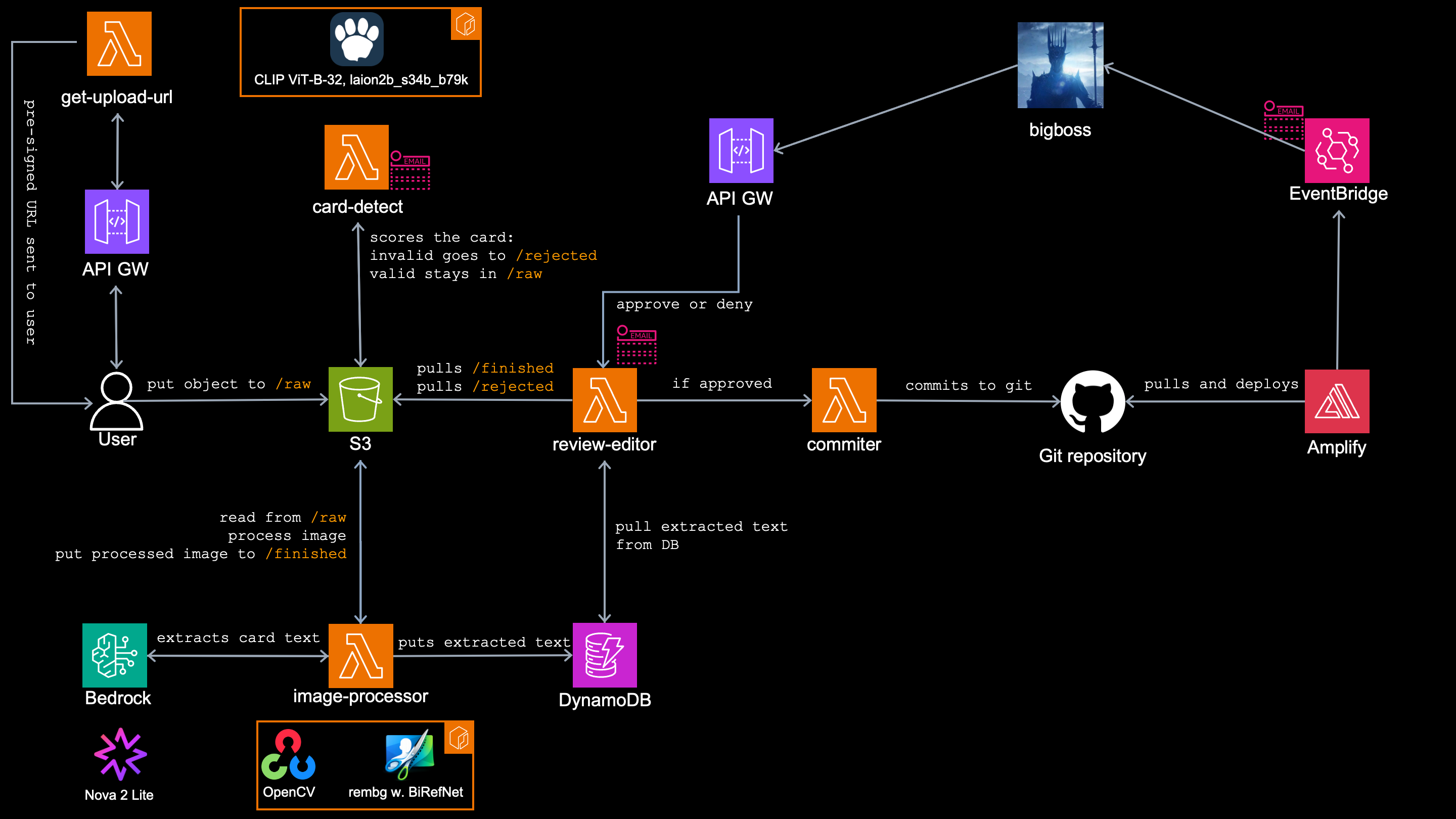
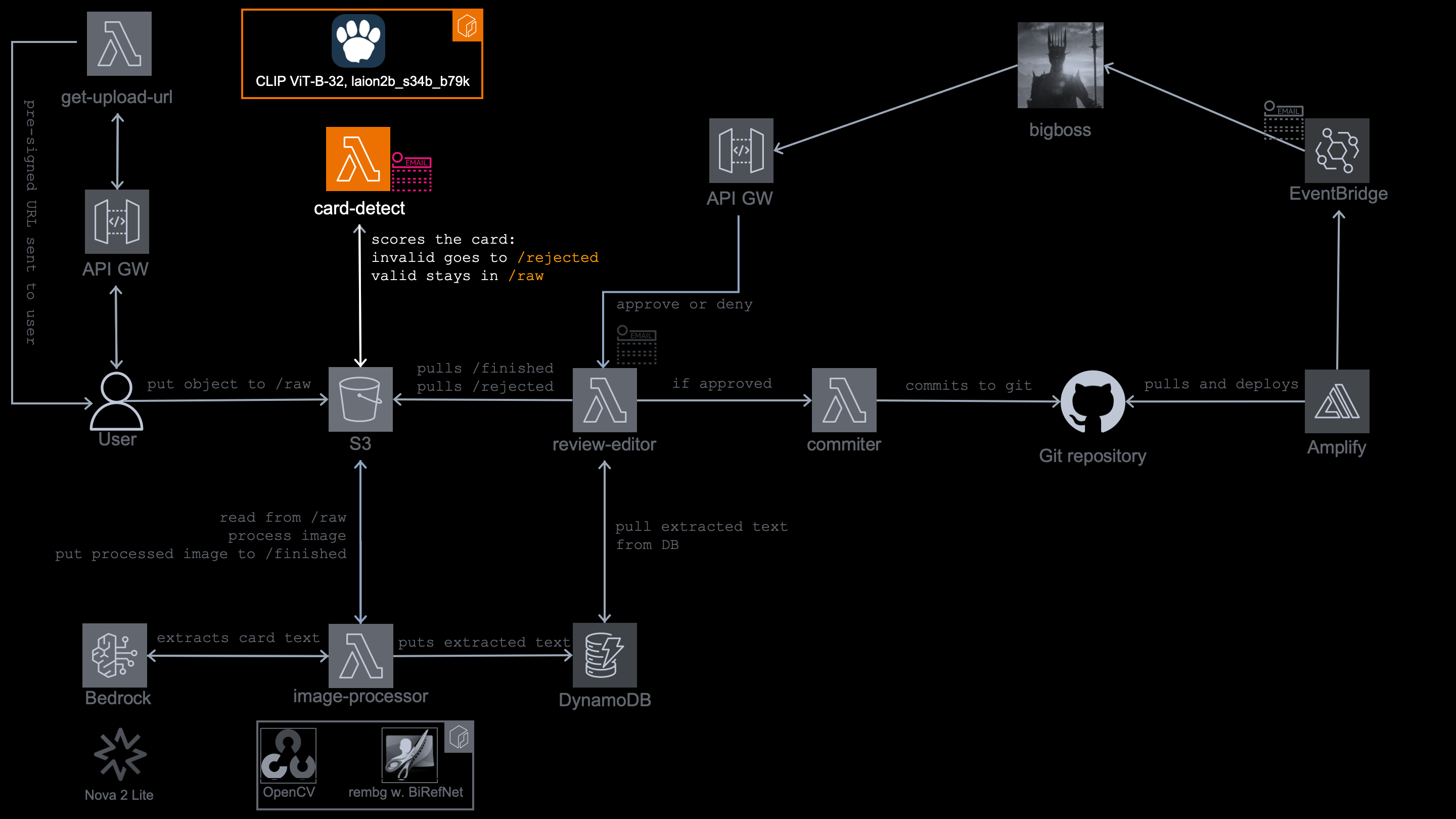
Today's article goes deep into a cheap image classifier, the image classification model inside the lambda container. Specifically it's this part:
Because the upload is public and anonymous, the AWS Builder Cards may not be the only images that lands in the upload bucket.
It could be cat photos, Pokemon cards, poker cards, sports collectibles, etc... Telling those apart from a real AWS card sounds like easy for the human eye, but not so easy for the ML model, considering no model was specifically trained on the AWS Builder Cards.
The path eye-brain is the key concept here. Just as your brain works by distinguishing the AWS Builder Card by some specifications, same you can tell the model to do.
This is what a real AWS Builder Card look like:
- A service icon
- A service name
- Little game effect
- QR code, etc...
Keep that layout in mind, because the whole trick below is built on describing it in plain English:
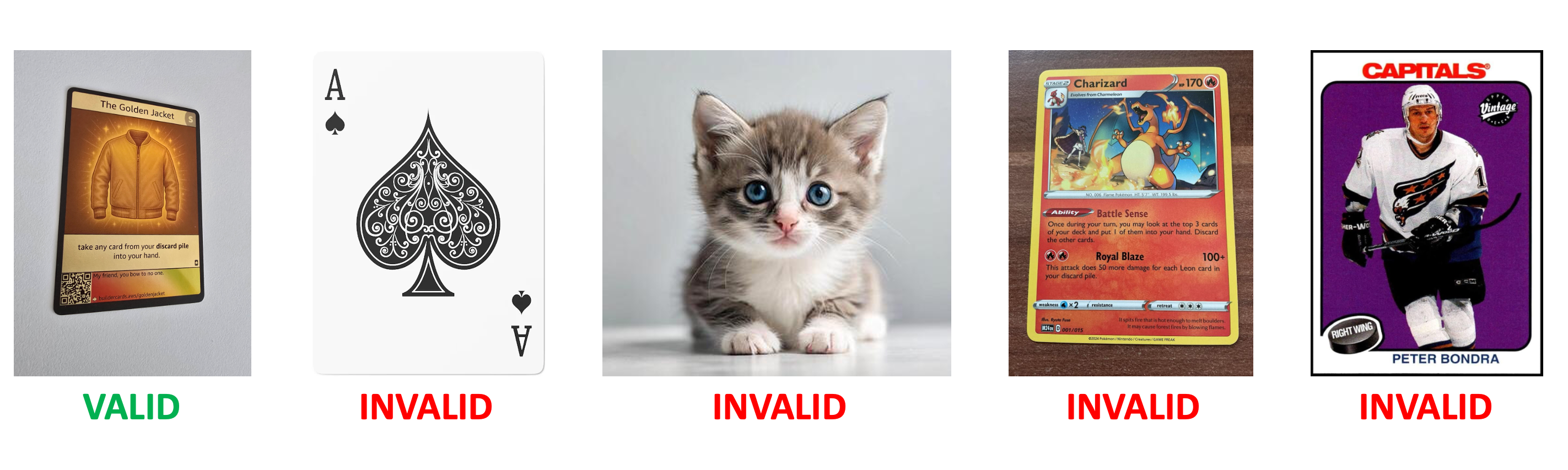
Image classification model inside card-detect lambda
One of the first tasks in my image processing pipeline in to answer the question: is this a valid AWS Builder Card?.
This is the job of card-detect, which should filter valid cards from anything else, before expensive processing starts. It uses vision classification model and runs in lambda container.
Too big to fit inside?
But before I put (any) model into the container, I have to answer the 3 questions. Based on the answers, which comes from running the model locally (in my case on M4 macOS), I can tell if I can use this or that model and put in inside the container, to do this or that particular job.
Q1: How much CPU and memory does it need to do the job?
A1: 2048 MB and plain CPU.
Q2: Where do the weights come from?
A2: I export them myself on my laptop and they are baked into the image and already sit at /opt/model at cold start.
Q3:. What runs at the inference?
A3: No PyTorch (unlike locally) anywhere in the image, but onnxruntime.
In other words: I have to find a model that is capable to do the job and still fits into lambda container
Why lambda container and not Bedrock models, SageMaker or GPU instances?
- There are no model in Bedrock capable of what I need here.
- I wanted it to be serverless
- I wanted to be cheap (GPUs and
SageMakercan become expensive) - The model is most of the time idle
Logically, only reasonable option was Lambda function deployed as ECR container.
Because of the container limitations I can allocate maximum of 10 GB of memory, it has to be amodel capable of delivering the task within that hardware requirements.
I found one, and there's something about this model that keep surprising me the most - it need no training at all!
The labels
The winner model for this case for me is from Contrastive Language-Image Pre-training (CLIP) family, which can do the image classification within 2 GB of memory ans still very fast.
The way it works is absolutely fascinating! CLIP models embeds images and text into the same space.
That means a cat image and the actual word cat end up close to each other. You describe what to look for and it looks for that in the picture. If it finds it, it knows the description and the picture goes close together. And that's exactly how I am using it here.
It compares my photo against a fixed set of labels which I created, and scores how close each one sits against the photo.
Then it looks into the script and knows into which category (AWS computing trading card, Pokemon trading card, etc...) it score to.
softmax turns those scores into percentages that sum to 100%, so when I upload an AWS card, the shares come out roughly like this:
| # | Scored phrase | Share |
|---|---|---|
| 1 | an AWS cloud computing trading card | 34.0% |
| 2 | a tech company card with a pixel-art icon, a service name and a QR code | 22.0% |
| 3 | a software product promotional trading card | 9.0% |
| 4 | a Pokemon trading card | 1.2% |
| 5 | a Magic: The Gathering trading card | 0.8% |
| 6 | a Yu-Gi-Oh trading card | 0.6% |
| 7 | a standard playing card | 0.9% |
| 8 | a poker playing card | 0.7% |
| 9 | an ice hockey trading card | 0.3% |
| 10 | a basketball trading card | 0.3% |
| 11 | an American football trading card | 0.3% |
| 12 | a baseball trading card | 0.4% |
| 13 | a soccer trading card | 0.3% |
| 14 | a sports trading card with a photo of an athlete | 0.5% |
| 15 | a collectible game card with fantasy artwork | 1.7% |
| 16 | a photo of a person | 0.2% |
| 17 | a selfie | 0.1% |
| 18 | an animal | 0.1% |
| 19 | a landscape photo | 0.2% |
| 20 | a screenshot of an app or website | 2.5% |
| 21 | a piece of food | 0.2% |
| 22 | an everyday object | 3.5% |
| 23 | a sheet of paper or a document | 6.0% |
| 24 | a business card | 12.5% |
| 25 | a cartoon or meme image | 1.2% |
| 26 | a photo of a room or building | 0.5% |
Let's say I want to add another category - maybe a monopoly card. In the "standard" machine learning, doing that means collecting labeled photos of monopoly cards and hours of retraining.
With CLIP I just write a new label where I describe it and when it compares the label and the picture it finds the match. No retraining, no fine-tning at all!
It is me who decides which labels it should recognize, because I define them:
AWS_LABELS = [
    "an AWS cloud computing trading card",
    "a tech company card with a pixel-art icon, a service name and a QR code",
    "a software product promotional trading card",
]
COMPETITOR_LABELS = [
    "a Pokemon trading card",
    "a Magic: The Gathering trading card",
    # ... (the other 10 competitor labels trimmed - see the table above) ...
]
NONCARD_LABELS = [
    "a photo of a person",
    "a selfie",
    # ... (the other 9 non-card labels trimmed - see the table above) ...
]
ALL_LABELS = AWS_LABELS + COMPETITOR_LABELS + NONCARD_LABELS
But why do I list the competitor cards at all?
Because softmax is a zero-sum game - all 26 shares must sum to 100%, so every percent one label wins, another label loses.
It wasn't always like this!
My first version had only generic labels like "a trading card" and it was a disaster! Every card scored ~1.0:
Pokemon card: ~1.0,
Poker card: ~1.0,
AWS card: ~1.0
...all the same, because "a trading card" describes all of them equally well.
The fix was not a better AWS label, but rather giving a Pokemon and others their own labels. Now the Pokemon card's probability lands on "a Pokemon trading card" (where it fits best) instead of leaking into my AWS labels and its AWS score collapses to almost zero - 0.016, when I measured it later.
Adding a card type as its own label is how you "subtract" points from its AWS score.
Imagine, with all those labels I have, the Pokemon card scores 87% in the Pokemon category, but 0.016% in AWS Builder Cards category.
The model
The model I am actually using here specifically is open_clip ViT-B/32, pretrained laion2b_s34b_b79k.
It has probably never seen an AWS Builder Card, but it has seen plenty of "pixel art", "QR code" and "service icon", and those are exactly the words I packed into my three AWS sentences at the top of the list.
From PyTorch to 3 local files
Now here is the catch:
CLIPlives insidePyTorch, andPyTorchturns a lambda into a ~2 GB image with a slow cold start.
You definitely do not want it inside your lambda, because it makes it anything but fast.
Here's the good news:
In zero-shot classification only the image encoder has to run for every upload, the other part (the labels) is constant, because they never change at runtime.
If I wanna make the pancake, I do not need to export whole kitchen where the recipe was created and the chef who created it. I just need the recipe.
There is a one-time build script, build_onnx.py, which I run (and you will too) locally and it does two things:
-
It exports the image encoder into a portable model format
Open Neural Network Exchange (ONNX).
The export works like watching a chef (CLIP) cook the dish in his super expensive fancy kitchen (PyTorch) for once and writing down every step. Then you just reproduce the steps in your own kitchen (ONNX) which is (sadly) way less fancy.
torch.onnx.exportpushes one fake image through the encoder, records every math operation it performs plus all the learned weights, and saves the result to disk:
def main():
    # ... (docstring and model loading trimmed) ...
    visual_path = os.path.join(OUT_DIR, "visual.onnx")
    dummy = torch.zeros(1, 3, IMAGE_SIZE, IMAGE_SIZE, dtype=torch.float32)
    torch.onnx.export(
        model.visual,
        dummy,
        visual_path,
        input_names=["image"],
        output_names=["embed"],

        # allow variable batch size (runtime sends 1 at a time)
        dynamic_axes={"image": {0: "batch"}, "embed": {0: "batch"}},
        opset_version=17,
    )
That produces two files:
-
visual.onnx- the "instructions" (~87 KB) -
visual.onnx.data- the learned weights (~335 MB).
From now on, the model can be executed by
onnxruntime- a small engine that only knows how to followONNXinstructions. It cannot train anything, it cannot learn anything, and that is exactly why it fits in a lambda. No PyTorch or any other ML framework needed anymore at inference. It just follows your 335 MB pancake recipe.
-
-
It vectorizes the labels.
The text encoder runs exactly once - all 26 labels go in as one batch and only the answers (26 vectors of 512 numbers each) get saved intotext.npz, together with the group counts:
def main():
    # ... (the ONNX export above and the aws_count/card_count comments trimmed) ...
    with torch.no_grad():
        tf = model.encode_text(tokenizer(ALL_LABELS))
        tf = tf / tf.norm(dim=-1, keepdim=True)
    text_embeds = tf.numpy().astype(np.float32)
    logit_scale = float(model.logit_scale.exp())

    text_path = os.path.join(OUT_DIR, "text.npz")
    np.savez(
        text_path,
        embeds=text_embeds,
        logit_scale=np.float32(logit_scale),
        aws_count=np.int64(len(AWS_LABELS)),
        card_count=np.int64(len(AWS_LABELS) + len(COMPETITOR_LABELS)),
        labels=np.array(ALL_LABELS),
    )
That means the model running in the lambda doesn't have to create the vectors from labels every time. They were already created locally and shipped. This is something that you by far can do locally, because the labels do not change often, if at all.
This is also the "regenerate the sentence points" step from the monopoly example: add a labeled sentence, re-run build_onnx.py, run terraform apply -> done.
text.npz changes its hash, terraform rebuilds the container image automatically and no manual intervention is needed.
The Docker puts all three files into the container at /opt/model, and on cold start the lambda loads them into module globals:
FROM public.ecr.aws/lambda/python:3.14
# ...ommited
ENV MODEL_DIR=/opt/model
COPY onnx_out/ /opt/model/
RUN chmod -R a+rX /opt/model
# ...ommited
Lambda then simply loads them in to the code as:
_SESSION = ort.InferenceSession(VISUAL_ONNX, providers=["CPUExecutionProvider"])
_INPUT_NAME = _SESSION.get_inputs()[0].name
_TEXT = np.load(TEXT_NPZ, allow_pickle=True)
_TEXT_EMBEDS = _TEXT["embeds"].astype(np.float32)
_LOGIT_SCALE = float(_TEXT["logit_scale"])
_CARD_COUNT = int(_TEXT["card_count"])
_AWS_COUNT = int(_TEXT["aws_count"]) if "aws_count" in _TEXT else _CARD_COUNT
There is no torch at the runtime, no tokenizer, no text encoder. The heavy "PyTorch kitchen" was needed exactly once when 3 files were produced locally.
After first run, you don't need to run it again until you change the labels (add monpoly card)
The inference and the scoring decision
The whole inference is actually about ten lines:
def p_card(raw_bytes):
    # ... (docstring and section comments trimmed) ...
    img = Image.open(io.BytesIO(raw_bytes))
    x = preprocess_np(img)
    emb = _SESSION.run(None, {_INPUT_NAME: x})[0]
    emb = emb / np.linalg.norm(emb, axis=-1, keepdims=True)
    logits = _LOGIT_SCALE * (emb @ _TEXT_EMBEDS.T)
    z = logits - logits.max(axis=-1, keepdims=True)
    e = np.exp(z)
    probs = (e / e.sum(axis=-1, keepdims=True))[0]
    p_aws = float(probs[:_AWS_COUNT].sum())
    p_any_card = float(probs[:_CARD_COUNT].sum())(AWS+competitor): LABELS a rejection, never gates
    return p_aws, p_any_card
...and the decision just one condition:
def handler(event, context):
    # ... (docstring, the threshold log line and the results list trimmed) ...
    for record in event.get("Records", []):
        # ... (unwrapping and guards omitted) ...
        try:
            # ... (the S3 fetch and the scoring omitted) ...
            if p_aws >= DROP_THRESHOLD:
                verdict = "aws-card" if p_aws >= KEEP_THRESHOLD else "aws-unsure"
                _forward_to_processor(record)
                action = "forwarded"
            else:
                verdict = "non-aws-card" if p_any >= DROP_THRESHOLD else "not-a-card"
                rejected_key = _quarantine(bucket, key)
                _publish_reject(bucket, key, rejected_key, p_aws)
                action = "rejected"
            # ... (the structured log line and the results list omitted)
Two thresholds (0,20 and 0,50) do the work.
The code looks only at p_aws - the sum of the three AWS labels:
-
p_aws≥ 0,50 - AWS card:_forward_to_processor()asynchronously invokes the next lambda with the same S3 event, so it starts processing it. -
0,20 ≤
p_aws< 0,50 - AWS unsure: still forwarded the same way. Maybe junk, maybe not - I will decide during human approval. -
p_aws< 0,20 - not an AWS card:_quarantine()moves it to theimages/rejected/prefix and_publish_reject()sends me an email about the rejected upload, so I can inspect it manually - just in case this was a valid card and the model got it wrong.
That closes two of the three questions from the top.
- The weights: exported once on my laptop as 3 files and baked into the image.
- The inference engine:
onnxruntime, four packages, no framework. Which leaves the first question - why this model gets a container of its own at all.
Now only the third one remains, which also answers why do I need its own lambda.
Why its own lambda for image classification model?
Could I run both vision models (image classification and image segmentation) in the same container?
I did it locally and it worked perfectly.

That's right. Locally it worked perfectly as one entity, but going into the container there are some requirements I had to follow.
Memory cap
When tested locally, image classification model used 2 GB memory and image segmentation model almost 10 GB. This would me not possible in the container where the memory cap is 10 GB. Even though later I was able to make image segmentation model use only 7,5 GB by shrinking the images to a maximum pixel cap and use a lighter model, together it still would be 9,5 GB+, which is kinda risky.
Cheap gate, expensive processor
This function is very fast - finishes literally in seconds. Imagine a user uploading 5 cat images. Even if I was able to run both models inside a single lambda, spinning up the whole 10 GB container just to tell this is a cat -> go and quarantine it would be an overkill.
Therefore this lambda must be a cheap gate in front of (relatively) expensive workloads, the flood of uploads cannot end up in expensive invocations.
Least privilege
This is already an evergreen, but separating lambdas allows me to assign them different IAM policies. The card-detect role can read and delete in images/raw/, write to images/rejected/, invoke the image-processor and publish to one sns. No Bedrock, no DynamoDB, no secrets.
Running a test set
The threshold and the memory story came from the real local testing.
My local testset of different shapes and different file formats was this:
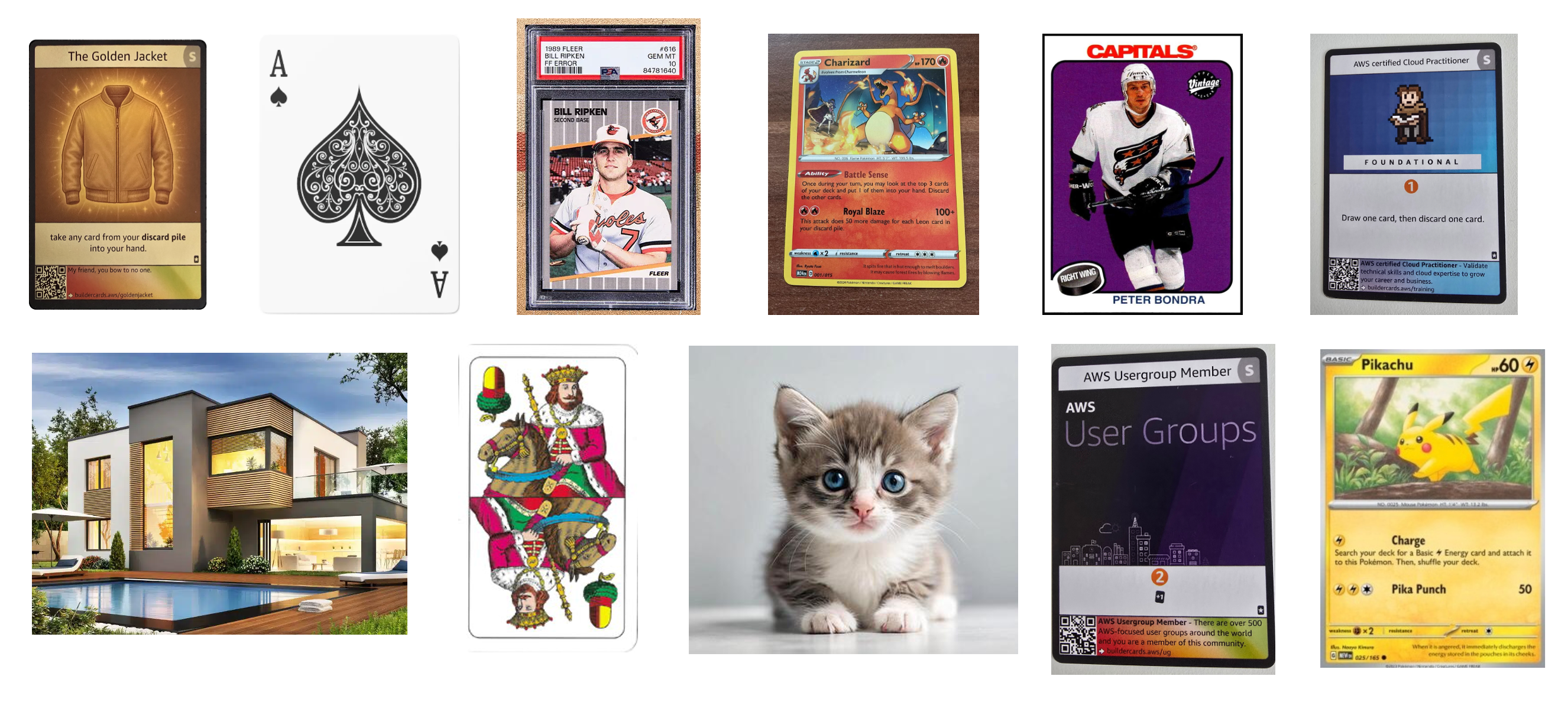
and the results went like this:
| Upload | p_aws |
Outcome |
|---|---|---|
| Real AWS cards | 0,31-0,93 | forwarded |
| Pokemon | 0,011-0,016 | rejected |
| Sports cards | 0,0002-0,0004 | rejected |
| Poker | 0,0001 | rejected |
| Scenery | 0,0001 | rejected |
| Cat | 0,0001 | rejected |
The lowest AWS Builder Cards scored 0,31 so it was below the confident threshold but still within unsure, thus forwarded for processing.
The highest ever scored non AWS card was a Pokemon with 0,016, so not even close to the unsure threshold, thus not forwarded
Both thresholds are lambda env vars set by terraform, so I can change them anytime and this re-tuning needs no rebuild at all.
resource "aws_lambda_function" "card_detect" {
  # ... (rest of the code omutted
      KEEP_THRESHOLD                = "0.50"
      DROP_THRESHOLD                = "0.20"
}
The part I got wrong first
At beginning I thought distinguishing a cat photo from an AWS Builder Card sounds like the easy part, and that it was the part I got wrong first.
I thought my job was to describe an AWS Builder Card really well. It turned out, it works better when describing everything else well enough that it stops competing for the card's score.
My first version had a generic label and no Pokemon/sports/poker labels and it confidently called a Pokemon card an AWS card with ~1.0 score.
Ater what I've learned here, I can confidently say: in a zero-sum score you do not win by describing your class better, you win by describing its neighbours at all, which is btw a whole article in one sentence.
So yes - take my code, swap the labels, re-run build_onnx.py, terraform apply, and the gate scores whatever you describe. With one condition the article already paid for: your labels have to be specific and every category you want to keep out needs its own sentence.
What's worth taking
You don't need to train model for something it was never trained for
CLIP family models probably never seen the AWS builder card, but it seen a lot of other stuff, including a pixel art, QR code, other cards, etc... You can use "that other stuff" to describe it in the labels and also to filter out what it knows. Then what stays is the thing it has never seen - exactly what you want it to know.
The Credits
CLIP - the idea that you can classify an image against sentences you make up at runtime, without training anything.
open_clip - the open implementation I actually import, by mlfoundations.
laion2b_s34b_b79k - the weights, trained by LAION on the LAION-2B set.
The name is the trainingrun: 2B dataset, 34B samples seen, batch 79k.
- Available at HuggingFace
Project repo and the remaining articles
From anonymous photo to a published page: An event-driven, AI, image processing pipeline on AWS
Where exactly is card in this photo? Image segmentation model inside a maxed-out lambda container
What does the card say? Text extraction using Amazon Nova Lite 2


Top comments (0)