


Five lambdas, three models, no server and one human. About ten minutes from a phone camera to a live page - under a minute of that is compute, and the rest is me. It is deployed, not a diagram.
Introduction
AWS Builder Cards. Poker cards. Cat photos. Pokémon cards. NHL Card
That's what arrives when you let anyone on the internet upload a photo without creating an account. I did it on purpose - the easiest way to stop people contributing is to make them register first.
So the first thing in this pipeline isn't AI. It's the bouncer.
The last thing isn't AI either. An AI drafts every page on the site, but it has never published one. It can't.
Everything in between exists to make those two sentences true.
The images I am processing here are part of AWS BuilderCards, which is an educational deckbuilding card game about how AWS services fit together to build well-architected workloads.

But some of those cards are collectibles, handed out at AWS re:Invent, AWS summits and community events.
I made a catalog for those collectible cards, where anyone owning one of them can contribute. Just take a picture of the card with your phone, fill in three fields and let the magic happen. At the other end it get back a clean, consistently formatted page on the site.
And if you collect nothing, the cards are not the point. The shape is.
- A small vision model running on CPU inside a lambda container
- A public front door with no login in front of it
- Human being the only thing allowed to publish.
Swap my cards for any other card, badge, label or image with text on it, and this is the same pipeline you can use!
The backbone isn't the website itself, it's the pipeline between a titled phone photo of a card and a live page. That pipeline has to:
Identify a AWS Builder Card among other images
Straighten the card image
Remove the background
Put card metadata into a database
Draft a card description for the web
Never publish anything a human hasn't approved
Always publish what was approved
Be serverless
Cost almost nothing
This article is a tour of how one upload event becomes a published page and where I put the gates.

Today's articles it first of the 5 series. Here I stay at the "choreography" level: how events flow between services and why.
The shape of the problem
The workload is mostly idle. Someone uploads a few cards and then nothing for a weeks. Being the only maintainer, I don't want to babysit a queue and also I don't want a server sitting there waiting for a photo that may not come even this month.
So the whole thing only exists while something is happening. Here is what processing one card actually costs me:
| memory | average run | compute | |
|---|---|---|---|
| Image classification in lambda | 2 GB | 9,3 s. | ~ 0,00025$ |
| Image segmentation in lambda | 10 GB | 35,6 s. | ~ 0,00474$ |
| Text extraction in Bedrock | - | - | ~ 0,00065$ |
I also have two hard requirements that shape everything:
Uploads are anonymous. There is no login for the uploader. If someone has to make an account to contribute a card photo, they don't have to. That means the front door is open to the whole internet - including junk - and that's why I need a system to cherry-pick the cards from other images. Vision models excel in that role.
Nothing is published automatically. Every card that lands on the site has passed through the eye first. The AI in the pipeline drafts and cleans, but it never decides. This is on me.
A story of three models
Everytime you upload a photo, three models touch it on its way to the catalog website.
Two of those models run inside a lambda container image (which I find absolutely fascinating) and the last lives in Bedrock.
Image classification model
A zero-shot image classification model running in lambda container checks whether an upload is a AWS Builder Card and quarantines everything that isn't.
Zero-shot means there it was not trained for that purpose. The model turns each photo into a vector, then I hand it a list of labels (English sentences I wrote myself), like: "an AWS cloud computing trading card", "a Pokemon trading card", "a photo of a person", and photos are scored against each of the labels.
Image segmentation model
An image segmentation model, which is also running inside lambda container, goes pixel by pixel and makes a decision on every single one of them: "card, background, card, background..." That's how it identifies where is a card and where is a background.
Straightening that card into a flat rectangle and cutting the background away is classical computer vision running in the same lambda, which is nothing more then good old deterministic plain geometry with no model in it.
Multimodal model
A vision-language model extracts the text from the card, and that text is then stored in DynamoDB as the card's metadata. This model lives in Bedrock, so there is no container around it at all.
Before I put a model anywhere into this pipeline, I ask three questions, because you can't put just any model into the lambda container:
- How much CPU and memory does it need?
- Where do the weights come from?
- What runs at inference?
I am not answering them here, all three models answer them completely different and one of them even refuses the questions entirely, so each model gets an article of its own:
- Is this even a valid card? Zero-shot image classification model in a lambda container
- Where exactly is card in this photo? Image segmentation model inside a maxed-out lambda container
- What does the card say? Text extraction using Amazon Nova 2 Lite
The end-to-end flow
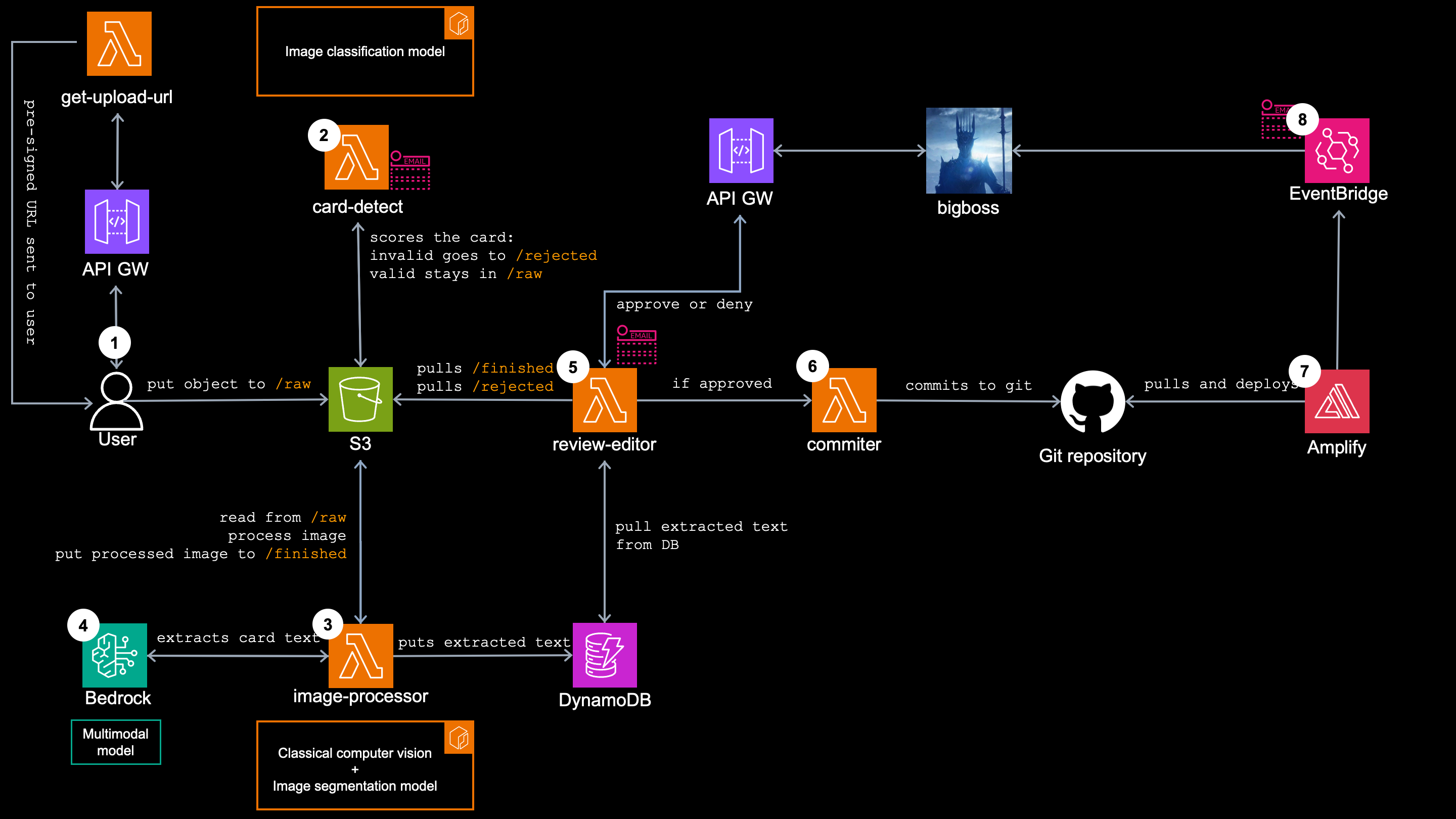
Here is the whole image processing pipeline as one picture, from the moment a user uploads the card image until it is published as a separate page and I get an sns message about the deploy.
1. The front door - get-upload-url
The upload form on the website calls a public API Gateway, which invokes the get-upload-url lambda and user receives a 5-minute pre-signed POST. The whole point of a pre-signed upload is that the bytes go straight from the phone to S3.
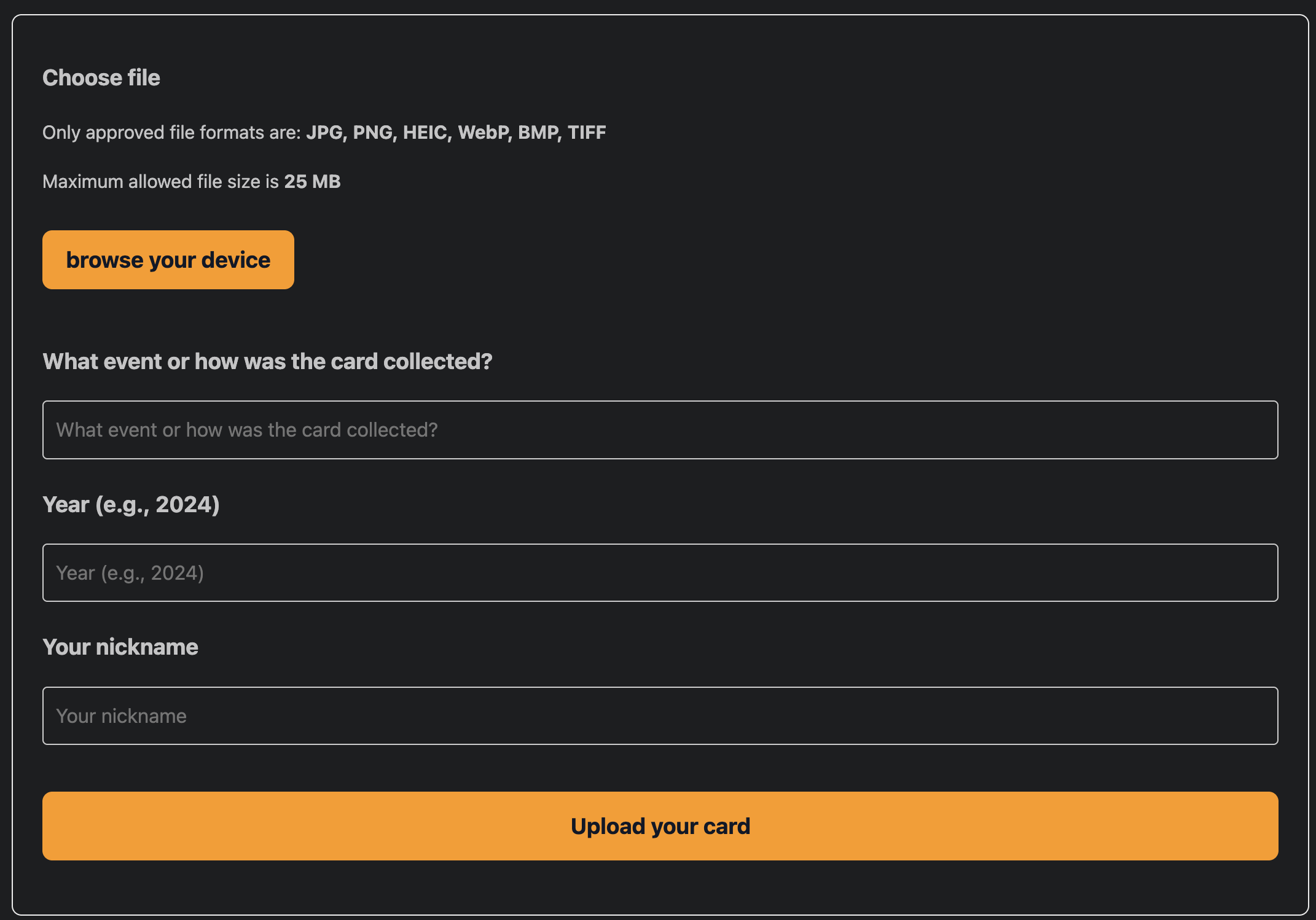
Before lambda signs anything, it validates. Content type is checked against an image allowlist (JPEG, PNG, WebP, HEIC/HEIF, BMP, TIFF), and also the year has to be 4 digits between 2020 and the current year.
The image lands in the S3 bucket under the prefix images/raw/, with a key like images/raw/<event>_<year>_<uuid>.jpg and lambda's role has exactly one S3 permission - s3:PutObject into images/raw/.
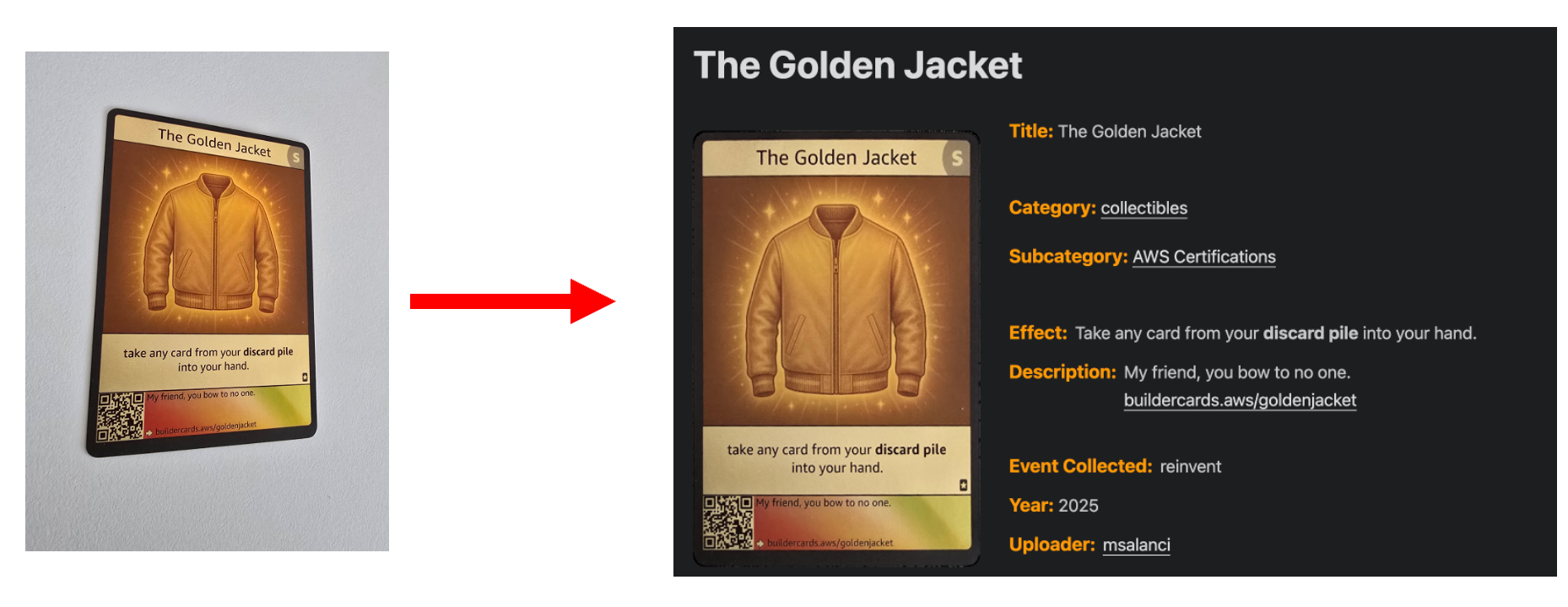
Once uploaded, the image looks something like this: not cropped, not straightened and with background.

But I still don't know whether this is a valid card at all. Somebody can upload a cat picture or anything else, so I need something to distinguish AWS Builder Card from everything else that comes through that open front door.
2. The gate - card-detect
The new object under images/raw/ fires an S3 event notification and that invokes the card-detect lambda. This is a container image with an image classification model inside.
It assigns a score to every uploaded picture, how likely this is this picture a AWS Builder Card. That score has three borders:
- Score
>= 0.50- a valid card, forward it for processing - score
0.20to0.50- unsure, forward for processing as well - score
< 0.20a junk, move the object toimages/rejected/and send me a reject email oversns
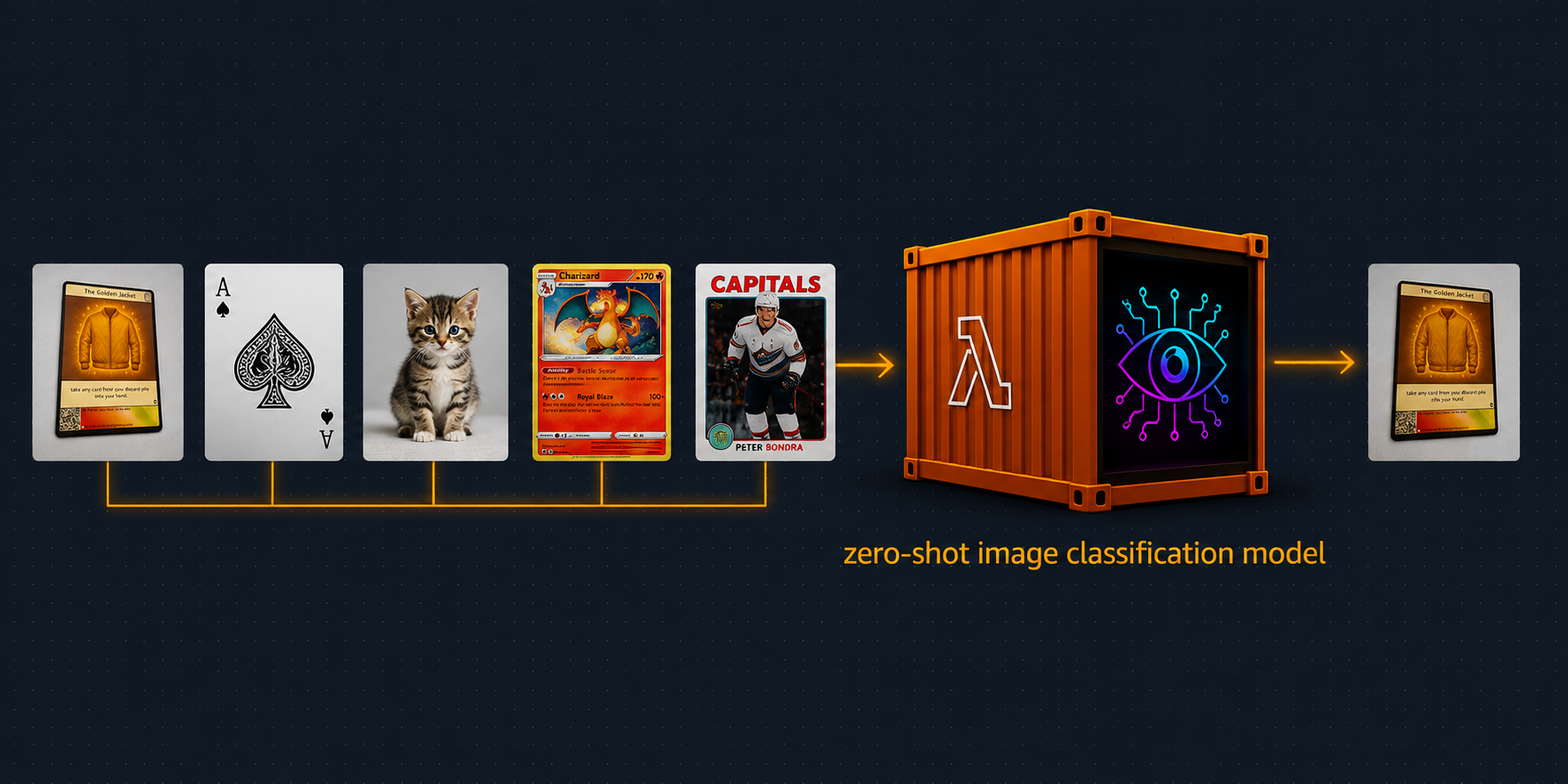
Forward it for processing means, the card-detect lambda async-invokes the next in line - image-processor lambda, with the exact same S3 event it received.
What is not forwarded, ends up images/rejected/ folder, which is a dead end. Nothing is triggered from there, but nothing is deleted either.
Also worth noticing: When I receive an email triggered by sns, that email contains only reject path. A forwarded card sends nothing at this point, the "go review it" email comes later from the different lambda.
More about the model, the labels and the thresholds in this article.
3. The cleanup - image-processor
The async invoke from the gate fires the image-processor - the second container lambda - which is arm64 with 10 GB of memory.
As we saw before, the card picture is not in a perfect shape, so something has to fix it. There are multiple steps running inside the lambda:
-
image segmentation modelproduces the card's mask - Classical computer vision (
OpenCV) identifies the corners of the card - Perspective transform straightens it into a flat and cropped rectangle, so only the card itself remains.
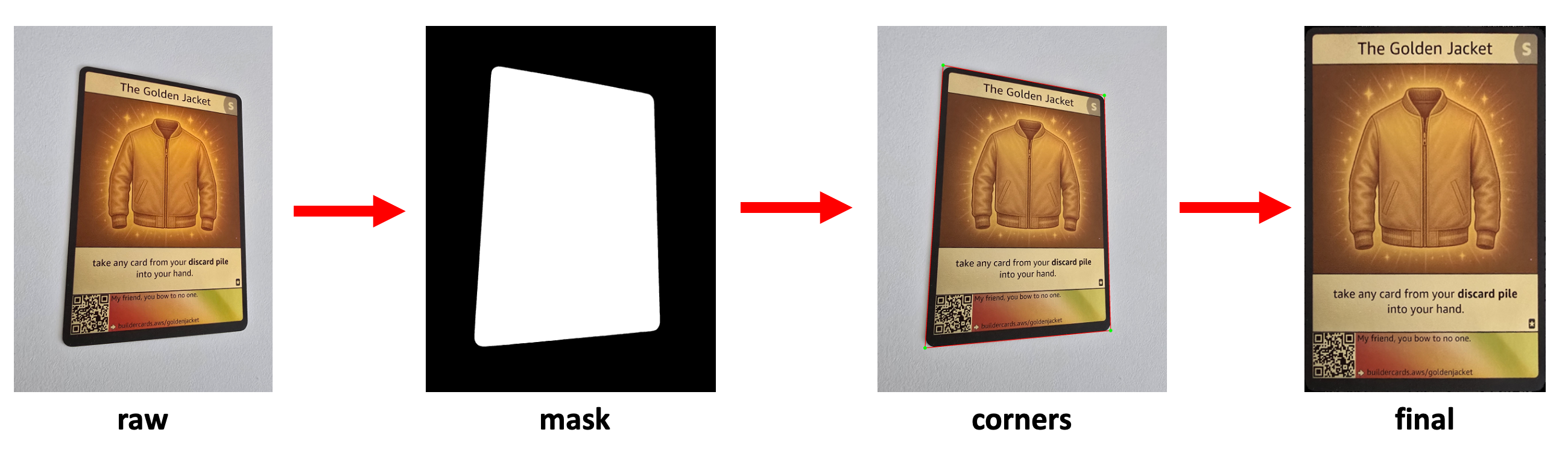
The finished png is finally written to images/finished/<cardId>.png. As this is done, the sns triggers an email out for me that "new card uploaded, go review it."
More about masks, corners and the straightening in following article.
4. The draft - image-processor (same run)
This is the same lambda and the same invocation as before, right after the image was straightened.
The cleaned card image now goes to a multimodal model in Amazon Bedrock, which extracts all the text from the card (the title, effect and description, etc...) and write it into DynamoDB as the card's metadata.
More about the prompt and the model in this article.
5. The approval - review-editor
This is the one and only manual step in whole process. I receive an email from sns, containing a link, where review-editor lambda serves a server-rendered page behind its own API Gateway.
It sound complicated, but basically it's just web page available only for me, which reads the card image, also reads a DynamoDB and renders everything in one place for me to approve.
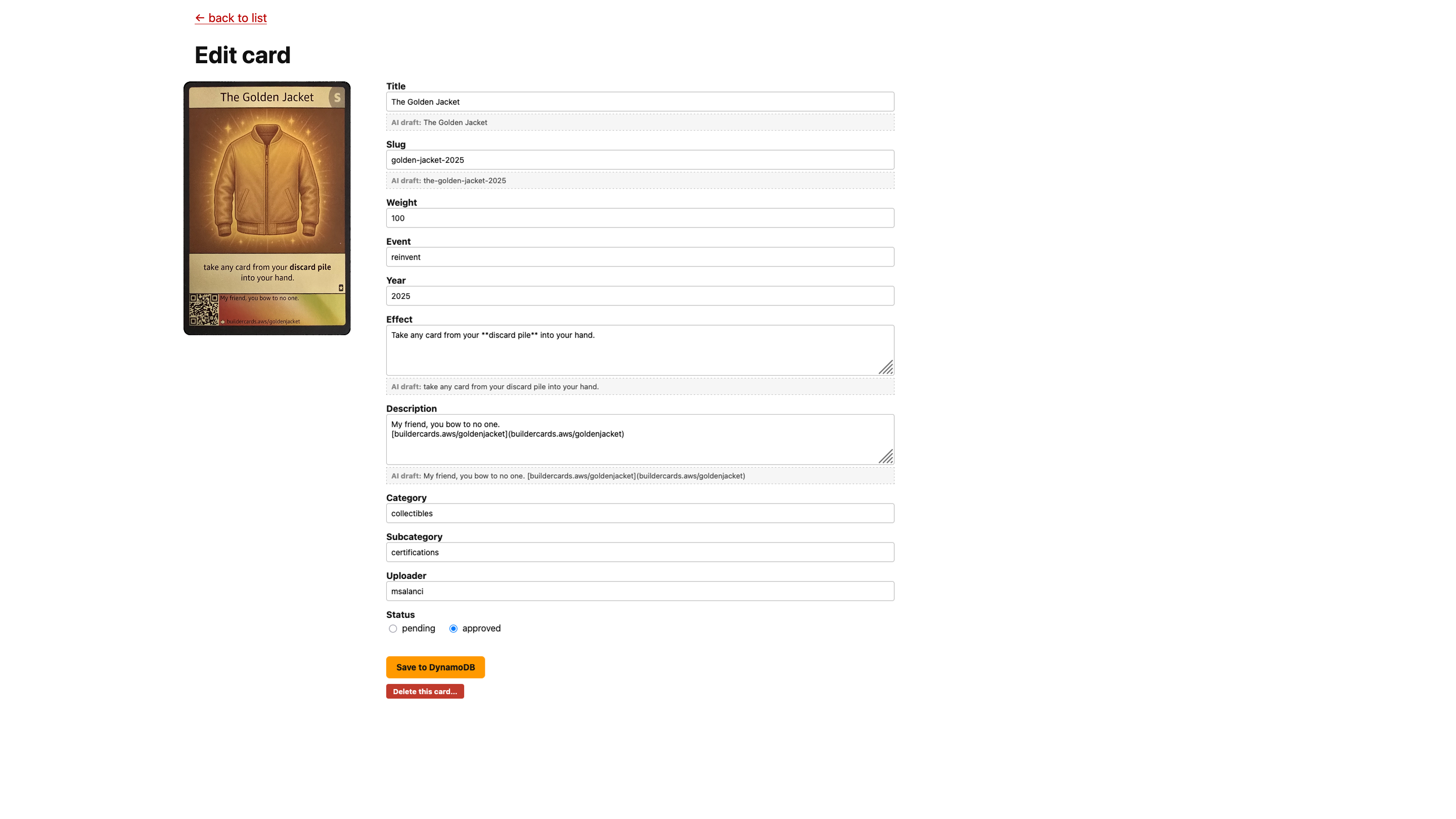
This page is not an internal page. It's gated by HTTP Basic Auth with credentials from Secrets Manager and behind the sepparate API Gateway with throttling at the API stage and reserved concurrency.
There is also a Rejected tab, which doesn't touch DynamoDB metadata at all. It lists the quarantined images from images/rejected/ directly from S3 (the ones lambda card-detect scored as invalid, or not a AWS builder card at all). It's just in case the lambda by mistake quarantines the valid card. I have an option to "unquarantine" it and put in into the processing
6. Commit to GitHub repo - committer
Saving a card while its status is approved invokes the committer lambda synchronously.
The whole catalog web is built by the static site generator Hugo, which turns markdown files into HTML. The committer builds the card's <slug>.md file and push it to the GitHub repo along with the clean processed image from images/finished/.
This is the example of a markdown it generates, based on the values in DynamoDB:
---
title: "The Golden Jacket"
slug: "golden-jacket-2025"
weight: 100
event: "reinvent"
year: 2025
effect: "Take any card from your **discard pile** into your hand."
image: "/cards/73e994de-0140-425d-857d-6447d0292cd2.png"
description: "My friend, you bow to no one.\n[buildercards.aws/goldenjacket](buildercards.aws/goldenjacket)"
category: "collectibles"
subcategory: "certifications"
uploader: ["msalanci"]
---
7. The publish - Amplify + EventBridge
The catalog page is deployed in Amplify, which reads the GitHub repo, so every new push starts a new build of the Hugo site and deployment job.
Whenever that happens, Amplify fires a status change event to the EventBridge, where those events are filtered. If they match jobStatus SUCCEED or FAILED, the sns publishes an email about new deployment.
FAILED event is actually more important for me then a SUCCEED, because FAILED is telling me something is wrong.
At the end of the day, this pipeline turned the slightly tilted card image from the beginning into a proper webpage.
Guarding an open front door
This is an open-source project where anyone can contribute, and the front door has no lock on it by design. So the guards have to sit somewhere else.
API Gateway throttling
Anyone can upload a card, so the upload door is sealed at 5 requests per second with a burst of 10. Everything above that gets HTTP 429 Too Many Requests at the gateway, before the lambda even runs. A flood costs me gateway requests, not lambda invocations.
Allowed file types
The upload request has to declare one of JPEG, PNG, WebP, HEIC, HEIF, BMP or TIFF, and the lambda returns HTTP 400 Bad Request.
One weakness here: this content type is a declared, it doesn't really check if .png is really a .png. Somebody can save a .zip archive as a .png and it would go through. The real filter is one hop later, when the card-detect provides a scoring. Since this would be no valid AWS Builder Card, it wouldn't go further.
Size limit
Every image has a hard deadline at 25 MiB (26,214,400 bytes). Anything bigger is rejected by S3 itself with HTTP 413 ContentTooLarge and nothing is stored.
This only works because the upload is a pre-signed POST, it doesn't work with PUT. A POST methond carries a content-length-range condition, which S3 enforces.
Resolution limit
There is also a limit on pixel size, because memory in the container is limited. Before processing, anything over 2048px on the longest side gets downscaled in memory. The original however stays untouched in images/raw/.
More on that in the image-processor article.
What event-driven bought me and what did not
What I actually got is resource isolation. The card-detect and image processor are independent units with separate memory and CPU, which allows me to redeploy either one without touching the other.
Truth is even if I wanted to I couldn't have them both as a single lambda, there is just not enough memory AWS allows me to use.
But there is a downside as well, and this is what I did not get which is the failure isolation. If the card-detect is down, nothing enters the pipeline at all because no images make it inside the S3 bucket thus there is nothing to process for image-processor.
If this was a commercial product, I would probably go further, with things like:
A queue between the
card-detectandimage-processor, and probably even DLQ.Step Functions for orchestrating the whole pipeline
Conclusion
The backbone idea behind this is "photo turning into a reviewed page project" was to automate as much as possible:
- Event-driven and serverless
- A pre-signed upload
- A cheap classifier gate (
card-detect) to clear the junk so an expensive processor (image-processor) can only runs on real cards - A human approval step
- Let
Amplifyto build the site.
I only scratched the surface in this article and the models and human approval are still closed boxes here. Besides going seep in the architecture, they also open a good old: "It works on my computer" issue, so upcoming four articles goes over all that:
Is this even a valid card? Zero-shot image classification model in a lambda container
Where exactly is card in this photo? Image segmentation model inside a maxed-out lambda container
What does the card say? Text extraction using Amazon Nova Lite 2
The whole code I used for the infrastructure including lambda functions is written in terraform and is available in (Github).
So if you have collectible AWS Builder Card(s) which are not yet published lying in a drawer, please take a picture and upload it. No account, no login. Just an event, a year, your nickname, the actual photo and you are the anonymous stranger from the top of this article.


Top comments (0)